
MLOps course · lesson 4 of 24
- 1What Is MLOps? From Notebooks to Reliable Production
- 2MLOps Principles and Maturity: From Manual to Automated
- 3ML Fundamentals for MLOps: Splits, Leakage, and Metrics
- 4A Reproducible ML Project: Layout, Seeds, and Data Code
- 5Data Engineering Basics for ML: Ingestion, SQL, and Skew
- 6Pipeline Orchestration: Apache Airflow and Kubeflow
- 7Batch vs Streaming: Spark, Kafka, and Flink
- 8Data Versioning and Lineage: DVC and Beyond
- 9Data Validation and Quality in ML Pipelines
- 10Experiment Tracking with MLflow
- 11Reproducible Training Pipelines
- 12Model Evaluation and Validation Gates
- 13Model Registry and Versioning
- 14CI/CD for Machine Learning
- 15Containers and Kubernetes for ML
- 16Infrastructure as Code: Terraform and Ansible
- 17Cloud ML Platforms: AWS, Azure, GCP, and Self-Built
- 18Model Serving Patterns: Batch, Online, and Streaming
- 19Inference Engineering Basics: Latency, Batching, and Cost
- 20Monitoring and Observability for ML Models
- 21Drift Detection and Retraining for ML Models
- 22Explainable AI: LIME, SHAP, and Model Interpretability
- 23Edge AI Deployment: Jetson, TFLite, and Mobile ML
- 24Capstone: An End-to-End MLOps Pipeline
In our previous discussions on what MLOps is and MLOps principles and maturity levels, we established that reproducibility is the first pillar of dependable machine learning. If an engineer cannot check out a repository, run a command, and produce the exact same model weights and validation metrics, debugging production issues becomes guesswork.
Achieving reproducibility requires structured software engineering habits from day one: clean directory layouts, pinned environment lockfiles, decoupled configuration files, and fixed random seeds.
In this lesson, you will learn how to structure a production machine learning repository, manage dependencies safely, control random seeds across libraries, and understand where auxiliary languages like Bash and Go fit into operations. You will also build and test the synthetic data generator for StayWell, our running case study, providing a deterministic customer churn dataset that powers the rest of this course.
The anatomy of a reproducible machine learning project
Many machine learning projects begin as an unorganized collection of notebooks, loose CSV files, and ad-hoc Python scripts in a single folder. While this setup allows rapid prototyping, it quickly causes confusion when team members attempt to run each other's code.
A production-ready repository enforces a strict separation between configuration, source code, data storage, and test suites:
1staywell-mlops/
2├── config/
3│   ├── model_params.yaml       # Hyperparameters and algorithm settings
4│   └── data_contract.yaml      # Schema rules, ranges, and null bounds
5├── data/                       # Local data caches (.gitignored)
6│   ├── raw/                    # Immutable source extracts
7│   └── processed/              # Cleaned feature tables
8├── notebooks/                  # Exploratory analysis and scratchpads
9│   └── 01_eda_subscribers.ipynb
10├── src/                        # Modular, importable Python package
11│   ├── __init__.py
12│   ├── data_generator.py       # Dataset synthesis
13│   ├── data_validator.py       # Schema and quality checks
14│   ├── pipeline.py             # Feature engineering and training
15│   └── evaluate.py             # Evaluation gates and metrics
16├── tests/                      # Automated test suite
17│   ├── __init__.py
18│   ├── test_data_generator.py
19│   ├── test_validator.py
20│   └── test_pipeline.py
21├── models/                     # Local artifact cache (.gitignored)
22├── .gitignore                  # Git exclusions for data, artifacts, caches
23├── Makefile                    # Standard terminal automation targets
24├── pyproject.toml              # Build tool and project metadata
25└── requirements.lock           # Exact pinned dependencies with hashes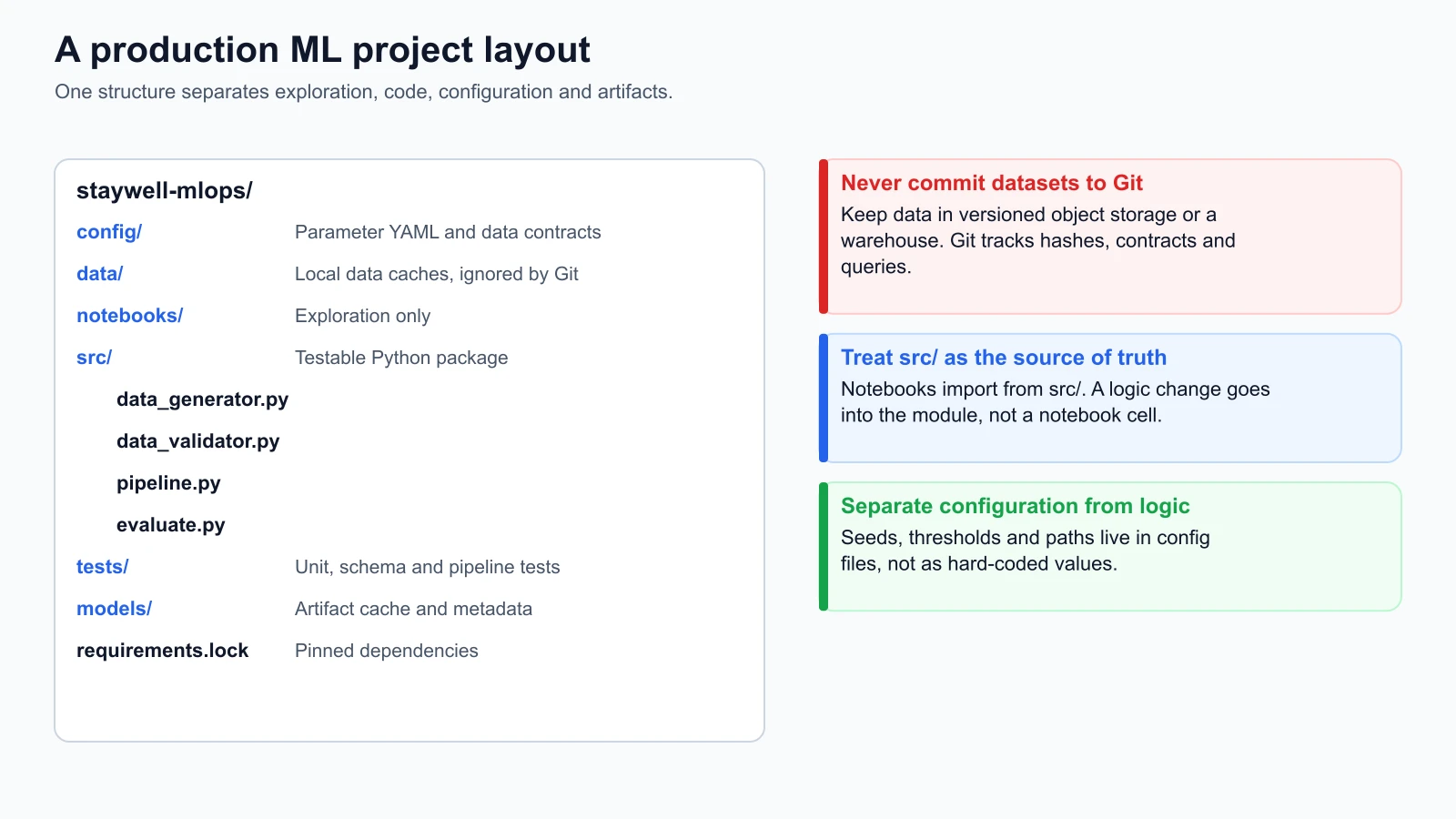
Three operational rules govern this layout:
1. Notebooks never contain production business logic
Notebooks are reserved for initial exploratory data analysis and visual debugging. Any data transformation, feature calculation, or modeling routine that needs to run in production belongs in src/. When working in a notebook, import functions directly from src/ rather than defining them inside notebook cells. This guarantees that improvements made during exploration immediately benefit the automated pipeline.
2. Datasets and model binaries never enter Git
Git is engineered to track incremental changes in plain text source code. Committing large, binary files (such as multi-gigabyte CSVs, parquet partitions, or serialized pickle weights) inflates repository size and degrades git performance. Store data in versioned cloud object storage or analytical warehouses, and keep local data/ and models/ directories listed in .gitignore.
3. Separate configuration from implementation
Avoid hardcoding parameters like learning rates, file paths, or random seeds directly inside Python functions. Place these values in declarative configuration files inside config/. This allows pipeline runners and CI/CD tools to modify parameters across environments without editing application code.
Dependency management and isolated environments
A common cause of pipeline failure is environmental drift. A script that runs on a data scientist's laptop can fail on a production server because a sub-dependency changed its default parameter or floating-point precision between package releases.
Virtual environments
A virtual environment is an isolated directory tree that contains a specific Python interpreter and a dedicated set of installed packages. Using a virtual environment prevents project dependencies from conflicting with system-level packages or other projects.
In Python, create and activate a clean virtual environment using the standard library venv module:
1# Create an isolated environment named .venv
2python3 -m venv .venv
3
4# Activate the environment (macOS / Linux)
5source .venv/bin/activate
Pinned lockfiles
Listing loose package names in a standard requirements.txt file (such as pandas>=2.0 or scikit-learn) is unsafe for production. When an automated deployment builds an environment from unpinned dependencies, the package installer downloads the latest available patch, which may introduce breaking changes.
To guarantee identical execution, you must use a lockfile. A lockfile records the exact version of every top-level package and every transitive sub-dependency, often alongside cryptographic file hashes:
1# requirements.lock (Example snippet)
2numpy==1.26.4 --hash=sha256:d37b6058...
3pandas==2.2.2 --hash=sha256:fa234bc1...
4scikit-learn==1.4.2 --hash=sha256:91c2da01...
5scipy==1.13.0 --hash=sha256:4a812ef9...
You can generate lockfiles using tools like pip-tools (pip-compile --generate-hashes), Poetry, or uv. When deploying to production clusters, install strictly from the lockfile:
1pip install --no-deps --require-hashes -r requirements.lockThe four pillars of deterministic execution
A machine learning run is deterministic if re-executing it on the same inputs yields identical outputs every single time. Achieving determinism requires locking four distinct factors:
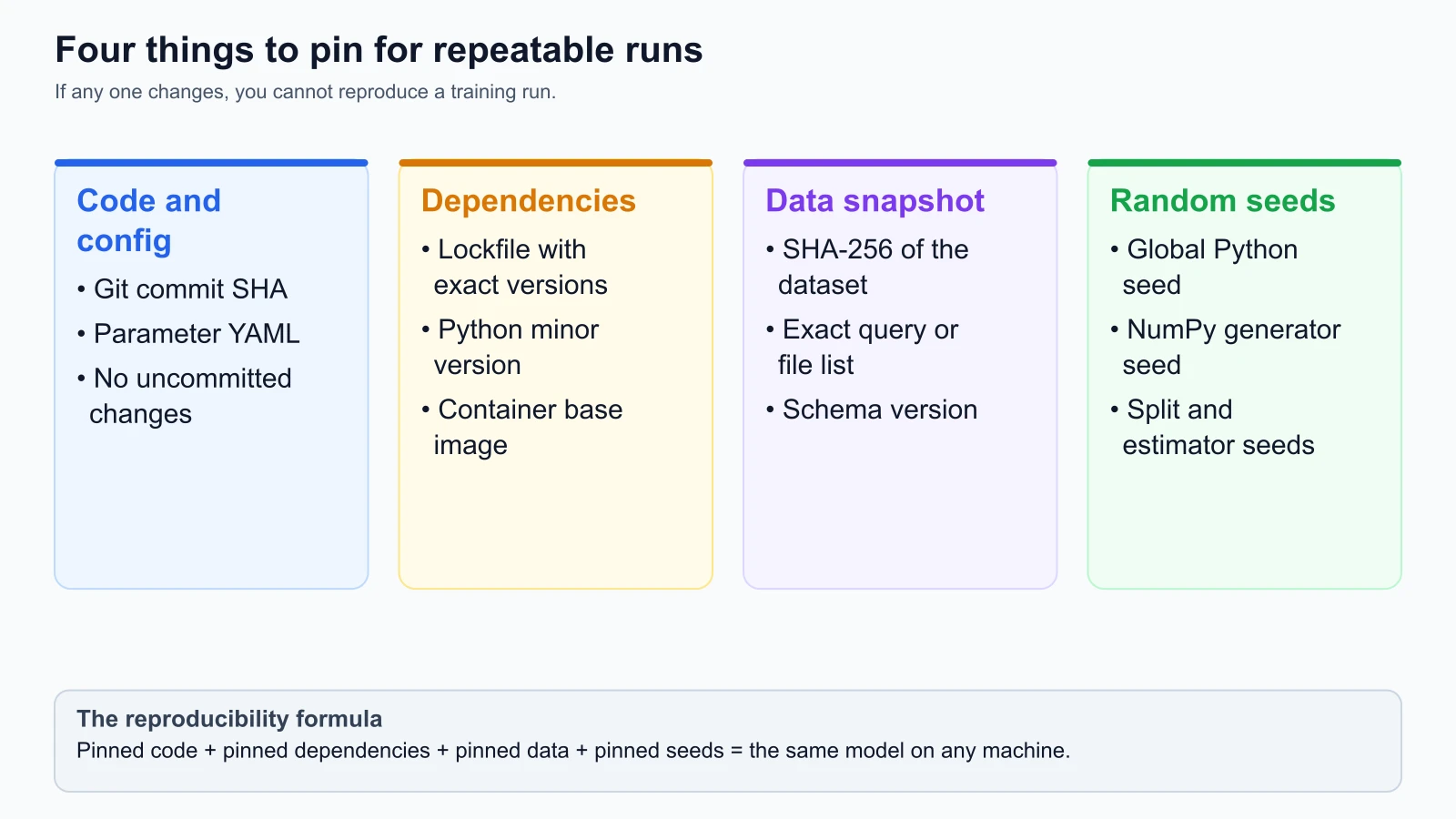
- Pinned code and configuration: The exact source code commit in Git and the explicit configuration values supplied to the run.
- Pinned dependencies and runtime: The exact minor version of Python and frozen lockfile versions for all libraries.
- Pinned data snapshot: The input data identified by a cryptographic hash (such as SHA-256) or an immutable object storage version tag.
- Pinned stochastic seeds: Explicit seeds for every pseudo-random number generator used in the workflow.
Controlling randomness with seeds
Computers generate random numbers using a pseudo-random number generator (PRNG). A PRNG is an algorithm that produces a sequence of numbers that appear random but are completely determined by an initial numeric value called a seed.
If you do not specify a seed, the runtime initializes the PRNG using an unpredictable system source, such as the current timestamp in nanoseconds. Consequently, two runs of the same script will produce different train-test splits and different initial weights.
To ensure reproducible behavior, set the seed explicitly across every library that introduces stochastic operations:
1import random
2import os
3import numpy as np
4
5def set_deterministic_seeds(seed: int = 42) -> None:
6    # Python standard library random
7    random.seed(seed)
8    # Python hash seed for dictionary order stability
9    os.environ["PYTHONHASHSEED"] = str(seed)
10    # NumPy random generator
11    np.random.seed(seed)
In scikit-learn, pass random_state=42 to any component that involves randomness, including train_test_split, LogisticRegression, and RandomForestClassifier.
Where Bash and Go fit in MLOps
While Python dominates data science and model training, production machine learning architectures frequently incorporate other programming languages:
Bash
Bash scripts serve as the glue between system layers. Typical uses for Bash in MLOps include:
- Container entrypoint scripts that download configuration files from cloud storage before starting a Python web service.
- Local developer automation scripts wrapped inside a
Makefile(such asmake test,make lint, andmake train). - Simple CI/CD step definitions that trigger Docker builds and cluster deployments.
Avoid writing complex business logic or data transformation in Bash. Keep Bash scripts short and delegate computational work to Python modules.
Go
Go is compiled to native static binaries, starts instantly, and handles high-concurrency network I/O with small memory footprints. In modern MLOps architectures, Go is often used for:
- High-throughput API gateway proxies that sit in front of Python model inference servers to perform rate limiting, authentication, and request routing.
- Custom Kubernetes operators and controllers that manage distributed training jobs across GPU clusters.
- Low-latency feature lookup services that query in-memory caches and return feature vectors in single-digit milliseconds.
For standard model training, validation, and offline scoring, Python remains the primary language. Go is adopted when network throughput or infrastructure management demands it.
Practical Git habits for machine learning
Because machine learning workflows generate large datasets and model files, disciplined Git habits prevent repository bloat:
1# .gitignore for StayWell MLOps
2
3# Byte-compiled / optimized files
4__pycache__/
5*.py[cod]
6*$py.class
7
8# Virtual environments
9.venv/
10venv/
11env/
12
13# Data caches (Never commit raw or generated data)
14data/raw/*
15data/processed/*
16!data/raw/.gitkeep
17!data/processed/.gitkeep
18
19# Model weights and artifacts
20models/*
21!models/.gitkeep
22
23# Local environment variables and credentials
24.env
25.env.local
26*.key
27
28# IDE settings
29.vscode/
30.idea/
31.DS_Store
32
33# Jupyter Notebook checkpoints
34.ipynb_checkpoints/
Always commit code alongside the configuration files that govern it. When you train a model, record the current Git commit hash in the experiment metadata. This creates an auditable link between the serialized model artifact and the exact code that built it.
The StayWell synthetic data generator
To ground these concepts in our running case study, we will now build the synthetic dataset generator for StayWell.
StayWell operates a subscription fitness and wellness mobile app. To predict member churn, we need a dataset that reflects realistic customer attributes, behavioral telemetry, and billing events.
Our data generator must satisfy three operational criteria:
- Fully deterministic: Running the generator with the same seed must produce the exact same records and identical SHA-256 file checksums across any machine.
- Realistic feature dynamics: Features like workout frequency, coach chats, and billing issues must correlate realistically with the churn outcome.
- Zero external dependencies: The generator relies exclusively on the Python 3.10+ standard library (
random,math,csv,hashlib,dataclasses), allowing it to run in any environment without installing external packages.
Here is the complete implementation:
data_generator.py
1import csv
2import hashlib
3import math
4import random
5from dataclasses import asdict, dataclass
6from typing import Any, Dict, List
7
8
9@dataclass(frozen=True)
10class SubscriberRecord:
11    user_id: str
12    age: int
13    tenure_months: int
14    membership_tier: str
15    workouts_completed: int
16    coach_messages_sent: int
17    app_logins_last_30_days: int
18    discount_applied: int
19    failed_payment_attempts: int
20    churned: int
21
22
23def _sigmoid(x: float) -> float:
24    return 1.0 / (1.0 + math.exp(-max(min(x, 20.0), -20.0)))
25
26
27def generate_staywell_dataset(
28    num_records: int = 1000,
29    seed: int = 42
30) -> List[Dict[str, Any]]:
31    rng = random.Random(seed)
32    records: List[Dict[str, Any]] = []
33
34    tiers = ["basic", "premium", "family"]
35    tier_weights = [0.55, 0.35, 0.10]
36
37    for i in range(1, num_records + 1):
38        user_id = f"USR-{10000 + i}"
39        age = rng.randint(18, 68)
40        tenure_months = rng.randint(1, 48)
41        membership_tier = rng.choices(tiers, weights=tier_weights, k=1)[0]
42
43        # Activity levels correlate with membership tier
44        base_workouts = 12 if membership_tier == "premium" else 8
45        workouts_completed = max(0, int(rng.gauss(base_workouts, 4)))
46        coach_messages_sent = (
47            max(0, int(rng.gauss(3, 2)))
48            if membership_tier != "basic"
49            else max(0, int(rng.gauss(1, 1)))
50        )
51        app_logins_last_30_days = max(
52            workouts_completed,
53            int(rng.gauss(workouts_completed * 1.5 + 4, 3))
54        )
55
56        discount_applied = 1 if rng.random() < 0.20 else 0
57        failed_payment_attempts = 1 if rng.random() < 0.08 else 0
58        if failed_payment_attempts == 1 and rng.random() < 0.25:
59            failed_payment_attempts = rng.randint(2, 3)
60
61        # Churn probability calculation based on operational risks
62        logit = -0.5
63        logit += 0.8 * failed_payment_attempts
64        logit -= 0.12 * workouts_completed
65        logit -= 0.15 * coach_messages_sent
66        logit -= 0.03 * tenure_months
67        if membership_tier == "basic":
68            logit += 0.3
69        if discount_applied == 1:
70            logit -= 0.2
71
72        prob = _sigmoid(logit)
73        churned = 1 if rng.random() < prob else 0
74
75        record = SubscriberRecord(
76            user_id=user_id,
77            age=age,
78            tenure_months=tenure_months,
79            membership_tier=membership_tier,
80            workouts_completed=workouts_completed,
81            coach_messages_sent=coach_messages_sent,
82            app_logins_last_30_days=app_logins_last_30_days,
83            discount_applied=discount_applied,
84            failed_payment_attempts=failed_payment_attempts,
85            churned=churned
86        )
87        records.append(asdict(record))
88
89    return records
90
91
92def export_to_csv(records: List[Dict[str, Any]], filepath: str) -> str:
93    if not records:
94        raise ValueError("Cannot export empty records list.")
95
96    headers = list(records[0].keys())
97    with open(filepath, mode="w", newline="", encoding="utf-8") as f:
98        writer = csv.DictWriter(f, fieldnames=headers)
99        writer.writeheader()
100        writer.writerows(records)
101
102    with open(filepath, mode="rb") as f:
103        return hashlib.sha256(f.read()).hexdigest()
Unit tests and mutation verification
In MLOps, test suites must verify data generation tools just like production application code. We use Python's built-in unittest framework to verify record counts, schema integrity, seed determinism, and churn rates:
data_generator_test.py
1import os
2import tempfile
3import unittest
4from data_generator import generate_staywell_dataset, export_to_csv
5
6
7class TestStayWellDataGenerator(unittest.TestCase):
8    def test_record_count(self):
9        records = generate_staywell_dataset(num_records=250, seed=42)
10        self.assertEqual(len(records), 250)
11
12    def test_deterministic_reproducibility(self):
13        run_a = generate_staywell_dataset(num_records=100, seed=123)
14        run_b = generate_staywell_dataset(num_records=100, seed=123)
15        self.assertEqual(run_a, run_b)
16
17    def test_seed_divergence(self):
18        run_a = generate_staywell_dataset(num_records=100, seed=123)
19        run_b = generate_staywell_dataset(num_records=100, seed=456)
20        self.assertNotEqual(run_a, run_b)
21
22    def test_schema_fields(self):
23        records = generate_staywell_dataset(num_records=10, seed=42)
24        expected_keys = {
25            "user_id", "age", "tenure_months", "membership_tier",
26            "workouts_completed", "coach_messages_sent", "app_logins_last_30_days",
27            "discount_applied", "failed_payment_attempts", "churned"
28        }
29        for r in records:
30            self.assertEqual(set(r.keys()), expected_keys)
31            self.assertIn(r["membership_tier"], ["basic", "premium", "family"])
32            self.assertIn(r["churned"], [0, 1])
33
34    def test_churn_prevalence(self):
35        records = generate_staywell_dataset(num_records=2000, seed=42)
36        churn_count = sum(r["churned"] for r in records)
37        churn_rate = churn_count / len(records)
38        # Verify churn rate represents typical subscription churn (between 10% and 22%)
39        self.assertGreater(churn_rate, 0.10)
40        self.assertLess(churn_rate, 0.22)
41
42    def test_csv_export_and_hash(self):
43        records = generate_staywell_dataset(num_records=50, seed=42)
44        with tempfile.NamedTemporaryFile(suffix=".csv", delete=False) as tmp:
45            tmp_path = tmp.name
46
47        try:
48            hash_a = export_to_csv(records, tmp_path)
49            self.assertEqual(len(hash_a), 64)
50
51            # Re-exporting identical records yields identical hash
52            hash_b = export_to_csv(records, tmp_path)
53            self.assertEqual(hash_a, hash_b)
54        finally:
55            if os.path.exists(tmp_path):
56                os.remove(tmp_path)
57
58
59if __name__ == "__main__":
60    unittest.main()
Running the test suite
You can run this test file directly using Python:
1python3 -m unittest discover -p '*_test.py' -vExecuting the suite confirms that all six test cases pass:
1test_churn_prevalence (data_generator_test.TestStayWellDataGenerator.test_churn_prevalence) ... ok
2test_csv_export_and_hash (data_generator_test.TestStayWellDataGenerator.test_csv_export_and_hash) ... ok
3test_deterministic_reproducibility (data_generator_test.TestStayWellDataGenerator.test_deterministic_reproducibility) ... ok
4test_record_count (data_generator_test.TestStayWellDataGenerator.test_record_count) ... ok
5test_schema_fields (data_generator_test.TestStayWellDataGenerator.test_schema_fields) ... ok
6test_seed_divergence (data_generator_test.TestStayWellDataGenerator.test_seed_divergence) ... ok
7
8----------------------------------------------------------------------
9Ran 6 tests in 0.012s
10
11OK
Mutation verification check
To verify that our unit tests actively catch regressions, we perform a mutation check.
In data_generator.py, we deliberately altered the baseline logit value:
1# Deliberate mutation test: change -0.5 to -3.0
2logit = -3.0
When we re-ran the test suite, test_churn_prevalence immediately caught the mutation and failed:
1FAIL: test_churn_prevalence (data_generator_test.TestStayWellDataGenerator.test_churn_prevalence)
2Traceback (most recent call last):
3  File "data_generator_test.py", line 39, in test_churn_prevalence
4    self.assertGreater(churn_rate, 0.10)
5AssertionError: 0.0125 not greater than 0.1
The test asserted that a churn rate of 1.25% fell outside acceptable operational boundaries. Restoring logit = -0.5 returned the test suite to passing status, confirming that our assertions protect data distribution integrity.
Sources
Checked on 4 November 2026:
- Python Packaging Authority (PyPA), Virtual Environments Guide.
- Git Documentation, Git Reference: gitignore.
- Python Documentation, random: Generate pseudo-random numbers.
Mistakes beginners make
When setting up machine learning project layouts and tracking code, developers often make several common errors:
1. Committing dataset CSV files directly to Git
Developers frequently run git add . and commit multi-megabyte CSV files or raw event logs to version control. As datasets expand, the repository becomes bloated, cloning times slow down, and sensitive subscriber records risk accidental exposure.
Fix: Add data/ to your .gitignore file before creating datasets. Store data in cloud object storage or analytical warehouses, and use cryptographic hashes or metadata files to track versions in Git.
2. Relying on unpinned package lists
Using loose package requirements (such as pandas without a version number) leads to unpredictable builds. When an upstream library releases a breaking change, pipelines fail unexpectedly without any changes to your code.
Fix: Use lockfiles that record exact dependency versions and cryptographic hashes. Build production environments strictly from lockfiles using --require-hashes.
3. Leaving pseudo-random number generator seeds unpinned
Omitting random seeds causes models to train on different data splits and initialize with different weights on every execution. This makes it impossible to distinguish genuine algorithmic improvements from random noise.
Fix: Pass an explicit seed parameter to all random operations, data splitters, and model estimators. Store the seed in your configuration file.
4. Writing business logic directly inside Jupyter notebooks
Developing complex data cleaning routines across ad-hoc notebook cells creates hidden state that cannot be run by automated pipeline runners or tested in CI/CD.
Fix: Keep notebooks lightweight for visual exploration only. Write data processing and modeling functions in modular Python files under src/, and import those functions into your notebooks.
Recap and try it yourself
In this lesson, you established the engineering foundation for reproducible machine learning:
- A standardized repository layout separates exploratory notebooks from modular source code, declarative configuration, and automated tests.
- Virtual environments and pinned lockfiles isolate dependencies and prevent environmental drift.
- Deterministic execution rests on four pillars: pinned code, pinned dependencies, pinned data hashes, and explicit random seeds.
- The StayWell synthetic data generator produces reproducible customer records with zero external dependencies, providing a reliable dataset for the rest of this course.
Try it yourself
To apply these principles, complete these practical exercises:
- Generate your first StayWell dataset: Copy
data_generator.pyinto a local directory and run a short script to generate 1,000 records. Export the dataset tostaywell_subscribers.csvand inspect its SHA-256 hash. Re-run the script to verify that the generated hash is identical. - Experiment with seed divergence: Generate two datasets of 500 records using seeds
42and99. Compare the average workout count and churn rate between the two runs. - Add an environment test: In
data_generator_test.py, add a test case verifying thatexport_to_csvraises aValueErrorwhen passed an empty list.
In the next lesson, we will explore data engineering fundamentals for machine learning, covering ETL vs ELT, data lakes, warehouses, and SQL feature generation.