
MLOps course · lesson 23 of 24
- 1What Is MLOps? From Notebooks to Reliable Production
- 2MLOps Principles and Maturity: From Manual to Automated
- 3ML Fundamentals for MLOps: Splits, Leakage, and Metrics
- 4A Reproducible ML Project: Layout, Seeds, and Data Code
- 5Data Engineering Basics for ML: Ingestion, SQL, and Skew
- 6Pipeline Orchestration: Apache Airflow and Kubeflow
- 7Batch vs Streaming: Spark, Kafka, and Flink
- 8Data Versioning and Lineage: DVC and Beyond
- 9Data Validation and Quality in ML Pipelines
- 10Experiment Tracking with MLflow
- 11Reproducible Training Pipelines
- 12Model Evaluation and Validation Gates
- 13Model Registry and Versioning
- 14CI/CD for Machine Learning
- 15Containers and Kubernetes for ML
- 16Infrastructure as Code: Terraform and Ansible
- 17Cloud ML Platforms: AWS, Azure, GCP, and Self-Built
- 18Model Serving Patterns: Batch, Online, and Streaming
- 19Inference Engineering Basics: Latency, Batching, and Cost
- 20Monitoring and Observability for ML Models
- 21Drift Detection and Retraining for ML Models
- 22Explainable AI: LIME, SHAP, and Model Interpretability
- 23Edge AI Deployment: Jetson, TFLite, and Mobile ML
- 24Capstone: An End-to-End MLOps Pipeline
In enterprise MLOps, the default assumption is that models live in central cloud data centers behind Kubernetes clusters and load balancers. However, an entire class of mission-critical applications cannot tolerate the round-trip latency, bandwidth costs, privacy risks, or connectivity dependencies of cloud-based inference.
When StayWell expanded from digital subscription software into physical fitness clubs, they launched an interactive smart kiosk and wearable companion service. The kiosk featured computer vision models designed to track user exercise form in real time and deliver instantaneous haptic and audio posture corrections. The initial engineering prototype streamed live 1080p camera frames over cellular networks to an AWS cloud GPU endpoint.
The architecture collapsed immediately in production. Network latency fluctuated between 80 milliseconds and 600 milliseconds, turning real-time posture feedback into a disjointed, frustrating user experience. When local gym Wi-Fi experienced temporary outages, the kiosks ceased functioning entirely. In addition, club members objected to having continuous live video feeds of gym floors streamed over public cloud networks.
To make the service viable, StayWell had to transition from cloud-centric inference to Edge AI: deploying optimized, quantized models directly onto local embedded hardware (NVIDIA Jetson modules inside the kiosks and mobile Neural Processing Units on members' smartphones).
This lesson covers Edge AI. We analyze the four core drivers of edge deployment, examine model compression and runtime compilation across TensorFlow Lite, PyTorch Mobile, and NVIDIA Jetson, design robust over-the-air (OTA) update pipelines with dual-bank A/B partitioning, manage intermittent fleet observability, and establish an operational edge deployment simulator.
The four drivers of edge AI
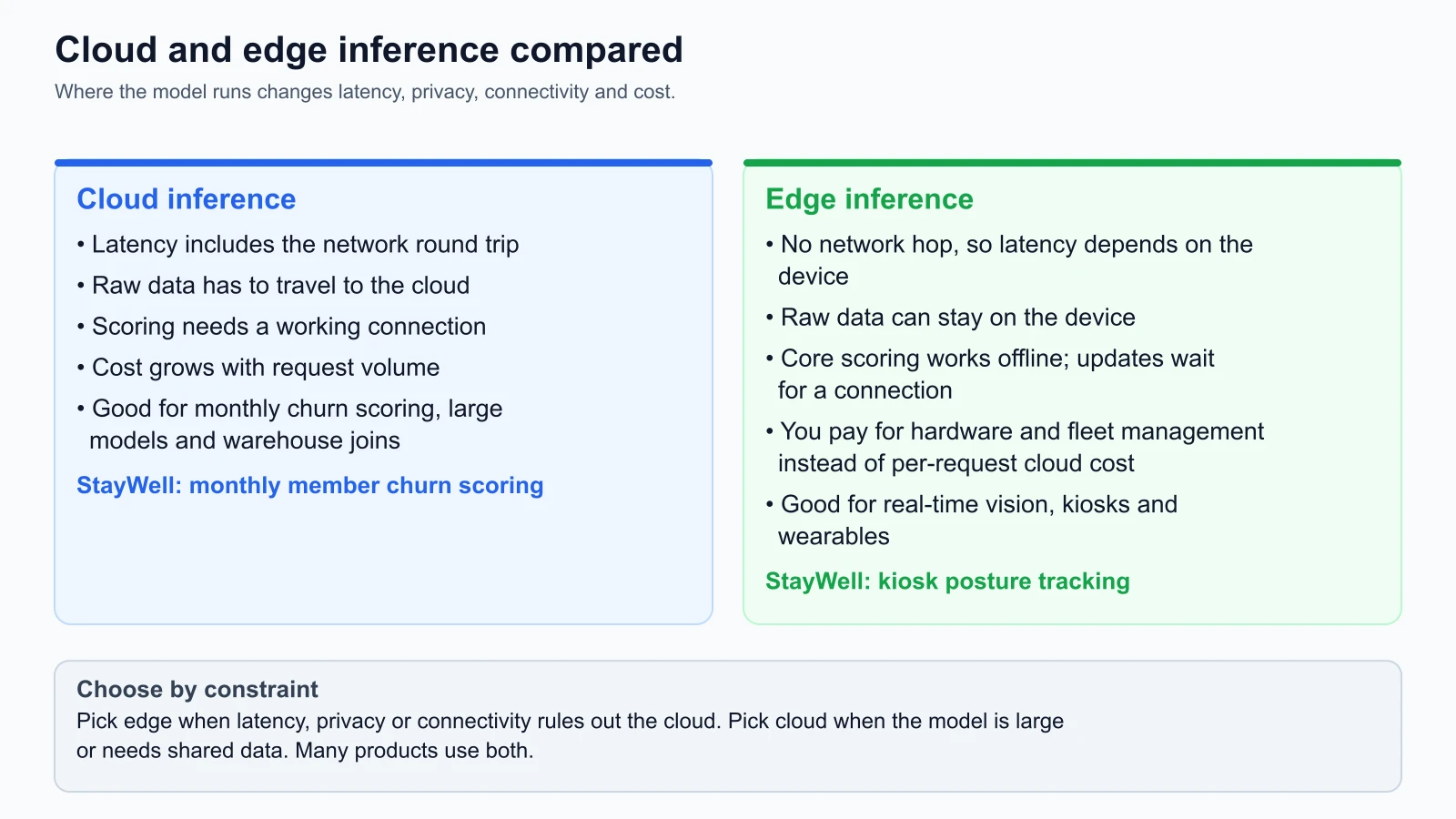
Moving machine learning models from scalable cloud clusters onto resource-constrained edge hardware introduces significant operational complexity. Mature engineering teams justify edge deployments only when dictated by four primary constraints:
| Driver | What it means on the device |
|---|---|
| 1. Low, predictable latency | No network round trip, so response time depends on the device alone |
| 2. Data privacy | Raw sensor and video data can stay on the device; you still have to secure the device and anything you upload |
| 3. Offline operation | Core inference keeps working without a connection; updates and telemetry wait until the device reconnects |
| 4. Bandwidth and cloud cost | You avoid streaming raw video to the cloud; you pay for device hardware and fleet management instead |
1. Deterministic low latency
In interactive applications (such as robotics control, drone navigation, augmented reality, or StayWell's real-time exercise posture tracking), inference must complete in under 16 milliseconds to support a smooth 60 frames-per-second (FPS) user feedback loop. Cloud inference over 4G/5G or commercial broadband introduces irreducible physical transmission delays, buffer bloat, and network jitter that make sub-20ms SLAs impossible. On-device accelerators execute inference deterministically in 1 to 5 milliseconds.
2. Data privacy and compliance
Under privacy regulations like GDPR, HIPAA, and biometric data laws, capturing and transmitting continuous video footage, audio recordings, or high-frequency health telemetry across external networks creates legal and compliance obligations. Running inference on the device lets you avoid sending raw biometric signals over the network: the model can process the video stream in memory and output only abstract numeric keypoints (for example knee_angle: 82_degrees). That reduces exposure, but it does not remove your duties under privacy law, and the keypoints and the device itself still need protecting. Ask a qualified privacy professional what applies to your product.
3. Connectivity and operational autonomy
Edge devices operate in environments where network connectivity is intermittent, slow, or nonexistent (such as basements, remote clinics, cargo ships, or underground mines). A connected medical device or industrial safety interlock cannot fail simply because a DNS server timed out. Running the model locally keeps core inference working while the network is down, although updates and telemetry have to wait until the device reconnects.
4. Bandwidth and cloud infrastructure costs
Streaming continuous high-definition video from 5,000 kiosks to cloud GPU endpoints requires petabytes of monthly network bandwidth and dozens of dedicated cloud GPU instances, costing hundreds of thousands of dollars each month. By executing inference locally on embedded hardware, the marginal cost per prediction drops to exactly $0.00. The cloud is used exclusively for periodic model distribution and aggregated summary telemetry.
Model compression: Shrinking models for embedded hardware
Embedded edge devices, ranging from mobile phones to microcontrollers, operate under strict hardware constraints: limited RAM (often 256MB to 4GB), restricted flash storage, tight thermal dissipation limits, and battery power budgets. Standard 32-bit floating-point (FP32) deep learning models cannot run efficiently in these environments without compression.
| Stage | Uncompressed model (FP32) | Post-training quantization | Deployed model |
|---|---|---|---|
| Format | Full-precision weights, 120 MB in this example | INT8 conversion with operator fusion | Compact FlatBuffer, 30 MB in this example |
| Effect | High memory use and battery drain | Uses integer hardware paths where available | Lower memory and power draw |
The file sizes are the illustrative numbers used throughout this lesson.
The three foundational model compression techniques include:
1. Quantization: FP32 to INT8
Quantization maps 32-bit floating-point weights and activations into compact 8-bit integers (INT8), reducing the storage needed for the weights to about a quarter of the FP32 size.
- Post-Training Quantization (PTQ): Converts an already-trained FP32 model into INT8 by passing a small representative calibration dataset through the network to calculate optimal dynamic scaling factors. PTQ requires zero retraining and takes seconds to execute.
- Quantization-Aware Training (QAT): Simulates low-precision clamping and rounding errors during the forward pass of model training, allowing backpropagation to adjust weights to compensate for quantization noise. QAT preserves near-perfect accuracy on sensitive deep learning tasks where PTQ causes slight degradation.
2. Structured pruning and weight sparsity
Pruning identifies and eliminates redundant or near-zero weight connections within neural network layers. Structured pruning removes entire channels or attention heads, creating smaller, denser matrices that execute significantly faster on hardware vector engines without requiring sparse matrix software libraries.
3. FlatBuffer serialization and zero-copy memory mapping
Traditional formats (like Python pickle or standard Protobuf) require deserializing files from disk into in-memory heap objects before execution. Embedded runtimes use FlatBuffers (such as .tflite files), allowing model weights to be mapped directly from flash storage into RAM (mmap) without an explicit parsing step, saving tens of megabytes of working memory.
Embedded ML runtimes: TFLite, PyTorch Mobile, and Jetson
Deploying models to edge devices requires selecting the runtime engine matched to the target hardware ecosystem (all runtime capabilities checked from official documentation on 5 November 2026: TensorFlow Lite Docs, PyTorch Mobile Docs, and NVIDIA Jetson Docs).
| Runtime Engine | Target Hardware Ecosystem | Primary Advantages | Typical Use Cases |
|---|---|---|---|
| TensorFlow Lite (LiteRT) | Android, iOS, Linux, Microcontrollers (Arm Cortex-M) | Ultra-lightweight C++ runtime (< 1MB binary), broad hardware delegation (GPU, NNAPI, Hexagon DSP). | Mobile smartphone apps, smart home sensors, wearable fitness trackers. |
| PyTorch Mobile / ExecuTorch | iOS (CoreML), Android (NNAPI), Embedded Linux | Native integration with PyTorch training workflows; minimal operator translation friction. | On-device NLP, mobile audio processing, computer vision features. |
| NVIDIA Jetson (TensorRT) | Jetson Nano, Xavier, Orin (Tegra SoC with CUDA cores) | Massive parallel compute (up to 275 TOPS on Orin); deep TensorRT kernel optimization and FP16/INT8 engines. | Smart gym kiosks, autonomous robotics, multi-stream industrial video analytics. |
1. TensorFlow Lite (LiteRT)
TensorFlow Lite converts saved models into a .tflite FlatBuffer. In production, TFLite delegates execution to specialized hardware accelerators via hardware delegates:
- GPU Delegate: Offloads floating-point operations to mobile OpenGL/Vulkan/Metal graphics processors.
- NNAPI Delegate (Android): Routes execution to dedicated Neural Processing Units (NPUs) on Qualcomm Snapdragon or Google Tensor processors.
1# TFLite INT8 post-training quantization conversion (from the docs, not run)
2import tensorflow as tf
3
4converter = tf.lite.TFLiteConverter.from_saved_model("saved_posture_model")
5converter.optimizations = [tf.lite.Optimize.DEFAULT]
6
7
8# Representative dataset generator for calibration
9def representative_data_gen():
10    for input_value in calibration_dataset.take(100):
11        yield [input_value]
12
13
14converter.representative_dataset = representative_data_gen
15converter.target_spec.supported_ops = [tf.lite.OpsSet.TFLITE_BUILTINS_INT8]
16tflite_quant_model = converter.convert()
17
18with open("posture_model_int8.tflite", "wb") as f:
19    f.write(tflite_quant_model)
2. NVIDIA Jetson and TensorRT
For heavy computer vision models running inside StayWell's gym kiosks, NVIDIA Jetson modules (such as the Jetson Orin Nano) provide desktop-grade GPU architectures in a low-power embedded form factor (7W to 15W).
The TensorRT optimization engine parses ONNX models, analyzes the target Jetson hardware capabilities, fuses adjacent convolution and activation layers into single fused GPU execution kernels, and selects the optimal precision mode (FP16 or INT8).
1# Compiling an ONNX model into an optimized TensorRT engine (from the docs, not run)
2trtexec --onnx=posture_tracker.onnx \
3        --saveEngine=posture_tracker_orin.engine \
4        --fp16 \
5        --int8 \
6        --calib=calibration.cache
Over-the-air (OTA) updates and fleet management
Deploying a model to 5,000 edge devices is fundamentally different from updating a Kubernetes deployment. In Kubernetes, you issue a command and pods replace themselves in seconds over 10Gbps data center networks. On the edge, devices communicate over unpredictable Wi-Fi or metered 4G cellular links, may be turned off by users mid-download, and can be rendered permanently inoperable ("bricked") if a corrupt update is applied.
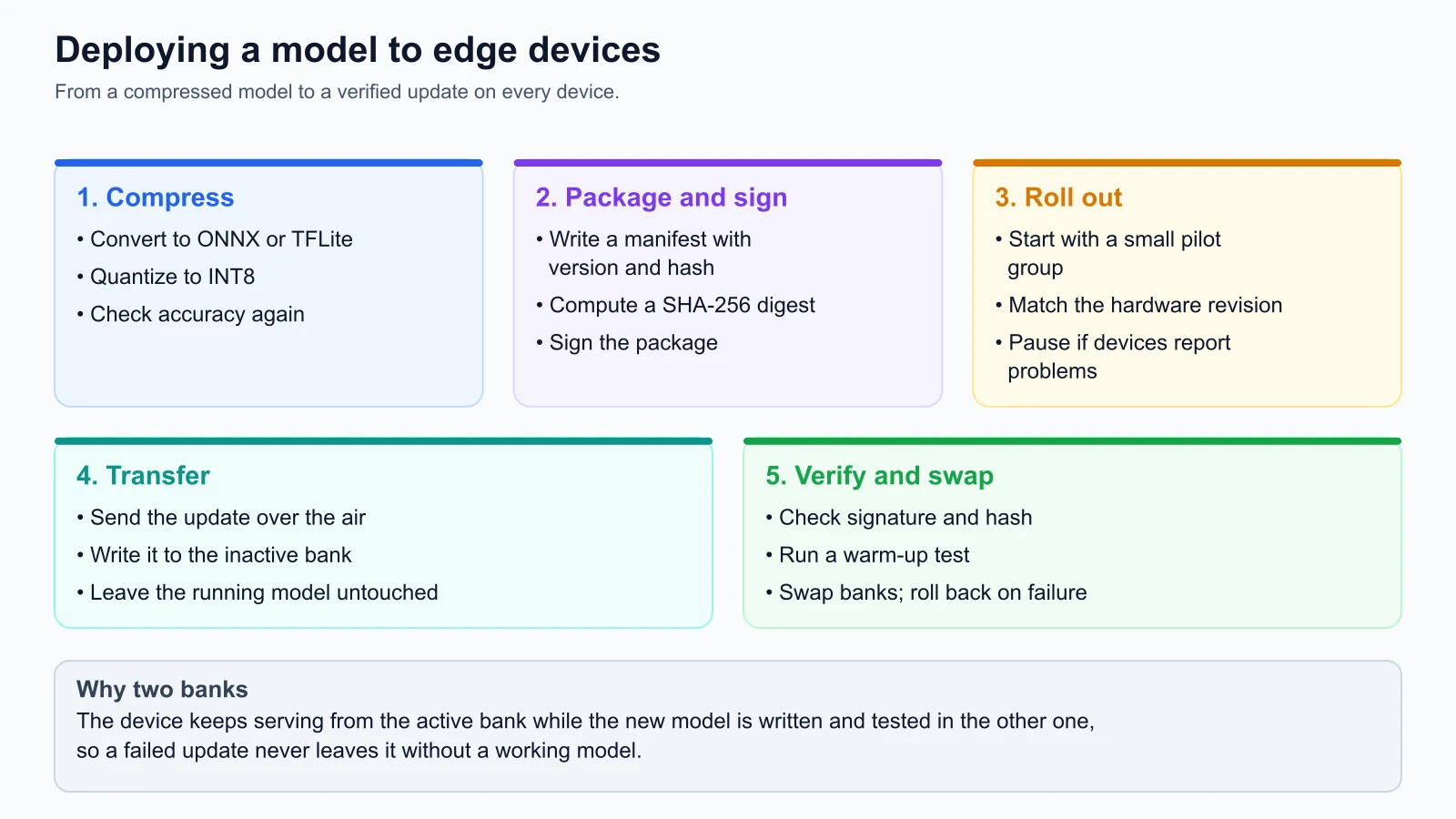
A resilient edge deployment lifecycle requires three core operational patterns:
1. Dual-bank (A/B) storage partitioning
To guarantee that a failed update never disables an edge device, storage is partitioned into two isolated banks:
- Active Bank (Bank A): Contains the currently running champion model version.
- Inactive Bank (Bank B): Receives incoming over-the-air update payloads.
During an update:
- The new model package is downloaded and written exclusively to the inactive partition (Bank B). The active model continues serving production inference uninterrupted.
- The device verifies the cryptographic signature and SHA-256 hash of the downloaded package against a hardware-protected public key.
- The device executes a local warm-up benchmark on Bank B, verifying that the new model loads into memory, executes a forward pass, and maintains safe thermal temperatures.
- If all checks pass, the bootloader performs an atomic pointer swap, setting Bank B as active.
- If the new model crashes or overheats within an observation window, the watchdog timer triggers an instant rollback to Bank A.
2. Cryptographic signing and hardware root of trust
Because edge devices reside in physically accessible or untrusted environments, models must be protected against malicious tampering. Every model artifact is cryptographically signed using a private Ed25519 or RSA key in the cloud CI/CD pipeline. The edge device verifies the digital signature using a public key embedded in its secure hardware root of trust (such as a TPM or secure enclave) before executing the binary.
3. Chunked delta updates and resume capabilities
Model artifacts can span tens or hundreds of megabytes. Downloading large files over unstable cellular links frequently fails. Fleet managers (such as AWS IoT Greengrass, Balena, or Azure IoT Operations) divide model packages into small cryptographic chunks (e.g. 1MB blocks). If a connection drops, the download resumes from the last confirmed byte offset rather than restarting from zero.
Monitoring edge fleets: Telemetry and delayed synchronization
Observability on edge devices requires fundamentally different patterns than cloud Prometheus scraping. You cannot pull metrics over HTTP from 10,000 remote devices operating behind NAT firewalls and cellular gateways.
Edge telemetry operates via intermittent asynchronous push synchronization:
On the device, a 60 frames-per-second video stream feeds the INT8 inference engine, which drives the haptic correction output. Hardware and runtime metrics go into a small local SQLite buffer: CPU temperature, GPU memory, battery level, P99 latency, frame rate, and histograms of the quantized keypoints. When the device is connected and idle, it uploads the buffer as a compressed batch over HTTPS or MQTT to the central fleet manager (for example AWS IoT Core).
Key edge telemetry signals include:
- Thermal and throttling states: Monitoring SoC core temperatures (e.g. flagging when a Jetson processor reaches 80°C and begins throttling clock frequency to prevent hardware damage).
- Inference frame rate (FPS): Tracking real-world throughput under fluctuating ambient temperatures.
- Battery drain impact: On mobile phones and wearables, monitoring the milliamp-hour (mAh) consumption attributable to neural engine wakeups.
- Local SQLite buffering: Storing prediction audit summaries in a circular on-device SQLite database that rolls over when storage limits are reached, syncing batches upstream only when unmetered Wi-Fi is detected.
Production code: Edge package validator and dual-bank manager
Below is a self-contained, fully tested Python implementation of an EdgeDeploymentManager. It simulates cryptographic signature validation, hardware target compatibility enforcement, dual-bank A/B staging, warm-up inference benchmarking, and automated atomic rollback mechanics.
edge_deployment.py
1"""
2Edge AI Model Package and Dual-Bank OTA Update Simulator.
3
4Provides:
5- Cryptographic signature and SHA-256 package verification
6- Hardware target compatibility validation
7- Dual-bank A/B memory partition staging
8- On-device warm-up benchmarking and thermal checks
9- Atomic pointer cutover and instant rollback
10- Pure Python standard library implementation
11"""
12
13from dataclasses import dataclass
14from typing import Dict, Optional
15import hashlib
16
17
18class EdgeVerificationError(Exception):
19    """Raised when an edge package fails cryptographic or hardware checks."""
20    pass
21
22
23@dataclass(frozen=True)
24class ModelPackage:
25    """Represents a compiled, signed model artifact bundle for edge distribution."""
26    model_id: str
27    version: str
28    target_hardware: str  # e.g. "jetson_orin", "arm_cortex_m", "android_npu"
29    payload: bytes
30    sha256_hash: str
31    signature: str
32
33    @classmethod
34    def create(
35        cls,
36        model_id: str,
37        version: str,
38        hardware: str,
39        payload: bytes,
40        signing_key: str
41    ) -> "ModelPackage":
42        """Construct a model package and generate cryptographic signature."""
43        digest = hashlib.sha256(payload).hexdigest()
44        # Simulated HMAC/Ed25519 signature based on key + digest
45        sig = hashlib.sha256((signing_key + digest).encode("utf-8")).hexdigest()
46        return cls(
47            model_id=model_id,
48            version=version,
49            target_hardware=hardware,
50            payload=payload,
51            sha256_hash=digest,
52            signature=sig
53        )
54
55    def verify_integrity(self, verification_key: str) -> bool:
56        """Verify that payload matches digest and signature matches public key."""
57        computed_digest = hashlib.sha256(self.payload).hexdigest()
58        if computed_digest != self.sha256_hash:
59            return False
60        expected_sig = hashlib.sha256((verification_key + self.sha256_hash).encode("utf-8")).hexdigest()
61        return self.signature == expected_sig
62
63
64class EdgeDeploymentManager:
65    """Manages dual-bank A/B storage partitions and model activations on edge hardware."""
66
67    def __init__(
68        self,
69        device_id: str,
70        supported_hardware: str,
71        verification_key: str,
72        initial_model: ModelPackage
73    ):
74        self.device_id = device_id
75        self.supported_hardware = supported_hardware
76        self.verification_key = verification_key
77
78        # Dual-bank storage partitions
79        self.banks: Dict[str, Optional[ModelPackage]] = {
80            "bank_a": initial_model,
81            "bank_b": None
82        }
83        self.active_bank = "bank_a"
84        self.inactive_bank = "bank_b"
85
86    def stage_ota_package(self, package: ModelPackage) -> bool:
87        """Validate package and stage it into the inactive partition."""
88        if package.target_hardware != self.supported_hardware:
89            raise EdgeVerificationError(
90                f"Hardware mismatch: device is {self.supported_hardware}, "
91                f"package requires {package.target_hardware}"
92            )
93
94        if not package.verify_integrity(self.verification_key):
95            raise EdgeVerificationError(
96                "Cryptographic signature or SHA-256 integrity check failed"
97            )
98
99        # Stage into inactive bank safely
100        self.banks[self.inactive_bank] = package
101        return True
102
103    def run_warmup_benchmark(
104        self,
105        simulated_fps: float,
106        simulated_temp_c: float,
107        min_fps: float = 30.0,
108        max_temp_c: float = 75.0
109    ) -> bool:
110        """Execute pre-activation hardware stress tests on the staged candidate."""
111        candidate = self.banks[self.inactive_bank]
112        if not candidate:
113            raise EdgeVerificationError("No staged candidate package in inactive bank")
114
115        # Verify performance does not violate latency SLA
116        if simulated_fps < min_fps:
117            return False
118
119        # Verify execution does not trigger thermal throttling
120        if simulated_temp_c > max_temp_c:
121            return False
122
123        return True
124
125    def commit_activation(self) -> str:
126        """Atomic pointer cutover: swaps inactive bank to active."""
127        if not self.banks[self.inactive_bank]:
128            raise EdgeVerificationError("Cannot activate an empty bank")
129
130        # Atomic pointer swap
131        old_active = self.active_bank
132        self.active_bank = self.inactive_bank
133        self.inactive_bank = old_active
134        return self.active_bank
135
136    def rollback(self) -> str:
137        """Instantly revert active pointer back to the previous bank."""
138        old_active = self.active_bank
139        self.active_bank = self.inactive_bank
140        self.inactive_bank = old_active
141        return self.active_bank
142
143    def get_active_model_version(self) -> str:
144        """Return version string of currently running champion model."""
145        pkg = self.banks[self.active_bank]
146        return pkg.version if pkg else "NONE"
Unit test suite validating edge OTA lifecycle
Here is the test suite validating successful OTA updates, hardware mismatch rejections, signature verification failures, thermal benchmark halts, and rollback mechanics:
edge_deployment_test.py
1import unittest
2from edge_deployment import EdgeDeploymentManager, EdgeVerificationError, ModelPackage
3
4
5class TestEdgeDeployment(unittest.TestCase):
6    def setUp(self):
7        self.signing_key = "secret_root_of_trust_key"
8        self.initial_pkg = ModelPackage.create(
9            model_id="kiosk_posture_tracker",
10            version="v1.0.0",
11            hardware="jetson_orin",
12            payload=b"initial_model_binary_weights_v1",
13            signing_key=self.signing_key
14        )
15        self.device = EdgeDeploymentManager(
16            device_id="kiosk-chicago-04",
17            supported_hardware="jetson_orin",
18            verification_key=self.signing_key,
19            initial_model=self.initial_pkg
20        )
21
22    def test_successful_ota_update_and_cutover(self):
23        v2_pkg = ModelPackage.create(
24            model_id="kiosk_posture_tracker",
25            version="v2.0.0",
26            hardware="jetson_orin",
27            payload=b"optimized_int8_quantized_weights_v2",
28            signing_key=self.signing_key
29        )
30
31        # 1. Stage to inactive bank
32        staged = self.device.stage_ota_package(v2_pkg)
33        self.assertTrue(staged)
34        self.assertEqual(self.device.get_active_model_version(), "v1.0.0")
35
36        # 2. Run warm-up benchmark (passes: 60 FPS, 62C)
37        warmup = self.device.run_warmup_benchmark(
38            simulated_fps=60.0,
39            simulated_temp_c=62.0
40        )
41        self.assertTrue(warmup)
42
43        # 3. Commit cutover
44        new_active = self.device.commit_activation()
45        self.assertEqual(new_active, "bank_b")
46        self.assertEqual(self.device.get_active_model_version(), "v2.0.0")
47
48    def test_corrupted_payload_fails_verification(self):
49        v2_pkg = ModelPackage.create(
50            model_id="kiosk_posture_tracker",
51            version="v2.0.0",
52            hardware="jetson_orin",
53            payload=b"tampered_weights",
54            signing_key="wrong_unauthorized_key"
55        )
56        with self.assertRaises(EdgeVerificationError):
57            self.device.stage_ota_package(v2_pkg)
58
59    def test_hardware_mismatch_fails_staging(self):
60        arm_pkg = ModelPackage.create(
61            model_id="kiosk_posture_tracker",
62            version="v2.0.0",
63            hardware="arm_cortex_m",  # Incompatible with jetson_orin
64            payload=b"microcontroller_binary",
65            signing_key=self.signing_key
66        )
67        with self.assertRaises(EdgeVerificationError) as ctx:
68            self.device.stage_ota_package(arm_pkg)
69        self.assertIn("Hardware mismatch", str(ctx.exception))
70
71    def test_thermal_or_fps_failure_prevents_activation(self):
72        v2_pkg = ModelPackage.create(
73            model_id="kiosk_posture_tracker",
74            version="v2.0.0",
75            hardware="jetson_orin",
76            payload=b"heavy_unoptimized_weights",
77            signing_key=self.signing_key
78        )
79        self.device.stage_ota_package(v2_pkg)
80
81        # Thermal breach (82C > 75C max threshold)
82        warmup_pass = self.device.run_warmup_benchmark(
83            simulated_fps=45.0,
84            simulated_temp_c=82.0
85        )
86        self.assertFalse(warmup_pass)
87
88        # Active model remains safely on v1.0.0
89        self.assertEqual(self.device.get_active_model_version(), "v1.0.0")
90
91    def test_rollback_restores_previous_bank(self):
92        v2_pkg = ModelPackage.create(
93            model_id="kiosk_posture_tracker",
94            version="v2.0.0",
95            hardware="jetson_orin",
96            payload=b"v2_weights",
97            signing_key=self.signing_key
98        )
99        self.device.stage_ota_package(v2_pkg)
100        self.device.commit_activation()
101        self.assertEqual(self.device.get_active_model_version(), "v2.0.0")
102
103        # Field anomaly detected: trigger rollback
104        self.device.rollback()
105        self.assertEqual(self.device.get_active_model_version(), "v1.0.0")
106
107
108if __name__ == "__main__":
109    unittest.main()
Save both files in the same folder and run the tests from that folder:
1python3 -m unittest discover -p '*_test.py'Mistakes beginners make
1. Attempting to deploy full unquantized FP32 models to edge devices
Developers frequently take a 500MB PyTorch model trained on a cluster of NVIDIA H100 GPUs and attempt to run it directly on a mobile phone or Raspberry Pi. The application crashes immediately with out-of-memory errors, drains the device battery in 20 minutes, or runs at an unusable 0.5 frames per second.
Fix: Apply post-training INT8 quantization, operator fusion, and weight pruning during export. Profile memory high-water marks and inference latency on physical target hardware before shipping to users.
2. Overwriting model files in place without dual-bank partitions
Teams often update edge models by writing incoming bytes directly over the existing active model binary file. If the device loses power halfway through the download, or if the cellular connection terminates, the active model file is left partially written and corrupted, permanently bricking the device in the field.
Fix: Implement dual-bank (A/B) storage partitioning. Always stage incoming update packages into an isolated inactive storage bank, verify cryptographic signatures and checksums, run a warm-up benchmark, and execute an atomic pointer swap to commit the update.
3. Streaming raw video to the cloud when only metadata is needed
Architects often default to streaming full HD video feeds back to cloud servers because "cloud GPUs are more flexible." This incurs massive recurring bandwidth fees, violates user privacy expectations, and creates complete failure modes during broadband outages.
Fix: Process high-bandwidth sensory data (video, audio, high-frequency IMU telemetry) locally on edge accelerators. Stream only lightweight, anonymized metadata summaries and aggregated metrics back to central cloud databases.
4. Forgetting thermal dissipation and environmental throttling
Engineers often benchmark edge devices in air-conditioned offices and assume performance will be identical in the field. When deployed inside sealed outdoor kiosks or hot gym environments, sustained GPU execution heats the SoC past 80°C, triggering hardware thermal throttling that cuts compute frequency and frame rates by half.
Fix: Benchmark edge workloads inside environmental thermal chambers under sustained peak load. Configure dynamic frame-skipping algorithms and thermal alarms that downscale model inference rates before hardware thermal throttling engages.
Recap and try it yourself
In this lesson, we explored the principles and operational practices of Edge AI:
- The four drivers of edge computing: Deploy on the edge to achieve deterministic sub-15ms latency, ensure privacy by design, maintain offline resilience, and eliminate cloud bandwidth bills.
- Model compression techniques: Shrink models using INT8 post-training quantization, structured pruning, and FlatBuffer zero-copy memory mapping.
- Runtime selection: Match execution engines to hardware ecosystems (TensorFlow Lite for mobile, PyTorch Mobile for iOS/Android, TensorRT for NVIDIA Jetson).
- Resilient over-the-air updates: Protect fleets using cryptographic signature verification, dual-bank A/B partitioning, on-device warm-up benchmarks, and automated watchdogs.
- Edge telemetry: Buffer metrics in local SQLite tables and push compact summary telemetry asynchronously over unmetered connections.
Hands-on exercises
- Simulate a dual-bank OTA deployment:
Using the
EdgeDeploymentManagerclass from our practical code, write a script that initializes a device with versionv1.0.0, stages an update package for versionv2.0.0, simulates a thermal breach during warm-up (85°C), and asserts that the device rejects the cutover and remains safely onv1.0.0. - Calculate edge bandwidth savings: StayWell operates 2,500 gym kiosks. Each kiosk processes 1080p video at 30 FPS for 14 hours daily. Assume streaming raw H.264 video to the cloud costs $0.08 per gigabyte of transferred data (an illustrative assumption; look up your provider's current network pricing) and that each stream uses 4 Mbps. Calculate the monthly cloud bandwidth cost of streaming video versus processing locally on Jetson modules.
- Evaluate quantization accuracy trade-offs: Suppose (with made-up illustrative numbers) an uncompressed FP32 posture model achieves 94.2% accuracy with a 120MB file size and 45ms inference latency. Post-training INT8 quantization reduces file size to 30MB and latency to 11ms, but drops accuracy to 93.6%. Under what product conditions is this 0.6% accuracy drop an acceptable engineering trade-off?