
MLOps course · lesson 9 of 24
- 1What Is MLOps? From Notebooks to Reliable Production
- 2MLOps Principles and Maturity: From Manual to Automated
- 3ML Fundamentals for MLOps: Splits, Leakage, and Metrics
- 4A Reproducible ML Project: Layout, Seeds, and Data Code
- 5Data Engineering Basics for ML: Ingestion, SQL, and Skew
- 6Pipeline Orchestration: Apache Airflow and Kubeflow
- 7Batch vs Streaming: Spark, Kafka, and Flink
- 8Data Versioning and Lineage: DVC and Beyond
- 9Data Validation and Quality in ML Pipelines
- 10Experiment Tracking with MLflow
- 11Reproducible Training Pipelines
- 12Model Evaluation and Validation Gates
- 13Model Registry and Versioning
- 14CI/CD for Machine Learning
- 15Containers and Kubernetes for ML
- 16Infrastructure as Code: Terraform and Ansible
- 17Cloud ML Platforms: AWS, Azure, GCP, and Self-Built
- 18Model Serving Patterns: Batch, Online, and Streaming
- 19Inference Engineering Basics: Latency, Batching, and Cost
- 20Monitoring and Observability for ML Models
- 21Drift Detection and Retraining for ML Models
- 22Explainable AI: LIME, SHAP, and Model Interpretability
- 23Edge AI Deployment: Jetson, TFLite, and Mobile ML
- 24Capstone: An End-to-End MLOps Pipeline
In traditional software development, input validation is taken for granted. If an API endpoint expects an integer user ID and receives an empty string or negative number, the handler rejects the request with an HTTP 400 bad request error. The bad data is stopped at the perimeter before it can corrupt database tables.
In machine learning, bad data rarely produces an immediate exception. If a billing service migration begins writing negative values into a monthly_spend column, a Gradient Boosting model will not crash. It will parse the numbers, compute feature splits on negative values, and generate nonsensical customer churn predictions. If a database timeout leaves forty percent of your categorical location values null, an imputation transformer might silently replace them with the string "missing", skewing decision boundaries without triggering a single runtime error.
This phenomenon is known as silent data corruption. Models fail silently because numerical algorithms accept whatever numbers they receive. To keep machine learning systems reliable, you must enforce strict data quality gates and formal data contracts across your pipelines.
In this lesson, you will learn how to design data quality gates across ingestion, transformation, pre-training, and inference. You will examine the anatomy of data contracts, study how industry frameworks like Great Expectations operate, and build a fully tested, runnable Python data validator from scratch.
The cost of validating late
The central principle of data quality in MLOps is simple: validate early and fail loudly.
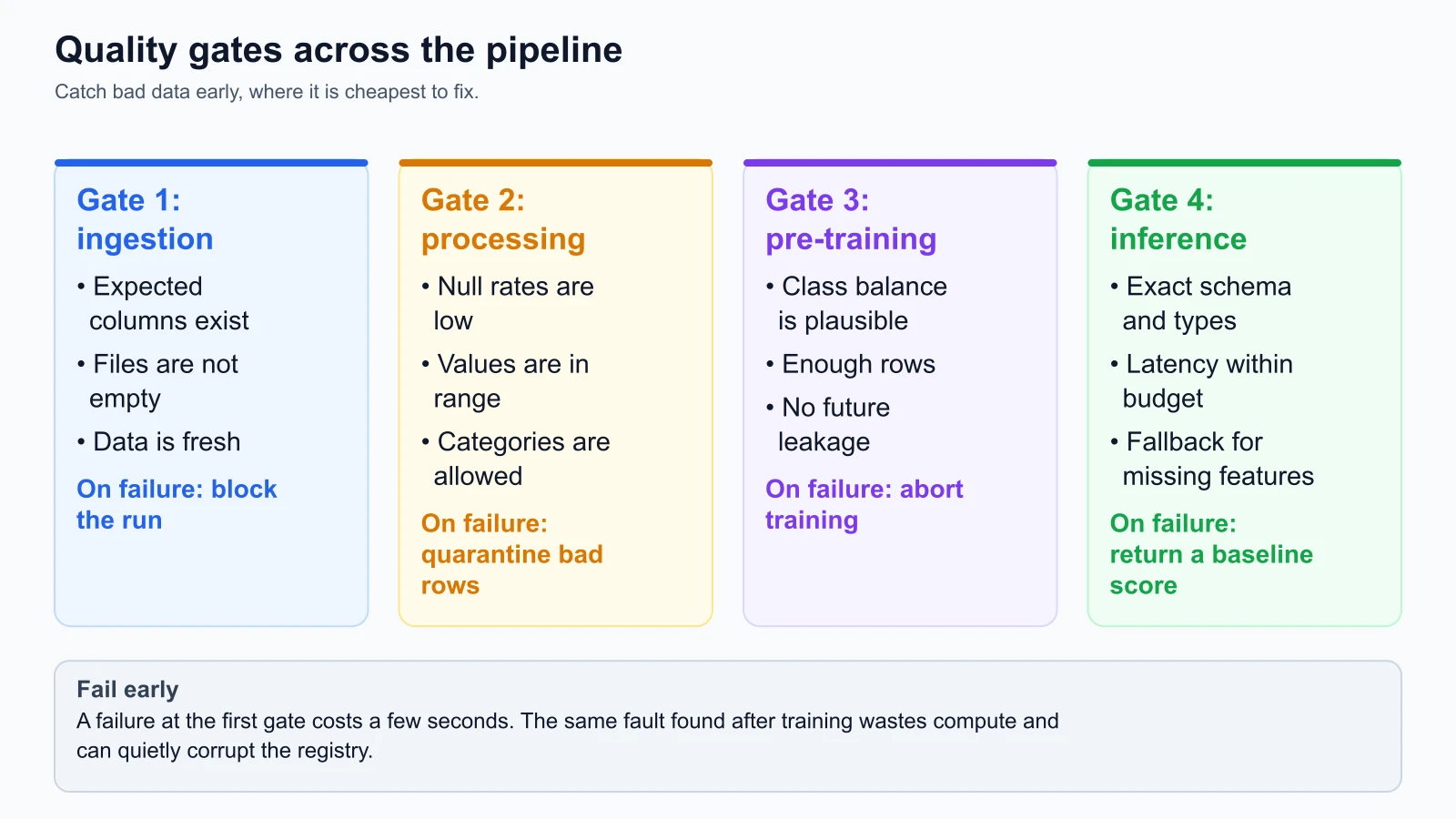
Data validation belongs at four distinct gates in the machine learning lifecycle:
Gate 1: Ingestion gate
The ingestion gate evaluates raw data at the boundary where external data sources land in your storage environment. This check occurs before any transformation logic executes.
Key checks at Gate 1:
- File completeness: Ensuring files are non-empty and uncorrupted.
- Freshness: Verifying that the data batch arrived within its expected time window (for example, yesterday's booking dump arrived before 02:00 UTC).
- Schema presence: Checking that expected primary keys, partition timestamps, and critical entity columns exist.
Failing at Gate 1 costs pennies in cloud compute. If the upstream transactional database export stalled and wrote a zero-byte file, your pipeline halts immediately, paging the data engineering team before any downstream training cluster spins up.
Gate 2: Processing and transformation gate
Once raw data is parsed and transformed into feature tables, the transformation gate checks the statistical integrity of individual columns.
Key checks at Gate 2:
- Null fraction thresholds: Confirming that missing values do not exceed predefined limits (for example,
customer_idmust have 0% nulls; optional survey answers must not exceed 10% nulls). - Numerical range bounds: Enforcing physical and business realities (such as
tenure_months >= 0andmonthly_spend >= 0.0). - Categorical set membership: Verifying that categorical variables match approved enumerations (such as
contract_type in {"month-to-month", "one-year", "two-year"}). - Entity uniqueness: Asserting that primary keys remain distinct without unexpected duplicate rows introduced by bad relational joins.
Gate 3: Pre-training gate
Before feeding a curated dataset into a multi-hour model training job, the pre-training gate verifies dataset-level distributions.
Key checks at Gate 3:
- Target class balance: In StayWell churn prediction, historical churn hovers between 10% and 25%. If a training snapshot exhibits a 1% or 90% churn rate, an upstream join or label filtering logic is broken.
- Minimum row count: Verifying that seasonal or network filtering did not discard ninety percent of the historical dataset.
- Feature drift against baseline: Comparing feature distributions against the previous training run to detect sudden distribution shifts.
Failing at Gate 3 prevents the model registry from being polluted with invalid model weights trained on broken labels.
Gate 4: Inference gate
When serving live predictions via REST API or streaming consumer, the inference gate inspects incoming feature payloads.
Key checks at Gate 4:
- Payload type validation: Ensuring incoming JSON fields match expected types.
- Outlier clamping: Capping extreme values that could cause numerical overflow in model scoring.
- Fallback routing: When essential features are missing in a live request, returning a safe population baseline prediction rather than throwing an unhandled HTTP 500 error.
Anatomy of a failing check: quarantine and alerts
When a validation check detects invalid data, how should the pipeline respond? A naive approach is to either ignore the error or drop all invalid rows silently. Both choices are dangerous: ignoring errors corrupts models, while silently dropping invalid rows introduces survivorship bias.
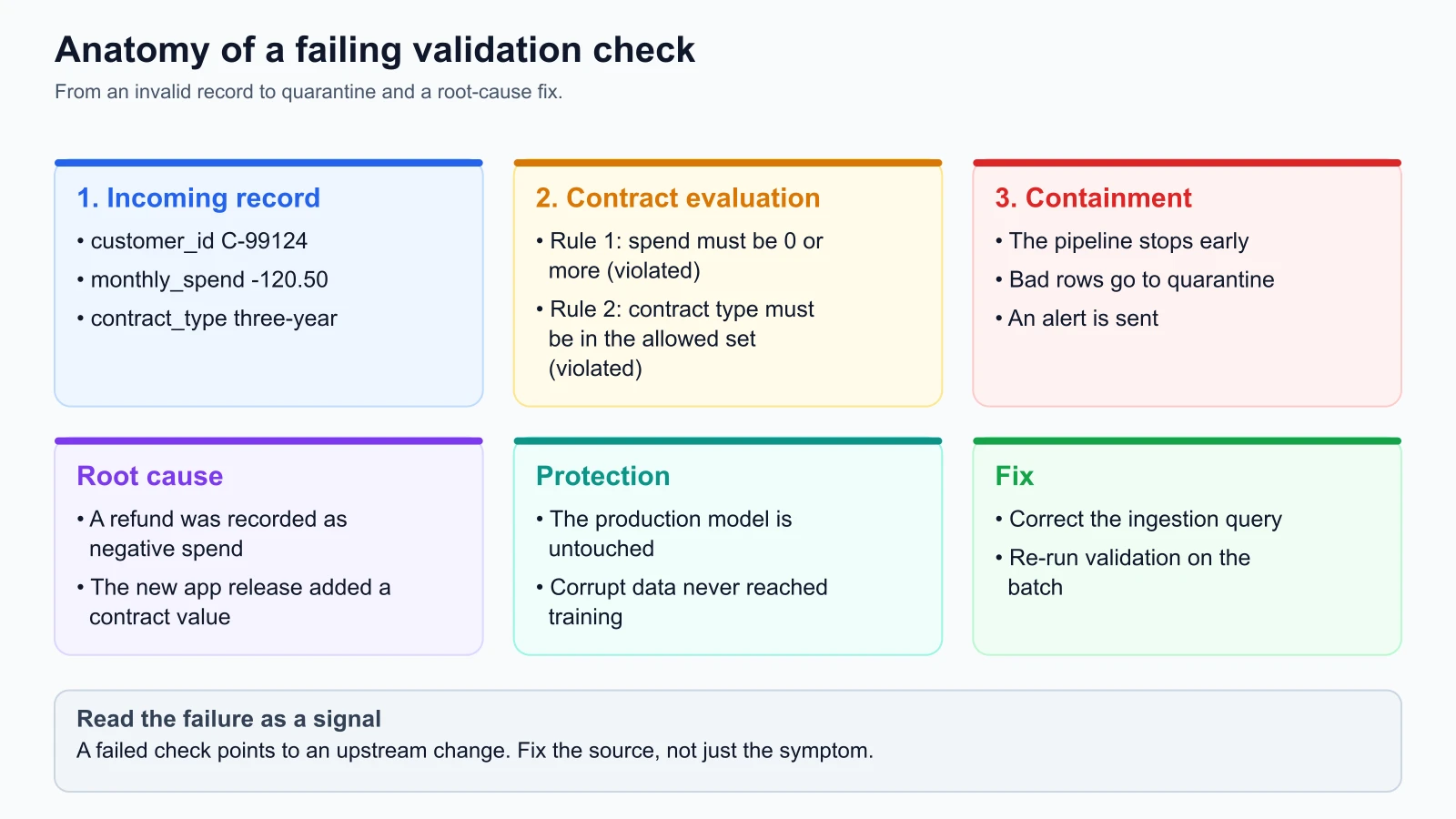
A good validation architecture separates failures into two severity levels:
Fail versus warn thresholds
- FAIL (Critical Severity): Triggered when foundational assumptions are broken. Examples include missing required columns, primary key duplicates, negative monetary values, or target label corruption.
- Pipeline Action: Abort execution immediately.
- Data Action: Isolate the invalid batch and write corrupt records to a designated quarantine object store (for example,
s3://staywell-mlops-lake/quarantine/). - Notification Action: Trigger high-priority alerts to on-call engineers via PagerDuty or Slack.
- WARN (Non-Critical Severity): Triggered when metrics drift slightly outside optimal ranges but do not compromise technical execution. Examples include optional survey fields exceeding missingness thresholds by 2%, or target churn rate shifting from 15% to 26% following a promotional campaign.
- Pipeline Action: Log the warning, continue execution, and record the metric in the run metadata.
- Notification Action: Dispatch a non-urgent notification to the team dashboard for review during normal business hours.
The quarantine pattern
Never discard failing records into the void. When twenty-four rows in StayWell's nightly booking batch fail because monthly_spend = -120.50, write those twenty-four rows to a quarantine storage bucket alongside metadata recording the timestamp, the rule that failed, and the violation reason.
Quarantining records enables root-cause investigations. In the StayWell case, examining the quarantined rows revealed that a new release of the mobile application (v4.2) had started recording customer refunds as negative spend transactions rather than logging them to a separate refund ledger. Because the validation gate halted the pipeline, zero negative spend values entered the training matrix, protecting the production churn classifier from corrupted feature weights.
Data contracts: decoupling producers and consumers
In modern software organizations, machine learning teams rarely own the databases that produce raw operational data. Software engineers building the checkout flow, billing service, or mobile app modify schemas to support user-facing product features, often unaware that a renamed column breaks an ML pipeline downstream.
A Data Contract is a formal, versioned agreement between data producers (the engineering teams generating data) and data consumers (the ML and analytics teams using data).
A data contract defines:
- Schema Definitions: Column names, data types, and nullability.
- Business Semantic Constraints: Value bounds, allowable categories, and expected business logic.
- Service Level Agreements (SLAs): Update frequency, delivery deadlines, and freshness bounds.
- Breaking Change Protocol: A required deprecation notice and transition window before schemas change.
Operational data contract template
Here is the production data contract established between StayWell's Core Billing Engineering team and the MLOps team:
1# StayWell MLOps Data Contract
2# Contract ID: DC-STAYWELL-CHURN-FEATURES-V1
3# Producer: Team Core Billing (billing-eng@staywell.internal)
4# Consumer: Team MLOps (mlops-eng@staywell.internal)
5# Status: ACTIVE (Effective: 2026-11-04)
6
7dataset:
8  name: staywell_customer_features
9  format: parquet
10  delivery_uri: s3://staywell-mlops-lake/staged/features/
11  sla_delivery_time_utc: "02:00"
12
13schema:
14  - name: customer_id
15    type: string
16    required: true
17    nullable: false
18    unique: true
19    description: "Unique alphanumeric customer identifier prefixed with CUST-"
20
21  - name: tenure_months
22    type: integer
23    required: true
24    nullable: false
25    min_value: 0
26    max_value: 120
27    description: "Total consecutive active subscription months"
28
29  - name: monthly_spend
30    type: float
31    required: true
32    nullable: false
33    min_value: 0.0
34    max_value: 5000.0
35    description: "Average recurring monthly billing spend in USD"
36
37  - name: contract_type
38    type: string
39    required: true
40    nullable: false
41    allowed_values: ["month-to-month", "one-year", "two-year"]
42    description: "Active subscription contract term"
43
44  - name: support_tickets
45    type: integer
46    required: false
47    nullable: true
48    max_null_fraction: 0.10
49    min_value: 0
50    max_value: 50
51    description: "Total customer support tickets submitted in last 90 days"
52
53  - name: churn
54    type: integer
55    required: true
56    nullable: false
57    allowed_values: [0, 1]
58    description: "Binary churn indicator: 1 if cancelled within 30 days, else 0"
59
60quality_rules:
61  min_row_count: 50000
62  target_balance:
63    column: churn
64    min_rate: 0.08
65    max_rate: 0.35
66    severity: WARN
67
68change_management:
69  deprecation_notice_days: 30
70  notification_channel: "#alerts-billing-data-contracts"
When schema or semantic changes occur, automated CI pipelines validate proposed migrations against active data contracts, preventing breaking changes from reaching production unnoticed.
Industry validation tools: Great Expectations and Pandera
While custom validation scripts work well for specialized tasks, open-source frameworks standardize how data expectations are declared, executed, and documented.
The official Great Expectations Documentation (verified on 4 November 2026) defines Great Expectations as a shared standard for data quality. In Great Expectations:
- Expectations: Assertions about data expressed declaratively in Python or JSON (in GX Core 1.x these are classes such as
ExpectColumnValuesToNotBeNullandExpectColumnValuesToBeBetween). - Expectation Suites: Bundles of individual expectations grouped into a cohesive contract for a specific dataset.
- Checkpoints: Execution units that pair an Expectation Suite with a data batch, evaluate the rules, trigger actions (like Slack alerts or S3 quarantines), and generate human-readable HTML documentation known as Data Docs.
1# Great Expectations (GX Core 1.x) checks on a small illustrative DataFrame
2import great_expectations as gx
3import great_expectations.expectations as gxe
4import pandas as pd
5
6df = pd.DataFrame({
7    "customer_id": ["C-1", "C-2", "C-3"],
8    "tenure_months": [3, 10, 200],
9    "monthly_spend": [20.0, 35.5, 10.0],
10    "contract_type": ["month-to-month", "one-year", "weird"],
11})
12
13context = gx.get_context()
14data_source = context.data_sources.add_pandas("staywell")
15asset = data_source.add_dataframe_asset(name="features")
16batch_definition = asset.add_batch_definition_whole_dataframe("whole")
17batch = batch_definition.get_batch(batch_parameters={"dataframe": df})
18
19expectations = [
20    gxe.ExpectColumnValuesToNotBeNull(column="customer_id"),
21    gxe.ExpectColumnValuesToBeUnique(column="customer_id"),
22    gxe.ExpectColumnValuesToBeBetween(column="tenure_months", min_value=0, max_value=120),
23    gxe.ExpectColumnValuesToBeBetween(column="monthly_spend", min_value=0.0, max_value=5000.0),
24    gxe.ExpectColumnValuesToBeInSet(
25        column="contract_type", value_set=["month-to-month", "one-year", "two-year"]
26    ),
27]
28for expectation in expectations:
29    result = batch.validate(expectation)
30    print(type(expectation).__name__, result.success)
I ran this on Great Expectations Core 1.24.1 and Python 3.12 on 5 November 2026. It prints True for the not-null, uniqueness and spend-range checks, and False for the tenure check (the value 200 is above the maximum of 120) and the contract-type check (the value "weird" is not in the allowed set). The library also prints progress bars. Older tutorials use context.sources.pandas_default and validator.expect_column_values_to_...; that API no longer exists in GX Core 1.x, so check which version a tutorial targets.
Similarly, the Pandera Documentation (verified on 4 November 2026) provides statistical schema validation for Pandas, Polars, and PySpark DataFrames, integrating validation decorators directly into function signatures.
Hands-on implementation: a tested Python data validator
To understand how validation logic operates without depending on external services, let us implement a lightweight, production-grade data validator using the Python standard library.
This validator enforces:
- Required column presence and data types
- Null fraction thresholds
- Numerical range boundaries
- Categorical set enumerations
- Entity uniqueness
- Target distribution health
The validator implementation (data_validator.py)
Here is the complete implementation of the validation engine:
data_validator.py
1"""Production data validator for machine learning pipelines.
2
3Validates tabular datasets against data contracts including schema definitions,
4nullability thresholds, numeric ranges, categorical allowed sets, uniqueness,
5and target label distributions.
6"""
7
8from __future__ import annotations
9
10import dataclasses
11from typing import Any, Dict, List, Optional, Set
12
13
14@dataclasses.dataclass(frozen=True)
15class ColumnRule:
16    """Rules for validating a single column in a dataset."""
17    name: str
18    dtype: type
19    required: bool = True
20    nullable: bool = False
21    max_null_fraction: float = 0.0
22    min_value: Optional[float] = None
23    max_value: Optional[float] = None
24    allowed_values: Optional[Set[Any]] = None
25    unique: bool = False
26
27
28@dataclasses.dataclass(frozen=True)
29class TargetBalanceRule:
30    """Rules for validating target label distribution (e.g. churn rate)."""
31    target_column: str
32    min_rate: float = 0.05
33    max_rate: float = 0.40
34    severity: str = "WARN"  # "WARN" or "FAIL"
35
36
37@dataclasses.dataclass
38class ValidationIssue:
39    """Represents a single validation error or warning."""
40    severity: str  # "FAIL" or "WARN"
41    column: Optional[str]
42    message: str
43
44
45@dataclasses.dataclass
46class ValidationReport:
47    """Summary of data validation execution."""
48    is_valid: bool
49    total_rows: int
50    errors: List[ValidationIssue] = dataclasses.field(default_factory=list)
51    warnings: List[ValidationIssue] = dataclasses.field(default_factory=list)
52    metrics: Dict[str, Any] = dataclasses.field(default_factory=dict)
53
54
55class DataValidator:
56    """Validates row-oriented datasets against a defined data contract."""
57
58    def __init__(
59        self,
60        column_rules: List[ColumnRule],
61        target_rule: Optional[TargetBalanceRule] = None,
62        min_rows: int = 1,
63    ) -> None:
64        self.column_rules = {r.name: r for r in column_rules}
65        self.target_rule = target_rule
66        self.min_rows = min_rows
67
68    def validate(self, dataset: List[Dict[str, Any]]) -> ValidationReport:
69        """Execute all contract checks against the given dataset."""
70        errors: List[ValidationIssue] = []
71        warnings: List[ValidationIssue] = []
72        metrics: Dict[str, Any] = {}
73
74        total_rows = len(dataset)
75        metrics["row_count"] = total_rows
76
77        # 1. Dataset size check
78        if total_rows < self.min_rows:
79            errors.append(
80                ValidationIssue(
81                    severity="FAIL",
82                    column=None,
83                    message=f"Dataset has {total_rows} rows, minimum required is {self.min_rows}.",
84                )
85            )
86            return ValidationReport(
87                is_valid=False,
88                total_rows=total_rows,
89                errors=errors,
90                warnings=warnings,
91                metrics=metrics,
92            )
93
94        # Collect columns present across records
95        present_columns = set()
96        for row in dataset:
97            present_columns.update(row.keys())
98
99        # 2. Required column existence checks
100        for rule_name, rule in self.column_rules.items():
101            if rule.required and rule_name not in present_columns:
102                errors.append(
103                    ValidationIssue(
104                        severity="FAIL",
105                        column=rule_name,
106                        message=f"Required column '{rule_name}' is missing from dataset.",
107                    )
108                )
109
110        # If required columns are missing, return early
111        if errors:
112            return ValidationReport(
113                is_valid=False,
114                total_rows=total_rows,
115                errors=errors,
116                warnings=warnings,
117                metrics=metrics,
118            )
119
120        # Per-column collectors
121        seen_values: Dict[str, Set[Any]] = {name: set() for name, r in self.column_rules.items() if r.unique}
122        duplicate_counts: Dict[str, int] = {name: 0 for name, r in self.column_rules.items() if r.unique}
123        null_counts: Dict[str, int] = {name: 0 for name in self.column_rules}
124        range_violations: Dict[str, int] = {name: 0 for name in self.column_rules}
125        type_violations: Dict[str, int] = {name: 0 for name in self.column_rules}
126        set_violations: Dict[str, int] = {name: 0 for name in self.column_rules}
127
128        # 3. Row-by-row validation
129        for row in dataset:
130            for rule_name, rule in self.column_rules.items():
131                val = row.get(rule_name)
132
133                # Null check
134                if val is None:
135                    null_counts[rule_name] += 1
136                    continue
137
138                # Uniqueness check
139                if rule.unique:
140                    if val in seen_values[rule_name]:
141                        duplicate_counts[rule_name] += 1
142                    else:
143                        seen_values[rule_name].add(val)
144
145                # Type check (allow int for float)
146                if not isinstance(val, rule.dtype):
147                    if rule.dtype is float and isinstance(val, int):
148                        val = float(val)
149                    else:
150                        type_violations[rule_name] += 1
151                        continue
152
153                # Range check
154                if rule.min_value is not None and val < rule.min_value:
155                    range_violations[rule_name] += 1
156                if rule.max_value is not None and val > rule.max_value:
157                    range_violations[rule_name] += 1
158
159                # Categorical set check
160                if rule.allowed_values is not None and val not in rule.allowed_values:
161                    set_violations[rule_name] += 1
162
163        # 4. Aggregate metrics and compile issues
164        for rule_name, rule in self.column_rules.items():
165            null_count = null_counts[rule_name]
166            null_frac = null_count / total_rows
167            metrics[f"{rule_name}.null_fraction"] = null_frac
168
169            if null_frac > rule.max_null_fraction:
170                errors.append(
171                    ValidationIssue(
172                        severity="FAIL",
173                        column=rule_name,
174                        message=(
175                            f"Column '{rule_name}' null fraction {null_frac:.4f} "
176                            f"exceeds maximum allowed {rule.max_null_fraction:.4f}."
177                        ),
178                    )
179                )
180
181            if type_violations[rule_name] > 0:
182                errors.append(
183                    ValidationIssue(
184                        severity="FAIL",
185                        column=rule_name,
186                        message=(
187                            f"Column '{rule_name}' had {type_violations[rule_name]} rows "
188                            f"violating expected type {rule.dtype.__name__}."
189                        ),
190                    )
191                )
192
193            if range_violations[rule_name] > 0:
194                errors.append(
195                    ValidationIssue(
196                        severity="FAIL",
197                        column=rule_name,
198                        message=(
199                            f"Column '{rule_name}' had {range_violations[rule_name]} rows "
200                            f"outside allowed range [{rule.min_value}, {rule.max_value}]."
201                        ),
202                    )
203                )
204
205            if set_violations[rule_name] > 0:
206                errors.append(
207                    ValidationIssue(
208                        severity="FAIL",
209                        column=rule_name,
210                        message=(
211                            f"Column '{rule_name}' had {set_violations[rule_name]} rows "
212                            f"with values not in allowed set {rule.allowed_values}."
213                        ),
214                    )
215                )
216
217            if rule.unique and duplicate_counts[rule_name] > 0:
218                errors.append(
219                    ValidationIssue(
220                        severity="FAIL",
221                        column=rule_name,
222                        message=(
223                            f"Column '{rule_name}' has {duplicate_counts[rule_name]} duplicate values."
224                        ),
225                    )
226                )
227
228        # 5. Target balance check
229        if self.target_rule and self.target_rule.target_column in present_columns:
230            target_col = self.target_rule.target_column
231            target_values = [r.get(target_col) for r in dataset if r.get(target_col) is not None]
232            if target_values:
233                positive_count = sum(1 for v in target_values if v in (1, 1.0, True, "1"))
234                positive_rate = positive_count / len(target_values)
235                metrics["target_positive_rate"] = positive_rate
236
237                if positive_rate < self.target_rule.min_rate or positive_rate > self.target_rule.max_rate:
238                    issue = ValidationIssue(
239                        severity=self.target_rule.severity,
240                        column=target_col,
241                        message=(
242                            f"Target '{target_col}' positive rate {positive_rate:.4f} "
243                            f"is outside acceptable bounds [{self.target_rule.min_rate}, {self.target_rule.max_rate}]."
244                        ),
245                    )
246                    if self.target_rule.severity == "FAIL":
247                        errors.append(issue)
248                    else:
249                        warnings.append(issue)
250
251        is_valid = len(errors) == 0
252        return ValidationReport(
253            is_valid=is_valid,
254            total_rows=total_rows,
255            errors=errors,
256            warnings=warnings,
257            metrics=metrics,
258        )
The unit test suite (data_validator_test.py)
Testing the validator ensures that your quality gates cannot be bypassed by edge cases or broken assumptions. Here is the full test suite covering valid runs, missing columns, range bounds, categorical sets, primary key duplicates, excessive nulls, and target imbalance:
data_validator_test.py
1"""Unit tests for production data validator."""
2
3import unittest
4from data_validator import (
5    ColumnRule,
6    DataValidator,
7    TargetBalanceRule,
8)
9
10
11class TestDataValidator(unittest.TestCase):
12
13    def setUp(self):
14        self.staywell_rules = [
15            ColumnRule(name="customer_id", dtype=str, required=True, nullable=False, unique=True),
16            ColumnRule(name="tenure_months", dtype=int, required=True, min_value=0, max_value=120),
17            ColumnRule(name="monthly_spend", dtype=float, required=True, min_value=0.0, max_value=5000.0),
18            ColumnRule(
19                name="contract_type",
20                dtype=str,
21                required=True,
22                allowed_values={"month-to-month", "one-year", "two-year"},
23            ),
24            ColumnRule(
25                name="support_tickets",
26                dtype=int,
27                required=False,
28                nullable=True,
29                max_null_fraction=0.10,
30                min_value=0,
31                max_value=50,
32            ),
33            ColumnRule(name="churn", dtype=int, required=True, allowed_values={0, 1}),
34        ]
35        self.target_rule = TargetBalanceRule(
36            target_column="churn", min_rate=0.08, max_rate=0.35, severity="WARN"
37        )
38        self.validator = DataValidator(
39            column_rules=self.staywell_rules,
40            target_rule=self.target_rule,
41            min_rows=5,
42        )
43
44        # Baseline clean dataset (10 rows, 2 churners = 20% churn rate)
45        self.valid_data = [
46            {
47                "customer_id": f"CUST-{i:04d}",
48                "tenure_months": 12 + i,
49                "monthly_spend": 99.50 + (i * 10.0),
50                "contract_type": "month-to-month" if i % 2 == 0 else "one-year",
51                "support_tickets": i % 3,
52                "churn": 1 if i in (2, 7) else 0,
53            }
54            for i in range(10)
55        ]
56
57    def test_valid_dataset_passes(self):
58        report = self.validator.validate(self.valid_data)
59        self.assertTrue(report.is_valid)
60        self.assertEqual(len(report.errors), 0)
61        self.assertEqual(len(report.warnings), 0)
62        self.assertEqual(report.total_rows, 10)
63        self.assertAlmostEqual(report.metrics["target_positive_rate"], 0.20)
64
65    def test_missing_required_column_fails(self):
66        corrupt_data = [dict(row) for row in self.valid_data]
67        for row in corrupt_data:
68            del row["customer_id"]
69
70        report = self.validator.validate(corrupt_data)
71        self.assertFalse(report.is_valid)
72        self.assertTrue(any(e.column == "customer_id" for e in report.errors))
73
74    def test_numeric_range_violation_fails(self):
75        corrupt_data = [dict(row) for row in self.valid_data]
76        corrupt_data[3]["monthly_spend"] = -45.0  # Negative spend violation
77
78        report = self.validator.validate(corrupt_data)
79        self.assertFalse(report.is_valid)
80        self.assertTrue(any("outside allowed range" in e.message for e in report.errors))
81
82    def test_categorical_set_violation_fails(self):
83        corrupt_data = [dict(row) for row in self.valid_data]
84        corrupt_data[4]["contract_type"] = "lifetime-vip"  # Unknown category
85
86        report = self.validator.validate(corrupt_data)
87        self.assertFalse(report.is_valid)
88        self.assertTrue(any("not in allowed set" in e.message for e in report.errors))
89
90    def test_duplicate_primary_key_fails(self):
91        corrupt_data = [dict(row) for row in self.valid_data]
92        corrupt_data[5]["customer_id"] = corrupt_data[0]["customer_id"]  # Duplicate PK
93
94        report = self.validator.validate(corrupt_data)
95        self.assertFalse(report.is_valid)
96        self.assertTrue(any("duplicate values" in e.message for e in report.errors))
97
98    def test_excessive_nulls_fails(self):
99        corrupt_data = [dict(row) for row in self.valid_data]
100        # Max null fraction is 10%, 3 nulls out of 10 rows is 30%
101        corrupt_data[0]["support_tickets"] = None
102        corrupt_data[1]["support_tickets"] = None
103        corrupt_data[2]["support_tickets"] = None
104
105        report = self.validator.validate(corrupt_data)
106        self.assertFalse(report.is_valid)
107        self.assertTrue(any("null fraction" in e.message for e in report.errors))
108
109    def test_class_imbalance_emits_warning(self):
110        # 10 rows with 0 churners (0% churn, below 8% threshold)
111        skewed_data = [dict(row) for row in self.valid_data]
112        for row in skewed_data:
113            row["churn"] = 0
114
115        report = self.validator.validate(skewed_data)
116        self.assertTrue(report.is_valid)  # Severity is WARN, so is_valid remains True
117        self.assertEqual(len(report.warnings), 1)
118        self.assertTrue(any("outside acceptable bounds" in w.message for w in report.warnings))
119
120
121if __name__ == "__main__":
122    unittest.main()
Save both files in the same folder and run the tests from that folder:
1python3 -m unittest discover -p '*_test.py'Every test runs in sub-millisecond time. In your CI/CD pipeline, running these validation unit tests ensures that any modification to your data contract or validation engine is verified before deployment.
Mistakes beginners make
1. Validating only after model training fails
Developers often wait until a training job crashes with a NaN loss error or produces zero precision before inspecting their input dataset. By that time, expensive GPU compute hours have been wasted and debugging requires sifting through hundreds of megabytes of intermediate tensors.
Fix: Insert Gate 1 and Gate 2 validation tasks as mandatory prerequisites before model training tasks in your orchestrator DAG. If data checks fail, halt the pipeline immediately before allocating training compute.
2. Silently dropping invalid records without quarantine
When incoming data contains nulls or range violations, teams often run df.dropna() or filter out invalid rows silently. If an upstream bug invalidates thirty percent of your records, your model trains on a skewed subset without alerting anyone.
Fix: Calculate the exact percentage of dropped or invalid rows. If the violation fraction exceeds an allowable threshold (such as 0.5%), abort the pipeline. Always route invalid records to a quarantine storage bucket with full error metadata for root-cause analysis.
3. Hardcoding validation thresholds inside transformation scripts
Embedding validation bounds (such as assert spend >= 0) directly inside feature transformation code scatters expectations across dozens of files. When business logic evolves, updating rules requires modifying and redeploying core pipeline scripts.
Fix: Decouple data contracts into dedicated configuration files (such as YAML or JSON schemas). Your validation engine should ingest the data contract as a configuration parameter, allowing rules to be audited, versioned, and updated independently of transformation code.
4. Treating all validation failures as pipeline-halting errors
Failing an entire nightly retraining run because an optional feedback survey column had 3% nulls instead of 2% creates alert fatigue. Engineers quickly begin disabling validation checks or ignoring PagerDuty notifications when non-critical anomalies block critical business operations.
Fix: Clearly distinguish between FAIL severity (critical structural violations that threaten model integrity) and WARN severity (distributional drift or optional field anomalies). Block pipelines only on FAIL, while logging WARN events to monitoring dashboards for scheduled review.
Recap and try it yourself
In this lesson, you explored how to stop bad data from reaching production machine learning systems:
- Machine learning models fail silently because numerical algorithms accept corrupt inputs without raising runtime exceptions.
- Quality gates must be placed across four distinct pipeline stages: ingestion, transformation, pre-training, and inference.
- Data contracts establish a formal, versioned agreement between data producers and ML consumers, preventing breaking changes.
- Frameworks like Great Expectations and Pandera standardize declarative expectations and automated data documentation.
- A tested, lightweight Python validator enforces schema existence, null fractions, numerical ranges, categorical sets, primary key uniqueness, and class balance.
Try it yourself
To practice implementing data quality gates on your machine:
- Extract and run the validator: Copy
data_validator.pyanddata_validator_test.pyinto a local directory and runpython3 -m unittest data_validator_test.py. Verify that all seven unit tests pass cleanly. - Add a string pattern rule: Extend
ColumnRuleandDataValidatorto support regex validation (for example, verifying thatcustomer_idstrictly matches the format^CUST-[0-9]{4}$). - Write a mutation test: Intentionally alter the validator logic to comment out the duplicate primary key check. Run the test suite and observe
test_duplicate_primary_key_failscatch the defect. - Build a quarantine writer: Write a small wrapper function that takes
ValidationReportand the input dataset, filters out rows that causedFAILerrors, and writes them to a local JSON Lines file namedquarantine_records.jsonlwith an attached error timestamp.