
Forward Deployed Engineer course · lesson 13 of 24
- 1What Is a Forward Deployed Engineer?
- 2A Day in the Life of a Forward Deployed Engineer
- 3FDE Career Paths, Tiers, and Interview Gates
- 4Build Your Forward Deployed Engineer Skill Map
- 5Requirements Gathering with a Customer
- 6Discovery, Scoping, and Sequencing Customer Work
- 7Audit Customer Data Before You Build
- 8Enterprise Workflow, Business Value, and ROI
- 9Choosing an AI Approach for a Customer
- 10Build a Working Prototype Fast
- 11Integration Engineering and the Last Mile
- 12Working Safely with Legacy Systems
- 13Data Pipelines for AI Features
- 14Evals as Acceptance Criteria
- 15Debugging Agent Logic and Observability
- 16Deploying in the Customer's Cloud
- 17Cost, Latency and Inference Choices
- 18Security, Privacy and AI Governance
- 19Stakeholders and Communication
- 20Technical Writing for Handoff
- 21UAT, Go-Live, and Day 2 Operations
- 22Executive Reporting and Proving ROI
- 23The Product Feedback Loop
- 24Capstone: Run an Engagement End to End
After this lesson, you will be able to map a customer's source data to an AI feature, choose between a scheduled batch and a continuous stream, and define checks for quality, freshness, lineage, and personal data. You will build and test a small Python pipeline that turns an approved CSV (comma-separated values) export into JSON Lines (JSONL), a format with one JSON object per line for a retrieval feature. NorthPort Freight is fictional. The export and records are generated by the example code and contain no customer data.
A data pipeline is a repeatable path that collects, checks, transforms, and delivers data for a specific use. For a retrieval feature, it might take dispatch guidance from a customer export, remove fields the model does not need, and prepare searchable text. The feature is only as useful as the material it receives. A pipeline can run without errors and still provide stale instructions, omit a required document, or send sensitive fields to a system that should not receive them.
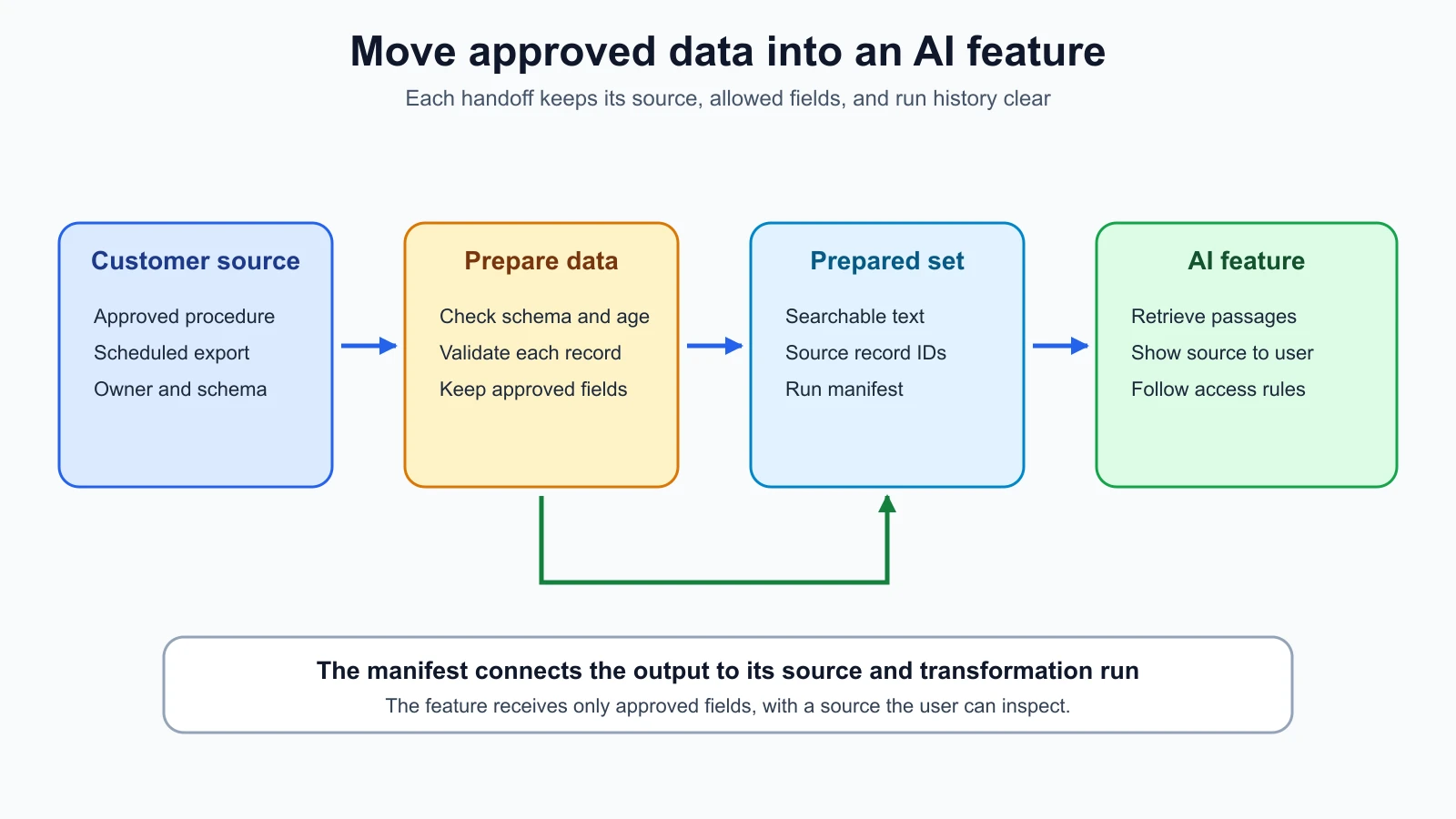
Start with the user task and work backwards. In the NorthPort example, a dispatcher asks how to handle a delivery exception. A retrieval-augmented generation (RAG) feature retrieves relevant passages from approved procedures before an AI model drafts a response for the dispatcher to review. Before designing ingestion, identify which procedure source is authoritative, who approves its use, how often it changes, and which fields are necessary for the task. This lesson prepares source documents; the AI Agent lessons on RAG and vector databases and building a RAG agent cover retrieval and generation.
Choose when the data should move
A batch pipeline collects records and processes them together on a schedule or when a file arrives. A daily export of updated procedures is a reasonable starting point when the dispatcher can use the latest approved export and changes do not need to appear immediately. Batch jobs are easy to inspect as a group: the team can identify which source file ran, what it produced, and which rows were rejected.
A streaming pipeline handles events as they arrive, often continuously. It can fit a workflow where new events must be available soon after they happen, such as a live vehicle signal. Streaming adds decisions about event order, duplicate delivery, late data, recovery, and how much state the service must keep. It does not automatically make data more accurate or the feature more useful. Google Cloud's streaming overview describes continuous event processing and contrasts it with processing collected data in batches. The right delay depends on the user's task and the source system's behavior.
Ask what "fresh enough" means before choosing. If NorthPort changes a procedure once a week, a scheduled file may meet the need. If a dispatcher needs a newly issued safety instruction immediately, a delayed batch may be too slow. These are fictional examples, not claims about a real NorthPort policy. Write down the maximum acceptable delay, who sets it, and what the feature should do when the latest data is late.
Streaming and batch can coexist. A team might process recent events continuously while rebuilding a clean historical view in batches. That design is useful only when both paths have a clear owner and rules for reconciling differences. A duplicate event or a late batch can otherwise overwrite a newer result. Start with the simplest cadence that meets the requirement; add a second path only when the task justifies it.
Know where the source data lives
A data warehouse is a store organized for analysis and reporting, often queried with SQL. A data lake is a storage environment that can hold raw and transformed data in different formats, including structured and unstructured files. The details vary by platform and company. AWS's Lake Formation terminology describes one vendor's lake, while its data warehousing guide describes warehouse and lake-house patterns. Treat these as examples of common arrangements, not a promise that every customer's architecture uses the same terms.
An AI feature may read from an operational service, a shared folder, a warehouse table, or a lake. The storage label does not tell you whether the content is approved, current, or fit for the feature. Find the system of record, the source the customer treats as authoritative for that information. Ask whether another process transforms the source, and whether the feature should consume the original data or a reviewed copy.
Do not move a complete warehouse or lake into an AI feature because it is available. Select the smallest approved dataset for the task. A retrieval feature may need procedure text and a source identifier; it probably does not need an author's email address or unrelated employee records. An identifier can also identify a person, so ask about its classification before carrying it into logs, searchable text, or output metadata.
Put checks between the source and the feature
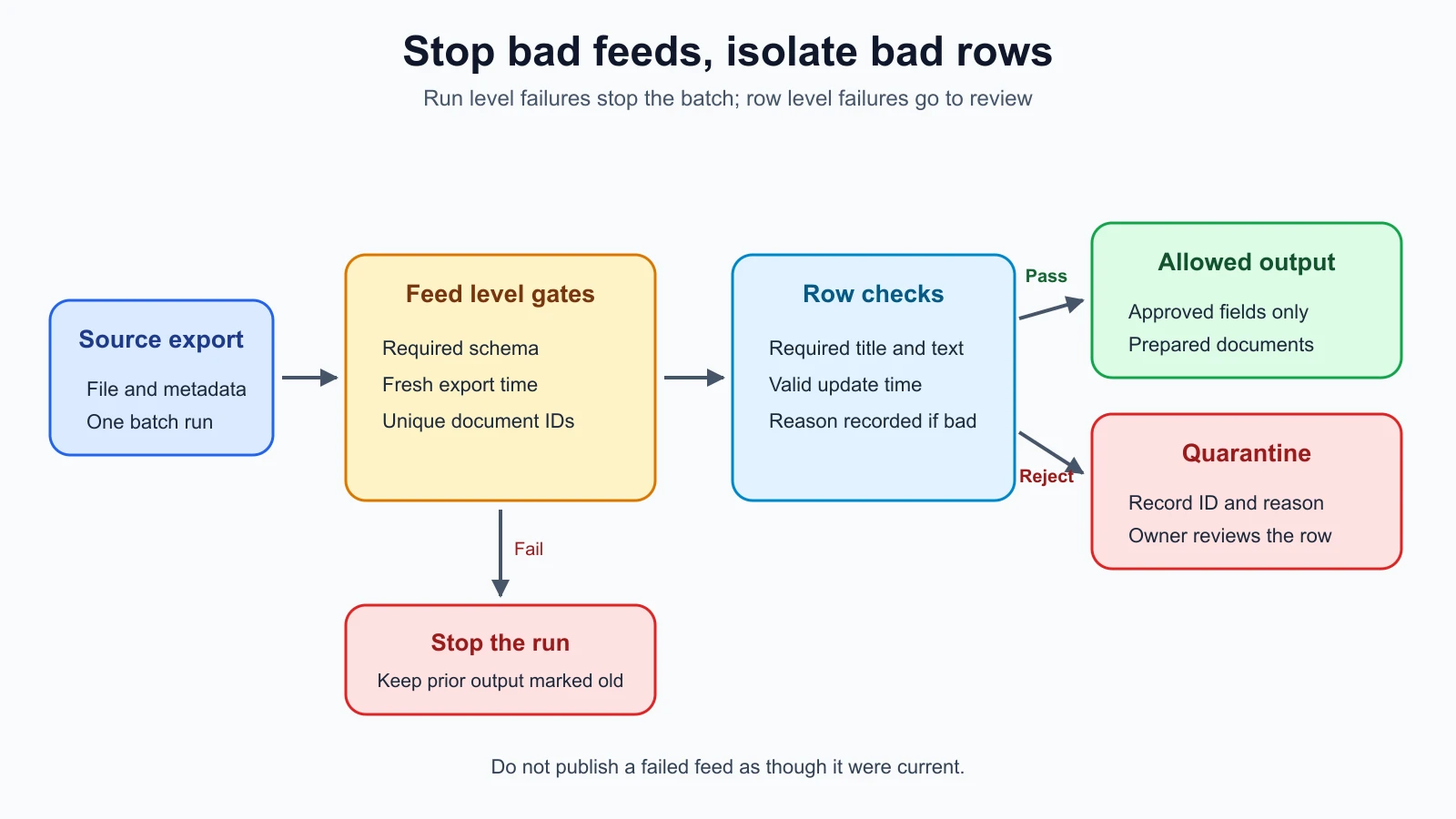
A quality gate is a check that must pass before data can move to the next stage. Gates turn vague expectations into conditions the pipeline can evaluate. For a document feed, the team might require a known schema, unique document IDs, a non-empty title and body, valid timestamps, and a recent export. The customer owner decides which failures stop the whole run and which individual records can be rejected for review.
A schema is the expected set of fields and their types or meanings. A schema check can catch a renamed column or a missing field before a transform silently produces empty text. It cannot tell you what a field means. A data owner must confirm semantics such as whether updated_at is when a document changed, when it was exported, or when an upstream system copied it.
Separate feed-level checks from row-level checks. If the required body column disappears, the pipeline should stop because every output would be incomplete. If one row has a blank body while other rows are valid, the pipeline may quarantine that row and continue, if the product owner approves that policy. A quarantine is a separate place for records that failed checks, with enough reason information for an owner to investigate. Do not mix rejected records into the AI-facing output.
A quality report should show the run, source, gate, and outcome. Avoid putting full source records into logs to make debugging easier. The code later in this lesson records a row identifier and reason for rejection, not the row's content. In a real customer pipeline, even identifiers and error messages need a data-handling review.
Check freshness and keep lineage
Freshness describes how recently the data was produced or updated relative to the need. A pipeline should know when the export was created and the latest update represented in it. The timestamp on a file can reflect a copy operation rather than the source update, so agree which timestamp is authoritative. A timestamp without a time zone can be ambiguous when systems run in different regions.
Define the freshness window with the workflow owner. A procedure search might tolerate an export from earlier in the day, while an alert that depends on a newly revoked instruction might need a shorter delay. The code uses a sample window to teach the check. Its threshold is not a recommendation for production. When a feed misses the agreed window, stop or mark the feature as degraded, tell the owner, and avoid presenting old material as current.
Lineage is a record of where data came from and how it moved through a job. The OpenLineage specification represents data-flow relationships between source and output datasets. A small script does not need a lineage platform to keep useful records. It can write the source filename, source digest, schema version, run time, pipeline version, and output counts in a manifest, a small record describing a pipeline run and its outputs. Those fields help an operator answer which export produced a result and which version of the transform ran.
Lineage is also useful when a user questions an answer. The team can trace a retrieved document to its source record and export, check whether it was current, and remove or replace it if the source owner changes it. Keep enough metadata to investigate without copying sensitive content into the manifest. Store manifests under the same access and retention rules as the pipeline outputs.
Minimize personal data
Personally identifiable information, or PII, is information that can identify a person directly or in combination with other information. NIST's SP 800-122 guide discusses identifying PII and protecting it from inappropriate access, use, and disclosure. The guide is written for U.S. federal agencies, so use it as security guidance and apply the customer's own privacy rules and legal advice to their environment.
Data minimization means using only the data needed for the task. An allowlist is a list of fields the pipeline is permitted to send downstream. It is often easier to review an allowlist than a long list of fields to remove. The sample output contains a document ID, text, source filename, source ID, and update timestamp. It leaves out the synthetic owner_email field. That is a deliberate transform, not an email detector.
An allowlist does not find sensitive information hidden in free text. A procedure body could contain a person's name or a case number. Ask the customer what the source may contain, which review or redaction process is approved, and who can access the outputs and logs. An embedding is a numeric representation of text used by some retrieval systems to compare content. Treat embeddings and their source text under the customer's data rules; changing the format does not grant approval to share them. The AI system, its storage, and its retention behavior must follow the customer's approved data path.
Build a small local pipeline
The example has four steps: generate a synthetic CSV export and metadata file, check the export schema and freshness, validate each row, and write prepared JSONL records with a manifest. The JSONL output is convenient for passing prepared records to another process, but it does not make a dataset automatically suitable for retrieval. The next system still needs its own chunking, dividing long documents into smaller passages; indexing, organizing those passages for search; access rules; and evaluation.
The source generator uses a fixed random seed so every run produces the same synthetic document IDs. One row has an empty body on purpose. The example rejects that row, retains the two valid documents, and records only the rejected ID and reason. It does not read customer files, call a cloud service, download a model, create embeddings, or make an AI request.
pipeline.py
1import argparse
2import csv
3import hashlib
4import json
5import random
6from datetime import datetime, timedelta, timezone
7from pathlib import Path
8from typing import Any
9
10PIPELINE_VERSION = "1.0"
11REQUIRED_FIELDS = {"document_id", "title", "body", "updated_at"}
12
13
14class PipelineError(Exception):
15    pass
16
17
18def parse_timestamp(value: str) -> datetime:
19    try:
20        parsed = datetime.fromisoformat(value.replace("Z", "+00:00"))
21    except ValueError as error:
22        raise PipelineError(f"invalid timestamp: {value}") from error
23    if parsed.tzinfo is None or parsed.utcoffset() is None:
24        raise PipelineError("timestamp must include a time zone")
25    return parsed
26
27
28def make_synthetic_rows(seed: int = 41) -> list[dict[str, str]]:
29    rng = random.Random(seed)
30    first_id = f"NP-DOC-{rng.randint(1000, 9999)}"
31    second_id = f"NP-DOC-{rng.randint(1000, 9999)}"
32    return [
33        {
34            "document_id": first_id,
35            "title": "Matching order references",
36            "body": "Compare the order reference with the dispatch record before release.",
37            "updated_at": "2026-11-05T09:00:00+00:00",
38            "owner_email": "dispatcher1@northport.invalid",
39        },
40        {
41            "document_id": second_id,
42            "title": "Damaged label procedure",
43            "body": "Hold the item and ask the shift lead to confirm the printed label.",
44            "updated_at": "2026-11-05T08:30:00+00:00",
45            "owner_email": "dispatcher2@northport.invalid",
46        },
47        {
48            "document_id": "NP-DOC-EMPTY",
49            "title": "Weekend transfer note",
50            "body": "",
51            "updated_at": "2026-11-05T07:00:00+00:00",
52            "owner_email": "dispatcher3@northport.invalid",
53        },
54    ]
55
56
57def write_synthetic_export(source_dir: Path) -> tuple[Path, Path]:
58    source_dir.mkdir(parents=True, exist_ok=True)
59    source_path = source_dir / "dispatch_guidance.csv"
60    metadata_path = source_dir / "export_metadata.json"
61    rows = make_synthetic_rows()
62    fields = ["document_id", "title", "body", "updated_at", "owner_email"]
63    with source_path.open("w", encoding="utf-8", newline="") as handle:
64        writer = csv.DictWriter(handle, fieldnames=fields)
65        writer.writeheader()
66        writer.writerows(rows)
67    metadata = {
68        "schema_version": "northport-guidance-v1",
69        "exported_at": "2026-11-05T10:00:00+00:00",
70    }
71    metadata_path.write_text(json.dumps(metadata, indent=2) + "\n", encoding="utf-8")
72    return source_path, metadata_path
73
74
75def read_metadata(metadata_path: Path) -> dict[str, Any]:
76    value = json.loads(metadata_path.read_text(encoding="utf-8"))
77    if not isinstance(value, dict):
78        raise PipelineError("export metadata must be an object")
79    if not isinstance(value.get("schema_version"), str):
80        raise PipelineError("export metadata needs a schema_version")
81    if not isinstance(value.get("exported_at"), str):
82        raise PipelineError("export metadata needs an exported_at timestamp")
83    return value
84
85
86def read_rows(source_path: Path) -> list[dict[str, str]]:
87    with source_path.open(encoding="utf-8-sig", newline="") as handle:
88        reader = csv.reader(handle)
89        header = next(reader, None)
90        if not header or any(not name.strip() for name in header):
91            raise PipelineError("CSV needs a non-empty header row")
92        if len(header) != len(set(header)):
93            raise PipelineError("CSV header names must be unique")
94        missing = REQUIRED_FIELDS - set(header)
95        if missing:
96            raise PipelineError(f"CSV is missing required fields: {sorted(missing)}")
97        rows: list[dict[str, str]] = []
98        for line_number, values in enumerate(reader, start=2):
99            if len(values) != len(header):
100                raise PipelineError(f"CSV row {line_number} does not match the header")
101            rows.append(dict(zip(header, values, strict=True)))
102    if not rows:
103        raise PipelineError("CSV contains no data rows")
104    return rows
105
106
107def write_jsonl(path: Path, records: list[dict[str, Any]]) -> None:
108    with path.open("w", encoding="utf-8", newline="") as handle:
109        for record in records:
110            handle.write(json.dumps(record, sort_keys=True, ensure_ascii=True) + "\n")
111
112
113def run_pipeline(
114    source_path: Path,
115    metadata_path: Path,
116    output_dir: Path,
117    *,
118    now: datetime,
119    freshness_hours: int = 24,
120) -> dict[str, Any]:
121    if now.tzinfo is None or now.utcoffset() is None:
122        raise ValueError("now must include a time zone")
123    if freshness_hours < 1:
124        raise ValueError("freshness_hours must be at least 1")
125
126    metadata = read_metadata(metadata_path)
127    exported_at = parse_timestamp(metadata["exported_at"])
128    age = now - exported_at
129    if age < timedelta(0):
130        raise PipelineError("export timestamp is in the future")
131    if age > timedelta(hours=freshness_hours):
132        raise PipelineError("source export is outside the freshness window")
133
134    rows = read_rows(source_path)
135    identifiers = [row["document_id"].strip() for row in rows]
136    if any(not identifier for identifier in identifiers):
137        raise PipelineError("document IDs cannot be blank")
138    if len(identifiers) != len(set(identifiers)):
139        raise PipelineError("document IDs must be unique")
140
141    documents: list[dict[str, Any]] = []
142    rejected: list[dict[str, Any]] = []
143    for row in rows:
144        document_id = row["document_id"].strip()
145        title = row["title"].strip()
146        body = row["body"].strip()
147        updated_at = row["updated_at"].strip()
148        reasons: list[str] = []
149        if not title:
150            reasons.append("missing_title")
151        if not body:
152            reasons.append("missing_body")
153        try:
154            parse_timestamp(updated_at)
155        except PipelineError:
156            reasons.append("invalid_updated_at")
157        if reasons:
158            rejected.append({"document_id": document_id, "reasons": reasons})
159            continue
160        documents.append(
161            {
162                "document_id": document_id,
163                "text": f"{title}\n\n{body}",
164                "source": {
165                    "file": source_path.name,
166                    "record_id": document_id,
167                    "updated_at": updated_at,
168                },
169            }
170        )
171
172    output_dir.mkdir(parents=True, exist_ok=True)
173    documents_path = output_dir / "documents.jsonl"
174    rejected_path = output_dir / "rejected.jsonl"
175    manifest_path = output_dir / "manifest.json"
176    write_jsonl(documents_path, documents)
177    write_jsonl(rejected_path, rejected)
178    manifest = {
179        "pipeline": {"name": "dispatch-guidance-prep", "version": PIPELINE_VERSION},
180        "run": {"created_at": now.isoformat(), "input_count": len(rows)},
181        "source": {
182            "file": source_path.name,
183            "sha256": hashlib.sha256(source_path.read_bytes()).hexdigest(),
184            "schema_version": metadata["schema_version"],
185            "exported_at": exported_at.isoformat(),
186        },
187        "quality_gates": {
188            "schema": "passed",
189            "unique_document_ids": "passed",
190            "freshness": "passed",
191            "required_text": "passed_with_rejections" if rejected else "passed",
192        },
193        "counts": {"accepted": len(documents), "rejected": len(rejected)},
194        "outputs": {"documents": documents_path.name, "rejected": rejected_path.name},
195    }
196    manifest_path.write_text(json.dumps(manifest, indent=2, sort_keys=True) + "\n", encoding="utf-8")
197    return manifest
198
199
200def run_demo(output_dir: Path) -> dict[str, Any]:
201    source_path, metadata_path = write_synthetic_export(output_dir / "source")
202    now = datetime(2026, 11, 5, 12, 0, tzinfo=timezone.utc)
203    return run_pipeline(source_path, metadata_path, output_dir / "prepared", now=now)
204
205
206def main() -> None:
207    parser = argparse.ArgumentParser(description="Prepare synthetic dispatch guidance for retrieval")
208    parser.add_argument("--output-dir", type=Path, default=Path("pipeline-output"))
209    args = parser.parse_args()
210    manifest = run_demo(args.output_dir)
211    print(f"accepted={manifest['counts']['accepted']} rejected={manifest['counts']['rejected']}")
212    print(f"documents={args.output_dir / 'prepared' / 'documents.jsonl'}")
213    print(f"manifest={args.output_dir / 'prepared' / 'manifest.json'}")
214
215
216if __name__ == "__main__":
217    main()
Run it with python3 pipeline.py --output-dir sample-output. Expected output is accepted=2 rejected=1, followed by paths to sample-output/prepared/documents.jsonl and sample-output/prepared/manifest.json. The output documents.jsonl contains two synthetic procedure documents. It does not contain owner_email. The manifest records the input filename and a SHA-256 digest, a fixed-length fingerprint of the source file, plus schema version, export time, pipeline version, run time, gates, counts, and output names. A schema version identifies which expected set of fields the export follows.
The sample uses the Python standard library only, so it has no external package pins. It uses Python 3.10 or newer for zip(..., strict=True). Python's CSV module documentation describes reading and writing tabular files; the code sets newline="" and an explicit encoding when opening its CSV. This local script reads the complete export into memory; it is not a distributed pipeline service. In production, write each run to a versioned output location or publish files atomically after all gates pass. Make downstream jobs check the current run status so a failed attempt cannot leave old documents looking fresh.
Test the gates
The tests use temporary directories and synthetic exports. They check reproducibility, accepted and rejected rows, PII field exclusion, lineage metadata, stale and future timestamps, a missing field, duplicate IDs, malformed row width, and invalid row content. A temporary directory is removed after each test, so test outputs do not depend on files from a previous run.
test_pipeline.py
1import csv
2import json
3import tempfile
4import unittest
5from datetime import datetime, timezone
6from pathlib import Path
7
8from pipeline import (
9    PipelineError,
10    make_synthetic_rows,
11    run_pipeline,
12    write_synthetic_export,
13)
14
15
16class PipelineTests(unittest.TestCase):
17    def setUp(self) -> None:
18        self.temp_dir = tempfile.TemporaryDirectory()
19        self.root = Path(self.temp_dir.name)
20        self.source_path, self.metadata_path = write_synthetic_export(self.root / "source")
21        self.output_dir = self.root / "prepared"
22        self.now = datetime(2026, 11, 5, 12, 0, tzinfo=timezone.utc)
23
24    def tearDown(self) -> None:
25        self.temp_dir.cleanup()
26
27    def rewrite_source(self, rows: list[dict[str, str]], fields: list[str] | None = None) -> None:
28        fields = fields or ["document_id", "title", "body", "updated_at", "owner_email"]
29        with self.source_path.open("w", encoding="utf-8", newline="") as handle:
30            writer = csv.DictWriter(handle, fieldnames=fields, extrasaction="ignore")
31            writer.writeheader()
32            writer.writerows(rows)
33
34    def test_source_rows_are_reproducible_with_a_fixed_seed(self) -> None:
35        self.assertEqual(make_synthetic_rows(), make_synthetic_rows())
36
37    def test_pipeline_accepts_good_rows_and_rejects_empty_body(self) -> None:
38        manifest = run_pipeline(
39            self.source_path, self.metadata_path, self.output_dir, now=self.now
40        )
41        self.assertEqual(manifest["counts"], {"accepted": 2, "rejected": 1})
42        self.assertEqual(manifest["quality_gates"]["required_text"], "passed_with_rejections")
43
44    def test_email_never_enters_prepared_outputs(self) -> None:
45        run_pipeline(self.source_path, self.metadata_path, self.output_dir, now=self.now)
46        prepared = (self.output_dir / "documents.jsonl").read_text(encoding="utf-8")
47        self.assertNotIn("@northport.invalid", prepared)
48        self.assertNotIn("owner_email", prepared)
49
50    def test_manifest_records_source_and_pipeline_lineage(self) -> None:
51        manifest = run_pipeline(
52            self.source_path, self.metadata_path, self.output_dir, now=self.now
53        )
54        self.assertEqual(manifest["source"]["file"], "dispatch_guidance.csv")
55        self.assertEqual(manifest["source"]["schema_version"], "northport-guidance-v1")
56        self.assertEqual(len(manifest["source"]["sha256"]), 64)
57        self.assertEqual(manifest["pipeline"]["version"], "1.0")
58
59    def test_stale_export_stops_the_run(self) -> None:
60        metadata = json.loads(self.metadata_path.read_text(encoding="utf-8"))
61        metadata["exported_at"] = "2026-11-04T00:00:00+00:00"
62        self.metadata_path.write_text(json.dumps(metadata), encoding="utf-8")
63        with self.assertRaisesRegex(PipelineError, "freshness"):
64            run_pipeline(self.source_path, self.metadata_path, self.output_dir, now=self.now)
65
66    def test_future_export_timestamp_stops_the_run(self) -> None:
67        metadata = json.loads(self.metadata_path.read_text(encoding="utf-8"))
68        metadata["exported_at"] = "2026-11-06T00:00:00+00:00"
69        self.metadata_path.write_text(json.dumps(metadata), encoding="utf-8")
70        with self.assertRaisesRegex(PipelineError, "future"):
71            run_pipeline(self.source_path, self.metadata_path, self.output_dir, now=self.now)
72
73    def test_missing_required_column_stops_the_run(self) -> None:
74        rows = make_synthetic_rows()
75        self.rewrite_source(rows, ["document_id", "title", "updated_at"])
76        with self.assertRaisesRegex(PipelineError, "missing required fields"):
77            run_pipeline(self.source_path, self.metadata_path, self.output_dir, now=self.now)
78
79    def test_duplicate_document_ids_stop_the_run(self) -> None:
80        rows = make_synthetic_rows()
81        rows[1]["document_id"] = rows[0]["document_id"]
82        self.rewrite_source(rows)
83        with self.assertRaisesRegex(PipelineError, "unique"):
84            run_pipeline(self.source_path, self.metadata_path, self.output_dir, now=self.now)
85
86    def test_extra_csv_value_stops_the_run(self) -> None:
87        self.source_path.write_text(
88            "document_id,title,body,updated_at,owner_email\n"
89            "doc-1,title,body,2026-11-05T09:00:00+00:00,person@example.invalid,extra\n",
90            encoding="utf-8",
91        )
92        with self.assertRaisesRegex(PipelineError, "does not match the header"):
93            run_pipeline(self.source_path, self.metadata_path, self.output_dir, now=self.now)
94
95    def test_invalid_row_is_quarantined_without_its_body(self) -> None:
96        manifest = run_pipeline(
97            self.source_path, self.metadata_path, self.output_dir, now=self.now
98        )
99        rejected = (self.output_dir / "rejected.jsonl").read_text(encoding="utf-8")
100        self.assertEqual(manifest["counts"]["rejected"], 1)
101        self.assertIn("missing_body", rejected)
102        self.assertNotIn("dispatcher3@northport.invalid", rejected)
103        self.assertNotIn("Compare the order reference", rejected)
104
105    def test_invalid_updated_at_is_quarantined(self) -> None:
106        rows = make_synthetic_rows()
107        rows[0]["updated_at"] = "yesterday"
108        self.rewrite_source(rows)
109        manifest = run_pipeline(
110            self.source_path, self.metadata_path, self.output_dir, now=self.now
111        )
112        rejected = (self.output_dir / "rejected.jsonl").read_text(encoding="utf-8")
113        self.assertEqual(manifest["counts"]["accepted"], 1)
114        self.assertIn("invalid_updated_at", rejected)
115
116    def test_naive_run_time_is_rejected(self) -> None:
117        with self.assertRaisesRegex(ValueError, "time zone"):
118            run_pipeline(
119                self.source_path,
120                self.metadata_path,
121                self.output_dir,
122                now=datetime(2026, 11, 5, 12, 0),
123            )
124
125
126if __name__ == "__main__":
127    unittest.main()
Copy pipeline.py and test_pipeline.py into one empty folder. Run python3 -m unittest discover -s . -p 'test_*.py', then run python3 pipeline.py --output-dir sample-output. The expected test output is Ran 12 tests followed by OK. Both commands use only Python 3.10 or newer and the standard library. The official Python unittest documentation describes the test cases and runner used here.
Use a mutation check to make sure the privacy test catches an accidental leak. In run_pipeline, change the output text expression from f"{title}\n\n{body}" to f"{title}\n\n{body}\n{row.get('owner_email', '')}". Rerun test_email_never_enters_prepared_outputs; it should fail because the synthetic email is now in the prepared JSONL. Restore the original expression and run all tests again. A passing test only covers the fields and cases written here. It does not replace a review of the actual source schema or customer data policy.
Decide when to add orchestration or distributed processing
A small script can be enough when one team owns a file export, one scheduled run meets the freshness need, and a person can see and recover a failed run. Add clear input and output locations, useful error messages, a run record, and a way to rerun safely. A script still needs an owner, permissions, monitoring, and a retention plan. "Simple" describes the implementation size, not the operational responsibility.
Workflow orchestration coordinates jobs, dependencies, schedules, retries, and run status. Apache Airflow models a workflow as tasks with dependencies; its architecture documentation describes the scheduler and other components. As checked on 5 November 2026, the documentation was for Airflow 3.3.2. Airflow can be useful when a pipeline has several jobs, dependencies, retries, and operators that need a shared view. It also requires someone to deploy and maintain Airflow. Do not install an orchestrator just to run a single script once a day.
Apache Spark is a processing engine for working with data across machines. Its Quick Start introduces structured datasets and transformations, and the Structured Streaming guide covers continuous data processing. As checked on 5 November 2026, Spark 4.3.0 was the current documentation release. Spark is an option when data volume, transformations, or parallel processing needs outgrow the simpler tools available to the team. It adds a runtime, deployment and monitoring work, and skills the team may need to acquire. Measure the problem and discuss the operating cost before proposing it.
These products are awareness topics here. Their documentation and versions change; confirm the current release, customer environment, and managed-service terms before planning a deployment. The local pipeline in this lesson does not use Airflow, Spark, a warehouse, a lake, or a hosted model. It shows the checks and handoffs to carry into those environments.
Mistakes beginners make
- Choosing streaming because the feature uses AI. Set a freshness requirement with the user; a scheduled batch may meet it.
- Treating a warehouse or lake label as proof that data is approved. Check source ownership, purpose, access, and field meaning.
- Passing every source column downstream. Select a small allowlist and assess identifiers and free text as well as obvious contact fields.
- Letting an empty file replace a valid dataset. Decide whether zero rows means a valid empty result or a failed export, and test that condition.
- Checking only that the script finished. Add gates for schema, uniqueness, required content, freshness, and rejected rows.
- Logging rejected source records in full. Keep enough metadata to investigate and limit who can see sensitive values.
- Treating a file modification time as the source update time. Ask the owner which timestamp describes the data's freshness.
- Adding Airflow or Spark before identifying a need. Start with the smallest system the team can operate reliably.
- Calling a manifest complete lineage. Record what it captures, and add a lineage service if teams need richer dependency discovery.
Recap and try it yourself
A data pipeline connects an approved source to the fields and format an AI feature needs. Choose a processing cadence based on the user's freshness requirement. Stop a run when the feed is stale or its schema changes; quarantine individual bad rows only when that policy is agreed. Keep a lineage record, minimize the fields sent downstream, and give every job an owner. Use a small script while it remains clear and supportable, then bring in orchestration or distributed processing when the workload calls for it.
Try it: run the synthetic pipeline, then change one source row to remove its title and rerun. Add a gate for that condition and verify that the row is rejected without its body appearing in rejected.jsonl. Fill in the following intake sheet for a fictional NorthPort procedure source:
| Intake question | Decision or owner |
|---|---|
| Which dispatcher task will use the prepared data? | |
| What is the authoritative source, and who owns it? | |
| Which fields are approved for the feature? | |
| How often does the source change, and what delay is acceptable? | |
| Which schema, uniqueness, content, and freshness gates must pass? | |
| What happens to rejected rows and stale exports? | |
| What source and run details belong in lineage metadata? | |
| Where can personal or confidential data appear? Who approves its handling? | |
| Who monitors failures, reruns work, and approves output changes? |
Sources
Checked on 5 November 2026. The code is a local standard-library example. It reads only the synthetic CSV and metadata files it generates. Airflow and Spark are described at awareness level; no service was installed or run for this lesson.
- Google Cloud streaming analytics overview, for its description of continuous event processing compared with batch processing.
- AWS Lake Formation terminology and Data Warehousing on AWS, for vendor-specific lake, warehouse, and lake-house examples.
- OpenLineage lineage facet, for source-to-output data-flow metadata in job lineage.
- NIST SP 800-122, for context-based PII identification and confidentiality protection. Its scope is U.S. federal agencies.
- Python 3.12 CSV documentation and
unittestdocumentation, for the standard-library file and test APIs used in the example. - Airflow 3.3.2 core concepts, for task dependencies and its scheduler architecture.
- Apache Spark 4.3.0 Quick Start and Structured Streaming guide, for distributed data transformations and streaming concepts.