
Forward Deployed Engineer course · lesson 20 of 24
- 1What Is a Forward Deployed Engineer?
- 2A Day in the Life of a Forward Deployed Engineer
- 3FDE Career Paths, Tiers, and Interview Gates
- 4Build Your Forward Deployed Engineer Skill Map
- 5Requirements Gathering with a Customer
- 6Discovery, Scoping, and Sequencing Customer Work
- 7Audit Customer Data Before You Build
- 8Enterprise Workflow, Business Value, and ROI
- 9Choosing an AI Approach for a Customer
- 10Build a Working Prototype Fast
- 11Integration Engineering and the Last Mile
- 12Working Safely with Legacy Systems
- 13Data Pipelines for AI Features
- 14Evals as Acceptance Criteria
- 15Debugging Agent Logic and Observability
- 16Deploying in the Customer's Cloud
- 17Cost, Latency and Inference Choices
- 18Security, Privacy and AI Governance
- 19Stakeholders and Communication
- 20Technical Writing for Handoff
- 21UAT, Go-Live, and Day 2 Operations
- 22Executive Reporting and Proving ROI
- 23The Product Feedback Loop
- 24Capstone: Run an Engagement End to End
After this lesson, you will be able to prepare a handoff pack that helps a customer understand, operate, and change a delivered system. NorthPort Freight is fictional; the service, roles, and examples below are illustrative.
The build is not finished when the code works on your laptop or the customer approves a demo. Someone who was not in the room must be able to answer basic questions later: What does this service do? Where does it run? How do I tell if it is healthy? What should I do when a dependency fails? Who owns the next action? Technical writing is part of delivery because it transfers the knowledge needed to use and support the system.
Documentation is not a transcript of the project. It is a tool for a reader with a task. A developer may need to run the service locally; an operator may need to recover a failed job; an approver may need to understand a data flow; a support analyst may need to route an incident. Start with those tasks, then choose the smallest set of documents that lets each reader complete them safely.
Write for the person doing the next task
Before writing, name the reader and the task. “Customer team” is too broad. Try “the platform engineer deploying the service after the FDE engagement ends” or “the dispatcher supervisor checking whether the answer index is current.” Ask what the reader already knows, what they are allowed to do, and what decision or action the document should support.
The Home Office engineering guidance recommends identifying potential readers, understanding their technical level and needs, and collecting feedback to check that the documentation works. GOV.UK API guidance similarly starts with developer needs and recommends organizing instructions around common tasks. These are useful principles outside government: a document is easier to use when its structure follows the reader’s work rather than the author’s system diagram.
Write in plain language and define specialized terms at first use. Prefer “restart the index refresh job” to “re-initiate the asynchronous ingestion workflow.” Use the customer’s vocabulary when it is precise, but explain internal project names and abbreviations. Put the action near the beginning of a procedure. Use headings that say what a reader will find, such as “Deploy to staging” or “If the index refresh fails,” rather than clever titles that require interpretation.
Keep facts, decisions, assumptions, and open questions distinct. “The service runs in the customer’s staging cluster” is a fact if verified. “We expect production to use the same network path” is an assumption until confirmed. “Platform will own production alerts” is a decision only if the accountable owner agreed. Mark unknowns and assign an owner and date to resolve them. Polished prose must not make uncertain information look settled.
Documents should be easy to find and maintain. Store them in the agreed customer location, link to the canonical copy, identify an owner, and include a review date or version when that helps readers judge freshness. Avoid copying provider instructions into your own guide; link to the provider’s current documentation and describe the customer-specific configuration around it. If a critical instruction depends on a vendor feature, note the product version or service tier where relevant.
Build a small, connected handoff pack
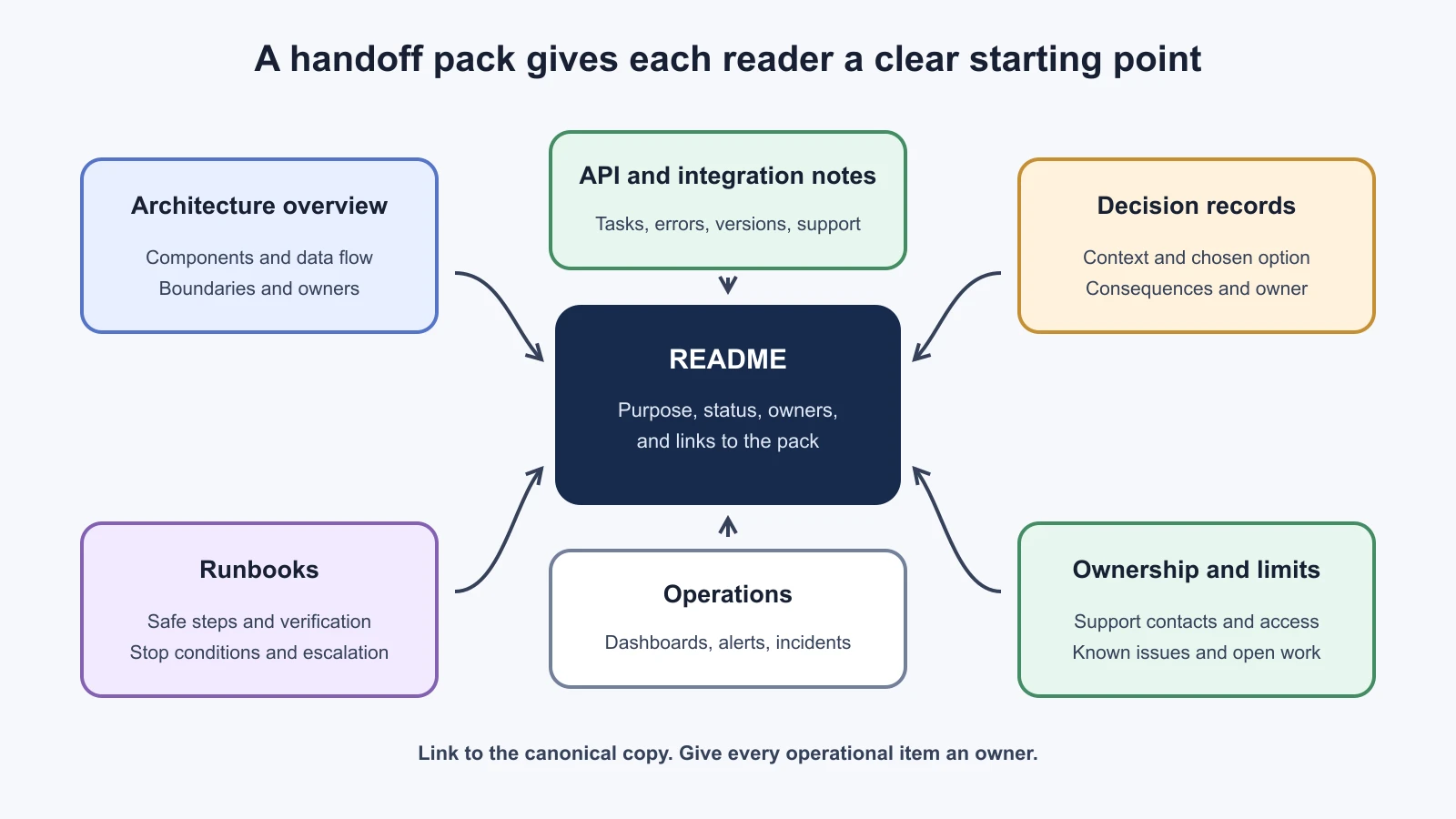
A useful pack has a clear entry point and links to deeper details. Do not create a large document bundle to make the handoff look complete. Include items that help the next team understand the product, make a change, investigate a problem, or find the right owner.
README: the starting point
The README should help a reader orient themselves and find the next relevant document. State what the service does, who it is for, what it does not do, where it runs, its current status, and who owns it. Add prerequisites and safe links to setup, deployment, architecture, API reference, runbooks, decision records, monitoring, and support. Give a short “get started” path when local setup is a supported task. Identify environments clearly and never include secrets or real customer records in example commands.
For NorthPort’s fictional dispatch assistant, the opening might look like this:
1# Dispatch Exception Assistant
2
3Purpose: helps dispatchers find approved procedures for an exception code.
4Status: staging; production approval is pending customer UAT.
5Owner: NorthPort Platform Operations
6Support: use the NorthPort service desk queue “Dispatch Assistant”.
7
8Start here
9- Architecture: docs/architecture.md
10- Deploy and rollback: docs/runbooks/release.md
11- Index refresh: docs/runbooks/index-refresh.md
12- API reference: [customer-approved API reference]
13- Decisions: docs/decisions/
14
15The service does not update shipment records or replace dispatcher judgment.
This is an illustrative excerpt, not a real customer README. The status and owner should be checked before a reader relies on them. A README that merely says “see the docs folder” is not an entry point. A README that repeats every procedure becomes stale when those procedures change.
Architecture one-pager: how the pieces fit
An architecture overview explains the main components, their responsibilities, and the important data or control flows. It should help a new engineer understand where a request goes and which team owns each boundary. Include the environment, identity mechanism, external services, data stores, key network paths, and failure or fallback points that affect operation. Label what is deployed now separately from the future state.
For the assistant, a one-page view might show the dispatcher web client, customer API, retrieval service, approved procedure index, model endpoint, identity provider, logs, and the owners at key boundaries. The accompanying text should answer what data crosses each boundary and why. Do not draw a provider logo and leave the reader to guess whether prompts, retrieved text, or logs leave the customer environment. The security review in Security, Privacy, and Governance covers mapping trust boundaries and data flows in more detail.
Diagrams need a text explanation and descriptive alternative text. A diagram should clarify relationships, not carry details that cannot be found elsewhere. Give it a title, legend if needed, and a date or version when the architecture changes often. Link to the source diagram when the customer maintains one.
API notes: how an integration behaves
An API reference lists routes, fields, and response shapes; it may be generated from the API contract. Add task-based notes for the integration work people actually do: obtain the right identity, make a safe example request in a test environment, interpret a response, handle expected errors, and find support. State authentication and authorization expectations, rate limits, timeouts, versioning, data restrictions, and sandbox limitations when they apply.
GOV.UK API guidance says an API reference alone is not enough. It recommends a conceptual overview when useful, a simple getting-started request, task-based guidance, testing instructions, version information, and support details. Keep provider-specific details linked to their official docs, and keep customer-specific configuration in the handoff. Test copyable examples in the approved sandbox. Replace sample tokens and identifiers with unmistakable placeholders.
Decision records: why the system is this way
A decision record captures a significant choice while its context is still available. Include the date, question, context, options considered, evidence, decision owner, selected option, consequences, and conditions that would make the team revisit it. A short record is often enough. Record the decision, not every discussion that led to it.
For example: “Decision: refresh the procedure index from the customer-approved export once per hour. Context: the source system has no event feed in the current scope. Consequence: newly approved procedures may take up to one hour to appear. Owner: procedure platform team. Revisit if the customer provides a supported change feed or dispatch policy requires a shorter delay.” The example is fictional. It is useful because the constraint and revisit condition travel with the choice.
The Home Office’s minimal documentation guidance includes architecture views, decision logs, runbooks, observability, and build, release, and deployment information. That is a government product standard, not a universal legal requirement, but it is a strong checklist for a service that another team must operate.
Write runbooks as safe procedures
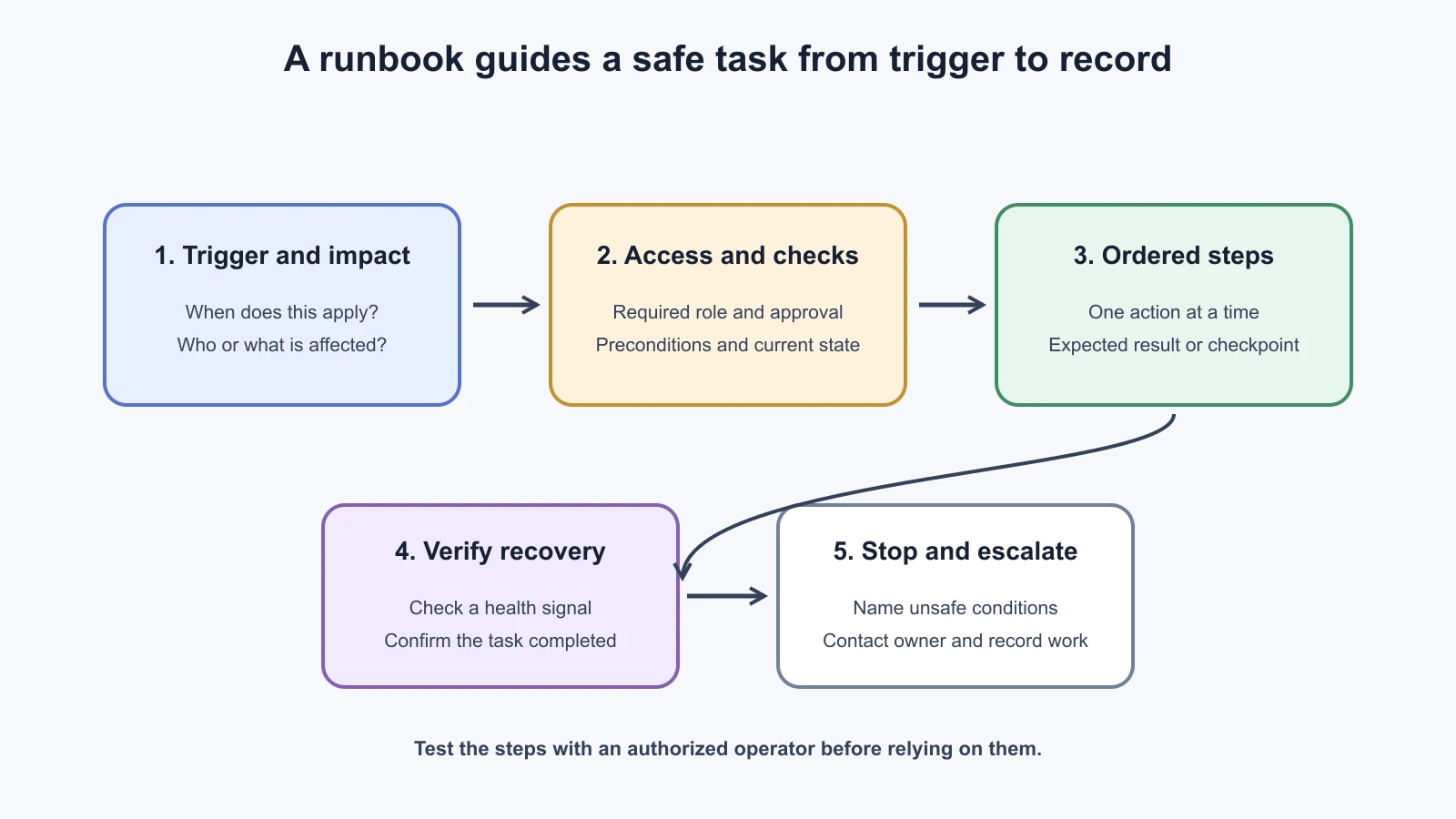
A runbook is a task-oriented procedure for an operational activity or a known failure. It should help an authorized reader decide whether the procedure applies, perform the steps, confirm the outcome, and know when to stop and escalate. It is not a collection of shell commands without context.
Use a consistent structure:
- Purpose and trigger: what condition makes this procedure relevant, and what it can fix.
- Impact and permissions: who may be affected, which role may run it, and what approval is required.
- Before you start: prerequisites, expected duration if known, current status, and links to dashboards or change records.
- Steps: one action per step, in order, with expected output or a checkpoint after risky changes.
- Verification: how to confirm recovery using an observable signal, not just “the command succeeded.”
- Stop and escalation: conditions where the reader should not continue, plus the team or incident path to contact.
- Recovery and record: how to undo a change where possible and what to record after the task.
Consider an index refresh procedure. A weak instruction says “rerun ingestion.” A safer one says to first check whether an approved source export is available, confirm the job is not already running, and review the current index timestamp. It names the authorized operator, points to the correct environment, starts the refresh through the supported job interface, and tells the operator where to confirm the new timestamp and record count. If the source file is malformed or the refresh would replace a known-good index, stop and contact the data owner. Do not give an irreversible command without naming its effect and approval path.
Runbooks should match the system that exists. Verify command names, dashboard links, access requirements, and expected output against the deployed version. Have a customer operator follow the procedure in a non-production environment when possible. Watch where they hesitate, ask for clarification, or use a different path. Fix the writing, then verify it again. This is a practical form of documentation testing.
The Home Office documentation standard calls for runbooks for expected tasks and incident, disaster recovery, and maintenance work assigned to the product team. Google Cloud’s operational readiness guidance also treats people, processes, tooling, and governance as parts of being ready to operate. Together, these ideas remind the FDE that instructions need owners, permissions, monitoring links, and an escalation route, not just technically correct steps.
Assemble the handoff pack
Use this template to scope the pack with the customer. Remove items that do not apply and add customer-specific requirements. Mark every item with an owner and status. “Not applicable” is better than a blank row if it is explained.
1Handoff pack
2Service and version: [name, deployed version, environment]
3Handoff date: [date]
4Customer owner: [name or team]
5FDE owner until handoff: [name or team]
6Pack location: [approved workspace link]
7
81. Service overview and README
9   Purpose, users, limits, status, owners, entry links: [link / owner / status]
102. Architecture one-pager
11   Components, data flows, trust boundaries, environments: [link / owner / status]
123. API and integration notes
13   Authentication, examples, errors, limits, versions, sandbox: [link / owner / status]
144. Runbooks
15   Deploy, rollback, routine tasks, known failures, escalation: [link / owner / status]
165. Decision records
17   Important choices, owners, consequences, revisit conditions: [link / owner / status]
186. Operations
19   Dashboards, alerts, logs, retention, incident process: [link / owner / status]
207. Release and recovery
21   Build, deployment, rollback, backup or restore where applicable: [link / owner / status]
228. Access and support
23   Required roles, request path, service desk, vendor contacts: [link / owner / status]
249. Known limitations and open work
25   Impact, workaround, owner, target review date: [link / owner / status]
2610. Acceptance and walkthrough
27   Customer operator who tried the steps, date, follow-up actions: [record]
The handoff is not complete because every row contains a link. Check that the customer can access the location, the links open with their permissions, and the named owner agrees to the responsibility. Review status and limitations together. If production support remains with your team or a vendor, state that boundary explicitly. Do not imply that the customer owns a service simply because the files were transferred.
Keep documentation current after delivery
Documentation decays when the system changes and the instructions do not. Treat key documents as part of the change. When a deployment changes an endpoint, identity, alert, or rollback path, update the relevant page in the same work item. Keep the API reference close to the contract or generate it from that contract where practical. Version the procedure if older deployments still need different steps.
Assign a review trigger rather than relying on memory. A runbook might be checked after each operational change and exercised during a scheduled readiness review. A decision record usually needs no routine rewrite, but it should be marked superseded when a later decision replaces it. A README should point to active docs and current owners. The goal is not to add a review date to every file; it is to make ownership and change responsibility clear.
Use links instead of duplicating information that changes elsewhere. If a third-party service changes its authentication instructions, maintain a concise local note about the customer’s chosen configuration and link to the provider’s current guide. If a critical dependency is unavailable, capture the customer-approved fallback and incident route locally. A reader under pressure should not need to search a vendor site to discover what their own team decided.
Protect the customer while documenting. Use synthetic examples, approved redaction, and minimal logs. Do not put credentials, personal data, private endpoints, or sensitive incident details into a broadly accessible README. Put restricted operational material in the approved access-controlled location and point to it from the general entry page. A useful document is not a reason to expose more data than the reader needs.
Mistakes beginners make
Writing from the author’s mental model. The author knows the acronyms, system history, and hidden assumptions, so the document skips the context a new operator needs.
Fix: Name the reader and task. Ask a customer operator to follow the instructions without coaching, then repair the points where they get stuck.
Treating a diagram or API schema as the whole explanation. A picture may not name the owner or explain a failure path. A schema does not teach a new integrator how to authenticate, test, and handle errors.
Fix: Add task steps, data-flow context, ownership, and links to detailed references. Describe the important meaning in text as well as visually.
Leaving uncertainty hidden. A draft can make a planned production setup sound like a deployed fact, or make a guess look like a customer decision.
Fix: Label the current state, assumptions, open questions, and decisions. Give unresolved items an owner and a review date.
Handing over untested runbooks. Commands and links can go stale, permissions can differ, and a procedure may have an unsafe step.
Fix: Verify the procedure against the deployed system and have an authorized customer operator rehearse it in a suitable environment.
Recap and try it yourself
Start with the reader and their task. Use a README as the entry point, an architecture overview to show components and boundaries, API notes to explain common integration tasks, decision records to preserve context, and runbooks to guide safe operations. Keep each document accurate, findable, owned, and linked to the rest of the pack. Test the instructions with the people who will use them, and update them when the system changes.
Try it yourself: for the fictional NorthPort dispatch assistant, fill in the handoff template with a staging deployment, an hourly procedure index refresh, and a customer platform team that will operate it. Write a short runbook entry for checking a failed refresh. Include the trigger, impact, permission, first checks, recovery steps, verification signal, stop condition, escalation owner, and record to update. Mark anything you cannot know from the example as an open question instead of inventing a customer fact.
Sources
Checked on 5 November 2026. The Home Office's guidance on effective documentation supports identifying readers, understanding their tasks and technical context, using accessible plain language, structuring content for digital readers, and testing it with users. Its minimal documentation set lists product context, architecture views, decision logs, runbooks, observability, and release or deployment information as documentation elements; it is a UK government product standard used here as a practical checklist. GOV.UK's API documentation guidance supports user-needs research, task-based instructions, API testing information, version and support details, and keeping third-party instructions linked to their canonical sources. NASA Kennedy Space Center's Technical Documentation Style Guide supports clear, concise, accurate, consistent writing; it applies to KSC and its contractors, so it is cited for writing principles rather than as a universal standard. Google Cloud's operational readiness guidance supports considering roles, processes, tooling, governance, monitoring, and day-two operations when preparing a service to run. NorthPort and all system details are fictional.