
Forward Deployed Engineer course · lesson 7 of 24
- 1What Is a Forward Deployed Engineer?
- 2A Day in the Life of a Forward Deployed Engineer
- 3FDE Career Paths, Tiers, and Interview Gates
- 4Build Your Forward Deployed Engineer Skill Map
- 5Requirements Gathering with a Customer
- 6Discovery, Scoping, and Sequencing Customer Work
- 7Audit Customer Data Before You Build
- 8Enterprise Workflow, Business Value, and ROI
- 9Choosing an AI Approach for a Customer
- 10Build a Working Prototype Fast
- 11Integration Engineering and the Last Mile
- 12Working Safely with Legacy Systems
- 13Data Pipelines for AI Features
- 14Evals as Acceptance Criteria
- 15Debugging Agent Logic and Observability
- 16Deploying in the Customer's Cloud
- 17Cost, Latency and Inference Choices
- 18Security, Privacy and AI Governance
- 19Stakeholders and Communication
- 20Technical Writing for Handoff
- 21UAT, Go-Live, and Day 2 Operations
- 22Executive Reporting and Proving ROI
- 23The Product Feedback Loop
- 24Capstone: Run an Engagement End to End
After this lesson, you will be able to inspect a customer data export, identify questions about its schema and access, and run a small Python profiler on CSV and JSON files. You will also have a checklist for recording what the data shows and what still needs an owner to confirm. The NorthPort Freight examples are fictional. The code generates its own synthetic records and never downloads or contacts a service.
A proposed feature can depend on field meanings, keys, update timing, or data access that no one has checked yet. An early data audit helps the team discover those conditions before implementation depends on them. The Forward Deployed Engineer roadmap includes data audit as part of the role's technical preparation. A workflow built around a missing, ambiguous, or unavailable field can fail even when its code runs.
What a data audit checks
A data audit is a structured review of a data source and its suitability for a specific task. It can include the format, schema, missing values, types, key behavior, duplicates, changes over time, permissions, sensitivity, and the people who own the data. A data profiler can summarize some observable properties. It cannot tell you whether a field means what you think it means or whether the customer has approved your use of the records.
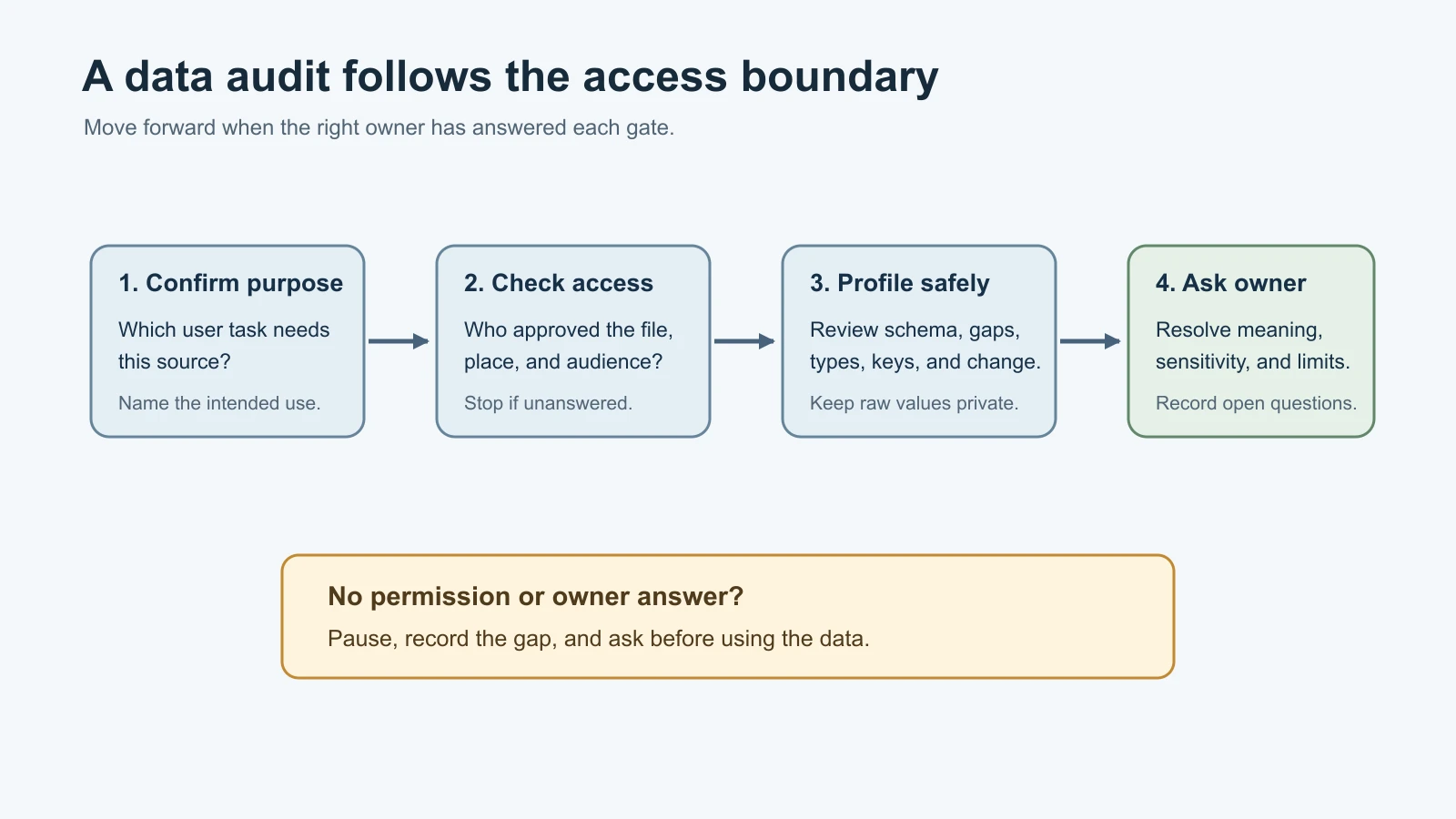
Start by writing down the purpose of the review. For the fictional NorthPort exercise, suppose a dispatcher wants to compare order references from two systems. The audit question is not simply, "What columns are in the export?" It is also, "Which fields contain the references the dispatcher uses, how are those values defined, and who can authorize reading them together?" The answer connects the data to the workflow without assuming a feature or access path.
Schema, fields, and grain
A schema describes the structure of a dataset: its fields, their types, and sometimes rules about which values are allowed. A field is one named attribute such as order_id or dispatch_reference. Ask the data owner what each field means, where it comes from, and whether its definition changed.
Grain describes what one row represents. A row could represent an order, an order line, an event, or a daily summary. Two files can both contain an order_id column while using different grains. If you join them or count rows without checking this, one order may appear several times for a valid reason.
Check whether the export has a header, whether names are unique, whether blank fields are allowed, and whether the documented schema matches the file you received. A column named created_at might mean when a record first appeared, when it was updated, or when it was exported. Ask before interpreting it as a timestamp for an operational event.
Missing values, types, and duplicates
A missing value is a value the source does not provide for a field. It may appear as an empty cell, whitespace, a JSON null, or an absent field in a record. Those representations can have different meanings. The profiler in this lesson treats an empty or whitespace-only CSV cell, JSON null, and an absent field as missing for its summary. It does not change the source file or infer why a value is missing.
A data type describes the kind of value stored in a field, such as text, an integer, a decimal, or a boolean. CSV readers return field values as text. JSON can represent strings, numbers, booleans, arrays, objects, and null. The tool reports those observed types; it does not guess a desired type or convert values. For instance, "0072" may be an identifier whose leading zero matters, while 72 is a number. The owner or system documentation must establish the meaning.
A duplicate row is a record whose complete set of fields matches another row. A duplicate key is a repeated value in the field you expect to identify one record. Those are separate checks. Two rows with the same order_id may represent duplicate exports, multiple line items, or an invalid key assumption. Ask what one row represents before treating repetition as an error.
Keys and changes between snapshots
A key is a field or combination of fields used to identify a record. Ask whether the candidate key is unique, whether it can be missing, and whether it can be reused. The profiler accepts one key field for its duplicate and missing-key counts; it does not validate compound keys.
Schema drift means the observed schema changes between two snapshots. In this lesson, the tool reports added or removed fields and changes in the types observed for a field. That is a narrow check. It does not detect every kind of data drift, such as a gradual change in value frequencies, meaning, or business process. A field can keep the same type while its definition changes, so retain the source and owner context for every comparison.
The tool compares type labels exactly as they appear in each file. If you compare a CSV export with JSON, the CSV values will be text while JSON may preserve numbers and booleans. Compare like formats when you want a meaningful type-change signal. The demo creates two JSON snapshots for this reason, along with a CSV file to demonstrate CSV profiling.
Confirm the access boundary before inspection
Before you inspect a customer file, find out who provided it, why you are allowed to use it, where it may be stored, and who can see the report. Confirm whether the environment is approved for the data's sensitivity. A sample from a production system can still contain personal, confidential, or commercially sensitive fields even if it contains only a few rows.
Personally identifiable information (PII) is information that can identify a person by itself or when combined with other information. NIST SP 800-122 describes identifying PII and protecting it from inappropriate access, use, and disclosure. That publication is written for U.S. federal agencies, so follow the customer's rules and applicable guidance for the actual environment. Ask the data owner or privacy and security contact to classify uncertain fields.
Use the least data needed to answer the audit question. A field name, a count of missing values, or a synthetic example may be enough to discuss a problem. Do not put raw records, contact details, secrets, or customer exports into an unapproved tool or report. The profiler prints column names and counts, not record values, but even column names can reveal information about a system. Review where you run it and where you save its output.
The code below is for synthetic files you create yourself. It does not establish that a production dataset is safe to use. If the owner cannot confirm permission, stop at the metadata and questions you are allowed to review.
Run the profiler on CSV and JSON
The example uses Python 3.10 or newer and the standard library only. It reads UTF-8 CSV files with a header row and JSON files containing an array of objects. The csv and json modules handle file parsing, while random.Random creates repeatable fictional records from a fixed seed. Python documentation and module behavior can change; these commands and code were checked on 5 November 2026.
The profiler reports row counts, field presence, missing values, distinct non-missing values, observed value types, exact duplicate rows, and missing or repeated values for one selected key. If you provide a baseline file, it also reports added or removed fields and changed type sets. The summary omits the actual cell values.
profile_data.py
1import argparse
2import csv
3import json
4import random
5from pathlib import Path
6from typing import TypeAlias
7
8Record: TypeAlias = dict[str, object]
9
10
11def is_missing(value: object) -> bool:
12    return value is None or isinstance(value, str) and not value.strip()
13
14
15def type_name(value: object) -> str:
16    if isinstance(value, bool):
17        return "bool"
18    if isinstance(value, int):
19        return "int"
20    if isinstance(value, float):
21        return "float"
22    if isinstance(value, str):
23        return "str"
24    if isinstance(value, list):
25        return "list"
26    if isinstance(value, dict):
27        return "object"
28    return type(value).__name__
29
30
31def canonical(value: object) -> str:
32    return json.dumps(value, sort_keys=True, separators=(",", ":"), ensure_ascii=True)
33
34
35def load_records(path: Path) -> list[Record]:
36    suffix = path.suffix.lower()
37    if suffix == ".csv":
38        with path.open(encoding="utf-8-sig", newline="") as handle:
39            reader = csv.DictReader(handle)
40            if not reader.fieldnames or any(not name.strip() for name in reader.fieldnames):
41                raise ValueError("CSV needs a non-empty header row.")
42            if len(reader.fieldnames) != len(set(reader.fieldnames)):
43                raise ValueError("CSV header names must be unique.")
44            records: list[Record] = []
45            for row in reader:
46                if None in row:
47                    raise ValueError("CSV row contains more values than the header.")
48                records.append(dict(row))
49            return records
50
51    if suffix == ".json":
52        with path.open(encoding="utf-8") as handle:
53            value = json.load(handle)
54        if not isinstance(value, list):
55            raise ValueError("JSON file must contain an array of objects.")
56        if any(not isinstance(row, dict) for row in value):
57            raise ValueError("Every JSON array item must be an object.")
58        records = value
59        if any(not isinstance(key, str) for row in records for key in row):
60            raise ValueError("JSON object keys must be strings.")
61        return records
62
63    raise ValueError("Choose a file with a .csv or .json extension.")
64
65
66def profile_records(records: list[Record], key_field: str | None = None) -> dict[str, object]:
67    fields = sorted({field for row in records for field in row})
68    columns: dict[str, dict[str, object]] = {}
69
70    for field in fields:
71        values = [row.get(field) for row in records]
72        present_values = [value for value in values if not is_missing(value)]
73        type_counts: dict[str, int] = {}
74        for value in present_values:
75            name = type_name(value)
76            type_counts[name] = type_counts.get(name, 0) + 1
77        columns[field] = {
78            "present_count": sum(field in row for row in records),
79            "missing_count": len(records) - len(present_values),
80            "distinct_non_missing_count": len({canonical(value) for value in present_values}),
81            "type_counts": dict(sorted(type_counts.items())),
82        }
83
84    seen_rows: set[str] = set()
85    duplicate_row_count = 0
86    for row in records:
87        signature = canonical(row)
88        if signature in seen_rows:
89            duplicate_row_count += 1
90        else:
91            seen_rows.add(signature)
92
93    missing_key_count = 0
94    duplicate_key_count = 0
95    if key_field is not None:
96        seen_keys: set[str] = set()
97        for row in records:
98            value = row.get(key_field)
99            if is_missing(value):
100                missing_key_count += 1
101                continue
102            signature = canonical(value)
103            if signature in seen_keys:
104                duplicate_key_count += 1
105            else:
106                seen_keys.add(signature)
107
108    return {
109        "row_count": len(records),
110        "columns": columns,
111        "duplicate_row_count": duplicate_row_count,
112        "key_field": key_field,
113        "missing_key_count": missing_key_count,
114        "duplicate_key_count": duplicate_key_count,
115    }
116
117
118def compare_profiles(baseline: dict[str, object], current: dict[str, object]) -> dict[str, object]:
119    before = baseline["columns"]
120    after = current["columns"]
121    if not isinstance(before, dict) or not isinstance(after, dict):
122        raise ValueError("Profiles must include column summaries.")
123
124    before_fields = set(before)
125    after_fields = set(after)
126    changed_types: dict[str, dict[str, list[str]]] = {}
127    for field in sorted(before_fields & after_fields):
128        before_column = before[field]
129        after_column = after[field]
130        if not isinstance(before_column, dict) or not isinstance(after_column, dict):
131            raise ValueError("Each column summary must be an object.")
132        before_types = sorted(before_column["type_counts"])
133        after_types = sorted(after_column["type_counts"])
134        if before_types != after_types:
135            changed_types[field] = {"before": before_types, "after": after_types}
136
137    return {
138        "new_fields": sorted(after_fields - before_fields),
139        "missing_fields": sorted(before_fields - after_fields),
140        "changed_types": changed_types,
141    }
142
143
144def make_synthetic_orders(seed: int = 31, count: int = 8) -> list[Record]:
145    if count < 1:
146        raise ValueError("Count must be at least one.")
147    generator = random.Random(seed)
148    routes = ["north", "central", "south"]
149    records: list[Record] = []
150    for index in range(count):
151        order_number = 1000 + index
152        reference = f"REF-{generator.randrange(100, 999)}"
153        dispatch_reference = reference if index % 3 else f"REF-{generator.randrange(100, 999)}"
154        records.append({
155            "order_id": f"NP-{order_number}",
156            "order_reference": reference,
157            "dispatch_reference": dispatch_reference,
158            "units": generator.randrange(1, 13),
159            "route": generator.choice(routes),
160        })
161    return records
162
163
164def write_demo_files(folder: Path) -> list[Path]:
165    folder.mkdir(parents=True, exist_ok=True)
166    records = make_synthetic_orders()
167    revised = [dict(row) for row in records]
168    for row in revised:
169        row["priority"] = "standard"
170    revised[2]["units"] = "unknown"
171
172    csv_path = folder / "orders.csv"
173    with csv_path.open("w", encoding="utf-8", newline="") as handle:
174        writer = csv.DictWriter(handle, fieldnames=list(records[0]))
175        writer.writeheader()
176        writer.writerows(records)
177
178    json_path = folder / "orders.json"
179    with json_path.open("w", encoding="utf-8") as handle:
180        json.dump(records, handle, indent=2)
181        handle.write("\n")
182
183    revised_path = folder / "orders-revised.json"
184    with revised_path.open("w", encoding="utf-8") as handle:
185        json.dump(revised, handle, indent=2)
186        handle.write("\n")
187
188    return [csv_path, json_path, revised_path]
189
190
191def main() -> int:
192    parser = argparse.ArgumentParser(description="Profile an approved CSV or JSON export.")
193    parser.add_argument("data_file", nargs="?", type=Path)
194    parser.add_argument("--key", dest="key_field")
195    parser.add_argument("--baseline", type=Path)
196    parser.add_argument("--make-demo", type=Path)
197    args = parser.parse_args()
198
199    if args.make_demo is not None:
200        paths = write_demo_files(args.make_demo)
201        print("Created synthetic files: " + ", ".join(path.name for path in paths))
202        return 0
203    if args.data_file is None:
204        parser.error("provide a CSV or JSON file, or use --make-demo DIRECTORY")
205
206    current = profile_records(load_records(args.data_file), args.key_field)
207    if args.baseline is not None:
208        baseline = profile_records(load_records(args.baseline), args.key_field)
209        current["drift"] = compare_profiles(baseline, current)
210    print(json.dumps(current, indent=2, sort_keys=True))
211    return 0
212
213
214if __name__ == "__main__":
215    raise SystemExit(main())
profile_data_test.py
1import json
2import tempfile
3import unittest
4from pathlib import Path
5
6from profile_data import (
7    compare_profiles,
8    load_records,
9    make_synthetic_orders,
10    profile_records,
11    write_demo_files,
12)
13
14
15class ProfileDataTests(unittest.TestCase):
16    def test_missing_values_include_absent_blank_and_null(self) -> None:
17        report = profile_records([{"name": "A"}, {"name": "  "}, {"name": None}, {}])
18        self.assertEqual(report["columns"]["name"]["missing_count"], 3)
19        self.assertEqual(report["columns"]["name"]["present_count"], 3)
20
21    def test_type_names_keep_booleans_separate_from_integers(self) -> None:
22        report = profile_records([{"value": True}, {"value": 1}, {"value": "1"}])
23        self.assertEqual(report["columns"]["value"]["type_counts"], {
24            "bool": 1, "int": 1, "str": 1
25        })
26
27    def test_duplicate_full_rows_count_only_repeats(self) -> None:
28        report = profile_records([{"id": "a"}, {"id": "a"}, {"id": "b"}])
29        self.assertEqual(report["duplicate_row_count"], 1)
30
31    def test_key_counts_ignore_missing_values(self) -> None:
32        report = profile_records([{"id": "a"}, {"id": "a"}, {"id": " "}, {}], "id")
33        self.assertEqual(report["duplicate_key_count"], 1)
34        self.assertEqual(report["missing_key_count"], 2)
35
36    def test_keys_compare_json_types_without_collapsing_values(self) -> None:
37        report = profile_records([{"id": 1}, {"id": "1"}], "id")
38        self.assertEqual(report["duplicate_key_count"], 0)
39
40    def test_comparison_reports_added_removed_and_changed_fields(self) -> None:
41        before = profile_records([{"id": 1, "old": "x", "units": 2}])
42        after = profile_records([{"id": 1, "new": "y", "units": "2"}])
43        self.assertEqual(compare_profiles(before, after), {
44            "new_fields": ["new"],
45            "missing_fields": ["old"],
46            "changed_types": {"units": {"before": ["int"], "after": ["str"]}},
47        })
48
49    def test_synthetic_records_repeat_for_the_same_seed(self) -> None:
50        self.assertEqual(make_synthetic_orders(), make_synthetic_orders())
51
52    def test_csv_and_json_demo_files_load(self) -> None:
53        with tempfile.TemporaryDirectory() as directory:
54            paths = write_demo_files(Path(directory))
55            self.assertEqual([path.name for path in paths], [
56                "orders.csv", "orders.json", "orders-revised.json"
57            ])
58            self.assertEqual(len(load_records(paths[0])), 8)
59            self.assertEqual(len(load_records(paths[1])), 8)
60
61    def test_json_comparison_finds_demo_changes(self) -> None:
62        with tempfile.TemporaryDirectory() as directory:
63            baseline, current = write_demo_files(Path(directory))[1:]
64            before = profile_records(load_records(baseline))
65            after = profile_records(load_records(current))
66            self.assertEqual(compare_profiles(before, after)["new_fields"], ["priority"])
67            self.assertIn("units", compare_profiles(before, after)["changed_types"])
68
69    def test_invalid_json_row_shape_is_rejected(self) -> None:
70        with tempfile.TemporaryDirectory() as directory:
71            path = Path(directory) / "bad.json"
72            path.write_text(json.dumps([{"ok": 1}, "not an object"]), encoding="utf-8")
73            with self.assertRaisesRegex(ValueError, "Every JSON array item"):
74                load_records(path)
75
76
77if __name__ == "__main__":
78    unittest.main()
The tests cover the missing-value rule, type labels, duplicate counts, key handling, schema comparison, deterministic generation, both file formats, and an invalid JSON shape. I also performed a mutation check: I changed the duplicate_row_count += 1 line in profile_records to duplicate_row_count += 0. The duplicate-row test failed, then passed again after restoring the code.
The tool treats empty strings and JSON null as missing for counts, but it preserves all input values. A blank line in a CSV file may be skipped by the CSV reader, while a row with empty cells is counted as a record with missing fields. The present_count lets you distinguish a field absent from some objects from a field that exists with an empty value.
Create and inspect the synthetic files in a temporary folder:
1python3 profile_data.py --make-demo sample_data
2python3 profile_data.py sample_data/orders.csv --key order_id
3python3 profile_data.py sample_data/orders.json --key order_id
4python3 profile_data.py sample_data/orders-revised.json --key order_id --baseline sample_data/orders.json
The first command prints:
1Created synthetic files: orders.csv, orders.json, orders-revised.jsonThe final command prints a JSON report. Its drift section includes:
1"drift": {
2  "changed_types": {
3    "units": {
4      "after": [
5        "int",
6        "str"
7      ],
8      "before": [
9        "int"
10      ]
11    }
12  },
13  "missing_fields": [],
14  "new_fields": [
15    "priority"
16  ]
17}
That excerpt is generated from the code's fictional snapshots. The tool does not decide whether priority is an approved field or whether the string unknown is an error. It reports a change for the team to investigate. The sample uses the same format for both snapshots so type differences are not caused by CSV's text representation.
Read the report as a set of questions
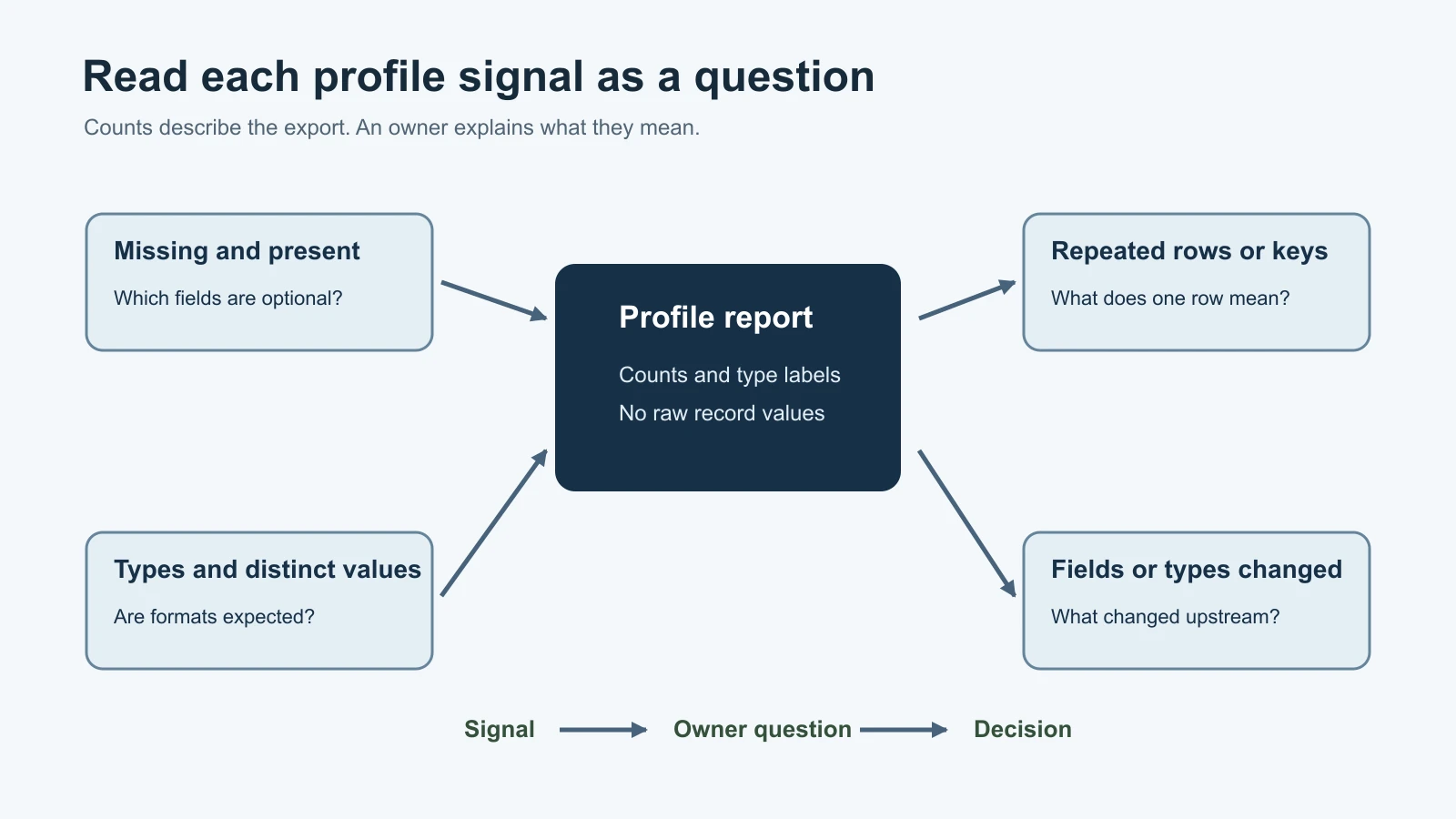
row_count is the number of records parsed. It is not proof that the export is complete. Compare it with an owner-provided expectation or another approved source if completeness matters.
For each field, present_count counts records that contain its name. missing_count counts missing representations according to this program's rule. distinct_non_missing_count counts different non-empty values, not the truth or usefulness of those values. A type count describes what the parser observed. These measures can show where to ask questions; they do not certify quality.
duplicate_row_count counts repeated full rows after the first occurrence. duplicate_key_count counts repeated, non-missing values in the selected key field after their first occurrence. missing_key_count counts records with a missing key. If the key field is absent from every row, all rows count as missing keys. That may indicate the wrong key was supplied, not a defective source.
The drift section compares field names and observed type labels. new_fields appear in the current snapshot, missing_fields appeared in the baseline but not the current snapshot, and changed_types lists type sets that differ. A changed type can indicate a source change, mixed input, or a parsing difference. Check the owner documentation and the actual workflow before deciding which explanation fits.
The report deliberately leaves out raw values. That makes it easier to review summary signals, but it does not make the report anonymous. A file path, column name, row count, or unusual type can still reveal details. Follow the agreed storage and sharing boundary for both the source file and the report.
Continue the audit beyond the script
Profiling is one step in a broader review. The profiler can summarize shape and some quality signals, but a data owner or subject matter expert must answer questions about meaning, access, and use. The checklist below can be copied into a project note. Record a source or owner for each answer, mark unknowns explicitly, and leave approval decisions with the person authorized to make them.
| Audit area | Questions to resolve | Evidence or owner | Status and follow-up |
|---|---|---|---|
| Purpose | Which user task depends on these records? What decision will the data support? | ||
| Source and owner | Which system produced the export? Who owns its schema and can explain changes? | ||
| Permission | Who approved access, the environment, and the intended use? Can the working copy be retained? | ||
| Grain | What does one row represent? Can a record appear more than once for a valid reason? | ||
| Schema | What does each field mean? Are names, units, time zones, and allowed values documented? | ||
| Missing values | Which fields can be blank or absent? What does each missing pattern mean? | ||
| Types and formats | Are identifiers text or numbers? Are dates and units represented consistently? | ||
| Keys and duplicates | Which field or field set identifies a record? Are duplicates expected, invalid, or unresolved? | ||
| Changes | What changed since the earlier snapshot? Is there a source or process change log? | ||
| Sensitivity | Could fields identify people or expose confidential business information alone or in combination? | ||
| Limits and next step | What cannot be concluded from this sample? Who will resolve each open question and by when? |
NIST's PII guidance describes identifying personal information in context and protecting it from inappropriate access, use, and disclosure. It also recommends that organizations tailor safeguards to their needs. The publication is written for U.S. federal agencies, so use it as a reference and ask the customer's privacy or security owner which rules apply to the engagement. Do not classify data based on a single column name when combinations of fields may change its sensitivity.
Mistakes beginners make
- Treating a clean profiler report as proof that a dataset is ready. Ask the owner about meaning, completeness, and intended use.
- Assuming repeated keys are always errors. Confirm what one row represents and whether the key is unique at that grain.
- Converting identifiers to numbers because they look numeric. Check whether leading zeros or formatting carry meaning.
- Comparing CSV and JSON type counts as though the parsers represent values the same way. Compare matching formats or explain the parsing difference.
- Treating a new field or type as a confirmed source defect. Record the signal, check the source change, and ask its owner.
- Running a profiler on a customer export without checking permission and report handling. Use the approved environment and keep only the data needed for the task.
Recap and try it yourself
A data audit connects a source to a user task and checks its structure, quality signals, access, and ownership. The profiler summarizes missing values, types, distinct values, duplicate rows and keys, plus field and type changes between snapshots. Use the output to direct questions. It cannot establish field meaning, permission, completeness, or whether a change is acceptable.
Try it: create the synthetic files and run all four commands. Inspect the CSV and JSON summaries, then compare the two JSON snapshots. Add one row with a repeated order_id to a copy of the synthetic data and observe the key count. Fill in the audit checklist for the fictional order review, marking unknowns instead of inventing NorthPort answers. Before applying the profiler to any real export, identify its owner, allowed environment, and approved purpose.
Sources
Checked on 5 November 2026. The lesson uses Python's standard library and synthetic records. Python behavior and organizational data-handling rules can change; follow the current policy for the customer's environment.
- Forward Deployed Engineer roadmap, for the course's data-audit topic. The roadmap page's text extraction does not expose its interactive chart labels; the detailed lesson outline follows the visual roadmap record already captured in the course plan.
- Python
csvdocumentation and Pythonjsondocumentation, for reading the two supported file formats. - Python
randomdocumentation andunittestdocumentation, for deterministic synthetic-data generation and the test framework. - NIST SP 800-122, for contextual PII identification and confidentiality safeguards. It is U.S. federal guidance and does not replace a customer's policy or applicable law.