
Forward Deployed Engineer course · lesson 10 of 24
- 1What Is a Forward Deployed Engineer?
- 2A Day in the Life of a Forward Deployed Engineer
- 3FDE Career Paths, Tiers, and Interview Gates
- 4Build Your Forward Deployed Engineer Skill Map
- 5Requirements Gathering with a Customer
- 6Discovery, Scoping, and Sequencing Customer Work
- 7Audit Customer Data Before You Build
- 8Enterprise Workflow, Business Value, and ROI
- 9Choosing an AI Approach for a Customer
- 10Build a Working Prototype Fast
- 11Integration Engineering and the Last Mile
- 12Working Safely with Legacy Systems
- 13Data Pipelines for AI Features
- 14Evals as Acceptance Criteria
- 15Debugging Agent Logic and Observability
- 16Deploying in the Customer's Cloud
- 17Cost, Latency and Inference Choices
- 18Security, Privacy and AI Governance
- 19Stakeholders and Communication
- 20Technical Writing for Handoff
- 21UAT, Go-Live, and Day 2 Operations
- 22Executive Reporting and Proving ROI
- 23The Product Feedback Loop
- 24Capstone: Run an Engagement End to End
After this lesson, you will be able to build a narrow prototype around one customer task, use synthetic data (fictional records generated for testing) or an approved sandbox (a separate test environment whose boundaries and permissions must be checked), and explain what the demo does and does not prove. You will also get a prototype boundary sheet and an inventory that labels which components work and which are simulated. NorthPort Freight is fictional. Every record, interface, and outcome described here is invented for teaching.
A prototype gives a customer something concrete to react to while the team is still learning. It can expose a missing requirement, a confusing handoff, or an assumption about what information a user needs. Its value comes from making one question easier to answer. A screen that looks finished can also create a false impression, so state what is simulated, what is connected, and what would still need to change before real use.
Pick one question for the prototype
A prototype is an early representation of a product or workflow built to test an idea. It may be a sketch, a clickable interface, or a small working slice. A prototype is not automatically secure, complete, scalable, or ready to run in a customer's production environment.
Start with a question the team needs the customer to answer. For the fictional NorthPort dispatch review, it might be: "Can a dispatcher understand a mismatch more quickly when both approved references and the reason for the flag appear in one review?" That question can guide a narrow demo. It does not assume the customer wants an AI decision or that the demo should update an order.
Choose one user, one task, and one visible outcome. Include only the steps needed to let the user react to the question. A prototype that tries to cover intake, routing, exception approval, analytics, and administration at once takes longer to build and makes feedback harder to interpret. A limited slice lets the customer respond to the workflow itself.
If the review supports continuing, a pilot is a limited trial with a defined user group, scope, and safeguards. Set those boundaries before the pilot; a successful demo does not set them for you.
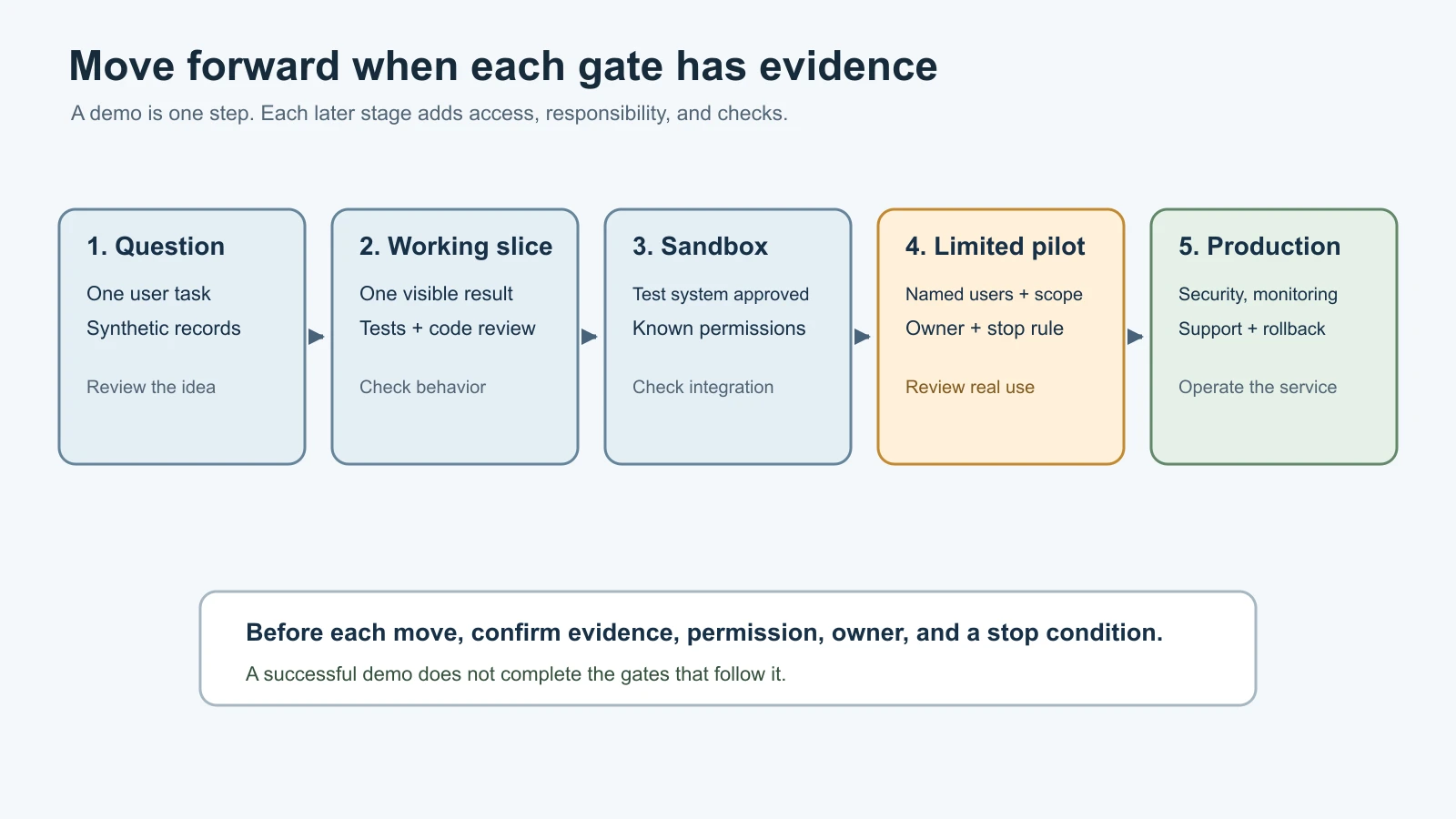
Write down what success would look like in the review. It might be that the dispatcher can identify the two references, understand why they differ, and explain what they would do next. That is a usability observation, not proof that the feature reduces handling time across the business. Use the baseline and value hypothesis process from mapping enterprise workflow and value when you need to assess a measured outcome.
A customer conversation can also uncover a reason not to proceed. If the user needs a source that the team cannot access, or a policy owner has not approved the proposed data use, a mockup may be the right stopping point. Record the blocker and owner instead of filling the gap with a fake connection that looks real.
Use coding tools with a bounded task
AI-assisted coding tools can help create a first interface, draft tests, or explain unfamiliar code. They do not remove the need to understand what files they can read, which commands they may run, or how a change will be reviewed. Give a tool a narrow task, state the allowed data and workspace, and ask it to summarize the changes for inspection.
As checked on 5 November 2026, the official documentation describes Claude Code as an agentic coding tool that reads code, edits files, and runs commands. OpenAI describes Codex across ChatGPT, editors, and terminal workflows. Google's Gemini CLI is an open-source terminal agent built around Gemini. Cursor presents its editor and agent workflow for understanding code, planning, and reviewing changes. OpenCode documents an open-source coding agent for terminal, desktop, and IDE use. These products and their features change, and their execution and account controls differ. Check the current documentation, service terms, and customer's approved environment before using one with project files.
OpenClaw belongs in a different part of this comparison. Its documentation describes an assistant and coordination layer, and says it is not an IDE replacement. It may be useful when a project needs persistent context or tool coordination, but select a repo-focused coding tool for direct code changes. If a shared assistant can access customer work, review its tool permissions, identity model, data routing, and trust boundary first.
Ask the coding tool to work on synthetic records and a local branch or isolated workspace. Avoid pointing it at a production database, real customer export, or secret-bearing environment unless the customer's owner has approved that exact setup. A sandbox is an isolated environment used for testing without changing production systems. Confirm whether it can reach the network, which files it can read, and whether its credentials are real or test-only. "Sandbox" does not by itself mean "safe for any data."
A useful task instruction names the outcome, files or components in scope, data boundary, and review conditions. For example: "Build a read-only mismatch review using the synthetic JSON records in this workspace. Show each reference and the reason for the flag. Do not add a model call, external network request, write action, or customer data. Add a test for a missing reference, then summarize changed files and checks run." The tool may still misunderstand the task. Inspect its diff, run the tests, and try the screen yourself.
For more background, see building a first vibe-coded app, where vibe coding stops, and Claude Code's security and sandboxing guidance. These lessons discuss tool use and safety in more depth. This prototype exercise adds the customer-facing boundary and demo explanation.
Keep synthetic data and sandboxes honest
Synthetic data is generated for testing and does not describe real people or customer records. For a demo, it should still resemble the shape and edge cases the customer needs to discuss. Make a few fictional orders with clear, contradictory, missing, or repeated references. Do not copy a real export and change only the names. Rare values, free-text notes, identifiers, and combinations of fields can still reveal information.
A sandbox can let the team test an integration before connecting it to production. It may still have access to sensitive files, a network connection, or write permissions, so inspect its configuration. Its behavior can also differ from the live service because it may use a smaller dataset, different permissions, fake notifications, or incomplete feature settings. Record the differences. If no such environment exists, use a local fixture (a fixed test input prepared for repeatable checks) or a stub (a deliberately limited substitute that returns known test responses). Label it as such in the interface and demo script.
Keep customer access separate from the prototype until approval is clear. Do not paste credentials into prompts, source files, screenshots, or chat transcripts. Use the organization's approved secret handling process and least-privilege access. Remove temporary credentials, sample files, and demo accounts when the work ends. A prototype can become a production risk when a temporary shortcut is forgotten.
Use version control so you can review and undo changes. Keep the prototype in its own branch or repository when that matches the team's workflow. Avoid creating extra infrastructure or collecting data that the demo does not need. Record libraries, services, and known limitations that will matter if someone continues the work. This keeps a short experiment understandable after the original builder moves on.
Separate real behavior from mock behavior
A real component is connected to the system or service it claims to represent, using an approved environment and data path. A mock is a substitute that imitates part of that behavior without calling the actual system. A fixed response that says "Order held" is mocked unless the workflow really sent an approved hold request and received a result.
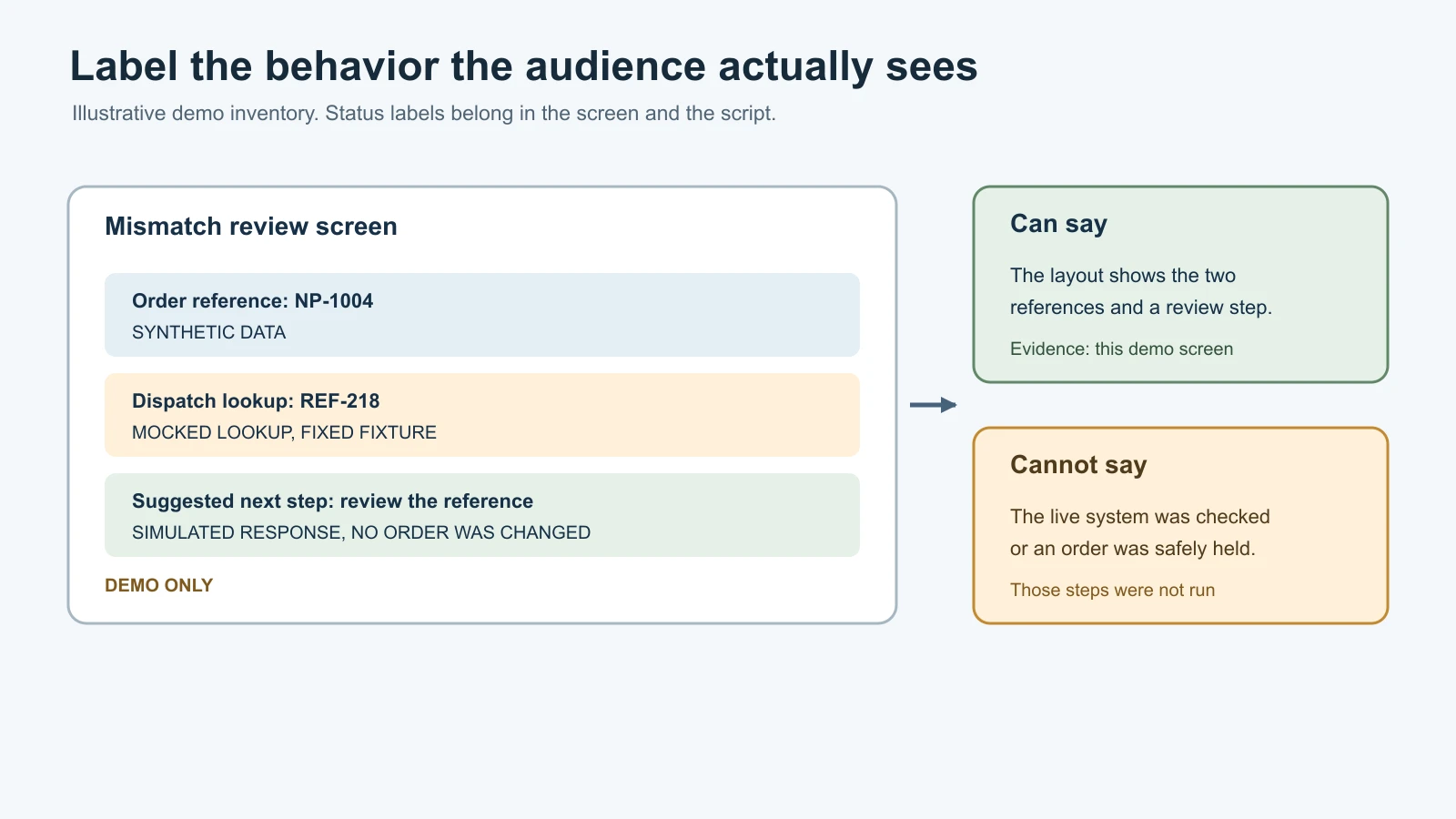
Make the distinction visible where it matters. Add a banner such as "Demo data only" and label a fake status as "Simulated response." If a screen displays a made-up customer record, show that it is synthetic. Do not rely on a spoken disclaimer that disappears when a screenshot is shared. Keep labels readable in the product and in any recording.
Before the review, walk through every user-visible action. Note whether the input is synthetic, whether a model is being called, whether the answer comes from a fixed fixture, whether a sandbox is connected, and whether any action writes data. If only some actions are real, say exactly which ones. A model-generated response can still be illustrative if it uses fabricated context or an untested prompt.
Do not call a mock "live" or a prototype "production-ready." A real sandbox call proves that the integration can communicate with that sandbox under those test conditions. It does not prove production permissions, data quality, service capacity, monitoring, rollback, or support ownership. State the next check needed before making a broader claim.
Use a short demo script with four parts: the user task, the data and environment, the behavior the customer should inspect, and the known limitations. Leave time for the user to try the task and correct your assumptions. If a step fails, explain what failed and what the demo actually showed. Do not hide a missing feature by clicking through a prerecorded or manually edited result without disclosure.
Plan the handoff beyond the demo
A prototype earns a next step only when the customer understands what the team learned and what remains. At the review, collect feedback on the task and workflow, not only on colors or layout. Ask which part matches the real process, what is missing, who needs to approve the next data path, and what evidence would justify a pilot.
The pilot needs a named owner, a rollback or stop condition, and a way to collect feedback. A production service has additional responsibilities such as access management, monitoring, incident response, data retention, service capacity, maintenance, and support. A prototype demonstration does not complete those tasks.
Use this boundary sheet before building and update it at the review:
| Boundary field | Record |
|---|---|
| Customer question | What decision or workflow assumption should the prototype help inspect? |
| User and task | Who will try it, and what will they do? |
| Data | Synthetic fixture, approved sample, or other source; state owner and approval. |
| Environment | Local workspace, sandbox, or other approved location; note network access. |
| Actions | What can the prototype read, change, send, or trigger? What is prohibited? |
| Included behavior | Which screens, rules, model calls, and integrations actually work? |
| Excluded behavior | What is absent, simulated, or deferred? |
| Review evidence | What will the user inspect or try? What observation will answer the question? |
| Stop condition | Which missing approval, unsafe result, or technical failure ends the demo or pilot? |
| Next owner | Who decides whether to revise, pilot, or stop, and what evidence do they need? |
Use this inventory to prevent ambiguity during the demo:
| Component | Status: real, mocked, or simulated | Data or environment | What the demo proves | What it does not prove |
|---|---|---|---|---|
| User input | ||||
| Data lookup | ||||
| Model response or rule | ||||
| External integration | ||||
| Write or notification action |
Mistakes beginners make
- Building a broad demo before choosing a question. Limit the work to one user task and one result the customer can inspect.
- Using real customer files because they make the screen look convincing. Generate synthetic records or use an approved sandbox with explicit permission.
- Treating the word "sandbox" as a complete safety review. Check its data, network, permissions, credentials, and differences from production.
- Letting an AI coding tool choose an unbounded task or environment. State its file, data, network, and action limits, then inspect its changes.
- Showing mocked behavior without an on-screen label. Mark fixtures and simulated responses in the interface and demo script.
- Saying the prototype "works" after one successful click. Describe the exact path tested and the conditions that remain untested.
- Leaving temporary access, data, or infrastructure behind. Assign an owner and cleanup step before the demo begins.
- Treating customer enthusiasm as production approval. Confirm data access, security, operational ownership, and acceptance conditions before a pilot.
Recap and try it yourself
Build the smallest prototype that helps a customer answer a real question. Keep data synthetic or approved, use a sandbox only after checking its boundaries, and tell the audience which parts are real, mocked, or simulated. Review the code and behavior produced by AI-assisted tools. Record limits and next steps before deciding whether the idea is ready for a limited pilot.
Try it: sketch a fictional NorthPort mismatch review with two synthetic order records. Fill in both templates. Label the reference lookup and any model response as real, mocked, or simulated. Write a four-part demo script and mark what evidence it can support. Then list the changes, approvals, safeguards, and owners needed before the same workflow could touch a live dispatch system.
Sources
Checked on 5 November 2026. The coding tools below change frequently. Their documentation supports only the descriptions given here; it does not establish that a product or account is approved for a customer's data.
- Claude Code overview, for its coding-agent surfaces and ability to read code, edit files, and run commands.
- OpenAI Codex, for its editor, terminal, and ChatGPT coding surfaces.
- Gemini CLI repository, for Google's open-source Gemini terminal agent.
- Cursor documentation, for its editor and agent workflows.
- OpenCode documentation, for its terminal, desktop, and IDE coding agent.
- OpenClaw overview, for its assistant and coordination role, distinct from an IDE replacement.