
Forward Deployed Engineer course · lesson 4 of 24
- 1What Is a Forward Deployed Engineer?
- 2A Day in the Life of a Forward Deployed Engineer
- 3FDE Career Paths, Tiers, and Interview Gates
- 4Build Your Forward Deployed Engineer Skill Map
- 5Requirements Gathering with a Customer
- 6Discovery, Scoping, and Sequencing Customer Work
- 7Audit Customer Data Before You Build
- 8Enterprise Workflow, Business Value, and ROI
- 9Choosing an AI Approach for a Customer
- 10Build a Working Prototype Fast
- 11Integration Engineering and the Last Mile
- 12Working Safely with Legacy Systems
- 13Data Pipelines for AI Features
- 14Evals as Acceptance Criteria
- 15Debugging Agent Logic and Observability
- 16Deploying in the Customer's Cloud
- 17Cost, Latency and Inference Choices
- 18Security, Privacy and AI Governance
- 19Stakeholders and Communication
- 20Technical Writing for Handoff
- 21UAT, Go-Live, and Day 2 Operations
- 22Executive Reporting and Proving ROI
- 23The Product Feedback Loop
- 24Capstone: Run an Engagement End to End
After this lesson, you will have a skill map that separates what you can already do from what you still need to practise. You will rank a few gaps, choose a learning order, and use a small Python program to sort the skills you want to work on. The example engagement is NorthPort Freight, a fictional logistics company. No customer data or results are used.
Use an FDE skill map to choose what to practise next and what evidence to build for a role you want. It cannot predict whether a particular employer will hire you. Job descriptions vary, so use the map to turn a specific role's expectations into work you can demonstrate.
Four layers to map
The roadmap.sh Forward Deployed Engineer roadmap groups skills across four layers. Here we use them to organize evidence and practice. The layers describe kinds of work rather than job levels, and you can develop skills in more than one layer at a time.
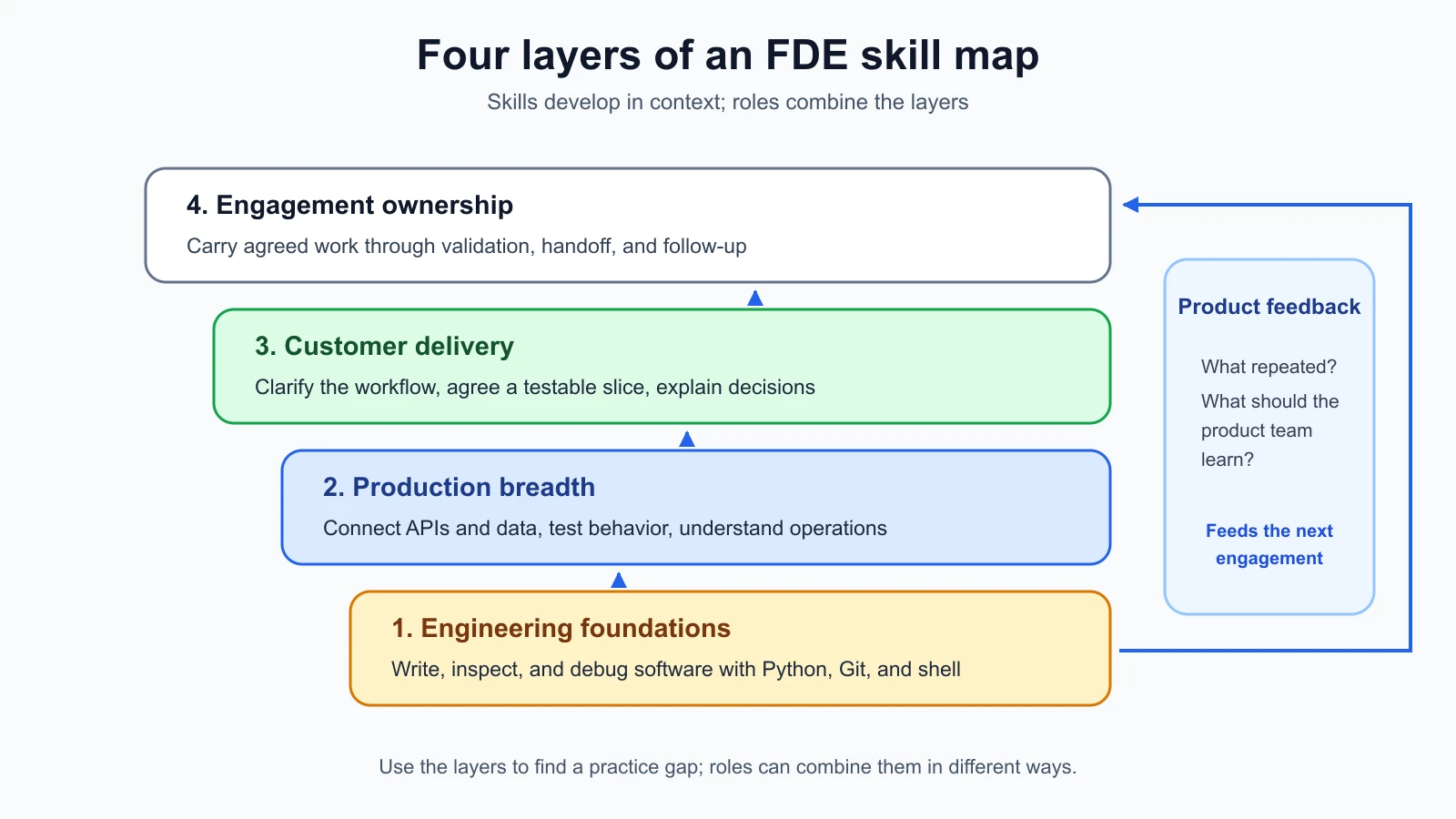
Engineering foundations
This layer is the working base: a programming language, Git, a shell, and the ability to read and change an existing project. You should be able to make a small change, run it, inspect the result, and explain what you changed. If you are new to programming, work through a general programming course first. The FDE roadmap assumes that base rather than teaching it from scratch.
Production breadth
Production breadth means understanding how an application behaves beyond the function you wrote. It includes APIs, data models, testing, logs, deployment, authentication, and the systems around an application. Focus on the cloud products and frameworks your work touches. Notice when a change crosses a boundary: a service calls another service, a user can see sensitive records, or a process fails after a network interruption.
Customer delivery
Customer delivery is the work of learning a real workflow, turning an unclear request into a testable slice, and explaining choices to the people who will use or operate the result. It takes practice to distinguish an observed fact from an assumption. Keep notes that show what you asked, what you learned, and which decision followed.
Engagement ownership
Ownership means carrying the work through the agreed result: discovery, implementation, validation, handoff, and follow-up. An FDE may not own every system or decision, so the map should record where another person must approve access, data use, or production changes. Ownership includes making those boundaries clear.
Assess evidence, not familiarity
Use a scale that describes what you can do today. Treat ratings as rough prompts for choosing practice, and point to evidence for each score.
| Score | What it means | Evidence to look for |
|---|---|---|
| 1 | I have not tried this yet. | No example to show. |
| 2 | I have followed a guide or needed help. | A guided exercise or a change completed with close support. |
| 3 | I can do this on a small project and explain my choices. | A project, review, test, or clear written explanation. |
| 4 | I can adapt this in an unfamiliar setting and help someone else. | A real work example or a practice project with stated limits and decisions. |
Familiarity with a tool name is weak evidence for a 4. Review a Git diff or recover a mistaken edit to show what you can do with Git. Turn a notebook exercise into a repeatable script to show your Python practice. Write down the action you performed and the artifact a reviewer could inspect.
Start with a small number of capabilities. A long list creates the appearance of progress while making it hard to choose a next task. The following template covers the four layers and leaves room to adapt it to a job description.
| Layer | Skill or responsibility | Score, 1 to 4 | Evidence I can show | Next practice task | Review date |
|---|---|---|---|---|---|
| Foundations | Write and run a small Python script | ||||
| Foundations | Inspect a Git diff and make a focused commit | ||||
| Foundations | Navigate a project and inspect files from a shell | ||||
| Production breadth | Call an API and handle an error response | ||||
| Production breadth | Test a normal case and a failure case | ||||
| Customer delivery | Ask questions that turn a vague request into a test | ||||
| Customer delivery | Explain one trade-off in plain language | ||||
| Engagement ownership | Document how to run, check, and hand off a small tool |
Add skills from a job description only when they connect to work you expect to do. If the role asks for a technology you have never used, record it, then look at the responsibility attached to it. “Use Kubernetes” may mean deploying and debugging a service in a managed cluster, while another team expects cluster administration. The named tool alone does not tell you which ability to practise.
Why Python is a useful working language
The FDE roadmap calls Python its go-to language. That is a practical recommendation from the roadmap; employers may prefer another language for their environment. Python is useful for small utilities, data inspection, API calls, and automation. Its standard library includes modules for common tasks, and the official tutorial walks through syntax, data structures, errors, file handling, and virtual environments. A developer with strong experience in another language can use that language when the customer environment calls for it.
For a skill-map exercise, Python keeps the example short and runnable without installing a package. The program below ranks self-assessed gaps so you can start with the capabilities you rated lowest. You will still need a role description, project constraints, and your own goals to decide which gap matters most.
The example needs Python 3.10 or newer and has no third-party dependencies. Python’s version and packaging guidance can change; check the official documentation when setting up a new machine. The code uses only built-in language features and the standard library.
skill_map.py
1from typing import TypeAlias
2
3SkillRating: TypeAlias = tuple[str, int]
4
5
6def rank_gaps(ratings: dict[str, int]) -> list[SkillRating]:
7    """Return skills from lowest self-rating to highest, preserving tie order."""
8    if not ratings:
9        raise ValueError("Add at least one skill rating.")
10
11    for skill, rating in ratings.items():
12        if not skill.strip():
13            raise ValueError("Skill names cannot be blank.")
14        if type(rating) is not int or rating not in range(1, 5):
15            raise ValueError(f"Rating for {skill!r} must be an integer from 1 to 4.")
16
17    return sorted(ratings.items(), key=lambda item: item[1])
18
19
20if __name__ == "__main__":
21    self_assessment = {
22        "Python script": 2,
23        "Git review": 3,
24        "Shell navigation": 2,
25        "Customer requirements": 1,
26    }
27
28    for skill, rating in rank_gaps(self_assessment)[:3]:
29        print(f"{rating}/4  {skill}")
Run it with python3 skill_map.py. The output is:
11/4  Customer requirements
22/4  Python script
32/4  Shell navigation
Python dictionaries keep their insertion order, so skills with the same score stay in the order you entered them. The validation rejects a blank skill, an empty assessment, a number outside the scale, and a value such as True that Python otherwise treats as an integer. The program sorts your judgment; only you can check whether each score matches your evidence.
The tests check the ordering behavior and the input limits. Save the second block as skill_map_test.py next to the first file, then run python3 -m unittest discover -p '*_test.py'.
skill_map_test.py
1import unittest
2
3from skill_map import rank_gaps
4
5
6class RankGapsTests(unittest.TestCase):
7    def test_sorts_lowest_rating_first_and_keeps_ties_in_input_order(self) -> None:
8        ratings = {"Python": 2, "Git": 3, "Shell": 2}
9
10        self.assertEqual(
11            rank_gaps(ratings),
12            [("Python", 2), ("Shell", 2), ("Git", 3)],
13        )
14
15    def test_rejects_empty_assessment(self) -> None:
16        with self.assertRaises(ValueError):
17            rank_gaps({})
18
19    def test_rejects_rating_outside_scale(self) -> None:
20        with self.assertRaises(ValueError):
21            rank_gaps({"Python": 5})
22
23    def test_rejects_boolean_rating(self) -> None:
24        with self.assertRaises(ValueError):
25            rank_gaps({"Python": True})
26
27    def test_rejects_blank_skill_name(self) -> None:
28        with self.assertRaises(ValueError):
29            rank_gaps({" ": 2})
30
31
32if __name__ == "__main__":
33    unittest.main()
When the code and tests are copied to an empty folder, run the tests there. For a mutation check, temporarily change key=lambda item: item[1] to key=lambda item: -item[1] in skill_map.py. The ordering test should fail because the highest score appears first. Restore the original line and run the tests again. The mutation is deliberate and should not remain in your working copy.
Git habits that make your work reviewable
Git records project changes so you can inspect how a project moved from one state to another. Its basic workflow separates edits in your working tree, selected changes in the staging area, and committed snapshots. Learn to check git status, inspect git diff, stage only the files you intend to include, and write a commit message that names the change. These small habits give another engineer a way to review your work and help you locate a mistake.
For a customer project, review the diff before sharing it. Look for generated files, credentials, local configuration, and sample data that should not leave the environment. A clean commit is useful evidence, but it does not replace review or approval for a production change. The WriterDock version control lesson for AI-built projects covers checkpoints and reviewing changes. The official Pro Git book explains the underlying states and common workflows.
You can use a graphical Git client for most tasks. Still learn enough command-line Git to understand status, diff, add, commit, branch, and log output. When an engineer sends you a command, you should be able to see which repository it affects and what it will change before running it.
Shell habits for an unfamiliar project
A shell is a text interface where you run commands against files and programs. It is useful when a customer gives you a repository, a deployment guide, or a command that reproduces a failure. Learn navigation and inspection first: pwd shows your current directory, ls lists files, cd changes directories, and commands such as head, tail, or cat display text files. Use git status before editing and git diff before sharing. You can look up unfamiliar options as you need them.
Check the current directory before a command that creates, deletes, or modifies files. Read unfamiliar commands before running them, especially commands that use sudo, recursive deletion, environment variables, or a production endpoint. Avoid pasting credentials into the terminal history or a screenshot. If you are unsure what a command will touch, ask the project owner or try it in a disposable copy first.
The Linux roadmap includes shell and other command-line basics. If shell commands are unfamiliar, practise them in a temporary folder with files you can replace. Focus on moving around a project and understanding what a command will affect before you run it.
Choose a learning order from the work
Choose a first gap that blocks the next piece of work or leaves a risk you cannot assess. If you cannot inspect a project with Git, practise that before model evaluation so you can make a safe change in the repository. If you can build a small service but cannot explain who will use its result, practise customer discovery before adding another technical feature.
Use this order when two gaps compete:
- Start with a gap that blocks you from making or checking a small change.
- Then practise the boundary where the change can affect data, access, or another system.
- Add customer communication around the decision and its limits.
- Practise completing the work with a handoff another person can follow.
Treat this order as a prompt. A job description may make another skill more urgent. Note why you chose the task so you can revise the order when new evidence arrives.
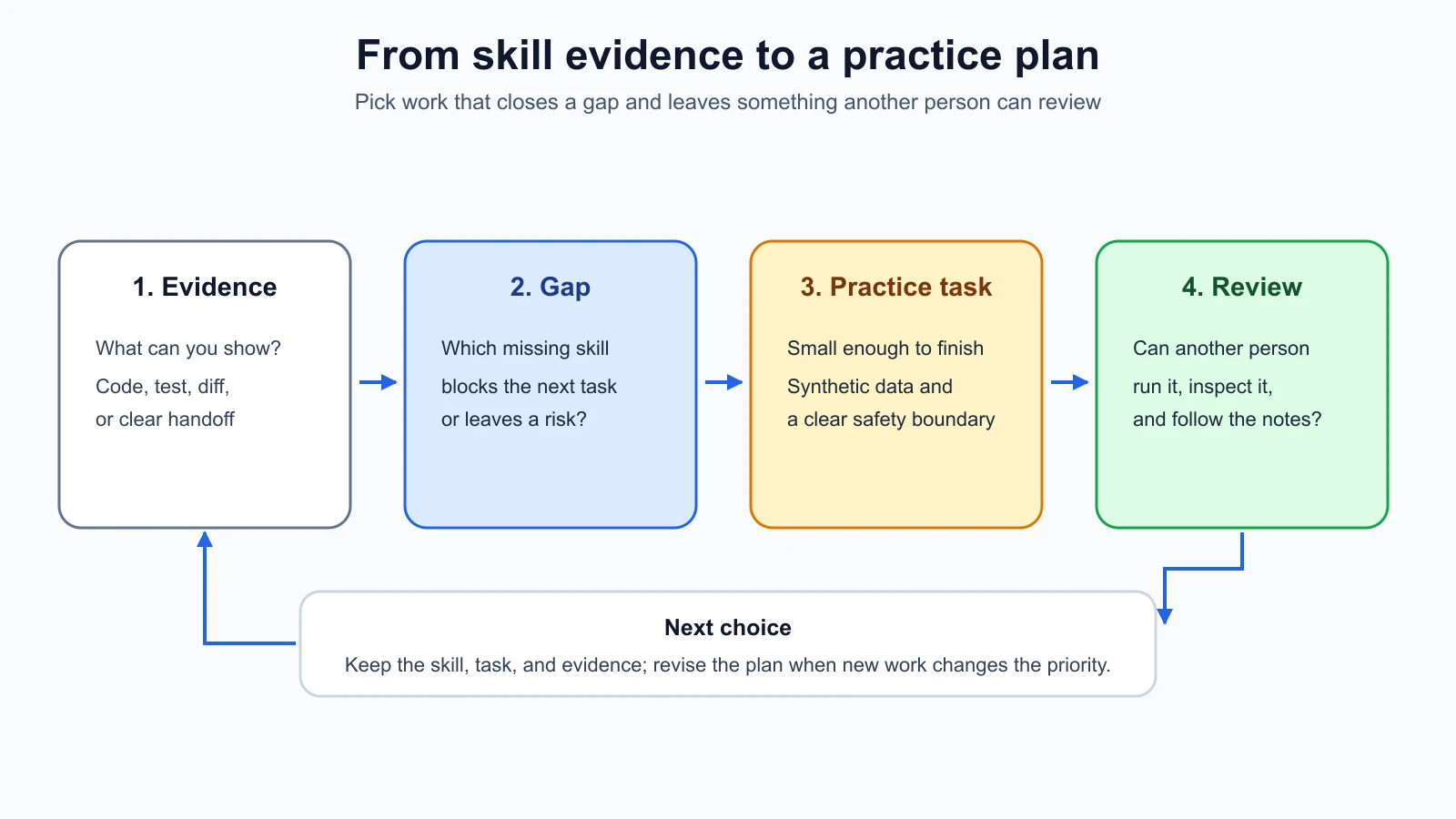
Use this second template to turn one gap into a practice plan. Keep the task small enough to finish and specific enough to review.
| Field | Example entry for the fictional NorthPort exercise |
|---|---|
| Target responsibility | Let a dispatcher review a sample order exception. |
| Evidence I have | I can write Python functions; I have not yet checked a file supplied by another person. |
| Gap to practise | Inspect unfamiliar CSV input and explain one assumption about its fields. |
| Practice task | Write a small script that reads synthetic orders and reports missing order identifiers. |
| Safety boundary | Use generated records only. Do not connect to a customer system. |
| Check for completion | A second person can run the script and understand its output from the README. |
| Review point | Ask a peer to follow the instructions and note where they get stuck. |
| Next decision | If the run is clear, add a test for an empty file; if not, improve the instructions first. |
Practise with a fictional engagement
NorthPort Freight is a fictional regional logistics company in this course. For this exercise, imagine a dispatcher asks for help spotting order exceptions. You have no permission to access real customer data, so use a short synthetic CSV that you create yourself. Do not make up a business result or say the exercise saved time. The point is to practise the delivery steps and record what remains unknown.
Begin with a small scope: read a local file, flag rows where an order identifier is missing, and print a review report. You can create the file by hand with fictional rows. Before coding, write down what “missing” means, whether whitespace counts as empty, and what should happen with a malformed row. Those are requirements for this exercise, not facts about a real NorthPort system.
Use Python to implement the check and write tests for an ordinary row, an empty identifier, and a malformed input. Use Git to save the changes in a focused commit. Use the shell to run the script and tests from a clean copy of the folder. Then prepare a short handoff: how to run it, what data it expects, what it flags, what it ignores, and what would require approval before connecting it to a real service.
This small exercise touches all four layers and leaves deeper study to the linked material. Python is the implementation tool, Git records the change, shell commands help you run and inspect it, and the handoff makes the result usable by another person. The customer-facing part is your record of assumptions and questions. If another person cannot tell what a flag means, clarify the output and instructions before adding more features.
WriterDock already has deeper lessons for some foundations. The Vibe Coding course's version control lesson covers working with Git while using an AI coding tool. Its deployment lesson explains one route from a repository to a deployed app. The AI Product Builders problem definition lesson helps frame a user problem before selecting a solution. For Python itself, begin with the official Python tutorial, which assumes you already know basic programming.
You can also use an AI coding assistant to explain an unfamiliar command or review a proposed change. Treat its explanation as a suggestion. Check the command against the repository and its documentation before running it, and inspect the diff it creates. The AI Product Builders lesson on working with a coding tool covers that workflow.
Mistakes beginners make
- Rating confidence instead of demonstrated ability. Attach one artifact or example to every score.
- Trying to learn every tool named by a roadmap. Start from the work and the system boundary you need to handle.
- Treating Python as a requirement for every FDE role. It is the roadmap's suggested language; the customer's stack and the employer's expectations still matter.
- Choosing a task because it is technically interesting even when it does not close a useful gap. Write down why this task comes first.
- Treating a passing local script as permission to use customer data. Access and production changes need the right owner and approval.
- Leaving a project without run instructions or known limits. A handoff should help someone else understand what the tool does and what it does not do.
Recap and try it yourself
The four skill layers organize a path from engineering foundations through production breadth and customer delivery to engagement ownership. Use evidence to rate your current skills, then pick a gap that blocks useful work or makes a boundary risky. Python, Git, and shell habits help you inspect and change projects; documentation and a handoff let another person check what you did.
Try it: complete the self-assessment for three skills from a role you are interested in. Choose one gap, write a bounded practice task using synthetic data, and name the evidence that will show you finished. Run the supplied skill-ranking tests, then make the deliberate mutation and confirm the ordering test catches it. Keep the task local until you have permission and a clear owner for any real customer data or system.
Sources
Checked on 5 November 2026. Roadmap content and language documentation can change.
- Forward Deployed Engineer roadmap, for the four skill layers and its suggestion to use Python as a working language. The roadmap is a learning guide, not an employer standard.
- Python tutorial, for Python's intended audience, language features, standard library, errors, files, and environment setup. The lesson code uses only the standard library.
- Pro Git book, for version-control concepts and the working tree, staging area, and commit workflow.
- Linux roadmap, for continued study of command-line and operating-system foundations.