
MLOps course · lesson 8 of 24
- 1What Is MLOps? From Notebooks to Reliable Production
- 2MLOps Principles and Maturity: From Manual to Automated
- 3ML Fundamentals for MLOps: Splits, Leakage, and Metrics
- 4A Reproducible ML Project: Layout, Seeds, and Data Code
- 5Data Engineering Basics for ML: Ingestion, SQL, and Skew
- 6Pipeline Orchestration: Apache Airflow and Kubeflow
- 7Batch vs Streaming: Spark, Kafka, and Flink
- 8Data Versioning and Lineage: DVC and Beyond
- 9Data Validation and Quality in ML Pipelines
- 10Experiment Tracking with MLflow
- 11Reproducible Training Pipelines
- 12Model Evaluation and Validation Gates
- 13Model Registry and Versioning
- 14CI/CD for Machine Learning
- 15Containers and Kubernetes for ML
- 16Infrastructure as Code: Terraform and Ansible
- 17Cloud ML Platforms: AWS, Azure, GCP, and Self-Built
- 18Model Serving Patterns: Batch, Online, and Streaming
- 19Inference Engineering Basics: Latency, Batching, and Cost
- 20Monitoring and Observability for ML Models
- 21Drift Detection and Retraining for ML Models
- 22Explainable AI: LIME, SHAP, and Model Interpretability
- 23Edge AI Deployment: Jetson, TFLite, and Mobile ML
- 24Capstone: An End-to-End MLOps Pipeline
In traditional software engineering, source code determines system behavior. If a bug surfaces in production, checking out the exact Git commit hash allows you to recreate the application state, inspect the execution flow, and pinpoint the defect. Code alone is sufficient for reproducibility.
In machine learning, code is only half the equation. A model artifact is the mathematical product of two inputs: an algorithm and the data used to train it. If you run the exact same training script with the exact same hyperparameters across two different weeks, but the underlying customer table silently added twenty thousand new rows, you will produce two different models with different decision boundaries, feature coefficients, and error rates.
When an executive asks why your customer churn model started making uncharacteristic predictions last Tuesday, saying that the model was trained on the latest database dump is an unacceptable answer. You must know the exact dataset snapshot, down to the cryptographic byte, that trained that specific model version.
This requirement introduces data versioning and data lineage. In this lesson, you will learn why Git fails as a data storage layer, how content-addressable storage works, how Data Version Control (DVC) links lightweight pointers in Git to remote object stores, and how to construct lineage records that guarantee complete model auditability.
Why Git cannot version machine learning data
Every software team starts by considering Git for data versioning. After all, Git is already installed, well understood, and integrated with continuous integration pipelines. However, storing large, rapidly evolving datasets inside a standard Git repository causes severe operational failure.
The internals of Git storage
Git was designed for text files containing source code:
- Full Object History: Git stores snapshots of modified files as compressed objects inside the hidden
.gitdirectory. When you clone a repository, Git downloads the complete historical record of every file ever committed. If you commit a two-gigabyte training dataset every week, every team member who clones the repository must download dozens of gigabytes of historical data, even if they only want to edit a single Python script. - Delta Compression Limits: While Git computes deltas between versions of text files, binary data formats like Parquet, ORC, Avro, or serialized NumPy arrays do not compress into clean textual diffs. Changing a few rows in a compressed Parquet file alters byte sequences across the entire archive, forcing Git to store a full copy of the file for every minor change.
- Repository Hosting Constraints: Code hosting platforms enforce strict hard limits. GitHub, for example, rejects files exceeding one hundred megabytes and throttles repositories that grow beyond a few gigabytes.
Git LFS and its boundaries
Git Large File Storage (Git LFS) replaces large files inside your repository with tiny pointer files containing a text hash. When you check out a branch, Git LFS downloads the corresponding binary file from a remote server.
The official Git LFS Documentation (verified on 4 November 2026) explains how Git LFS integrates with the Git command line. While Git LFS works well for static game assets, images, and binary dependencies, it lacks machine learning workflows. Git LFS does not support cloud-native storage remotes like Amazon S3, Google Cloud Storage, or Azure Blob without third-party plugins. It does not track data processing pipelines, dependencies between transformation steps, or metric comparison across dataset versions.
The provenance triangle: code, data, and model
To achieve reproducibility in machine learning, you must bind three independent artifacts together:
- The Code Version: The exact commit SHA in your Git repository representing your training scripts, preprocessing transformations, configuration parameters, and pinned library dependencies.
- The Data Version: An immutable cryptographic hash representing the exact input dataset used for training, stored in a durable object store.
- The Model Version: A unique model artifact identifier registered in an artifact store or model registry, tagged with the code commit and data hash that produced it.
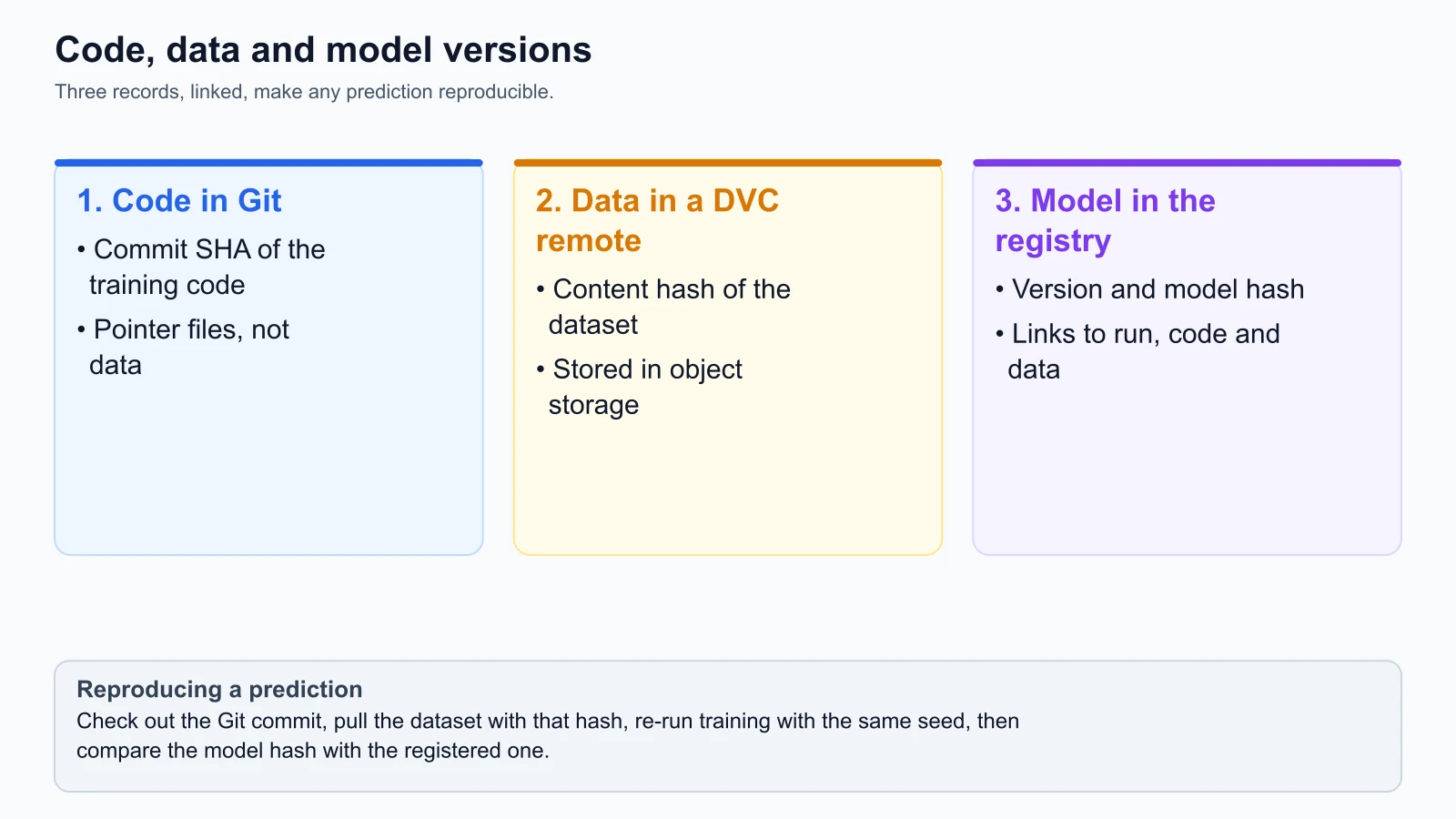
When all three components are bound together, any prediction produced in production can be audited backward through time. If model version churn-classifier:v2 outputs an unexpected prediction for a StayWell customer, an engineer can:
- Check out Git commit
a94f8e12to recover the exact training logic - Pull dataset hash
7b9c1d0fto recover the exact training rows - Re-run the deterministic pipeline to produce an identical model artifact
- Inspect the training data to determine whether bad or biased data influenced the model
Content-addressable storage and dataset hashing
How do you assign an unambiguous identity to a dataset containing hundreds of thousands of rows? You use cryptographic hashing.
A cryptographic hash function (such as MD5 or SHA-256) takes an arbitrary stream of input bytes and computes a fixed-length hexadecimal digest. These functions have two properties essential for data versioning:
- Determinism: The same file contents always produce the exact same hexadecimal digest.
- Avalanche Effect: Modifying a single character or byte in a multi-gigabyte file produces a completely different digest.
In Content-Addressable Storage (CAS), files are stored and retrieved using their content hash rather than a directory path or human-assigned filename. If two files have identical content, they have the same hash and are stored once, providing automatic deduplication.
Here is a pure Python script using the standard library to demonstrate how dataset fingerprinting works:
1# Pure Python dataset fingerprinting using cryptographic hashing
2# Standard library: hashlib, pathlib
3import hashlib
4from pathlib import Path
5
6def compute_dataset_hash(file_path: str, chunk_size: int = 65536) -> str:
7    """Compute SHA-256 hash of a dataset file using streaming chunks to minimize memory."""
8    path = Path(file_path)
9    if not path.is_file():
10        raise FileNotFoundError(f"Dataset file not found: {file_path}")
11
12    hasher = hashlib.sha256()
13    with open(path, "rb") as f:
14        while chunk := f.read(chunk_size):
15            hasher.update(chunk)
16
17    return hasher.hexdigest()
18
19if __name__ == "__main__":
20    # Demonstration of the avalanche effect on a simulated dataset
21    sample_v1 = b"customer_id,monthly_spend,churn\n101,149.50,0\n102,89.00,1\n"
22    sample_v2 = b"customer_id,monthly_spend,churn\n101,149.50,0\n102,89.00,0\n"
23
24    hash_v1 = hashlib.sha256(sample_v1).hexdigest()
25    hash_v2 = hashlib.sha256(sample_v2).hexdigest()
26
27    print(f"Dataset V1 Hash: {hash_v1}")
28    print(f"Dataset V2 Hash: {hash_v2}")
29    print(f"Identical Hashes? {hash_v1 == hash_v2}")
Notice that altering one label from 1 to 0 for customer 102 changes the entire hash. The hash acts as an unforgeable fingerprint.
Data version control (DVC) in practice
Data Version Control (DVC) is the established open-source tool designed to bring Git-like version control to data, models, and machine learning pipelines.
The official DVC Documentation (verified on 4 November 2026) explains that DVC works alongside Git to track large files without storing their contents in the Git repository.
How DVC works: pointers and storage remotes
DVC decouples metadata tracking from data storage:
- The Working Directory: Where you inspect, edit, and read your raw CSV or Parquet files as normal files on your local drive.
- The Local DVC Cache: A hidden directory inside
.dvc/cachethat stores versions of tracked files indexed by their MD5 content hashes. - The Git Repository: Git stores only tiny human-readable text files called pointer files (such as
data/staywell_raw.parquet.dvc). These files are typically under two hundred bytes. - The DVC Remote: A shared central storage system (such as an Amazon S3 bucket, Google Cloud Storage bucket, or network-attached storage) where actual large binary files are backed up and shared across the team.
1# Example DVC pointer file: data/staywell_raw.parquet.dvc
2# Reference: DVC File Format Documentation (from the docs, not run)
3outs:
4  - md5: 7b9c1d0f8a32b1e459021cfa6b0091ef
5    size: 51249028
6    hash: md5
7    path: staywell_raw.parquet
When you inspect data/staywell_raw.parquet.dvc, it contains only the MD5 hash, the file size, and the relative path. Because this pointer file is tiny plain text, Git tracks it effortlessly.
The daily DVC workflow
The daily workflow with DVC mirrors standard Git operations:
1# Initialize DVC inside an existing Git repository
2# Reference: DVC Getting Started Documentation (from the docs, not run)
3dvc init
4git commit -m "Initialize DVC project"
5
6# Configure a remote storage location (e.g., S3 bucket)
7dvc remote add -d myremote s3://staywell-mlops-data-lake/dvc-storage
8git add .dvc/config
9git commit -m "Configure S3 DVC remote storage"
10
11# Track a large dataset
12dvc add data/staywell_raw.parquet
13
14# DVC generates staywell_raw.parquet.dvc and adds the raw file to .gitignore
15git add data/staywell_raw.parquet.dvc data/.gitignore
16git commit -m "Track raw StayWell churn dataset version 1"
17
18# Upload actual binary data to the remote S3 bucket
19dvc push
When a colleague clones your Git repository, the raw five-gigabyte dataset is not downloaded initially. To retrieve the exact dataset corresponding to the current Git commit, they run:
1# Retrieve the exact binary data files associated with the current commit
2# Reference: DVC CLI Reference (from the docs, not run)
3git checkout feature/churn-model-v2
4dvc pull
dvc pull reads the hashes listed in the .dvc pointer files, checks if they already exist in the local .dvc/cache, and downloads any missing files from the configured remote storage.
Multi-stage DVC pipelines
Beyond tracking standalone files, DVC can orchestrate and track multi-stage computational pipelines through a dvc.yaml file. This connects transformation scripts, input datasets, hyperparameters, and generated model outputs:
1# dvc.yaml: Defining a reproducible training pipeline stage
2# Reference: DVC Pipeline Documentation (from the docs, not run)
3stages:
4  prepare_features:
5    cmd: python -m src.prepare --input data/staywell_raw.parquet --output data/features.parquet
6    deps:
7      - data/staywell_raw.parquet
8      - src/prepare.py
9    outs:
10      - data/features.parquet
11
12  train_model:
13    cmd: python -m src.train --data data/features.parquet --config params.yaml
14    deps:
15      - data/features.parquet
16      - src/train.py
17    params:
18      - train.learning_rate
19      - train.n_estimators
20    outs:
21      - models/churn_classifier.joblib
22    metrics:
23      - metrics.json:
24          cache: false
When you execute dvc repro, DVC checks the cryptographic hashes of every input dependency and script. If neither data/staywell_raw.parquet nor src/prepare.py has changed since the last execution, DVC skips the prepare_features stage entirely and restores the cached output. If the input dataset changed, DVC automatically re-runs only the downstream stages affected by that change.
End-to-end data lineage
Data versioning tells you what dataset version you have. Data lineage tells you where it came from, how it was transformed, and where it is used.
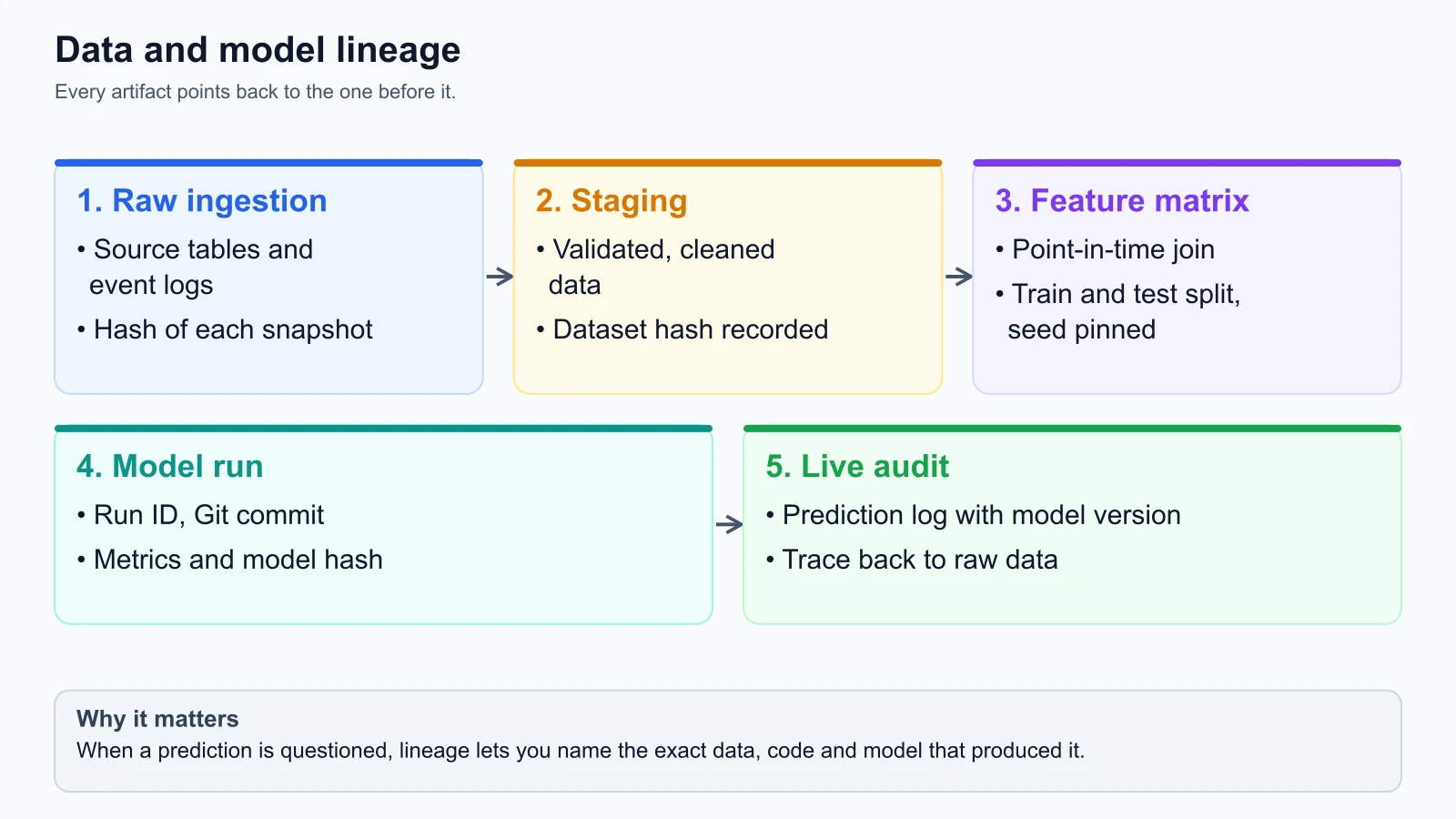
A complete data lineage graph captures the full lifecycle of data:
- Raw Ingestion Layer: Captures source database snapshots, streaming event topics, and API batch dumps, locking their initial hashes.
- Staging and Transformation Layer: Tracks cleaning, deduplication, imputation, and feature engineering transformations.
- Feature Matrix Layer: Captures the final curated feature table, enforcing point-in-time correctness to prevent future leakage.
- Model Training Layer: Binds the feature matrix hash to the training run ID, code commit, hyperparameter set, and generated model artifact.
- Inference and Serving Layer: Logs predictions tagged with the model version and input feature payload hash for live monitoring and debugging.
OpenLineage and Marquez
In large enterprise platforms where data moves across multiple engines (Airflow, Spark, dbt, Flink, and MLflow), tracking lineage manually in spreadsheets or ad-hoc metadata tables breaks down.
The industry has converged around OpenLineage, an open standard for metadata and lineage collection. The official OpenLineage Documentation (verified on 4 November 2026) defines an extensible specification for capturing lineage metadata from orchestrators and compute engines as tasks execute.
Tools like Marquez (verified on 4 November 2026) serve as the reference metadata collection server, visualizing data pipelines, datasets, and job runs as a Directed Acyclic Graph. When an Airflow DAG runs a Spark job that reads from an S3 bucket and writes to a Snowflake feature table, OpenLineage emits event metadata automatically, recording dataset version hashes and operational run states in real time.
Operational template: data and model lineage record
Every production model deployment should maintain a formal lineage record. This record acts as the identity card and audit certificate for the model.
1# StayWell MLOps Lineage and Provenance Record
2# Document ID: LIN-STAYWELL-CHURN-2026-11-04-001
3# Status: Approved for Production
4
5## 1. System Identity
6- Model Name: StayWell Customer Churn Classifier
7- Model Version: 2.4.0
8- Model Registry URI: models:/staywell-churn-classifier/2.4.0
9- Model Artifact SHA-256: e4a11b8971f54c2d3a98701e8823cba14902b48901f4c78104e12a9f772391cf
10
11## 2. Code Provenance
12- Git Repository: github.com/staywell-hospitality/churn-prediction
13- Git Commit SHA: a94f8e12d59a7701bc498263152a4e98f092b771
14- Git Branch: release/v2.4
15- Pipeline Definition: dvc.yaml (SHA: 8812cfa098...)
16- Docker Base Image Digest: python@sha256:d812049e77...
17
18## 3. Data Provenance
19- Raw Dataset Name: staywell_historical_bookings_20261101.parquet
20- Raw Dataset S3 URI: s3://staywell-mlops-lake/raw/bookings/2026-11-01/data.parquet
21- Raw Dataset DVC Hash (MD5): 7b9c1d0f8a32b1e459021cfa6b0091ef
22- Feature Dataset Name: staywell_features_v2_clean.parquet
23- Feature Dataset DVC Hash: f73abb0192e44c21980312fa883901ba
24- Ingestion Cutoff Date (Point-in-Time): 2026-11-01T00:00:00Z
25- Total Training Records: 250,000 rows
26- Total Validation Records: 50,000 rows
27- Random Split Seed: 42 (Pinned)
28
29## 4. Run Execution and Metrics
30- Orchestrator Run ID: Airflow DAG `monthly_retrain` run `manual__2026-11-04T10:00:00`
31- Experiment Tracking Run URI: mlflow://runs/3a7c89b201f94a8e
32- Training Compute Environment: AWS EC2 g4dn.2xlarge (Single Node)
33- Key Metrics:
34  - ROC AUC: 0.864
35  - Precision @ 10% Churn Recall: 0.742
36  - Brier Score (Calibration): 0.089
37
38## 5. Sign-off and Approvals
39- Trained By: Machine Learning Engineer (Automated CI/CD Pipeline)
40- Evaluated By: Automated Gatekeeper (Passed all data validation and metric checks)
41- Approved For Release By: Lead ML Engineer (4 November 2026)
Keeping this record with every release ensures that any regulatory inquiry, algorithmic audit, or troubleshooting session can be resolved with cryptographic proof.
Mistakes beginners make
1. Committing raw datasets directly to Git
Developers new to machine learning often run git add data/training_data.csv when datasets are small. Within a few months, the repository size balloons to dozens of gigabytes, clones take thirty minutes, and Git commands become sluggish.
Fix: Add data/ and all raw data extensions (*.csv, *.parquet, *.h5) to .gitignore on the first day of the project. Use DVC or an object storage pointer tool to track files and commit only tiny .dvc pointer files to Git.
2. Versioning datasets by filename rather than content hash
Teams frequently create files named data_final.csv, data_final_v2.csv, or data_2026_updated.csv. Filenames do not guarantee immutability. An automated cron job or team member can overwrite data_final_v2.csv with new records, permanently destroying the ability to reproduce the model trained on that file yesterday.
Fix: Adopt content-addressable storage where every dataset version is identified by its cryptographic hash (MD5 or SHA-256). Treat data files as immutable write-once artifacts.
3. Forgetting to commit the updated pointer file to Git
After updating a dataset and running dvc add data/raw.parquet and dvc push, developers often forget to stage and commit the updated data/raw.parquet.dvc file to Git. While the new data sits safely in the remote S3 bucket, Git continues to point to the previous dataset hash, causing team members to pull stale data.
Fix: Configure pre-commit Git hooks or integrate DVC status checks into your pull request CI workflow (dvc status). The CI pipeline should immediately fail if data changes are detected without matching pointer file updates in Git.
4. Overlooking upstream data source changes
Machine learning engineers often track the feature table generated inside their Python workspace, but fail to track the upstream database tables or Kafka topics where raw data originated. When an upstream schema migration silently renames a column or drops historical records, the model breaks and nobody can identify which upstream change caused the failure.
Fix: Extend your lineage graph to include the raw ingestion layer. Log database snapshot timestamps, query parameters, and Kafka offset ranges alongside your feature dataset hashes in your lineage record.
Recap and try it yourself
In this lesson, you explored how to version data and track lineage in machine learning systems:
- Git was built for source code diffs and cannot efficiently store or version multi-gigabyte binary datasets.
- Reproducibility requires the provenance triangle: binding the code commit SHA, the dataset content hash, and the model registry artifact together.
- Content-addressable storage and cryptographic hashing (MD5, SHA-256) provide deterministic, immutable fingerprints for datasets.
- DVC tracks large files by storing tiny human-readable pointer files in Git while storing binary data in remote object storage like Amazon S3.
- Data lineage captures the full transformation graph from raw ingestion to live production inference logs, supported by standards like OpenLineage.
Try it yourself
To gain hands-on experience with dataset versioning and content hashing on your machine:
- Create two dataset versions: Using the StayWell customer generator or a simple Python script, generate a CSV file named
customers_v1.csvwith one hundred rows. Duplicate it ascustomers_v2.csvand change a single numeric value in row 50. - Compute streaming hashes: Write a Python function using
hashlib.sha256()that streams both files in 64 KB chunks and prints their hexadecimal digests. Confirm that changing one value alters the entire digest. - Simulate a pointer file: Write a Python script that takes a file path, computes its SHA-256 hash and file size in bytes, and writes a companion
.metaJSON file (e.g.,customers_v1.csv.meta). Inspect how small the metadata file is compared to the data. - Build a lineage verification function: Write a function
verify_dataset(data_path: str, meta_path: str) -> boolthat recalculates the data hash from disk and asserts that it matches the hash recorded in the metadata file. Test it by intentionally modifying the data file and verifying that the function detects the corruption.