
DevOps course · lesson 14 of 24
- 1What Is DevOps?
- 2A Language and a Service to Operate
- 3Linux and the Terminal
- 4Bash Scripting for Ops
- 5Git and Collaboration
- 6Networking for DevOps
- 7Web Servers, Proxies and Load Balancers
- 8Docker for DevOps
- 9Docker Compose and Multi-Service Apps
- 10Cloud Providers: AWS, Azure and Google Cloud
- 11Serverless Functions and Platforms
- 12Terraform and Infrastructure as Code
- 13Ansible and Configuration Management
- 14Continuous Integration with GitHub Actions and GitLab CI
- 15Continuous Delivery and Deployment Strategies
- 16Secret Management
- 17Kubernetes Basics
- 18Kubernetes in Practice
- 19GitOps with Argo CD and Flux
- 20Service Mesh: Istio, Linkerd, Consul and Envoy
- 21Metrics and Alerting with Prometheus and Grafana
- 22Logs and Tracing with Loki, Elastic and OpenTelemetry
- 23Reliability, SLOs and Cloud Design Patterns
- 24Capstone: Pebble to Production
After this lesson, you should be able to explain continuous integration, describe what a CI runner does, add a test pipeline for Pebble in GitHub Actions or GitLab CI, and read the result when a check passes or fails. You will learn how triggers, jobs, steps, matrices and caches fit together, and how to limit pipeline permissions so a test job does not receive access it does not need.
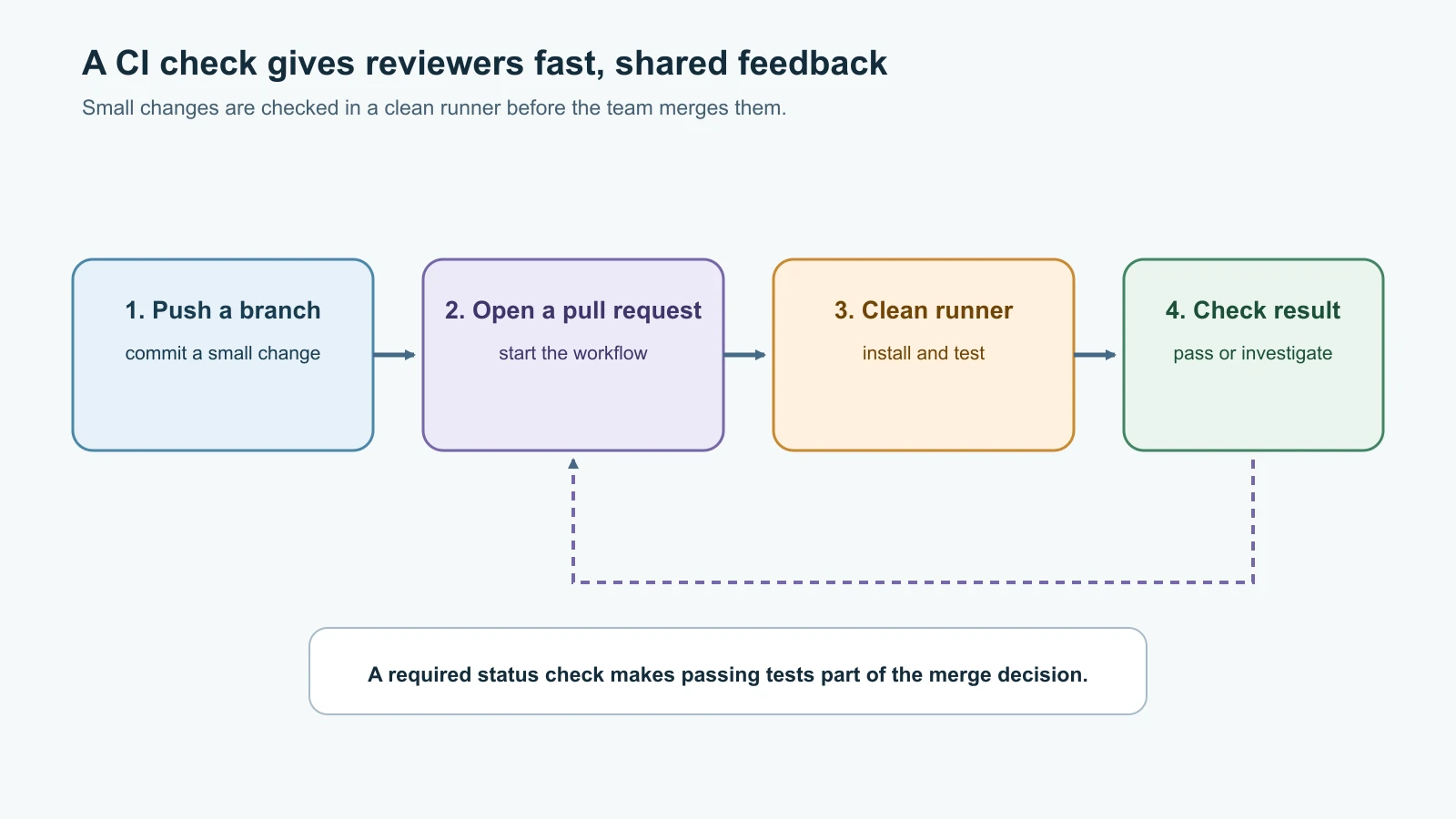
In Git and Collaboration, Pebble's engineers added a local Git hook to run tests before a commit. Hooks give fast feedback, but they only run on a developer's machine and can be skipped. The team needs a shared check that runs when a pull request is opened or updated, before the code is merged into main. That is the job of continuous integration.
What continuous integration means
Continuous integration (CI) is the practice of integrating small code changes frequently and checking them automatically. A CI system watches a repository for events, starts a clean job environment, runs defined commands and reports the result. For Pebble, the first useful pipeline can install its Python dependencies and run the existing unit tests on every pull request.
The point is not to automate every part of software delivery in one file. A passing CI result gives reviewers evidence that a repeatable set of checks succeeded for a specific change. It does not prove that the code has no bugs, is secure, works under production traffic or behaves correctly with real infrastructure. Tests only cover the cases they actually check.
Pebble is not packaged as a Python wheel in this example, so CI does not publish a release artifact. Installing the pinned CI dependencies prepares the runner; compileall checks that Python can compile the source files; Ruff checks selected code-quality rules; ShellCheck checks the operations scripts from Bash Scripting for Ops; and the unit suite checks behavior. A future package or container build can add its own artifact job once the team decides what it needs to retain and release.
| Pipeline term | Meaning | Pebble example |
|---|---|---|
| Trigger | An event that starts a pipeline | A pull request is opened or a commit is pushed to main. |
| Runner | A machine or container that executes a job | A fresh Ubuntu runner with Python installed. |
| Job | A set of commands that runs on a runner | test installs requirements and runs unittest. |
| Step | One action or command within a job | Check out code, select Python, install dependencies. |
| Matrix | Repeats a job across chosen combinations | Run the same tests with Python 3.12 and 3.15. |
| Cache | Reuses downloaded data to reduce repeat work | Cache pip downloads using the requirements file as a key. |
| Status check | A named result attached to a commit or pull request | Test on Python 3.12 and Test on Python 3.15 must pass before merge. |
CI is one part of CI/CD. Continuous delivery keeps a tested change ready to release, while continuous deployment automatically releases a change after it passes the required gates. The next lesson covers delivery strategies and deployment. This lesson's workflows stop after tests; they do not deploy Pebble or receive cloud credentials.
Start with the tests Pebble already has
Pebble now has a unit test suite from Docker Compose and Multi-Service Apps. It checks the HTTP service using temporary SQLite databases and a small fake cache, so the tests do not need a live PostgreSQL server, Valkey service, cloud account or production data. That is a good first CI target: quick, repeatable checks that can run in a clean environment.
The repository root should contain these files:
1pebble/
2  pebble.py
3  test_pebble.py
4  pebble-healthcheck.sh
5  pebble-backup.sh
6  test-scripts.sh
7  requirements.txt
8  requirements-ci.txt
9  ruff.toml
The requirements.txt file pins the external Python packages used by the app and tests:
1psycopg[binary]==3.3.9
2redis==8.1.0
Keep CI-only tools separate from the packages needed to run the service. Add requirements-ci.txt:
1-r requirements.txt
2ruff==0.17.4
Ruff is a Python linter. This exact version was released on 5 November 2026; pinning it makes the lint rules consistent until the team chooses to update it.
Also choose the rules explicitly. Ruff's default rule set can grow between releases, and with Ruff 0.17.4's defaults, Pebble's code reports five style findings, such as preferring datetime.UTC over timezone.utc. Those are reasonable suggestions, but a first CI gate should check a small, agreed set of rules, and a team should adopt new rules on purpose. Add ruff.toml beside the code:
1[lint]
2select = ["E4", "E7", "E9", "F"]
These are the classic Pyflakes (F) checks, such as unused imports and undefined names, plus a few error-level pycodestyle rules (E4, E7, E9). With this file, ruff check pebble.py test_pebble.py on Pebble 0.3.0 prints All checks passed!. When the team wants more rules, add them to select in a reviewed change and fix the findings in the same pull request.
The tests use SQLite by default; these pinned packages ensure imports and optional service paths are available as the suite grows. A CI job should run the same test command that a developer can run locally:
1python -m pip install --disable-pip-version-check -r requirements-ci.txt
2ruff check pebble.py test_pebble.py
3shellcheck pebble-healthcheck.sh pebble-backup.sh test-scripts.sh
4python -m compileall -q pebble.py test_pebble.py
5python -m unittest -v
ShellCheck is not a Python package; install it with your operating system's package manager, as in the Bash lesson. If lint or a test fails locally, fix it before pushing. When the job fails on the CI runner, open the job log, find the first failing check or command, reproduce the problem locally, and push a correction. A red result is useful information, not a signal to disable the pipeline.
GitHub Actions workflow
GitHub Actions reads workflow files from .github/workflows/. Create .github/workflows/pebble-ci.yml:
1name: Pebble CI
2
3on:
4  pull_request:
5  push:
6    branches: [main]
7
8permissions:
9  contents: read
10
11concurrency:
12  group: ${{ github.workflow }}-${{ github.ref }}
13  cancel-in-progress: true
14
15jobs:
16  test:
17    name: Test on Python ${{ matrix.python-version }}
18    runs-on: ubuntu-24.04
19    timeout-minutes: 10
20    strategy:
21      fail-fast: false
22      matrix:
23        python-version: ["3.12", "3.15"]
24    steps:
25      - name: Check out the repository
26        uses: actions/checkout@3d3c42e5aac5ba805825da76410c181273ba90b1 # v7.0.1
27        with:
28          persist-credentials: false
29
30      - name: Set up Python
31        uses: actions/setup-python@5fda3b95a4ea91299a34e894583c3862153e4b97 # v7.0.0
32        with:
33          python-version: ${{ matrix.python-version }}
34          cache: pip
35          cache-dependency-path: |
36            requirements.txt
37            requirements-ci.txt
38
39      - name: Install dependencies
40        run: python -m pip install --disable-pip-version-check -r requirements-ci.txt
41
42      - name: Lint Python files
43        run: ruff check pebble.py test_pebble.py
44
45      - name: Lint shell scripts
46        run: shellcheck pebble-healthcheck.sh pebble-backup.sh test-scripts.sh
47
48      - name: Check Python syntax
49        run: python -m compileall -q pebble.py test_pebble.py
50
51      - name: Run the test suite
52        run: python -m unittest -v
The pull_request trigger runs the workflow for pull requests, including later commits pushed to the branch. The push trigger also checks changes that land directly on main, such as an approved merge. In a GitHub repository that uses this workflow, protect main with a ruleset that requires the named matrix checks to pass before merge. A workflow file existing in Git is not enough by itself to make checks a merge requirement.
The matrix creates two test jobs, one for each Python version: 3.12, the oldest version the team supports, and 3.15, the version in Pebble's Docker image, so CI tests the runtime that production actually uses. This can catch differences between supported runtime versions. It costs more runner time than one job, so teams choose combinations that match the versions they claim to support. Python version strings such as 3.12 select a current patch release in that series. For more exact repeatability, pin the full runtime version and runner image where practical, then update them deliberately.
permissions: contents: read gives the workflow token only read access to repository contents. The test job does not publish packages or deploy infrastructure, so it does not need write permissions. persist-credentials: false asks checkout not to leave its token available for later Git commands. The two actions are pinned to full commit SHAs; comments identify the corresponding releases for people reviewing updates. GitHub recommends a full SHA as the immutable action reference. Review action updates and their source instead of changing the references blindly.
The workflow uses pull_request, not pull_request_target. Pull request code can come from a fork and must be treated as untrusted input. Do not give a job that executes proposed code access to deployment secrets, write-capable tokens or a production network. Keep CI credentials out of unit-test jobs. A later deployment workflow should use a separate, narrowly scoped identity and stricter approval boundaries.
cache: pip saves downloaded packages to speed up later runs. The cache is only an optimization: the job must still succeed when no cache exists. The cache key is built from both requirements.txt and requirements-ci.txt. Listing both matters: requirements-ci.txt only includes the other file by reference, so a key built from it alone would not change when an app dependency changes. GitHub's ubuntu-24.04 runner image includes ShellCheck, so that step needs no installation. Do not cache virtual environments across incompatible operating systems or Python versions.
Read a GitHub Actions result
Push the workflow in a branch, open a pull request, and select the Checks area or the workflow run from the repository's Actions tab. Each matrix entry appears as a separate job. A successful job means its commands returned exit code zero. A failing test makes python -m unittest -v return a non-zero exit code, which makes the job fail and marks the check red.
To require the checks, open the repository's branch rules or ruleset settings for main and add the two job check names. GitHub may show the matrix jobs as Test on Python 3.12 and Test on Python 3.15; select the actual names displayed by the run. Try to merge a pull request with a deliberately failing test in a practice branch. The merge should be blocked while the required status check is failing. Revert the deliberate test change afterward.
The same test in GitLab CI/CD
GitLab reads a pipeline configuration from .gitlab-ci.yml at the root of the repository. Create this file for the equivalent test job:
1image: python:3.15-slim
2
3stages:
4  - test
5
6workflow:
7  rules:
8    - if: '$CI_PIPELINE_SOURCE == "merge_request_event"'
9    - if: '$CI_COMMIT_BRANCH && $CI_OPEN_MERGE_REQUESTS'
10      when: never
11    - if: '$CI_COMMIT_BRANCH'
12
13variables:
14  PIP_CACHE_DIR: "$CI_PROJECT_DIR/.cache/pip"
15
16cache:
17  key:
18    files:
19      - requirements.txt
20      - requirements-ci.txt
21  paths:
22    - .cache/pip/
23
24pebble_tests:
25  stage: test
26  script:
27    - python --version
28    - apt-get update && apt-get install -y --no-install-recommends shellcheck
29    - python -m pip install --disable-pip-version-check -r requirements-ci.txt
30    - ruff check pebble.py test_pebble.py
31    - shellcheck pebble-healthcheck.sh pebble-backup.sh test-scripts.sh
32    - python -m compileall -q pebble.py test_pebble.py
33    - python -m unittest -v
GitLab pipelines are run by a GitLab Runner. The image field requires a runner executor that can run container images, such as Docker or Kubernetes. A shell executor on a machine does not use the job's image, so its Python environment must be set up separately. The workflow: rules section enables merge-request pipelines and branch pipelines, while avoiding a duplicate branch pipeline for a commit that already has an open merge request. Rules are checked in order, so keep the merge-request rule before the branch exclusion rule.
This example caches pip's download directory using both requirements files as the cache key. The slim Python image does not include ShellCheck, so the job installs it from Debian's package archive first. It does not skip the dependency installation command; pip checks and installs the declared packages each time. As in GitHub Actions, a cache miss should only make the job slower, not change its result. The python:3.15-slim image, which matches Pebble's Dockerfile, is a moving tag. A team that needs stronger image reproducibility can use a reviewed image digest and update it on a schedule.
The GitLab project must have a runner available to execute the job. Use the pipeline editor or CI lint feature to inspect the configuration, then push the file to a branch and open a merge request. In the merge request, the pipeline status should be visible alongside the change. Configure the project's merge checks so the pipeline must pass before merge. As with GitHub, test this rule on a practice branch rather than relying on the YAML alone.
GitHub Actions and GitLab CI compared
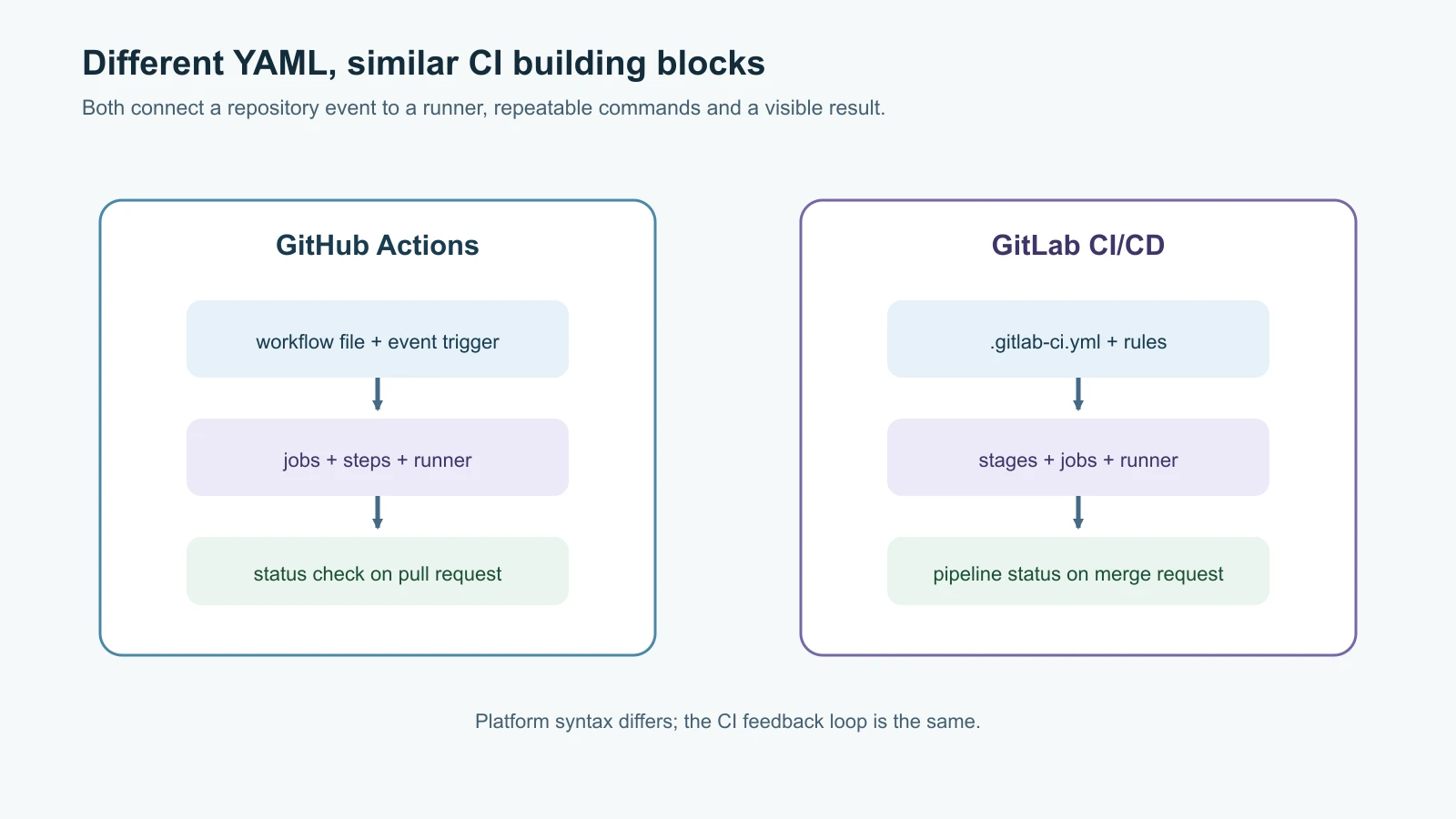
Both systems let teams keep pipeline definitions in the repository, run jobs on events, split work into stages or jobs, and display status beside code review. Their YAML structures and platform features differ, but the problem-solving loop is similar: define an event, choose a clean runner, run repeatable commands, preserve useful results, and make the pass/fail status visible to the people deciding whether to merge.
| Area | GitHub Actions | GitLab CI/CD |
|---|---|---|
| Config location | .github/workflows/*.yml | .gitlab-ci.yml |
| Unit of work | Workflow contains jobs and steps | Pipeline contains stages and jobs with scripts |
| Execution | GitHub-hosted or self-hosted runners | GitLab-hosted or self-managed runners |
| Reuse | Actions and reusable workflows | Includes, components and CI/CD templates |
| Typical integration | GitHub repository and pull request | GitLab project and merge request |
| Main portability concern | Actions and GitHub event context | Runner executor, GitLab variables and pipeline syntax |
CircleCI, TeamCity and Buildkite are other CI platforms. CircleCI offers hosted and self-hosted runner options and config in .circleci/config.yml. TeamCity provides a build server and Kotlin-based configuration options, often in organizations that want a dedicated build platform. Buildkite uses pipeline files with hosted orchestration and customer-managed agents. The right choice depends on where the code lives, what runner environments are needed, access controls, integration, cost, support and the team's ability to maintain it. A new learner does not need to learn every platform at once; the workflow concepts transfer.
Good pipeline habits
Start with a fast, useful signal. Unit tests and formatting checks are good first jobs because they run quickly and point to a specific change. Running these checks on every pull request is what people mean by shifting left: problems are found early in the delivery process, while the change is small and its author still remembers it, rather than late in staging or production when they are slower and more expensive to fix. Add static analysis or security scanning when the team understands what the findings mean and who will handle them. A pipeline with dozens of noisy jobs teaches developers to ignore red checks.
Keep each job focused. If tests fail, the log should make it easy to locate the failure. Add a timeout so a hung process does not consume a runner indefinitely. Use a matrix only for versions or platforms that the project intends to support. Split independent slow jobs when parallel execution will help, and use job dependencies when a later job must wait for an earlier result.
Treat runner environments as disposable. They should start from a known image and avoid hidden state from an earlier build. Do not assume that files or processes from one job will be available in another unless you deliberately pass an artifact or cache. Artifacts are outputs worth keeping, such as a test report or built package. A cache is reusable data that can be regenerated, such as downloaded dependencies. Do not treat a cache as the authoritative copy of a release artifact.
Limit permissions and secrets. A test pipeline should not need production passwords, cloud owner credentials or access to deployment networks. Avoid running untrusted branch code with a privileged token. Prefer short-lived, narrowly scoped credentials for jobs that truly need them, and keep deployment jobs separate from ordinary pull request tests. These boundaries connect to Git and Collaboration and Ansible and Configuration Management: reviewed source and repeatable automation need explicit access limits.
Make checks required, but keep the gate meaningful. A required status check should represent a defined policy, such as all supported Python versions passing tests. Do not mark an optional or unrelated job as required if it cannot run for some pull requests. When a runner outage or flaky test blocks work, fix the infrastructure or test. Temporarily bypassing protections should be an explicit, documented exception with a follow-up owner, not the routine way to merge.
Mistakes beginners make
- Calling a local Git hook CI, even though other contributors can skip it.
- Running tests on only the developer's laptop and assuming CI will have the same dependencies.
- Building a pipeline that never runs on pull requests or whose status is not required for merge.
- Giving a test job deployment credentials or write access it does not need.
- Using
pull_request_targetto run untrusted pull request code with privileged repository context. - Treating a cache as required input instead of an optional speed improvement.
- Adding every runtime version to a matrix without considering support policy and runner time.
- Pinning some dependencies while leaving actions, images or scripts unreviewed.
- Assuming a green build proves production behavior, security or performance.
- Ignoring a red check, disabling it permanently or merging around it without documenting why.
- Treating test reports, caches and release artifacts as interchangeable.
- Forgetting to keep runner images and action references maintained over time.
Recap and try it yourself
Continuous integration runs repeatable checks for changes in a shared environment and reports the result to the team. A pipeline is built from triggers, runners, jobs and commands; a matrix can test a supported set of runtimes, and a cache can reduce installation time without affecting correctness. GitHub Actions and GitLab CI use different YAML structures, but both can run Pebble's existing Python tests for pull requests and branch changes.
Start with a clear, fast test job, grant it only the permissions it needs, require the relevant checks before merging, and read failure logs rather than weakening the gate. CI is evidence for a specific set of checks. Later work adds packaging, release and deployment while keeping those concerns separate.
Try it yourself:
- Add the GitHub Actions workflow to a practice branch. Confirm both Python matrix jobs appear on a pull request and that
mainhas the checks configured as required. - Break one assertion in
test_pebble.py, push the branch and observe the failing job. Fix the test or implementation and confirm the jobs pass again. - Add the GitLab file to a separate practice project or branch. Use GitLab's CI lint, check which runner executor is available, then confirm a merge-request pipeline starts.
- Temporarily remove the cache configuration and rerun CI. Confirm the tests still pass even though package installation may take longer.
- Review the workflow permissions and list every secret the test job can access. Remove any that the tests do not need.
Go deeper
- GitHub Actions: Building and testing Python
- GitHub Actions: Secure use reference
- GitHub Actions: Dependency lockfiles
- GitLab CI/CD YAML syntax
- GitLab workflow rules
- GitLab cache
- CircleCI configuration reference
- TeamCity Kotlin DSL
- Buildkite pipeline steps
Sources checked on 14 November 2026: GitHub Docs for building and testing Python, secure use, workflow dependency lockfiles and workflow permissions; the official actions/checkout v7.0.1 and actions/setup-python v7.0.0 repositories; the Ruff 0.17.4 release; GitLab Docs for CI/CD YAML, workflow rules and caching; and the official CircleCI configuration reference, JetBrains TeamCity Kotlin DSL and Buildkite pipeline steps. Pebble and its team are fictional. The workflows run checks only and do not deploy a service.