
DevOps course · lesson 20 of 24
- 1What Is DevOps?
- 2A Language and a Service to Operate
- 3Linux and the Terminal
- 4Bash Scripting for Ops
- 5Git and Collaboration
- 6Networking for DevOps
- 7Web Servers, Proxies and Load Balancers
- 8Docker for DevOps
- 9Docker Compose and Multi-Service Apps
- 10Cloud Providers: AWS, Azure and Google Cloud
- 11Serverless Functions and Platforms
- 12Terraform and Infrastructure as Code
- 13Ansible and Configuration Management
- 14Continuous Integration with GitHub Actions and GitLab CI
- 15Continuous Delivery and Deployment Strategies
- 16Secret Management
- 17Kubernetes Basics
- 18Kubernetes in Practice
- 19GitOps with Argo CD and Flux
- 20Service Mesh: Istio, Linkerd, Consul and Envoy
- 21Metrics and Alerting with Prometheus and Grafana
- 22Logs and Tracing with Loki, Elastic and OpenTelemetry
- 23Reliability, SLOs and Cloud Design Patterns
- 24Capstone: Pebble to Production
After this lesson, you will be able to describe what a service mesh manages, distinguish the control plane from the data plane, explain sidecar and ambient designs, and identify the difference between encryption and authorization. You will configure a small Istio traffic split in a local Kubernetes cluster, compare Istio with Linkerd and Consul, recognize Envoy's role, and decide when the extra system is not worth its cost.
In GitOps with Argo CD and Flux, Pebble's cluster state is reconciled from Git. A service mesh sits on a different path: it manages how workloads communicate after they are running. It can add workload identity, encrypted service-to-service connections, traffic policy and network-level telemetry without requiring each application to implement a different client library. It does not replace Kubernetes Services, an external ingress or API gateway, application security, or a reliable database design.
What a mesh manages
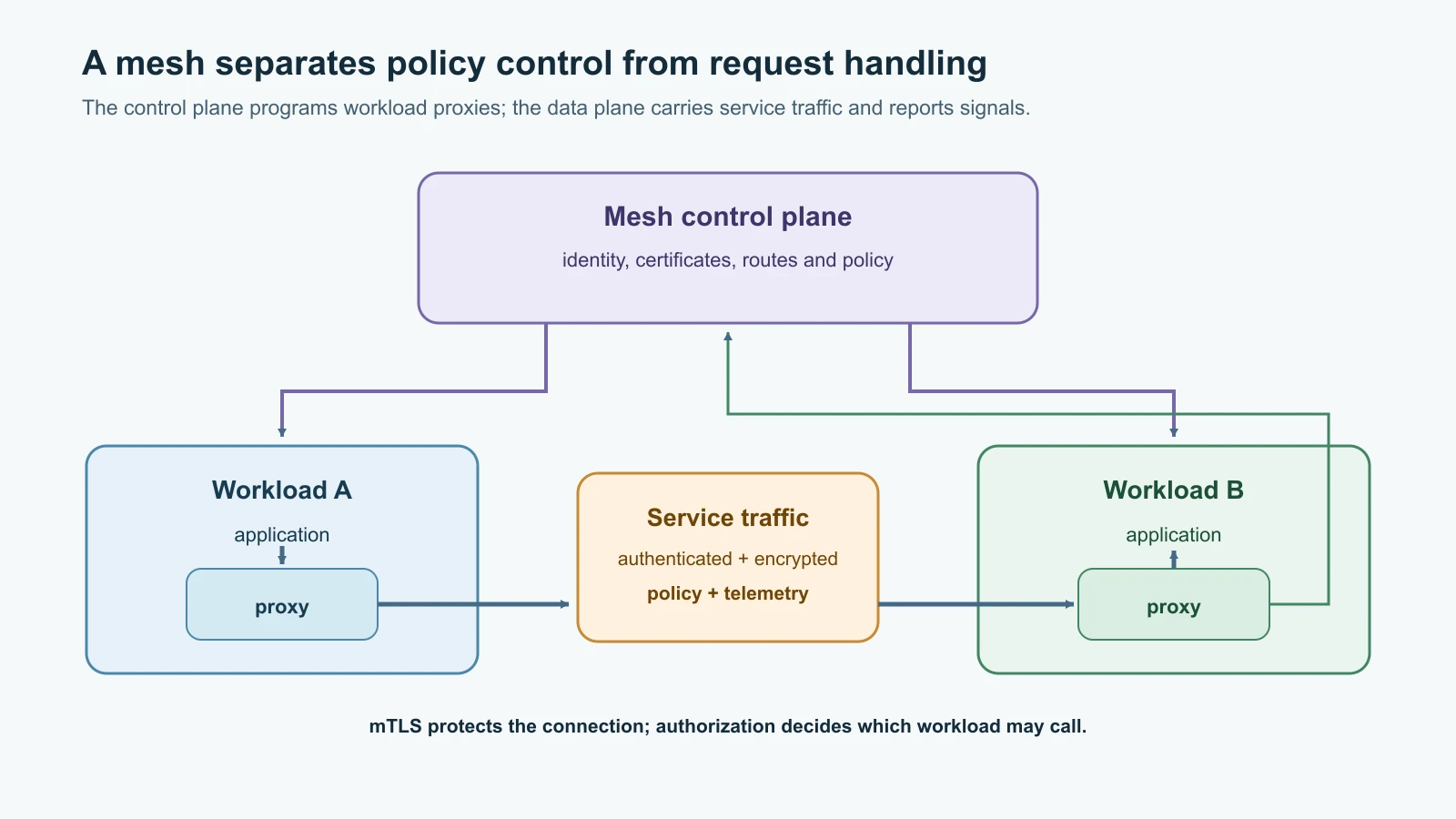
A service mesh is a layer for managing communication between services. It is most useful when a system has enough independent workloads that teams need consistent service identity, encryption, access policy, traffic routing or communication telemetry across many applications. Instead of asking every application team to build and update those controls in a different language, a mesh moves some of that work into infrastructure components close to the traffic.
Most meshes have two logical parts:
- The control plane watches cluster and mesh configuration, issues or arranges workload identity, and programs the proxies with routing and security policy.
- The data plane handles requests between workloads. Depending on the mesh, it may use a proxy beside each Pod, a node-level proxy, or another forwarding mechanism.
Kubernetes already provides Services and cluster DNS for basic discovery and load distribution. If Pebble calls a PostgreSQL Service by its stable DNS name, Kubernetes does not require a mesh. A mesh adds traffic-level features such as workload-to-workload mTLS, service identity checks, policy between named workloads, request-aware routing, and metrics gathered from proxy traffic. These capabilities depend on the mesh mode, traffic protocol, policy and installation. They do not appear merely because a control plane is installed.
Sidecars and ambient data planes
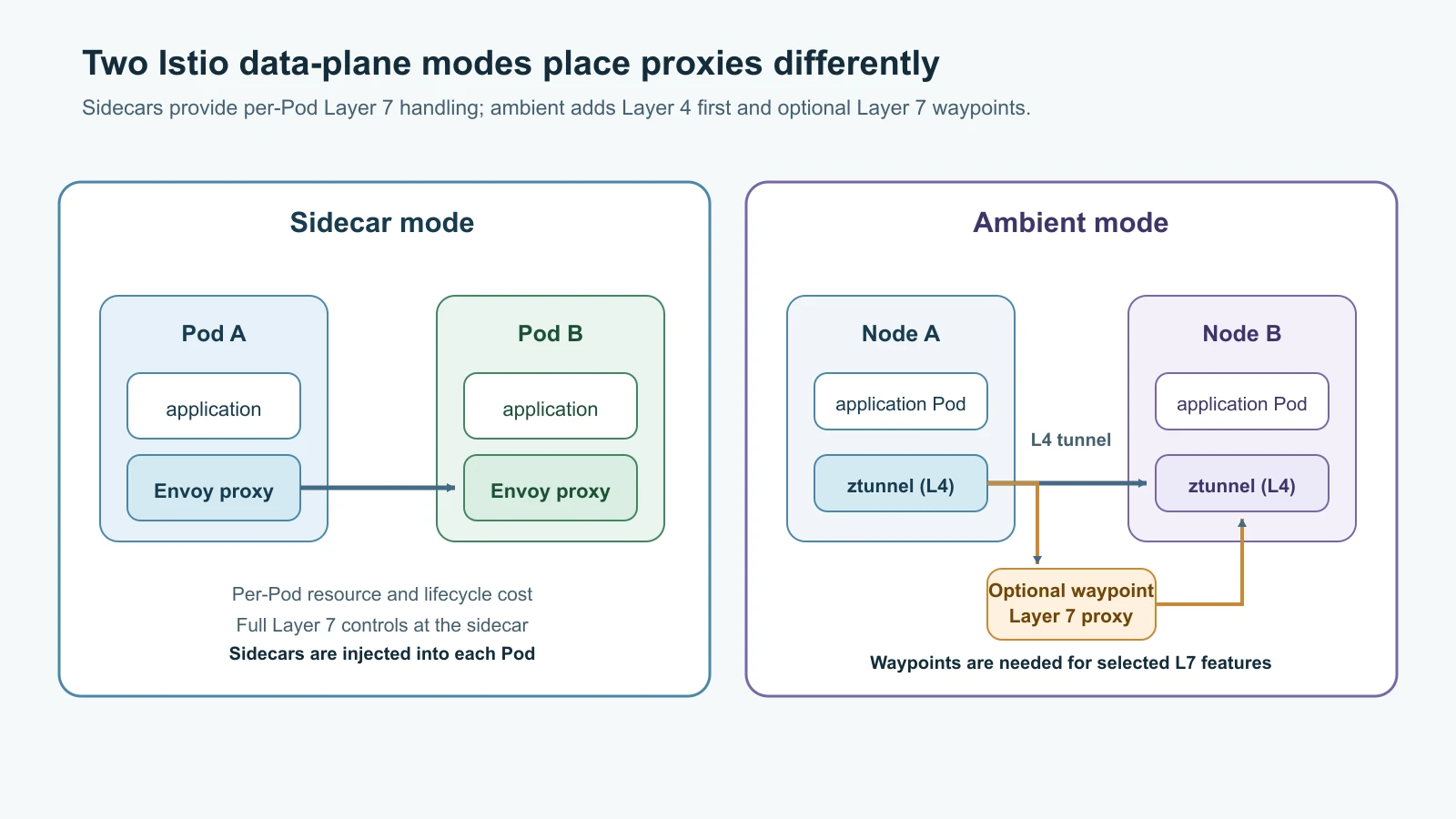
In the traditional sidecar model, an additional proxy container runs in each application Pod. Network rules redirect selected inbound and outbound traffic through the proxy. The application still makes an ordinary TCP, HTTP or gRPC call; the proxy handles the mesh connection and policy. Istio and Consul commonly use Envoy as this proxy. Linkerd uses its own lightweight linkerd2-proxy data-plane proxy.
Sidecars work across many application languages and expose detailed Layer 7 features, such as HTTP route matching and weighted request routing. They also add a container to each Pod. That container needs memory, CPU, health checks, upgrades and troubleshooting. It can affect startup ordering, port use, connection behavior and shutdown. More proxies also mean more data-plane components to keep compatible with the control plane.
Istio also offers ambient mode, which separates the base secure transport from optional Layer 7 processing. A per-node ztunnel proxy handles Layer 4 connectivity, identity, mTLS and Layer 4 authorization for enrolled workloads. A waypoint proxy can be added where a workload needs Layer 7 policy, routing or telemetry. Ambient enrollment does not add a sidecar to every Pod, although it still adds components and operational needs to the cluster.
The current Istio documentation recommends that new users evaluate ambient mode, while sidecar mode remains supported. The example later uses sidecars because Istio's VirtualService and DestinationRule resources provide a clear, stable way to learn weighted HTTP routing. For ambient traffic management, prefer the Gateway API HTTPRoute support in the release you have pinned; the capabilities and maturity of mesh APIs differ by mode and release. Do not copy an older sidecar tutorial into ambient mode without checking the current support table.
mTLS protects a connection, not the whole application
Mutual TLS (mTLS) encrypts a connection and authenticates both ends using certificates. A mesh can issue short-lived workload credentials tied to an identity such as a Kubernetes namespace and ServiceAccount, distribute them to proxies and rotate them. An application can then send ordinary traffic while its proxies establish an authenticated encrypted connection to another meshed workload.
Two details matter when evaluating this protection. First, both ends need to participate in the mesh for the proxy-to-proxy mTLS connection. A non-meshed client may still be allowed to send plaintext unless an explicit policy rejects it. Second, an encrypted connection does not by itself say which requests the caller is allowed to make. Use authorization policy to allow the required workload identity and operation. Keep the rule as narrow as the application boundary allows.
Istio's default automatic mTLS can accept both plaintext and mTLS traffic in permissive mode. Once all expected callers and servers are enrolled and verified, an operator can require strict mTLS with a PeerAuthentication policy. Review ingress, health checks, jobs and external callers before tightening the policy: a path that is not enrolled can lose access. Linkerd requires mTLS for traffic between two meshed workloads by default, but non-meshed sources can still speak plaintext unless authorization policy disallows them.
Here is the shape of a namespace-scoped strict policy in Istio:
1apiVersion: security.istio.io/v1
2kind: PeerAuthentication
3metadata:
4  name: default
5  namespace: mesh-lab
6spec:
7  mtls:
8    mode: STRICT
The policy expects client connections to arrive through an enrolled mesh data plane. A local kubectl port-forward is useful for reaching the demo Service, but it is not a substitute for a meshed workload identity and should not be used to prove strict east-west mTLS. In a real rollout, map all callers first, observe which paths are using plaintext, and then enforce the policy in a controlled scope.
Route a small canary with Istio
The Kubernetes Service from Kubernetes Basics balances across ready Pods. That is enough for many apps. Istio's Layer 7 routing can direct a weighted share of HTTP requests to a versioned subset, which lets a team test a canary before shifting more traffic. The weights describe a relative distribution over many requests; they do not promise that exactly one of every ten requests will reach the canary.
This lab uses the local kind cluster from Kubernetes Basics, recreated with kind create cluster --name pebble --config kind-config.yaml if you deleted it, and Istio 1.32.0, released 9 November 2026 and officially supported on Kubernetes 1.33 through 1.37. It uses the sidecar profile. The two Deployments use the same Pebble image but different PEBBLE_BASE_URL values so the short_url field makes the selected version visible. Each Pod has its own temporary SQLite file. Use the lab only to create sample links; do not follow them, scale it for real traffic or reuse it for durable data.
Download the pinned Istio distribution and use its CLI:
1curl -L https://istio.io/downloadIstio | ISTIO_VERSION=1.32.0 sh -
2cd istio-1.32.0
3export PATH="$PWD/bin:$PATH"
4istioctl version --remote=false
The expected client version is 1.32.0. Confirm the active context and that the Pebble image is available on the kind nodes, then install the default sidecar profile:
1kubectl config current-context
2kind load docker-image pebble:0.3.0 --name pebble
3istioctl install --set profile=default --skip-confirmation
4kubectl get pods -n istio-system
Before creating application Pods, make a dedicated namespace and enable sidecar injection. New Pods in this namespace will receive the Istio proxy:
1kubectl create namespace mesh-lab
2kubectl label namespace mesh-lab istio-injection=enabled
Save the following file as pebble-mesh.yaml. It contains two tiny Deployments and a stable Kubernetes Service. Their version labels are the names Istio's destination subsets will use:
1apiVersion: apps/v1
2kind: Deployment
3metadata:
4  name: pebble-stable
5  namespace: mesh-lab
6spec:
7  replicas: 1
8  selector:
9    matchLabels:
10      app: pebble
11      version: stable
12  template:
13    metadata:
14      labels:
15        app: pebble
16        version: stable
17    spec:
18      automountServiceAccountToken: false
19      securityContext:
20        runAsNonRoot: true
21        runAsUser: 10001
22        seccompProfile:
23          type: RuntimeDefault
24      containers:
25        - name: pebble
26          image: pebble:0.3.0
27          imagePullPolicy: IfNotPresent
28          ports:
29            - name: http
30              containerPort: 8080
31          env:
32            - name: PEBBLE_BASE_URL
33              value: http://stable.pebble.example.test
34          readinessProbe:
35            httpGet:
36              path: /readyz
37              port: http
38            periodSeconds: 5
39          livenessProbe:
40            httpGet:
41              path: /healthz
42              port: http
43            periodSeconds: 10
44          resources:
45            requests:
46              cpu: 100m
47              memory: 128Mi
48            limits:
49              cpu: 500m
50              memory: 256Mi
51          securityContext:
52            allowPrivilegeEscalation: false
53            readOnlyRootFilesystem: true
54          volumeMounts:
55            - name: data
56              mountPath: /data
57      volumes:
58        - name: data
59          emptyDir:
60            sizeLimit: 1Gi
61---
62apiVersion: apps/v1
63kind: Deployment
64metadata:
65  name: pebble-canary
66  namespace: mesh-lab
67spec:
68  replicas: 1
69  selector:
70    matchLabels:
71      app: pebble
72      version: canary
73  template:
74    metadata:
75      labels:
76        app: pebble
77        version: canary
78    spec:
79      automountServiceAccountToken: false
80      securityContext:
81        runAsNonRoot: true
82        runAsUser: 10001
83        seccompProfile:
84          type: RuntimeDefault
85      containers:
86        - name: pebble
87          image: pebble:0.3.0
88          imagePullPolicy: IfNotPresent
89          ports:
90            - name: http
91              containerPort: 8080
92          env:
93            - name: PEBBLE_BASE_URL
94              value: http://canary.pebble.example.test
95          readinessProbe:
96            httpGet:
97              path: /readyz
98              port: http
99            periodSeconds: 5
100          livenessProbe:
101            httpGet:
102              path: /healthz
103              port: http
104            periodSeconds: 10
105          resources:
106            requests:
107              cpu: 100m
108              memory: 128Mi
109            limits:
110              cpu: 500m
111              memory: 256Mi
112          securityContext:
113            allowPrivilegeEscalation: false
114            readOnlyRootFilesystem: true
115          volumeMounts:
116            - name: data
117              mountPath: /data
118      volumes:
119        - name: data
120          emptyDir:
121            sizeLimit: 1Gi
122---
123apiVersion: v1
124kind: Service
125metadata:
126  name: pebble
127  namespace: mesh-lab
128spec:
129  type: ClusterIP
130  selector:
131    app: pebble
132  ports:
133    - name: http
134      port: 8080
135      targetPort: http
Save the two routing objects as pebble-traffic.yaml:
1apiVersion: networking.istio.io/v1
2kind: DestinationRule
3metadata:
4  name: pebble
5  namespace: mesh-lab
6spec:
7  host: pebble.mesh-lab.svc.cluster.local
8  subsets:
9    - name: stable
10      labels:
11        version: stable
12    - name: canary
13      labels:
14        version: canary
15---
16apiVersion: networking.istio.io/v1
17kind: VirtualService
18metadata:
19  name: pebble
20  namespace: mesh-lab
21spec:
22  hosts:
23    - pebble.mesh-lab.svc.cluster.local
24  http:
25    - route:
26        - destination:
27            host: pebble.mesh-lab.svc.cluster.local
28            subset: stable
29          weight: 90
30        - destination:
31            host: pebble.mesh-lab.svc.cluster.local
32            subset: canary
33          weight: 10
Apply the workloads, wait for both injected Pods, then apply the route:
1kubectl apply -f pebble-mesh.yaml
2kubectl rollout status deployment/pebble-stable -n mesh-lab --timeout=120s
3kubectl rollout status deployment/pebble-canary -n mesh-lab --timeout=120s
4kubectl get pods -n mesh-lab
5kubectl apply -f pebble-traffic.yaml
6istioctl analyze -n mesh-lab
Each Pod should show two ready containers: Pebble and its Envoy sidecar. istioctl analyze should report no configuration problems for these resources. Send requests from the stable Pebble Pod. Its injected Envoy proxy handles the outbound call to the Pebble Service, so the VirtualService can apply its traffic rule. A direct kubectl port-forward from your laptop reaches a Pod without a source-side mesh proxy and is not a valid way to test this Layer 7 rule.
1kubectl exec deployment/pebble-stable -n mesh-lab -c pebble -- python -c '
2import json
3import urllib.request
4
5for _ in range(50):
6    body = json.dumps({"url": "https://example.com/mesh-demo"}).encode()
7    request = urllib.request.Request(
8        "http://pebble.mesh-lab.svc.cluster.local:8080/api/links",
9        data=body,
10        headers={"Content-Type": "application/json"},
11    )
12    with urllib.request.urlopen(request, timeout=3) as response:
13        print(json.load(response)["short_url"])
14'
15kubectl logs deployment/pebble-stable -n mesh-lab -c pebble --tail=10
16kubectl logs deployment/pebble-canary -n mesh-lab -c pebble --tail=10
The short_url in responses should show either the stable or canary base URL. Over enough requests, traffic should broadly reflect the configured 90-to-10 weight. A small sample can vary substantially, so do not treat it as a precise statistical test. Each copy stores the submitted link in its own temporary SQLite database. The point is to inspect routing, not to follow those short URLs or claim that this is a safe way to deploy a stateful application.
To move all new requests to the stable subset, edit the weights to 100 and 0, then apply the routing file again. This is a configuration change; it does not terminate requests already in flight, repair a broken canary or roll back external effects. A real rollout also needs application health signals, a decision threshold, a stop condition and an operator who can revert the route.
When finished, remove the local cluster. That removes Istio, its custom resources and the temporary Pebble databases together:
1kind delete cluster --name pebble
2kind get clusters
If you keep a separate kind cluster for another exercise, delete the mesh-lab namespace and follow Istio's uninstall guide before removing the control plane. Do not remove mesh resources from a shared or production cluster as a cleanup shortcut.
Linkerd, Consul and Envoy
Linkerd provides a focused Kubernetes service mesh with workload mTLS, telemetry, load balancing and traffic policy. Its proxy is purpose-built rather than Envoy. The project distinguishes the stable release line, currently Linkerd 2.20 as of June 2026, from frequent edge releases; the open source project says vendor distributions produce stable release artifacts. Choose and support a distribution deliberately, pin compatible CLI and control-plane versions, and check the official release page before installing.
Consul service mesh is part of HashiCorp Consul's service networking system. It uses Envoy sidecars for service-to-service connectivity and can span Kubernetes, virtual machines and other supported runtimes. That breadth can be useful where services already use Consul discovery or need a common service network across Kubernetes and non-Kubernetes environments. It also means the team must operate Consul servers, agents or dataplanes, identity and the mesh configuration in addition to the application platform.
Envoy is a programmable Layer 7 and network proxy. It can be used at an edge, as a standalone service proxy or as the data plane for a larger system. Envoy is not itself a complete mesh control plane: it does not by itself enroll Kubernetes workloads, define every service identity, distribute a mesh policy or decide how changes should be promoted. Istio and Consul can manage Envoy proxies; Linkerd uses its own proxy.
| Option | What it gives you | A useful fit |
|---|---|---|
| Istio | Broad traffic, identity and policy features; Envoy sidecars or ambient data plane with optional waypoints | Teams needing detailed traffic controls, several workloads or gradual Layer 4 and Layer 7 adoption |
| Linkerd | Kubernetes-focused mesh with its own proxy, automatic mTLS for meshed traffic and a simpler feature set | Teams seeking service identity, telemetry and common traffic controls with fewer configuration surfaces |
| Consul | Service networking and mesh controls using Envoy across Kubernetes and non-Kubernetes workloads | Organizations already using Consul or connecting services across runtime boundaries |
| Envoy | A configurable proxy and data-plane building block | Teams integrating a proxy into an existing control plane or building a gateway or traffic layer |
These are starting points, not performance rankings. Compare the capabilities you need, the Kubernetes versions supported, proxy resource use under your traffic, upgrade procedure, policy model, operational skills, license and support arrangement. Run a representative workload before choosing: mesh overhead varies with traffic patterns, filters, TLS, telemetry and configuration. Avoid universal claims such as "mesh adds exactly N milliseconds" without measuring your own system.
Reliability features need careful policy
A mesh can retry a request when a downstream service returns a retryable failure. Retries can help with brief, safe-to-repeat failures, but each retry creates more work. If a service is overloaded, retries from many callers can intensify the overload. Retry only operations with well-understood idempotency. Pebble's POST /api/links creates a new record, so a client retry can create duplicate links; do not turn on a blanket retry policy for it. Timeouts should bound how long callers wait, while circuit breakers or outlier detection can reduce load on an unhealthy destination.
Traffic splitting is also not a health check. A 10 percent canary receives a share of traffic whether it is correct or faulty unless a separate rollout controller or operator evaluates health and adjusts the route. Define what success means, how much traffic is safe, which measurements cause an abort, and how quickly the previous route can be restored. Preserve database compatibility across versions before using a mesh to shift production traffic.
Mesh telemetry usually describes connections and requests observed by the proxy: rates, errors, duration and sometimes protocol-specific details. It does not automatically tell you why the application returned an error, expose business metrics, produce complete traces or replace structured logs. Correlate proxy signals with application logs and metrics. The observability lessons will cover those signals separately.
When a mesh is not a good fit
For a small application with a few services, Kubernetes DNS, readiness probes, NetworkPolicy and TLS at a gateway may already solve the operational problem. If your main need is an external HTTP entry point, an ingress controller or Gateway API implementation is often the narrower tool. If the applications already implement robust service clients and the platform does not need centralized identity or traffic policy, adding a proxy layer may duplicate those mechanisms.
A mesh adds control-plane availability, proxy rollout and resource overhead, certificate trust, policy design and debugging surfaces. It can create a misleading sense of safety if plaintext callers remain, mTLS is permissive, or authorization rules are too broad. It can also make traffic harder to diagnose when operators do not know whether DNS, Kubernetes networking, a sidecar, waypoint, gateway or application handler made the decision.
Before adopting one, write down the specific need: for example, "only this workload identity may call the billing API," or "we need to split HTTP traffic by request path." Identify the policy or control that solves it, how you will test it, who upgrades the mesh, what happens when a proxy or control plane is unhealthy, and how an incident responder can see the traffic path. If you cannot state a concrete operational problem, defer adoption and use the Kubernetes features you already understand.
Mistakes beginners make
- Assuming every Kubernetes cluster needs a service mesh.
- Confusing the mesh control plane with the proxies that carry application traffic.
- Assuming that installing a control plane automatically enrolls existing workloads.
- Treating mTLS as authorization or assuming it blocks all plaintext from non-mesh callers.
- Mixing Istio sidecar resources with ambient capabilities without checking current support.
- Using Envoy as if it were a complete mesh controller and policy system on its own.
- Retrying non-idempotent operations such as Pebble's create-link request.
- Treating a weighted route as a canary analysis or health-based rollout controller.
- Splitting stateful traffic across Pods with separate databases and assuming the mesh shares their data.
- Enabling strict mTLS before identifying probes, ingress, jobs and external clients that use the namespace.
- Installing a mesh without assigning an owner for proxy upgrades, resource use and incident response.
Recap and try it yourself
A service mesh manages service-to-service communication through a control plane and a data plane. Sidecars place proxies next to application containers; Istio ambient mode uses a node-level L4 proxy and optional L7 waypoints. mTLS can encrypt and authenticate mesh connections, while authorization decides which identity may call a service. Istio can express weighted traffic routes, Linkerd offers a focused Kubernetes mesh with its own proxy, Consul uses Envoy across a broader set of runtimes, and Envoy itself is a proxy rather than a full mesh control plane.
Try it yourself:
- Inspect the stable and canary labels in the Istio manifests, then trace how the DestinationRule defines subsets and the VirtualService assigns route weights.
- Send enough requests to the local Service to see both base URLs in Pebble's responses and both Pods' logs. Explain why the 90/10 ratio is approximate in a small sample.
- Change the route to 100 percent stable and 0 percent canary. Inspect the configuration before applying it, then confirm that new requests follow the stable route.
- Read the strict
PeerAuthenticationexample and list which clients, probes and gateways must be enrolled before enforcing it. - Choose one service communication problem and compare whether Kubernetes NetworkPolicy, Gateway API, application code or a service mesh provides the smallest operational fix.
- Write a retry rule for a read-only Pebble request and explain why the same policy is unsafe for
POST /api/linkswithout an idempotency key.
Go deeper
- Istio sidecar and ambient modes
- Istio ambient mode overview
- Istio ambient quick start
- Istio installation and uninstall
- Istio automatic mTLS and security model
- Istio traffic management
- Istio VirtualService reference
- Linkerd features
- Linkerd automatic mTLS
- Linkerd releases and versions
- Consul service mesh
- Envoy overview
- Kubernetes Basics
- Kubernetes in Practice
- GitOps with Argo CD and Flux
Sources checked on 14 November 2026: roadmap.sh DevOps; Istio 1.32.0 release and Kubernetes compatibility, ambient quick start, data-plane modes, security model and traffic management; Linkerd features, automatic mTLS and release status; HashiCorp Consul service mesh; and Envoy documentation. Tool releases and feature support change; use the pinned release docs for a lab and check the supported Kubernetes matrix before deployment. Pebble is fictional; its SQLite mesh example is disposable.