
DevOps course · lesson 13 of 24
- 1What Is DevOps?
- 2A Language and a Service to Operate
- 3Linux and the Terminal
- 4Bash Scripting for Ops
- 5Git and Collaboration
- 6Networking for DevOps
- 7Web Servers, Proxies and Load Balancers
- 8Docker for DevOps
- 9Docker Compose and Multi-Service Apps
- 10Cloud Providers: AWS, Azure and Google Cloud
- 11Serverless Functions and Platforms
- 12Terraform and Infrastructure as Code
- 13Ansible and Configuration Management
- 14Continuous Integration with GitHub Actions and GitLab CI
- 15Continuous Delivery and Deployment Strategies
- 16Secret Management
- 17Kubernetes Basics
- 18Kubernetes in Practice
- 19GitOps with Argo CD and Flux
- 20Service Mesh: Istio, Linkerd, Consul and Envoy
- 21Metrics and Alerting with Prometheus and Grafana
- 22Logs and Tracing with Loki, Elastic and OpenTelemetry
- 23Reliability, SLOs and Cloud Design Patterns
- 24Capstone: Pebble to Production
After this lesson, you should be able to explain configuration management, describe how Ansible connects to managed machines, organize an inventory and playbook into a reusable role, and use a cautious plan-and-apply loop to configure a Pebble server. You will also compare Ansible with Chef, Puppet and Salt, and decide when to update a server in place versus replace it with a newly built image.
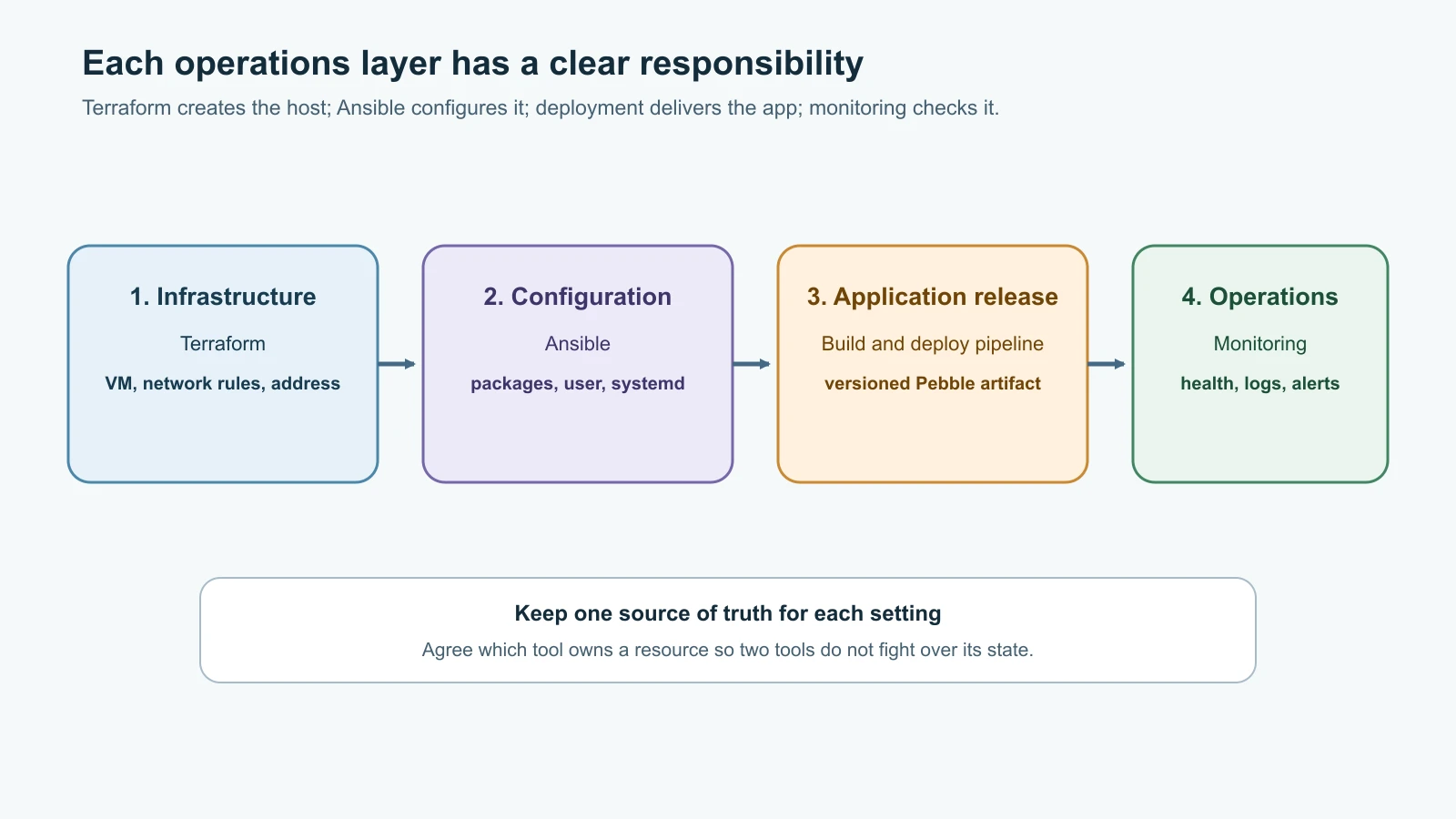
In Terraform and Infrastructure as Code, you described the cloud resources Pebble needs: a virtual machine, network rules and an address. Terraform can create the machine, but it does not automatically keep its operating system packages, service files, users and application configuration aligned with your intended setup. That is a different job. Configuration management describes how the software and settings inside a machine should look, then checks or changes the machine to match.
What configuration management does
A configuration is the set of settings that determines how a system behaves: installed packages, service accounts, directories, permissions, configuration files and running services. Configuration management describes those settings in a repeatable form and applies them to one or more machines. A team can store that description in Git, review changes before applying them, and reuse it when replacing or expanding a server.
Without a management tool, an engineer might SSH into each server and run commands by hand. Over time, one machine gets a security update, another has a different config file, and a third has a package that nobody remembers installing. Those differences are called configuration drift. Drift makes failures harder to explain and increases the chance that a fix works on one server but not another.
A configuration management tool gives the team a record of intended state. For Pebble, that might include a dedicated pebble service user, the application in /opt/pebble, a protected environment file in /etc/pebble, a systemd unit and a running service. If the team replaces a failed VM, it can apply the same configuration again instead of relying on someone's memory.
Configuration management is related to infrastructure as code, but the boundary is useful:
| Tooling layer | Typical responsibility | Pebble example |
|---|---|---|
| Infrastructure as code | Create or manage infrastructure resources | Terraform creates an Ubuntu VM and permits SSH from an approved admin address. |
| Configuration management | Configure the operating system and application on a machine | Ansible installs Python, places Pebble files and enables the systemd unit. |
| Application deployment | Deliver a selected application release | Copy or fetch a versioned Pebble artifact and restart it safely. |
| Monitoring | Check whether the result is healthy and useful | A health probe and metrics alert show when Pebble stops responding. |
Tools can overlap. Terraform providers can configure some services, and Ansible can create cloud resources through collections. Clear ownership still helps: decide which system is authoritative for a resource and avoid two tools continually trying to change the same setting.
Ansible's control node and managed nodes
Ansible is an automation tool that usually runs from a control node, such as your laptop or a small automation runner. It connects to managed nodes, usually Linux servers, over SSH and runs modules to inspect or change them. The managed Linux nodes generally do not need an Ansible agent installed; they do need a supported Python interpreter for most modules. Ansible can manage Windows through PowerShell remoting and can manage network devices through their supported connection methods, but this lesson focuses on Linux and SSH.
This agentless approach is convenient: you install Ansible in one controlled environment, identify the hosts you may manage, and use your existing SSH access. It also means that network access, credentials, privilege escalation and host-key verification matter. Ansible can make changes quickly across many machines, so a typo in the target group or a broad play can also spread a mistake quickly.
Ansible uses a few core concepts:
- An inventory names the hosts and groups that Ansible can target. It can be a static YAML or INI file, or generated from a cloud inventory plugin.
- A playbook is a YAML file containing one or more plays. A play selects hosts and applies an ordered set of tasks.
- A task calls a module, such as
ansible.builtin.apt,ansible.builtin.templateoransible.builtin.systemd_service. - A module describes an operation in terms Ansible can understand. A package module can check whether a package is present instead of blindly running an install command every time.
- A role groups related tasks, handlers, templates, files and defaults into a reusable directory structure.
- A handler runs when a task reports a change and notifies it. For example, a changed systemd unit can trigger a service restart.
The ansible.builtin prefix is a fully qualified collection name (FQCN). It makes clear which collection provides the module. The built-in modules used here ship with ansible-core, so the example needs no extra collection.
Idempotence: the desired state can be applied again
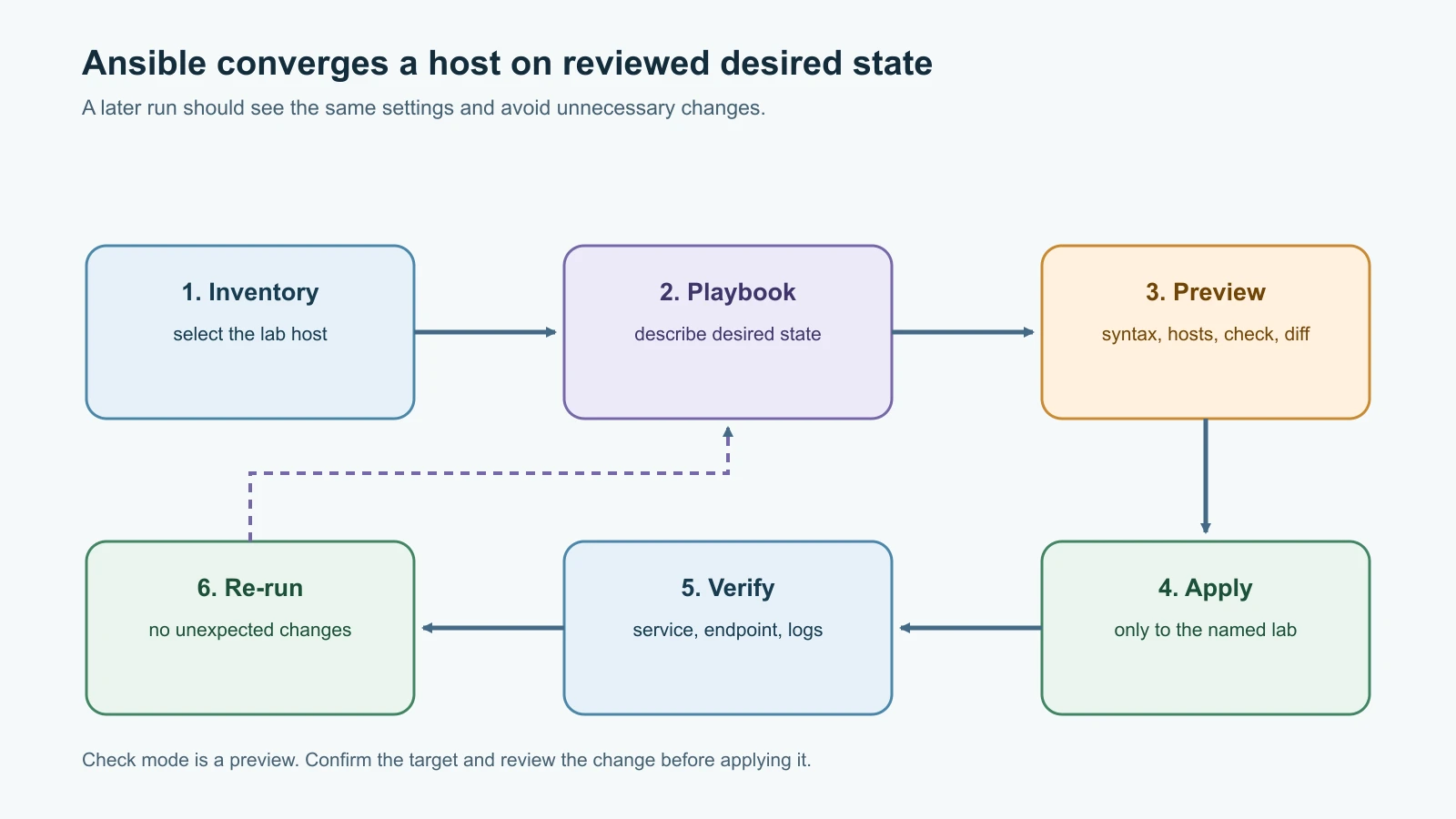
An operation is idempotent when applying it again leaves the same final result. If a playbook says that the python3 package must be present, and it is already present, Ansible should report that no change was needed. If a template file is already identical, the template task should leave it alone. Running a good configuration playbook repeatedly should converge on the same intended state rather than append duplicate lines or restart everything on every run.
Idempotence is not automatic magic. Many Ansible modules check current state and make only a necessary change, but a task that executes a shell command may not know whether that command has already had its desired effect. A task such as command: echo line >> /etc/example.conf appends another line every time. Prefer modules such as file, copy, template, user, apt and systemd_service that describe the desired end state. When a command is unavoidable, use a suitable creates, removes or changed_when condition and test it carefully.
Ansible reports task results as ok, changed, skipped, failed or unreachable. A successful run is not necessarily a no-change run. The first application may create several resources; a second run should normally have few or no changes. If a task reports changed every time, investigate whether it is genuinely changing something or whether the task cannot recognize the current state.
Build a small project for Pebble
The following project manages the service layout from Linux and the Terminal. It expects a disposable Ubuntu test VM already reachable over SSH, a non-root login with sudo, and the pebble.py from A Language and a Service to Operate. The VM should be dedicated to this exercise. The playbook will create or update the pebble service account, files and service, so do not point it at a work or production host.
On the control node, use Python 3.12 and pin Ansible Core to 2.21.6, the current maintained release line compatible with Python 3.12 as of 14 November 2026. A virtual environment keeps the tool and its dependencies separate from system Python:
1mkdir -p ~/devops-labs/pebble-ansible
2cd ~/devops-labs/pebble-ansible
3python3.12 -m venv .venv
4source .venv/bin/activate
5python -m pip install --upgrade pip
6python -m pip install 'ansible-core==2.21.6'
7ansible-playbook --version
Create this directory structure. Copy the Pebble application file from the earlier lesson into the role's files directory; the playbook will copy it to the server.
1pebble-ansible/
2  ansible.cfg
3  inventory/
4    hosts.yml
5    group_vars/
6      pebble_lab.yml
7  playbooks/
8    site.yml
9  roles/
10    pebble/
11      defaults/main.yml
12      files/pebble.py
13      handlers/main.yml
14      tasks/main.yml
15      templates/pebble.env.j2
16      templates/pebble.service.j2
In ansible.cfg, make the project inventory and role path explicit. Leave SSH host-key checking enabled; first connect to the test VM yourself and verify its host-key fingerprint before Ansible uses it.
1[defaults]
2inventory = ./inventory/hosts.yml
3roles_path = ./roles
4host_key_checking = True
5interpreter_python = auto_silent
In inventory/hosts.yml, add only the dedicated test machine. Replace the documentation-only address and username with the VM's actual private address and your non-root SSH user. Do not put a password or private key content in this file.
1all:
2  children:
3    pebble_lab:
4      hosts:
5        pebble-lab:
6          ansible_host: 192.0.2.10
7          ansible_user: asha
192.0.2.10 belongs to a range reserved for examples; it will not reach your VM. Use the VM's private address if your control node is on the same isolated network, or its public address only when firewall rules limit SSH to your own current admin IP. Use an SSH config alias or ansible_ssh_private_key_file if Ansible cannot find your key. Never disable host-key checking to work around an identity warning.
Put group settings in inventory/group_vars/pebble_lab.yml:
1ansible_become: true
2pebble_port: 8080
3pebble_base_url: http://localhost:8080
ansible_become: true asks Ansible to use privilege escalation, normally sudo, for tasks that need it. Your login still connects as the ordinary user. Ansible may ask for the sudo password; do not save it in plaintext inventory. For automated environments, use a managed credential store with narrowly scoped access.
The playbook playbooks/site.yml selects only the lab group and imports a role named pebble:
1---
2- name: Configure the Pebble lab server
3  hosts: pebble_lab
4  become: true
5  gather_facts: true
6  roles:
7    - pebble
The role defaults live in roles/pebble/defaults/main.yml. Defaults allow a play or inventory to override values for staging, but keep the normal service settings in one place:
1---
2pebble_port: 8080
3pebble_base_url: http://localhost:8080
The tasks in roles/pebble/tasks/main.yml describe the target state. Pebble's source stays root-owned so the service account cannot edit its own code. The service user owns only its runtime data directory, which systemd creates with StateDirectory.
1---
2- name: Ensure Python is installed
3  ansible.builtin.apt:
4    name: python3
5    state: present
6    update_cache: true
7    cache_valid_time: 3600
8
9- name: Create the unprivileged Pebble service account
10  ansible.builtin.user:
11    name: pebble
12    system: true
13    shell: /usr/sbin/nologin
14    create_home: false
15    state: present
16
17- name: Create Pebble application and configuration directories
18  ansible.builtin.file:
19    path: "{{ item.path }}"
20    state: directory
21    owner: root
22    group: root
23    mode: "{{ item.mode }}"
24  loop:
25    - { path: /opt/pebble, mode: "0755" }
26    - { path: /etc/pebble, mode: "0750" }
27
28- name: Install Pebble application
29  ansible.builtin.copy:
30    src: pebble.py
31    dest: /opt/pebble/pebble.py
32    owner: root
33    group: root
34    mode: "0644"
35  notify: Restart Pebble
36
37- name: Render Pebble environment settings
38  ansible.builtin.template:
39    src: pebble.env.j2
40    dest: /etc/pebble/pebble.env
41    owner: root
42    group: root
43    mode: "0600"
44  notify: Restart Pebble
45
46- name: Install Pebble systemd unit
47  ansible.builtin.template:
48    src: pebble.service.j2
49    dest: /etc/systemd/system/pebble.service
50    owner: root
51    group: root
52    mode: "0644"
53  notify: Restart Pebble
54
55- name: Ensure Pebble is enabled and running
56  ansible.builtin.systemd_service:
57    name: pebble
58    enabled: true
59    state: started
60    daemon_reload: true
Ansible's file module maintains directories with the requested owner, group and mode. The copy and template modules compare file contents before replacing them. The systemd task reloads unit definitions and ensures the service is enabled and started. It does not restart a running service just because it was checked. A changed code, environment or unit file notifies the handler.
The environment template roles/pebble/templates/pebble.env.j2 matches the application settings used earlier:
1PEBBLE_HOST=127.0.0.1
2PEBBLE_PORT={{ pebble_port }}
3PEBBLE_BASE_URL={{ pebble_base_url }}
4PEBBLE_DB_PATH=/var/lib/pebble/pebble.db
The service template roles/pebble/templates/pebble.service.j2 keeps the same least-privilege and systemd sandbox settings as the manual setup:
1[Unit]
2Description=Pebble URL shortener
3After=network-online.target
4Wants=network-online.target
5
6[Service]
7Type=simple
8User=pebble
9Group=pebble
10WorkingDirectory=/opt/pebble
11EnvironmentFile=/etc/pebble/pebble.env
12ExecStart=/usr/bin/python3 /opt/pebble/pebble.py
13Restart=on-failure
14RestartSec=2
15StateDirectory=pebble
16NoNewPrivileges=true
17ProtectSystem=strict
18ProtectHome=true
19PrivateTmp=true
20
21[Install]
22WantedBy=multi-user.target
The handler in roles/pebble/handlers/main.yml restarts Pebble only when a task notifies it:
1---
2- name: Restart Pebble
3  ansible.builtin.systemd_service:
4    name: pebble
5    state: restarted
6    daemon_reload: true
On the first run, Ansible installs the files, reloads systemd and starts the service. If a managed file changes, the handler restarts Pebble after the other tasks finish. If no managed file changes on a later run, the handler does not run.
Review first, then apply
Ansible is powerful because one play can target several hosts. That is also why the order of operations matters. Start by verifying that the inventory contains exactly the lab VM:
1ansible-inventory --graph
2ansible pebble_lab -m ansible.builtin.ping
The ping module does not send ICMP echo requests; it checks that Ansible can connect and execute a small module. Expected output includes SUCCESS and "ping": "pong". Check that the host name and address in the output are the ones you intended.
Check the playbook syntax and target list before making changes:
1ansible-playbook playbooks/site.yml --syntax-check
2ansible-playbook playbooks/site.yml --list-hosts
Ansible should report a successful syntax check and list only pebble-lab. Then use check mode to simulate supported changes and diff mode to show text-file differences:
1ansible-playbook playbooks/site.yml --limit pebble_lab --check --diff --ask-become-passCheck mode is a preview, not a perfect rehearsal. Some modules do not support it fully, and tasks whose behavior depends on the result of a previous task may be incomplete in simulation. Review the target list and diff yourself. Diff output can reveal private values, so do not use it on secrets or share the terminal output in a public place.
When the inventory and preview are correct, apply the play to the lab target:
1ansible-playbook playbooks/site.yml --limit pebble_lab --ask-become-passExpected output shows each task as ok or changed, followed by a recap with failed=0 and unreachable=0. Confirm the service as you did in Linux and the Terminal:
1ssh asha@192.0.2.10 'systemctl is-active pebble && curl -fsS http://127.0.0.1:8080/healthz'Replace the example username and address with the lab VM values. Expected results are active and a small JSON response reporting an ok status. On a second Ansible run, the play recap should usually show changed=0. If it does not, inspect which task changed and why. A restart caused by an actual source or configuration change is appropriate; a restart on every run is usually a sign that a task or handler needs attention.
Change one setting safely
To move the service to port 9090, change pebble_port in the lab group variables. First run the syntax check, host listing and check-mode preview again. The preview should show the environment template changing and the Pebble handler being notified. After you apply, Ansible should restart the service once, and curl on the old port should fail while the new port responds.
This is configuration as code: the change is a reviewed file, Ansible applies it to a named group, and the service state gives you evidence. Commit the change to a branch and use a pull request as described in Git and Collaboration. Do not put private addresses, credentials or customer data in a public repository.
Roles and team reuse
The example role is small enough to read in one sitting. Larger teams typically split operating-system setup, monitoring agents, reverse proxies and application deployment into separate roles. Roles can expose defaults, accept variables, use handlers, include files and ship templates. A site.yml playbook composes them for a purpose, such as staging or production.
Keep roles focused and make their assumptions visible. Document supported operating systems and versions. Prefer ansible.builtin modules or trusted collections, pin collection versions in requirements.yml when you use them, and review community roles before installing them. A role from a public repository can run with the same permissions as the Ansible process. Treat it like third-party code: review its source, ownership, dependencies and maintenance activity before it manages important hosts.
Inventory and variable files should describe environments, but secrets need special handling. Ansible Vault encrypts files or individual values for storage, but it does not remove the need to protect the Vault password, limit who can decrypt it, or avoid printing secrets in logs. For production automation, integrate with an approved secret manager or credential system. Do not commit passwords, private keys, API tokens or unencrypted cloud credentials. The next lesson on continuous integration builds on the same idea: automation should run with deliberately limited credentials and a well-defined scope.
Ansible, Chef, Puppet and Salt
Ansible is one option among several configuration-management systems. Their architecture and workflow differ, but all can help teams encode desired system state and reduce manual drift.
| Tool | Common model | Beginner's mental picture |
|---|---|---|
| Ansible | Agentless control node commonly connects over SSH or PowerShell remoting; YAML playbooks and modules | The controller connects when you run a playbook and applies tasks to selected hosts. |
| Chef | Client/server or local execution; recipes are commonly written in Ruby-based DSL | Nodes converge on policy described in cookbooks and recipes. |
| Puppet | Agent-based model is common, with declarative manifests and a catalog | An agent periodically checks and enforces its assigned catalog. |
| Salt (Salt Project) | Supports agent-based and agentless patterns; states and remote execution | A controller can target groups of minions or use SSH-oriented operation. |
This table is a high-level orientation, not a feature matrix. Each project supports multiple deployment models and has its own terminology, ecosystem and operational requirements. Organizations choose based on the systems they already run, team experience, scale, security model, integration needs and support expectations. Do not choose a tool just because a tutorial used it.
Mutable servers and immutable images
The Ansible example updates a machine in place. This is called a mutable server approach: install a package, update a config file, deploy a new application version and keep the same machine. It can be efficient for small environments or special-purpose systems, but repeated changes can create hidden history. If two machines were patched differently, their behavior may diverge even if a playbook now looks identical.
An immutable infrastructure approach builds a new machine image or container for a release, tests it, then replaces the old instance. The running instance is not modified by routine configuration changes. This can make deployments more repeatable and rollback clearer, but image pipelines, artifact storage, rollout orchestration and data separation need careful design. Persistent data should live outside the replaceable instance.
These approaches are not a strict either-or choice. A team might build a base VM image with approved packages, use Ansible at boot for environment-specific configuration, then replace the VM for application releases. Another may use Ansible to maintain a small fleet directly. Pick the smallest approach that gives the team repeatable changes, safe recovery and enough evidence for its service needs. In Docker Compose and Multi-Service Apps, Pebble's app and supporting services run in containers, but the host still needs configuration and maintenance.
Mistakes beginners make
- Running a playbook against
allbefore checking the inventory and target list. - Treating check mode as proof that a production change is safe.
- Using shell commands for work that has a purpose-built Ansible module.
- Assuming that every task is idempotent without checking module behavior or second-run results.
- Giving Ansible a root login when a normal SSH account with controlled
sudois enough. - Disabling SSH host-key verification because a host identity changed unexpectedly.
- Keeping passwords, keys or tokens in plaintext inventory or printing them through debug and diff output.
- Installing an unreviewed role from the internet and giving it broad privilege.
- Letting Terraform and Ansible both own the same setting without agreeing which system wins.
- Updating a service and forgetting to confirm its health, logs and rollback path.
- Calling infrastructure immutable while manually changing its running instances after every deployment.
Recap and try it yourself
Configuration management records and applies the intended operating-system and application settings of managed machines. Ansible commonly runs from a control node and connects to Linux hosts over SSH without installing an agent. Inventories define the targets, playbooks select hosts and tasks, modules describe operations, roles organize reusable work, and handlers react to changes. Idempotent modules can converge a machine on the desired state without repeating unnecessary changes.
For Pebble, Ansible manages a service account, code and configuration files, a systemd unit and service state. Review the inventory, syntax and check-mode diff before applying anything, limit changes to the dedicated lab VM, then verify that the service is healthy and that a second run makes no unexpected changes. Chef, Puppet and Salt offer other models. Mutable updates and immutable replacement each have operational trade-offs.
Try it yourself:
- Build the Ansible project and point it at a disposable Ubuntu VM. Run the inventory graph, ping, syntax check and host listing before applying the play.
- Apply the playbook twice. Record the
changedcount each time and explain any task that changes again. - Change Pebble's port to 9090. Review the check-mode diff, apply it, verify the old port is closed and the new health endpoint works, then change it back.
- Add a second disposable VM to
pebble_lab. Run--list-hostsand check mode first, then apply to both. Compare the result with making the same change by hand on each machine. - Sketch how you would rebuild Pebble's VM from an image instead of updating it in place. Mark where the database lives and how you would preserve it during a replacement.
Go deeper
- Ansible getting started guide
- Ansible playbooks and desired state
- Ansible roles
- Ansible check and diff mode
- Chef documentation
- Puppet documentation
- Salt Project documentation
- Immutable servers, by Martin Fowler
Sources checked on 14 November 2026: Ansible Community Documentation for installation and supported node requirements, inventory, playbooks and idempotence, roles, check and diff mode, and ansible-core release and maintenance; the Ansible Core 2.21.6 release; official Chef, Puppet, Salt Project documentation, and Martin Fowler's ImmutableServer article. Pebble and the lab host are fictional or disposable examples; use the play only on systems you own or administer.