
DevOps course · lesson 4 of 24
- 1What Is DevOps?
- 2A Language and a Service to Operate
- 3Linux and the Terminal
- 4Bash Scripting for Ops
- 5Git and Collaboration
- 6Networking for DevOps
- 7Web Servers, Proxies and Load Balancers
- 8Docker for DevOps
- 9Docker Compose and Multi-Service Apps
- 10Cloud Providers: AWS, Azure and Google Cloud
- 11Serverless Functions and Platforms
- 12Terraform and Infrastructure as Code
- 13Ansible and Configuration Management
- 14Continuous Integration with GitHub Actions and GitLab CI
- 15Continuous Delivery and Deployment Strategies
- 16Secret Management
- 17Kubernetes Basics
- 18Kubernetes in Practice
- 19GitOps with Argo CD and Flux
- 20Service Mesh: Istio, Linkerd, Consul and Envoy
- 21Metrics and Alerting with Prometheus and Grafana
- 22Logs and Tracing with Loki, Elastic and OpenTelemetry
- 23Reliability, SLOs and Cloud Design Patterns
- 24Capstone: Pebble to Production
After this lesson, you will be able to write Bash scripts that fail loudly instead of silently, use variables, quoting, conditions, loops and functions correctly, return meaningful exit codes, clean up with trap, and test scripts with plain Bash. You will build two scripts Pebble's team runs every day: a health check that retries and reports clearly, and a backup script that makes a consistent, verified, compressed copy of the database and deletes old ones. Then you will schedule the backup with a systemd timer, see the cron equivalent, and compare it all with PowerShell.
In Linux and the Terminal you ran Pebble as a systemd service and typed commands one at a time. Typing works when you are watching. It does not work at 2:30 in the morning, on twenty servers, or when the person who knows the steps is on holiday. A script turns a sequence of commands into something repeatable, reviewable and testable. Bash is the natural first scripting language for operations because it is already installed on almost every Linux server and every command you know is already a Bash command.
From commands to a script
A Bash script is a text file of commands. Two lines make it a proper script:
1#!/usr/bin/env bash
2set -euo pipefail
The first line, called the shebang, tells the operating system which program runs the file. /usr/bin/env bash finds Bash wherever it is installed, which matters on systems where it is not at /bin/bash. Make the file executable with chmod +x script.sh and run it as ./script.sh.
The second line turns on three safety settings, often called strict mode:
-estops the script when a command fails. Without it, Bash carries on after an error, so a failedcdfollowed by a delete can delete the wrong files.-utreats a reference to an unset variable as an error instead of quietly substituting an empty string. A typo such as$BACKUP_DRIstops the script instead of turning a path into/.-o pipefailmakes a pipeline fail if any command in it fails, not just the last one. Without it,broken_command | gzip > filereports success becausegzipsucceeded.
Strict mode is not a complete safety net. The Bash manual lists cases where -e does not stop the script: a command tested by if or while, any command in a && or || list except the last, any command in a pipeline except the last (which is why pipefail matters), and a command negated with !. Treat strict mode as a seatbelt and still check the results that matter explicitly.
Variables and quoting
1db="/var/lib/pebble/pebble.db"
2keep="${KEEP:-7}"
3echo "Backing up $db and keeping $keep copies"
There are no spaces around =. ${KEEP:-7} means "use the environment variable KEEP if it is set and not empty, otherwise 7". That one pattern lets the same script take defaults on a laptop and settings from systemd or a CI pipeline in production, following the twelve-factor idea of configuration in the environment.
Always quote variables: write "$db", not $db. Without quotes, Bash splits the value on spaces and expands wildcard characters, so a path such as /backups/old files becomes two arguments. Quoting is the single most common fix in shell code reviews. Command substitution, $(command), captures a command's output into a variable: stamp=$(date -u +%Y%m%dT%H%M%SZ). Arithmetic uses $(( )): $((keep + 1)).
Exit codes: how scripts talk to each other
Every command finishes with an exit code, a number from 0 to 255. Zero means success; anything else means failure. $? holds the last command's exit code. Monitoring tools, CI systems, systemd and other scripts read exit codes, not your log messages, so choosing them deliberately is part of designing a script.
Pebble's health check uses four codes, documented at the top of the script:
| Exit code | Meaning | What a caller should do |
|---|---|---|
0 | Pebble is alive and ready | Nothing |
1 | Pebble answers but is not ready, for example the database is unavailable | Investigate the dependency, do not restart Pebble |
2 | Pebble does not respond at all | Restart or page someone |
64 | The script was called incorrectly | Fix the caller |
Code 64 follows the convention from the BSD sysexits.h header, where 64 means a usage error. Using distinct codes means a deployment pipeline or monitoring system can react differently to "not ready" and "down", the same distinction you built into Pebble's /healthz and /readyz endpoints.
Conditions, loops and functions
[[ ... ]] is Bash's test command. It compares strings (==), numbers (-lt, -gt) and checks files (-f for a regular file, -d for a directory). The =~ operator matches a regular expression, which is a compact way to validate input:
1[[ "$keep" =~ ^[1-9][0-9]*$ ]] || die "KEEP must be a positive number, got: $keep"The || runs the right-hand side only if the left-hand side fails, so this line reads "keep must be a positive whole number, or stop". && is the opposite: run the right side only if the left succeeded.
for loops over a list, and while read loops over lines of input:
1for attempt in $(seq 1 "$retries"); do
2  echo "attempt $attempt"
3done
4
5while IFS= read -r line; do
6  echo "got: $line"
7done < file.txt
IFS= read -r reads each line exactly as written, without trimming spaces or treating backslashes specially. Use it every time you read lines.
Functions group commands and keep scripts readable:
1log() {
2  printf '%s %s\n' "$(date -u +%Y-%m-%dT%H:%M:%SZ)" "$*"
3}
$* is all the function's arguments joined into one string; $1, $2 and so on are individual arguments. Inside a function, declare variables with local so they do not leak into the rest of the script. Prefer printf over echo for anything other than simple text, because echo behaves differently between shells when the text starts with a dash or contains backslashes.
The health-check script
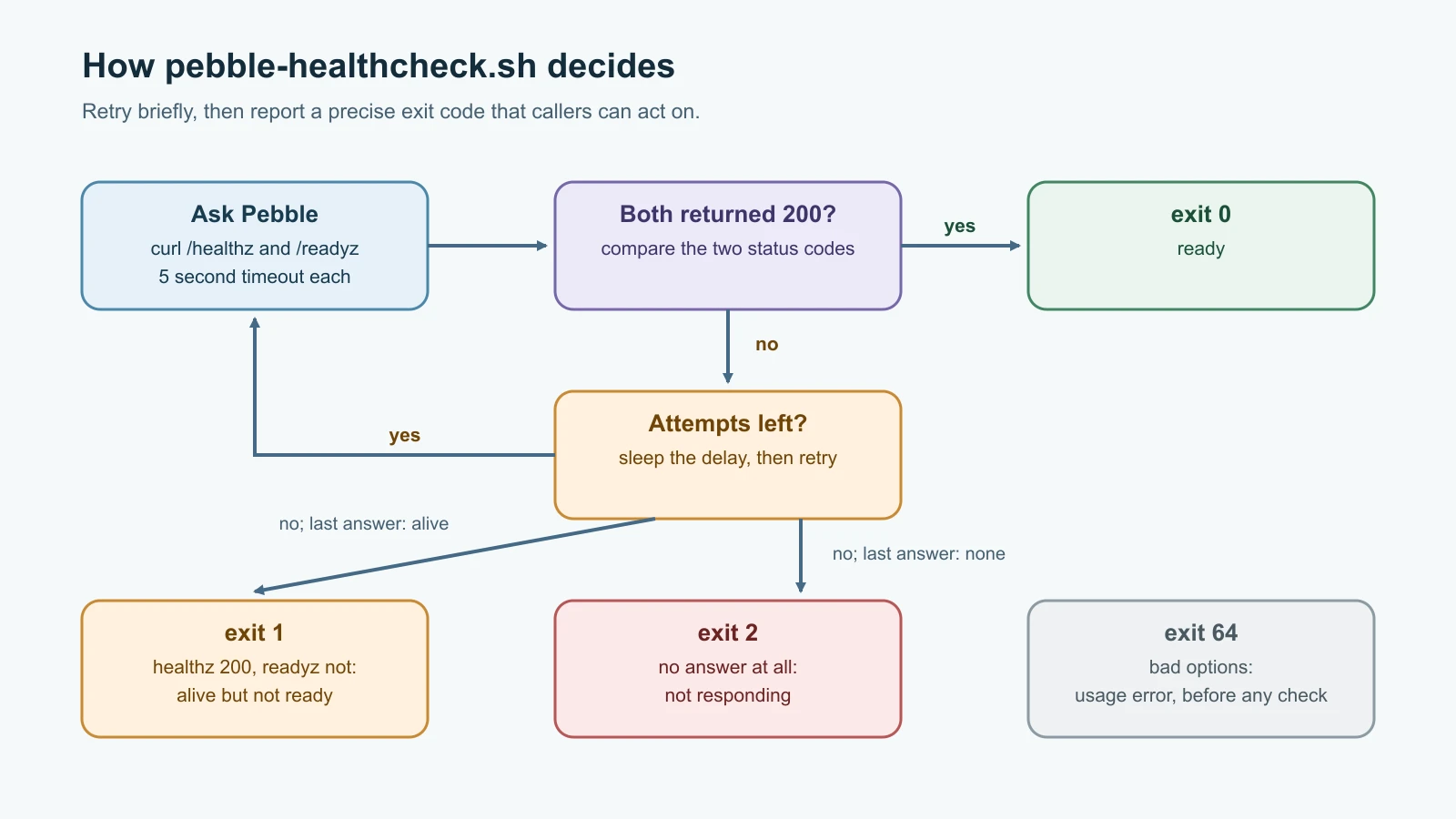
This script asks Pebble's /healthz and /readyz endpoints, retries a few times to ride out a brief blip, and exits with the codes above. Save it as pebble-healthcheck.sh:
1#!/usr/bin/env bash
2# Check that Pebble is alive and ready. Exit 0 = ready, 1 = alive but not ready,
3# 2 = not responding, 64 = usage error.
4set -euo pipefail
5
6usage() {
7  echo "usage: $0 [-u base_url] [-r retries] [-d delay_seconds]" >&2
8  exit 64
9}
10
11base_url="${PEBBLE_URL:-http://localhost:8080}"
12retries=3
13delay=2
14
15while getopts ":u:r:d:" opt; do
16  case "$opt" in
17    u) base_url="$OPTARG" ;;
18    r) retries="$OPTARG" ;;
19    d) delay="$OPTARG" ;;
20    *) usage ;;
21  esac
22done
23
24[[ "$retries" =~ ^[1-9][0-9]*$ ]] || usage
25[[ "$delay" =~ ^[0-9]+$ ]] || usage
26
27log() {
28  printf '%s %s\n' "$(date -u +%Y-%m-%dT%H:%M:%SZ)" "$*"
29}
30
31http_status() {
32  curl --silent --output /dev/null --write-out '%{http_code}' --max-time 5 "$1" || true
33}
34
35for attempt in $(seq 1 "$retries"); do
36  health=$(http_status "$base_url/healthz")
37  ready=$(http_status "$base_url/readyz")
38  if [[ "$health" == "200" && "$ready" == "200" ]]; then
39    log "OK $base_url is ready (attempt $attempt)"
40    exit 0
41  fi
42  log "attempt $attempt/$retries: healthz=$health readyz=$ready"
43  if (( attempt < retries )); then
44    sleep "$delay"
45  fi
46done
47
48if [[ "$health" == "200" ]]; then
49  log "FAIL $base_url is alive but not ready"
50  exit 1
51fi
52log "FAIL $base_url is not responding"
53exit 2
Some details worth noticing:
getoptsparses short options such as-u,-rand-d. The leading colon in":u:r:d:"lets the script handle unknown options itself, through the*)branch that callsusage.curl --write-out '%{http_code}'prints only the HTTP status. If Pebble is not running,curlprints000and exits with an error, and|| truestops strict mode from ending the script, because "no answer" is a result the script wants to handle, not a crash.--max-time 5makes sure a hung server cannot make the check hang forever. Every network call in a script needs a timeout.- The retry loop sleeps only between attempts, not after the last one.
Run it against Pebble while it is running, then stop Pebble and run it again:
1chmod +x pebble-healthcheck.sh
2./pebble-healthcheck.sh
3echo "exit code: $?"
4./pebble-healthcheck.sh -r 3 -d 2
5echo "exit code: $?"
On the machine used for this lesson, with Pebble running the first time and stopped the second time, the output was:
12026-11-13T08:16:29Z OK http://localhost:8080 is ready (attempt 1)
2exit code: 0
32026-11-13T08:16:30Z attempt 1/3: healthz=000 readyz=000
42026-11-13T08:16:32Z attempt 2/3: healthz=000 readyz=000
52026-11-13T08:16:35Z attempt 3/3: healthz=000 readyz=000
62026-11-13T08:16:35Z FAIL http://localhost:8080 is not responding
7exit code: 2
The timestamps show the delay of about two seconds between attempts; they are rounded to the whole second, so the gaps print as two or three. On the server from the previous lesson, Pebble listens on 127.0.0.1:8080, so the default URL works as is.
The backup script
Copying a database file while the service is writing to it can capture a half-written state. SQLite provides an online backup API that copies a consistent snapshot even while Pebble is running, and Python's sqlite3 module exposes it as backup(). The script uses it through a short embedded Python program, then checks the copy before keeping it. Save it as pebble-backup.sh:
1#!/usr/bin/env bash
2# Make a consistent, compressed, verified backup of Pebble's SQLite database
3# and keep only the newest $KEEP backups.
4set -euo pipefail
5
6db="${PEBBLE_DB_PATH:-/var/lib/pebble/pebble.db}"
7backup_dir="${BACKUP_DIR:-/var/backups/pebble}"
8keep="${KEEP:-7}"
9
10log() {
11  printf '%s %s\n' "$(date -u +%Y-%m-%dT%H:%M:%SZ)" "$*"
12}
13
14die() {
15  log "ERROR $*" >&2
16  exit 1
17}
18
19[[ -f "$db" ]] || die "database not found: $db"
20[[ "$keep" =~ ^[1-9][0-9]*$ ]] || die "KEEP must be a positive number, got: $keep"
21mkdir -p "$backup_dir"
22
23lock="$backup_dir/.lock"
24mkdir "$lock" 2>/dev/null || die "another backup is running ($lock exists)"
25cleanup() {
26  if [[ -n "${work:-}" ]]; then rm -rf "$work"; fi
27  rmdir "$lock"
28}
29trap cleanup EXIT
30work=$(mktemp -d)
31
32stamp=$(date -u +%Y%m%dT%H%M%SZ)
33snapshot="$work/pebble-$stamp.db"
34
35links=$(python3 - "$db" "$snapshot" <<'PY'
36import sqlite3, sys
37source = sqlite3.connect(sys.argv[1])
38target = sqlite3.connect(sys.argv[2])
39source.backup(target)
40check = target.execute("PRAGMA integrity_check").fetchone()[0]
41links = target.execute("SELECT COUNT(*) FROM links").fetchone()[0]
42target.close()
43source.close()
44if check != "ok":
45    sys.exit(f"integrity check failed: {check}")
46print(links)
47PY
48)
49
50gzip -9 "$snapshot"
51final="$backup_dir/pebble-$stamp.db.gz"
52mv "$snapshot.gz" "$final"
53log "OK backup $final ($links links, $(wc -c < "$final" | tr -d ' ') bytes)"
54
55# Timestamps in the names sort oldest to newest, so newest-first is a reverse sort.
56old_backups=$(printf '%s\n' "$backup_dir"/pebble-*.db.gz | sort -r | tail -n +"$((keep + 1))")
57if [[ -n "$old_backups" ]]; then
58  while IFS= read -r old; do
59    rm -f -- "$old"
60    log "removed old backup $old"
61  done <<< "$old_backups"
62fi
This script shows several habits that make operational scripts safe:
- Validate before acting. It refuses to run if the database is missing or
KEEPis not a positive number. The missing-file check matters more than it looks: without it,sqlite3.connectwould quietly create a new, empty database at that path. - Lock against overlap.
mkdireither creates the lock directory or fails if it already exists, in one step, so two copies of the script cannot both believe they hold the lock. On Linux, theflockcommand is a common alternative;mkdirworks on every Unix-like system. - Clean up with
trap.trap cleanup EXITrunscleanuphowever the script ends: success, failure or interruption. It removes the temporary folder and releases the lock. The trap is set only after the lock is taken, so a script that fails to get the lock never deletes another run's lock. - Write, verify, then publish. The snapshot is built in a private temporary folder, checked with SQLite's
PRAGMA integrity_check, compressed, and only then moved into the backup folder. A half-finished or corrupt backup never appears where a restore would look for it. - Delete carefully. Retention sorts by the timestamp in each file name, newest first, and deletes everything after the first
KEEPentries. It never useslsoutput for file names, andrm -f -- "$old"uses--so a file name starting with a dash cannot be mistaken for an option. - Report something useful. The final line says where the backup went, how many links it holds and its size, so a person reading the log can tell at a glance whether it looks right.
Run it against a local copy of Pebble's database with relative paths:
1chmod +x pebble-backup.sh
2PEBBLE_DB_PATH=./pebble.db BACKUP_DIR=./backups ./pebble-backup.sh
With three links in the database, the output on the machine used for this lesson was:
12026-11-13T08:16:29Z OK backup ./backups/pebble-20261113T081629Z.db.gz (3 links, 457 bytes)A backup you have never restored is only a hope. Restore it to a separate file and look inside:
1gunzip -c backups/pebble-*.db.gz > restored.db
2sqlite3 restored.db 'PRAGMA integrity_check;'
3sqlite3 restored.db 'SELECT url FROM links;'1ok
2https://www.debian.org/
3https://ubuntu.com/
4https://www.kernel.org/The sqlite3 command-line tool is in Ubuntu's sqlite3 package. You will turn this restore into a regular drill in Reliability, SLOs and Cloud Design Patterns.
Test the scripts
Scripts deserve tests as much as application code does. You do not need a framework: a few lines of Bash can start Pebble on a free port, run each script, and compare exit codes and results. Save this as test-scripts.sh in the same folder as pebble.py and the two scripts:
1#!/usr/bin/env bash
2# Tests for pebble-healthcheck.sh and pebble-backup.sh against a real Pebble.
3set -uo pipefail
4cd "$(dirname "$0")" || exit 1
5
6passed=0
7failed=0
8tmp=$(mktemp -d)
9pebble_pid=""
10
11stop_pebble() {
12  if [[ -n "$pebble_pid" ]]; then
13    kill "$pebble_pid" 2>/dev/null
14    wait "$pebble_pid" 2>/dev/null
15    pebble_pid=""
16  fi
17}
18trap 'stop_pebble; rm -rf "$tmp"' EXIT
19
20check() {
21  local name=$1 expected=$2 actual=$3
22  if [[ "$actual" == "$expected" ]]; then
23    echo "PASS $name"
24    passed=$((passed + 1))
25  else
26    echo "FAIL $name: expected '$expected', got '$actual'"
27    failed=$((failed + 1))
28  fi
29}
30
31port=$(python3 -c 'import socket; s = socket.socket(); s.bind(("127.0.0.1", 0)); print(s.getsockname()[1])')
32url="http://127.0.0.1:$port"
33export PEBBLE_PORT=$port PEBBLE_DB_PATH="$tmp/pebble.db"
34
35python3 pebble.py > "$tmp/pebble.log" &
36pebble_pid=$!
37for _ in $(seq 1 50); do
38  curl -s -o /dev/null "$url/healthz" && break
39  sleep 0.1
40done
41
42./pebble-healthcheck.sh -u "$url" -r 1 > /dev/null
43check "healthcheck passes when ready" 0 $?
44
45for site in https://www.debian.org/ https://ubuntu.com/ https://www.kernel.org/; do
46  curl -s -o /dev/null -X POST "$url/api/links" -d "{\"url\": \"$site\"}"
47done
48
49out=$(BACKUP_DIR="$tmp/backups" KEEP=3 ./pebble-backup.sh)
50check "backup exits 0" 0 $?
51newest=$(printf '%s\n' "$tmp/backups"/pebble-*.db.gz | sort | tail -1)
52gunzip -c "$newest" > "$tmp/restored.db"
53rows=$(python3 -c 'import sqlite3, sys; print(sqlite3.connect(sys.argv[1]).execute("SELECT COUNT(*) FROM links").fetchone()[0])' "$tmp/restored.db")
54check "backup restores all links" 3 "$rows"
55check "backup reports link count" 1 "$(grep -c '(3 links' <<< "$out")"
56
57for old in 20260101T000000Z 20260102T000000Z 20260103T000000Z 20260104T000000Z; do
58  touch "$tmp/backups/pebble-$old.db.gz"
59done
60BACKUP_DIR="$tmp/backups" KEEP=3 ./pebble-backup.sh > /dev/null
61kept=("$tmp/backups"/pebble-*.db.gz)
62check "keeps only newest 3 backups" 3 "${#kept[@]}"
63check "oldest backups removed first" 0 "$(printf '%s\n' "${kept[@]}" | grep -c "2026010[12]")"
64
65mkdir "$tmp/backups/.lock"
66BACKUP_DIR="$tmp/backups" ./pebble-backup.sh 2> /dev/null
67check "backup refuses to run while locked" 1 $?
68check "lock left for the running backup" yes "$([[ -d "$tmp/backups/.lock" ]] && echo yes)"
69rmdir "$tmp/backups/.lock"
70
71BACKUP_DIR="$tmp/backups" KEEP=0 ./pebble-backup.sh 2> /dev/null
72check "backup rejects KEEP=0" 1 $?
73
74PEBBLE_DB_PATH="$tmp/missing.db" BACKUP_DIR="$tmp/backups" ./pebble-backup.sh 2> /dev/null
75check "backup fails on missing database" 1 $?
76check "missing database is not created" no "$([[ -e "$tmp/missing.db" ]] && echo yes || echo no)"
77
78mv "$tmp/pebble.db" "$tmp/pebble.db.saved"
79mkdir "$tmp/pebble.db"
80./pebble-healthcheck.sh -u "$url" -r 2 -d 0 > /dev/null
81check "healthcheck exits 1 when not ready" 1 $?
82rmdir "$tmp/pebble.db"
83mv "$tmp/pebble.db.saved" "$tmp/pebble.db"
84
85stop_pebble
86./pebble-healthcheck.sh -u "$url" -r 2 -d 0 > /dev/null
87check "healthcheck exits 2 when down" 2 $?
88
89./pebble-healthcheck.sh -r 0 2> /dev/null
90check "healthcheck rejects zero retries" 64 $?
91
92echo "$passed passed, $failed failed"
93[[ $failed -eq 0 ]]
The test script deliberately does not use set -e, because it runs commands that are expected to fail and checks their exit codes. It cleans up with its own trap, picks a free port by asking the operating system for one, and waits for Pebble to answer before testing. Run it:
1chmod +x test-scripts.sh
2./test-scripts.sh1PASS healthcheck passes when ready
2PASS backup exits 0
3PASS backup restores all links
4PASS backup reports link count
5PASS keeps only newest 3 backups
6PASS oldest backups removed first
7PASS backup refuses to run while locked
8PASS lock left for the running backup
9PASS backup rejects KEEP=0
10PASS backup fails on missing database
11PASS missing database is not created
12PASS healthcheck exits 1 when not ready
13PASS healthcheck exits 2 when down
14PASS healthcheck rejects zero retries
1514 passed, 0 failedTo check the tests themselves, each important line of both scripts was broken on purpose, one at a time: accepting a ready check without /readyz, swapping exit codes, reversing the retention sort, keeping one backup too many, using mkdir -p so the lock never blocks, skipping the SQLite backup call and never releasing the lock. Every change made at least one test fail. One change initially survived: removing the missing-database check, because the script still failed a few lines later. That revealed the real problem, an empty database file created as a side effect, and the missing database is not created test was added for it.
Lint with ShellCheck
ShellCheck is a static analysis tool for shell scripts. It catches unquoted variables, useless cat commands, unreachable code, portability problems and many subtle bugs before you run anything. Install and run it on Ubuntu:
1sudo apt install -y shellcheck
2shellcheck pebble-healthcheck.sh pebble-backup.sh test-scripts.sh
No output means no findings. When ShellCheck does report something, each message has a code such as SC2086 that links to an explanation on its wiki. Read it, fix the cause, and only silence a warning with a # shellcheck disable= comment when you understand why it does not apply. In Continuous Integration you will run ShellCheck automatically on every change.
Schedule the backup with a systemd timer
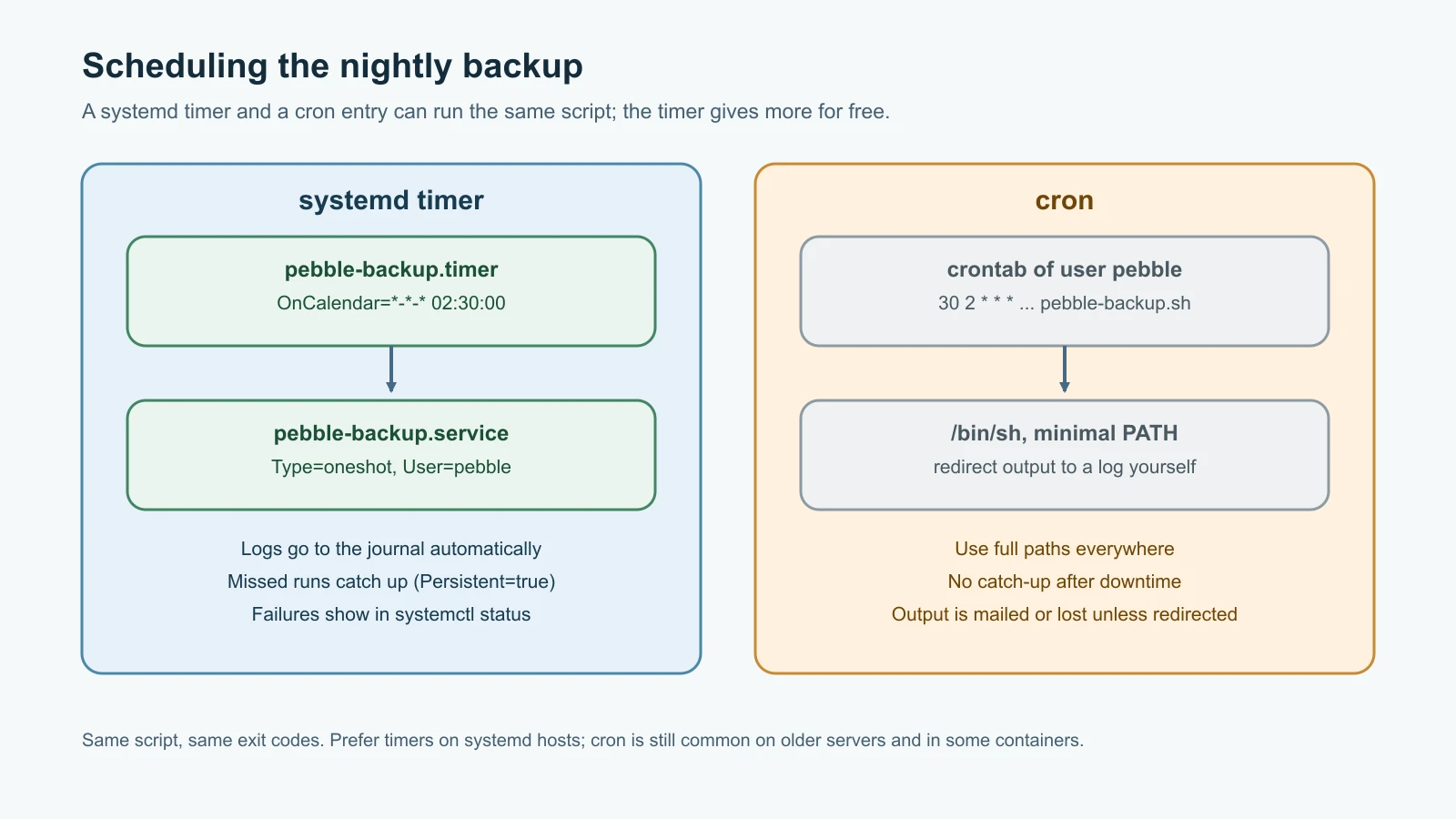
On a systemd server, the modern way to run a job on a schedule is a timer: a .timer unit that starts a matching .service unit. First install the script and create the backup folder, owned by the pebble user so the job does not need root:
1sudo install -m 0755 pebble-backup.sh /usr/local/bin/pebble-backup.sh
2sudo install -d -o pebble -g pebble -m 0750 /var/backups/pebble
3sudo apt install -y sqlite3
Create /etc/systemd/system/pebble-backup.service:
1[Unit]
2Description=Back up the Pebble database
3
4[Service]
5Type=oneshot
6User=pebble
7Group=pebble
8Environment=PEBBLE_DB_PATH=/var/lib/pebble/pebble.db
9Environment=BACKUP_DIR=/var/backups/pebble
10Environment=KEEP=7
11ExecStart=/usr/local/bin/pebble-backup.sh
Type=oneshot tells systemd the program runs to completion and exits, rather than staying running like Pebble itself. Then create /etc/systemd/system/pebble-backup.timer:
1[Unit]
2Description=Daily Pebble database backup
3
4[Timer]
5OnCalendar=*-*-* 02:30:00
6RandomizedDelaySec=10m
7Persistent=true
8
9[Install]
10WantedBy=timers.target
OnCalendar=*-*-* 02:30:00 means every day at 02:30. RandomizedDelaySec=10m adds up to ten minutes of random delay, so a fleet of servers does not hit shared storage at the same second. Persistent=true means that if the machine was off at 02:30, the backup runs as soon as it starts again. The timer starts the service with the same name, pebble-backup.service.
Enable the timer, run one backup by hand to prove it works, and read the result:
1sudo systemctl daemon-reload
2sudo systemctl enable --now pebble-backup.timer
3systemctl list-timers pebble-backup.timer
4sudo systemctl start pebble-backup.service
5journalctl -u pebble-backup -n 5 --no-pager
6sudo ls -l /var/backups/pebble
list-timers shows when the job runs next and when it last ran. The journal shows the script's OK backup line, and the backup folder holds the new file. If the script exits with an error, systemctl status pebble-backup.service shows it as failed, which your monitoring can alert on later.
The cron equivalent
cron is the classic Unix scheduler and is still everywhere, including servers without systemd and many container setups. Each line in a crontab has five time fields, minute (0 to 59), hour (0 to 23), day of month (1 to 31), month (1 to 12) and day of week (0 to 7, where both 0 and 7 are Sunday), followed by the command. Edit the pebble user's crontab with sudo crontab -u pebble -e and add:
130 2 * * * PEBBLE_DB_PATH=/var/lib/pebble/pebble.db BACKUP_DIR=/var/backups/pebble /usr/local/bin/pebble-backup.sh >> /var/backups/pebble/backup.log 2>&1
2*/5 * * * * /usr/local/bin/pebble-healthcheck.sh -r 2 -d 5 > /dev/null 2>&1 || logger -t pebble-healthcheck "health check failed with exit code $?"
The first line runs the backup at 02:30 every day and appends its output to a log file. The second runs the health check every five minutes and, if it fails, writes a message to the system log with logger. Remember three things about cron. It runs commands with /bin/sh and a minimal PATH, so use full paths. It does not catch up on runs missed while the machine was off. And it mails output to the crontab's owner unless you redirect it, which on most servers means the output silently disappears. Timers handle all three better, which is why this course prefers them on systemd hosts.
The same ideas in PowerShell
On Windows, PowerShell scripts do the same jobs with different syntax. The concepts map directly:
| Bash | PowerShell |
|---|---|
set -euo pipefail | $ErrorActionPreference = 'Stop' and Set-StrictMode -Version Latest |
exit 2 | exit 2 |
${KEEP:-7} | $keep = if ($env:KEEP) { $env:KEEP } else { 7 } |
curl | Invoke-WebRequest |
trap cleanup EXIT | try { ... } finally { ... } |
gzip | Compress-Archive |
sort -r | tail -n +8 | Sort-Object -Descending | Select-Object -Skip 7 |
| cron or a systemd timer | Task Scheduler, Register-ScheduledTask |
Here is the core of the health check in PowerShell 7:
1$base = if ($env:PEBBLE_URL) { $env:PEBBLE_URL } else { 'http://localhost:8080' }
2try {
3    $health = Invoke-WebRequest -Uri "$base/healthz" -TimeoutSec 5 -SkipHttpErrorCheck
4    $ready = Invoke-WebRequest -Uri "$base/readyz" -TimeoutSec 5 -SkipHttpErrorCheck
5} catch {
6    Write-Output "FAIL $base is not responding"
7    exit 2
8}
9if ($health.StatusCode -eq 200 -and $ready.StatusCode -eq 200) {
10    Write-Output "OK $base is ready"
11    exit 0
12}
13Write-Output "FAIL $base is alive but not ready"
14exit 1
-SkipHttpErrorCheck makes Invoke-WebRequest return a 503 response instead of throwing an error, so the script can inspect the status code itself; a connection failure still throws and lands in catch. Save it as pebble-healthcheck.ps1 and run it with pwsh ./pebble-healthcheck.ps1.
Mistakes beginners make
- Leaving variables unquoted, so a path with a space becomes two arguments.
- Writing scripts without
set -euo pipefail, so they keep running after a failure. - Assuming
set -ecatches every failure, including commands insideiftests and&&lists. - Returning exit code 0 after printing an error message, so callers think it worked.
- Calling network services without a timeout.
- Parsing
lsoutput to get file names. - Copying a live database file with
cpinstead of using the database's backup method. - Writing the backup straight into its final location, so a failed run leaves a broken file that looks valid.
- Never testing a restore.
- Running scheduled jobs as root when a service user would do.
- Relying on cron without full paths, logging or any check that the job actually ran.
Recap and try it yourself
A good operations script starts with a shebang and set -euo pipefail, quotes every variable, takes configuration from the environment with sensible defaults, validates its input, and returns exit codes that callers can act on. Functions keep it readable, trap guarantees cleanup, a lock prevents overlapping runs, and writing to a temporary location before publishing keeps half-finished results out of sight. Pebble now has a health check that distinguishes "down" from "not ready" and a backup that is consistent, verified, compressed, rotated and tested with fourteen checks. A systemd timer runs the backup every night, logs to the journal and catches up after downtime; cron does the same job with fewer guarantees.
Try it yourself:
- Run
test-scripts.sh, then run ShellCheck on all three scripts and fix anything it reports. - Add a
-qoption topebble-healthcheck.shthat prints nothing and only sets the exit code, and add a test for it. - Write
pebble-restore.sh, which takes a backup file, refuses to run while thepebbleservice is active, decompresses the backup to a temporary file, checks it withPRAGMA integrity_check, and only then replaces the live database. Test it with a backup from your machine. - Change the timer to run every six hours with
OnCalendar=*-*-* 00/6:00:00. Usesystemd-analyze calendar '*-*-* 00/6:00:00'to check when it will next fire before you enable it.
Sources checked on 13 November 2026: the GNU Bash Reference Manual and its set builtin section (local Bash 5.2 man bash used for the -e exceptions); SQLite's online backup API and Python's sqlite3 backup method; ShellCheck; systemd manual pages for systemd.timer and systemd.time; Ubuntu's crontab(5) manual page; Microsoft's Invoke-WebRequest documentation; and the roadmap.sh DevOps roadmap. Pebble is fictional.