
DevOps course · lesson 19 of 24
- 1What Is DevOps?
- 2A Language and a Service to Operate
- 3Linux and the Terminal
- 4Bash Scripting for Ops
- 5Git and Collaboration
- 6Networking for DevOps
- 7Web Servers, Proxies and Load Balancers
- 8Docker for DevOps
- 9Docker Compose and Multi-Service Apps
- 10Cloud Providers: AWS, Azure and Google Cloud
- 11Serverless Functions and Platforms
- 12Terraform and Infrastructure as Code
- 13Ansible and Configuration Management
- 14Continuous Integration with GitHub Actions and GitLab CI
- 15Continuous Delivery and Deployment Strategies
- 16Secret Management
- 17Kubernetes Basics
- 18Kubernetes in Practice
- 19GitOps with Argo CD and Flux
- 20Service Mesh: Istio, Linkerd, Consul and Envoy
- 21Metrics and Alerting with Prometheus and Grafana
- 22Logs and Tracing with Loki, Elastic and OpenTelemetry
- 23Reliability, SLOs and Cloud Design Patterns
- 24Capstone: Pebble to Production
After this lesson, you will be able to explain the GitOps control loop, organize Kubernetes configuration for more than one environment, deploy a local Pebble workload with Argo CD, and recognize how Flux implements the same ideas. You will also know how drift correction works, when automatic deletion is dangerous, and how to recover through a reviewed Git change.
In Kubernetes in Practice, Pebble's Deployment, Service, configuration and Helm chart were applied to a local kind cluster. Here, we put the desired Kubernetes state in a Git repository and install a controller that watches it. A change becomes a reviewed commit. The controller notices that commit and brings the cluster toward the declared state.
GitOps is a deployment approach
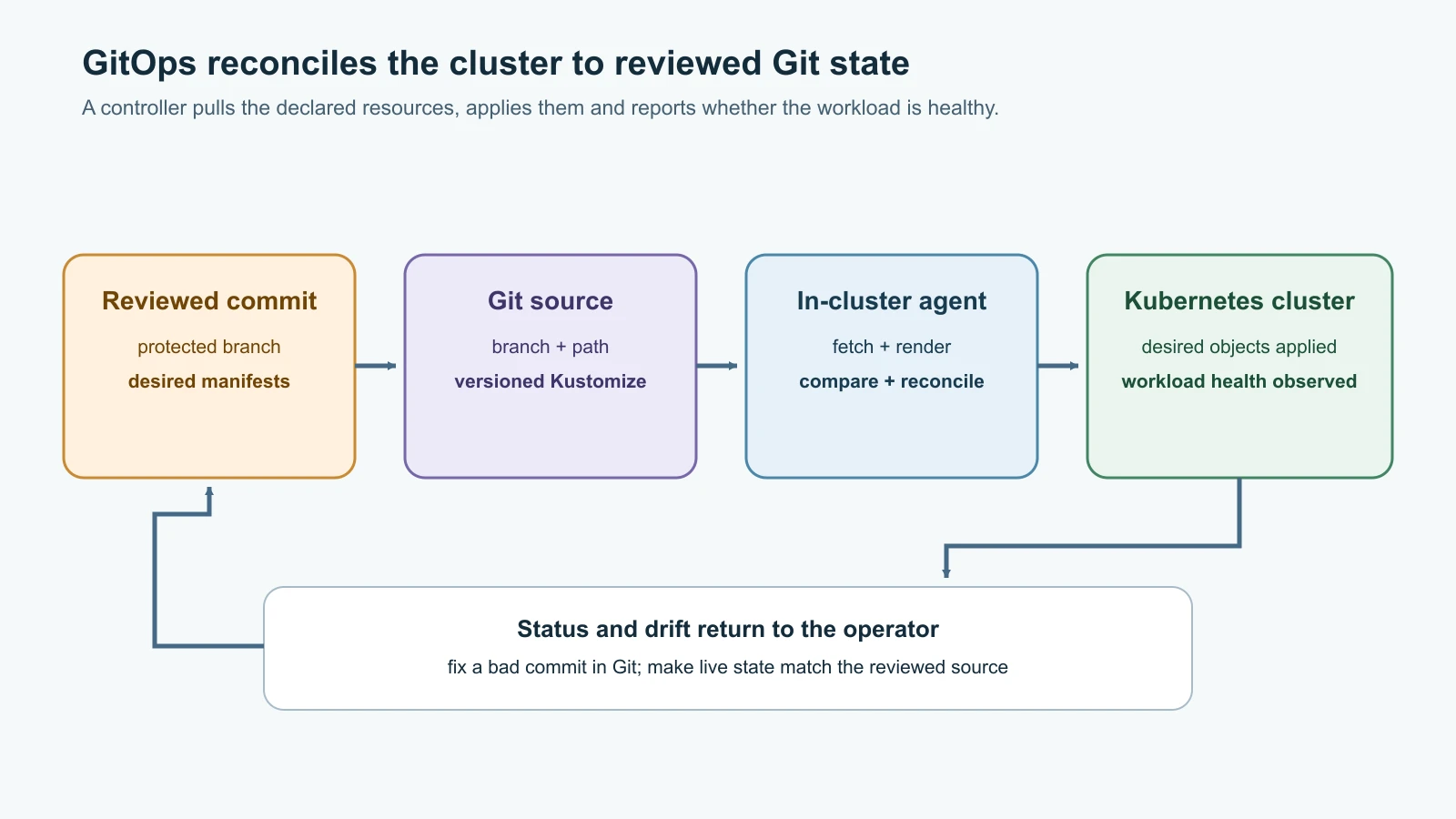
GitOps uses a version-controlled, declarative description of a system as the source for operations. A reconciler watches that description and continually compares it with what is running. If it sees a difference, it can apply the approved state or report that an operator needs to intervene. The OpenGitOps project describes the approach through four principles: declarative state, versioned and immutable state, automatic pull, and continuous reconciliation.
This differs from a conventional push deployment. In a push pipeline, a CI runner or release job holds credentials that let it connect to the Kubernetes API and apply objects. In a pull-based GitOps setup, an agent inside the cluster reads the repository and makes the API changes from inside the cluster. CI can still build, test and publish the Pebble image, then update the image reference in a configuration repository. It does not need direct deployment credentials for that cluster.
GitOps does not mean "merge any commit and deploy it everywhere." A branch rule, code review, environment promotion, policy check or human approval can gate the change before the controller sees it. A team can use automatic sync in development and require a reviewed release tag or manual sync in production. The deployment policy is part of the design.
The Git repository is the source for the fields the controller manages. The cluster still has runtime state such as Pod status, allocated addresses and generated fields. Kubernetes controllers create some objects from others. GitOps tools compare the rendered desired resources with the live objects they track; they do not replace Kubernetes controllers or turn every runtime detail into a file in Git.
Separate application code from deployment state
The application repository contains Pebble's source code, tests, Dockerfile and CI workflow. A configuration repository contains the Kubernetes manifests that describe where and how a built image should run. Keeping these responsibilities separate is common, but a monorepo can also keep source and deployment directories side by side. The key is to know which path a deployment controller watches and who can approve changes to it.
Here is a small configuration repository for a development cluster:
1pebble-gitops/
2  clusters/
3    dev/
4      pebble/
5        kustomization.yaml
6        namespace.yaml
7        deployment.yaml
8        service.yaml
Kustomize is a Kubernetes configuration tool that composes plain manifests and can generate ConfigMaps with content hashes. The example below keeps the base URL as ordinary configuration and lets the generated name change when its value changes.
clusters/dev/pebble/namespace.yaml:
1apiVersion: v1
2kind: Namespace
3metadata:
4 name: pebble-labclusters/dev/pebble/kustomization.yaml:
1apiVersion: kustomize.config.k8s.io/v1beta1
2kind: Kustomization
3resources:
4  - namespace.yaml
5  - deployment.yaml
6  - service.yaml
7configMapGenerator:
8  - name: pebble-config
9    literals:
10 - PEBBLE_BASE_URL=http://localhost:8080clusters/dev/pebble/deployment.yaml:
1apiVersion: apps/v1
2kind: Deployment
3metadata:
4  name: pebble
5  namespace: pebble-lab
6  labels:
7    app: pebble
8spec:
9  replicas: 1
10  selector:
11    matchLabels:
12      app: pebble
13  template:
14    metadata:
15      labels:
16        app: pebble
17    spec:
18      automountServiceAccountToken: false
19      securityContext:
20        runAsNonRoot: true
21        runAsUser: 10001
22        seccompProfile:
23          type: RuntimeDefault
24      containers:
25        - name: pebble
26          image: pebble:0.3.0
27          imagePullPolicy: IfNotPresent
28          ports:
29            - name: http
30              containerPort: 8080
31          envFrom:
32            - configMapRef:
33                name: pebble-config
34          readinessProbe:
35            httpGet:
36              path: /readyz
37              port: http
38            periodSeconds: 5
39          livenessProbe:
40            httpGet:
41              path: /healthz
42              port: http
43            periodSeconds: 10
44          resources:
45            requests:
46              cpu: 100m
47              memory: 128Mi
48            limits:
49              cpu: 500m
50              memory: 256Mi
51          securityContext:
52            allowPrivilegeEscalation: false
53            readOnlyRootFilesystem: true
54          volumeMounts:
55            - name: data
56              mountPath: /data
57      volumes:
58        - name: data
59          emptyDir:
60 sizeLimit: 1Giclusters/dev/pebble/service.yaml:
1apiVersion: v1
2kind: Service
3metadata:
4  name: pebble
5  namespace: pebble-lab
6spec:
7  type: ClusterIP
8  selector:
9    app: pebble
10  ports:
11    - name: http
12      port: 8080
13      targetPort: http
The image tag matches the local image built in Kubernetes Basics. On kind, load that image into the nodes before scheduling Pebble. In a shared or production cluster, publish a verified image and refer to a unique version or digest instead of relying on a local-only tag. A digest identifies exact image content; an image tag can be moved to different content by a registry user.
The ConfigMap generator adds a hash to the generated ConfigMap's name and rewrites the reference in the Deployment. Changing PEBBLE_BASE_URL therefore changes the Pod template and triggers a rollout. For a real service, use an environment-appropriate URL and validate it before merging.
Add a repository and inspect the rendered objects
Create a Git repository on your chosen provider, clone it, and add the files above under clusters/dev/pebble. Commit and push them to the main branch. The repository can be private, but Argo CD must then have a restricted credential or deploy key that can read it. Follow the secret management guidance and the Git provider's least-privilege recommendations. Do not put a token in the repository, an Application manifest, or a command that may be saved in shell history.
Before installing a controller, ask Kustomize to render the directory. From the root of your cloned repository, run:
1kubectl kustomize clusters/dev/pebbleReview the output. It should contain the Namespace, Deployment, Service and a generated ConfigMap with a hashed name. Confirm the image tag, namespace, selectors, probes, resource values and mounted volume. This review is useful even after a controller is installed: a reconciler faithfully applying an incorrect manifest can make a mistake consistent and repeatable.
The development overlay uses one replica and an emptyDir for the fictional Pebble lab. It is deliberately unsuitable for real URL data. The Pods do not share that SQLite file, and the volume disappears when the Pod is replaced. Do not publish the example as a production system by changing the namespace and calling it done.
Install Argo CD in the local cluster
Argo CD is a declarative continuous-delivery tool for Kubernetes. Its API server provides a user interface and CLI endpoint, its repository server fetches and renders sources, and its application controller compares desired resources with live cluster state and performs sync operations. The controller runs inside the cluster and watches the Git path you configure.
You need the local kind cluster from Kubernetes Basics with the pebble:0.3.0 image loaded. If you deleted it at the end of the previous lesson, recreate it from the same kind-config.yaml and load the image again:
1kind create cluster --name pebble --config kind-config.yaml --wait 90s
2kind load docker-image pebble:0.3.0 --name pebble
If the Helm release from Kubernetes in Practice is still installed, remove it with helm uninstall pebble -n pebble-lab first, so Argo CD does not compete with Helm for the same Deployment and Service.
This exercise uses Argo CD v3.6.1, released on 4 November 2026. Argo CD's compatibility table lists the 3.6 release line as tested with Kubernetes v1.37, which matches the local kind cluster. Pin the version in the manifest URL so a later release does not silently change the exercise. Check the current context first:
1kubectl config current-contextCreate the namespace and install the official single-cluster manifests for the pinned release:
1kubectl create namespace argocd
2kubectl apply --server-side --force-conflicts -n argocd \
3  -f https://raw.githubusercontent.com/argoproj/argo-cd/v3.6.1/manifests/install.yaml
4kubectl wait --for=condition=Established crd/applications.argoproj.io --timeout=120s
5kubectl wait -n argocd --for=condition=Available deployment --all --timeout=300s
6kubectl get deployments -n argocd
The manifests install Argo CD components and custom resource definitions into the cluster. Keep the API server local for this exercise. Do not change its Service to LoadBalancer or expose it to the internet as a shortcut. The official getting-started guide describes secure access patterns and initial credentials; production access needs TLS, authentication, network controls and carefully scoped roles.
Create an Argo CD Application resource that points to the repository directory. Replace the repository URL with the HTTPS URL for your Git repository. Use an SSH URL only after configuring its private deploy key through Argo CD's repository credential mechanism.
pebble-application.yaml:
1apiVersion: argoproj.io/v1alpha1
2kind: Application
3metadata:
4  name: pebble-dev
5  namespace: argocd
6spec:
7  project: default
8  source:
9    repoURL: https://github.com/YOUR_ACCOUNT/pebble-gitops.git
10    targetRevision: main
11    path: clusters/dev/pebble
12  destination:
13    server: https://kubernetes.default.svc
14    namespace: pebble-lab
15  syncPolicy:
16    automated:
17      selfHeal: true
18    syncOptions:
19      - CreateNamespace=true
Apply the Application after replacing YOUR_ACCOUNT:
1kubectl apply -f pebble-application.yaml
2kubectl get applications -n argocd
3kubectl get deployments,pods,services -n pebble-lab
The Application is the instruction Argo CD follows: watch main, render clusters/dev/pebble, and deploy the namespaced resources into the in-cluster Kubernetes API. The CreateNamespace sync option makes sure the destination exists before namespaced resources are applied. The first sync can take a short time while the controller fetches the repository and waits for the Deployment health check.
For a local status page, keep this port-forward running in a terminal:
1kubectl port-forward -n argocd svc/argocd-server 8080:443Open https://localhost:8080 and accept the local certificate warning for this disposable cluster only. Use the credentials method in the official guide, then inspect the pebble-dev Application. The page should show the Git revision, sync status and health status. Do not copy its initial password into a shared note or leave it as the production administrator credential.
Follow a change from commit to cluster
Change the base URL in clusters/dev/pebble/kustomization.yaml, render the result again, then commit and push. A GitOps reconciler polls or receives repository events according to its configuration. Argo CD should report the new revision, update the generated ConfigMap, and roll out a Pod with the new environment value.
1kubectl kustomize clusters/dev/pebble
2git diff
3git add clusters/dev/pebble
4git commit -m "chore: update Pebble development URL"
5git push
6kubectl get applications -n argocd
7kubectl rollout status deployment/pebble -n pebble-lab --timeout=120s
8kubectl get pods -n pebble-lab
The commit is the reviewable change record; the controller's status shows whether the cluster converged. Application code still travels through its CI process: CI tests and builds the image, pushes it to a registry, and a reviewed configuration change updates the image reference. A deployment controller should not build arbitrary source code from a pull request with cluster permissions.
The selfHeal setting asks Argo CD to correct live changes to fields it manages. To see it in this local workload, briefly scale the Deployment directly:
1kubectl scale deployment/pebble --replicas=2 -n pebble-lab
2kubectl get deployments,pods -n pebble-lab --watch
Argo CD should notice that the live replica count differs from Git and restore one replica. Stop the watch with Ctrl-C. Do not send traffic or create data during this short experiment: the two Pebble Pods have separate temporary SQLite volumes. In a real incident, a direct change may be necessary to restore service; record what changed and make a follow-up Git commit so the source and cluster agree again.
Pruning is disabled unless you turn it on. Pruning means deleting a live object because its manifest was removed from the tracked source. This example omits prune: true, so it avoids automatic deletion while you are learning. Before enabling pruning, understand what resource deletion means for its data, volume claims, namespace and dependencies. A missing manifest caused by a typo or bad path should not be allowed to empty an application without an explicit policy.
Automatic sync is also not a general rollback tool. Argo CD does not perform a normal rollback against an Application with automated sync enabled; the usual recovery is a new Git commit that restores the previous known-good manifest. Reverting a commit preserves the audit trail and gives the controller a new desired revision. It does not reverse database writes, external side effects or incompatible schema migrations.
How Flux expresses the same control loop
Flux is a toolkit of Kubernetes controllers that reconcile Git repositories, artifacts, Kustomize builds and Helm releases. Its bootstrap procedure installs controllers and stores their own configuration in a Git repository. Its core projects do not provide a built-in graphical dashboard like Argo CD's; teams commonly inspect Flux through the CLI, Kubernetes conditions, events and ecosystem interfaces.
Flux describes a source and a reconciliation separately. A GitRepository tells source-controller where to fetch content. A Kustomization tells kustomize-controller which path to build, where to apply it, how often to reconcile, whether to prune, and whether to wait for health checks. This short example shows the shape of those objects; substitute a repository you control and keep them in the Flux bootstrap path:
1apiVersion: source.toolkit.fluxcd.io/v1
2kind: GitRepository
3metadata:
4  name: pebble-gitops
5  namespace: flux-system
6spec:
7  interval: 1m
8  url: https://github.com/YOUR_ACCOUNT/pebble-gitops
9  ref:
10    branch: main
11---
12apiVersion: kustomize.toolkit.fluxcd.io/v1
13kind: Kustomization
14metadata:
15  name: pebble-dev
16  namespace: flux-system
17spec:
18  interval: 5m
19  path: ./clusters/dev/pebble
20  prune: false
21  sourceRef:
22    kind: GitRepository
23    name: pebble-gitops
24  targetNamespace: pebble-lab
25  wait: true
26  timeout: 2m
Flux uses spec.prune directly on its Kustomization resource. With pruning false, objects removed from the source are left behind until an operator handles them. If you enable pruning, deleting the Flux Kustomization can also garbage-collect objects it previously applied, depending on its deletion policy. Read the data-retention consequences before changing those settings.
To install Flux with a Git provider, the current recommended method is flux bootstrap. The command installs selected controllers, writes their configuration into a Git repository, and configures the cluster to reconcile that repository. Bootstrap needs cluster administrator access and a provider credential with the permissions it requires. Flux's setup guide recommends using a dedicated provider identity and fine-grained token scopes. Use the exact provider-specific procedure in the Flux installation guide rather than copying a personal access token into a lesson or a checked-in script.
Both tools implement the same general pattern: fetch the desired source, render it, compare it with cluster objects, apply changes, and report readiness or errors. Argo CD often appeals to teams that want a clear application inventory and UI. Flux can be a natural fit for teams that want modular controllers and Kubernetes resources to define reconciliation. Neither choice automatically supplies a safe repository policy, secret encryption, a rollout strategy or a data recovery plan.
Promote a change across environments
Avoid having development and production follow the same mutable branch if every commit should not reach both clusters. A repository can keep overlays for dev, staging and production, or keep environment configuration in separate repositories when access controls need a stronger boundary.
For example, CI can build Pebble once and publish an image identified by its commit SHA or digest. A pull request updates the development overlay. After the development checks and review pass, a second reviewed change promotes that same image identity to staging, then production. Do not rebuild the source independently for each environment; promote the artifact that was already tested. Keep per-environment settings separate and keep credentials out of the manifest repository unless they are encrypted for the intended controller and protected through an approved key workflow.
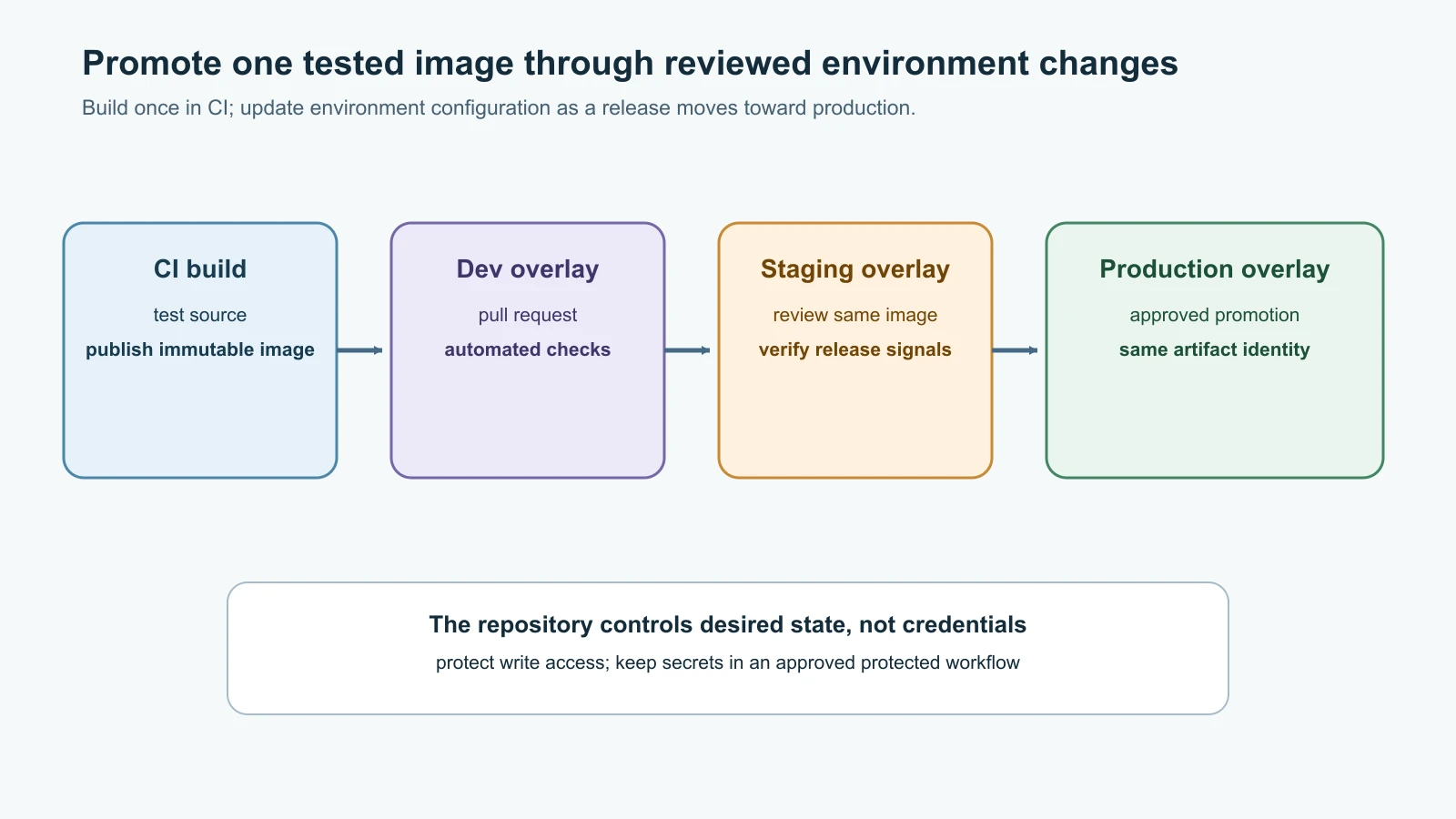
The controller should have access only to the repository paths and cluster namespaces it needs. Argo CD Projects can restrict trusted repositories, destinations and resource kinds. Flux has controller RBAC and multi-tenancy settings, including ways to constrain cross-namespace references. Keep these controls aligned with team boundaries. A Git write permission can become permission to change the cluster state covered by that repository path, so protect branches, review changes and audit deploy keys just as carefully as cluster credentials.
Diagnose a reconciliation that is not healthy
When an application does not converge, follow the source-to-runtime path instead of repeatedly editing the live resource:
1kubectl get applications -n argocd
2kubectl describe application pebble-dev -n argocd
3kubectl get events -n argocd --sort-by=.lastTimestamp
4kubectl get deployments,pods,services -n pebble-lab
5kubectl describe deployment pebble -n pebble-lab
Check the Application's repository URL, target revision and path first. Then check whether Argo CD can authenticate to Git and whether Kustomize can render the directory. If the application is synced but unhealthy, inspect the Kubernetes Deployment, Pod events and container logs using the diagnostics from Kubernetes in Practice. A sync status and a health status answer different questions: the manifests may match Git even though the program is crashing or failing its readiness probe.
For Flux, inspect source and Kustomization conditions with the CLI:
1flux get sources git -A
2flux get kustomizations -A
3kubectl describe gitrepository pebble-gitops -n flux-system
4kubectl describe kustomization pebble-dev -n flux-system
5kubectl get events -n flux-system --sort-by=.lastTimestamp
A failed source condition points toward repository access, branch or fetch problems. A source that is ready with a failed Kustomization points further down the path: wrong directory, invalid manifests, denied API permissions or unhealthy resources. Read the condition message before forcing a reconcile. If the problem is a bad commit, fix or revert it in Git so every operator sees the same recovery state.
Mistakes beginners make
- Treating GitOps as a replacement for code review, branch protection, tests or release approval.
- Letting a CI runner keep broad cluster-admin credentials when an in-cluster reconciler can pull approved state.
- Confusing a successful sync with a healthy application.
- Using a floating image tag and assuming a changed image will always produce a new Pod template.
- Enabling pruning without considering namespaces, persistent claims and data deletion.
- Making manual changes during an incident and forgetting to record the final state in Git.
- Storing plain-text credentials in the configuration repository or in a repository credential manifest.
- Giving a controller access to every namespace and repository when it only needs one workload path.
- Using one branch for every environment without a deliberate promotion and approval rule.
- Expecting rollback to undo database changes or to work while automated sync immediately reapplies the current Git revision.
- Scaling the temporary SQLite Pebble example as if its replicas shared one database.
Recap and try it yourself
GitOps keeps declarative, versioned desired state in a repository and uses a pull-based reconciler to converge the cluster. Argo CD represents a deployment with an Application and shows sync and health status in a UI and CLI. Flux uses source and reconciliation resources handled by separate controllers. Both tools can detect changes from Git and live drift, but their deletion, permissions and environment-promotion settings need deliberate review.
Try it yourself:
- Create the development Kustomize directory, render it, and confirm that the generated ConfigMap name changes after you edit
PEBBLE_BASE_URL. - Install Argo CD in the local kind cluster, point an Application at your Git repository, and inspect its revision, sync state and health.
- Change the image to a nonexistent local tag in a branch. Observe the failing Pod, then revert the Git change and follow the healthy rollout.
- Scale the local Deployment manually and observe self-healing. Explain why the same test is unsafe for a service that writes valuable state to Pod-local SQLite files.
- Compare the Argo CD Application with Flux's GitRepository and Kustomization resources. Identify where each example declares the repository, path, namespace, interval and pruning policy.
- Write a short promotion rule describing how one tested image moves from development to production and which review is required at each step.
Go deeper
- OpenGitOps principles
- Argo CD getting started
- Argo CD automated sync
- Argo CD declarative setup
- Argo CD security
- Argo CD tested Kubernetes versions
- Flux get started
- Flux Kustomizations
- Flux installation and bootstrap
- Flux security best practices
- Continuous Delivery and Deployment Strategies
- Secret Management
- Kubernetes in Practice
Sources checked on 14 November 2026: OpenGitOps principles; Argo CD v3.6.1 release, getting started, tested Kubernetes versions, automated sync, declarative setup and security; Flux installation, bootstrap, Kustomization and security best practices. Pebble is fictional. The local SQLite configuration is a disposable learning workload, not a production data plan.