
DevOps course · lesson 16 of 24
- 1What Is DevOps?
- 2A Language and a Service to Operate
- 3Linux and the Terminal
- 4Bash Scripting for Ops
- 5Git and Collaboration
- 6Networking for DevOps
- 7Web Servers, Proxies and Load Balancers
- 8Docker for DevOps
- 9Docker Compose and Multi-Service Apps
- 10Cloud Providers: AWS, Azure and Google Cloud
- 11Serverless Functions and Platforms
- 12Terraform and Infrastructure as Code
- 13Ansible and Configuration Management
- 14Continuous Integration with GitHub Actions and GitLab CI
- 15Continuous Delivery and Deployment Strategies
- 16Secret Management
- 17Kubernetes Basics
- 18Kubernetes in Practice
- 19GitOps with Argo CD and Flux
- 20Service Mesh: Istio, Linkerd, Consul and Envoy
- 21Metrics and Alerting with Prometheus and Grafana
- 22Logs and Tracing with Loki, Elastic and OpenTelemetry
- 23Reliability, SLOs and Cloud Design Patterns
- 24Capstone: Pebble to Production
After this lesson, you will be able to identify secrets and common leak paths, choose how an application should receive a credential, explain the role of Vault and cloud secret stores, and plan a credential rotation. You will also know how Sealed Secrets and External Secrets Operator (ESO) fit into a Kubernetes workflow, and what to do if a secret reaches Git.
In Continuous Delivery and Deployment Strategies, the pipeline packages Pebble and promotes the same artifact between environments. The artifact should not contain a production password, API token or private key. The application still needs a way to authenticate to PostgreSQL, a cloud service or an external API. Secret management is the work of storing those values, deciding who can retrieve them, delivering them to the right workload and replacing them safely.
What counts as a secret
A secret is a value that grants access or proves identity and should not be available to everyone who can read the application. Examples include a database password, cloud access token, private SSH key, API credential, webhook signing key, TLS private key and encryption key. A username, service URL or public certificate is usually configuration rather than a secret, though the surrounding details can still be sensitive.
Secrets differ from ordinary settings in the damage an exposed value can cause. PEBBLE_PORT=8080 changes behavior. A valid database password can let someone read or alter stored links. The same kind of value can also be a secret in one environment and harmless sample data in another. Label and protect credentials based on what they can access, how long they remain valid and what an attacker could do with them.
An encryption key is not just another password. If it protects backups, signing material or stored customer data, losing it can make that data unavailable; exposing it can defeat the protection. Keep key administration separate from application secrets where the platform supports it, limit access, and plan recovery before replacing or deleting keys.
Where secrets leak
Putting a value in a file is only one way it can escape. Check the whole path from creation to retirement:
- Source code, configuration files, sample commands and Git history. Deleting a credential in a later commit does not remove it from earlier commits or clones.
- CI output, test failure messages, shell tracing, deployment logs, environment dumps and build artifacts. A masked value can still leak in a different encoding or context.
- Container image layers, build arguments, Docker build logs, package archives, crash reports and backups.
- Terraform state, plan files and debug output. As Terraform and Infrastructure as Code explains, marking a Terraform value sensitive hides some display output; it does not remove it from state.
- Process arguments, environment inspection, temporary files, terminal history, support tickets and chat messages.
- Overbroad permissions in a cloud account, CI runner, Kubernetes namespace or secret store.
The safest credential is one the workload does not need. If Pebble can use a cloud workload identity to request access, there is no cloud API key to copy into a .env file. For credentials that are required, reduce how many copies exist, how long they live, who can read them and what each copy can do.
Choose how the application receives a secret
An environment variable is easy to pass to a process and is supported by many application frameworks. It is a useful interface for non-sensitive configuration. For a secret, however, variables may be exposed through process inspection, diagnostic endpoints, crash reports or code that dumps the environment. They are inherited by child processes unless the application limits that behavior. Treat them as a delivery mechanism with trade-offs, not as a secret store.
A file can work well for a service that reads a mounted credential at startup. Restrict who can read the file, keep it outside the source tree and image, and avoid copying it into logs or backups. File delivery can reduce accidental exposure in process listings, but any user or process with enough access can still read it. Pebble's Compose example uses a local bind-mounted file for a single-machine exercise; that is a development convenience, not a centrally managed production secret service.
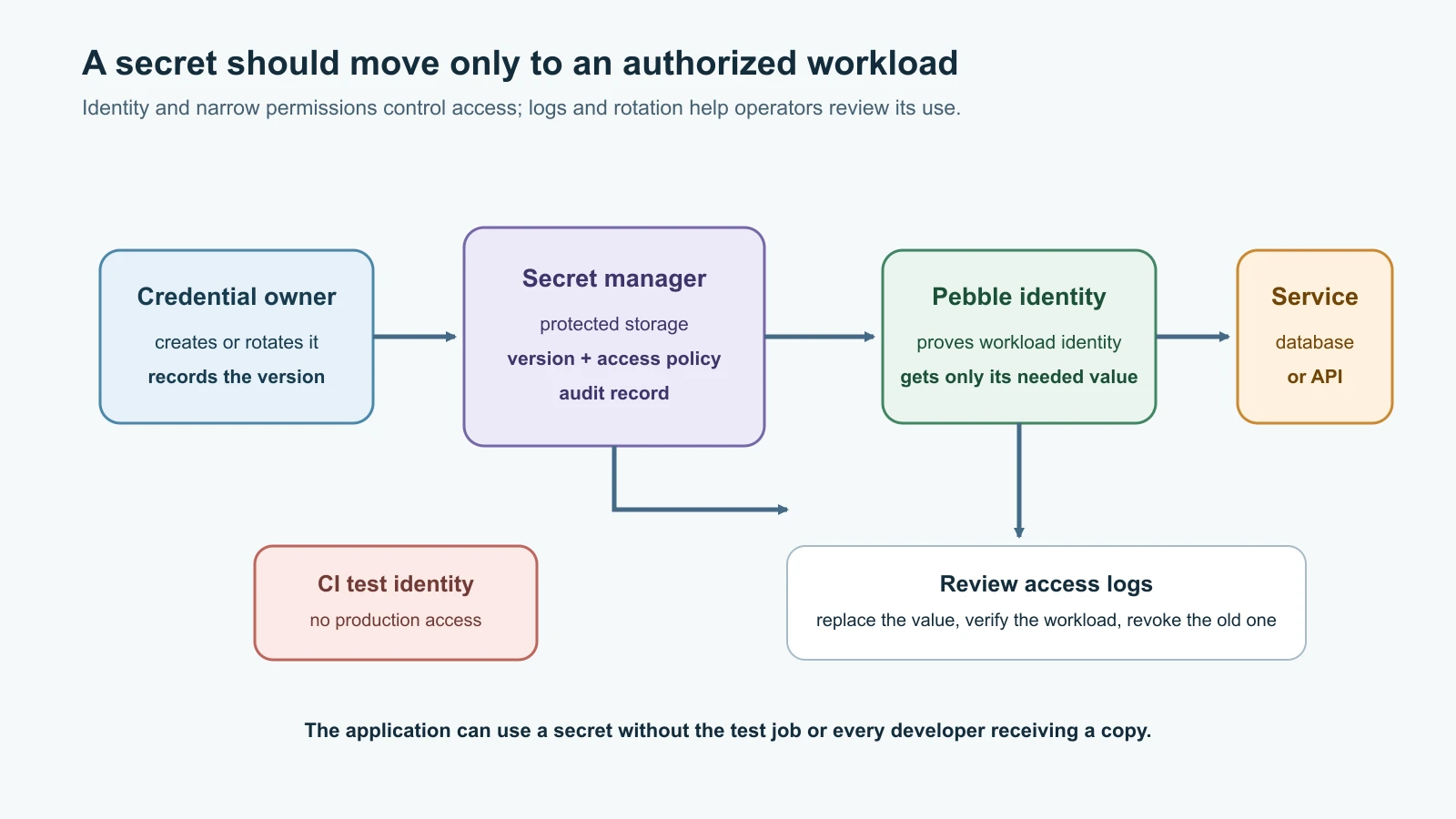
A secret manager stores values behind an identity and access policy. A workload authenticates, requests only the secret it needs, and receives an audited response. Depending on the provider and application, it can read a version through an API, mount a file, or use an integration that writes a Kubernetes Secret. The manager can provide encryption, version history, access logs and rotation workflows, but a value may still be copied to the application, a node or a cluster. Review the full data path.
| Delivery method | Good fit | Main concern |
|---|---|---|
| Environment variable | Simple runtime configuration; integration that specifically requires it | May appear in diagnostics, process inspection or inherited process state |
| Restricted file or mounted volume | Application can read a file and the host or platform controls its permissions | File copies, backups, node access and reload behavior still need protection |
| Secret-manager API or managed integration | Workloads need auditable, scoped access and centrally managed versions | Identity setup, network dependency, caching and outage behavior must be designed |
| Kubernetes Secret | A cluster workload needs a namespaced value in a Pod or volume | Base64 is not encryption; API and etcd access must be restricted and configured |
Whatever the delivery mechanism, do not print secret values. Avoid shell tracing with set -x around secret handling, don't use printenv in build logs, and ensure errors name the failed operation rather than echoing a connection string. Do not place credentials in command-line arguments when a tool supports a safer file, standard-input or identity-based option.
For Pebble, keep ordinary settings such as the listen port in environment configuration and provide the database password through a protected file or a platform integration. The application should read the value when needed, keep it in memory only as long as required, avoid logging it, and return a generic connection error to callers. A startup log may say database authentication failed; it should never include the password or full credential-bearing URL.
Secrets during a container build
Builds need credentials too, for example a token for a private package index. Never pass one with ARG or ENV, or COPY it into the image: as Docker for DevOps showed, every layer keeps what it contains, and build arguments can appear in the image history. Docker BuildKit provides secret mounts for this. The value is mounted as a file for one RUN step only and is not written into any layer:
1# syntax=docker/dockerfile:1
2RUN \
3 pip install --no-cache-dir -r requirements.txtThe build command supplies the value from a file or an environment variable on the build machine, for example docker build --secret id=pip_index_url,src=./pip_index_url.txt ., where the file holds the private index address including its access token. pip reads the PIP_INDEX_URL environment variable, and the env= option sets it for that single step only; without env=, the value is available as the file /run/secrets/pip_index_url. Keep the source file out of Git and out of the build context through .dockerignore. In CI, read the value from the platform's secret store, and make sure the step that uses it does not print it. A secret mount keeps the credential out of the image, but the build step itself can still misuse or leak it, so build only trusted code with credentials attached.
Prefer workload identity over stored cloud keys
People and services need identities. A human operator can authenticate through the organization's identity provider and receive short-lived access. A CI job can use a provider's identity federation or OIDC integration. A cloud workload can use an attached role, managed identity or service account. These approaches let a trusted platform issue temporary credentials after checking who the caller is, instead of requiring a long-lived cloud access key in a repository or runner.
Give each workload a separate identity and the smallest permission it needs. Pebble's staging service should not be able to retrieve production secrets. The CI test job should not be able to read production database credentials. A deploy job may need permission to publish a release while a test job does not. Make these boundaries visible in policy and review them when the service changes.
Workload identity does not make an application invulnerable. A compromised process may use its permissions while it is running. Keep policies narrow, protect the identity configuration, audit requests and revoke access when the workload is retired. Human administrators should have a different access path from the application identity, with stronger controls for high-impact actions.
What a secret manager does
A secret manager is a protected service for values that applications or operators need to retrieve. Common features include encryption at rest and in transit, identity-based access control, audit records, versioning, replication options and integrations with compute platforms. These features reduce the number of unmanaged copies; they do not remove the need to secure the application, its host, the manager's administrator account or the identity that can read a value.
HashiCorp Vault
HashiCorp Vault is a secret-management system with authentication methods, policies and secrets engines. A secrets engine can store and return versioned key-value data, generate credentials for another system, or provide other cryptographic services. Vault clients authenticate using a supported method, receive a token with attached policies, and request only the paths those policies permit.
For example, a policy for a Pebble production app can allow reading one database credential path and nothing else:
1path "kv/data/pebble/production/database" {
2  capabilities = ["read"]
3}
The policy is a permission rule, not a credential. An administrator still has to configure the kv engine, the authentication method and a role or identity that receives this policy. Do not give the app a root token or a general-purpose admin token. Keep the Vault server's storage, unseal or recovery process, audit device, TLS configuration, backups and upgrades in the operating plan; self-hosting Vault means operating a security-critical service.
Vault can also issue dynamic secrets. Instead of storing one shared database password indefinitely, a secrets engine can create a credential for a client and attach a lease with a time to live. A client renews or replaces the credential as permitted; expiry or revocation can invalidate it. Dynamic credentials narrow the time window and help attribute use, but the client must handle renewal, expiration and temporary Vault unavailability.
Cloud secret stores
The major cloud providers offer managed secret stores. Their names differ, but the common design is to grant a workload identity access to a specific secret or version and record access for review.
| Provider | Service | A useful design question |
|---|---|---|
| AWS | AWS Secrets Manager | Can the workload use an attached role, and does rotation update both the stored value and the database or partner service? |
| Microsoft Azure | Azure Key Vault | Can the workload authenticate with a managed identity and retrieve only the required secret? |
| Google Cloud | Secret Manager | Can IAM be limited to this secret, and should the release pin a specific version instead of following latest automatically? |
Rotation is not just changing a string in the manager. The system that accepts the credential must also accept the new value, and the workload must start using it. For example, AWS documents rotation workflows that update both Secrets Manager and the target database or service. Google recommends choosing a versioning and rollout process carefully because an invalid latest version can break consumers. Read the provider's current guidance for the service you operate and test its exact integration before enabling automatic rotation.
Kubernetes: native Secrets, Sealed Secrets and ESO
A Kubernetes Secret is an API object intended to hold small sensitive values. Its data field is base64-encoded; base64 is a text encoding, not encryption. Kubernetes documentation warns that Secrets are stored unencrypted in etcd by default unless encryption at rest is configured. Limit Secret access with RBAC, restrict which containers receive each value, protect etcd and control who can create Pods in the namespace. Someone allowed to create a Pod may be able to mount a Secret in that namespace even without direct permission to read the Secret object.
Use a Secret object only as one part of the access design. It may make sense for a Pod to mount a value as a file or, if the application requires it, set an environment variable. The value is still available to the processes and administrators who can inspect the relevant Pod or node. Keep namespaces and service accounts scoped, and do not assume that hiding a value from a manifest protects it from cluster administrators.
Sealed Secrets is a Kubernetes tool for teams that want encrypted secret resources in Git. The kubeseal client encrypts a Kubernetes Secret into a SealedSecret; the controller in the target cluster decrypts it and creates the Secret. The repository stores ciphertext rather than the plaintext resource. Encryption is tied to the controller's key and the configured scope. Protect and back up the controller's private key, plan key rotation and recovery, and do not treat a sealed value as rotated: the underlying database password or API token still needs to change at its provider.
External Secrets Operator (ESO) connects Kubernetes to an external secret provider. A SecretStore or ClusterSecretStore describes access to a provider; an ExternalSecret names which remote value to synchronize and how to create a Kubernetes Secret from it. Configure ESO's provider access with workload identity where supported. If ESO copies a value into a Kubernetes Secret, the cluster's encryption-at-rest and RBAC protections still apply. Plan refresh behavior and Pod reload behavior together: updating an object does not guarantee that an application which read the value only at startup will use the new version.
This example shows the mapping from an external secret to a Kubernetes Secret without placing any credential in Git:
1apiVersion: external-secrets.io/v1
2kind: ExternalSecret
3metadata:
4  name: pebble-database
5  namespace: pebble-production
6spec:
7  refreshInterval: 1h
8  secretStoreRef:
9    name: pebble-production-store
10    kind: SecretStore
11  target:
12    name: pebble-database
13    creationPolicy: Owner
14  data:
15    - secretKey: password
16      remoteRef:
17        key: production/pebble/database
18        property: password
The referenced store and remote key must already exist, and the store must use a suitable identity. The resulting Kubernetes Secret is named pebble-database; the application can mount its password key as a file. Before applying a manifest like this, check the installed ESO version's API and provider setup, the target namespace, the identity's permissions, and the cluster's Secret protections. Do not create an ExternalSecret that imports every value from a broad provider path when the app needs one key.
Keep the security boundaries clear: Sealed Secrets encrypts a Kubernetes Secret manifest for storage in Git; ESO retrieves and synchronizes values from an external provider; Kubernetes Secrets are the cluster API objects Pods consume. Neither integration removes the need to limit access or rotate the original credential.
Rotate credentials without creating an outage
Rotation replaces a credential with a new value and retires the old one. Define the process before an emergency. A rotation plan needs an owner, a target system, a way to create the replacement, a rollout and verification step, a revocation point, and a recovery path. A calendar schedule alone does not guarantee that applications adopt the replacement or that the old value stops working.
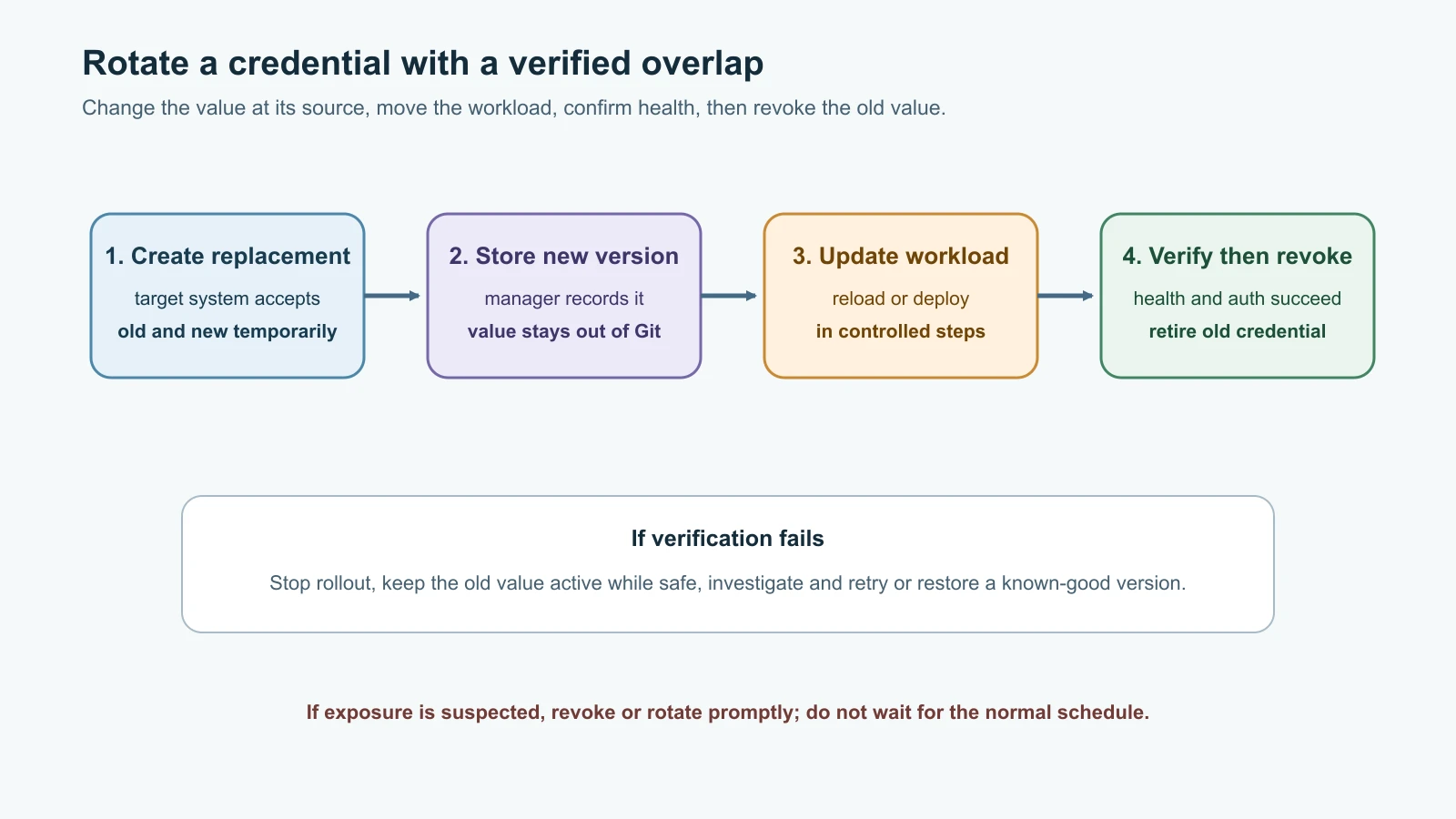
For a credential that supports two active values, a controlled sequence is:
- Confirm the service, dependencies, owner and current credential version. Check whether clients cache the value and how they reload it.
- Create a second credential in the target system while the current one remains valid.
- Store the new value in the secret manager and record its version without copying the value into a ticket or release note.
- Allow the workload to retrieve the new version, deploy or reload it gradually, and verify authentication and service health.
- Check for clients still using the old value. Revoke it only after the replacement works and the overlap window is understood.
- Record the versions and outcome, then remove temporary permissions and rotation artifacts.
Some systems allow only one active password. The rotation may require a brief coordinated change or a different design, such as separate database roles that can overlap. For certificates and encryption keys, replacing a key may require a different migration plan because old data or signatures can depend on the former key. Never disable the existing credential until you know what depends on it and how recovery works.
If a credential is suspected to be exposed, treat it as compromised. Revoke or rotate it promptly, check relevant access logs, identify what the credential could reach, and notify the service owner. Cleaning Git history can be useful after containment, but it does not make an exposed credential safe again: forks, clones, caches, logs and artifacts may retain the old value. Rotate first, then coordinate any repository cleanup.
Scan before and after a commit
Use several layers because every detector has limits:
- Keep local files containing real credentials out of Git. For Pebble,
.gitignorecan include.env,.env.*,!.env.example, andsecrets/. The example file should list setting names and clearly fake placeholders only. - Review changes for private keys, tokens, connection strings, cloud access keys, unexpected
.envfiles and generated artifacts before committing. - Enable secret scanning and push protection where the repository host supports them. Push protection can stop supported patterns before they reach the remote, but it does not recognize every secret format or every leak path.
- Run a local or CI secret scanner over the repository and, when investigating an incident, scan the full Git history and relevant build outputs. Configure false-positive handling carefully; do not add a real credential to a scanner allowlist.
- Restrict CI permissions and logs. A test job should not receive production secrets, and a scanner finding should block promotion until it is resolved.
If GitHub blocks a push, remove the real value from the change and rotate it if it has ever been valid. Do not bypass the block just to make a build pass. If the alert is a confirmed false positive, follow the repository's documented review process. Secret scanning is an additional catch, not permission to commit credentials and clean them up later.
A secret access review for Pebble
Use this small review when adding a credential to Pebble or changing its delivery:
| Question | Pebble example |
|---|---|
| What is the secret and what can it access? | The PostgreSQL password can authenticate as Pebble's application database role. |
| Which identity retrieves it? | The production Pebble workload identity, not the CI test job or a developer account. |
| What is the narrowest permission? | Read one production database credential, not the whole account or namespace. |
| Where does it travel? | Secret store to the authorized workload; mounted into the container as a file. |
| Where can it be copied or logged? | Process memory, container or node access, debug output, backups and cluster state. |
| How is it changed? | Add a replacement role/password, update and verify Pebble, then revoke the old credential. |
| How will you detect misuse? | Review secret access logs and database authentication events; alert on unexpected identity or volume. |
| What happens if the provider is unavailable? | Existing instances may keep a cached credential for a bounded period; new starts may need a documented fallback or wait. |
An access review should describe what the system actually does. If Pebble cannot reload a mounted file, document that restart requirement instead of assuming rotation is seamless. If it caches the password, bound the cache lifetime and ensure it refreshes after replacement. The application's behavior is part of the secret design.
Mistakes beginners make
- Treating
.gitignoreas a way to remove a credential that was already committed. - Assuming base64, masked CI output or a
sensitiveTerraform value makes a secret encrypted everywhere. - Giving a workload a human administrator's key or a cloud-wide permission when it needs one credential.
- Putting production credentials in CI jobs that only run tests on pull requests.
- Relying on push protection as the only scanner or assuming it detects every secret type.
- Rotating a value in the manager without changing the database or service that validates it.
- Revoking the old credential before the replacement reaches all instances.
- Enabling periodic rotation without testing client caching, reloads, notifications, failure handling and rollback.
- Storing a sealed Kubernetes manifest in Git while forgetting that the controller's decryption key needs protection and recovery.
- Syncing a value through ESO, then assuming Kubernetes RBAC and etcd protection no longer matter.
- Logging full URLs, request headers, environment variables or exception details that contain credentials.
- Removing a leaked value from the latest source file but leaving the exposed credential active.
Recap and try it yourself
Secrets include passwords, tokens, private keys and other values that grant access. Reduce exposure by using workload identity where possible, limiting permissions, keeping values out of code and logs, and choosing a controlled delivery method. Secret managers provide guarded storage and audit features; Vault can also create leased dynamic credentials. Cloud managers offer managed versions and rotation features, but rotation must update both the secret and the service that accepts it.
Kubernetes Secret data is base64-encoded and needs additional access and encryption controls. Sealed Secrets encrypts manifests for a cluster controller; ESO synchronizes selected values from an external store. Both still depend on safe identity, narrow scope, version handling and a plan for how workloads reload values. A committed credential must be revoked or rotated even after its text is removed from Git.
Try it yourself:
- Make a credential inventory for a fictional Pebble deployment. For each value, record its owner, permissions, retrieval identity, storage location, log risks and rotation process. Use placeholders only.
- Add
.env,.env.*andsecrets/to a sample.gitignore, while allowing.env.example. Put fake setting names in the example file and check which paths Git ignores. - Review the Vault policy above. Name one permission it gives Pebble and three things it does not allow. Sketch a separate policy for staging.
- Walk through the ExternalSecret example. Identify which object holds provider access, which field names the external value, and which Kubernetes object the controller creates. Explain what protection is still needed in etcd and RBAC.
- Write a six-step rotation plan for Pebble's database password. Include a verification signal, the old credential's revocation point and what you would do if the new password fails.
- In a disposable repository, enable an available secret scanner and push protection. Use the tool's documented test fixture or a clearly invalid dummy pattern; never paste a live credential into a test.
Go deeper
- HashiCorp Vault secrets engines
- Vault authentication methods
- Vault leases, renewal and revocation
- AWS Secrets Manager best practices
- AWS Secrets Manager rotation
- Azure Key Vault secret security
- Google Cloud Secret Manager best practices
- Kubernetes Secrets
- Bitnami Sealed Secrets
- External Secrets Operator overview
- External Secrets Operator ExternalSecret API
- GitHub push protection
Sources checked on 14 November 2026: HashiCorp Vault documentation for secrets engines, authentication, leases and response wrapping; AWS Secrets Manager best practices and rotation; Microsoft Key Vault secret security; Google Cloud Secret Manager best practices and rotation recommendations; Kubernetes Secret documentation; the Bitnami Sealed Secrets project; External Secrets Operator overview and ExternalSecret API; and GitHub push protection. Pebble and all credential values in the examples are fictional; do not use real credentials in exercises.