
DevOps course · lesson 17 of 24
- 1What Is DevOps?
- 2A Language and a Service to Operate
- 3Linux and the Terminal
- 4Bash Scripting for Ops
- 5Git and Collaboration
- 6Networking for DevOps
- 7Web Servers, Proxies and Load Balancers
- 8Docker for DevOps
- 9Docker Compose and Multi-Service Apps
- 10Cloud Providers: AWS, Azure and Google Cloud
- 11Serverless Functions and Platforms
- 12Terraform and Infrastructure as Code
- 13Ansible and Configuration Management
- 14Continuous Integration with GitHub Actions and GitLab CI
- 15Continuous Delivery and Deployment Strategies
- 16Secret Management
- 17Kubernetes Basics
- 18Kubernetes in Practice
- 19GitOps with Argo CD and Flux
- 20Service Mesh: Istio, Linkerd, Consul and Envoy
- 21Metrics and Alerting with Prometheus and Grafana
- 22Logs and Tracing with Loki, Elastic and OpenTelemetry
- 23Reliability, SLOs and Cloud Design Patterns
- 24Capstone: Pebble to Production
After this lesson, you will be able to describe the parts of a Kubernetes cluster, deploy a container as a Pod managed by a Deployment, reach it through a Service, inspect and scale the workload, and clean up a local cluster. You will also know what Ingress and Gateway API do, and how EKS, GKE, AKS, OpenShift, ECS with Fargate and Docker Swarm differ.
In Docker Compose and Multi-Service Apps, Pebble runs as several cooperating containers on one machine. Kubernetes takes the container image and desired configuration and coordinates workloads across a cluster. It can replace failed Pods, spread replicas across nodes, give changing Pods stable service names and carry out controlled application updates. It does not make application design, storage, network policy or cluster operations disappear.
What Kubernetes is for
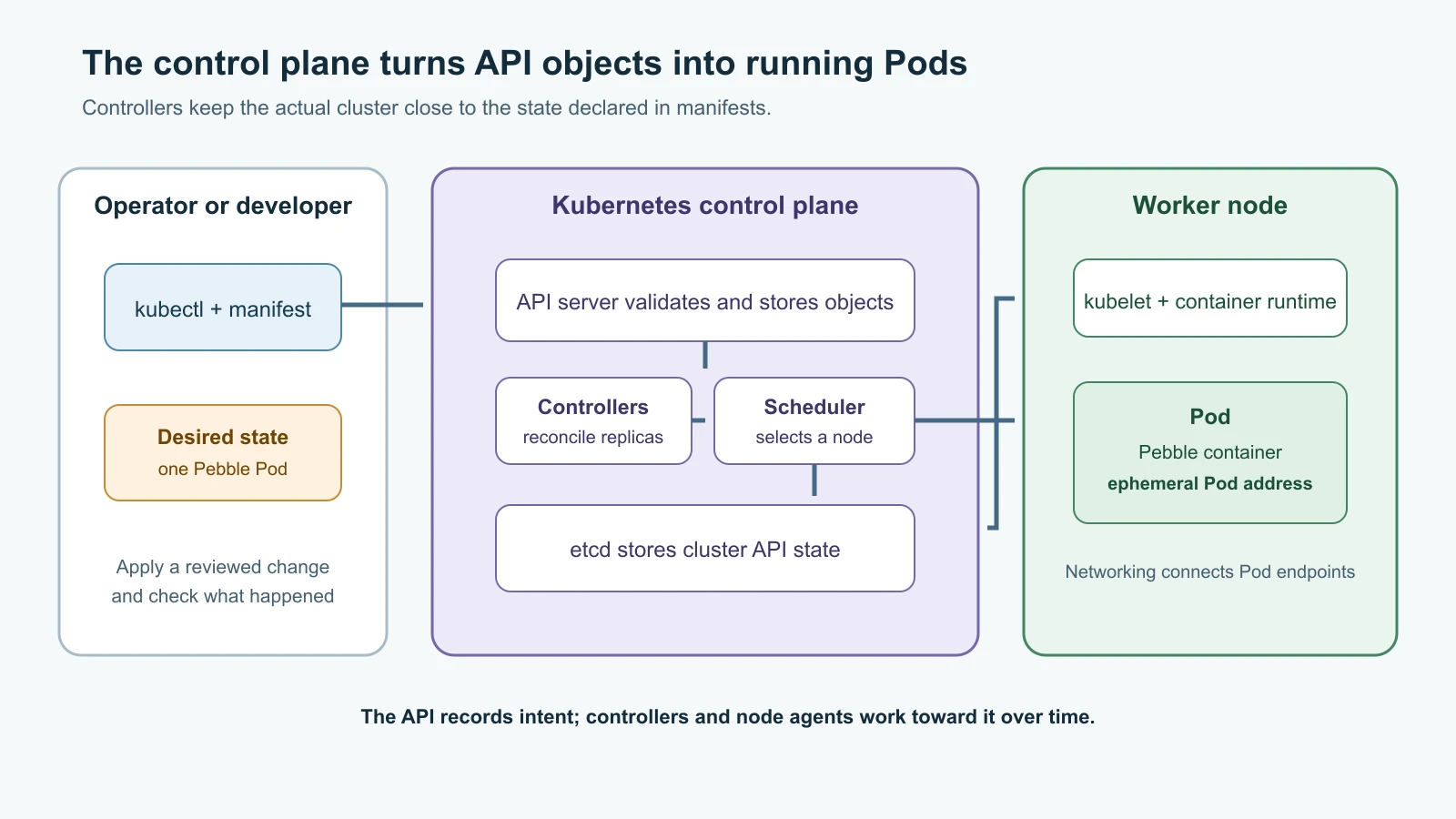
Kubernetes, often shortened to K8s, is an open source platform for managing containerized workloads. You describe what you want in API objects, such as "run one Pebble container" or "keep three copies available." The Kubernetes control plane and node agents work to make actual cluster state match that description. This repeated correction is called reconciliation.
The desired state is not a script that runs once and exits. If a Pod disappears, its controller notices and creates another. If someone scales a Deployment from one replica to three, Kubernetes schedules more Pods. If a node becomes unavailable, workloads may be started on another suitable node, assuming the cluster has capacity and the application can safely run there.
Kubernetes is useful when a team needs a consistent API for deploying and operating containers across a cluster, wants orchestration features, or already has a platform team and supporting services. It carries real operating costs: cluster upgrades, networking, storage, access control, monitoring, incident response and a growing set of extensions. A single small service may be easier to operate on one VM with Docker Compose, as in the previous lesson. Choose Kubernetes because its capabilities solve a problem you have, not because a container automatically requires a cluster.
A cluster has a control plane and nodes
A cluster is a set of machines or virtual machines, called nodes, that run workloads and Kubernetes components. The control plane exposes and maintains the Kubernetes API and coordinates the cluster. Worker nodes provide compute where application Pods run.
The main control-plane components are:
- kube-apiserver receives authenticated API requests and validates objects.
kubectltalks to this API server. - etcd stores the cluster's API state. Protect it and back it up according to the cluster's recovery plan.
- kube-scheduler selects a suitable node for each Pod that has not been assigned one. It considers requests, constraints and available capacity.
- kube-controller-manager runs controllers that compare actual resources with requested state and take action to close the gap.
- cloud-controller-manager, when present, connects Kubernetes to cloud-specific infrastructure such as load balancers or node information.
Each worker node normally runs a kubelet, which communicates with the API server and makes sure assigned Pods are running, plus a container runtime that starts the containers. A networking implementation lets Pods communicate, and cluster DNS lets applications find Services by name. Cloud clusters may install additional integrations for network interfaces, storage volumes, identity and load balancing.
A managed Kubernetes service operates parts of this system for you, but your responsibilities depend on its mode and configuration. "Managed" does not mean that application permissions, worker workloads, network exposure, upgrades and costs are automatically correct.
The objects you will use first
Kubernetes resources are API objects, usually described as YAML files. Each has an apiVersion, a kind, metadata such as its name and namespace, and a spec describing desired state. The API server stores and validates these objects; controllers act on them over time. kubectl apply -f file.yaml submits a declarative configuration. kubectl get, describe and logs help you inspect what happened.
Pods and containers
A Pod is Kubernetes' smallest deployable unit. It contains one or more closely related containers that share a network identity and can share mounted storage. Most applications use one main application container per Pod. A tightly coupled helper, such as a log or proxy sidecar, can share a Pod when the processes need to run together. Separate application components generally belong in separate Pods so they can be scaled and updated independently.
Pods are replaceable. Their IP address and local writable layer are not a durable identity or storage plan. If a Pod is deleted and recreated, Kubernetes can give the new Pod a different IP. Clients should use a Service, not a Pod IP. Store durable data in a suitable persistent storage service; the local exercise below uses temporary storage and does not retain Pebble data.
Deployments and ReplicaSets
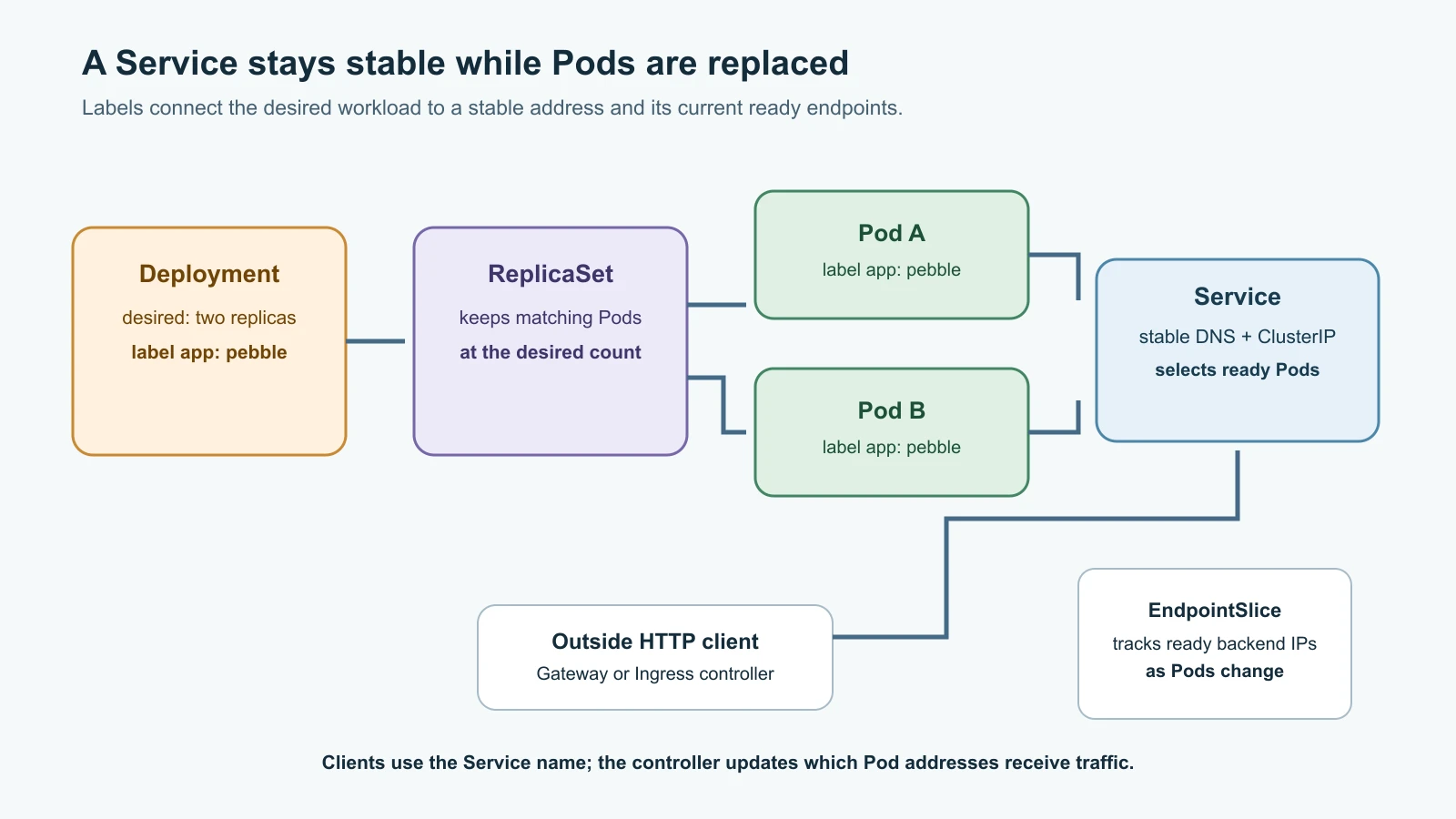
A Deployment describes a stateless application rollout: which image to run, how many replicas to maintain and how the Pods should be configured. The Deployment controller manages a ReplicaSet, which ensures the requested number of matching Pods exists. When you update the Pod template, the Deployment creates a new ReplicaSet and rolls out the new version according to its strategy.
Most application changes should update the Deployment rather than a live Pod. A Pod is an outcome of the specification. If it is changed by hand, a controller may replace it to restore the desired configuration. Keep manifests in version control and apply reviewed changes from files or a deployment system.
Services and stable discovery
A Service provides a stable virtual address and DNS name for a set of Pods. A selector matches Pod labels, and the Service's endpoints update as matching Pods become ready or are replaced. Applications can connect to pebble or a fully qualified Service name without knowing which Pod currently handles the request.
The common Service types are:
- ClusterIP exposes a Service only inside the cluster. This is the default and is appropriate for Pebble's internal app Service in the local exercise.
- NodePort opens a port on each node and forwards traffic to the Service. It can be used for testing or as a building block, but public node access needs network controls.
- LoadBalancer asks a supported platform or installed controller to provide an external load balancer. The resulting infrastructure can incur cost and needs cloud configuration.
- ExternalName maps a Service name to an external DNS name; it does not proxy traffic.
Namespaces and labels
A namespace groups namespaced resources inside a cluster. It helps teams organize objects and apply resource quotas and access policy. Names are unique within a namespace, so staging and production can each have a Service named pebble. A namespace is not a strong security boundary by itself. Use RBAC, network policy, admission controls and separate clusters where the threat model requires stronger isolation.
Labels are key-value metadata used to identify and select objects. For example, app: pebble connects a Service selector to the Pod template labels in a Deployment. A spelling mismatch can leave a Service with no endpoints even though both resources exist. Labels also help operators list and filter resources consistently.
Make Services reachable from outside
A ClusterIP Service is reachable from inside the cluster. A public or private client outside the cluster needs another entry point. A Service of type LoadBalancer asks a cloud integration or load-balancer controller to provision one. That does not mean Kubernetes itself contains a universal external load balancer; the cluster needs an implementation.
Ingress is a Kubernetes API for HTTP and HTTPS routing rules, such as sending a hostname and path to a Service. Creating an Ingress object alone does nothing: an Ingress controller must implement it. The Ingress API remains stable, but the Kubernetes project has frozen its development and recommends the newer Gateway API for new capabilities.
Gateway API is an extensible set of resources for traffic infrastructure and routing. A GatewayClass identifies an implementation, a Gateway describes a listener or network endpoint, and routes such as HTTPRoute describe application traffic rules. It can separate infrastructure, cluster and application responsibilities more clearly than a single Ingress object. It is an add-on API, so install or use a compatible implementation before creating Gateway resources. The course will return to this networking layer when it covers cluster operations and traffic management.
Run a local cluster with kind
kind (Kubernetes in Docker) runs Kubernetes nodes as containers. It is useful for learning and repeatable local testing; it does not reproduce every cloud load balancer, storage provider or production failure mode. The example uses kind v0.33.0, whose release provides a Kubernetes v1.37.0 node image, and kubectl v1.37.1. The node image is pinned by digest so kind uses the image built for that release.
You need a working Docker-compatible container engine, Go 1.17 or newer if installing kind with go install, kubectl and enough memory for the engine and cluster. Install kubectl v1.37.1 using the official instructions for your operating system. Install kind with:
1go install sigs.k8s.io/kind@v0.33.0Ensure $(go env GOPATH)/bin is on your PATH, then check:
1kind version
2kubectl version --client
3docker info
Create a working folder containing the Pebble source and Docker Compose build files from Docker Compose and Multi-Service Apps. Build the image locally; the compose file tags it pebble:0.3.0:
1docker compose build appCreate kind-config.yaml with one control-plane node and one worker. Both use the release-pinned node image:
1kind: Cluster
2apiVersion: kind.x-k8s.io/v1alpha4
3nodes:
4  - role: control-plane
5    image: kindest/node:v1.37.0@sha256:a1ed56cfb0e7b93589bdf97c8cd566405a265939e3620fc4f5de89adff580ae5
6  - role: worker
7    image: kindest/node:v1.37.0@sha256:a1ed56cfb0e7b93589bdf97c8cd566405a265939e3620fc4f5de89adff580ae5
Create the local cluster and load the application image into its nodes. Because the image is loaded locally, Kubernetes must not try to fetch it from a public registry:
1kind create cluster --name pebble --config kind-config.yaml --wait 90s
2kubectl config current-context
3kubectl get nodes -o wide
4kind load docker-image pebble:0.3.0 --name pebble
The current context should be kind-pebble. Always check the context before applying manifests; kubectl may be configured to point at a cloud or shared cluster from earlier work.
Deploy Pebble with a Deployment and Service
Save this as pebble-k8s.yaml. It creates a lab namespace, a one-replica Deployment, a readiness probe, a liveness probe and a ClusterIP Service. An emptyDir volume gives the container a writable /data directory for its local SQLite file. The data disappears when the Pod is removed, so this lab is for checking Kubernetes health and discovery only. Do not use it to store links you need to keep or treat the one-Pod SQLite design as a scaled production setup.
1apiVersion: v1
2kind: Namespace
3metadata:
4  name: pebble-lab
5---
6apiVersion: apps/v1
7kind: Deployment
8metadata:
9  name: pebble
10  namespace: pebble-lab
11  labels:
12    app: pebble
13spec:
14  replicas: 1
15  selector:
16    matchLabels:
17      app: pebble
18  template:
19    metadata:
20      labels:
21        app: pebble
22    spec:
23      securityContext:
24        runAsNonRoot: true
25        runAsUser: 10001
26        seccompProfile:
27          type: RuntimeDefault
28      containers:
29        - name: pebble
30          image: pebble:0.3.0
31          imagePullPolicy: IfNotPresent
32          ports:
33            - name: http
34              containerPort: 8080
35              protocol: TCP
36          readinessProbe:
37            httpGet:
38              path: /readyz
39              port: http
40            periodSeconds: 5
41          livenessProbe:
42            httpGet:
43              path: /healthz
44              port: http
45            periodSeconds: 10
46          resources:
47            requests:
48              cpu: 100m
49              memory: 128Mi
50            limits:
51              cpu: 500m
52              memory: 256Mi
53          securityContext:
54            allowPrivilegeEscalation: false
55            readOnlyRootFilesystem: true
56          volumeMounts:
57            - name: pebble-data
58              mountPath: /data
59      volumes:
60        - name: pebble-data
61          emptyDir: {}
62---
63apiVersion: v1
64kind: Service
65metadata:
66  name: pebble
67  namespace: pebble-lab
68spec:
69  type: ClusterIP
70  selector:
71    app: pebble
72  ports:
73    - name: http
74      port: 8080
75      targetPort: http
76      protocol: TCP
The container image runs as user ID 10001, which matches the Pod's non-root security context. The root filesystem is read-only, while the app's SQLite directory is a separate writable temporary volume. The readiness probe checks whether Pebble can serve requests; the liveness probe checks that its process responds. A readiness failure removes the Pod from Service traffic. A liveness failure causes Kubernetes to restart the container. Those probes should reflect application behavior rather than simply checking that a process exists.
Apply the file and watch for the Deployment to become available:
1kubectl apply -f pebble-k8s.yaml
2kubectl rollout status deployment/pebble -n pebble-lab --timeout=120s
3kubectl get deployment,pods,service -n pebble-lab -o wide
4kubectl get endpointslice -n pebble-lab
Expected: the Deployment reports one desired and one available replica; a Pebble Pod reaches Running and Ready; the Service has a ClusterIP; and its EndpointSlice lists the ready Pod address. The assigned IPs and Pod name vary. If the Pod is not ready, inspect its events and logs:
1kubectl describe pod -l app=pebble -n pebble-lab
2kubectl logs deployment/pebble -n pebble-lab
3kubectl get events -n pebble-lab --sort-by=.lastTimestamp
Forward a local port to the Service. In one terminal, run:
1kubectl port-forward service/pebble 8080:8080 -n pebble-labIn another terminal, check the application endpoints:
1curl -i http://127.0.0.1:8080/healthz
2curl -i http://127.0.0.1:8080/readyz
Both should return HTTP 200. The port-forward is a local testing path, not public ingress. It closes when the command stops.
Change desired state and observe reconciliation
Scale the Deployment to two replicas:
1kubectl scale deployment/pebble --replicas=2 -n pebble-lab
2kubectl rollout status deployment/pebble -n pebble-lab --timeout=120s
3kubectl get pods -l app=pebble -n pebble-lab -o wide
4kubectl get endpointslice -n pebble-lab
The Deployment controller asks for another Pod. The scheduler places it on a node with available resources, and the EndpointSlice adds its address when it becomes ready. The Service name and ClusterIP stay stable while the backing Pods change.
This is only a scaling demonstration. Each Pebble Pod has its own temporary SQLite database, so writes to one Pod would not appear in the other. A real multi-replica service needs shared external storage such as the PostgreSQL configuration introduced in the Compose lesson, plus an appropriate persistent-data plan. Do not scale the lab app to serve real user data.
Now delete one Pod by name, using a name shown by kubectl get pods:
1kubectl delete pod <pod-name> -n pebble-lab
2kubectl get pods -l app=pebble -n pebble-lab --watch
The Deployment's ReplicaSet notices the missing Pod and creates a replacement to return to two. Stop watching with Ctrl-C. You changed a Pod, but the lasting request remains the Deployment's desired replica count.
Configuration and secrets
A ConfigMap holds non-confidential settings such as a log level or feature endpoint. A Kubernetes Secret is intended for sensitive values, but its data is base64-encoded and needs the additional protections described in Secret Management: encryption at rest, narrow RBAC and careful Pod access. Do not put a real password in a YAML manifest committed to Git. Use a protected secret-delivery workflow such as a cloud integration, ESO or an approved encrypted-secret process.
Configuration can be delivered as environment variables or mounted files. Environment variables are convenient but an application may need a restart to read changed values. A mounted ConfigMap or Secret can be updated by Kubernetes, but the application must still reload it. Rotation is a sequence across the source system, Kubernetes and the consumer, not just an edit to a manifest.
Where cloud and platform options fit
The Kubernetes API is portable, but cluster installation, networking, storage, identity, policy and support differ among providers. Compare the responsibilities you need to own rather than assuming every product is identical.
| Platform | What it provides | Useful distinction |
|---|---|---|
| Amazon EKS | Managed Kubernetes on AWS | AWS manages the Kubernetes control plane; node and compute options include managed nodes, EKS Auto Mode and Fargate with documented constraints. |
| Google Kubernetes Engine (GKE) | Managed Kubernetes on Google Cloud | Google manages the control plane; Standard and Autopilot modes offer different levels of node management. |
| Azure Kubernetes Service (AKS) | Managed Kubernetes on Azure | Automatic and Standard modes divide node, upgrade and security operations differently. |
| Red Hat OpenShift | Kubernetes container platform and product ecosystem | Adds an integrated, opinionated platform experience, including Operators and Routes, with Red Hat's supported distribution and tooling. |
| Amazon ECS with AWS Fargate | AWS container orchestration with managed task compute | ECS is not a Kubernetes API. Fargate runs containers without you managing EC2 hosts; Fargate can also run selected Pods in EKS through profiles. |
| Docker Swarm mode | Cluster management built into Docker Engine | Uses Docker services and tasks with a simpler Docker-oriented API; it is an alternative orchestrator, not Kubernetes. |
For EKS, GKE and AKS, check who patches the control plane, worker nodes, add-ons and operating system in the mode you choose. Managed services still require a plan for API access, workload identities, version upgrades, network rules, container images, backups and monitoring. OpenShift is also Kubernetes-based, but its supported components and operating model differ from a plain upstream cluster. ECS and Swarm can be good fits when their narrower platform model meets the requirement and you do not need Kubernetes APIs or its ecosystem.
Clean up the local cluster
When you finish, stop the port-forward and remove the disposable cluster. Deleting the cluster also removes its local nodes and the temporary SQLite data:
1kind delete cluster --name pebble
2kind get clusters
The pebble cluster should no longer appear in the list. If the local image is useful for another exercise, it remains in the container engine's image store. For cloud clusters, delete resources using the provider's documented process and confirm that related load balancers, disks and IP addresses are removed; deleting Kubernetes manifests alone does not necessarily delete every cloud resource.
Mistakes beginners make
- Treating Kubernetes as a way to run a container without learning its API, controllers and networking model.
- Creating standalone Pods for applications that should be managed by a Deployment or another controller.
- Connecting to a Pod IP and assuming it will remain stable after replacement.
- Giving a Service a selector that does not match the Deployment's Pod labels, leaving it with no endpoints.
- Assuming a namespace isolates network traffic or replaces RBAC.
- Assuming a Service of type
LoadBalancercreates a free, universally available load balancer in every cluster. - Creating an Ingress object without installing an Ingress controller, or assuming the old Ingress API is still gaining new features.
- Treating a
RunningPod as proof that the application is ready to serve requests. - Scaling a service that stores data in each Pod's local filesystem and expecting replicas to share the data.
- Applying manifests without checking the current
kubectlcontext and namespace. - Assuming a managed cluster means the cloud provider operates the application, its data, its access controls and every add-on.
- Leaving a local cluster running after finishing a short practice session.
Recap and try it yourself
Kubernetes clusters have a control plane that accepts API changes and reconciles desired state, plus nodes that run Pods. A Pod packages one or more co-located containers. A Deployment manages a set of replaceable Pods through a ReplicaSet. A Service gives clients a stable address and selects ready Pods by label. Namespaces group resources but need RBAC and other controls for meaningful isolation.
kind provides a local cluster for learning the Kubernetes API without a cloud account. In the Pebble exercise, a Deployment runs the existing container image, probes check health and readiness, and a ClusterIP Service provides a stable internal address. The lab uses temporary per-Pod storage, so it is deliberately limited to health and orchestration practice. Ingress needs a controller; Gateway API is the project's recommended direction for new traffic APIs. EKS, GKE, AKS and OpenShift offer Kubernetes-based platforms with different managed operations, while ECS/Fargate and Docker Swarm use different orchestration models.
Try it yourself:
- Change the Pebble Deployment to two replicas and check the Service's EndpointSlice after both Pods become ready. Explain why the lab must not accept link writes with independent SQLite files.
- Delete one Pod by name and watch the controller create a replacement. Identify which object requested the replica count.
- Change the Service selector to
app: pebble-demo, apply the manifest, then inspect its EndpointSlice. Restore the correct selector and verify the backend endpoints return. - Inspect
kubectl get nodes,kubectl get namespacesandkubectl get all -n pebble-lab. Identify a control-plane component, a worker node, a workload and a service-discovery object. - Draw a path for public HTTP traffic from a client to a Gateway, HTTPRoute, Service and ready Pod. Name which Gateway API implementation the cluster would need.
- Delete the kind cluster and use
kind get clustersto confirm thatpebbleis no longer running.
Go deeper
- Kubernetes components
- Kubernetes Pods
- Deployments
- Services and networking
- Namespaces
- Ingress and its controller requirement
- Gateway API
- kind quick start
- kind v0.33.0 release notes
- Amazon EKS overview
- Google Kubernetes Engine overview
- Azure Kubernetes Service overview
- OpenShift Operators
- Amazon ECS with Fargate
- Docker Swarm mode
Sources checked on 14 November 2026: Kubernetes documentation for cluster components, Pods, Deployments, Services, Namespaces, Ingress and Gateway API; kind's quick start and v0.33.0 release notes; Kubernetes release information; AWS EKS, EKS Fargate and ECS Fargate; Google Cloud GKE; Microsoft AKS; Red Hat OpenShift Operators; and Docker Swarm mode. Version-sensitive product details may change; recheck the linked provider docs when setting up a real cluster. Pebble is fictional.