
DevOps course · lesson 18 of 24
- 1What Is DevOps?
- 2A Language and a Service to Operate
- 3Linux and the Terminal
- 4Bash Scripting for Ops
- 5Git and Collaboration
- 6Networking for DevOps
- 7Web Servers, Proxies and Load Balancers
- 8Docker for DevOps
- 9Docker Compose and Multi-Service Apps
- 10Cloud Providers: AWS, Azure and Google Cloud
- 11Serverless Functions and Platforms
- 12Terraform and Infrastructure as Code
- 13Ansible and Configuration Management
- 14Continuous Integration with GitHub Actions and GitLab CI
- 15Continuous Delivery and Deployment Strategies
- 16Secret Management
- 17Kubernetes Basics
- 18Kubernetes in Practice
- 19GitOps with Argo CD and Flux
- 20Service Mesh: Istio, Linkerd, Consul and Envoy
- 21Metrics and Alerting with Prometheus and Grafana
- 22Logs and Tracing with Loki, Elastic and OpenTelemetry
- 23Reliability, SLOs and Cloud Design Patterns
- 24Capstone: Pebble to Production
After this lesson, you will be able to separate application configuration from its image, decide whether data belongs in a temporary volume or a persistent claim, set resource requests and limits, and recognize when horizontal autoscaling is appropriate. You will also package the Pebble Deployment as a Helm chart, review a small RBAC policy, and use a repeatable sequence to troubleshoot common Pod and Service problems.
In Kubernetes Basics, Pebble runs in a local kind cluster as a Deployment behind a ClusterIP Service. The first example is intentionally small: one replica, temporary SQLite storage and health probes. Operating a real Kubernetes workload means making those choices explicit, learning what happens when they fail, and keeping the workload's desired state reviewable.
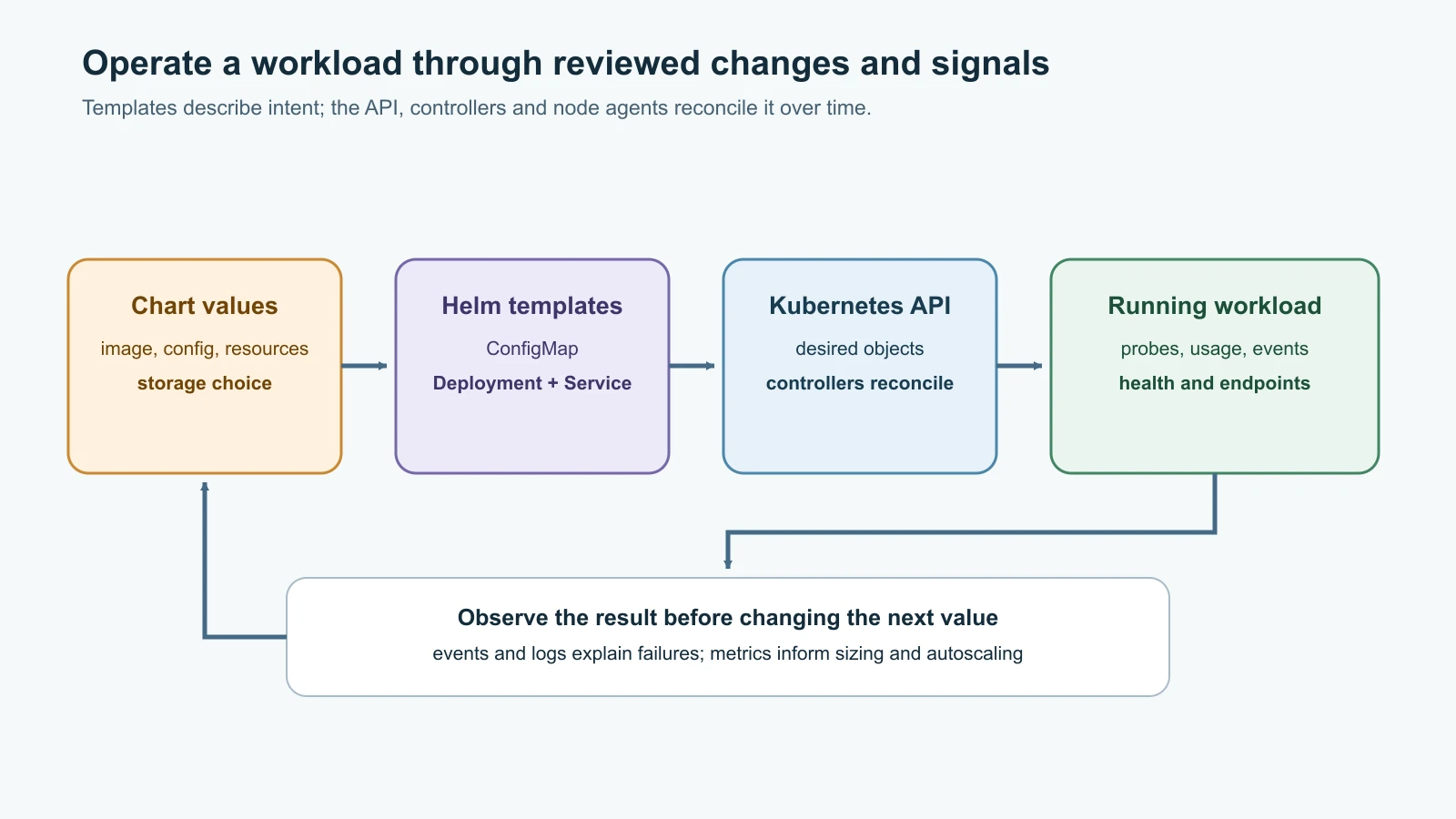
Keep configuration outside the image
A container image should describe the application and its runtime dependencies. Values that differ between local, test and production environments belong in configuration, so you can promote the same image and set its environment-specific behavior separately.
A Kubernetes ConfigMap stores non-confidential key-value settings. A Pod can consume keys as environment variables, command arguments or files in a mounted volume. Pebble's PEBBLE_BASE_URL is an example of ordinary configuration. A database password is not: use a protected Secret workflow or a provider integration, as described in Secret Management.
Configuration updates have different effects depending on how the Pod consumes them. An environment variable is set when a container starts, so updating the ConfigMap does not change a running process's environment. A projected ConfigMap volume is eventually updated by the kubelet, but the application must notice and reload the file. A subPath mount does not receive projected updates. Many teams use a configuration change to trigger a controlled Pod rollout, which makes the running version visible and gives the application a clean startup path.
In the Helm chart below, an annotation hashes the rendered ConfigMap. When its content changes, the Pod template changes too, so the Deployment creates new Pods with the updated environment. This mechanism is useful for files and environment settings that are read on startup; applications that can safely reload configuration may use another approach.
ConfigMaps are not a place for confidential values. Do not store passwords in values.yaml, pass them through --set, or assume a Helm dry run hides Secrets. Helm stores release information in the cluster, and generated manifests or command output can reveal values. Keep secret data in its approved store and refer to it through the integration used by the cluster.
Probes describe whether a Pod can serve traffic
The previous lesson used a readiness probe and a liveness probe. A readiness probe answers whether this instance should receive requests now. If readiness fails, Kubernetes removes the Pod from the ready endpoints for matching Services, but does not restart the container. A liveness probe answers whether the container has stopped making progress and should be restarted. A failed liveness check can restart a container even when its application is still recovering from a slow dependency.
A startup probe gives a slow-starting process time to initialize before Kubernetes begins liveness and readiness checks. If you use one, choose its failure threshold and interval to cover realistic startup behavior. Avoid making liveness depend on a downstream service such as PostgreSQL: a database outage could otherwise restart every Pebble instance at once without fixing the database. Readiness can check a dependency if the application must stop receiving traffic when that dependency is unavailable.
Use the lightest check that answers the operational question. A TCP probe only shows that a port accepts a connection; it does not prove the app can answer a useful request. An HTTP probe can check a health endpoint. An exec probe runs inside the container and should be used only when its command is available and its overhead is acceptable. Test the endpoint's failure behavior so that the probe does not report healthy while the app is broken or mark a recoverable delay as a deadlock.
Set resource requests and limits deliberately
A container's resource request tells the scheduler how much CPU and memory to reserve for placement decisions. It is also a planning input for quotas and CPU-based autoscaling. A limit caps the resource the container may use. CPU limits can throttle work under load. A container that exceeds its memory limit may be terminated by the node's out-of-memory handling and restarted according to its Pod policy.
Requests and limits should come from observed behavior under representative load, not copied from another service as if they were universal. The Pebble chart uses small starting values for a local teaching example; production values need measurements and enough headroom for bursts, sidecars and startup work. Too-large requests can leave Pods Pending because the scheduler cannot fit them. Too-small memory limits can create restarts, while an aggressive CPU limit can hurt latency through throttling.
Useful commands show the declared settings and current usage, when a metrics pipeline is installed:
1kubectl describe pod -l app.kubernetes.io/instance=pebble -n pebble-lab
2kubectl top pods -n pebble-lab
3kubectl top nodes
kubectl top uses the resource metrics API, commonly provided by Metrics Server. If it reports that Metrics API is unavailable, verify that the provider or local cluster has a compatible metrics component before drawing conclusions. kubectl top is a quick operational view, not a long-term monitoring or capacity-planning system.
Scale replicas only when the app can share its state
Manual scaling changes a controller's replica count. The earlier lab used this to watch a Service gain another endpoint. Horizontal Pod Autoscaling (HPA) changes the replica count in response to metrics. With the autoscaling/v2 API, an HPA can use CPU or memory resource metrics and, with the right adapters, custom or external metrics.
For a resource-based HPA, define requests so Kubernetes can calculate utilization. The HPA controller needs the relevant metrics API, and the cluster needs room to schedule additional Pods. Scaling can also create more database connections, cache load, outbound requests and cost. Define minimum and maximum replicas, understand scale-up and scale-down behavior, and watch whether the downstream services can handle the change.
Here is an illustrative CPU-based HPA for a stateless service with an external database:
1apiVersion: autoscaling/v2
2kind: HorizontalPodAutoscaler
3metadata:
4  name: pebble
5  namespace: pebble-lab
6spec:
7  scaleTargetRef:
8    apiVersion: apps/v1
9    kind: Deployment
10    name: pebble
11  minReplicas: 1
12  maxReplicas: 3
13  metrics:
14    - type: Resource
15      resource:
16        name: cpu
17        target:
18          type: Utilization
19          averageUtilization: 70
The 70 target means average CPU usage as a percentage of the Pods' CPU requests, not their CPU limits. This is an example starting point, not a universal target. The SQLite version of Pebble in the local lab keeps data inside each Pod's temporary volume, so do not apply this HPA to that lab. First move application state to a shared database and confirm that additional replicas can safely serve the same requests. Until then, keep the desired replica count at one and use manual scaling only for the health-check exercise.
Horizontal Pod scaling adds or removes application replicas. A cluster autoscaler or provider-specific node provisioner may add or remove worker capacity when Pods cannot fit, but its configuration and limits are separate. HPA cannot create node capacity by itself, and a Pending Pod will stay Pending if the cluster cannot place it.
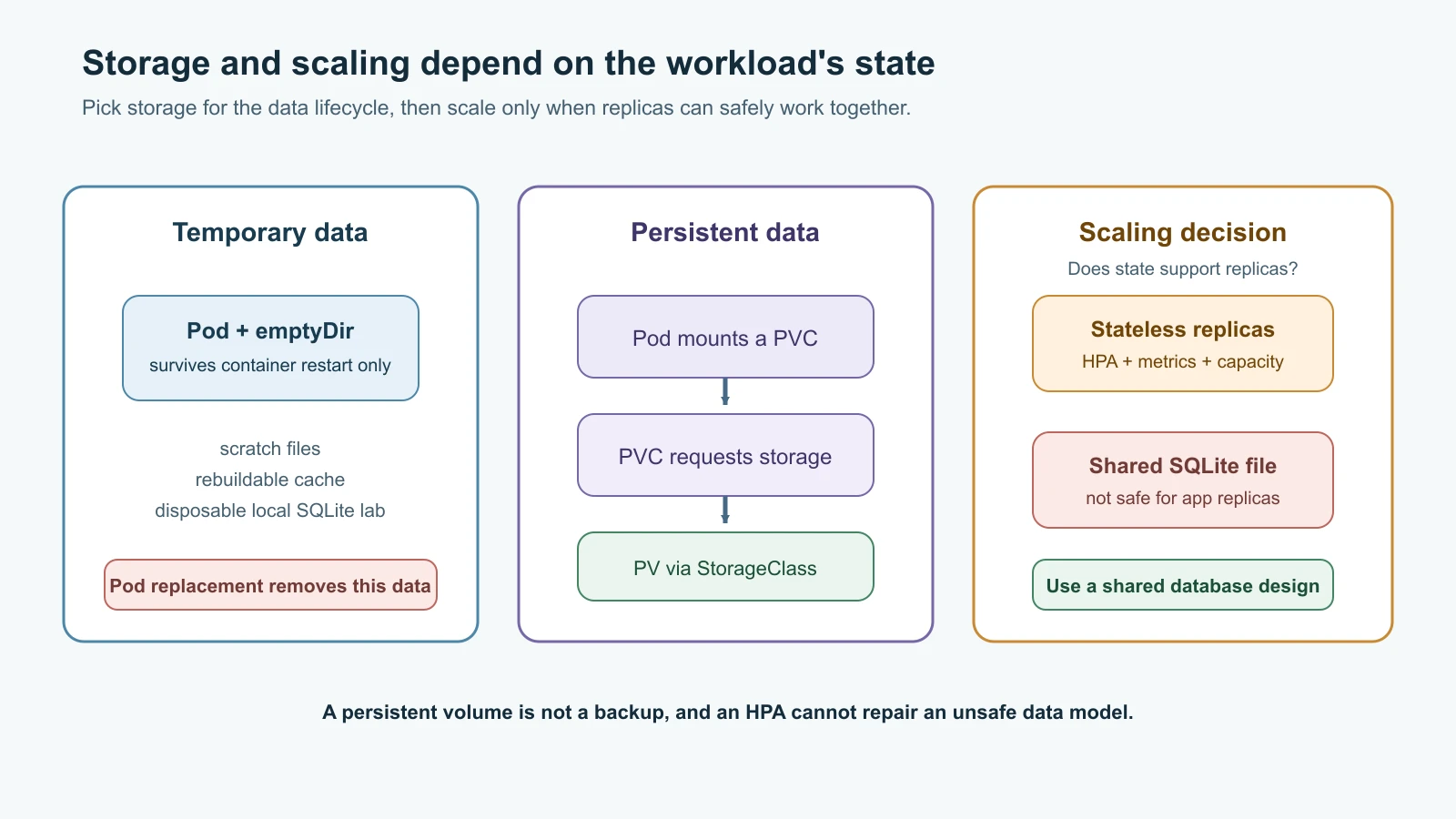
Choose temporary or persistent storage
Pod-local writable layers and emptyDir volumes are temporary. An emptyDir survives a container restart inside the same Pod, but is deleted when the Pod is removed from its node. That is appropriate for scratch files, caches that can be rebuilt, and the local Pebble demo. It is not a backup or durable database plan.
For persistent application data, Kubernetes separates the request from the implementation:
- A PersistentVolume (PV) represents storage available to a cluster, either created by an administrator or provisioned dynamically.
- A PersistentVolumeClaim (PVC) asks for a size, access mode and, optionally, a class of storage. A Pod mounts the claim rather than a provider-specific disk ID.
- A StorageClass describes how the cluster provisions a kind of storage. Its provisioner and performance choices depend on the platform and CSI driver.
Check the available classes before requesting a volume:
1kubectl get storageclass
2kubectl get persistentvolume
3kubectl get persistentvolumeclaim -A
A teaching PVC might look like this:
1apiVersion: v1
2kind: PersistentVolumeClaim
3metadata:
4  name: pebble-data
5  namespace: pebble-lab
6spec:
7  accessModes:
8    - ReadWriteOnce
9  resources:
10    requests:
11      storage: 1Gi
This requests a dynamically provisioned volume from the default StorageClass if the cluster has one. Without a matching class or pre-created PV, the claim may remain Pending. The 1Gi value is a small example request; choose storage size, throughput, encryption, backup and retention settings based on the database and platform. A bound PVC is not a backup. Test restore from a separate backup plan.
Access modes describe how storage can be mounted, but they do not make a database safe for concurrent writes. ReadWriteOnce generally means writable from one node at a time, not necessarily one Pod. Do not share a SQLite file across Pebble Pods as a shortcut to a multi-replica service. Use PostgreSQL or another shared database for shared application state; separate database reliability, backups and upgrades from the app's Pod lifecycle.
A StatefulSet is a workload controller for applications that need stable Pod identities and often per-replica claims. It can be useful for software that knows how to coordinate members, but it does not turn a single-process database into a replicated, backed-up database automatically. For many applications, a managed database service is simpler to operate than self-managing a database StatefulSet. The Compose example already introduced Pebble's PostgreSQL configuration; Kubernetes storage and database operation remain separate decisions.
The chart below leaves persistence disabled by default and can render an optional PVC if the cluster has a suitable StorageClass. Enabling that claim for one Pebble replica can preserve its SQLite file across Pod replacement, but it does not make the application safe to scale to multiple writers. Inspect the class and data lifecycle before enabling it.
Use RBAC to keep permissions narrow
Kubernetes Role-Based Access Control (RBAC) assigns permissions to identities. A Role defines permissions in one namespace. A RoleBinding grants a Role to a user, group or ServiceAccount in that namespace. A ClusterRole and ClusterRoleBinding can grant permissions across namespaces or to cluster-scoped resources, so prefer a namespaced Role when it is enough.
Pebble does not need to query the Kubernetes API to serve URL redirects. Its Pod should not receive a service-account token without a reason. The chart sets automountServiceAccountToken: false. If a separate support automation needs to inspect Pebble Pods and Services, it can receive a narrow read-only role:
1apiVersion: v1
2kind: ServiceAccount
3metadata:
4  name: pebble-observer
5  namespace: pebble-lab
6---
7apiVersion: rbac.authorization.k8s.io/v1
8kind: Role
9metadata:
10  name: pebble-observer
11  namespace: pebble-lab
12rules:
13  - apiGroups: [""]
14    resources: ["pods", "services"]
15    verbs: ["get", "list", "watch"]
16---
17apiVersion: rbac.authorization.k8s.io/v1
18kind: RoleBinding
19metadata:
20  name: pebble-observer
21  namespace: pebble-lab
22subjects:
23  - kind: ServiceAccount
24    name: pebble-observer
25    namespace: pebble-lab
26roleRef:
27  apiGroup: rbac.authorization.k8s.io
28  kind: Role
29  name: pebble-observer
This does not grant access to Secrets, write operations or objects in other namespaces. Bind only the identity that needs it. Listing Secrets can reveal their values, and permission to create Pods can indirectly provide access to other objects in the same namespace. Namespace boundaries are useful but should not be treated as a strong security wall between mutually untrusted teams. For authorization, start with the exact verbs and resources required, then test a positive and a negative permission:
1kubectl auth can-i list pods --as=system:serviceaccount:pebble-lab:pebble-observer -n pebble-lab
2kubectl auth can-i get secrets --as=system:serviceaccount:pebble-lab:pebble-observer -n pebble-lab
The expected answers are yes and no. The caller needs permission to impersonate the ServiceAccount for these checks; a local kind administrator can usually do so. Never give an application a cluster-admin binding to make a permissions error go away.
Package the Pebble manifests with Helm
Helm is a package manager for Kubernetes applications. A chart contains templates, default values and metadata. Installing a chart creates a named release. Helm records release revisions so an operator can inspect, upgrade or roll back the Kubernetes objects managed by that release.
Helm does not replace Kubernetes. It renders templates from chart values and submits the resulting objects to the Kubernetes API. values.yaml provides chart defaults; a separate values file can set environment differences. Pin chart versions and inspect third-party chart sources and permissions before installation. Do not use latest as an unreviewed dependency version.
Install Helm v4.3.1 using the official installation guide. The following example turns the existing Pebble workload into a small local chart. It keeps the same image and health checks while adding configuration, a checksum-triggered rollout and an optional PVC.
Create this directory structure:
1pebble-chart/
2  Chart.yaml
3  values.yaml
4  templates/
5    configmap.yaml
6    deployment.yaml
7    service.yaml
8    pvc.yaml
Chart.yaml describes the chart package. The chart version changes when its templates or defaults change; appVersion identifies the application version by convention:
1apiVersion: v2
2name: pebble
3description: A local learning chart for the fictional Pebble service
4type: application
5version: 0.1.0
6appVersion: "0.3.0"
values.yaml holds configurable defaults. The storage class is left unset so Kubernetes can use its default, if one is configured:
1replicaCount: 1
2
3image:
4  repository: pebble
5  tag: "0.3.0"
6  pullPolicy: IfNotPresent
7
8service:
9  type: ClusterIP
10  port: 8080
11
12baseUrl: "http://localhost:8080"
13
14resources:
15  requests:
16    cpu: 100m
17    memory: 128Mi
18  limits:
19    cpu: 500m
20    memory: 256Mi
21
22persistence:
23  enabled: false
24  accessMode: ReadWriteOnce
25  size: 1Gi
26  storageClassName: ""
templates/configmap.yaml makes the public base URL environment-specific without changing the container image:
1apiVersion: v1
2kind: ConfigMap
3metadata:
4  name: {{ .Release.Name }}-config
5data:
6  PEBBLE_BASE_URL: {{ .Values.baseUrl | quote }}
templates/deployment.yaml defines the workload. The checksum changes when Helm renders a new ConfigMap, so changing baseUrl also changes the Pod template and starts a rollout:
1apiVersion: apps/v1
2kind: Deployment
3metadata:
4  name: {{ .Release.Name }}
5  labels:
6    app.kubernetes.io/name: pebble
7    app.kubernetes.io/instance: {{ .Release.Name }}
8spec:
9  replicas: {{ .Values.replicaCount }}
10  selector:
11    matchLabels:
12      app.kubernetes.io/instance: {{ .Release.Name }}
13  template:
14    metadata:
15      labels:
16        app.kubernetes.io/name: pebble
17        app.kubernetes.io/instance: {{ .Release.Name }}
18      annotations:
19        checksum/config: {{ include (print $.Template.BasePath "/configmap.yaml") . | sha256sum }}
20    spec:
21      automountServiceAccountToken: false
22      securityContext:
23        runAsNonRoot: true
24        runAsUser: 10001
25        seccompProfile:
26          type: RuntimeDefault
27      containers:
28        - name: pebble
29          image: "{{ .Values.image.repository }}:{{ .Values.image.tag }}"
30          imagePullPolicy: {{ .Values.image.pullPolicy }}
31          ports:
32            - name: http
33              containerPort: 8080
34              protocol: TCP
35          envFrom:
36            - configMapRef:
37                name: {{ .Release.Name }}-config
38          readinessProbe:
39            httpGet:
40              path: /readyz
41              port: http
42            periodSeconds: 5
43          livenessProbe:
44            httpGet:
45              path: /healthz
46              port: http
47            periodSeconds: 10
48          resources:
49{{ toYaml .Values.resources | indent 12 }}
50          securityContext:
51            allowPrivilegeEscalation: false
52            readOnlyRootFilesystem: true
53          volumeMounts:
54            - name: data
55              mountPath: /data
56      volumes:
57        - name: data
58{{ if .Values.persistence.enabled }}
59          persistentVolumeClaim:
60            claimName: {{ .Release.Name }}-data
61{{ else }}
62          emptyDir:
63            sizeLimit: 1Gi
64{{ end }}
templates/service.yaml gives clients a stable internal name for the selected Pods:
1apiVersion: v1
2kind: Service
3metadata:
4  name: {{ .Release.Name }}
5spec:
6  type: {{ .Values.service.type }}
7  selector:
8    app.kubernetes.io/instance: {{ .Release.Name }}
9  ports:
10    - name: http
11      port: {{ .Values.service.port }}
12      targetPort: http
13      protocol: TCP
templates/pvc.yaml only creates a claim if you enable persistence. Omitting storageClassName lets the cluster use its configured default class:
1{{- if .Values.persistence.enabled }}
2apiVersion: v1
3kind: PersistentVolumeClaim
4metadata:
5  name: {{ .Release.Name }}-data
6spec:
7  accessModes:
8    - {{ .Values.persistence.accessMode }}
9  resources:
10    requests:
11      storage: {{ .Values.persistence.size }}
12{{- if .Values.persistence.storageClassName }}
13  storageClassName: {{ .Values.persistence.storageClassName | quote }}
14{{- end }}
15{{- end }}
Start by linting and rendering the chart locally. helm template shows the generated Kubernetes YAML without installing it:
1helm lint ./pebble-chart
2helm template pebble ./pebble-chart --namespace pebble-lab
3helm template pebble ./pebble-chart --namespace pebble-lab --set persistence.enabled=true
Review the rendered image, namespace, labels, ports, security context, ConfigMap, PVC condition and probes. The persistence-enabled render proves that a PVC is requested; it does not prove the cluster has a provisioner or that the claim will bind.
Install the local release into the kind cluster from the previous lesson. The pebble:0.3.0 image must already be loaded into the kind nodes, and the current context must be kind-pebble:
1kubectl config current-context
2helm upgrade --install pebble ./pebble-chart \
3  --namespace pebble-lab --create-namespace \
4  --wait --timeout 120s
5helm status pebble -n pebble-lab
6helm list -n pebble-lab
7kubectl get deployment,pods,service -n pebble-lab
Expected: Helm reports a deployed release, the Deployment has one available replica, the Pod is ready, and the pebble Service has a ClusterIP. The image tag is set to the previously loaded local image, so the node does not need to find pebble:0.3.0 in a public registry.
Change baseUrl to a fictional value and upgrade the release:
1helm upgrade pebble ./pebble-chart \
2  --namespace pebble-lab \
3  --set baseUrl=http://pebble.example.test:8080 \
4  --wait --timeout 120s
5kubectl rollout status deployment/pebble -n pebble-lab --timeout=120s
6helm history pebble -n pebble-lab
The chart's checksum annotation changes the Pod template, so Kubernetes replaces the Pod and injects the updated environment. To restore the previous chart release, inspect the revision numbers from helm history and roll back to the prior good revision:
1helm rollback pebble 1 -n pebble-lab --wait --timeout 120s
2kubectl rollout status deployment/pebble -n pebble-lab --timeout=120s
3helm status pebble -n pebble-lab
This local upgrade changes harmless configuration only. Helm rollback restores Kubernetes resources to a previous chart revision; it does not reverse data written to PostgreSQL, undo an external cloud change or make an incompatible database migration safe. Treat chart rollback as one recovery tool inside a broader release plan.
When finished, uninstall the release and then remove the local cluster as in the preceding lesson:
1helm uninstall pebble -n pebble-lab
2kind delete cluster --name pebble
Diagnose from the symptom
Start by identifying which layer is failing: scheduling, image retrieval, process startup, readiness, Service selection, storage or metrics. Inspect the resource and its events before changing values. Use the Pod name from kubectl get pods in the following commands:
1kubectl get pods -n pebble-lab -o wide
2kubectl describe pod <pod-name> -n pebble-lab
3kubectl logs <pod-name> -n pebble-lab --all-containers=true --tail=50
4kubectl logs <pod-name> -n pebble-lab --previous
5kubectl get events -n pebble-lab --sort-by=.lastTimestamp| Symptom | First checks | Common explanations |
|---|---|---|
Pod stays Pending | kubectl describe pod; check PVC status and node capacity | Requests cannot fit, a scheduling constraint excludes nodes, or a required volume has not bound. |
ImagePullBackOff or ErrImagePull | Inspect the exact image name and tag, pull policy, node events and registry access | Tag typo, image not loaded into kind, private-registry credentials missing, or registry/network failure. |
CrashLoopBackOff | Read current and --previous logs; inspect exit code and events | App exits during startup, configuration is invalid, dependency is unreachable, or memory limit repeatedly terminates it. |
Pod is Running but not Ready | Describe the Pod and check probe path, port and response | Wrong probe route/port, slow startup, or application dependency causes readiness to fail. |
| Service has no endpoints | Compare the Service selector with Pod labels and readiness; inspect EndpointSlices | Selector mismatch, no matching Pods, or every matching Pod is unready. |
PVC stays Pending | kubectl describe pvc; inspect StorageClasses and PVs | No default or matching provisioner, unsupported access mode, or insufficient storage. |
HPA shows <unknown> metrics | kubectl describe hpa; check the resource metrics API and requests | Metrics Server is absent or unhealthy, resource requests are missing, or metrics have not arrived yet. |
kubectl logs --previous reads the last terminated container instance if one exists. kubectl describe includes recent events, which often point to the failing step. Do not start with kubectl delete pod as a universal repair: a controller may replace the Pod, but the same configuration or dependency error will make the replacement fail too.
Mistakes beginners make
- Putting credentials in ConfigMaps, chart defaults, command history or Helm
--setvalues. - Expecting environment variables from a ConfigMap to change inside an already running process.
- Using liveness checks to restart every Pod during a shared database outage.
- Setting requests too low to fit locally and limits too tight for normal startup or traffic bursts.
- Assuming an HPA creates more worker nodes or functions without a metrics API.
- Scaling a SQLite workload across Pods and expecting each copy to share the same file.
- Treating a PVC as a backup, or assuming a StorageClass exists because the PVC YAML is valid.
- Reading
ReadWriteOnceas "one Pod only" or assuming access modes guarantee database write safety. - Granting
cluster-adminto an application because a narrow API request was forbidden. - Installing a chart without checking its templates, values, permissions, dependencies and image sources.
- Expecting Helm rollback to restore database contents or undo external side effects.
- Repeatedly restarting a failing Pod without checking its previous logs and events.
Recap and try it yourself
ConfigMaps hold non-secret settings outside the image, while Secrets need protected handling. Environment-based settings take effect when a container starts; a projected file may update but still needs an application reload. Probes answer different questions: startup allows initialization, readiness controls traffic, and liveness triggers a restart. Resource requests influence scheduling and CPU utilization calculations; limits cap consumption. HPA uses metrics to adjust replicas, but it needs metrics support, capacity and an application whose data model supports multiple instances.
PersistentVolumes, claims and StorageClasses separate storage provisioning from Pod configuration. Temporary volumes suit scratch data, not durable records. A StatefulSet provides stable identity for workloads designed to use it; it does not make database replication and backup automatic. Helm templates Kubernetes objects from chart values, tracks release revisions and can roll back those objects. RBAC should grant only the namespace-scoped operations an identity needs. Good diagnosis follows events, logs, probes, endpoints, storage and metrics from the actual symptom.
Try it yourself:
- Install the chart in your local kind cluster, change its
baseUrl, and watch the Deployment roll out due to the ConfigMap checksum. Usehelm historyand roll back to the first revision. - Render the chart with persistence enabled. Check which PVC it would create, inspect the cluster's StorageClasses, and explain what would keep the claim Pending if no provisioner matched it.
- Write an HPA for a stateless test service with CPU requests. Identify the metrics API it needs and explain why the Pebble SQLite chart must not use this HPA.
- Apply the
pebble-observerRole and RoleBinding in a disposable cluster. Check that it can list Pods but cannot read Secrets. Remove the sample resources afterward. - Change the Service selector in a copy of the chart, render it with
helm template, and identify why it would produce no endpoints. Restore the matching label before installing. - Pick a
Pending,ImagePullBackOff,CrashLoopBackOfforRunningbut unready symptom. Write down the two read-only commands you would run first and what each result would tell you.
Go deeper
- Kubernetes ConfigMaps
- Kubernetes probes
- Resource requests and limits
- Horizontal Pod Autoscaling
- Persistent Volumes and Claims
- StatefulSets
- RBAC good practices
- Debug Pods
- Helm chart structure
- Helm quick start
- Helm rollback
- Secret Management
- Kubernetes Basics
Sources checked on 14 November 2026: Kubernetes documentation for ConfigMaps, probes, resource requests and limits, HPA, PersistentVolumes and Claims, StatefulSets, RBAC good practices and Pod troubleshooting; Helm chart structure, quick start, upgrade and rollback documentation. Chart values and local workload are examples; inspect the target cluster's metrics and storage implementations before enabling autoscaling or persistence. Pebble is fictional.