
DevOps course · lesson 2 of 24
- 1What Is DevOps?
- 2A Language and a Service to Operate
- 3Linux and the Terminal
- 4Bash Scripting for Ops
- 5Git and Collaboration
- 6Networking for DevOps
- 7Web Servers, Proxies and Load Balancers
- 8Docker for DevOps
- 9Docker Compose and Multi-Service Apps
- 10Cloud Providers: AWS, Azure and Google Cloud
- 11Serverless Functions and Platforms
- 12Terraform and Infrastructure as Code
- 13Ansible and Configuration Management
- 14Continuous Integration with GitHub Actions and GitLab CI
- 15Continuous Delivery and Deployment Strategies
- 16Secret Management
- 17Kubernetes Basics
- 18Kubernetes in Practice
- 19GitOps with Argo CD and Flux
- 20Service Mesh: Istio, Linkerd, Consul and Envoy
- 21Metrics and Alerting with Prometheus and Grafana
- 22Logs and Tracing with Loki, Elastic and OpenTelemetry
- 23Reliability, SLOs and Cloud Design Patterns
- 24Capstone: Pebble to Production
After this lesson, you will be able to explain why DevOps engineers need a programming language and how Python and Go are used, describe the twelve-factor ideas that make a service easy to deploy and operate, and build and test Pebble, the small web service you will containerize, automate, deploy and monitor for the rest of this course. Pebble will read its settings from environment variables, write structured logs, expose separate health and readiness checks, and shut down cleanly when asked.
In What Is DevOps? you met Pebble as an idea: a fictional URL shortener run by a two-person team that deploys over SSH. Now you will write it. You might wonder why a DevOps course starts by writing an application. The reason is practical: you cannot operate something you do not understand. Knowing how a service starts, where it keeps data, how it reports problems and how it stops is what makes containers, pipelines and Kubernetes manifests make sense later.
Why DevOps engineers write code
DevOps work is full of small programs. You will write scripts that check whether a service is healthy, tools that clean up old backups, glue code that calls a cloud provider's API, and tests for your infrastructure. You will also read application code constantly: when a deployment fails, the error often comes from how the application handles configuration, connections or signals.
You do not need to be an expert application developer. You need one language you can write comfortably and the ability to read others. The roadmap.sh DevOps roadmap recommends starting with Python or Go, and lists Ruby, Rust and JavaScript (Node.js) as other options.
Python and Go compared
Both are excellent choices. They suit slightly different jobs.
| Python | Go | |
|---|---|---|
| How it runs | Interpreted; you run the source with the python3 command | Compiled to a single binary file with no runtime to install |
| Strengths for DevOps | Quick scripts, automation, data handling, a huge standard library, readable syntax | Fast command-line tools and network services, easy to ship, strong concurrency |
| Where you meet it | Ansible modules, cloud SDKs, CI scripts, glue code, many internal tools | Docker, Kubernetes, Terraform, Prometheus and many other cloud-native tools are written in Go |
| Learning curve | Gentle; easy to start | Small language, but stricter: static types, explicit error handling |
| Current versions (13 Nov 2026) | Python 3.15.2 (released 25 October 2026); 3.11 to 3.15 are supported, 3.10 reached end of life on 1 October 2026 | Go 1.27.4 (released 10 November 2026); each major release is supported until two newer major releases exist |
This course uses Python for Pebble and for most scripts because it is quick to read and needs nothing beyond the standard library. You will see Go code when you read the source or plugins of cloud-native tools, and a short Go example appears near the end of this lesson so you can compare.
The other languages on the roadmap are worth recognizing. Ruby appears in older tooling such as Chef and in many web applications. Rust is used for fast, memory-safe infrastructure software and increasingly in command-line tools. JavaScript with Node.js runs many web services and serverless functions, and you will meet it in the serverless lesson. If you already know one of these well, use it for your own scripts; the operational ideas in this lesson apply to any language.
The twelve-factor app
Adam Wiggins and contributors who drew on their work with the Heroku platform wrote The Twelve-Factor App, a short set of principles for building software-as-a-service applications that are easy to deploy and scale. The site was last updated in 2017, but the ideas still describe what platforms like Kubernetes expect from an application. Here they are, with what each means for Pebble:
| Factor | Summary from 12factor.net | How Pebble follows it |
|---|---|---|
| 1. Codebase | One codebase tracked in revision control, many deploys | One Git repository, deployed to test and production (Git and Collaboration) |
| 2. Dependencies | Explicitly declare and isolate dependencies | Standard library only today; later versions pin dependencies in the container image |
| 3. Config | Store config in the environment | Port, host, base URL and database path come from PEBBLE_* environment variables |
| 4. Backing services | Treat backing services as attached resources | The database is reached by a path today and a connection URL later, swappable without code changes |
| 5. Build, release, run | Strictly separate build and run stages | Covered when you build images and pipelines |
| 6. Processes | Execute the app as one or more stateless processes | No state kept in memory between requests; links live in the database |
| 7. Port binding | Export services via port binding | Pebble runs its own HTTP server on a port |
| 8. Concurrency | Scale out via the process model | Run more copies behind a load balancer, covered in later lessons |
| 9. Disposability | Maximize robustness with fast startup and graceful shutdown | Starts in under a second, stops cleanly on SIGTERM |
| 10. Dev/prod parity | Keep development, staging, and production as similar as possible | The same code and settings model everywhere; containers close the remaining gaps |
| 11. Logs | Treat logs as event streams | One JSON line per event, written to standard output |
| 12. Admin processes | Run admin/management tasks as one-off processes | Database setup is idempotent and runs at startup; later one-off tasks run as separate commands |
Three of these matter most on day one.
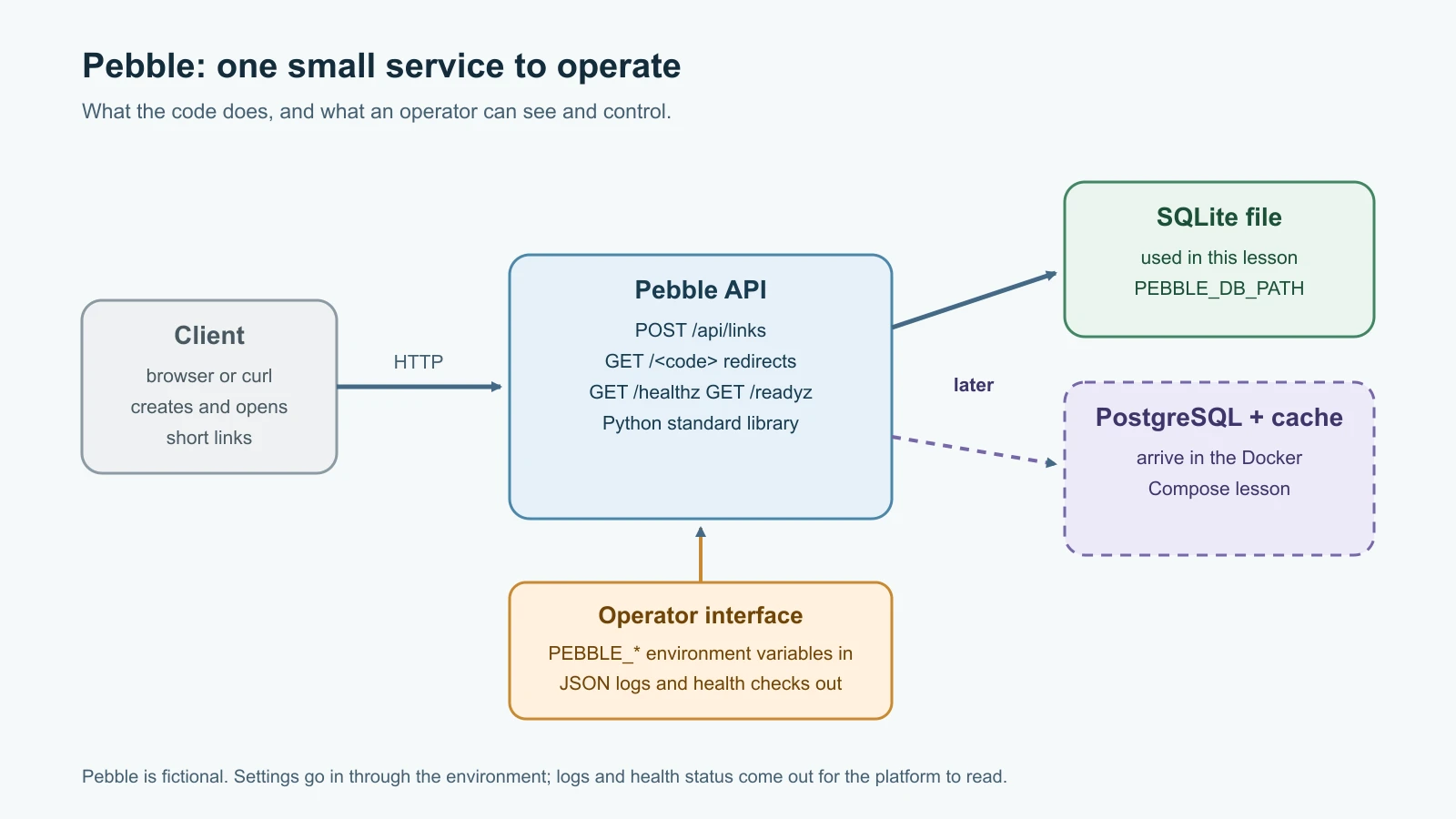
Config in the environment. Settings that change between environments, such as ports, URLs, database locations and credentials, should not be written into the code. If they are, you must edit and rebuild the application to deploy it somewhere else, and secrets end up in Git. Environment variables are supported by every operating system, container runtime and platform, so they make a good common interface.
Logs as event streams. The application should not decide where logs go or how they are rotated. It writes events to standard output, one per line, and the platform collects them. Writing each event as JSON makes it easy for log tools to search by field later, which you will do in Logs and Tracing.
Disposability. Platforms stop and start processes constantly: during deployments, when scaling down, when moving work between machines. A disposable process starts quickly and, when it receives the SIGTERM signal, stops accepting new work, finishes what it is doing and exits. A process that ignores SIGTERM gets killed abruptly after a timeout, which can drop requests in the middle.
Pebble's design
Pebble does one job: it stores a long URL under a short code and redirects visitors who use the code. Its interface is four HTTP endpoints:
| Method and path | What it does | Success response |
|---|---|---|
POST /api/links | Accepts JSON such as {"url": "https://..."} and creates a short code | 201 Created with the code and short URL |
GET /<code> | Looks up the code and redirects to the stored URL | 302 Found with a Location header |
GET /healthz | Says whether the Pebble process itself is working | 200 with {"status": "ok"} |
GET /readyz | Says whether Pebble can serve real traffic, including reaching its database | 200 when ready, 503 when the database is unavailable |
For storage, this version uses SQLite, a database engine built into Python's standard library that keeps everything in one file. That lets you run Pebble with nothing installed but Python. In Docker Compose and Multi-Service Apps, Pebble moves to PostgreSQL and gains a cache, which is the architecture shown in the diagram above. Because the database location is configuration, that move changes settings and one storage class, not the whole application.
A few defensive choices are built in from the start. Pebble only accepts http and https URLs with a host name, so nobody can store a javascript: link that runs code in a visitor's browser. It caps request bodies at 4,096 bytes and URLs at 2,048 characters, so one bad request cannot exhaust memory. Short codes use Python's secrets module, which is designed for unpredictable values, and an alphabet without easily confused characters such as 0, o, 1 and l.
Build Pebble
Make a folder named pebble and save this file inside it as pebble.py. It needs Python 3.11 or newer and nothing else:
1"""Pebble: a small URL-shortening service used throughout the DevOps course."""
2
3import json
4import os
5import secrets
6import signal
7import sqlite3
8import sys
9import threading
10from datetime import datetime, timezone
11from http.server import BaseHTTPRequestHandler, ThreadingHTTPServer
12from urllib.parse import urlparse
13
14ALPHABET = "abcdefghijkmnpqrstuvwxyz23456789"
15MAX_BODY_BYTES = 4096
16MAX_URL_LENGTH = 2048
17
18
19def load_config(env=os.environ):
20    port = int(env.get("PEBBLE_PORT", "8080"))
21    if not 0 <= port <= 65535:
22        raise ValueError(f"PEBBLE_PORT must be 0-65535, got {port}")
23    return {
24        "host": env.get("PEBBLE_HOST", "127.0.0.1"),
25        "port": port,
26        "base_url": env.get("PEBBLE_BASE_URL", f"http://localhost:{port}").rstrip("/"),
27        "db_path": env.get("PEBBLE_DB_PATH", "pebble.db"),
28    }
29
30
31def log(level, message, **fields):
32    record = {"time": datetime.now(timezone.utc).isoformat(timespec="seconds"),
33              "level": level, "message": message, **fields}
34    print(json.dumps(record), flush=True)
35
36
37class LinkStore:
38    def __init__(self, db_path):
39        self.db_path = db_path
40
41    def connect(self):
42        return sqlite3.connect(self.db_path, timeout=5)
43
44    def init(self):
45        with self.connect() as db:
46            db.execute("CREATE TABLE IF NOT EXISTS links ("
47                       "code TEXT PRIMARY KEY, url TEXT NOT NULL, created_at TEXT NOT NULL)")
48
49    def ping(self):
50        with self.connect() as db:
51            db.execute("SELECT 1 FROM links LIMIT 1")
52
53    def create(self, url):
54        for _ in range(5):
55            code = "".join(secrets.choice(ALPHABET) for _ in range(7))
56            try:
57                with self.connect() as db:
58                    db.execute("INSERT INTO links VALUES (?, ?, ?)",
59                               (code, url, datetime.now(timezone.utc).isoformat()))
60                return code
61            except sqlite3.IntegrityError:
62                continue
63        raise RuntimeError("could not generate a unique code")
64
65    def lookup(self, code):
66        with self.connect() as db:
67            row = db.execute("SELECT url FROM links WHERE code = ?", (code,)).fetchone()
68        return row[0] if row else None
69
70
71def valid_url(url):
72    if not isinstance(url, str) or len(url) > MAX_URL_LENGTH:
73        return False
74    parts = urlparse(url)
75    return parts.scheme in ("http", "https") and bool(parts.netloc)
76
77
78def make_handler(store, base_url):
79    class PebbleHandler(BaseHTTPRequestHandler):
80        def send_json(self, status, body):
81            data = json.dumps(body).encode()
82            self.send_response(status)
83            self.send_header("Content-Type", "application/json")
84            self.send_header("Content-Length", str(len(data)))
85            self.end_headers()
86            self.wfile.write(data)
87
88        def do_GET(self):
89            if self.path == "/healthz":
90                return self.send_json(200, {"status": "ok"})
91            if self.path == "/readyz":
92                try:
93                    store.ping()
94                except sqlite3.Error:
95                    return self.send_json(503, {"status": "database unavailable"})
96                return self.send_json(200, {"status": "ready"})
97            url = store.lookup(self.path.lstrip("/"))
98            if url is None:
99                return self.send_json(404, {"error": "unknown link"})
100            self.send_response(302)
101            self.send_header("Location", url)
102            self.send_header("Content-Length", "0")
103            self.end_headers()
104
105        def do_POST(self):
106            if self.path != "/api/links":
107                return self.send_json(404, {"error": "not found"})
108            length = int(self.headers.get("Content-Length") or 0)
109            if length > MAX_BODY_BYTES:
110                return self.send_json(413, {"error": "request body too large"})
111            try:
112                url = json.loads(self.rfile.read(length) or b"{}").get("url")
113            except (json.JSONDecodeError, AttributeError):
114                return self.send_json(400, {"error": "body must be a JSON object"})
115            if not valid_url(url):
116                return self.send_json(400, {"error": "url must be an http or https link"})
117            code = store.create(url)
118            self.send_json(201, {"code": code, "short_url": f"{base_url}/{code}", "url": url})
119
120        def log_request(self, code="-", size="-"):
121            log("info", "request", method=self.command, path=self.path, status=int(code))
122
123        def log_message(self, format, *args):
124            log("warning", format % args)
125
126    return PebbleHandler
127
128
129def build_server(config):
130    store = LinkStore(config["db_path"])
131    store.init()
132    handler = make_handler(store, config["base_url"])
133    return ThreadingHTTPServer((config["host"], config["port"]), handler)
134
135
136def main():
137    try:
138        config = load_config()
139        server = build_server(config)
140    except (ValueError, sqlite3.Error, OSError) as error:
141        log("error", "startup failed", error=str(error))
142        return 1
143
144    def stop(signum, frame):
145        log("info", "shutting down", signal=signal.Signals(signum).name)
146        threading.Thread(target=server.shutdown).start()
147
148    signal.signal(signal.SIGTERM, stop)
149    signal.signal(signal.SIGINT, stop)
150    log("info", "pebble started", host=config["host"], port=config["port"])
151    server.serve_forever()
152    server.server_close()
153    log("info", "pebble stopped")
154    return 0
155
156
157if __name__ == "__main__":
158    sys.exit(main())
Here is how the pieces fit together:
load_configreadsPEBBLE_HOST,PEBBLE_PORT,PEBBLE_BASE_URLandPEBBLE_DB_PATH, applies defaults, and fails immediately with a clear message if the port is invalid. Failing at startup is much better than failing on the first request an hour later. Port0is allowed because it asks the operating system for any free port, which the tests use.logwrites one JSON object per line to standard output, with a UTC timestamp and a level.LinkStorekeeps all database access in one class. Each request opens its own short-lived connection, which keeps the code safe when several requests run at once.initcreates the table only if it does not exist, so running it at every startup is harmless.make_handlerbuilds the request handler./healthzreturnsokwithout touching the database./readyzruns a tiny query and returns503 Service Unavailableif it fails.maininstalls handlers forSIGTERMandSIGINT(what Ctrl+C sends). The handler callsserver.shutdown()from a separate thread, because calling it from the thread runningserve_forever()would wait forever.
Run it
From inside the pebble folder, start the service:
1python3 pebble.pyIt prints a startup line and waits for requests. Open a second terminal and create a short link with curl:
1curl -s -X POST http://localhost:8080/api/links \
2  -H 'Content-Type: application/json' \
3  -d '{"url": "https://www.python.org/downloads/"}'
On the test machine for this lesson (macOS, Python 3.12), the response was:
1{"code": "fqma3yg", "short_url": "http://localhost:8080/fqma3yg", "url": "https://www.python.org/downloads/"}Your code will be different, because codes are random. Use yours in the next command. The -i flag tells curl to show the response headers instead of following the redirect:
1curl -s -i http://localhost:8080/fqma3yg1HTTP/1.0 302 Found
2Server: BaseHTTP/0.6 Python/3.12.0
3Date: Fri, 13 Nov 2026 07:50:13 GMT
4Location: https://www.python.org/downloads/
5Content-Length: 0Check the two operational endpoints, then try to store a dangerous link:
1curl -s http://localhost:8080/healthz
2curl -s http://localhost:8080/readyz
3curl -s -X POST http://localhost:8080/api/links -d '{"url": "javascript:alert(1)"}'1{"status": "ok"}
2{"status": "ready"}
3{"error": "url must be an http or https link"}Now stop the server with Ctrl+C, or send it SIGTERM from the second terminal with kill -TERM <process id>. The first terminal shows Pebble's log stream for the whole session:
1{"time": "2026-11-13T07:50:12+00:00", "level": "info", "message": "pebble started", "host": "127.0.0.1", "port": 8080}
2{"time": "2026-11-13T07:50:13+00:00", "level": "info", "message": "request", "method": "POST", "path": "/api/links", "status": 201}
3{"time": "2026-11-13T07:50:13+00:00", "level": "info", "message": "request", "method": "GET", "path": "/fqma3yg", "status": 302}
4{"time": "2026-11-13T07:50:13+00:00", "level": "info", "message": "request", "method": "GET", "path": "/healthz", "status": 200}
5{"time": "2026-11-13T07:50:13+00:00", "level": "info", "message": "request", "method": "GET", "path": "/readyz", "status": 200}
6{"time": "2026-11-13T07:50:13+00:00", "level": "info", "message": "request", "method": "POST", "path": "/api/links", "status": 400}
7{"time": "2026-11-13T07:50:13+00:00", "level": "info", "message": "shutting down", "signal": "SIGTERM"}
8{"time": "2026-11-13T07:50:13+00:00", "level": "info", "message": "pebble stopped"}
Every line is a complete JSON object, so a log tool can filter on status or path without guessing at the format. Notice that the URL being shortened is not logged; logging only what you need is a habit that matters once real user data is involved.
Finally, see configuration in action. Change the port through the environment, and try an invalid value:
1PEBBLE_PORT=9090 python3 pebble.py
2PEBBLE_PORT=99999 python3 pebble.py
The first starts Pebble on port 9090 without any code change. The second refuses to start, prints {"time": "...", "level": "error", "message": "startup failed", "error": "PEBBLE_PORT must be 0-65535, got 99999"} and exits with status 1. A deployment tool can see that non-zero exit status and stop the rollout.
Health checks and readiness checks
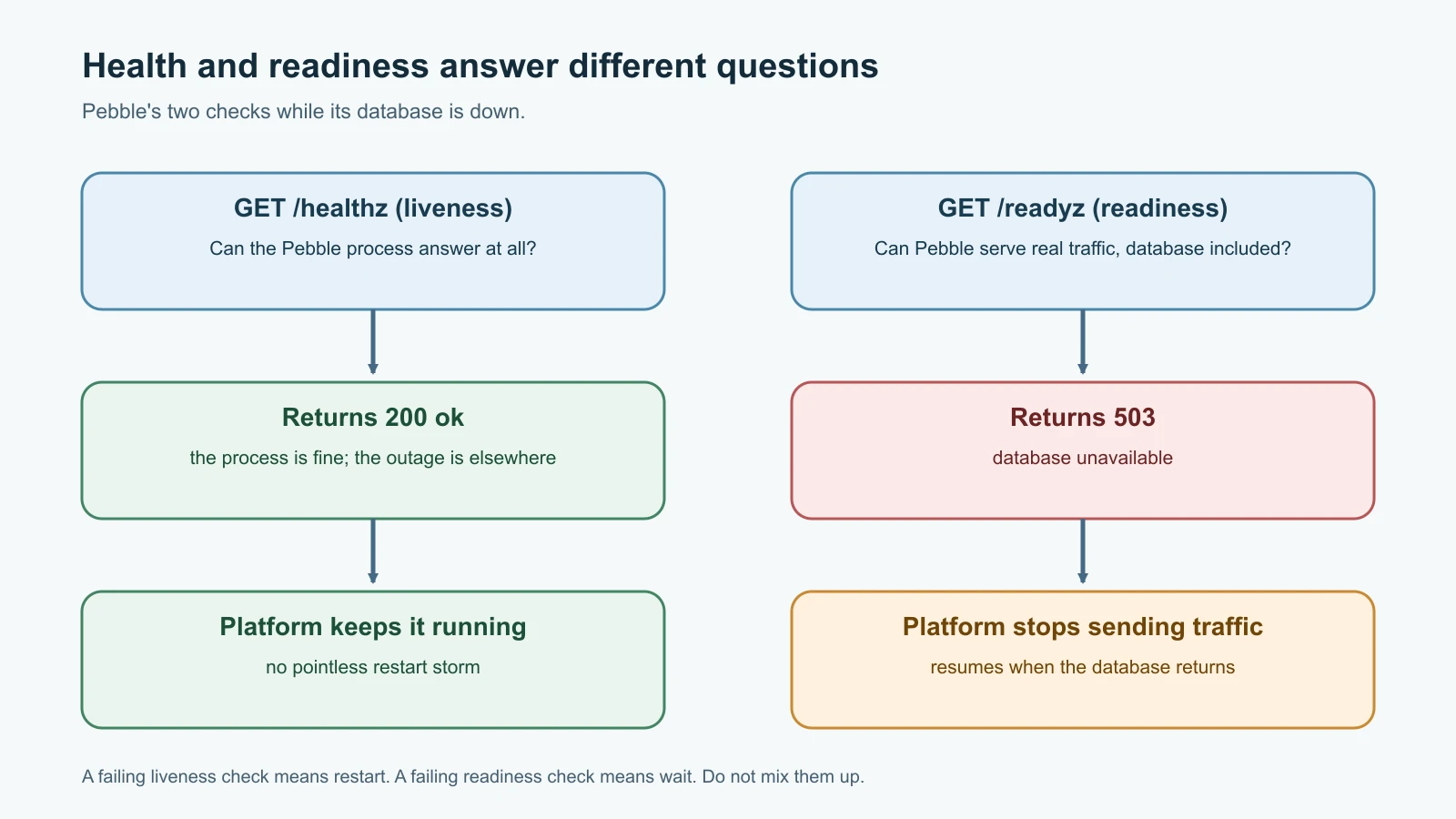
Why two endpoints instead of one? Because the right reaction to "something is wrong" depends on what is wrong.
Kubernetes, which you will use later in the course, makes the distinction explicit. Its documentation says "liveness probes determine when to restart a container" and "readiness probes determine when a container is ready to accept traffic". It also warns that "incorrect implementation of liveness probes can lead to cascading failures".
Think about what happens if Pebble's database goes down for a minute. If the health check tested the database, every copy of Pebble would fail its liveness check at the same time, and the platform would restart all of them. Restarting does not fix a database outage. The restarts would simply add load, slow recovery and drop requests. Instead, Pebble's /healthz only confirms that the process can answer, and /readyz reports the database problem. The platform stops sending traffic to copies that are not ready and keeps them running, so they can serve again as soon as the database returns. The Kubernetes documentation describes exactly this split: the liveness probe passes when the app itself is healthy, and the readiness probe additionally checks required back-end services.
The same idea applies outside Kubernetes. Load balancers, uptime monitors and deployment scripts all use health endpoints. Decide what each check is for before you decide what it tests.
Test Pebble
Save this as test_pebble.py in the same folder:
1import json
2import os
3import tempfile
4import threading
5import unittest
6import urllib.error
7import urllib.request
8from contextlib import redirect_stdout
9from io import StringIO
10
11import pebble
12
13
14class NoRedirect(urllib.request.HTTPRedirectHandler):
15    def redirect_request(self, *args, **kwargs):
16        return None
17
18
19OPENER = urllib.request.build_opener(NoRedirect)
20
21
22def call(url, method="GET", body=None, raw=None):
23    data = raw if raw is not None else (json.dumps(body).encode() if body is not None else None)
24    request = urllib.request.Request(url, data=data, method=method,
25                                     headers={"Content-Type": "application/json"})
26    try:
27        with OPENER.open(request) as response:
28            return response.status, dict(response.headers), response.read()
29    except urllib.error.HTTPError as error:
30        return error.code, dict(error.headers), error.read()
31
32
33class PebbleTest(unittest.TestCase):
34    def setUp(self):
35        self.folder = tempfile.TemporaryDirectory()
36        self.config = pebble.load_config({"PEBBLE_PORT": "0",
37                                          "PEBBLE_DB_PATH": os.path.join(self.folder.name, "t.db"),
38                                          "PEBBLE_BASE_URL": "https://peb.example/"})
39        self.quiet = redirect_stdout(StringIO())
40        self.quiet.__enter__()
41        self.server = pebble.build_server(self.config)
42        self.base = f"http://127.0.0.1:{self.server.server_address[1]}"
43        threading.Thread(target=self.server.serve_forever, daemon=True).start()
44
45    def tearDown(self):
46        self.server.shutdown()
47        self.server.server_close()
48        self.quiet.__exit__(None, None, None)
49        self.folder.cleanup()
50
51    def test_create_then_redirect(self):
52        status, _, body = call(self.base + "/api/links", "POST", {"url": "https://example.com/a?b=1"})
53        self.assertEqual(status, 201)
54        created = json.loads(body)
55        self.assertEqual(created["short_url"], "https://peb.example/" + created["code"])
56        status, headers, _ = call(self.base + "/" + created["code"])
57        self.assertEqual(status, 302)
58        self.assertEqual(headers["Location"], "https://example.com/a?b=1")
59
60    def test_rejects_non_http_urls(self):
61        too_long = "https://example.com/" + "a" * 3000
62        for bad in ["javascript:alert(1)", "ftp://example.com", "example.com", "https://", too_long, 42, None]:
63            status, _, _ = call(self.base + "/api/links", "POST", {"url": bad})
64            self.assertEqual(status, 400, bad)
65
66    def test_rejects_bad_json_and_large_bodies(self):
67        self.assertEqual(call(self.base + "/api/links", "POST", raw=b"[1, 2]")[0], 400)
68        self.assertEqual(call(self.base + "/api/links", "POST", raw=b"{not json")[0], 400)
69        big = json.dumps({"url": "https://example.com/" + "a" * 5000}).encode()
70        self.assertEqual(call(self.base + "/api/links", "POST", raw=big)[0], 413)
71
72    def test_unknown_code_is_404(self):
73        self.assertEqual(call(self.base + "/nope123")[0], 404)
74
75    def test_health_and_readiness(self):
76        self.assertEqual(call(self.base + "/healthz")[0], 200)
77        self.assertEqual(call(self.base + "/readyz")[0], 200)
78        os.remove(self.config["db_path"])
79        os.mkdir(self.config["db_path"])
80        self.assertEqual(call(self.base + "/healthz")[0], 200)
81        self.assertEqual(call(self.base + "/readyz")[0], 503)
82
83    def test_codes_are_unique_and_short(self):
84        codes = {json.loads(call(self.base + "/api/links", "POST", {"url": f"https://example.com/{i}"})[2])["code"]
85                 for i in range(50)}
86        self.assertEqual(len(codes), 50)
87        self.assertTrue(all(len(c) == 7 and set(c) <= set(pebble.ALPHABET) for c in codes))
88
89
90class ConfigTest(unittest.TestCase):
91    def test_defaults(self):
92        config = pebble.load_config({})
93        self.assertEqual((config["host"], config["port"]), ("127.0.0.1", 8080))
94        self.assertEqual(config["base_url"], "http://localhost:8080")
95
96    def test_rejects_bad_port(self):
97        for bad in ["0x", "70000", "-1"]:
98            with self.assertRaises(ValueError):
99                pebble.load_config({"PEBBLE_PORT": bad})
100
101
102if __name__ == "__main__":
103    unittest.main()
These tests start a real Pebble server on a free port with a temporary database, send it real HTTP requests, and shut it down after each test. That is slower than testing functions in isolation, but it checks what operators and users actually depend on: status codes, headers and behavior. The NoRedirect helper stops urllib from following the 302, so the test can inspect the Location header. redirect_stdout hides Pebble's log lines while the tests run.
The readiness test is the most interesting. It deletes the database file and replaces it with a folder of the same name, which SQLite cannot open. /healthz still returns 200, and /readyz switches to 503, which is exactly the behavior described in the previous section.
Run the tests from the pebble folder:
1python3 -m unittest -v test_pebbleAll eight tests pass. They take a few seconds, mostly because the server checks for a shutdown request every half second. As a check that the tests are worth having, each important line of pebble.py was deliberately broken one at a time: accepting any URL scheme, dropping the host-name check, removing the body and URL size limits, skipping the readiness query, returning 301 instead of 302, and more. Every one of those changes made at least one test fail.
The same health check in Go
For comparison, here is a minimal Go program that serves only a health endpoint and reads its port from the same environment variable. Save it as healthz.go in an empty folder:
1package main
2
3import (
4	"encoding/json"
5	"log"
6	"net/http"
7	"os"
8)
9
10func main() {
11	port := os.Getenv("PEBBLE_PORT")
12	if port == "" {
13		port = "8080"
14	}
15
16	mux := http.NewServeMux()
17	mux.HandleFunc("GET /healthz", func(w http.ResponseWriter, r *http.Request) {
18		w.Header().Set("Content-Type", "application/json")
19		json.NewEncoder(w).Encode(map[string]string{"status": "ok"})
20	})
21
22	log.Printf("listening on :%s", port)
23	log.Fatal(http.ListenAndServe(":"+port, mux))
24}
Run it with Go 1.22 or newer, which added method patterns such as "GET /healthz" to the standard router:
1go run healthz.goThen, from another terminal, curl -s http://localhost:8080/healthz returns {"status":"ok"}. Go's JSON encoder writes no spaces, unlike Python's default. Building it with go build healthz.go produces a single executable you can copy to a server with nothing else installed, which is a big reason so many infrastructure tools are written in Go.
Mistakes beginners make
- Writing ports, URLs or passwords directly into the code, so every environment needs a code change and secrets leak into Git.
- Making the liveness check depend on the database, so a database blip restarts every instance at once.
- Having only one health endpoint that always returns
200, even when the service cannot do its job. - Writing logs to a file inside the application instead of standard output, then losing them when the container is replaced.
- Logging full request bodies or user data "just in case".
- Ignoring
SIGTERM, so deployments cut off requests halfway through. - Accepting any string as a URL, including
javascript:links. - Starting with a heavy web framework and many dependencies before understanding what the service needs.
- Testing only the happy path and never checking what happens when the database is unavailable.
Recap and try it yourself
DevOps engineers write code every day, mostly scripts, tools and automation, and read application code when things break. Python is a strong first choice for automation and small services, and Go powers much of the cloud-native toolset. The twelve-factor principles describe services that are easy to run: config in the environment, logs as event streams, stateless processes and fast, graceful startup and shutdown. Pebble now follows those ideas. It reads PEBBLE_* variables, writes JSON logs to standard output, separates liveness from readiness, validates input and stops cleanly on SIGTERM, with eight tests to prove it.
Try it yourself:
- Run Pebble and the tests on your own machine. Then start Pebble with
PEBBLE_BASE_URL=https://peb.exampleand create a link. What changes in the response, and why is the base URL configuration rather than code? - Add a
GET /api/links/<code>endpoint that returns the stored URL as JSON without redirecting, and a test for both a known and an unknown code. - While Pebble is running, rename
pebble.dbin another terminal and call/readyz. Explain the result, then put the file back. - Write down which twelve-factor principle each of these breaks: a log file written to
/var/log/pebble.log, a database password inpebble.py, and an in-memory dictionary of recent links shared between requests.
Sources checked on 13 November 2026: roadmap.sh DevOps roadmap; The Twelve-Factor App; Python downloads and release status; Go release history; Kubernetes, liveness, readiness and startup probes; Python documentation for http.server, sqlite3 and secrets; Go documentation for net/http. Pebble is fictional.