
DevOps course · lesson 12 of 24
- 1What Is DevOps?
- 2A Language and a Service to Operate
- 3Linux and the Terminal
- 4Bash Scripting for Ops
- 5Git and Collaboration
- 6Networking for DevOps
- 7Web Servers, Proxies and Load Balancers
- 8Docker for DevOps
- 9Docker Compose and Multi-Service Apps
- 10Cloud Providers: AWS, Azure and Google Cloud
- 11Serverless Functions and Platforms
- 12Terraform and Infrastructure as Code
- 13Ansible and Configuration Management
- 14Continuous Integration with GitHub Actions and GitLab CI
- 15Continuous Delivery and Deployment Strategies
- 16Secret Management
- 17Kubernetes Basics
- 18Kubernetes in Practice
- 19GitOps with Argo CD and Flux
- 20Service Mesh: Istio, Linkerd, Consul and Envoy
- 21Metrics and Alerting with Prometheus and Grafana
- 22Logs and Tracing with Loki, Elastic and OpenTelemetry
- 23Reliability, SLOs and Cloud Design Patterns
- 24Capstone: Pebble to Production
After this lesson, you will be able to explain infrastructure as code and the difference between declarative and imperative tools, write Terraform configuration with providers, resources, data sources, variables, outputs and modules, run the init, plan, apply and destroy workflow and read a plan correctly, explain what Terraform state is, why it holds secrets and how to store it safely and remotely with locking, detect drift, and define Pebble's cloud server from the previous lessons as reviewed, repeatable code. You will also know how OpenTofu, Pulumi, the AWS CDK and CloudFormation compare.
In Cloud Providers: AWS, Azure and Google Cloud you created Pebble's server with a sequence of AWS CLI commands. It worked once. Now try to run it again: the security group "already exists" and the script fails. Change the instance type and you must work out which commands to run, in which order, to change only that. Forget the clean-up step and nothing tells you a server is still running. A script describes how to change things. Infrastructure as code describes what should exist, and lets a tool work out the how.
Infrastructure as code
Infrastructure as code (IaC) means defining servers, networks, firewalls, databases and DNS records in text files that live in version control and are applied by a tool. The benefits are the same ones you have been collecting all course for application code:
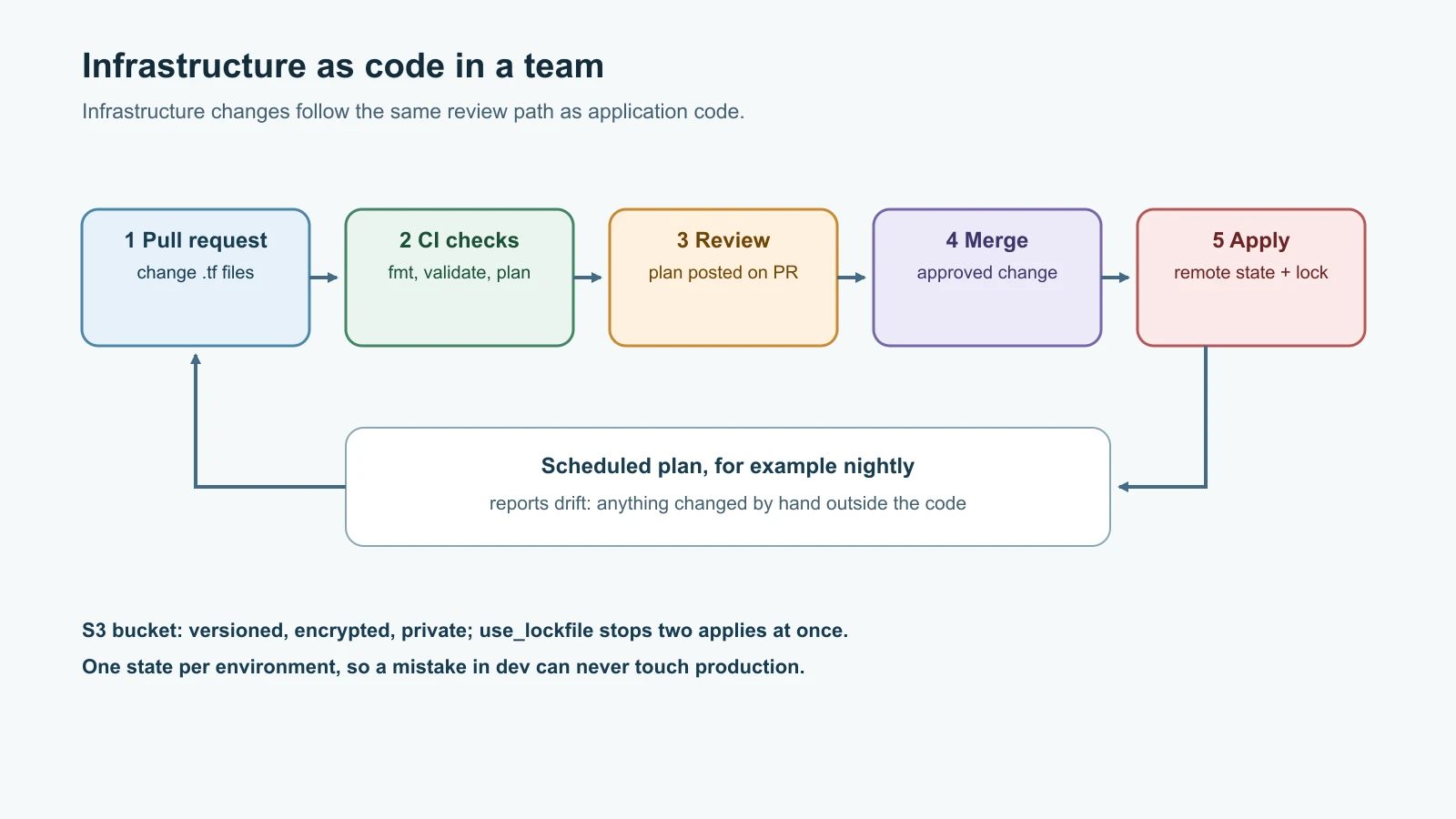
- Reviewable. A change to a firewall is a pull request someone can read, as in Git and Collaboration.
- Repeatable. The same files create identical staging and production environments, and recreate either after a disaster.
- Traceable. Git history shows who changed what, when and why.
- Testable. Tools can check the files for mistakes and policy violations before anything is created.
There are two styles of tool:
| Imperative | Declarative | |
|---|---|---|
| You write | The steps: create this, then add that | The end state: these things should exist with these settings |
| Running it twice | Usually fails or creates duplicates | Changes nothing if reality already matches |
| Changing one setting | You work out the steps | The tool computes the difference |
| Removing something | You write the delete steps | Delete it from the file and the tool removes it |
| Examples | Shell scripts with cloud CLIs | Terraform, OpenTofu, CloudFormation, Kubernetes manifests |
Running a declarative tool twice and getting the same result is called idempotency, the same property you wanted from serverless functions in the previous lesson.
Terraform in five ideas
Terraform, from HashiCorp, is the most widely used declarative IaC tool. You write configuration in HCL, the HashiCorp Configuration Language, in files ending in .tf. The latest release at the time of writing is Terraform 1.17.2; the examples here were run with Terraform 1.12.2 and use no features newer than that.
- Providers are plugins that talk to an API:
aws,azurerm,google,cloudflare,github, and also small utility providers such aslocalfor files andrandomfor generated values. Thousands exist, published on the Terraform Registry. - Resources are things Terraform creates and manages: an
aws_instance, anaws_security_group, alocal_file. - Data sources read things Terraform does not manage, such as the ID of the latest Ubuntu image or your default network.
- Variables and outputs are a configuration's inputs and results.
- State is Terraform's record of which real objects correspond to which resources in your files.
Terraform reads all the .tf files in a folder, works out the order from the references between resources, and creates independent resources in parallel.
The workflow is always the same:
| Command | What it does |
|---|---|
terraform init | Downloads providers and modules and sets up the state backend |
terraform fmt | Formats files in the standard style |
terraform validate | Checks syntax and references without contacting any API |
terraform plan | Compares configuration, state and reality, and shows what it would change |
terraform apply | Shows the plan again, asks for confirmation, then makes the changes |
terraform destroy | Removes everything this configuration manages |
A real project you can run on a laptop
You can learn the whole workflow without a cloud account, using the local and random providers. This project generates Pebble's environment files and database passwords for two environments, staging and production, from one reusable module. Install Terraform from HashiCorp's official instructions, then create this layout:
1pebble-local/
2  versions.tf
3  main.tf
4  modules/pebble_config/
5    variables.tf
6    main.tf
7    outputs.tf
8    pebble.env.tftpl
versions.tf pins Terraform and the providers. ~> 2.9 means "2.9 or any later 2.x", which accepts fixes but not breaking major versions:
1terraform {
2  required_version = ">= 1.10"
3  required_providers {
4    local = {
5      source  = "hashicorp/local"
6      version = "~> 2.9"
7    }
8    random = {
9      source  = "hashicorp/random"
10      version = "~> 3.9"
11    }
12  }
13}
The module's inputs are in modules/pebble_config/variables.tf. The validation block rejects nonsense before anything happens:
1variable "environment" {
2  type        = string
3  description = "Environment name, used in file paths and the base URL"
4}
5
6variable "base_url" {
7  type        = string
8  description = "Public base URL for short links"
9}
10
11variable "app_replicas" {
12  type        = number
13  description = "How many Pebble app containers to run"
14  default     = 2
15
16  validation {
17    condition     = var.app_replicas >= 1 && var.app_replicas <= 10
18    error_message = "app_replicas must be between 1 and 10."
19  }
20}
The module's resources are in modules/pebble_config/main.tf:
1resource "random_password" "db" {
2  length  = 24
3  special = false
4}
5
6resource "local_sensitive_file" "db_password" {
7  filename        = "${path.root}/out/${var.environment}/secrets/db_password.txt"
8  content         = random_password.db.result
9  file_permission = "0644"
10}
11
12resource "local_file" "env" {
13  filename             = "${path.root}/out/${var.environment}/pebble.env"
14  file_permission      = "0644"
15  directory_permission = "0755"
16  content = templatefile("${path.module}/pebble.env.tftpl", {
17    base_url     = var.base_url
18    app_replicas = var.app_replicas
19  })
20}
random_password generates a 24-character password once and keeps it. local_sensitive_file writes it to a file, and because the resource is marked sensitive, Terraform hides its content in plans and output. local_file renders Pebble's settings from a template with templatefile, and path.root and path.module keep the paths correct wherever the module is used. The template, modules/pebble_config/pebble.env.tftpl, uses ${...} for the values passed in:
1PEBBLE_BASE_URL=${base_url}
2PEBBLE_APP_REPLICAS=${app_replicas}
3PEBBLE_DATABASE_URL=postgresql://pebble@db:5432/pebble
4PEBBLE_DATABASE_PASSWORD_FILE=/run/secrets/db_password
5PEBBLE_CACHE_URL=redis://cache:6379/0
The module's results are in modules/pebble_config/outputs.tf:
1output "env_file" {
2  value = local_file.env.filename
3}
4
5output "db_password" {
6  value     = random_password.db.result
7  sensitive = true
8}
Finally, the root main.tf uses the module twice with different inputs, which is exactly how one definition produces several environments:
1module "staging" {
2  source       = "./modules/pebble_config"
3  environment  = "staging"
4  base_url     = "https://staging.pebble.example"
5  app_replicas = 1
6}
7
8module "production" {
9  source       = "./modules/pebble_config"
10  environment  = "production"
11  base_url     = "https://pebble.example"
12  app_replicas = var.production_replicas
13}
14
15variable "production_replicas" {
16  type    = number
17  default = 2
18}
19
20output "env_files" {
21  value = [module.staging.env_file, module.production.env_file]
22}
Init, validate, plan and apply
From the pebble-local folder:
1terraform init
2terraform fmt -check -recursive
3terraform validate
On the machine used for this lesson, init found both module calls, downloaded the providers and printed:
1Initializing modules...
2- production in modules/pebble_config
3- staging in modules/pebble_config
4Initializing provider plugins...
5- Installed hashicorp/random v3.9.1 (signed by HashiCorp)
6- Installed hashicorp/local v2.9.1 (signed by HashiCorp)
7Terraform has created a lock file .terraform.lock.hcl to record the provider
8selections it made above. Include this file in your version control repository
The lock file records the exact provider versions and their checksums, so everyone on the team, and every CI run, uses the same ones. Commit it. fmt -check printed nothing because the files were already formatted, and validate printed Success! The configuration is valid.
Now ask what Terraform would do:
1terraform planThe plan lists six resources, three per environment. Here is one of them, followed by the summary:
1  # module.production.local_file.env will be created
2  + resource "local_file" "env" {
3      + content              = <<-EOT
4            PEBBLE_BASE_URL=https://pebble.example
5            PEBBLE_APP_REPLICAS=2
6            PEBBLE_DATABASE_URL=postgresql://pebble@db:5432/pebble
7            PEBBLE_DATABASE_PASSWORD_FILE=/run/secrets/db_password
8            PEBBLE_CACHE_URL=redis://cache:6379/0
9        EOT
10      + content_base64sha256 = (known after apply)
11      + content_base64sha512 = (known after apply)
12      + content_md5          = (known after apply)
13      + content_sha1         = (known after apply)
14      + content_sha256       = (known after apply)
15      + content_sha512       = (known after apply)
16      + directory_permission = "0755"
17      + file_permission      = "0644"
18      + filename             = "./out/production/pebble.env"
19      + id                   = (known after apply)
20    }
21
22Plan: 6 to add, 0 to change, 0 to destroy.
Read every plan before you apply it. The symbol in front of each resource tells you what will happen: + create, ~ update in place, -/+ destroy and recreate, - destroy. (known after apply) marks values that only exist once the resource is created, such as IDs. The password appears as (sensitive value), never in clear text. A plan that says it will destroy something you did not expect is the most important thing Terraform will ever show you.
Apply it:
1terraform applyTerraform prints the plan again and waits for you to type yes. Then:
1Apply complete! Resources: 6 added, 0 changed, 0 destroyed.
2
3Outputs:
4
5env_files = [
6  "./out/staging/pebble.env",
7  "./out/production/pebble.env",
8]
The files exist, and running terraform plan again now says No changes. Your infrastructure matches the configuration. That is idempotency in practice.
Change something and read the plan
Raise production to three replicas without editing any file, by passing a variable on the command line:
1terraform plan -var production_replicas=31 # module.production.local_file.env must be replaced
2-/+ resource "local_file" "env" {
3 ~ content = <<-EOT # forces replacement
4 PEBBLE_BASE_URL=https://pebble.example
5 - PEBBLE_APP_REPLICAS=2
6 + PEBBLE_APP_REPLICAS=3
7 PEBBLE_DATABASE_URL=postgresql://pebble@db:5432/pebble
8 PEBBLE_DATABASE_PASSWORD_FILE=/run/secrets/db_password
9 PEBBLE_CACHE_URL=redis://cache:6379/0
10 EOT
11 # (3 unchanged attributes hidden)
12 }
13
14Plan: 1 to add, 0 to change, 1 to destroy.Only production's settings file changes, staging is untouched, and the password is kept. The plan also says the file "must be replaced" rather than updated, and marks which change "forces replacement". For a file that is harmless. For a database or a server, replacement means the old one is deleted, so this line is exactly what reviewers look for.
Try an invalid value, and the validation rule stops it before anything is planned:
1terraform plan -var production_replicas=501Error: Invalid value for variable
2
3 on main.tf line 12, in module "production":
4 12: app_replicas = var.production_replicas
5 ├────────────────
6 │ var.app_replicas is 50
7
8app_replicas must be between 1 and 10.State: Terraform's memory
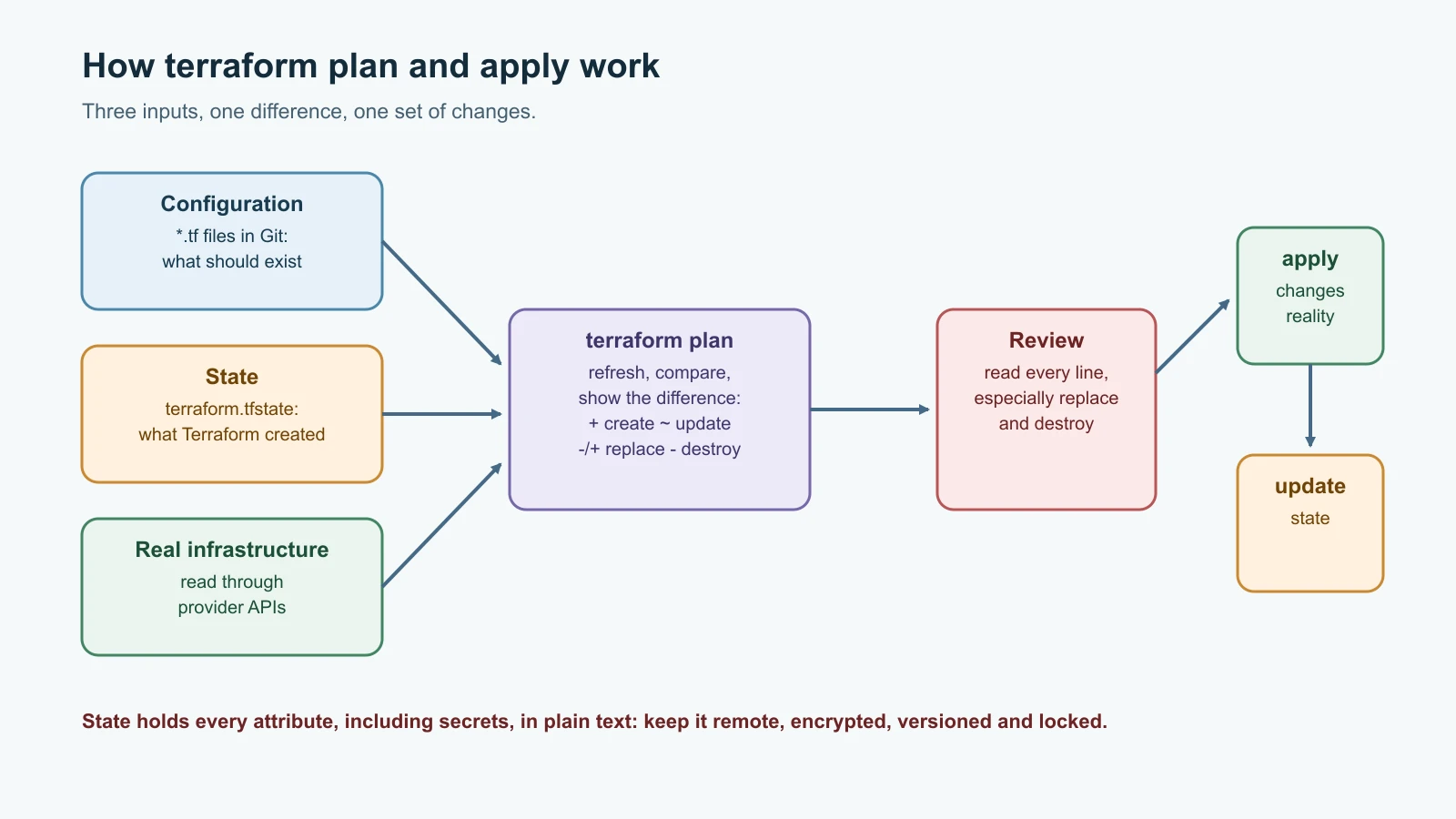
Terraform keeps a state file, terraform.tfstate by default, that maps each resource in the configuration to the real object it created, along with every attribute. On each plan, Terraform refreshes the state by asking the providers about the real objects, compares that with the configuration, and plans the difference. Without state, Terraform would not know that a server in your account is "its" server.
terraform state list shows what it tracks:
1module.production.local_file.env
2module.production.local_sensitive_file.db_password
3module.production.random_password.db
4module.staging.local_file.env
5module.staging.local_sensitive_file.db_password
6module.staging.random_password.db
And here is the most important fact about state: it contains secrets in plain text. terraform state show module.production.random_password.db displays result = (sensitive value), but that only hides it on screen. Opening terraform.tfstate on the lesson's machine showed both 24-character passwords stored as ordinary text. Marking values as sensitive keeps them out of logs and plans; it does not encrypt the state. Treat a state file like a password vault:
- Never commit state to Git. Add
*.tfstateand*.tfstate.*to.gitignore, along with the.terraform/folder of downloaded plugins. - Store it remotely, encrypted, with tight access, as described below.
- Never edit it by hand. Use
terraform statesubcommands andterraform importwhen you must change what Terraform tracks.
Drift: when reality changes behind Terraform's back
Drift is any difference between what the configuration says and what really exists, usually because someone changed something by hand in a console. Simulate it by editing a generated file directly:
1echo 'PEBBLE_DEBUG=true' >> out/staging/pebble.env
2terraform plan1Note: Objects have changed outside of Terraform
2
3 # module.staging.local_file.env has been deleted
4 # module.staging.local_file.env will be created
5
6Plan: 1 to add, 0 to change, 0 to destroy.The local provider decides a file whose content no longer matches is gone, and plans to write it again. Cloud providers report drift attribute by attribute, for example a security group rule someone added. Either way, terraform apply puts things back to what the code says; after applying here, the extra line was gone. Running terraform plan on a schedule in CI is a simple way to detect drift, and terraform plan -refresh-only shows what changed outside Terraform without proposing fixes. The cure for drift is cultural as much as technical: once something is managed by code, change it through code.
When you have finished, remove everything:
1terraform destroy1Plan: 0 to add, 0 to change, 6 to destroy.
2Destroy complete! Resources: 6 destroyed.The files are deleted. The empty out/ folders remain, because the local provider manages files, not the folders it created for them.
Modules: write once, use many times
A module is a folder of Terraform files with variables as inputs and outputs as results. Every configuration is a module, the root module, and it can call child modules, as main.tf does twice. Modules let a team encode its standards once: a "web server" module with encrypted disks, required tags and safe firewall rules means nobody has to remember those details for each new server.
The Terraform Registry also hosts public modules, such as widely used ones for building AWS networks. Use them with a pinned version, read what they create, and prefer a few well-understood modules over many deep layers of nesting, which make plans hard to follow.
Pebble's cloud server as code
Now the real thing: the server from the cloud providers lesson, defined in Terraform. Create a new folder, pebble-aws, with these files. versions.tf pins the AWS provider to version 6, the current major version at the time of writing (the latest release was 6.73.0), and adds default tags to every resource it creates:
1terraform {
2  required_version = ">= 1.10"
3  required_providers {
4    aws = {
5      source  = "hashicorp/aws"
6      version = "~> 6.0"
7    }
8  }
9}
10
11provider "aws" {
12  region = var.region
13  default_tags {
14    tags = {
15      project    = "pebble"
16      env        = var.environment
17      managed-by = "terraform"
18    }
19  }
20}
variables.tf defines the inputs. The SSH rule has a validation that refuses to open SSH to the whole internet:
1variable "region" {
2  type    = string
3  default = "ap-south-1"
4}
5
6variable "environment" {
7  type    = string
8  default = "dev"
9}
10
11variable "instance_type" {
12  type    = string
13  default = "t4g.small"
14}
15
16variable "image" {
17  type        = string
18  description = "Pebble container image, for example ghcr.io/your-account/pebble:0.2.0"
19}
20
21variable "ssh_public_key_path" {
22  type    = string
23  default = "~/.ssh/id_ed25519.pub"
24}
25
26variable "ssh_allowed_cidr" {
27  type        = string
28  description = "Your public IP address in CIDR form, for example 203.0.113.7/32"
29
30  validation {
31    condition     = can(cidrhost(var.ssh_allowed_cidr, 0)) && var.ssh_allowed_cidr != "0.0.0.0/0"
32    error_message = "ssh_allowed_cidr must be a valid CIDR block and must not be 0.0.0.0/0."
33  }
34}
main.tf replaces every CLI command from the earlier deployment:
1data "aws_ssm_parameter" "ubuntu" {
2  name = "/aws/service/canonical/ubuntu/server/26.04/stable/current/arm64/hvm/ebs-gp3/ami-id"
3}
4
5data "aws_vpc" "default" {
6  default = true
7}
8
9resource "aws_key_pair" "pebble" {
10  key_name   = "pebble-${var.environment}"
11  public_key = file(pathexpand(var.ssh_public_key_path))
12}
13
14resource "aws_security_group" "web" {
15  name        = "pebble-web-${var.environment}"
16  description = "Pebble web server"
17  vpc_id      = data.aws_vpc.default.id
18}
19
20resource "aws_vpc_security_group_ingress_rule" "ssh" {
21  security_group_id = aws_security_group.web.id
22  description       = "SSH from the operator"
23  ip_protocol       = "tcp"
24  from_port         = 22
25  to_port           = 22
26  cidr_ipv4         = var.ssh_allowed_cidr
27}
28
29resource "aws_vpc_security_group_ingress_rule" "http" {
30  security_group_id = aws_security_group.web.id
31  description       = "HTTP from anywhere"
32  ip_protocol       = "tcp"
33  from_port         = 80
34  to_port           = 80
35  cidr_ipv4         = "0.0.0.0/0"
36}
37
38resource "aws_vpc_security_group_egress_rule" "all" {
39  security_group_id = aws_security_group.web.id
40  description       = "Outbound for packages and images"
41  ip_protocol       = "-1"
42  cidr_ipv4         = "0.0.0.0/0"
43}
44
45resource "aws_instance" "web" {
46  ami                    = data.aws_ssm_parameter.ubuntu.insecure_value
47  instance_type          = var.instance_type
48  key_name               = aws_key_pair.pebble.key_name
49  vpc_security_group_ids = [aws_security_group.web.id]
50  user_data              = templatefile("${path.module}/cloud-init.yaml.tftpl", { image = var.image })
51
52  metadata_options {
53    http_tokens = "required"
54  }
55
56  root_block_device {
57    volume_size = 10
58    encrypted   = true
59  }
60
61  tags = {
62    Name = "pebble-web-${var.environment}"
63  }
64}
Compared with the CLI script, a few things are now explicit and reviewable:
- The Ubuntu 26.04 image is looked up through the same public SSM parameter as before, using a data source.
- Each firewall rule is its own resource, which is the approach the AWS provider recommends for security group rules. A Terraform-managed security group has no outbound rule unless you add one, so the egress rule allows the server to install packages and pull images.
metadata_optionsrequires IMDSv2, the token-based version of the instance metadata service, which blocks a class of attacks where a vulnerable application is tricked into leaking the server's credentials.- The root disk is encrypted, and every resource carries
project,envandmanaged-bytags.
cloud-init.yaml.tftpl is the cloud-init file from the previous lesson with the image name turned into a template variable:
1#cloud-config
2package_update: true
3packages:
4  - docker.io
5  - docker-compose-v2
6
7write_files:
8  - path: /opt/pebble/compose.yaml
9    permissions: "0644"
10    content: |
11      services:
12        pebble:
13          image: ${image}
14          volumes:
15            - pebble-data:/data
16          restart: unless-stopped
17        proxy:
18          image: caddy:2
19          command: caddy reverse-proxy --from :80 --to pebble:8080
20          ports:
21            - "80:80"
22          depends_on:
23            - pebble
24          restart: unless-stopped
25      volumes:
26        pebble-data:
27
28runcmd:
29  - systemctl enable --now docker
30  - docker compose -f /opt/pebble/compose.yaml up -d
outputs.tf prints where to find the server:
1output "public_ip" {
2  value = aws_instance.web.public_ip
3}
4
5output "url" {
6  value = "http://${aws_instance.web.public_ip}"
7}
Put your own values in dev.tfvars. These are not secret, but keep real addresses and account details out of public repositories:
1image            = "ghcr.io/your-account/pebble:0.2.0"
2ssh_allowed_cidr = "203.0.113.7/32"
Then run the familiar workflow, signed in with aws configure sso as before:
1terraform init
2terraform plan -var-file=dev.tfvars
3terraform apply -var-file=dev.tfvars
4terraform output url
The plan shows six resources to add: the key pair, the security group, three rules and the instance. After apply, wait a minute or two for cloud-init, then curl the URL's /healthz. When you are done, terraform destroy -var-file=dev.tfvars removes all six, in the right order, with nothing forgotten.
One behavior to understand before you rely on this in production: the data source always returns the latest Ubuntu image. When Canonical publishes a new one, the next plan will show the instance as -/+ must be replaced, because its image changed. For a disposable server that is a feature. For one you want to keep, add lifecycle { ignore_changes = [ami] } inside the aws_instance resource, and replace servers deliberately when you choose.
Remote state with locking
Local state works for one person on one laptop. Teams need the state in one shared, safe place, and they need locking, so two people running apply at the same moment cannot corrupt it. With AWS, the standard answer is an S3 bucket. Create it once, outside the configuration it will hold, with versioning turned on so every previous state is recoverable:
1aws s3api create-bucket --bucket pebble-terraform-state-123456789012 \
2  --region ap-south-1 --create-bucket-configuration LocationConstraint=ap-south-1
3aws s3api put-bucket-versioning --bucket pebble-terraform-state-123456789012 \
4  --versioning-configuration Status=Enabled
5aws s3api put-public-access-block --bucket pebble-terraform-state-123456789012 \
6  --public-access-block-configuration BlockPublicAcls=true,IgnorePublicAcls=true,BlockPublicPolicy=true,RestrictPublicBuckets=true
Bucket names are global across all AWS accounts, so include something unique such as your account ID. Then add a backend block, for example in backend.tf:
1terraform {
2  backend "s3" {
3    bucket       = "pebble-terraform-state-123456789012"
4    key          = "pebble/dev/terraform.tfstate"
5    region       = "ap-south-1"
6    use_lockfile = true
7    encrypt      = true
8  }
9}
use_lockfile = true makes Terraform write a small lock file next to the state in S3 while it works. Older guides use a DynamoDB table for locking; Terraform's documentation now marks DynamoDB-based locking as deprecated in favor of this lock file. Run terraform init -migrate-state once to move existing local state into the bucket. From then on, everyone with access to the bucket, and your CI pipeline, works on the same state, and nobody needs a copy on their laptop. Use a separate state per environment, through different key paths or separate folders, so a mistake in development cannot touch production's state.
Terraform, OpenTofu, Pulumi, CDK and CloudFormation
In 2023, HashiCorp moved Terraform from an open source licence to the Business Source License (BUSL). In response, a group of companies forked the last open source version as OpenTofu, now a Linux Foundation project that describes itself as a drop-in replacement for Terraform; its latest release at the time of writing is 1.13.9. For most configurations, including everything in this lesson, the tofu command works the same as terraform. Other tools take different approaches:
| Tool | Language | Clouds | State | Notes |
|---|---|---|---|---|
| Terraform | HCL | Any, through providers | Managed by you, local or remote | The most widely used; BUSL licence |
| OpenTofu | HCL | Any, through the same providers | Managed by you; adds built-in state encryption | Linux Foundation fork of Terraform |
| Pulumi | Python, TypeScript, Go, C# and others | Any | Pulumi Cloud service or your own backend | Real programming languages with loops, functions and tests |
| AWS CDK | TypeScript, Python, Java, C#, Go | AWS | Kept by CloudFormation | Generates CloudFormation templates from code |
| AWS CloudFormation | YAML or JSON | AWS | Kept by AWS in a stack | AWS-native; SAM from the serverless lesson builds on it |
Choose by context. Terraform or OpenTofu suits teams working across several providers or wanting the largest ecosystem. Pulumi suits teams who would rather write infrastructure in a general-purpose language they already test. CDK and CloudFormation suit teams fully committed to AWS who want AWS to manage state. The concepts you learned here, declarative resources, plans, state, drift and modules, carry over to all of them.
Mistakes beginners make
- Applying without reading the plan, especially lines that say
must be replacedordestroy. - Committing
terraform.tfstateto Git, with every secret inside it. - Believing
sensitive = trueencrypts anything. - Sharing local state by copying files, with no locking.
- Not committing
.terraform.lock.hcl, so different people get different provider versions. - Leaving provider versions unpinned and getting surprised by a major upgrade.
- Changing managed resources by hand in the console, then losing the change on the next apply.
- Putting staging and production in one state, so one apply can affect both.
- Hard-coding image IDs, regions and addresses instead of using data sources and variables.
- Opening SSH to
0.0.0.0/0in code, where it is copied into every environment.
Recap and try it yourself
Infrastructure as code turns servers and networks into reviewed, versioned, repeatable files. Declarative tools such as Terraform describe the end state and compute the changes, so running them twice changes nothing. Providers talk to APIs, resources are what you manage, data sources read what you do not, and variables, outputs and modules make configuration reusable. The workflow is init, fmt, validate, plan, apply and destroy, and the plan is the thing to read carefully. State maps code to reality, holds secrets in plain text, and belongs in an encrypted, versioned, locked remote backend such as S3 with use_lockfile. Drift shows up in plans and is fixed by applying the code. Pebble's cloud server now exists as code with encrypted disks, IMDSv2, tags and a guard against open SSH. OpenTofu, Pulumi, CDK and CloudFormation apply the same ideas with different languages and trade-offs.
Try it yourself:
- Run the local project. Add a third environment called
demowith one replica, plan, apply, and confirm that the plan touched only the new module's three resources. - Add
lifecycle { prevent_destroy = true }to therandom_passwordresource, then tryterraform destroyand read the error. Remove it again before cleaning up. - Apply the AWS configuration, change the instance type to
t4g.micro, and read the plan: is the change in place or a replacement? Then destroy everything. - Move the AWS project to remote state in an S3 bucket with
use_lockfile, then start anapplyin one terminal and aplanin another, and read the locking message.
Sources checked on 13 November 2026: Terraform releases, language documentation, S3 backend, state and modules; the hashicorp/local, hashicorp/random and hashicorp/aws providers, including the security group ingress rule resource; OpenTofu; Pulumi; the AWS CDK; AWS CloudFormation; AWS's guidance on IMDSv2; and the roadmap.sh DevOps roadmap. Pebble is fictional.