
DevOps course · lesson 7 of 24
- 1What Is DevOps?
- 2A Language and a Service to Operate
- 3Linux and the Terminal
- 4Bash Scripting for Ops
- 5Git and Collaboration
- 6Networking for DevOps
- 7Web Servers, Proxies and Load Balancers
- 8Docker for DevOps
- 9Docker Compose and Multi-Service Apps
- 10Cloud Providers: AWS, Azure and Google Cloud
- 11Serverless Functions and Platforms
- 12Terraform and Infrastructure as Code
- 13Ansible and Configuration Management
- 14Continuous Integration with GitHub Actions and GitLab CI
- 15Continuous Delivery and Deployment Strategies
- 16Secret Management
- 17Kubernetes Basics
- 18Kubernetes in Practice
- 19GitOps with Argo CD and Flux
- 20Service Mesh: Istio, Linkerd, Consul and Envoy
- 21Metrics and Alerting with Prometheus and Grafana
- 22Logs and Tracing with Loki, Elastic and OpenTelemetry
- 23Reliability, SLOs and Cloud Design Patterns
- 24Capstone: Pebble to Production
After this lesson, you will be able to explain the difference between a web server, a forward proxy, a reverse proxy, a load balancer and a caching server, configure Nginx to balance traffic across two copies of Pebble, see failover happen when one copy dies, cache responses, limit request rates and request sizes, terminate TLS with a free certificate, and choose sensibly between Nginx, Caddy, Apache, Tomcat and IIS.
At the end of Networking for DevOps, Pebble was running on a server, listening only on 127.0.0.1:8080, behind a firewall that allowed nothing but SSH. That is safe, but useless to anyone else. You could make Pebble listen on a public address and open its port, but Pebble's small Python server was never designed to face the internet: it has no HTTPS, no protection against slow or abusive clients, and only one copy runs, so a crash or a deployment means downtime. The standard answer is to put a purpose-built server in front of it.
Web servers and proxies
A web server accepts HTTP connections and answers them. It can serve files from disk directly, such as HTML, images and JavaScript, or pass requests on to an application. Nginx, Apache HTTP Server, Caddy and Microsoft IIS are web servers.
A proxy is a server that sits between a client and another server and passes traffic between them. Which side it works for makes all the difference:
| Forward proxy | Reverse proxy | |
|---|---|---|
| Works on behalf of | Clients | Servers |
| Clients know it exists | Yes, they are configured to use it | Usually not; it looks like the site itself |
| Typical uses | Control and log outbound web access in a company, reach the internet from a private network, cache downloads | HTTPS, load balancing, caching, rate limiting, hiding internal servers |
| Example | A corporate proxy that all office browsers use, or Squid | Nginx in front of Pebble |
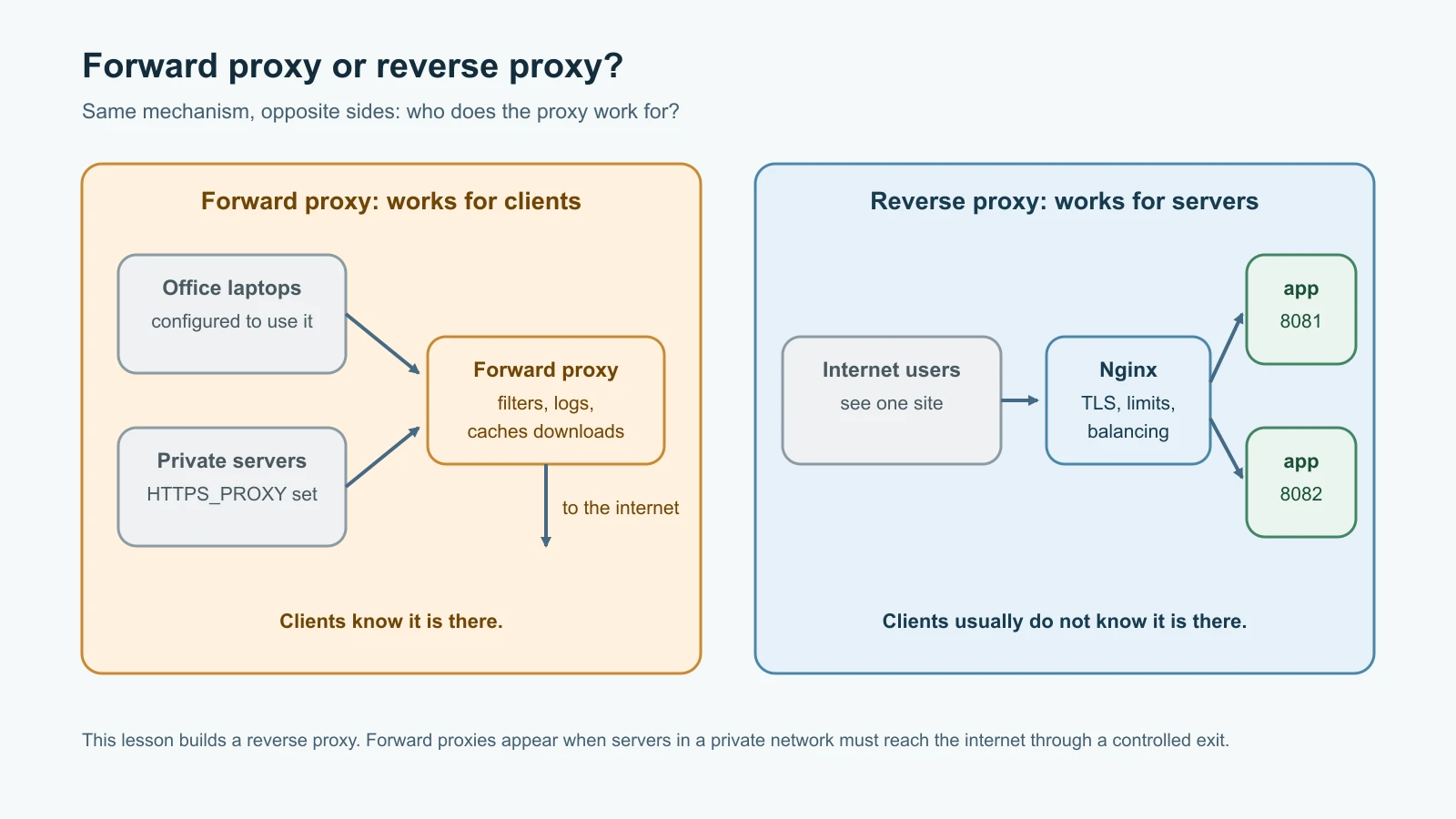
You will meet forward proxies when servers in a private network must download packages through a controlled exit point, often configured with the HTTP_PROXY and HTTPS_PROXY environment variables. This lesson is mostly about reverse proxies, because that is what you build in front of your own services.
A load balancer is a reverse proxy that spreads requests across several copies of a service, so more copies can handle more traffic and one failure does not take the service down. A caching server keeps copies of responses and answers repeat requests itself, without bothering the application. In practice one Nginx process often does all three jobs, and cloud providers sell managed load balancers that do the same at a larger scale.
Why Pebble needs a reverse proxy
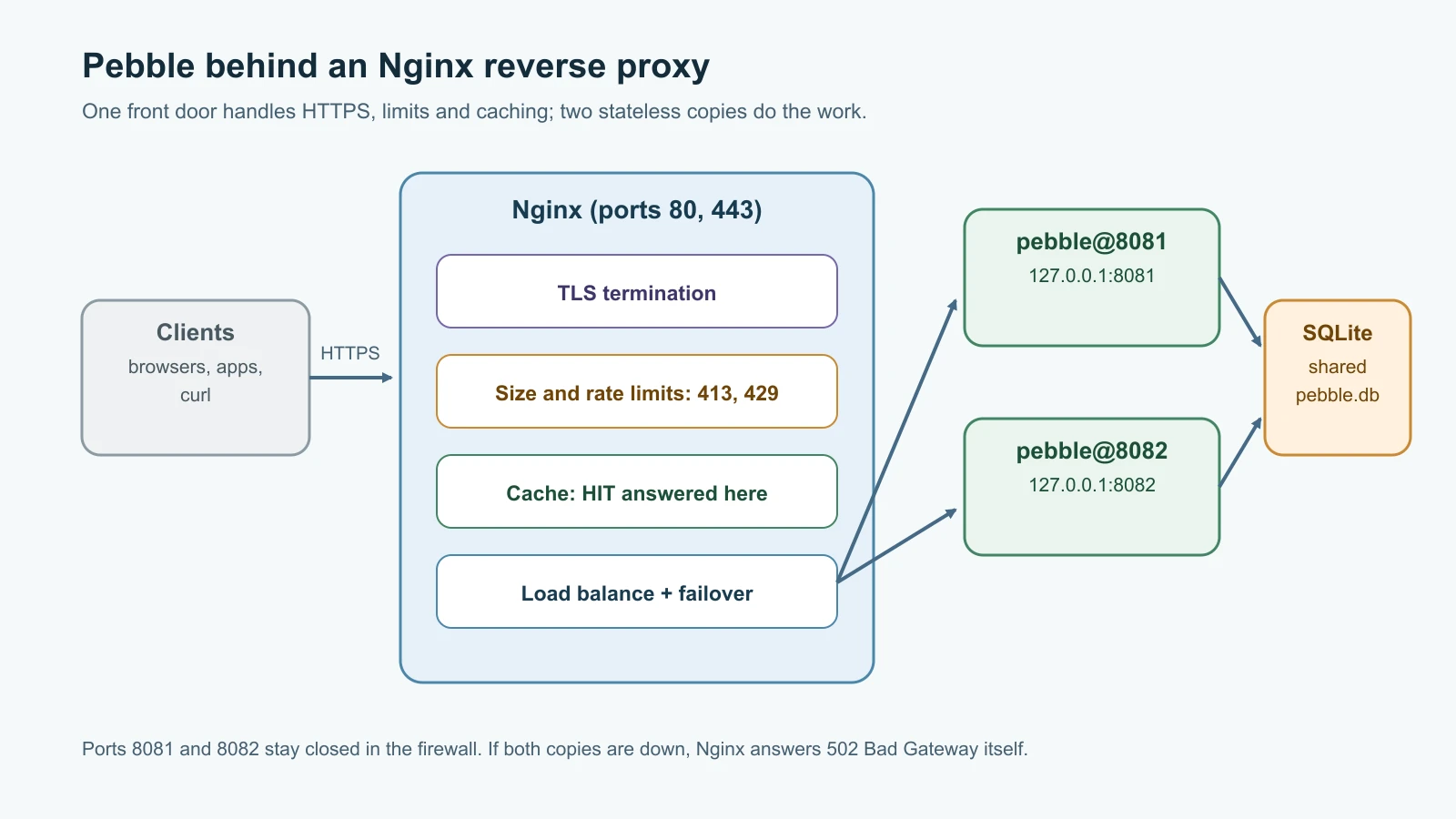
A reverse proxy in front of Pebble gives you, in one place:
- TLS termination. The proxy holds the certificate and handles HTTPS, then talks plain HTTP to Pebble on the same machine. The application never touches certificates.
- Load balancing and failover. Several copies of Pebble can run, and the proxy routes around one that fails.
- Zero-downtime deployments. Restart one copy at a time while the other keeps serving.
- Protection. The proxy enforces request size limits, rate limits and timeouts, and absorbs slow clients, so Pebble only ever sees complete, reasonable requests.
- Caching and compression. Repeat reads are answered from memory or disk.
- One front door. Several applications can share ports 80 and 443 on one server, routed by host name or path.
Running two copies only works because Pebble follows the twelve-factor "stateless processes" principle from A Language and a Service to Operate: it keeps nothing important in memory, so any copy can answer any request. Both copies point at the same database file. SQLite handles several processes reading and writing one file for a service of Pebble's size; PostgreSQL takes over in the Docker Compose lesson.
Nginx in front of two Pebbles
Nginx (pronounced "engine x") is a fast, widely used web server and reverse proxy. At the time of writing, nginx.org lists 1.31.8 as the mainline version and 1.30.6 as the stable version; the configuration in this lesson was tested with nginx 1.27.5 and uses only long-established directives, so it works on both. Ubuntu's package is installed with sudo apt install nginx.
You can try everything in this section on a laptop before touching a server. Start two copies of Pebble on ports 8081 and 8082, sharing one database file, each in its own terminal:
1PEBBLE_PORT=8081 PEBBLE_DB_PATH=./pebble.db python3 pebble.py
2PEBBLE_PORT=8082 PEBBLE_DB_PATH=./pebble.db python3 pebble.py
Here is the Nginx configuration for Pebble. Save it as pebble.conf:
1upstream pebble_app {
2    server 127.0.0.1:8081 max_fails=2 fail_timeout=10s;
3    server 127.0.0.1:8082 max_fails=2 fail_timeout=10s;
4}
5
6proxy_cache_path cache levels=1:2 keys_zone=pebble_cache:10m max_size=100m inactive=10m;
7limit_req_zone $binary_remote_addr zone=pebble_create:10m rate=5r/s;
8
9server {
10    listen 127.0.0.1:8080;
11    server_name localhost;
12
13    client_max_body_size 4k;
14
15    location / {
16        proxy_pass http://pebble_app;
17        proxy_set_header Host $host;
18        proxy_set_header X-Real-IP $remote_addr;
19        proxy_set_header X-Forwarded-For $proxy_add_x_forwarded_for;
20        proxy_set_header X-Forwarded-Proto $scheme;
21        proxy_connect_timeout 2s;
22        proxy_read_timeout 10s;
23        proxy_next_upstream error timeout http_502;
24        add_header X-Upstream $upstream_addr always;
25    }
26
27    location = /api/links {
28        limit_req zone=pebble_create burst=5 nodelay;
29        limit_req_status 429;
30        proxy_pass http://pebble_app;
31        proxy_set_header Host $host;
32        proxy_set_header X-Forwarded-For $proxy_add_x_forwarded_for;
33        add_header X-Upstream $upstream_addr always;
34    }
35
36    location /api/links/ {
37        proxy_pass http://pebble_app;
38        proxy_set_header Host $host;
39        proxy_cache pebble_cache;
40        proxy_cache_valid 200 30s;
41        add_header X-Cache-Status $upstream_cache_status always;
42        add_header X-Upstream $upstream_addr always;
43    }
44
45    location = /healthz {
46        access_log off;
47        proxy_pass http://pebble_app;
48    }
49}
Read it from the top:
- The
upstreamblock names a group of backend servers,pebble_app. With no other instruction, Nginx uses round robin: each new request goes to the next server in the list.max_fails=2 fail_timeout=10sis a passive health check: after two failed attempts to reach a server within 10 seconds, Nginx stops sending it traffic for 10 seconds, then tries it again with real requests. proxy_cache_pathsets up a cache on disk with 10 MB of keys in memory, andlimit_req_zonecreates a rate-limit counter per client IP address at five requests per second. Both live at the top level of the file, outside anyserverblock.- The
serverblock listens on127.0.0.1:8080for this local test; on a real server it listens on ports 80 and 443.client_max_body_size 4krejects large request bodies at the proxy, matching Pebble's own 4,096-byte limit. location /passes everything else to the upstream. Theproxy_set_headerlines tell Pebble the original host name, the client's real IP address and whether the client used HTTPS; without them, every request would appear to come from127.0.0.1over plain HTTP. The timeouts stop a stuck backend from holding connections forever.proxy_next_upstreamretries a request on the other backend when the first cannot be reached, and theX-Upstreamheader reports which backend answered, which is handy for learning and debugging but something you would usually remove in production.location = /api/linksis an exact match for link creation and applies the rate limit.burst=5 nodelayallows a short burst of five extra requests at once; beyond that, clients get429 Too Many Requests.location /api/links/caches successful link lookups for 30 seconds and reportsHITorMISSin anX-Cache-Statusheader.location = /healthzturns off access logging for health checks, which would otherwise fill the log with noise.
Nginx needs a small main file around this. Ubuntu's package supplies one; for a laptop test, save this as nginx.conf in the same folder:
1worker_processes 1;
2error_log logs/error.log warn;
3pid logs/nginx.pid;
4events { worker_connections 256; }
5http {
6    access_log logs/access.log;
7    client_body_temp_path tmp/body;
8    proxy_temp_path tmp/proxy;
9    fastcgi_temp_path tmp/fastcgi;
10    uwsgi_temp_path tmp/uwsgi;
11    scgi_temp_path tmp/scgi;
12    include pebble.conf;
13}
Test the configuration, then start Nginx using the current folder as its home with -p. Always run nginx -t before starting or reloading; a typo then fails safely instead of taking the site down:
1mkdir -p logs tmp cache
2nginx -p "$PWD/" -e logs/error.log -c nginx.conf -t
3nginx -p "$PWD/" -e logs/error.log -c nginx.conf1nginx: the configuration file ./nginx.conf syntax is ok
2nginx: configuration file ./nginx.conf test is successfulWatch the load balancer work
Send four requests through Nginx and print the header that names the backend:
1for i in 1 2 3 4; do curl -s -o /dev/null -D - http://localhost:8080/readyz | grep -i x-upstream; done1X-Upstream: 127.0.0.1:8082
2X-Upstream: 127.0.0.1:8081
3X-Upstream: 127.0.0.1:8082
4X-Upstream: 127.0.0.1:8081Requests alternate between the two copies. Create a link and follow it through the proxy:
1curl -s http://localhost:8080/api/links -H 'Content-Type: application/json' \
2  -d '{"url": "https://nginx.org/en/docs/"}'
3curl -s -i http://localhost:8080/44sxkid
Use the code from your own response in the second command. The redirect now comes through Nginx:
1HTTP/1.1 302 Found
2Server: nginx/1.27.5
3Date: Fri, 13 Nov 2026 09:55:54 GMT
4Content-Length: 0
5Connection: keep-alive
6Location: https://nginx.org/en/docs/
7X-Upstream: 127.0.0.1:8081
The link was created by one copy and redirected by the other, which only works because they share the database.
Failover. Now simulate a crash: kill the Pebble on port 8082 with kill -9, as you did in Linux and the Terminal, and send four more requests:
1X-Upstream: 127.0.0.1:8082, 127.0.0.1:8081
2X-Upstream: 127.0.0.1:8081
3X-Upstream: 127.0.0.1:8082, 127.0.0.1:8081
4X-Upstream: 127.0.0.1:8081
Every request still returned 200. When a request was sent to 8082 and the connection was refused, Nginx retried it on 8081, so the header lists both. After the second failure, Nginx marked 8082 as unavailable, and its error log says so:
1[warn] ... upstream server temporarily disabled while connecting to upstream, client: 127.0.0.1, server: localhost, request: "GET /readyz HTTP/1.1", upstream: "http://127.0.0.1:8082/readyz", host: "localhost:8080"The [error] lines just before it say connect() failed with "Connection refused". When both copies are down, there is nothing to retry and Nginx answers for them:
1HTTP/1.1 502 Bad Gateway
2Server: nginx/1.27.5
That is the 502 from the HTTP status table in the previous lesson: the proxy is fine, the application behind it is not. Start both copies again, wait for the 10-second fail_timeout to pass, and requests alternate between 8081 and 8082 once more.
Passive checks only notice a failure when real traffic hits it. Commercial Nginx Plus, HAProxy, Kubernetes and cloud load balancers add active health checks that call an endpoint such as Pebble's /readyz on a schedule and remove an instance before users are affected. That is exactly what the readiness endpoint is for.
Caching, rate limits and size limits
Look up the same link three times:
1for i in 1 2 3; do curl -s -D - -o /dev/null http://localhost:8080/api/links/44sxkid | grep -iE 'x-cache|x-upstream'; done1X-Cache-Status: MISS
2X-Upstream: 127.0.0.1:8082
3X-Cache-Status: HIT
4X-Cache-Status: HITThe first request went to Pebble and the response was stored. The next two were answered by Nginx from its cache, which is why there is no X-Upstream header: no backend was contacted. For 30 seconds, Pebble does no work for repeat lookups. Caching is powerful and easy to get wrong. Only cache responses that are the same for every user, set short lifetimes until you understand the effects, and never cache anything personal or anything that changes on every request. Pebble's redirects are not cached here on purpose, because a link might be corrected or removed.
Now send twelve link-creation requests as fast as curl can:
1for i in $(seq 1 12); do
2  curl -s -o /dev/null -w '%{http_code} ' http://localhost:8080/api/links \
3    -H 'Content-Type: application/json' -d '{"url":"https://example.com/'$i'"}'
4done; echo1201 201 201 201 201 201 429 429 429 429 429 429One request plus a burst of five got through; the rest were refused with 429 Too Many Requests and never reached Pebble. A request with a body larger than 4 KB gets 413 from Nginx, also without reaching Pebble. Limits like these turn a flood from a broken script or an abusive client into a few cheap rejections at the edge. Choose real limits from your own traffic data, not from this example.
Nginx's access log records each request in the standard "combined" format, including the rejected ones:
1127.0.0.1 - - [13/Nov/2026:15:26:06 +0530] "POST /api/links HTTP/1.1" 429 169 "-" "curl/8.7.1"
2127.0.0.1 - - [13/Nov/2026:15:26:06 +0530] "POST /api/links HTTP/1.1" 413 183 "-" "curl/8.7.1"
Stop Nginx with nginx -p "$PWD/" -c nginx.conf -s quit, which finishes active requests before exiting, and stop the two Pebbles.
Load balancing methods
Round robin is a good default when every request costs about the same. Nginx offers others:
| Method | Directive | How it chooses | Good for |
|---|---|---|---|
| Round robin | none, the default | The next server in turn | Similar servers, similar requests |
| Weighted | server ... weight=3; | More requests to servers with a higher weight | Servers of different sizes, or sending a small share to a new version |
| Least connections | least_conn; | The server with the fewest active connections | Requests that vary a lot in duration |
| IP hash | ip_hash; | Always the same server for the same client IP | Old applications that keep sessions in memory |
| Generic hash | hash $request_uri consistent; | The same server for the same key, such as a URL | Spreading a cache across servers |
Avoid needing sticky sessions in new applications. If a user must always return to the same server, that server's failure logs them out, and the load can never spread evenly. Stateless services, like Pebble, make every method work.
Run it on the server with HTTPS
On the Ubuntu server from earlier lessons, Pebble ran as one systemd service on port 8080. To run two copies, turn the unit into a template. Rename /etc/systemd/system/pebble.service to /etc/systemd/system/pebble@.service and add one line in the [Service] section, after EnvironmentFile=:
1Environment=PEBBLE_PORT=%i%i is replaced by whatever follows the @ in the unit name, so pebble@8081 runs on port 8081. Settings read from an EnvironmentFile= override Environment= lines, so also delete the PEBBLE_PORT line from /etc/pebble/pebble.env, and change PEBBLE_BASE_URL to your public address, such as https://pebble.example. Then switch over:
1sudo systemctl disable --now pebble
2sudo systemctl daemon-reload
3sudo systemctl enable --now pebble@8081 pebble@8082
4systemctl status 'pebble@*' --no-pager
Install Nginx and add the site. On Ubuntu, site files go in /etc/nginx/sites-available/ and are switched on with a link from /etc/nginx/sites-enabled/. Copy pebble.conf there with three changes: listen 80; instead of the local address, server_name pebble.example; with your domain, and proxy_cache_path /var/cache/nginx/pebble ... for the cache location:
1sudo apt install -y nginx
2sudo mkdir -p /var/cache/nginx/pebble
3sudo nano /etc/nginx/sites-available/pebble
4sudo ln -s /etc/nginx/sites-available/pebble /etc/nginx/sites-enabled/pebble
5sudo rm /etc/nginx/sites-enabled/default
6sudo nginx -t
7sudo systemctl reload nginx
8sudo ufw allow 'Nginx Full'
'Nginx Full' is a ufw profile, installed with the package, that opens ports 80 and 443. Pebble's ports 8081 and 8082 stay closed, because only Nginx on the same machine talks to them.
For HTTPS you need a domain name whose A record points at the server, as covered in the previous lesson. Certbot, from the Electronic Frontier Foundation, obtains a free certificate from Let's Encrypt using the ACME protocol, edits the Nginx configuration to use it, and sets up automatic renewal. Its official instructions install it as a snap package:
1sudo snap install --classic certbot
2sudo ln -s /snap/bin/certbot /usr/local/bin/certbot
3sudo certbot --nginx -d pebble.example
4sudo certbot renew --dry-run
Certbot asks for an email address for expiry notices and whether to redirect HTTP to HTTPS; say yes to the redirect. renew --dry-run proves renewal will work without changing anything. With certificate lifetimes shrinking, as described in Networking for DevOps, that automatic renewal is not optional. Afterwards, curl -sI https://pebble.example/healthz should return 200 over HTTPS, and http:// requests should get a 301 redirect to https://.
Caddy: HTTPS by default
Caddy is a newer web server whose main attraction is automatic HTTPS. For any public domain in its configuration, Caddy obtains a certificate from an ACME certificate authority, Let's Encrypt or ZeroSSL by default, renews it, and redirects HTTP to HTTPS, with no extra tools. Requirements are the same as for Certbot: DNS pointing at the server and ports 80 and 443 reachable. The whole Pebble setup is a few lines in a file called Caddyfile:
1pebble.example {
2    reverse_proxy 127.0.0.1:8081 127.0.0.1:8082 {
3        lb_policy round_robin
4        health_uri /readyz
5        health_interval 10s
6    }
7}
health_uri adds active health checks against Pebble's readiness endpoint. Caddy is an excellent choice for small teams and new services. Nginx remains more common, has more documentation and third-party examples, and gives finer control for complex setups.
Apache, Tomcat and IIS
Apache HTTP Server, usually just "Apache" and packaged as apache2 on Debian and Ubuntu or httpd on RHEL, is one of the oldest and most widely deployed web servers; version 2.4.71 was released on 11 November 2026. It is configured with modules, and its reverse proxy and load balancer come from mod_proxy and mod_proxy_balancer. The equivalent of Pebble's upstream looks like this:
1<Proxy "balancer://pebble">
2    BalancerMember "http://127.0.0.1:8081"
3    BalancerMember "http://127.0.0.1:8082"
4</Proxy>
5ProxyPass        "/" "balancer://pebble/"
6ProxyPassReverse "/" "balancer://pebble/"
Apache also allows per-folder configuration through .htaccess files, which shared hosting relies on. You will meet it on older servers and in many PHP applications.
Apache Tomcat is a different project: a Java application server that runs Java web applications packaged as WAR files. It is not a general web server; teams usually put Nginx or Apache in front of it, just as you put Nginx in front of Pebble. IIS (Internet Information Services) is Microsoft's web server for Windows Server, common for .NET applications and managed with IIS Manager or PowerShell. Its Application Request Routing extension adds reverse proxy and load balancing features.
| Server | Strengths | Typical use |
|---|---|---|
| Nginx | Fast, efficient, flexible reverse proxy, huge community | Front door for most Linux web services, including Pebble |
| Caddy | Automatic HTTPS, very short configuration | Small teams, new services, internal tools |
| Apache HTTP Server | Mature, modular, .htaccess support | Existing deployments, PHP applications, shared hosting |
| Apache Tomcat | Runs Java servlet applications | Java web apps, usually behind Nginx or Apache |
| IIS | Integrated with Windows Server and .NET | Windows-based organizations |
Mistakes beginners make
- Exposing the application's own port to the internet instead of putting a proxy in front.
- Forgetting the
proxy_set_headerlines, so the application logs every request as coming from127.0.0.1. - Reloading Nginx without running
nginx -tfirst. - Running one copy of the service behind a load balancer and calling it highly available.
- Keeping user sessions in application memory, then needing sticky sessions.
- Caching responses that are personal or change often.
- Setting rate limits without measuring normal traffic first.
- Leaving proxy timeouts at their defaults for an application with very different needs.
- Obtaining a certificate by hand and forgetting renewal.
- Opening backend ports in the firewall "just to test" and never closing them.
Recap and try it yourself
A web server answers HTTP requests; a forward proxy acts for clients and a reverse proxy acts for servers. A load balancer is a reverse proxy that spreads traffic across copies of a service and routes around failures, and a caching server answers repeat requests itself. Nginx now sits in front of two stateless Pebble instances, balancing with round robin, retrying and temporarily removing a failed instance, caching link lookups, rejecting floods with 429 and oversized bodies with 413, and returning 502 only when no backend is left. On the server, a systemd template runs the two copies, Nginx owns ports 80 and 443, and Certbot or Caddy provides automatically renewed HTTPS. Apache, Tomcat and IIS fill the same roles in other environments.
Try it yourself:
- Run the local setup. Add
weight=3to the 8081 server, reload withnginx -s reload, send twenty requests and count how many each backend received. - Switch the upstream to
least_conn;. Then add a temporarytime.sleep(2)to one copy's readiness endpoint and watch how least connections responds compared with round robin. - Do a rolling restart on the server:
sudo systemctl restart pebble@8081, wait for it to be ready, then restartpebble@8082, while a loop ofcurlrequests runs in another terminal. Did any request fail? - Change the cache lifetime to 5 seconds and confirm with
X-Cache-Statusthat a lookup returns toMISSafter it expires.
Sources checked on 13 November 2026: nginx.org downloads, HTTP load balancing, ngx_http_upstream_module, ngx_http_proxy_module and ngx_http_limit_req_module; Certbot's Nginx instructions; Caddy's automatic HTTPS and reverse_proxy documentation; the Apache HTTP Server project and its mod_proxy_balancer documentation; Apache Tomcat; Microsoft's IIS documentation; the systemd systemd.exec manual page; and the roadmap.sh DevOps roadmap. Pebble and its domain are fictional.