
DevOps course · lesson 9 of 24
- 1What Is DevOps?
- 2A Language and a Service to Operate
- 3Linux and the Terminal
- 4Bash Scripting for Ops
- 5Git and Collaboration
- 6Networking for DevOps
- 7Web Servers, Proxies and Load Balancers
- 8Docker for DevOps
- 9Docker Compose and Multi-Service Apps
- 10Cloud Providers: AWS, Azure and Google Cloud
- 11Serverless Functions and Platforms
- 12Terraform and Infrastructure as Code
- 13Ansible and Configuration Management
- 14Continuous Integration with GitHub Actions and GitLab CI
- 15Continuous Delivery and Deployment Strategies
- 16Secret Management
- 17Kubernetes Basics
- 18Kubernetes in Practice
- 19GitOps with Argo CD and Flux
- 20Service Mesh: Istio, Linkerd, Consul and Envoy
- 21Metrics and Alerting with Prometheus and Grafana
- 22Logs and Tracing with Loki, Elastic and OpenTelemetry
- 23Reliability, SLOs and Cloud Design Patterns
- 24Capstone: Pebble to Production
After this lesson, you will be able to describe a multi-service application in one compose.yaml file, start and stop it with one command, connect services by name over private networks, keep data in volumes, make services wait for their dependencies to be healthy, pass a database password as a secret instead of an environment variable, run a database migration once before the app starts, scale a service, and edit code with live reload. Pebble grows from one process with a SQLite file into five cooperating containers: an Nginx proxy, two Pebble replicas, PostgreSQL and a Valkey cache.
In Docker for DevOps you packaged Pebble as an image and ran it with a long docker run command. Real applications rarely run alone. Pebble's growth plan needs a database server that several app copies can share safely, a cache for popular links, and the proxy from Web Servers, Proxies and Load Balancers. Starting five containers by hand, in the right order, on the right networks, with the right volumes, is slow and error-prone. Docker Compose describes the whole application in one file and turns it into a single command.
Why Pebble needs PostgreSQL and a cache
SQLite served Pebble well, and it is an excellent database for one machine. But it is a file, so every app copy must run on the machine that holds it, and it allows only one writer at a time. PostgreSQL is a database server: many app copies on many machines connect to it over the network, and it handles concurrent writes, backups, replication and access control. It is one of the most widely used databases in production. At the time of writing, PostgreSQL 18.7 is the current release; version 19 has reached its second release candidate but is not yet final, so this lesson uses the postgres:18-alpine image.
A cache keeps frequently read data in memory so the database does not have to answer the same question repeatedly. For a link shortener, a few popular links can receive most of the traffic. Pebble will cache lookups in Valkey, an open source, BSD-licensed key-value store backed by the Linux Foundation and compatible with Redis. Pebble talks to it with redis-py, the standard Python client for Redis-compatible servers, using the redis:// URL scheme. If your company already runs Redis, the same code works unchanged.
The cache follows one firm rule: it must never be the reason a request fails. If Valkey is slow or down, Pebble logs a warning and reads from the database instead. A cache makes things faster; it should not become a new single point of failure.
Pebble 0.3.0: two backends and a cache
Pebble's code changes in four places. The full files follow; the important parts first:
LinkStorenow accepts an optional database URL. With one, it uses PostgreSQL through psycopg, the standard PostgreSQL driver for Python; without one, it uses SQLite exactly as before, so every earlier lesson still works. The two differ only in how to connect, how parameters are written in SQL (%sfor psycopg,?for SQLite), and which exception types they raise, so one smallrunmethod handles both and the SQL stays the same.LinkCachewraps the Valkey client with short timeouts of half a second and catches every cache error.cached_lookupchecks the cache first, falls back to the database, and stores only links that exist, so unknown codes never fill the cache.- Configuration gains
PEBBLE_DATABASE_URL,PEBBLE_CACHE_URLandPEBBLE_DATABASE_PASSWORD_FILE. The password file follows a common container convention, also used by the official PostgreSQL image: rather than putting a secret in an environment variable, where it shows up indocker inspectoutput and process listings, you put it in a file and pass the file's path. The startup log reports"database": "postgresql", never the URL, so a password can never leak into logs. - A
migratecommand.python pebble.py migratecreates the database table and exits. This is the twelve-factor "admin processes" principle from A Language and a Service to Operate in action, and it fixes a real problem: when two replicas start at the same moment and both runCREATE TABLE IF NOT EXISTSagainst PostgreSQL, one can fail with a duplicate-key error on PostgreSQL's internal catalog. Running the migration once, before the app starts, avoids the race completely.
Replace pebble.py with this version:
1"""Pebble: a small URL-shortening service used throughout the DevOps course."""
2
3import json
4import os
5import secrets
6import signal
7import sqlite3
8import sys
9import threading
10from datetime import datetime, timezone
11from http.server import BaseHTTPRequestHandler, ThreadingHTTPServer
12from urllib.parse import urlparse
13
14ALPHABET = "abcdefghijkmnpqrstuvwxyz23456789"
15MAX_BODY_BYTES = 4096
16MAX_URL_LENGTH = 2048
17VERSION = "0.3.0"
18CACHE_TTL_SECONDS = 300
19
20
21def load_config(env=os.environ):
22    port = int(env.get("PEBBLE_PORT", "8080"))
23    if not 0 <= port <= 65535:
24        raise ValueError(f"PEBBLE_PORT must be 0-65535, got {port}")
25    return {
26        "host": env.get("PEBBLE_HOST", "127.0.0.1"),
27        "port": port,
28        "base_url": env.get("PEBBLE_BASE_URL", f"http://localhost:{port}").rstrip("/"),
29        "db_path": env.get("PEBBLE_DB_PATH", "pebble.db"),
30        "database_url": env.get("PEBBLE_DATABASE_URL", ""),
31        "database_password_file": env.get("PEBBLE_DATABASE_PASSWORD_FILE", ""),
32        "cache_url": env.get("PEBBLE_CACHE_URL", ""),
33    }
34
35
36def log(level, message, **fields):
37    record = {"time": datetime.now(timezone.utc).isoformat(timespec="seconds"),
38              "level": level, "message": message, **fields}
39    print(json.dumps(record), flush=True)
40
41
42class LinkStore:
43    """Stores links in SQLite by default, or PostgreSQL when given a database URL."""
44
45    def __init__(self, db_path="pebble.db", database_url="", password=""):
46        if database_url:
47            import psycopg
48            self.options = {"connect_timeout": 5}
49            if password:
50                self.options["password"] = password
51            self.connect = lambda: psycopg.connect(database_url, **self.options)
52            self.placeholder = "%s"
53            self.errors = (psycopg.Error,)
54            self.duplicate = psycopg.errors.UniqueViolation
55        else:
56            self.connect = lambda: sqlite3.connect(db_path, timeout=5)
57            self.placeholder = "?"
58            self.errors = (sqlite3.Error,)
59            self.duplicate = sqlite3.IntegrityError
60
61    def run(self, sql, params=(), fetch=False):
62        db = self.connect()
63        try:
64            row = db.execute(sql.replace("?", self.placeholder), params)
65            row = row.fetchone() if fetch else None
66            db.commit()
67            return row
68        finally:
69            db.close()
70
71    def init(self):
72        self.run("CREATE TABLE IF NOT EXISTS links ("
73                 "code TEXT PRIMARY KEY, url TEXT NOT NULL, created_at TEXT NOT NULL)")
74
75    def ping(self):
76        self.run("SELECT 1 FROM links LIMIT 1")
77
78    def create(self, url):
79        for _ in range(5):
80            code = "".join(secrets.choice(ALPHABET) for _ in range(7))
81            try:
82                self.run("INSERT INTO links VALUES (?, ?, ?)",
83                         (code, url, datetime.now(timezone.utc).isoformat()))
84                return code
85            except self.duplicate:
86                continue
87        raise RuntimeError("could not generate a unique code")
88
89    def lookup(self, code):
90        row = self.run("SELECT url FROM links WHERE code = ?", (code,), fetch=True)
91        return row[0] if row else None
92
93
94class LinkCache:
95    """Caches lookups in Redis or Valkey. Cache failures never break a request."""
96
97    def __init__(self, url="", client=None):
98        import redis
99        self.errors = redis.RedisError
100        self.client = client or redis.Redis.from_url(
101            url, socket_timeout=0.5, socket_connect_timeout=0.5)
102
103    def get(self, code):
104        try:
105            value = self.client.get(f"link:{code}")
106        except self.errors as error:
107            log("warning", "cache unavailable", error=str(error))
108            return None
109        return value.decode() if value else None
110
111    def put(self, code, url):
112        try:
113            self.client.setex(f"link:{code}", CACHE_TTL_SECONDS, url)
114        except self.errors as error:
115            log("warning", "cache unavailable", error=str(error))
116
117
118def cached_lookup(store, cache, code):
119    url = cache.get(code) if cache else None
120    if url is None:
121        url = store.lookup(code)
122        if url is not None and cache:
123            cache.put(code, url)
124    return url
125
126
127def valid_url(url):
128    if not isinstance(url, str) or len(url) > MAX_URL_LENGTH:
129        return False
130    parts = urlparse(url)
131    return parts.scheme in ("http", "https") and bool(parts.netloc)
132
133
134def make_handler(store, base_url, cache=None):
135    class PebbleHandler(BaseHTTPRequestHandler):
136        def send_json(self, status, body):
137            data = json.dumps(body).encode()
138            self.send_response(status)
139            self.send_header("Content-Type", "application/json")
140            self.send_header("Content-Length", str(len(data)))
141            self.end_headers()
142            self.wfile.write(data)
143
144        def do_GET(self):
145            if self.path == "/healthz":
146                return self.send_json(200, {"status": "ok"})
147            if self.path == "/readyz":
148                try:
149                    store.ping()
150                except store.errors:
151                    return self.send_json(503, {"status": "database unavailable"})
152                return self.send_json(200, {"status": "ready"})
153            if self.path.startswith("/api/links/"):
154                code = self.path.removeprefix("/api/links/")
155                url = cached_lookup(store, cache, code)
156                if url is None:
157                    return self.send_json(404, {"error": "unknown link"})
158                return self.send_json(200, {"code": code, "url": url})
159            url = cached_lookup(store, cache, self.path.lstrip("/"))
160            if url is None:
161                return self.send_json(404, {"error": "unknown link"})
162            self.send_response(302)
163            self.send_header("Location", url)
164            self.send_header("Content-Length", "0")
165            self.end_headers()
166
167        def do_POST(self):
168            if self.path != "/api/links":
169                return self.send_json(404, {"error": "not found"})
170            length = int(self.headers.get("Content-Length") or 0)
171            if length > MAX_BODY_BYTES:
172                return self.send_json(413, {"error": "request body too large"})
173            try:
174                url = json.loads(self.rfile.read(length) or b"{}").get("url")
175            except (json.JSONDecodeError, AttributeError):
176                return self.send_json(400, {"error": "body must be a JSON object"})
177            if not valid_url(url):
178                return self.send_json(400, {"error": "url must be an http or https link"})
179            code = store.create(url)
180            self.send_json(201, {"code": code, "short_url": f"{base_url}/{code}", "url": url})
181
182        def log_request(self, code="-", size="-"):
183            log("info", "request", method=self.command, path=self.path, status=int(code))
184
185        def log_message(self, format, *args):
186            log("warning", format % args)
187
188    return PebbleHandler
189
190
191def build_store(config):
192    password = ""
193    if config["database_password_file"]:
194        with open(config["database_password_file"], encoding="utf-8") as handle:
195            password = handle.read().strip()
196    return LinkStore(config["db_path"], config["database_url"], password)
197
198
199def build_server(config):
200    store = build_store(config)
201    store.init()
202    cache = LinkCache(config["cache_url"]) if config["cache_url"] else None
203    handler = make_handler(store, config["base_url"], cache)
204    return ThreadingHTTPServer((config["host"], config["port"]), handler)
205
206
207def main(argv=sys.argv[1:]):
208    if argv == ["migrate"]:
209        try:
210            build_store(load_config()).init()
211        except Exception as error:  # report any failure as a non-zero exit
212            log("error", "migration failed", error=str(error))
213            return 1
214        log("info", "migrations applied")
215        return 0
216    try:
217        config = load_config()
218        server = build_server(config)
219    except Exception as error:  # any startup failure: log it and exit non-zero
220        log("error", "startup failed", error=str(error))
221        return 1
222
223    def stop(signum, frame):
224        log("info", "shutting down", signal=signal.Signals(signum).name)
225        threading.Thread(target=server.shutdown).start()
226
227    signal.signal(signal.SIGTERM, stop)
228    signal.signal(signal.SIGINT, stop)
229    log("info", "pebble started", host=config["host"], port=config["port"],
230        database="postgresql" if config["database_url"] else config["db_path"],
231        cache=bool(config["cache_url"]), version=VERSION)
232    server.serve_forever()
233    server.server_close()
234    log("info", "pebble stopped")
235    return 0
236
237
238if __name__ == "__main__":
239    sys.exit(main())
Two new dependencies go in requirements.txt, pinned to exact versions so every build installs the same code:
1psycopg[binary]==3.3.9
2redis==8.1.0
psycopg[binary] installs a prebuilt version of the driver, published for both x86_64 and arm64 Linux on Python 3.15, so the slim image needs no compiler.
Tests for the new behavior
The test file grows to sixteen tests. The earlier ones still run Pebble against SQLite. The new ones use a tiny in-memory stand-in for Valkey, called FakeRedis, so they need no running server. They check that a second lookup comes from the cache even after the database row is deleted, that unknown codes are not cached, that a broken cache falls back to the database, that HTTP requests really go through the cache, that an unreachable PostgreSQL server raises an error the readiness check understands, that the password file is read but never appears in errors or logs, and that migrate creates the schema and exits successfully.
1import json
2import os
3import tempfile
4import threading
5import unittest
6import urllib.error
7import urllib.request
8from contextlib import redirect_stdout
9from io import StringIO
10
11import pebble
12
13
14class NoRedirect(urllib.request.HTTPRedirectHandler):
15    def redirect_request(self, *args, **kwargs):
16        return None
17
18
19OPENER = urllib.request.build_opener(NoRedirect)
20
21
22def call(url, method="GET", body=None, raw=None):
23    data = raw if raw is not None else (json.dumps(body).encode() if body is not None else None)
24    request = urllib.request.Request(url, data=data, method=method,
25                                     headers={"Content-Type": "application/json"})
26    try:
27        with OPENER.open(request) as response:
28            return response.status, dict(response.headers), response.read()
29    except urllib.error.HTTPError as error:
30        return error.code, dict(error.headers), error.read()
31
32
33class PebbleTest(unittest.TestCase):
34    def setUp(self):
35        self.folder = tempfile.TemporaryDirectory()
36        self.config = pebble.load_config({"PEBBLE_PORT": "0",
37                                          "PEBBLE_DB_PATH": os.path.join(self.folder.name, "t.db"),
38                                          "PEBBLE_BASE_URL": "https://peb.example/"})
39        self.quiet = redirect_stdout(StringIO())
40        self.quiet.__enter__()
41        self.server = pebble.build_server(self.config)
42        self.base = f"http://127.0.0.1:{self.server.server_address[1]}"
43        threading.Thread(target=self.server.serve_forever, daemon=True).start()
44
45    def tearDown(self):
46        self.server.shutdown()
47        self.server.server_close()
48        self.quiet.__exit__(None, None, None)
49        self.folder.cleanup()
50
51    def test_create_then_redirect(self):
52        status, _, body = call(self.base + "/api/links", "POST", {"url": "https://example.com/a?b=1"})
53        self.assertEqual(status, 201)
54        created = json.loads(body)
55        self.assertEqual(created["short_url"], "https://peb.example/" + created["code"])
56        status, headers, _ = call(self.base + "/" + created["code"])
57        self.assertEqual(status, 302)
58        self.assertEqual(headers["Location"], "https://example.com/a?b=1")
59
60    def test_rejects_non_http_urls(self):
61        too_long = "https://example.com/" + "a" * 3000
62        for bad in ["javascript:alert(1)", "ftp://example.com", "example.com", "https://", too_long, 42, None]:
63            status, _, _ = call(self.base + "/api/links", "POST", {"url": bad})
64            self.assertEqual(status, 400, bad)
65
66    def test_rejects_bad_json_and_large_bodies(self):
67        self.assertEqual(call(self.base + "/api/links", "POST", raw=b"[1, 2]")[0], 400)
68        self.assertEqual(call(self.base + "/api/links", "POST", raw=b"{not json")[0], 400)
69        big = json.dumps({"url": "https://example.com/" + "a" * 5000}).encode()
70        self.assertEqual(call(self.base + "/api/links", "POST", raw=big)[0], 413)
71
72    def test_link_info_returns_json(self):
73        created = json.loads(call(self.base + "/api/links", "POST", {"url": "https://example.com/info"})[2])
74        status, _, body = call(self.base + "/api/links/" + created["code"])
75        self.assertEqual(status, 200)
76        self.assertEqual(json.loads(body), {"code": created["code"], "url": "https://example.com/info"})
77        self.assertEqual(call(self.base + "/api/links/nope123")[0], 404)
78
79    def test_unknown_code_is_404(self):
80        self.assertEqual(call(self.base + "/nope123")[0], 404)
81
82    def test_health_and_readiness(self):
83        self.assertEqual(call(self.base + "/healthz")[0], 200)
84        self.assertEqual(call(self.base + "/readyz")[0], 200)
85        os.remove(self.config["db_path"])
86        os.mkdir(self.config["db_path"])
87        self.assertEqual(call(self.base + "/healthz")[0], 200)
88        self.assertEqual(call(self.base + "/readyz")[0], 503)
89
90    def test_codes_are_unique_and_short(self):
91        codes = {json.loads(call(self.base + "/api/links", "POST", {"url": f"https://example.com/{i}"})[2])["code"]
92                 for i in range(50)}
93        self.assertEqual(len(codes), 50)
94        self.assertTrue(all(len(c) == 7 and set(c) <= set(pebble.ALPHABET) for c in codes))
95
96
97class ConfigTest(unittest.TestCase):
98    def test_defaults(self):
99        config = pebble.load_config({})
100        self.assertEqual((config["host"], config["port"]), ("127.0.0.1", 8080))
101        self.assertEqual(config["base_url"], "http://localhost:8080")
102
103    def test_migrate_command_creates_schema_and_exits(self):
104        with tempfile.TemporaryDirectory() as folder:
105            path = os.path.join(folder, "m.db")
106            os.environ["PEBBLE_DB_PATH"] = path
107            try:
108                with redirect_stdout(StringIO()) as output:
109                    self.assertEqual(pebble.main(["migrate"]), 0)
110            finally:
111                del os.environ["PEBBLE_DB_PATH"]
112            self.assertIn("migrations applied", output.getvalue())
113            self.assertIsNone(pebble.LinkStore(path).lookup("anything"))
114
115    def test_rejects_bad_port(self):
116        for bad in ["0x", "70000", "-1"]:
117            with self.assertRaises(ValueError):
118                pebble.load_config({"PEBBLE_PORT": bad})
119
120
121class FakeRedis:
122    def __init__(self, broken=False):
123        self.data, self.broken, self.calls = {}, broken, 0
124
125    def get(self, key):
126        self.calls += 1
127        if self.broken:
128            import redis
129            raise redis.ConnectionError("cache down")
130        return self.data.get(key)
131
132    def setex(self, key, ttl, value):
133        if self.broken:
134            import redis
135            raise redis.ConnectionError("cache down")
136        self.data[key] = value.encode()
137
138
139class CacheTest(unittest.TestCase):
140    def setUp(self):
141        self.folder = tempfile.TemporaryDirectory()
142        self.store = pebble.LinkStore(os.path.join(self.folder.name, "c.db"))
143        self.store.init()
144        self.code = self.store.create("https://example.com/cached")
145        self.quiet = redirect_stdout(StringIO())
146        self.quiet.__enter__()
147
148    def tearDown(self):
149        self.quiet.__exit__(None, None, None)
150        self.folder.cleanup()
151
152    def test_second_lookup_comes_from_cache(self):
153        cache = pebble.LinkCache(client=FakeRedis())
154        self.assertEqual(pebble.cached_lookup(self.store, cache, self.code), "https://example.com/cached")
155        self.store.run("DELETE FROM links")
156        self.assertEqual(pebble.cached_lookup(self.store, cache, self.code), "https://example.com/cached")
157
158    def test_unknown_codes_are_not_cached(self):
159        fake = FakeRedis()
160        self.assertIsNone(pebble.cached_lookup(self.store, pebble.LinkCache(client=fake), "nope123"))
161        self.assertEqual(fake.data, {})
162
163    def test_broken_cache_falls_back_to_database(self):
164        cache = pebble.LinkCache(client=FakeRedis(broken=True))
165        self.assertEqual(pebble.cached_lookup(self.store, cache, self.code), "https://example.com/cached")
166
167    def test_works_without_cache(self):
168        self.assertEqual(pebble.cached_lookup(self.store, None, self.code), "https://example.com/cached")
169
170
171class PostgresConfigTest(unittest.TestCase):
172    def test_unreachable_postgres_is_a_store_error(self):
173        store = pebble.LinkStore(database_url="postgresql://pebble@127.0.0.1:1/pebble", password="x")
174        self.assertEqual(store.placeholder, "%s")
175        self.assertEqual(store.options["password"], "x")
176        with self.assertRaises(store.errors):
177            store.ping()
178
179    def test_password_file_is_read_and_never_logged(self):
180        with tempfile.TemporaryDirectory() as folder:
181            secret = os.path.join(folder, "db_password")
182            with open(secret, "w") as handle:
183                handle.write("s3cret-value\n")
184            config = pebble.load_config({"PEBBLE_PORT": "0",
185                                         "PEBBLE_DATABASE_URL": "postgresql://pebble@127.0.0.1:1/pebble",
186                                         "PEBBLE_DATABASE_PASSWORD_FILE": secret})
187            output = StringIO()
188            with redirect_stdout(output):
189                with self.assertRaises(Exception) as caught:
190                    pebble.build_server(config)
191            self.assertNotIn("s3cret-value", str(caught.exception) + output.getvalue())
192
193
194class CachedServerTest(unittest.TestCase):
195    def test_http_lookups_use_the_cache(self):
196        with tempfile.TemporaryDirectory() as folder, redirect_stdout(StringIO()):
197            store = pebble.LinkStore(os.path.join(folder, "s.db"))
198            store.init()
199            code = store.create("https://example.com/via-cache")
200            handler = pebble.make_handler(store, "http://x", pebble.LinkCache(client=FakeRedis()))
201            server = pebble.ThreadingHTTPServer(("127.0.0.1", 0), handler)
202            threading.Thread(target=server.serve_forever, daemon=True).start()
203            base = f"http://127.0.0.1:{server.server_address[1]}"
204            try:
205                self.assertEqual(call(base + "/api/links/" + code)[0], 200)
206                store.run("DELETE FROM links")
207                self.assertEqual(call(base + "/api/links/" + code)[0], 200)
208                self.assertEqual(call(base + "/" + code)[0], 302)
209            finally:
210                server.shutdown()
211                server.server_close()
212
213
214if __name__ == "__main__":
215    unittest.main()
To run the tests outside Docker, create a virtual environment and install the dependencies first:
1python3 -m venv .venv
2.venv/bin/pip install -r requirements.txt
3.venv/bin/python -m unittest -q test_pebble
All sixteen pass. Each new line of logic was also broken on purpose, one at a time, including skipping the cache, caching unknown codes, ignoring the password and bypassing the cache in the HTTP handler, and every change made a test fail.
The updated Dockerfile
The Dockerfile changes in one place: the base stage now installs dependencies before any application code is copied, the cache-friendly order explained in the previous lesson. Editing pebble.py no longer reinstalls psycopg and redis-py.
1# syntax=docker/dockerfile:1
2FROM python:3.15-slim AS base
3ENV PYTHONDONTWRITEBYTECODE=1 \
4 PYTHONUNBUFFERED=1
5WORKDIR /app
6COPY requirements.txt ./
7RUN pip install --no-cache-dir -r requirements.txt
8
9FROM base AS test
10COPY pebble.py test_pebble.py ./
11RUN python -m unittest -q test_pebble
12
13FROM base AS runtime
14RUN groupadd --system --gid 10001 pebble \
15 && useradd --system --uid 10001 --gid pebble --no-create-home --shell /usr/sbin/nologin pebble \
16 && mkdir /data \
17 && chown pebble:pebble /data
18COPY /app/pebble.py ./
19ENV PEBBLE_HOST=0.0.0.0 \
20 PEBBLE_PORT=8080 \
21 PEBBLE_DB_PATH=/data/pebble.db
22USER pebble
23EXPOSE 8080
24VOLUME ["/data"]
25HEALTHCHECK \
26 CMD ["python", "-c", "import urllib.request; urllib.request.urlopen('http://127.0.0.1:8080/readyz', timeout=2)"]
27CMD ["python", "pebble.py"]The Compose file
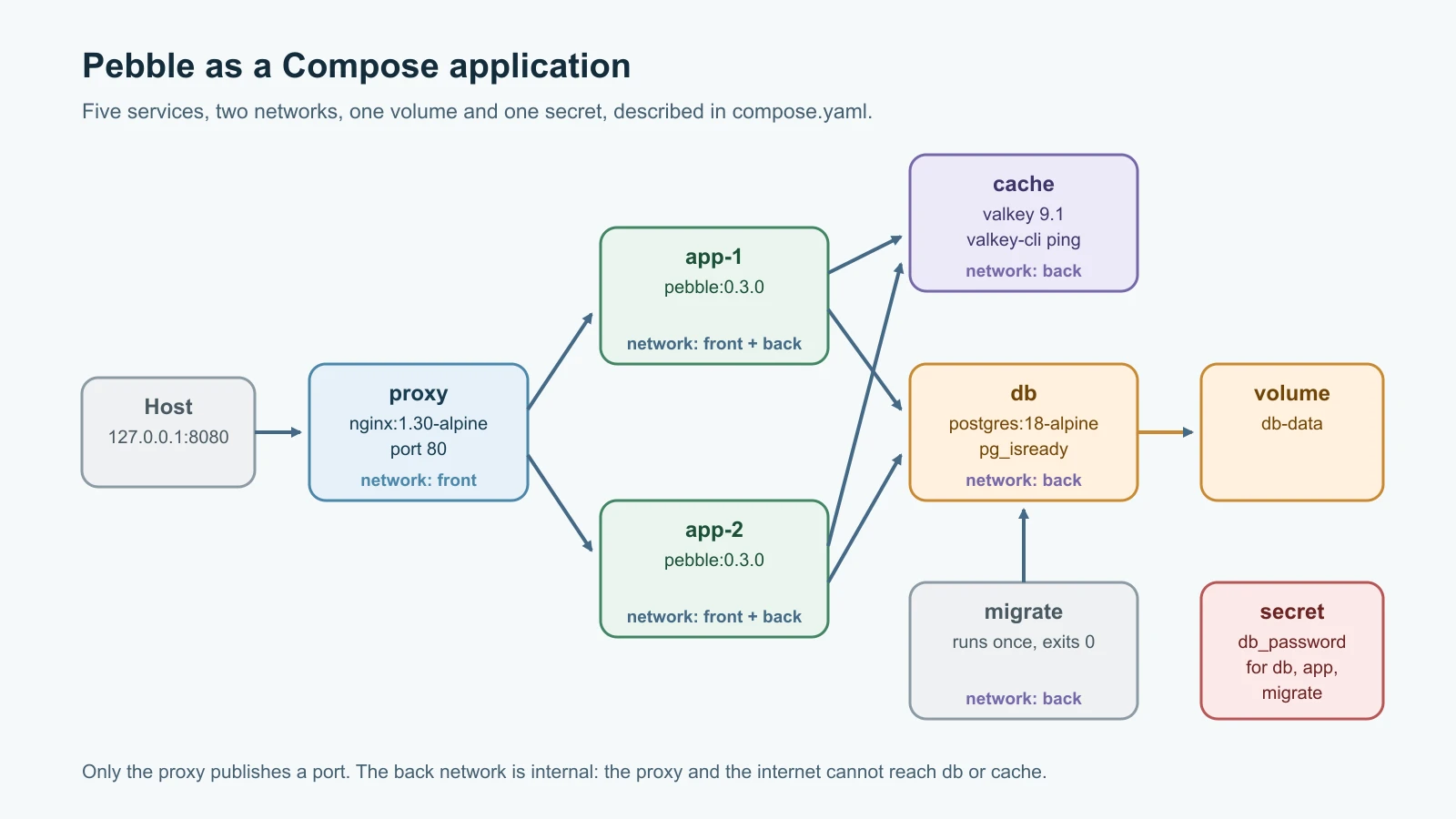
Create compose.yaml next to the Dockerfile:
1name: pebble
2
3x-pebble: &pebble
4  build: .
5  image: pebble:0.3.0
6  environment:
7    PEBBLE_BASE_URL: http://localhost:8080
8    PEBBLE_DATABASE_URL: postgresql://pebble@db:5432/pebble
9    PEBBLE_DATABASE_PASSWORD_FILE: /run/secrets/db_password
10    PEBBLE_CACHE_URL: redis://cache:6379/0
11  secrets: [db_password]
12
13services:
14  proxy:
15    image: nginx:1.30-alpine
16    ports:
17      - "127.0.0.1:8080:80"
18    volumes:
19      - ./nginx/pebble.conf:/etc/nginx/conf.d/default.conf:ro
20    depends_on:
21      app:
22        condition: service_healthy
23    networks: [front]
24    restart: unless-stopped
25
26  migrate:
27    <<: *pebble
28    command: ["python", "pebble.py", "migrate"]
29    depends_on:
30      db:
31        condition: service_healthy
32    networks: [back]
33    restart: "no"
34
35  app:
36    <<: *pebble
37    depends_on:
38      migrate:
39        condition: service_completed_successfully
40      cache:
41        condition: service_healthy
42    deploy:
43      replicas: 2
44    networks: [front, back]
45    restart: unless-stopped
46    develop:
47      watch:
48        - action: sync+restart
49          path: ./pebble.py
50          target: /app/pebble.py
51        - action: rebuild
52          path: ./requirements.txt
53
54  db:
55    image: postgres:18-alpine
56    environment:
57      POSTGRES_USER: pebble
58      POSTGRES_DB: pebble
59      POSTGRES_PASSWORD_FILE: /run/secrets/db_password
60    secrets: [db_password]
61    volumes:
62      - db-data:/var/lib/postgresql
63    healthcheck:
64      test: ["CMD-SHELL", "pg_isready -U pebble -d pebble"]
65      interval: 5s
66      timeout: 3s
67      retries: 10
68    networks: [back]
69    restart: unless-stopped
70
71  cache:
72    image: valkey/valkey:9.1-alpine
73    command: ["valkey-server", "--save", "", "--appendonly", "no", "--maxmemory", "64mb", "--maxmemory-policy", "allkeys-lru"]
74    healthcheck:
75      test: ["CMD", "valkey-cli", "ping"]
76      interval: 5s
77      timeout: 3s
78      retries: 10
79    networks: [back]
80    restart: unless-stopped
81
82networks:
83  front:
84  back:
85    internal: true
86
87volumes:
88  db-data:
89
90secrets:
91  db_password:
92    file: ./secrets/db_password.txt
Here is what each part does.
name: pebble sets the project name. Compose prefixes containers, networks and volumes with it, such as pebble-db-1 and pebble_db-data.
x-pebble: &pebble is shared configuration. Compose ignores top-level keys starting with x-, and the YAML anchor &pebble lets two services reuse the block with <<: *pebble. Both migrate and app build the same image, pebble:0.3.0, with the same environment and secret, without repeating them.
Services talk by name. Inside the Compose networks, each service name is also a host name. Pebble reaches PostgreSQL at db:5432 and Valkey at cache:6379, and Nginx reaches Pebble at app:8080. Docker's built-in DNS answers those names, so no IP addresses appear anywhere. When a service has several replicas, its name resolves to all of their addresses.
Two networks. proxy is only on front. db and cache are only on back, which is marked internal: true, so containers on it have no route to the internet and the proxy cannot reach the database at all. app and migrate join the networks they need. This is the network segmentation idea in miniature: each component can reach only what it must.
Only the proxy publishes a port, and only on the host's loopback address, the safe pattern from the previous lesson. PostgreSQL and Valkey have no published ports, so nothing outside Docker can connect to them.
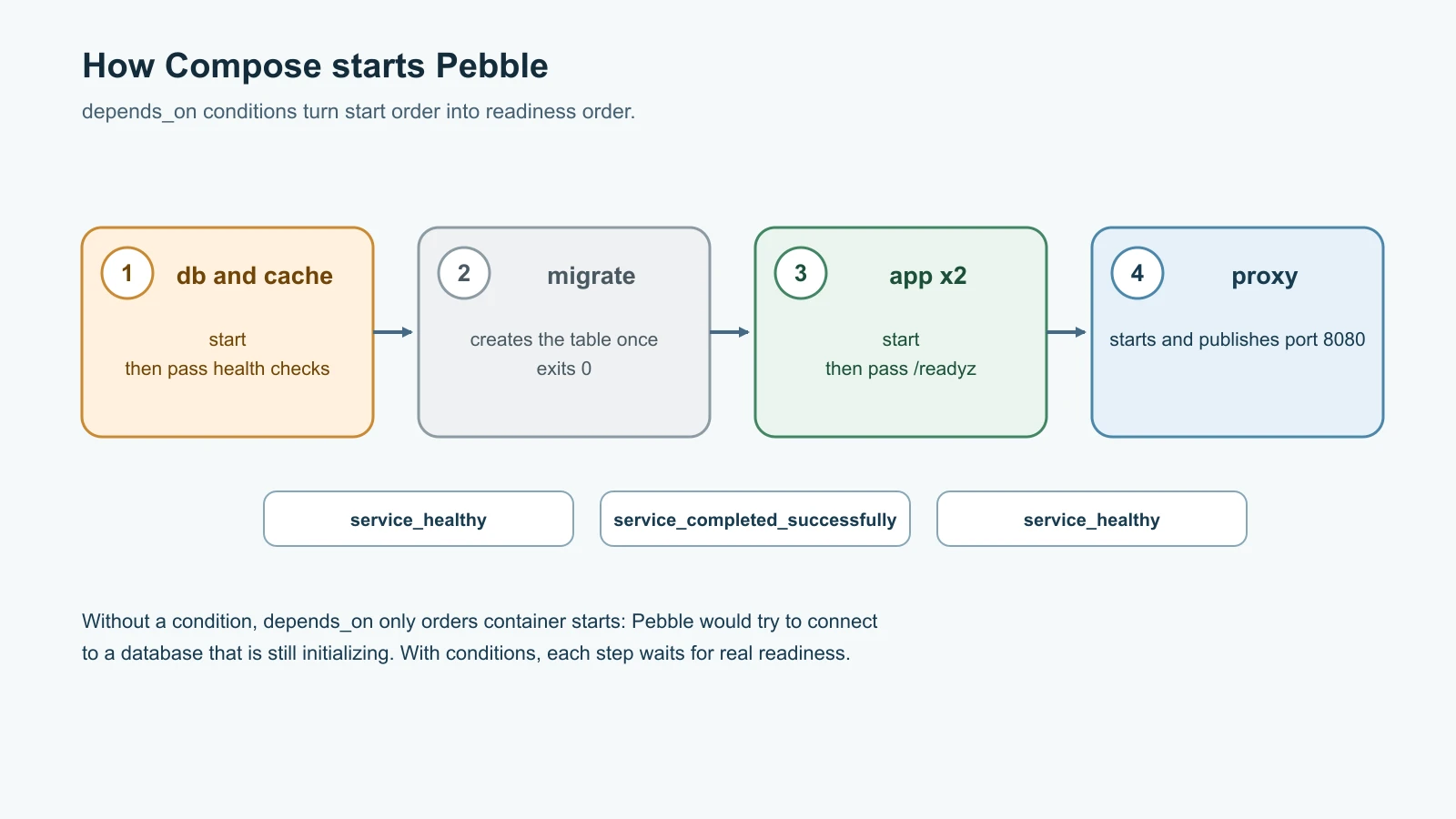
Start order and health. depends_on with a condition tells Compose what "ready" means:
migratewaits fordbto beservice_healthy, judged by thepg_isreadyhealth check.appwaits formigrateto finish withservice_completed_successfullyand forcacheto be healthy, judged byvalkey-cli ping.proxywaits forappto be healthy, judged by theHEALTHCHECKbuilt into Pebble's image, which calls/readyz.
Without conditions, depends_on only controls start order, and Pebble would try to connect to a database that is still initializing.
Volumes. db-data is a named volume for PostgreSQL's data. From PostgreSQL 18, the official image expects the volume at /var/lib/postgresql, one level above the older /var/lib/postgresql/data; mounting the wrong path on version 18 is an easy way to lose data on every recreate. Valkey runs with persistence switched off (--save "" and --appendonly no) and a 64 MB memory cap that evicts the least recently used keys, because a cache can always be refilled from the database. The proxy's configuration is a bind mount: the file from your project folder, mounted read-only with :ro.
Secrets. The secrets section mounts the file secrets/db_password.txt into each service that lists it, at /run/secrets/db_password. PostgreSQL reads it through POSTGRES_PASSWORD_FILE when it first initializes an empty data folder, and Pebble reads it through PEBBLE_DATABASE_PASSWORD_FILE. The password never appears in compose.yaml, in environment variables or in the image.
deploy.replicas: 2 runs two copies of app, and restart: unless-stopped restarts crashed containers, except migrate, which is meant to run once and stop.
develop.watch configures the development loop, covered below.
The proxy configuration
Create nginx/pebble.conf. It is the configuration from the web servers lesson, trimmed down, with the upstream pointing at the app service name:
1upstream pebble_app {
2    server app:8080 max_fails=2 fail_timeout=10s;
3}
4
5server {
6    listen 80;
7    server_name localhost;
8    client_max_body_size 4k;
9
10    location / {
11        proxy_pass http://pebble_app;
12        proxy_set_header Host $host;
13        proxy_set_header X-Real-IP $remote_addr;
14        proxy_set_header X-Forwarded-For $proxy_add_x_forwarded_for;
15        proxy_set_header X-Forwarded-Proto $scheme;
16        proxy_connect_timeout 2s;
17        proxy_read_timeout 10s;
18        proxy_next_upstream error timeout http_502;
19        add_header X-Upstream $upstream_addr always;
20    }
21}
Nginx looks up app when it starts and balances across every address it gets back, one per replica. It does not look the name up again while running, so restart the proxy after you change the number of replicas.
Create the secret and keep it out of Git
Generate a random password and save it where the Compose file expects it:
1mkdir -p secrets
2openssl rand -base64 24 > secrets/db_password.txt
3chmod 644 secrets/db_password.txt
4printf 'secrets/\n' >> .gitignore
Compose delivers file secrets as bind mounts, so the container sees the host file with its host permissions. Pebble runs as the unprivileged user 10001 inside its container, so on Linux the file must be readable by that user; 644 is the simplest choice for a development machine. This file-based approach suits a laptop or a single server. Production systems use a dedicated secret store, which Secret Management covers. Adding secrets/ to .gitignore stops the password from ever being committed.
Start everything
Build and start the whole application in the background:
1docker compose up -d --build
2docker compose ps
Compose builds the image, which runs all sixteen tests in the test stage, creates the networks and the volume, then starts the services in dependency order: db and cache, then migrate once they are healthy, then the two app replicas after the migration succeeds, then proxy. docker compose ps lists db, cache, app-1, app-2 and proxy as running, with (healthy) against those that have health checks. Add --all to also see migrate with an Exited (0) status: it did its job and stopped.
Now use the application through the proxy, exactly as before:
1curl -s http://localhost:8080/api/links -H 'Content-Type: application/json' \
2  -d '{"url": "https://www.postgresql.org/docs/"}'
3curl -s -i http://localhost:8080/<code>
The link is stored in PostgreSQL, and the redirect comes back through Nginx. Repeat the second command a few times and watch the X-Upstream header alternate between the two replicas' addresses on the front network.
Logs from every service are one command away:
1docker compose logs --tail 5 app
2docker compose logs -f
Each line is prefixed with the container name, so you can follow two replicas, the database and the proxy side by side. The first command shows the replicas' startup lines with "database": "postgresql" and "cache": true. To look inside the database, open psql in the db container:
1docker compose exec db psql -U pebble -c 'SELECT code, url FROM links;'And to see the cache at work:
1docker compose exec cache valkey-cli keys 'link:*'
2docker compose exec cache valkey-cli ttl link:<code>
After you visit a link, its key appears with a time to live counting down from 300 seconds.
Break it on purpose
Failure drills show whether the design holds up. Try each one and watch docker compose ps and the logs.
Stop the cache. Run docker compose stop cache, then follow a few links. They still work. The app logs show "cache unavailable" warnings, and every lookup goes to PostgreSQL. Start the cache again with docker compose start cache and the warnings stop. Exactly what the design promised.
Stop the database. Run docker compose stop db. Within a few health-check intervals, both app replicas report unhealthy because /readyz fails, curl http://localhost:8080/readyz returns the 503 that Pebble sends, and creating links fails. The processes themselves keep running, because the liveness endpoint, /healthz, still answers. Start the database again and the replicas become healthy on their own, with no restarts needed. This is the liveness-versus-readiness split from earlier lessons working as designed.
Kill a replica. Run docker kill pebble-app-1. Nginx routes around it, as in the web servers lesson, and restart: unless-stopped brings it back.
Scale and tear down
Change the number of app replicas without editing the file:
1docker compose up -d --scale app=3
2docker compose restart proxy
The proxy restart makes Nginx look up app again and pick up the third replica. Scaling works smoothly because Pebble is stateless: every replica shares the same PostgreSQL database and cache.
To stop and remove the containers and networks while keeping your data:
1docker compose downThe db-data volume survives, so docker compose up -d brings back every link. docker compose down -v also deletes the volumes, and with them the whole database. Use -v deliberately, never out of habit.
A fast development loop with watch
Rebuilding an image for every one-line change is slow. Compose watch watches files and updates running containers. The develop.watch section in compose.yaml defines two rules: when pebble.py changes, sync+restart copies the file into the running app containers and restarts them, which takes about a second; when requirements.txt changes, rebuild builds a new image and replaces the containers, because new dependencies cannot be copied in. Start it in a second terminal:
1docker compose watchNow edit pebble.py, for example by changing the VERSION constant, save the file, and run docker compose logs --tail 2 app: the replicas have restarted with the new startup line. A third action, sync, copies files without restarting, which suits frameworks that reload code themselves.
A watched container runs code that never went through the test stage, so watch is strictly for development. Anything you deploy should be a fresh build from a commit, which is exactly what Continuous Integration will automate.
Where Compose fits
Compose runs containers on one machine. That makes it ideal for development environments, demos, test setups in CI pipelines and small production services on a single server. It does not spread containers across several machines, move them when a machine fails, or roll out new versions gradually. Those jobs belong to an orchestrator such as Kubernetes, which you will meet in Kubernetes Basics. The concepts carry over directly: services, replicas, health checks, volumes, secrets and private networks all have Kubernetes equivalents, and you have already used every one of them here.
Mistakes beginners make
- Using
depends_onwithout a health condition and assuming the database is ready when its container starts. - Running schema setup in every app replica at startup, so replicas race each other.
- Putting database passwords directly in
compose.yamlor in environment variables. - Committing the
secrets/folder or a.envfile with real credentials. - Publishing database and cache ports to the host "for debugging" and forgetting them.
- Mounting PostgreSQL 18's volume at the old
/var/lib/postgresql/datapath. - Letting a cache failure take the whole application down.
- Running
docker compose down -vwithout realizing it deletes the database. - Scaling a service behind Nginx and forgetting that Nginx resolved the old addresses at startup.
- Deploying code from a watch session instead of a tested build.
Recap and try it yourself
Docker Compose describes a whole application in one file: services, the networks between them, volumes for data, secrets and the conditions that decide when each service may start. Pebble 0.3.0 can use PostgreSQL for shared, concurrent storage and caches lookups in Valkey, while staying fully functional when the cache fails. A one-off migrate container sets up the schema before the replicas start, health checks gate the start order, an internal network keeps the database and cache unreachable from the proxy and the internet, and the password arrives as a file, never as an environment variable. docker compose up, ps, logs, exec, --scale, down and watch cover daily work. Compose runs on one machine; Kubernetes takes the same ideas across many.
Try it yourself:
- Bring the stack up, create five links, run
docker compose down, thenup -dagain and confirm the links survive. Then trydown -vand see what happens. - Stop the cache and then the database, one at a time, and note exactly what
curl,docker compose psand the app logs show for each. Write the results down as a two-line runbook entry for each failure. - Add a
pgadminoradminerservice for browsing the database, on thebacknetwork only, and reach it from your laptop withdocker compose portor a temporary port bound to127.0.0.1. Remove it when you are done. - Change
CACHE_TTL_SECONDSto 30 whiledocker compose watchis running, visit a link, and confirm withvalkey-cli ttlthat the new value is used.
Sources checked on 13 November 2026: Docker documentation for the Compose file reference, services, startup order, secrets in Compose, Compose watch and networking in Compose; the postgres official image, including its PostgreSQL 18 volume change; PostgreSQL's versioning policy; Valkey and its container image; psycopg 3 and redis-py documentation; The Twelve-Factor App on admin processes; and the roadmap.sh DevOps roadmap. Pebble is fictional.