
DevOps course · lesson 15 of 24
- 1What Is DevOps?
- 2A Language and a Service to Operate
- 3Linux and the Terminal
- 4Bash Scripting for Ops
- 5Git and Collaboration
- 6Networking for DevOps
- 7Web Servers, Proxies and Load Balancers
- 8Docker for DevOps
- 9Docker Compose and Multi-Service Apps
- 10Cloud Providers: AWS, Azure and Google Cloud
- 11Serverless Functions and Platforms
- 12Terraform and Infrastructure as Code
- 13Ansible and Configuration Management
- 14Continuous Integration with GitHub Actions and GitLab CI
- 15Continuous Delivery and Deployment Strategies
- 16Secret Management
- 17Kubernetes Basics
- 18Kubernetes in Practice
- 19GitOps with Argo CD and Flux
- 20Service Mesh: Istio, Linkerd, Consul and Envoy
- 21Metrics and Alerting with Prometheus and Grafana
- 22Logs and Tracing with Loki, Elastic and OpenTelemetry
- 23Reliability, SLOs and Cloud Design Patterns
- 24Capstone: Pebble to Production
After this lesson, you should be able to distinguish continuous delivery from continuous deployment, explain why teams promote a built artifact instead of rebuilding for each environment, create a simple Jenkins pipeline that packages a tested Pebble release, and choose among rolling, blue-green and canary deployment patterns. You will also compare artifact registries, understand what feature flags do, and plan a rollback that accounts for data changes.
In Continuous Integration with GitHub Actions and GitLab CI, Pebble's tests, linter and syntax check run for proposed changes. A green test result is a reason to consider the change, not yet a release. Before the operations team can deploy it, they need a clearly identified package, an orderly path through environments, and a way to tell whether the new version is healthy. That path is continuous delivery.
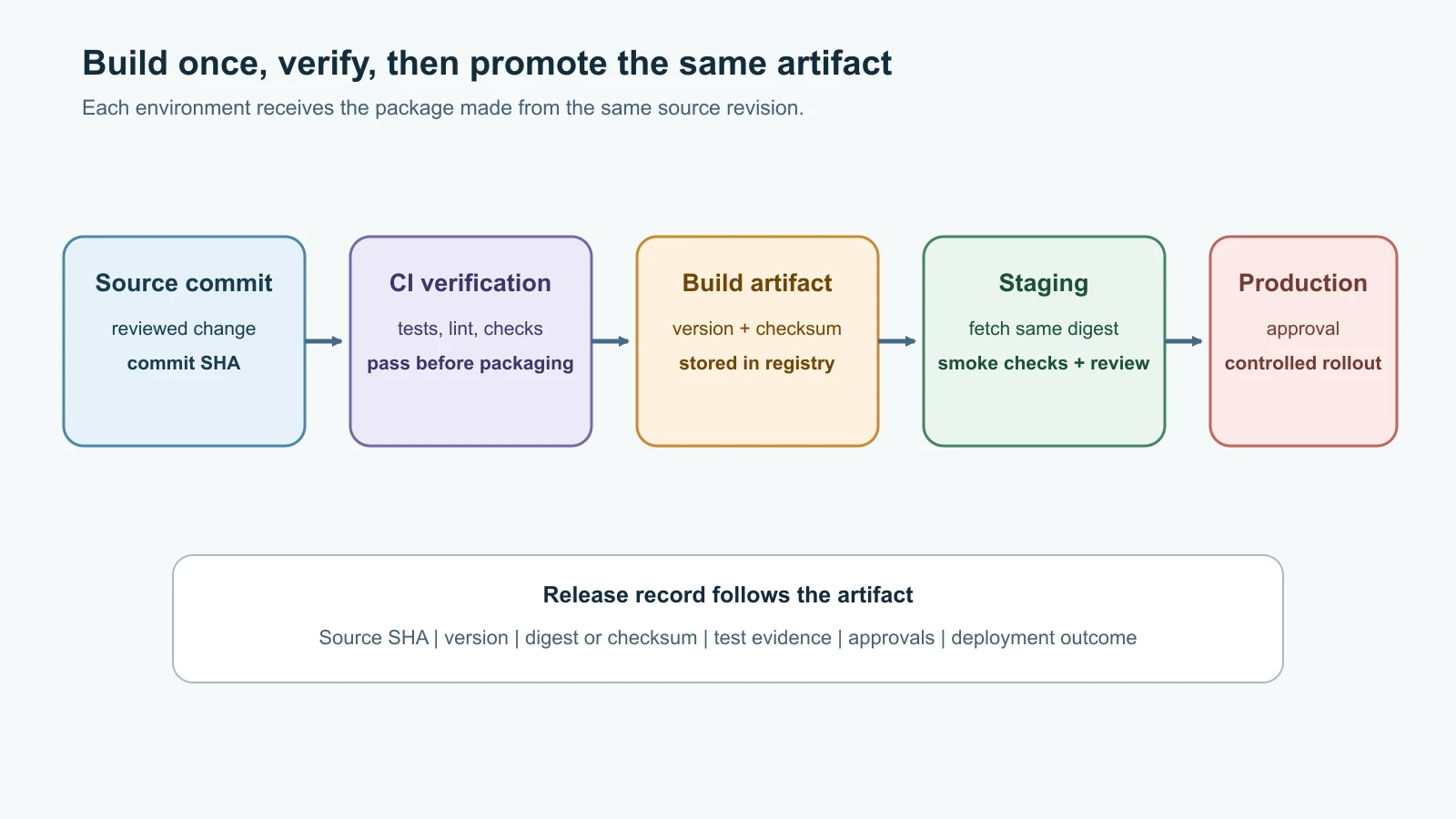
From a passing check to a releasable build
Continuous delivery is the practice of keeping software in a state where a release can be made reliably. A change passes automated and human checks, becomes a release candidate, and can be deployed when the team or organization decides. The final production decision may require a person, a maintenance window or a business approval.
Continuous deployment goes one step further: after the required checks pass, the system deploys the change to users automatically, without a separate manual release decision. It depends on strong test coverage, small changes, monitoring, a way to limit impact, and a recovery plan. A team does not have to use continuous deployment to practice continuous delivery well.
The sequence matters:
- Integrate and verify the source change, as in the previous lesson.
- Build a release artifact from the approved source revision.
- Identify and store it so a later job can fetch the same bytes.
- Deploy to a lower-risk environment and run smoke checks against the deployed service.
- Promote that artifact to the next environment after required checks or approval.
- Observe the rollout and stop or recover if its health signals are poor.
An artifact is a build output that can be stored and delivered: a container image, Python wheel, archive, package or binary. Its identity should be traceable to the source revision and build. A pipeline cache is not a release artifact: a cache is disposable data used to make a later job faster; an artifact is an output the team intends to verify, retain or deploy.
Build once, promote the same artifact
Suppose Pebble passes tests and is packaged on Monday. If staging rebuilds the package from source one way and production rebuilds it another way, the two environments might receive different bytes despite sharing a version label. The build could pick up a changed dependency, a different base image or a new build tool. That makes it harder to know exactly what was tested.
Instead, create one artifact from a particular commit, calculate its checksum or digest, store it, and promote the same artifact from development to staging to production. Environment-specific settings should be supplied at deployment time, not embedded by rebuilding the application. If a check fails in staging, production does not receive the artifact. If a new build is needed, it receives a new identity.
For Pebble, a simple source archive can include pebble.py and its runtime requirements.txt, but exclude tests, CI tools, local databases and environment files. A container image is another option, especially once the Dockerfile and deployment environment are ready. Do not publish a credential, .env file, database, local cache or private test data into the artifact.
Versions, tags and digests
A version tells people which release they are discussing. Semantic Versioning (SemVer) uses MAJOR.MINOR.PATCH for projects that define a public API: a major release signals an incompatible API change, a minor release adds compatible functionality, and a patch release contains compatible fixes. It is a convention with a specification, not a guarantee that every project follows it correctly. Pebble is currently at 0.3.0; under SemVer, versions below 1.0.0 are initial development and the public interface should not be treated as stable.
If the team writes commit messages in the Conventional Commits format from Git and Collaboration, release tools can propose the next version automatically: a fix: commit suggests a patch release, a feat: commit a minor release, and a ! or BREAKING CHANGE: footer a major release. The same commit types can generate the release notes. Review the proposed version and notes before publishing; a tool can only read the labels people wrote.
Git tags can mark source releases, such as v0.3.0. The build should also record the commit SHA, because the tag name alone does not show what source was used if tags are moved or repositories are mishandled. Once a package version is published, treat its bytes as immutable. If something needs correction, publish a new version rather than silently replacing the old one.
Container tags are convenient names, but tags such as latest can be moved to point at different images. A digest is a content-based identifier for the image manifest. Deploying ghcr.io/example/pebble@sha256:... identifies a specific image, while ghcr.io/example/pebble:latest asks the registry to resolve a name that may later point elsewhere. Keep a human-readable version tag for discovery, and record the digest used by each environment.
The digest does not tell you whether an image is safe, tested or trustworthy. It only identifies content. Release records should connect it to source commit, build run, test results, dependency inputs and the people or automation that approved promotion. Add signing or provenance checks when the organization is ready to operate them consistently.
A Jenkins pipeline that packages Pebble
Jenkins is an automation server that runs jobs on agents. A pipeline stored as a Jenkinsfile in the repository is called Pipeline as Code: the build and release steps are reviewed alongside application changes. Jenkins uses plugins for many integrations, so the controller, agents and installed plugins need maintenance and access controls.
The example below verifies Pebble, then archives a source package for builds from the main branch. It uses the same CI dependencies and checks as the previous lesson. The package name includes the source commit so it can be traced to a revision. Jenkins archives the package and records a fingerprint for its build page. This is a teaching example; an organization that needs retention, replication, scanning and promotion across teams should publish to a package or container registry instead of treating a Jenkins build archive as its long-term artifact store.
Add this Jenkinsfile to the Pebble repository:
1pipeline {
2    agent any
3
4    options {
5        timeout(time: 15, unit: 'MINUTES')
6        buildDiscarder(logRotator(numToKeepStr: '20'))
7    }
8
9    stages {
10        stage('Verify') {
11            steps {
12                sh 'python3 -m venv .venv'
13                sh '.venv/bin/python -m pip install --disable-pip-version-check -r requirements-ci.txt'
14                sh '.venv/bin/ruff check pebble.py test_pebble.py'
15                sh '.venv/bin/python -m compileall -q pebble.py test_pebble.py'
16                sh '.venv/bin/python -m unittest -v'
17            }
18        }
19
20        stage('Package') {
21            when {
22                branch 'main'
23            }
24            steps {
25                sh '''
26                    set -eu
27                    mkdir -p dist
28                    commit="$(git rev-parse HEAD)"
29                    archive="dist/pebble-${commit}.tar.gz"
30                    tar -czf "$archive" pebble.py requirements.txt
31                    sha256sum "$archive" > "$archive.sha256"
32                    printf '%s\n' "$commit" > dist/source-commit.txt
33                '''
34                archiveArtifacts artifacts: 'dist/*', fingerprint: true
35            }
36        }
37    }
38}
This when { branch 'main' } condition expects a Jenkins Multibranch Pipeline, which discovers repository branches and sets their branch names. The build agent must have Python 3 with the venv module (the python3-venv package on Debian and Ubuntu), plus the system tar and sha256sum commands. The Verify stage creates a virtual environment in the workspace and calls its tools by path, because each sh step starts a fresh shell and an activate in one step would not carry over to the next. Installing into the agent's system Python instead fails on current Debian and Ubuntu releases, which mark it as externally managed (PEP 668) and refuse pip install there. The virtual environment also keeps one build's packages away from the agent and from other jobs. The package stage runs only after the Verify stage succeeds. archiveArtifacts keeps output associated with a Jenkins build; it does not automatically upload it to Artifactory, Nexus, Cloudsmith or a container registry.
The package includes only the application module and runtime dependency file. It does not include CI tools, tests or environment settings. The checksum file helps detect accidental corruption when the package is copied, but it is not a signature and does not prove who built the package. The source commit file and Jenkins fingerprint provide additional traceability within this Jenkins installation.
For a production pipeline, use an artifact repository or registry with appropriate retention and permissions. Give only the packaging job permission to publish. Give deployment jobs permission to read the selected package. Separate read and write credentials, avoid exposing them to pull-request code, and scope them to the specific repository or project. Jenkins credentials are stored and referenced through credential IDs, but any job allowed to run untrusted pipeline code can still expose credentials it can access. Masking reduces accidental display; it is not a security boundary against malicious code.
Artifact repositories and registries
A package registry stores versioned packages for a format such as Python, Maven, npm or Docker/OCI containers. An artifact repository manager can also proxy upstream repositories, cache dependencies, host internal artifacts and apply access or retention policies. Product scope varies, so check supported formats, deployment model, security features, availability, price and operational fit before choosing one.
| Product | Typical role | Useful distinction |
|---|---|---|
| JFrog Artifactory | Universal package and artifact repository manager | Local repositories host internal builds, remote repositories proxy upstream sources, and virtual repositories combine views. |
| Sonatype Nexus Repository | Repository manager for packages and dependencies | Hosted repositories store your releases, proxy repositories cache upstream content, and group repositories provide a combined endpoint. |
| Cloudsmith | Hosted package and artifact management service | Provides format-specific or universal repositories, package metadata and access controls as a managed service. |
| GitHub Container Registry (GHCR) | Container image registry connected to GitHub | Convenient for images built in GitHub Actions; package access and workflow token permissions must be configured. |
| Jenkins artifact archive | Build output attached to a Jenkins run | Useful for short-term build output and traceability; a dedicated repository is usually better for shared release promotion. |
An artifact registry reduces the chance that every environment rebuilds software from source, but it is still an important service to protect. Restrict publishing rights, retain enough history to support recovery, clean up abandoned snapshots, and ensure deployment systems can retrieve an approved version. Avoid giving every developer a production publish token.
A release moves through environments
An environment is a deployment target with its own configuration, users, risk and purpose. Teams often use development, test, staging and production, but names and gates differ. Environments should provide enough similarity to make checks useful, while sensitive production data stays protected.
Promotion means advancing the same identified artifact to another environment. A release may be installed in staging, exercised with synthetic data and monitored, then approved for production. Do not rebuild it between environments. Record which artifact digest or package checksum went where, who approved it, when the deployment occurred and what verification ran afterward.
A release tool can coordinate these steps. Octopus Deploy models projects, releases, environments and deployment processes, and documents patterns such as rolling, blue-green and canary deployments. Jenkins can also coordinate deployments through Pipeline steps and plugins. Teams may instead use their CI provider, an orchestrator or a platform. Tool choice does not remove the need to define the release gates and recovery steps.
Use a release record for every production change:
| Record field | Example content |
|---|---|
| Release identity | Pebble v0.3.1; image digest or package checksum. |
| Source | Repository, commit SHA and tagged source revision. |
| Build evidence | CI run link, test/lint status and build inputs. |
| Target | Staging or production environment and deployment window. |
| Change summary | User-visible changes, configuration changes and database migration notes. |
| Approval | Named role or automated policy that permitted promotion. |
| Health checks | Smoke test, readiness, error rate and other service-specific signals. |
| Recovery | Previous artifact, traffic switch or forward-fix decision; owner and stop condition. |
This is a practical record, not a universal compliance form. Keep sensitive values out of the release notes; point to a protected system of record when more detail is needed.
Choose a rollout pattern
A rollout pattern determines how a new version replaces the old one and how much of the service can be affected before the team sees a problem. No strategy guarantees zero downtime. Each depends on health checks, compatible data changes, capacity, routing and the ability to stop safely.
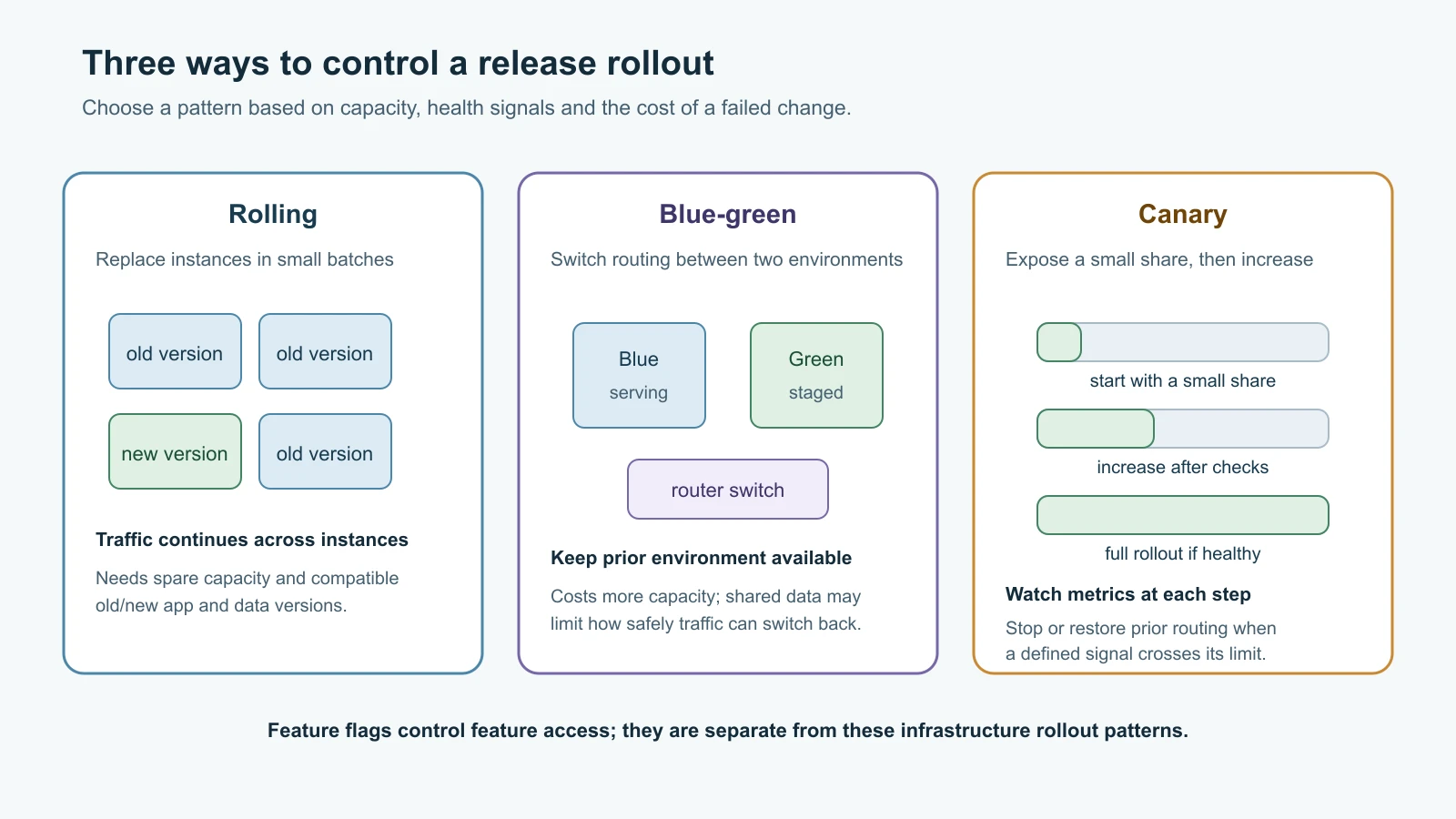
Rolling deployment
A rolling deployment replaces instances gradually. The old and new versions run at the same time for part of the rollout. The load balancer or orchestrator keeps serving traffic through healthy instances while each batch is updated. This can work well when the application can run multiple versions concurrently, the service has enough capacity, and readiness checks accurately indicate whether an instance can receive traffic.
The operator should set a rollout batch size or concurrency limit, watch the error and latency signals, and define when the update pauses. If a new instance fails, stop before updating the rest. A rollback may require redeploying the old version to updated hosts. During the mixed-version period, both application versions may read and write the same database, so schema changes must remain compatible with both.
Blue-green deployment
A blue-green deployment keeps two environments available. Blue is serving the current release; the new version is installed and checked in green. A router, load balancer or platform then switches traffic to green. If the new version fails its verification, traffic can be switched back to blue while blue remains intact.
Blue-green can make the traffic switch easy to understand, but it may require near-duplicate capacity and careful handling of shared state. If both environments write to the same database, a migration or new application behavior can affect the old version too. If green is destroyed after cutover, recovery may require rebuilding it. Check data compatibility, background workers, scheduled jobs, sessions, external side effects and DNS or connection draining before using this pattern.
Canary deployment
A canary deployment sends a small, controlled portion of traffic to a new release while most traffic remains on the current release. The team watches a defined set of signals, such as failed request rate, latency, saturation or business outcomes. If the canary behaves well, the rollout expands in deliberate steps. If the signals cross the agreed stop condition, the team stops increasing exposure and directs traffic away from the canary.
Canary works best when traffic can be split reliably, versions can coexist, metrics have enough volume to be meaningful and someone is watching the decision. A small sample may not reveal a problem that appears only for a certain region, account type or workload. A canary is not simply deploying one server first and hoping users notice problems; the observation and stop rules need to be clear.
| Pattern | How new code receives traffic | Strength | Trade-off |
|---|---|---|---|
| Rolling | Gradually as instances are replaced | Uses the fleet and capacity incrementally | Old and new versions coexist; rollback can take time. |
| Blue-green | After routing switches to the prepared environment | Clear cutover and fast traffic reversal when the old environment remains healthy | Needs extra capacity and careful shared-state planning. |
| Canary | Starts with a limited traffic segment, then grows | Limits initial exposure and supports measured expansion | Needs reliable traffic control, observability and decision thresholds. |
These are deployment patterns, not buttons that make a service safe by themselves. Start with a strategy your team can operate and rehearse. More complicated traffic splitting adds components and failure modes, so adopt it when its risk reduction is worth the operational cost.
Feature flags separate deployment from release
A feature flag is a runtime setting that decides whether a feature is active for some user, group or environment. The code can be deployed while the feature remains disabled. The team can enable it for internal users, a test group or a portion of traffic, then expand exposure after observing results.
Feature flags are useful for separating a code deployment from a product release, coordinating a long-running change behind a safe switch, or disabling a problematic feature without reverting the entire service. They do not replace code review, access control, tests or a deployment strategy. A flag system itself must be available and secure; define a safe default if it cannot be reached.
Flags have a lifecycle. Name an owner, document the intended behavior, decide how to measure the rollout, and set a cleanup date. A flag left in the code forever creates extra branches of behavior that developers must test and understand. Also distinguish a release toggle, which controls whether a feature is exposed, from an operational switch, which operators may use to reduce load or disable a risky capability during an incident.
Rollback, roll forward and data
A rollback returns an application to an earlier release or redirects traffic to the previous version. A roll forward deploys a new version that fixes the problem. Which choice is safer depends on what has changed, what data has been written and whether the previous version can still work with the current database.
Application packages can often be replaced. Database writes cannot be undone simply by restoring an old application binary. A migration that removes a column, changes its meaning or rewrites records may make the old version fail or lose data. Prefer expand and contract changes: add a compatible field, deploy code that can work with both old and new shapes, migrate data, then remove the old field in a later release after confirming no version needs it.
Before deployment, document the previous artifact, the health signal that triggers a pause, who can halt the rollout, how traffic will be restored, and whether a database change is reversible. Practice the recovery path in staging. Do not automate an instant rollback based on one noisy alert unless the signal and the recovery process have been validated. Sometimes a new forward fix is safer than reverting data or code.
A practical release gate for Pebble
For a first version of this workflow, keep the path short:
- A reviewed change passes the CI checks.
- A package job builds a source archive from the approved commit and records its checksum.
- The artifact is placed in a release repository with a commit identifier and, when appropriate, a semantic version tag.
- A staging deployment fetches that exact artifact, applies environment configuration, and checks
/healthzand/readyz. - A reviewer checks the release record and approves production promotion.
- The deployment uses a small rolling update or a prepared blue-green target, then watches service health and application logs.
- If the stop condition is reached, the operator stops the rollout, decides whether to restore the prior artifact or move forward with a fix, and records the result.
This describes a process, not an instruction to run a production deployment. A real service needs environment-specific design, access controls, a rollback rehearsal, and a clear owner. Pebble's course examples use fictional endpoints and test data.
Mistakes beginners make
- Rebuilding the software separately for staging and production, then assuming both environments run the same bytes.
- Treating a Git tag, package version, container tag and digest as interchangeable identifiers.
- Publishing a new artifact over an existing version instead of creating a new version.
- Using
latestas the only production release identifier. - Keeping a build archive as the only copy of a release that needs long-term retention or team-wide promotion.
- Giving pull-request tests credentials that can publish packages or change production.
- Choosing rolling, blue-green or canary without checking capacity, health signals and data compatibility.
- Calling a canary a test when there is no measured traffic split or stop condition.
- Using a feature flag as a replacement for authorization or as a permanent way to avoid cleanup.
- Reverting application code after an irreversible database change without checking compatibility.
- Assuming a successful deployment means the service is healthy for real users.
- Automating rollback before practicing it with the database and external dependencies in scope.
Recap and try it yourself
Continuous delivery keeps a tested change ready to release; continuous deployment automatically releases changes after they pass policy. A release artifact is built from a source revision, identified and stored, then promoted unchanged. Versions help people communicate a release, while a digest identifies exact container content. Jenkins can define a pipeline in a reviewed Jenkinsfile; an artifact manager or registry provides a stronger shared home for release packages. Octopus Deploy and other systems can coordinate environment promotion and deployment patterns.
Rolling, blue-green and canary releases control how new code reaches users. Feature flags control whether a capability is enabled and can separate deployment from product exposure. All patterns depend on useful health signals, compatible data changes and rehearsed recovery. A rollback can be harder than a new forward fix after database state changes.
Try it yourself:
- Add the Jenkinsfile above to a practice Pebble repository. Run the verification and package stages on a Jenkins test installation, then inspect the archive and checksum. Confirm the recorded commit matches
git rev-parse HEAD. - Draft a release record for a fictional Pebble
v0.3.1candidate. Include the commit, artifact checksum, CI evidence, staging health checks, approval owner and recovery decision. - Draw a rolling, blue-green and canary plan for two Pebble app instances. Mark where traffic flows, what metric stops the rollout and what prior version remains available.
- Describe a database schema change that would make rollback unsafe. Rewrite it as an expand-and-contract sequence that allows old and new app versions to overlap.
- Add a fictional
new-link-previewfeature flag to a release note. Name its owner, rollout audience, success signal and cleanup date.
Go deeper
- Jenkins Pipeline as Code
- Jenkins Pipeline syntax
- Jenkins archive artifacts step
- Octopus Deploy deployment patterns
- Octopus Deploy rollback guidance
- JFrog Artifactory repository types
- Sonatype Nexus repository types
- Cloudsmith artifact management
- Docker image digests
- Semantic Versioning 2.0.0
Sources checked on 14 November 2026: Jenkins official documentation for Jenkinsfiles, Pipeline syntax, archived artifacts and credentials; Octopus Deploy's deployment patterns, rollbacks and feature flag rollouts; JFrog repository management, Sonatype repository types, Cloudsmith artifact management and key concepts; Docker image digests and build best practices; and Semantic Versioning 2.0.0. Pebble and all release scenarios are fictional. Jenkins package output is an expected example; run and review it on a practice Jenkins installation before using it in a real release process.