
Cyber Security course · lesson 19 of 24
- 1What Is Cyber Security?
- 2Fundamental IT Skills for Cyber Security
- 3Operating Systems for Security: Windows, Linux and macOS
- 4Virtualization and Your Safe Cyber Security Lab
- 5Networking Fundamentals for Cyber Security
- 6Network Services and Infrastructure for Cyber Security
- 7Network Troubleshooting and Traffic Analysis Tools
- 8Core Security Concepts Every Defender Uses
- 9Authentication and Access Control Explained
- 10Cryptography Basics for Cyber Security
- 11Secure Protocols and Wireless Security
- 12The Threat Landscape and Security Frameworks
- 13Social Engineering and Human Attacks
- 14Network and Wireless Attacks and How to Detect Them
- 15Web Attacks and the OWASP Top 10
- 16Malware, Exploits and System Attacks
- 17Hardening and Endpoint Security
- 18Network Defense, Logging and SIEM
- 19Vulnerability Management and Threat Hunting
- 20Incident Response and Digital Forensics
- 21Cloud Security Basics
- 22Scripting for Security
- 23Ethical Hacking, CTFs and Penetration Testing
- 24Cyber Security Standards, Certifications and Capstone
After this lesson, you should be able to describe a vulnerability management cycle, explain why an accurate asset inventory matters, plan a safe scan, validate and prioritize findings without relying on one score, verify a patch or mitigation, and conduct a small hypothesis-driven threat hunt using authorized logs. You will also leave with a risk register row and a threat-hunt worksheet. All Harbor Books examples are fictional; scanning exercises must remain inside your own isolated lab or a system you have explicit written permission to assess.
Harbor Books has hardened its endpoints and set up network monitoring. Its next challenge is deciding which of many possible weaknesses deserves attention first, and checking whether suspicious activity is already present. These are related but different jobs: vulnerability management reduces known weaknesses, while threat hunting searches for signs that an attacker may already be using a weakness or another path.
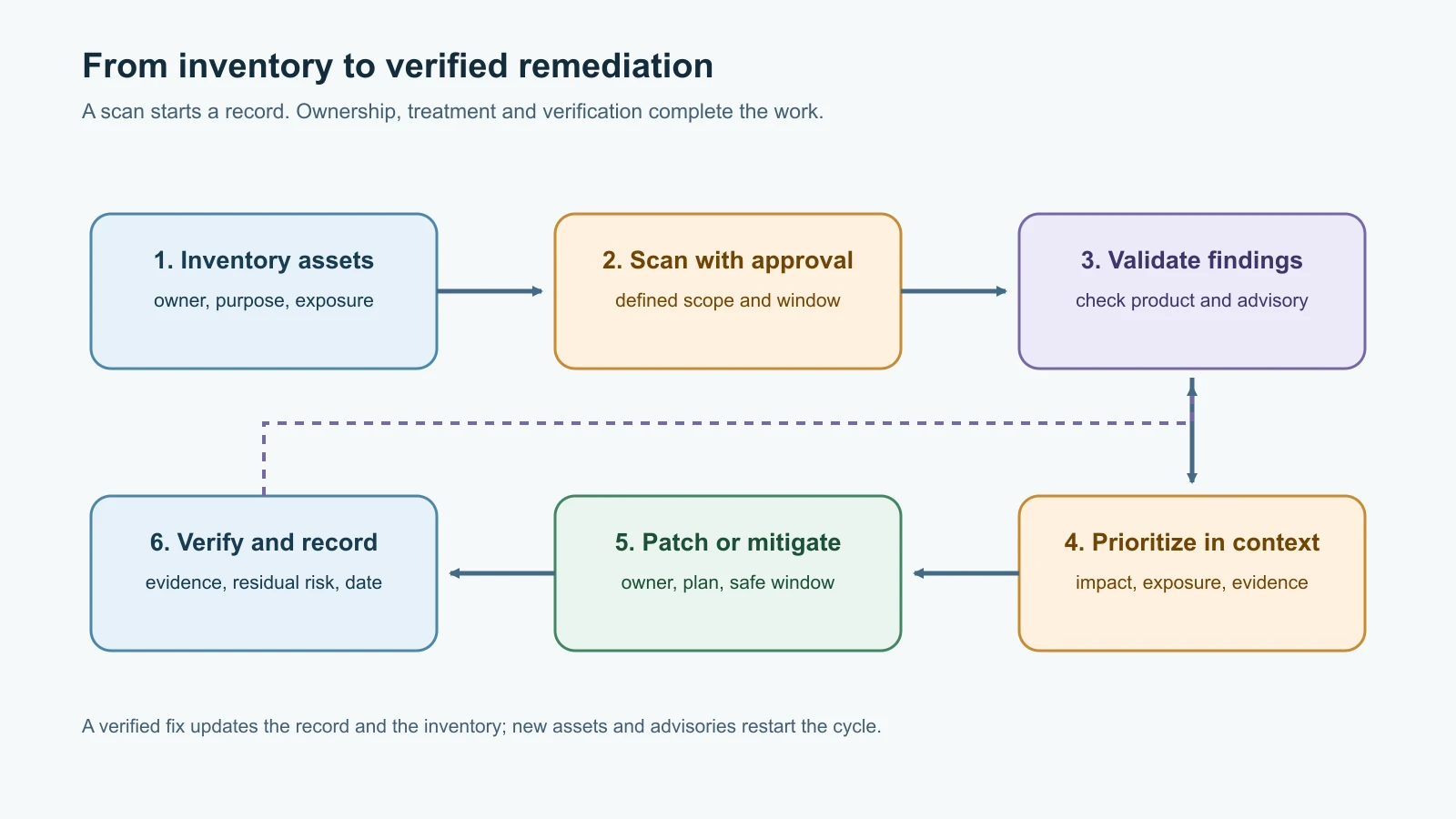
Start with the assets you actually have
A vulnerability is a weakness in a system, application, device, configuration or process that could be used to cause harm. A scan result only matters if you can connect it to a real asset and understand that asset's role. An old office laptop used for public browsing is not the same business risk as a point-of-sale terminal, the router connecting store systems, or the web server holding order data.
Harbor Books keeps an inventory with an owner, business purpose, location, operating system or product, version, network exposure, data handled, support status, and date last checked. It includes devices that are easy to forget: router firmware, a Wi-Fi access point, payment terminals, printers, cloud services, browser extensions, externally managed websites, backup appliances and software libraries. The inventory from Fundamental IT Skills for Cyber Security is a starting point, but vulnerability management needs enough detail to match an advisory to a specific product and version.
An inventory is never finished. A new laptop appears, a vendor changes a hosted service, or a device goes offline and returns months later. Compare more than one source when possible: purchasing records, endpoint management, network observations, cloud inventories and the owners who use the systems. Record unknowns instead of quietly treating them as absent. An "unknown owner" can itself be a finding to resolve.
Use scanning carefully
A vulnerability scanner checks systems for known weaknesses using methods such as software and configuration inspection, version checks, or network probes. A credentialed scan can authenticate to a device and inspect installed packages or settings in more depth. An uncredentialed scan sees only what is reachable from its network position. Neither view is complete: a scanner may not know about a custom build, a backported security fix, a device it cannot reach, or a vulnerability hidden behind an unexpected route.
Scanning is an authorized activity. Before using a scanner, define the owner, targets, allowed time, methods, rate, credentials, excluded systems, emergency contact and stop condition. A test on a lab VM is different from a scan against the public internet. Even a routine scan can stress a fragile service, trigger monitoring or violate a third party's terms. Follow the authorization principles from What Is Cyber Security? and keep exercises on your own isolated lab systems.
Plan scans in a way that makes the output useful:
- Confirm the target list against the asset inventory and written authorization.
- Check scanner version, detection content and credential scope.
- Choose a maintenance window and a safe scan profile with the system owner.
- Record when the scan started, where it ran from, and which assets responded.
- Review results with asset owners; do not assume every result is correct.
- Track missed or unreachable devices as coverage gaps rather than clean systems.
A scanner report is a lead. Validate a finding against the vendor advisory, installed product and version, configuration, network exposure and any available fix. Some vendors backport a security fix without changing the version in the way a generic scanner expects. A component may be present but not reachable or enabled. Conversely, an unreported asset or an unsupported product may be a bigger concern than the displayed count. NIST's patch planning guidance treats identification, prioritization, acquisition, installation and verification as an organized maintenance process, not a one-time scan.
Prioritize risk in context
Scanner severity helps sort work, but it is not the same as local risk. CVSS, the Common Vulnerability Scoring System, provides a standardized severity measure for a vulnerability's technical characteristics. NIST's National Vulnerability Database explicitly says CVSS is not a measure of risk. A base score does not know whether Harbor Books runs the affected product, whether it is internet-facing, whether a control limits access, what data it handles, or what downtime would mean for the shop.
Use several kinds of evidence together:
| Input | What it contributes | What it cannot tell you alone |
|---|---|---|
| Asset criticality | Business impact if the device fails or is compromised | Whether an attacker can reach the weakness |
| Exposure | Whether the affected service is internet-facing or reachable from less-trusted networks | Whether exploitation is occurring |
| CVSS severity | Technical severity using a common scoring method | Your local business consequence or likelihood |
| CISA KEV | Evidence that a vulnerability is known to have been exploited in the wild | Whether your exact product, configuration and asset are affected |
| EPSS | Estimated probability of exploitation activity being observed for a CVE over the next 30 days | Local exposure, controls, business impact or a complete risk score |
| Existing controls | Segmentation, filtering, endpoint protection, backups or other mitigations | A guarantee that the issue is harmless |
| Operational constraints | Safety, availability, vendor support and patch window | Permission to leave a serious exposure unmanaged indefinitely |
CISA's Known Exploited Vulnerabilities (KEV) Catalog is a curated list of vulnerabilities known to have been exploited in the wild. Use it as a strong prioritization input, especially when the affected asset is present and reachable. Its inclusion does not automatically prove that a particular instance is vulnerable; check the product, version and vendor guidance. Federal agencies may have binding deadlines under CISA directives. Other organizations can use KEV as information for their own risk-based plans, but should not mistake federal agency deadlines for universal legal requirements.
The Exploit Prediction Scoring System (EPSS), maintained through FIRST's EPSS Special Interest Group, estimates the probability that exploitation activity for a vulnerability will be observed in the wild over the next 30 days. It is a population-level signal, not a local risk score. Use it as one input alongside observed exploitation, asset context and possible impact. CISA's Stakeholder-Specific Vulnerability Categorization (SSVC) is another example of a decision process that considers exploitation status and organization-specific consequences rather than reducing every decision to a single number.
Consider a fictional scanner report for Harbor Books' web server: it identifies a component version that may be affected by a vendor advisory. The first questions are not "Is the CVSS number high?" alone. Is that component actually installed and in the affected version range? Is the vulnerable feature enabled? Is the server reachable from the internet? Is there evidence of exploitation or a KEV entry? Does the vendor provide a fixed version or workaround? Could patching immediately interrupt online orders? The owner uses the answers to set urgency, treatment and an accountable due date.
Follow the patch and mitigation cycle
Patching is one treatment, not the entire process. NIST SP 800-40 Rev. 4 describes enterprise patch management as identifying, prioritizing, acquiring, installing and verifying patches, updates and upgrades. Harbor Books turns that into a practical loop:
- Identify the asset and affected product. Confirm the finding and its source.
- Prioritize using exposure, exploitation evidence, business impact, controls and operational constraints.
- Plan the patch, upgrade, configuration change or temporary mitigation. Name an owner and target date.
- Test the change on a representative non-production system when feasible. Confirm backup and rollback steps for critical services.
- Apply the approved change in the agreed window. For unsupported products, plan replacement rather than assuming a patch will appear.
- Verify the exact asset received the change and the vulnerable condition is resolved. Re-scan or use another reliable check.
- Record the evidence, remaining risk, exception owner and review date. Reopen the finding if verification fails.
If a patch is not yet available or cannot safely be applied immediately, consider a vendor-supported workaround or compensating control, such as restricting access to the affected service, disabling the vulnerable feature, adding a firewall rule, or increasing monitoring. These steps may reduce exposure; they do not necessarily remove the underlying weakness. Record the residual risk and a date to revisit the temporary measure. Risk acceptance should be explicit, approved by the right owner, and time-bound where practical.
Do not use a fixed scanning frequency as a substitute for judgment. A small shop may scan after major changes and on a regular schedule based on exposure, capacity and regulatory needs. Internet-facing systems, critical assets, new high-impact advisories and major configuration changes may justify faster checks. What matters is that the scope, cadence, analysis and follow-through are defined and reviewed.
Keep a useful risk register
A risk register is a working record of risks, owners, decisions and progress. It should let an operator answer: what is affected, why does it matter, what will we do, who will do it, and how will we know it worked? Avoid turning it into a list of scanner findings with no context or owner.
| ID | Asset and owner | Finding and evidence | Exposure and impact | Priority rationale | Treatment, owner, due date | Verification and status |
|---|---|---|---|---|---|---|
| VM-001 | Harbor web server; web maintainer | Fictional vendor advisory; installed version still being confirmed | Public-facing order service; downtime affects sales | Confirm affected version, KEV status, vendor fix and order impact before setting final urgency | Confirm version, test fix, schedule change; named owner; target date | Re-scan or verify installed fixed version; open pending validation |
This is a fictional example, not a claim that a real product or Harbor Books system has a vulnerability. Never copy a real exploit or customer record into a public ticket. Keep enough evidence to reproduce the finding safely, store scan reports where access is controlled, and note when an exception will be reviewed again.
Threat hunting starts with a question
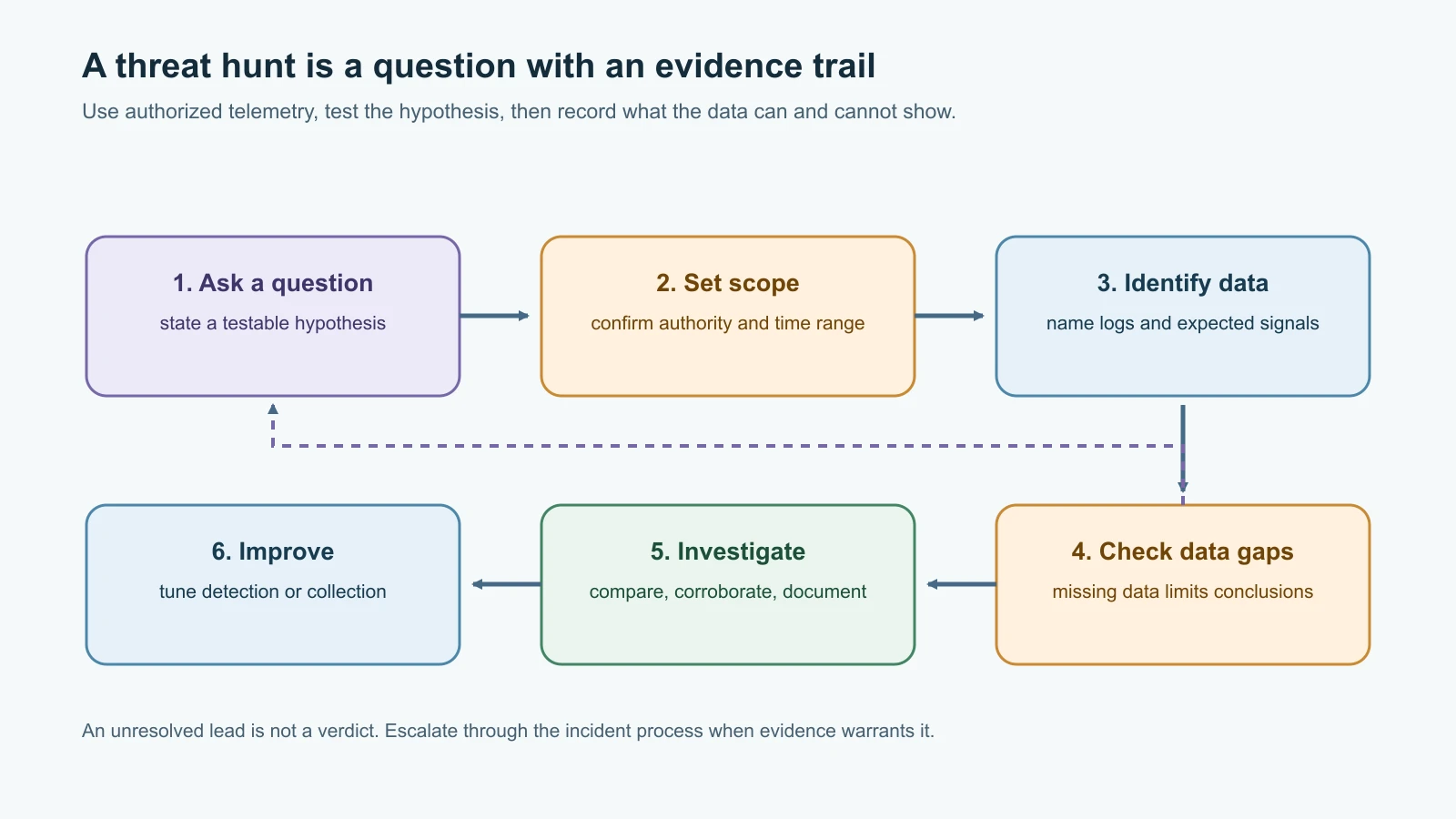
Vulnerability management asks, "What known weaknesses do our assets have, and how do we reduce them?" Threat hunting asks, "What suspicious activity might already be present, and what evidence would help confirm or rule it out?" A hunt is proactive analysis using available telemetry; it is not an excuse to search random machines or probe systems without authorization.
The difference from routine alert monitoring is the starting point. An IDS or SIEM rule may notify an analyst that a defined pattern occurred. A hunt begins with a question or hypothesis, based on risk, threat intelligence, a recent incident, or a gap in existing detection. MITRE's ATT&CK training describes a practical sequence: develop a hypothesis, determine required data, identify collection gaps, implement or test analytics, and investigate.
Harbor Books forms a simple hypothesis: "If an unauthorized device is using the shop network after closing, the firewall or wireless logs may show a new device communicating with the point-of-sale segment." The team does not start by accusing a user or blocking an address. It first checks what logs exist, whether device identity is reliable, what after-hours maintenance is scheduled, and whether the same behavior appears on known devices. If the evidence is missing, the hunt records a telemetry gap and an improvement action.
A safe beginner hunt follows six steps:
- Set the scope. Name the systems, accounts, logs and time period you are allowed to review.
- Write the hypothesis. Make it specific enough that evidence could support or weaken it.
- List expected data. For example: firewall records, DHCP leases, Wi-Fi association events and endpoint inventory.
- Check data quality. Verify timestamps, retention, asset mapping and known collection gaps.
- Investigate the pattern. Compare with normal business activity and corroborate across sources. Treat anomalies as leads.
- Document the result. Record what you searched, what you found, confidence, gaps, next action and whether a detection rule or control should change.
MITRE ATT&CK can help describe adversary behavior and organize a detection hypothesis, but it is not a checklist that proves a technique was or was not used. A missing data source limits what the hunt can conclude. "No evidence found in these logs" is more accurate than "no threat exists." If findings suggest a real incident, preserve evidence and follow the formal incident response process rather than improvising containment.
A threat-hunt worksheet
| Field | Example entry |
|---|---|
| Hunt question | Is an unknown device communicating with the POS segment after closing? |
| Scope and authorization | Harbor Books lab VLAN and approved one-week log window |
| Data sources | DHCP leases, Wi-Fi association events, firewall flow summaries, asset list |
| Expected behavior | Known POS device addresses; approved vendor update window |
| Observed pattern | Fictional example: one address appears in firewall logs but is absent from the device inventory |
| Validation | Check lease history, switch port owner and maintenance records with the network owner |
| Conclusion | Unresolved lead until ownership is confirmed; not an incident verdict |
| Data gaps | Wi-Fi logs retained only for a shorter period; note and improve collection |
| Next action | Assign owner and date; escalate through the incident process if corroborating evidence appears |
This example is fictional and does not describe a real intrusion. The worksheet helps separate observation, interpretation and decision. That separation makes it easier for another analyst to reproduce the work and prevents a plausible story from becoming an unsupported claim.
Mistakes beginners make
- Scanning an address range before confirming authorization, scope and system-owner approval.
- Treating every discovered host as inventoried or every unresponsive host as safe.
- Assuming a scanner's version match is conclusive without checking vendor guidance and configuration.
- Ranking every finding only by CVSS or treating EPSS as a local risk score.
- Ignoring a KEV entry because a different score looks modest, or assuming KEV proves the local system is exploitable.
- Applying a patch to a critical service without a maintenance window, test or recovery plan.
- Closing a finding after an update command runs without verifying the asset and fixed state.
- Letting a temporary workaround or accepted risk remain ownerless and indefinite.
- Calling any unusual log event an intrusion.
- Starting a hunt without a clear question, authorized scope or required data sources.
- Claiming "no threat" when the relevant logs were missing or expired.
- Forgetting to turn a useful hunt result into a detection, inventory or logging improvement.
Recap and try it yourself
Vulnerability management connects an accurate asset inventory to authorized scanning, validation, contextual prioritization, treatment, verification and records. CVSS describes technical severity; KEV provides evidence of known exploitation; EPSS estimates a population-level probability. None alone determines local risk. Threat hunting starts with a scoped hypothesis, checks the data needed to investigate it, compares behavior with context, and records both conclusions and gaps.
Try it yourself using the fictional web-server row above. Write down which product and version evidence you would need, how you would check a vendor advisory and KEV, what business effect an emergency patch could have, and what temporary control might reduce exposure while a fix is tested. Then use the hunt worksheet to ask one question about the lab logs from Network Defense, Logging and SIEM. Do not scan anything outside the lab or use a real customer system for the exercise.
When a hunt or a finding turns into a real incident, Incident Response and Digital Forensics covers what to do next.
Sources checked on 12 November 2026: NIST SP 800-40 Rev. 4, Guide to Enterprise Patch Management Planning, NIST NVD CVSS explanation, and NIST vulnerability management glossary; CISA Known Exploited Vulnerabilities Catalog, SSVC Guide, and Vulnerability Management Guide for its scan, prioritize, act, verify and improve cycle; FIRST EPSS FAQ and Using EPSS; MITRE ATT&CK Threat Hunting Training and Enterprise introduction; and roadmap.sh Cyber Security roadmap. All Harbor Books scenarios are fictional. No real network was scanned and no live threat hunt was conducted.