
Cyber Security course · lesson 12 of 24
- 1What Is Cyber Security?
- 2Fundamental IT Skills for Cyber Security
- 3Operating Systems for Security: Windows, Linux and macOS
- 4Virtualization and Your Safe Cyber Security Lab
- 5Networking Fundamentals for Cyber Security
- 6Network Services and Infrastructure for Cyber Security
- 7Network Troubleshooting and Traffic Analysis Tools
- 8Core Security Concepts Every Defender Uses
- 9Authentication and Access Control Explained
- 10Cryptography Basics for Cyber Security
- 11Secure Protocols and Wireless Security
- 12The Threat Landscape and Security Frameworks
- 13Social Engineering and Human Attacks
- 14Network and Wireless Attacks and How to Detect Them
- 15Web Attacks and the OWASP Top 10
- 16Malware, Exploits and System Attacks
- 17Hardening and Endpoint Security
- 18Network Defense, Logging and SIEM
- 19Vulnerability Management and Threat Hunting
- 20Incident Response and Digital Forensics
- 21Cloud Security Basics
- 22Scripting for Security
- 23Ethical Hacking, CTFs and Penetration Testing
- 24Cyber Security Standards, Certifications and Capstone
After this lesson, you should be able to classify threats as known or unknown, explain what a zero day and an advanced persistent threat are, walk an attack through the seven phases of the Cyber Kill Chain, find tactics and techniques in MITRE ATT&CK, describe an intrusion with the Diamond Model, explain what threat intelligence and OSINT are, use public lookup tools such as VirusTotal, urlscan, sandboxes and domain registration lookups without leaking data, and pull indicators out of a suspicious message with a small tested script. This lesson opens the module on threats and attacks. Its frameworks give you a shared language for every attack in the lessons that follow.
Who attacks, and why
A threat actor is a person or group behind an attack. Motives shape what they do, so defenders group actors loosely:
- Cybercriminals want money: ransomware, stolen card data, fraudulent invoices, selling access to other criminals.
- State-sponsored groups want intelligence, influence or disruption for a government.
- Hacktivists want attention for a cause, often through defacement or leaks.
- Insiders are staff, contractors or partners who misuse their access, deliberately or by mistake.
- Opportunists run automated scans and attacks against anything reachable, with no particular target in mind.
For Harbor Books, the fictional shop in this course, the realistic threats are criminals after money and automated attacks against anything exposed, not foreign intelligence services. That judgement drives the risk register from Core Security Concepts Every Defender Uses.
Classifying threats
Known and unknown
A known threat is one defenders have already seen and described: a malware family with published signatures, a vulnerability with a public advisory and a patch. An unknown threat is new: malware no tool has a signature for yet, or a weakness nobody has reported. Known threats are handled by patches, signatures and blocklists. Unknown ones need defenses that do not depend on recognizing the specific threat: least privilege, segmentation, monitoring for unusual behavior, and backups.
Zero days
NIST's glossary defines a zero-day attack as an attack that exploits a previously unknown hardware, firmware or software vulnerability. "Zero day" refers to the defenders having had zero days to fix it. Once the vendor publishes a fix, the vulnerability is no longer a zero day, but every system that has not applied the fix stays exposed. In practice, many successful attacks use these already-known, already-fixed weaknesses on unpatched systems, sometimes called n-day vulnerabilities.
CISA keeps the Known Exploited Vulnerabilities (KEV) catalog, which it describes as the authoritative source of vulnerabilities that have been exploited in the wild, and advises organizations to use it as an input to their patch prioritization. On 12 November 2026 it listed 1,779 entries. A vulnerability on the KEV list is not theoretical: someone has used it. You will use it in the lesson on vulnerability management.
Advanced persistent threats
NIST defines an advanced persistent threat (APT) as an adversary with sophisticated levels of expertise and significant resources that uses multiple methods, such as cyber, physical and deception, to establish and keep a foothold inside an organization. The key word is persistent: an APT is patient, quiet and returns after being removed. Many APTs are state-sponsored, and security companies give them names and numbers. A small bookshop is an unlikely APT target, but its suppliers, customers or software providers might be, which is why attacks sometimes arrive through trusted partners.
The Cyber Kill Chain
In 2011, Lockheed Martin researchers Eric Hutchins, Michael Cloppert and Rohan Amin published a paper describing intrusions as a chain of phases an attacker must complete. Their Cyber Kill Chain has seven phases:
- Reconnaissance: researching and selecting targets, for example gathering staff email addresses from websites.
- Weaponization: pairing malicious code with something deliverable, such as a document file.
- Delivery: getting it to the target, for example by email attachment or a malicious link.
- Exploitation: triggering the attacker's code, usually through a software weakness or by persuading the user.
- Installation: installing a backdoor or remote access tool so the attacker can stay.
- Command and control (C2): the infected machine contacts the attacker's server for instructions.
- Actions on objectives: the goal itself, which the paper notes is typically data exfiltration (copying data out).
The paper's central idea is that the defender only needs to break one link. It pairs each phase with six possible defender responses taken from military doctrine: detect, deny, disrupt, degrade, deceive and destroy. For example, a mail filter can deny delivery, an updated application can deny exploitation, and a firewall rule can disrupt command and control.
Here is a fictional Harbor Books example mapped to the chain:
| Phase | What the attacker does | Where Harbor Books can break it |
|---|---|---|
| Reconnaissance | Reads the shop's website for the owner's email and suppliers' names | Use a role address such as orders@ on the website |
| Weaponization | Builds a fake invoice document with a malicious macro | Nothing to do here; it happens on the attacker's side |
| Delivery | Emails it, pretending to be a book supplier | Email filtering; staff trained to report the suspicious email |
| Exploitation | The owner opens it and enables macros | Office blocks macros from the internet; standard user account |
| Installation | A remote access tool is installed | Antivirus or endpoint detection; no admin rights |
| Command and control | The PC contacts the attacker's server | Outbound firewall rules, DNS logging and alerts |
| Actions on objectives | Copies invoices and customer list | Segmentation, alerting on large uploads, encrypted backups |
The Kill Chain's limit is that it was built around intrusions that start outside and deliver malware. Attacks by insiders, or that use only stolen passwords and legitimate tools, do not follow it neatly. That is one reason ATT&CK exists.
MITRE ATT&CK
MITRE ATT&CK is a free, public knowledge base of adversary tactics and techniques based on real-world observations, maintained by MITRE, a US non-profit. Where the Kill Chain gives seven broad phases, ATT&CK gives hundreds of specific behaviors, each with examples, detection ideas and mitigations. It is organized in three levels:
- Tactics are the attacker's goals at each stage: the why.
- Techniques (and sub-techniques) are the ways to reach each goal: the how.
- Procedures are how a specific group or piece of malware actually carried out a technique.
The Enterprise matrix in ATT&CK version 20.1 (October 2026) lists 15 tactics: Reconnaissance, Resource Development, Initial Access, Execution, Persistence, Privilege Escalation, Stealth, Defense Impairment, Credential Access, Discovery, Lateral Movement, Collection, Command and Control, Exfiltration and Impact. Each has an ID such as TA0004 for Privilege Escalation, which you met in Authentication and Access Control Explained. If you read older reports or training, you will see a tactic called Defense Evasion with the ID TA0005; current ATT&CK names TA0005 Stealth and lists Defense Impairment (TA0112) separately. Check the live site rather than memorizing the list, because it changes between versions.
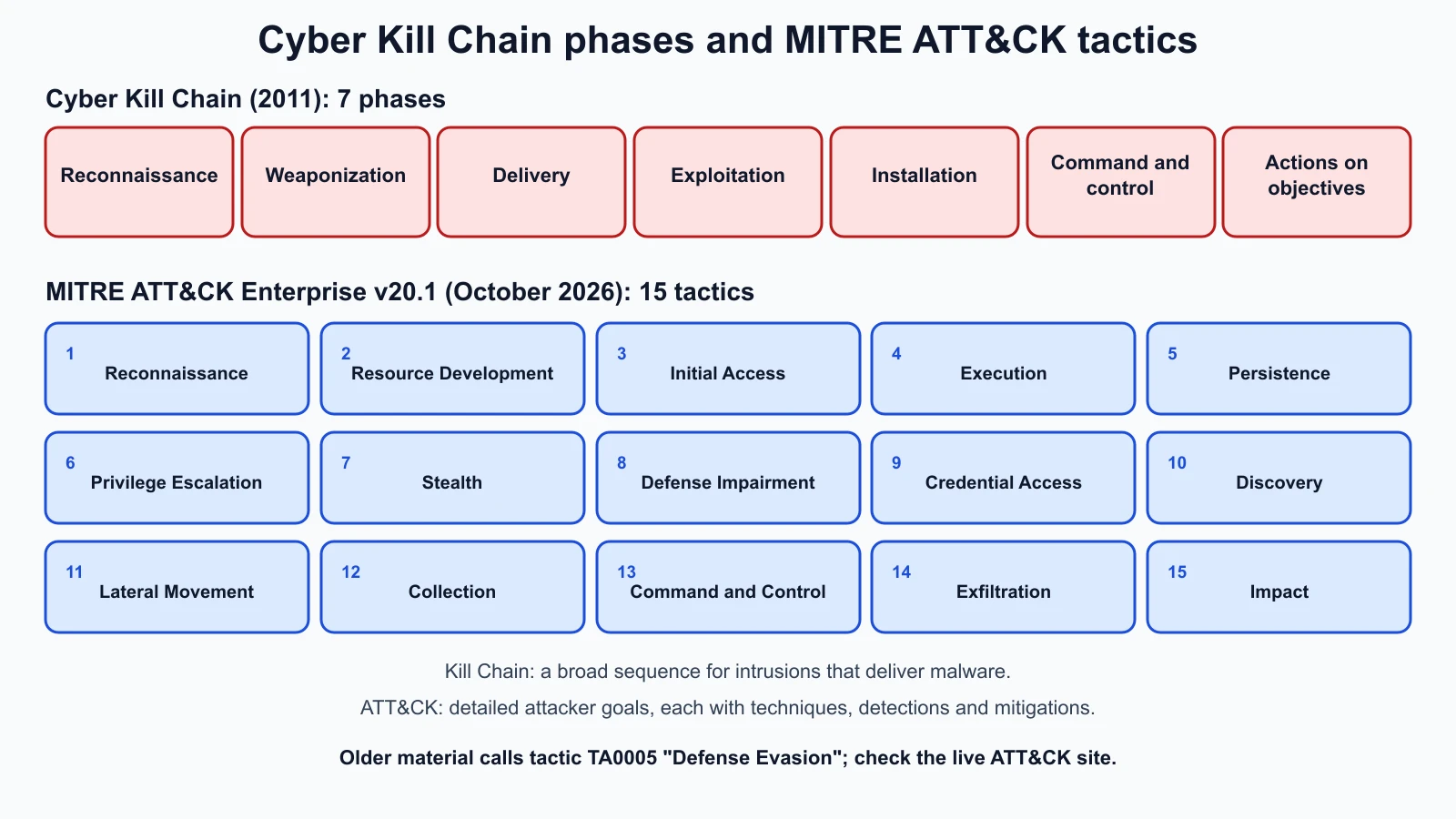
Defenders use ATT&CK in three common ways:
- Reading reports. Threat reports tag behaviors with technique IDs, so you can compare attacks and look up detections.
- Checking coverage. List the techniques your logs and tools can detect, and look for gaps.
- Purple teaming. Pick a technique, run a safe test of it in the lab, and check whether the blue side saw it, as described in the core concepts lesson.
The Diamond Model
The Diamond Model of Intrusion Analysis was published in 2013 by Sergio Caltagirone, Andrew Pendergast and Christopher Betz. Its first axiom says that for every intrusion event there is an adversary taking a step towards a goal by using a capability over infrastructure against a victim to produce a result. Those four core features sit at the corners of a diamond:
- Adversary: who is behind it, possibly unknown at first.
- Capability: the tools and techniques used, such as a malware family or a phishing kit.
- Infrastructure: what the adversary uses to deliver and control, such as domains, IP addresses and email accounts.
- Victim: the target, whether a person, an organization or a system.
The paper also defines meta-features such as timestamp, phase, result and direction.
The model's practical strength is pivoting: starting from one known corner and moving to others. If Harbor Books receives a phishing email from a look-alike domain (infrastructure), an analyst can look up what else is hosted on the same server (more infrastructure), which malware was delivered from it (capability), and which other shops received similar emails (other victims), building a picture of the campaign.
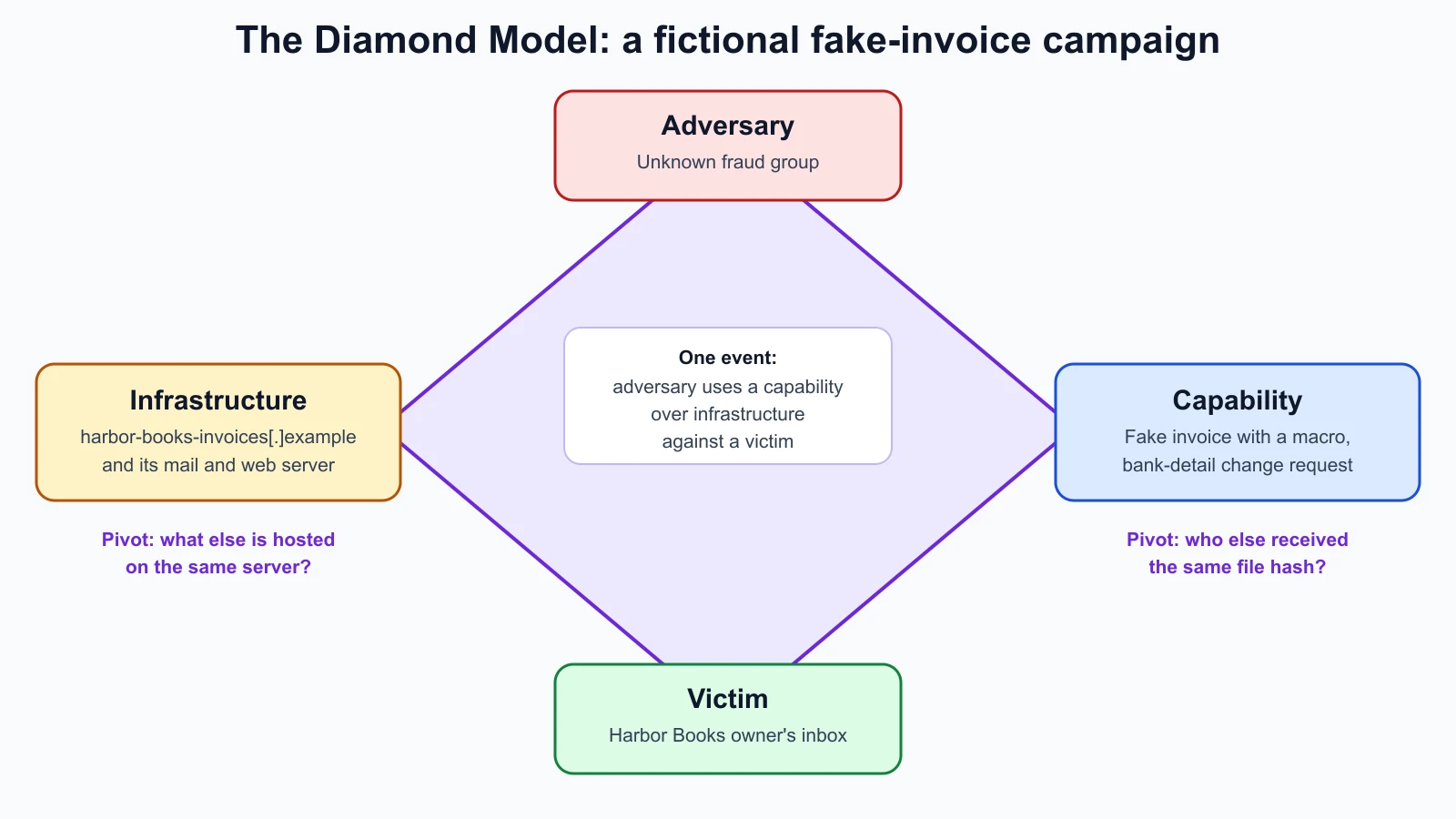
The three frameworks fit together. The Kill Chain describes the sequence, ATT&CK the specific behaviors, and the Diamond Model the relationships between the people, tools, infrastructure and targets in each event.
Threat intelligence and OSINT
Threat intelligence is information about threats that has been collected, analyzed and turned into something a defender can act on. It is often described at three levels:
- Strategic: the big picture for decision makers, such as which kinds of attacks hit retailers this year.
- Operational: how a particular campaign or group works, often described with ATT&CK techniques.
- Tactical: specific technical details, especially indicators of compromise (IOCs): file hashes, IP addresses, domains, URLs and email addresses linked to malicious activity.
IOCs are useful but short-lived: an attacker can change a domain or recompile malware cheaply, while changing how they operate (their techniques) is much harder. Good detection uses both.
OSINT (open-source intelligence) is intelligence gathered from public sources: websites, social media, public records, domain registration data, code repositories and news. Defenders use OSINT to investigate suspicious domains and to see what an attacker could learn about their own organization. Attackers use the same sources for reconnaissance. Looking at what is public about Harbor Books, such as staff names on the website or the owner's email in a review reply, is a sensible defensive exercise.
Threat intelligence tools, and how to use them safely
These public services help investigate suspicious files, links and domains. Each one has a privacy cost, so read the notes before using them.
| Tool | What it does | Privacy note |
|---|---|---|
| VirusTotal | Scans files and URLs with dozens of antivirus engines and blocklists; shows reports for hashes, domains and IPs | Its documentation says reports are shared with the community and file contents may be shared with premium customers; never upload confidential documents |
| urlscan.io | Visits a URL in a browser and records what the page loads, with screenshots | Scans are public by default; unlisted scans are visible to its Pro customers; private scans only to you |
| any.run | Interactive online sandbox: you watch a file or link run in a cloud virtual machine | Check the visibility and sharing settings before you submit anything |
| Joe Sandbox | Automated sandbox that runs files and URLs and reports their behavior, mapped to ATT&CK | Free community tier has limits; check how reports are shared |
| URLVoid | Checks a website against multiple reputation and blocklist services | Only the domain is checked |
| ICANN lookup (RDAP, formerly WHOIS) | Shows domain registration details such as creation date and registrar | Look-ups only; nothing is uploaded |
A note on WHOIS: domain registration data used to be queried with the WHOIS protocol. ICANN explains that RDAP (Registration Data Access Protocol) is its replacement, and since 28 January 2025 registries and registrars for generic top-level domains are no longer required to offer WHOIS, except for .com, .name and .post. Many tools still say "WHOIS" when they mean either. A domain registered a few days before it emailed you an invoice is a strong warning sign.
Safe habits when investigating:
- Search before you submit. Look up a file's hash or a domain first. If someone else has already analyzed it, you learn without uploading anything.
- Never upload sensitive files. A customer list or a real invoice uploaded to a public scanner may be readable by strangers.
- Do not open suspicious links on your own computer. Let a scanner or sandbox visit them, or use an isolated lab VM.
- Defang indicators when you share them. Writing
hxxps://evil[.]examplestops email clients and chat tools from turning it into a clickable link. - Record what you find in the incident log, with the time and the tool used.
A tested IOC helper
When a suspicious email arrives, the first job is to pull out its indicators. This Python script reads text from standard input, accepts defanged indicators, extracts URLs, IP addresses, domains and file hashes, prints each one defanged, and builds lookup links you can open yourself. It does not contact any service, so nothing is uploaded. It deliberately gives no public lookup for private or documentation addresses, which belong in your own logs.
1# ioc_helper.py
2import ipaddress
3import re
4import sys
5from urllib.parse import quote
6
7HASH_LENGTHS = {32: "md5", 40: "sha1", 64: "sha256"}
8URL_RE = re.compile(r"\bhttps?://[^\s\"'<>]+", re.IGNORECASE)
9IP_RE = re.compile(r"\b(?:\d{1,3}\.){3}\d{1,3}\b")
10HASH_RE = re.compile(r"\b[a-fA-F0-9]{32}\b|\b[a-fA-F0-9]{40}\b|\b[a-fA-F0-9]{64}\b")
11DOMAIN_RE = re.compile(r"\b(?:[a-z0-9](?:[a-z0-9-]{0,61}[a-z0-9])?\.)+[a-z]{2,24}\b", re.IGNORECASE)
12
13
14def refang(text: str) -> str:
15    text = re.sub(r"hxxp", "http", text, flags=re.IGNORECASE)
16    text = re.sub(r"\[\.\]|\(\.\)|\{\.\}", ".", text)
17    return text.replace("[:]", ":")
18
19
20def defang(ioc: str) -> str:
21    return ioc.replace("http", "hxxp").replace(".", "[.]")
22
23
24def extract(text: str) -> dict[str, list[str]]:
25    clean = refang(text)
26    urls = sorted({u.rstrip(".,;)") for u in URL_RE.findall(clean)})
27    without_urls = URL_RE.sub(" ", clean)
28    ips = sorted({ip for ip in IP_RE.findall(without_urls) if _valid_ip(ip)})
29    hashes = sorted({h.lower() for h in HASH_RE.findall(without_urls)})
30    domains = sorted({d.lower() for d in DOMAIN_RE.findall(without_urls)})
31    return {"url": urls, "ip": ips, "domain": domains, "hash": hashes}
32
33
34def _valid_ip(text: str) -> bool:
35    try:
36        ipaddress.ip_address(text)
37        return True
38    except ValueError:
39        return False
40
41
42def lookup_links(kind: str, ioc: str) -> list[str]:
43    if kind == "ip":
44        if not ipaddress.ip_address(ioc).is_global:
45            return []
46        return [f"https://www.virustotal.com/gui/ip-address/{ioc}"]
47    if kind == "domain":
48        return [f"https://www.virustotal.com/gui/domain/{ioc}", f"https://lookup.icann.org/en/lookup?name={ioc}"]
49    if kind == "hash":
50        return [f"https://www.virustotal.com/gui/file/{ioc}"]
51    return [f"https://www.virustotal.com/gui/search/{quote(ioc, safe='')}"]
52
53
54def main() -> None:
55    found = extract(sys.stdin.read())
56    for kind, items in found.items():
57        for ioc in items:
58            label = f"{kind} ({HASH_LENGTHS[len(ioc)]})" if kind == "hash" else kind
59            links = lookup_links(kind, ioc) or ["not a public address: check your own logs instead"]
60            print(f"{label:14} {defang(ioc)}")
61            for link in links:
62                print(f"{'':14} {link}")
63
64
65if __name__ == "__main__":
66    main()
Here is a fictional report about a fake invoice sent to Harbor Books, saved as sample.txt. The domain uses the reserved .example ending, the public address is from a documentation range, and the hash is simply the SHA-256 of the word "test", so nothing here points at anything real:
1Invoice phish reported 12 Nov 2026.
2Sender domain: harbor-books-invoices[.]example
3Link: hxxps://harbor-books-invoices[.]example/pay?id=7
4Callback IP 203.0.113.45 and internal 192.168.10.37
5Attachment SHA256 9F86D081884C7D659A2FEAA0C55AD015A3BF4F1B2B0B822CD15D6C15B0F00A08
Running python3 ioc_helper.py < sample.txt with Python 3.12 printed:
1url            hxxps://harbor-books-invoices[.]example/pay?id=7
2               https://www.virustotal.com/gui/search/https%3A%2F%2Fharbor-books-invoices.example%2Fpay%3Fid%3D7
3ip             192[.]168[.]10[.]37
4               not a public address: check your own logs instead
5ip             203[.]0[.]113[.]45
6               not a public address: check your own logs instead
7domain         harbor-books-invoices[.]example
8               https://www.virustotal.com/gui/domain/harbor-books-invoices.example
9               https://lookup.icann.org/en/lookup?name=harbor-books-invoices.example
10hash (sha256)  9f86d081884c7d659a2feaa0c55ad015a3bf4f1b2b0b822cd15d6c15b0f00a08
11               https://www.virustotal.com/gui/file/9f86d081884c7d659a2feaa0c55ad015a3bf4f1b2b0b822cd15d6c15b0f00a08
The documentation address 203.0.113.45 is treated like a private one, because Python's is_global is false for it; in a real report, a public attacker address would get a VirusTotal link. The links are for you to open deliberately, not for the script to visit. These tests check the behavior; save them as ioc_helper_test.py and run python3 -m unittest discover -p '*_test.py':
1# ioc_helper_test.py
2import unittest
3
4from ioc_helper import defang, extract, lookup_links, refang
5
6SAMPLE = """Invoice phish reported 12 Nov 2026.
7Sender domain: harbor-books-invoices[.]example
8Link: hxxps://harbor-books-invoices[.]example/pay?id=7
9Callback IP 203.0.113.45 and internal 192.168.10.37
10Attachment SHA256 9F86D081884C7D659A2FEAA0C55AD015A3BF4F1B2B0B822CD15D6C15B0F00A08
11Not an IP: 999.1.1.1"""
12
13
14class IocHelperTest(unittest.TestCase):
15    def test_refang(self):
16        self.assertEqual(refang("hxxps://a[.]b(.)c"), "https://a.b.c")
17        self.assertEqual(refang("hxxps[:]//a[.]b"), "https://a.b")
18
19    def test_defang_round_trip(self):
20        self.assertEqual(refang(defang("https://evil.example/x")), "https://evil.example/x")
21
22    def test_extract_sample(self):
23        found = extract(SAMPLE)
24        self.assertEqual(found["url"], ["https://harbor-books-invoices.example/pay?id=7"])
25        self.assertEqual(found["ip"], ["192.168.10.37", "203.0.113.45"])
26        self.assertIn("harbor-books-invoices.example", found["domain"])
27        self.assertEqual(found["hash"], ["9f86d081884c7d659a2feaa0c55ad015a3bf4f1b2b0b822cd15d6c15b0f00a08"])
28
29    def test_trailing_punctuation_is_not_part_of_url(self):
30        self.assertEqual(extract("Do not open hxxp://a[.]example/x.")["url"], ["http://a.example/x"])
31
32    def test_invalid_ip_ignored(self):
33        self.assertNotIn("999.1.1.1", extract(SAMPLE)["ip"])
34
35    def test_ips_not_reported_as_domains(self):
36        self.assertFalse(any(d[0].isdigit() for d in extract(SAMPLE)["domain"]))
37
38    def test_no_public_lookup_for_private_or_documentation_ips(self):
39        self.assertEqual(lookup_links("ip", "192.168.10.37"), [])
40        self.assertEqual(lookup_links("ip", "203.0.113.45"), [])
41        self.assertEqual(lookup_links("ip", "8.8.8.8"), ["https://www.virustotal.com/gui/ip-address/8.8.8.8"])
42
43
44if __name__ == "__main__":
45    unittest.main()
All seven tests passed. To check that the tests catch mistakes, six deliberate bugs were introduced one at a time, including removing the [:] refang, trusting every dotted number as an IP address, keeping uppercase hashes and leaving trailing full stops on URLs. The first round showed that two bugs went unnoticed: one exposed a line of code that did nothing, which was removed, and the other led to an extra test. After that, each bug made at least one test fail.
The extractor is deliberately simple. It can pick up ordinary dotted words that look like domains, such as file names, and it does not handle IPv6. Treat its output as a starting list for a person to review, not a verdict.
Mistakes beginners make
-
Uploading confidential files to public scanners. Others may be able to read them.
Fix: Search by hash first, and upload only files you are allowed to share.
-
Clicking suspicious links to "see what happens". That is the delivery and exploitation phases, done for the attacker.
Fix: Use a scanner, a sandbox or an isolated lab VM.
-
Treating IOCs as the whole picture. Attackers change domains and hashes easily.
Fix: Also look for behaviors, described as ATT&CK techniques, that survive those changes.
-
Memorizing framework lists instead of using them. ATT&CK changes between versions.
Fix: Use the live site and map real events to it.
-
Assuming "we are too small to be targeted". Automated and opportunistic attacks hit everyone reachable.
Fix: Plan for opportunistic attacks first, then for anything specific to your sector.
Recap and try it yourself
Threat actors include criminals, state-sponsored groups, hacktivists, insiders and opportunists. Known threats are handled with patches and signatures; unknown ones need behavior-based defenses. A zero day exploits a previously unknown vulnerability, and CISA's KEV catalog lists vulnerabilities known to be exploited. An APT is skilled, well-resourced and persistent. The Cyber Kill Chain (2011) gives seven phases and six defender responses. MITRE ATT&CK (version 20.1, 15 Enterprise tactics) describes tactics, techniques and procedures in detail. The Diamond Model (2013) links adversary, capability, infrastructure and victim and supports pivoting. Threat intelligence works at strategic, operational and tactical levels, IOCs are its most technical and shortest-lived form, and OSINT comes from public sources. VirusTotal, urlscan, sandboxes, URLVoid and RDAP lookups help, as long as you protect what you submit.
Try it:
- Open the ATT&CK Enterprise tactics page. Pick one tactic and read two of its techniques, including their detection notes.
- Map a phishing email you have received (or the Harbor Books example) to the seven Kill Chain phases, and name one place to break the chain at each.
- Run the IOC helper and its tests. Then paste in the text of a real suspicious email you have received, without opening any links, and look up the domain's registration date with the ICANN lookup tool.
- Draw a Diamond for the Harbor Books invoice campaign and write one pivot from each corner.
- Search CISA's KEV catalog for a product you use, such as your browser or router brand, and note whether any entries are listed.
In the next lesson you will look at the attacks that most often start the chain: social engineering, from phishing and vishing to tailgating and typosquatting.
Sources checked on 12 November 2026: Lockheed Martin, Cyber Kill Chain; Hutchins, Cloppert and Amin, Intelligence-Driven Computer Network Defense (paper); MITRE ATT&CK; MITRE ATT&CK, Enterprise tactics; MITRE ATT&CK, versions; Caltagirone, Pendergast and Betz, The Diamond Model of Intrusion Analysis; NIST glossary, zero-day attack; NIST glossary, advanced persistent threat; CISA, Known Exploited Vulnerabilities catalog; VirusTotal, how it works; urlscan, scan visibility; ANY.RUN; Joe Security, Joe Sandbox; URLVoid; ICANN, RDAP; ICANN lookup.