
Cyber Security course · lesson 13 of 24
- 1What Is Cyber Security?
- 2Fundamental IT Skills for Cyber Security
- 3Operating Systems for Security: Windows, Linux and macOS
- 4Virtualization and Your Safe Cyber Security Lab
- 5Networking Fundamentals for Cyber Security
- 6Network Services and Infrastructure for Cyber Security
- 7Network Troubleshooting and Traffic Analysis Tools
- 8Core Security Concepts Every Defender Uses
- 9Authentication and Access Control Explained
- 10Cryptography Basics for Cyber Security
- 11Secure Protocols and Wireless Security
- 12The Threat Landscape and Security Frameworks
- 13Social Engineering and Human Attacks
- 14Network and Wireless Attacks and How to Detect Them
- 15Web Attacks and the OWASP Top 10
- 16Malware, Exploits and System Attacks
- 17Hardening and Endpoint Security
- 18Network Defense, Logging and SIEM
- 19Vulnerability Management and Threat Hunting
- 20Incident Response and Digital Forensics
- 21Cloud Security Basics
- 22Scripting for Security
- 23Ethical Hacking, CTFs and Penetration Testing
- 24Cyber Security Standards, Certifications and Capstone
After this lesson, you should be able to explain why social engineering works, recognize phishing, spear phishing, whaling, vishing, smishing, spam and spim, business email compromise, impersonation and pretexting, describe physical tricks such as shoulder surfing, dumpster diving and tailgating, explain watering hole, drive-by and typosquatting attacks, read a domain's SPF and DMARC records and say what DKIM adds, and set up layered defenses including a payment verification rule and a reporting template. Most attacks in the Cyber Kill Chain from The Threat Landscape and Security Frameworks begin at the delivery phase, and delivery very often means fooling a person.
Why people are the target
CISA defines social engineering as an attack in which someone uses human interaction and social skills to obtain or compromise information about an organization or its computer systems. It works because it skips the technical defenses: no firewall stops an employee from typing their password into a convincing page or paying a convincing invoice.
Social engineers use a small set of pressures, often several at once:
- Urgency: "Pay today or the account will be suspended."
- Authority: a message that appears to come from the owner, a bank, the tax office or IT support.
- Fear: a security alert, a legal threat, an unpaid fine.
- Curiosity or reward: a parcel delivery, a refund, a prize, a shared document.
- Helpfulness and trust: a polite caller who "just needs one detail" or a visitor carrying boxes who asks you to hold the door.
None of this means people are foolish. Attackers write their messages to arrive at a busy moment and look routine. The defense is to make the right action easy and the dangerous action slow, and to treat reporting a mistake as normal.
Reconnaissance first
Targeted attacks start with reconnaissance, the first Kill Chain phase. Attackers read websites, social media, job adverts, review replies and company registries to learn names, roles, suppliers and how invoices are paid. For Harbor Books, the fictional shop in this course, the owner's name is on the website, the main book supplier is mentioned in a blog post, and a staff member's social profile says they handle orders. That is enough to write a believable email. Reviewing what your own organization makes public, and trimming what is not needed, is a cheap defense.
The main attack types
Messages
| Attack | What it is | Typical example |
|---|---|---|
| Phishing | Email or malicious websites that impersonate a trustworthy organization to obtain personal information (CISA's definition) | "Your mailbox is full: sign in here" |
| Spear phishing | Phishing aimed at a specific person or organization, using details from reconnaissance | An email to the Harbor Books owner naming the real book supplier |
| Whaling | Spear phishing aimed at a "big phish", such as a senior leader with access to valuable assets (as the UK NCSC describes it) | A fake legal notice addressed to the managing director |
| Vishing | Voice phishing by phone call, including spoofed caller ID (CISA) | "This is your bank's fraud team; read me the code we just sent" |
| Smishing | Phishing by SMS text message, often with a link (CISA) | "Your parcel is held: pay the fee at this link" |
| Spam and spim | Spam is unsolicited bulk email; spim is the same on instant messaging | Mass advertising or scam messages in chat apps |
| Business email compromise (BEC) | Using a hijacked or look-alike business email account to redirect payments | "Please note our new bank details for this invoice" |
MITRE ATT&CK lists phishing as technique T1566, with sub-techniques for attachments, links, messages through third-party services, and voice. Its voice sub-technique covers a pattern worth knowing: an email or text asks the victim to call a number, and the person who answers talks them into visiting a site or installing remote access software. Moving the victim to the phone sidesteps email filters.
Impersonation and pretexting
Impersonation is pretending to be someone the victim trusts: a supplier, the owner, an IT technician, a delivery driver. Pretexting is the invented story that makes the request seem reasonable: "I'm from the card terminal company, we need to update the till this afternoon." Pretexting can happen by email, phone or in person.
Physical and on-site tricks
- Shoulder surfing: watching someone type a PIN or password, or reading their screen, in person or with a camera.
- Dumpster diving: searching rubbish for useful material: invoices, staff lists, printed passwords, old hard drives.
- Tailgating: following an authorized person through a controlled door without using your own access. When the authorized person knowingly lets them in, it is often called piggybacking.
At Harbor Books, these map to the till PIN pad, the recycling bin behind the shop, and the stockroom door that leads to the office PC.
Web-based traps
- Watering hole attack: NIST defines it as an attack where the attacker infects websites that are frequently visited by members of the group being attacked. For a bookshop, that might be a trade association site that shop owners visit.
- Drive-by compromise: ATT&CK (T1189) describes gaining access when a user visits a website during normal browsing, for example through a compromised legitimate site or malicious advertising. Targeted versions aimed at one community are what people call watering hole or strategic web compromise attacks.
- Typosquatting: registering domain names that look like a real one through a typo or a swapped character, such as
harbourbooks.exampleforharborbooks.example, orharb0rbooks.examplewith a zero, to catch mistyped addresses or to make phishing links look genuine.
Patching browsers and plugins, blocking known-bad sites, and standard user accounts limit drive-by attacks. Typosquatting is best handled by checking addresses carefully, using bookmarks for important sites, and, for an organization, registering the most obvious variants of its own name.
Anatomy of a phishing email
CISA lists common warning signs: a sender address that imitates a real business by changing or dropping a few characters, a generic greeting, links whose text does not match where they go, look-alike or shortened URLs, poor grammar or odd formatting, and unsolicited attachments paired with urgency.
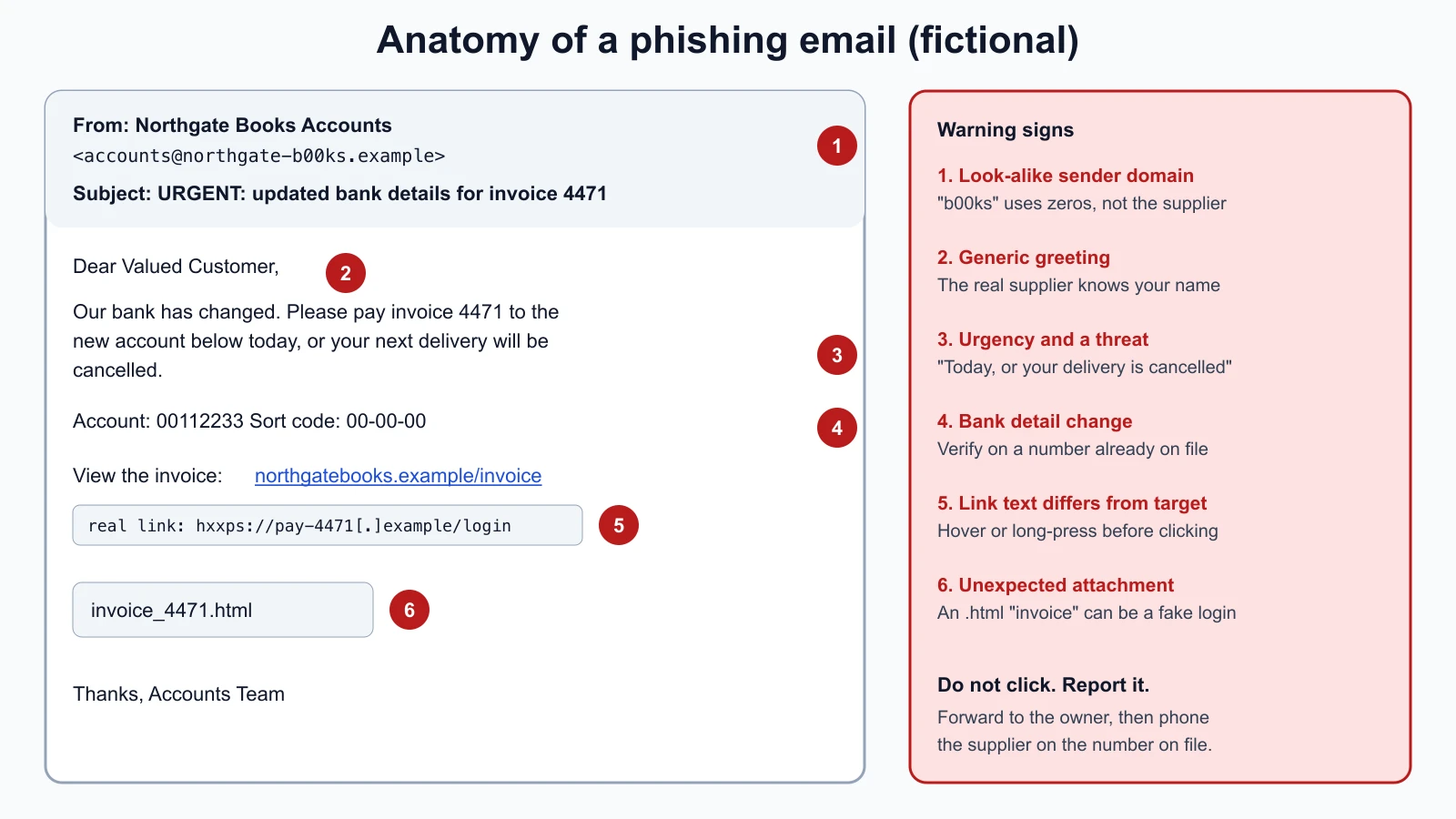
Not every phishing email has obvious mistakes; careful attackers write cleanly. The most reliable signs are the request itself (credentials, payment, bank details, remote access, gift cards) and any pressure to skip normal checks. Those are signs you can teach and build processes around.
Stopping spoofed email: SPF, DKIM and DMARC
Email was designed without a way to prove who sent a message, so anyone can put any address in the "From" line. Three DNS-based standards let a domain owner state which mail is genuine, and let receiving mail servers check:
- SPF (Sender Policy Framework, RFC 7208) is a DNS record listing which servers may send mail for the domain.
- DKIM (DomainKeys Identified Mail, RFC 6376) adds a digital signature to each message. The receiving server checks it against a public key published in the sender's DNS, using the asymmetric signatures from Cryptography Basics for Cyber Security.
- DMARC (Domain-based Message Authentication, Reporting and Conformance) ties them to the visible "From" domain and tells receivers what to do with mail that fails:
p=none(only report),p=quarantine(treat as suspicious, usually the spam folder) orp=reject(refuse it). It also asks receivers to send the domain owner reports.
DMARC was first published as RFC 7489 in 2015, an informational document. In May 2026 it was replaced by standards-track RFC 9989, with RFCs 9990 and 9991 covering aggregate and failure reports. The policies are the same. One visible change: the old pct tag, which applied a policy to a percentage of mail, was removed because, as RFC 9989 explains, it was not applied consistently in practice.
Here is real output from looking up two government domains' SPF and DMARC records with dig on 12 November 2026:
1dig +short TXT cisa.gov | grep spf1
2dig +short TXT _dmarc.cisa.gov
3dig +short TXT ncsc.gov.uk | grep spf1
4dig +short TXT _dmarc.ncsc.gov.uk1"v=spf1 include:spf.dhs.gov include:spf.protection.outlook.com include:spf-00376703.gpphosted.com -all"
2"v=DMARC1; p=reject; pct=100; rua=mailto:DMARC@hq.dhs.gov, mailto:reports@dmarc.cyber.dhs.gov"
3"v=spf1 include:spf.protection.outlook.com -all"
4"v=DMARC1;p=reject;adkim=s;aspf=s;rua=mailto:dmarc-rua@dmarc.service.gov.uk;"Read them like this. In SPF, each include: names another domain whose list of permitted servers is included, and -all at the end says every other server is not allowed. In DMARC, p=reject asks receivers to refuse failing mail, and rua= is where aggregate reports go. The NCSC record adds adkim=s and aspf=s, requiring strict alignment: the DKIM and SPF domains must exactly match the "From" domain. The CISA record still carries pct=100, which is the old default and now a historic tag. Records change, so look them up yourself rather than relying on these.
DMARC protects your domain from being spoofed exactly. It does not stop look-alike domains, such as harbor-books-invoices.example, which can have their own valid SPF, DKIM and DMARC. That is why the human checks below still matter.
For Harbor Books: publish SPF listing its email provider, turn on DKIM signing in the provider's settings, then publish DMARC at p=none with a report address, read the reports for a few weeks to find any legitimate senders you missed (such as the web shop's order emails), and move to p=quarantine and then p=reject. The UK NCSC notes that DMARC also helps genuine mail reach inboxes and protects the organization's reputation.
Layered defenses
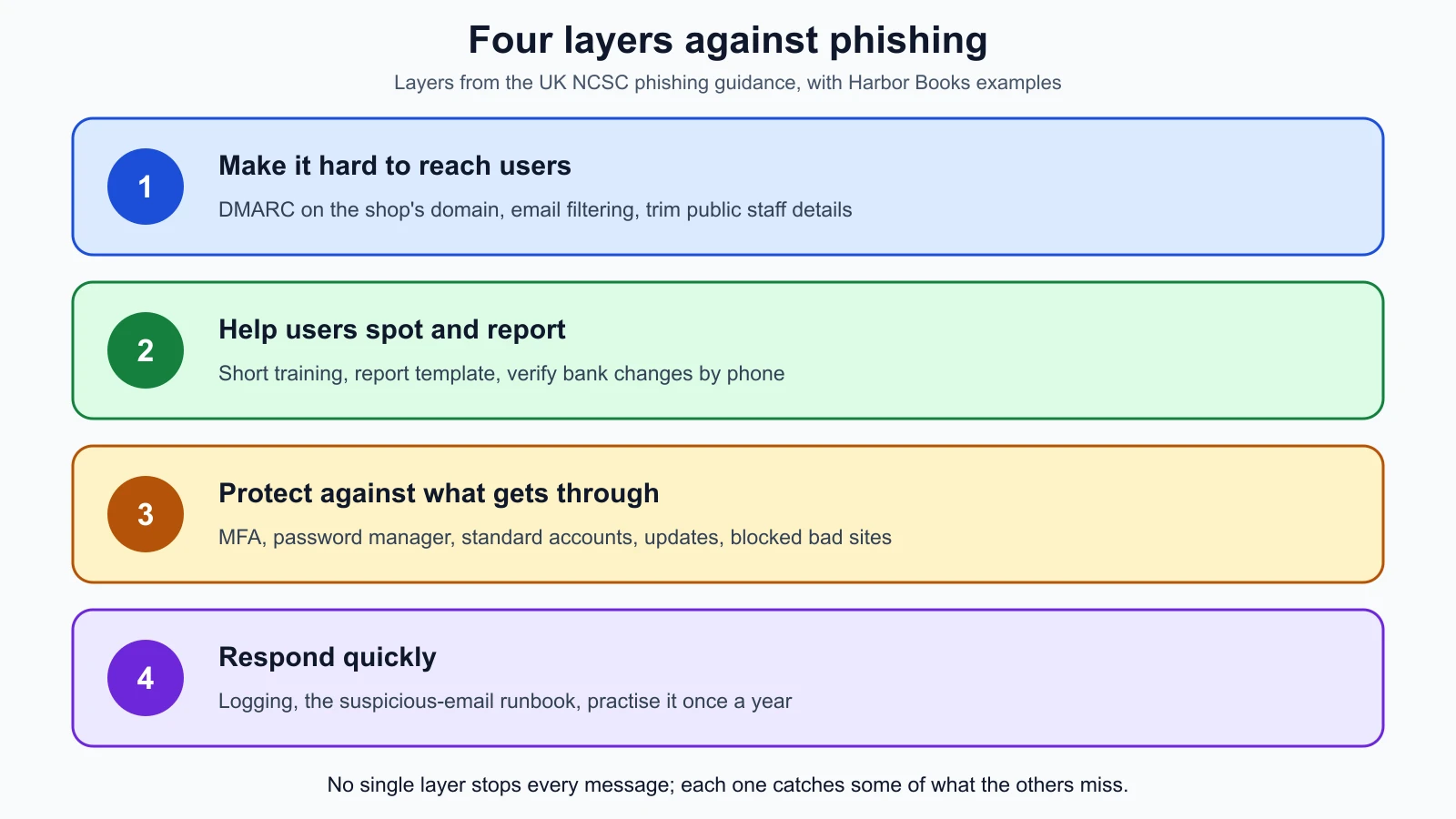
The UK National Cyber Security Centre recommends a multi-layered approach because no single control stops every phishing attempt. Its four layers:
- Make it hard for attackers to reach users: anti-spoofing controls such as DMARC, filtering and blocking phishing before it reaches inboxes, and limiting what attackers can learn from public information.
- Help users identify and report phishing: training as one part of the defense, not all of it, processes that are hard to fake (such as verifying payment changes through a second channel), and making reporting easy.
- Protect the organization from the effects of phishing that gets through: patching, limited administrator accounts, blocking known-bad sites, MFA and password managers.
- Respond quickly: logging to detect incidents early, and an incident response plan that has been practised.
A payment rule that beats the cleverest email
Business email compromise succeeds when a payment changes on the strength of an email alone. The FBI's Internet Crime Complaint Center recommends verifying any request to change account information through a secondary channel or two-factor authentication, and checking that links and sender addresses really match the business they claim to come from. Harbor Books adopts a simple rule:
No supplier bank details are changed, and no new payee is paid, until the owner has phoned the supplier on a number already held on file, never a number from the email or invoice.
That rule works even if the email comes from the supplier's real, hijacked mailbox, which no technical check can catch.
Physical defenses
- Position the till and PIN pad so customers cannot see screens and keypads; use privacy screens on the office PC.
- Shred invoices, delivery notes and anything with names, addresses or account details; wipe or destroy old drives, as in the IT skills lesson.
- Keep the stockroom and office door locked; politely ask visitors who they are visiting; never hold a secure door for someone you do not know.
- Verify unexpected technicians: phone the company on a known number before letting anyone touch the till or router.
A reporting culture
The NCSC advises against blaming people who click, because reprimands discourage reporting, and suggests measuring how many people report phishing, not only how many click. A report within minutes lets the owner block a sender, warn others and reset a password before damage spreads. The runbook in Core Security Concepts Every Defender Uses covers what happens next.
If a phishing test campaign is ever run against staff, it needs written authorization from the business owner, and the NCSC recommends checking with HR first; punishing people for clicking on simulated emails can even create legal risk. Sending phishing to people who have not agreed, outside an authorized program, is an attack, not a test.
A phishing report template
Staff fill this in, or say it aloud on the phone, as soon as they notice something suspicious:
| Field | Example (fictional) |
|---|---|
| Reported by and time | Sam, shop assistant, 12 Nov 2026, 10:42 |
| How it arrived | Email to orders@ |
| Sender as shown | "Northgate Books Accounts" |
| Actual sender address | accounts@northgate-b00ks.example (zero instead of o) |
| Subject | URGENT: updated bank details for invoice 4471 |
| What it asked for | Change payment details and pay today |
| Links or attachments | One link, one attachment named invoice_4471.html (not opened) |
| Did anyone click, reply, open or pay? | No |
| Actions taken | Not deleted; forwarded to owner as an attachment; supplier phoned on file number |
| Supplier's answer | They did not send it; bank details unchanged |
The indicators from the actual sender, link and attachment can go straight into the IOC helper from the threat frameworks lesson.
If someone did click
CISA's advice for anyone who thinks they have fallen for a social engineering attack: report it to the people responsible for the network, contact your bank immediately if financial information or payments were involved, change any password you revealed (and use unique passwords), and watch for signs of identity theft. For Harbor Books, add: check that MFA is still on and sign out other sessions on the affected account, and note the time of each action for the incident log.
Mistakes beginners make
-
Relying on spotting spelling mistakes. Well-written phishing exists.
Fix: Judge the request (payment, password, bank details, remote access) and verify it through another channel.
-
Calling the number in the email to check. It reaches the attacker.
Fix: Use a number you already hold or look it up independently.
-
Treating DMARC as complete protection. It stops exact spoofing, not look-alike domains.
Fix: Combine DMARC with filtering, verification rules and staff reporting.
-
Punishing people who click. They stop reporting.
Fix: Thank reporters, fix the process that allowed the risk, and measure report rates.
-
Forgetting the physical side. Shredding and closed doors are security controls too.
Fix: Include the bin, the door and the screen in the risk register.
Recap and try it yourself
Social engineering uses urgency, authority, fear, curiosity and helpfulness to get people to act. Phishing (email), spear phishing (targeted), whaling (senior targets), vishing (voice), smishing (text), spim (instant messaging) and business email compromise are the message-based forms; impersonation and pretexting supply the story; shoulder surfing, dumpster diving and tailgating are the physical ones; watering hole, drive-by and typosquatting attacks use the web. SPF lists permitted senders, DKIM signs messages, and DMARC, now standardized in RFC 9989 (May 2026), sets a none, quarantine or reject policy and asks for reports. The NCSC's four layers, a verify-by-known-number payment rule, physical habits and a no-blame reporting culture work together.
Try it:
- Look up the SPF and DMARC records of your own email domain, or of a company you use, with
dig +short TXT domainanddig +short TXT _dmarc.domain(ornslookup -type=TXTon Windows). Which DMARC policy does it publish? - Find a phishing or scam message in your own spam folder. Without clicking anything, fill in the report template for it, and list every warning sign you can see.
- Search for what is public about an organization you know: staff names, email formats, suppliers. Write down two things you would remove.
- Write a one-paragraph payment verification rule for a small team, like the Harbor Books rule.
- Walk through a workplace (or your home) with the physical list: who can see screens and PIN pads, what goes in the bin, and which doors can be followed through?
In the next lesson you will move from people to the network: denial of service, person-in-the-middle, spoofing, ARP and DNS poisoning, evil twins and other network and wireless attacks, and how each shows up in logs.
Sources checked on 12 November 2026: CISA, avoiding social engineering and phishing attacks; UK NCSC, phishing attacks: defending your organisation; MITRE ATT&CK, Phishing T1566; MITRE ATT&CK, Drive-by Compromise T1189; NIST glossary, watering hole attack; RFC 7208, SPF; RFC 6376, DKIM; RFC 7489, DMARC (obsoleted); RFC 9989, DMARC; RFC 9990, DMARC aggregate reporting; RFC 9991, DMARC failure reporting; FBI IC3, Business Email Compromise PSA (June 2023).