
Cyber Security course · lesson 9 of 24
- 1What Is Cyber Security?
- 2Fundamental IT Skills for Cyber Security
- 3Operating Systems for Security: Windows, Linux and macOS
- 4Virtualization and Your Safe Cyber Security Lab
- 5Networking Fundamentals for Cyber Security
- 6Network Services and Infrastructure for Cyber Security
- 7Network Troubleshooting and Traffic Analysis Tools
- 8Core Security Concepts Every Defender Uses
- 9Authentication and Access Control Explained
- 10Cryptography Basics for Cyber Security
- 11Secure Protocols and Wireless Security
- 12The Threat Landscape and Security Frameworks
- 13Social Engineering and Human Attacks
- 14Network and Wireless Attacks and How to Detect Them
- 15Web Attacks and the OWASP Top 10
- 16Malware, Exploits and System Attacks
- 17Hardening and Endpoint Security
- 18Network Defense, Logging and SIEM
- 19Vulnerability Management and Threat Hunting
- 20Incident Response and Digital Forensics
- 21Cloud Security Basics
- 22Scripting for Security
- 23Ethical Hacking, CTFs and Penetration Testing
- 24Cyber Security Standards, Certifications and Capstone
After this lesson, you should be able to tell identification, authentication, authorization and accounting apart, apply current password guidance from NIST, rank MFA methods by how well they resist phishing, explain how an authenticator app's six-digit code is calculated, describe what Kerberos, LDAP, single sign-on and RADIUS each do, explain where certificates and keys fit, and say what privilege escalation is and how least privilege limits it. Stolen and guessed credentials are a common way into organizations, so this is the control at the top of most risk registers, including the Harbor Books register from Core Security Concepts Every Defender Uses.
Four steps: who, prove it, what may you do, what did you do
Access control is easier to reason about when you split it into four steps, often called IAAA:
- Identification: you claim an identity, for example by typing a user name.
- Authentication: you prove the claim, for example with a password and a code from your phone.
- Authorization: the system decides what that identity is allowed to do.
- Accounting: the system records what you did, so it can be reviewed later.
The two that beginners mix up are authentication (who are you?) and authorization (what may you do?). A shop assistant at Harbor Books authenticates to the till exactly as the owner does, but is authorized only to take payments, not to change prices. Many serious security failures are authorization failures: the user really is who they say, but the system lets them see or change something they should not. You will meet the web version, broken access control, in the lesson on web attacks.
Authentication factors
A factor is a kind of proof. There are three classic kinds:
- Something you know: a password or PIN.
- Something you have: a phone with an authenticator app, a hardware security key, a smart card.
- Something you are: a fingerprint or face, usually used to unlock a device or key you have.
Multi-factor authentication (MFA) requires proofs of at least two different kinds. Two-factor authentication (2FA) is MFA with exactly two. A password plus a security question is not MFA, because both are something you know. The value of MFA is that a stolen password alone is no longer enough.
Passwords, by current NIST guidance
Passwords are still the most common factor, and the advice about them has changed. NIST's Digital Identity Guidelines, SP 800-63B-4, published as final in July 2025, set out these rules for the systems that check passwords:
- Length matters most. A password used on its own as a single factor must be at least 15 characters. One used only as part of MFA must be at least 8. Systems should allow at least 64 characters, so people can use long passphrases.
- No composition rules. Systems shall not impose rules such as "must contain a symbol and a number". Those rules produce predictable patterns like
Summer2026!without making passwords much harder to guess. - No forced periodic changes. Systems should require a change only when there is evidence the password was compromised. Forced monthly changes lead people to make small, guessable edits.
- Check against a blocklist. New passwords must be compared with a list of commonly used, expected or compromised passwords, and rejected if they appear.
For people, the practical advice follows: use a password manager to create and store a long, unique password for every account, and turn on MFA wherever it is offered. A unique password per site matters because attackers take passwords leaked from one site and try them on others, an attack called credential stuffing.
How systems should store passwords, as salted, slow hashes rather than the passwords themselves, is part of the lesson on cryptography basics.
MFA methods are not equal
CISA's fact sheet on phishing-resistant MFA (October 2022) ranks MFA forms from strongest to weakest:
- Phishing-resistant MFA: FIDO/WebAuthn authenticators (security keys and passkeys) and certificate-based (PKI) methods such as smart cards. CISA calls this the gold standard and says the only widely available phishing-resistant authentication is FIDO/WebAuthn.
- App-based codes or push with number matching: a one-time code from an authenticator app or token, or a push notification where you must type the number shown on the login screen. CISA describes these as the best options for small and medium businesses that cannot yet use phishing-resistant MFA. They are still vulnerable to phishing, because a fake login page can ask for the code and use it immediately.
- Push notifications without number matching: vulnerable to push bombing, where an attacker who has the password sends prompt after prompt until the user taps Approve out of confusion or annoyance.
- SMS or voice codes: CISA says these should only be a last resort. They are vulnerable to phishing, to SIM swapping (an attacker convinces a mobile carrier to move your number to their SIM) and to weaknesses in the phone network's signaling system (SS7).
Why do security keys and passkeys resist phishing? A FIDO authenticator signs the login with a key tied to the real website's address. On a look-alike site, the browser asks for a signature for the wrong address, and the authenticator has no key for it, so there is nothing for the attacker to steal and reuse. With a six-digit code, the user can be tricked into typing it into the fake site.
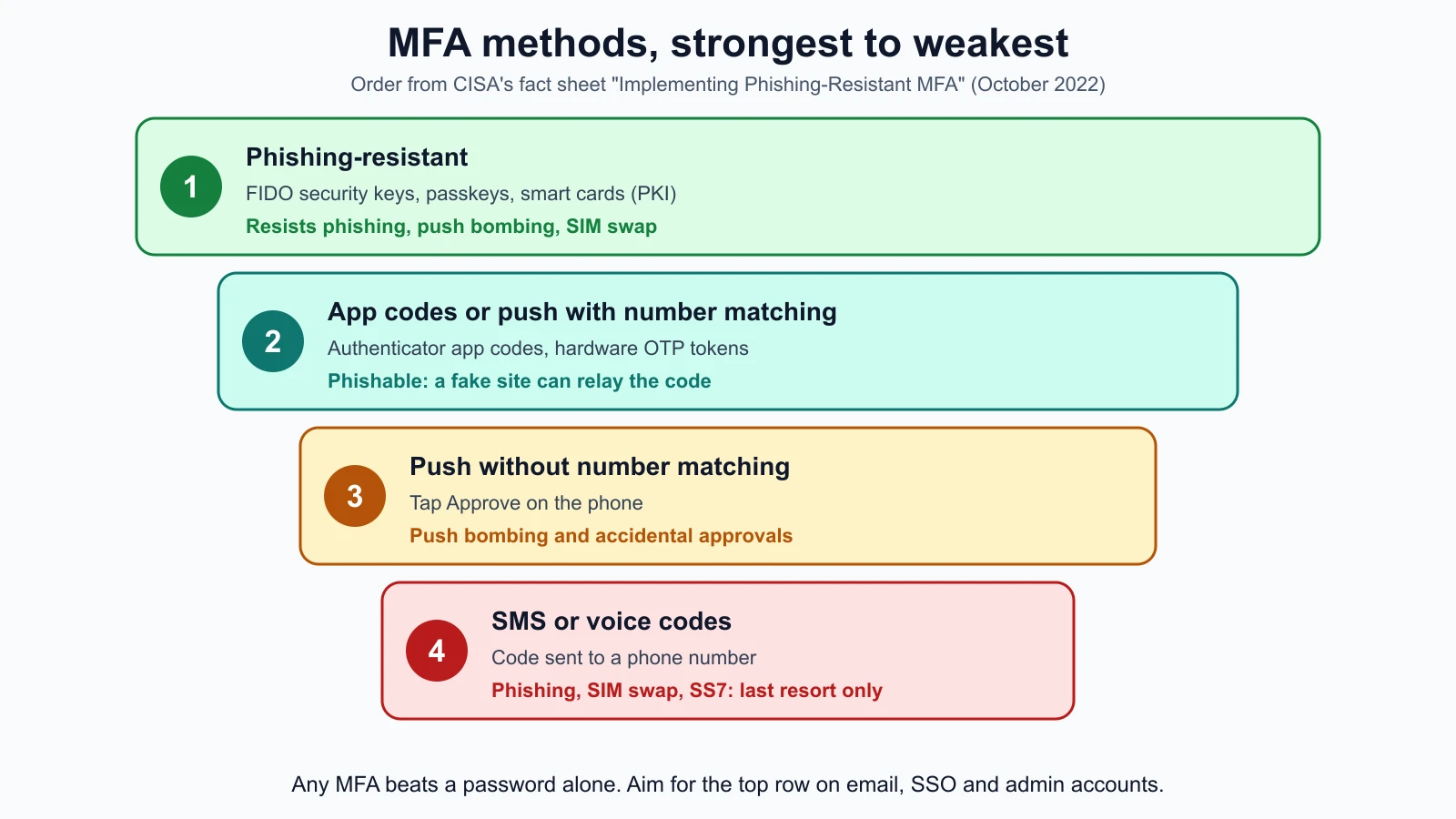
Any MFA is far better than none. The ladder tells you where to aim. For Harbor Books, the owner's email and the web shop admin account get security keys or passkeys; staff accounts use an authenticator app; SMS is kept only as a recovery option where a service offers nothing better.
How an authenticator code is made
Authenticator apps usually implement TOTP (time-based one-time password), defined in RFC 6238. When you set up the app, the service and the app share a secret, usually shown as a QR code. Every 30 seconds, both sides compute a code from that secret and the current time. The server accepts your code if it matches what the server computed. No network connection is needed on the phone, which is why the codes work offline.
The calculation is short enough to read in full. This Python version uses only the standard library:
1# totp_demo.py
2import hashlib
3import hmac
4import struct
5import sys
6import time
7
8
9def totp(secret: bytes, unix_time: int, digits: int = 6, step: int = 30) -> str:
10    counter = unix_time // step
11    digest = hmac.new(secret, struct.pack(">Q", counter), hashlib.sha1).digest()
12    offset = digest[-1] & 0x0F
13    code = struct.unpack(">I", digest[offset:offset + 4])[0] & 0x7FFFFFFF
14    return str(code % 10**digits).zfill(digits)
15
16
17if __name__ == "__main__":
18    secret = sys.argv[1].encode() if len(sys.argv) > 1 else b"harbor-lab-demo-secret"
19    now = int(time.time())
20    print(f"code now: {totp(secret, now)}  (changes in {30 - now % 30} s)")
Step by step: divide the current Unix time (seconds since 1 January 1970) by 30 to get a counter, compute an HMAC (a keyed hash, explained in the cryptography lesson) of the counter with the shared secret, pick four bytes from the result at a position given by its last byte, and keep the last six digits. Real apps receive the secret encoded in base32 inside the QR code; this demo takes it as plain text to keep the code short.
RFC 6238 publishes test values: a fixed secret and the codes it must produce at given times. These tests check the function against all six SHA-1 values from the RFC. Save them as totp_demo_test.py beside the script and run python3 -m unittest discover -p '*_test.py':
1# totp_demo_test.py
2import unittest
3
4from totp_demo import totp
5
6RFC6238_SEED = b"12345678901234567890"
7
8
9class TotpTest(unittest.TestCase):
10    def test_rfc6238_sha1_vectors(self):
11        vectors = {
12            59: "94287082",
13            1111111109: "07081804",
14            1111111111: "14050471",
15            1234567890: "89005924",
16            2000000000: "69279037",
17            20000000000: "65353130",
18        }
19        for unix_time, expected in vectors.items():
20            with self.subTest(unix_time=unix_time):
21                self.assertEqual(totp(RFC6238_SEED, unix_time, digits=8), expected)
22
23    def test_same_code_within_one_time_step(self):
24        self.assertEqual(totp(RFC6238_SEED, 60), totp(RFC6238_SEED, 89))
25        self.assertNotEqual(totp(RFC6238_SEED, 89), totp(RFC6238_SEED, 90))
26
27    def test_different_secret_gives_different_code(self):
28        self.assertNotEqual(totp(b"secret-a", 1234567890), totp(b"secret-b", 1234567890))
29
30
31if __name__ == "__main__":
32    unittest.main()
All three tests passed with Python 3.12. As a check on the tests, four deliberate bugs were introduced one at a time (a wrong byte mask, a missing sign-bit mask, an off-by-one counter and the wrong hash function), and each one made tests fail.
Two security lessons come out of the code. First, the code depends on the clock, which is one more reason to keep NTP working, as covered in the network services lesson. Second, anyone who has the shared secret can generate valid codes forever, so the QR code shown at setup must be treated like a password, and services must store the secret carefully.
Local and central authentication
Local authentication means each machine keeps its own accounts. Windows stores local accounts in its Security Account Manager database; Linux lists accounts in /etc/passwd and keeps password hashes in /etc/shadow, which only root can read. Local accounts are fine for one or two computers. With many machines, they become a mess: an employee who leaves still has an account on every machine nobody remembered to update.
Central authentication keeps accounts in one directory that every system asks. That makes it possible to disable a leaver once, apply one password policy, and see every sign-in in one place. The next four sections describe the protocols that make this work.
LDAP: the directory
A directory is a database of users, groups, computers and their attributes, organized as a tree. LDAP (Lightweight Directory Access Protocol, RFC 4511) is the standard protocol for reading and searching a directory, and for authenticating to it with an operation called a bind. Microsoft's Active Directory, OpenLDAP and many cloud identity services speak LDAP.
The simple bind sends the user name and password to the server. RFC 4513 says that method is not suitable for authentication without confidentiality protection, and requires implementations to be able to protect it with TLS. In practice, that means LDAP over TLS (LDAPS, port 636) or StartTLS on port 389, never a plain simple bind across the network. A plain bind can be read with the packet capture skills from the troubleshooting lesson, exactly like the FTP password there.
Kerberos: tickets instead of passwords
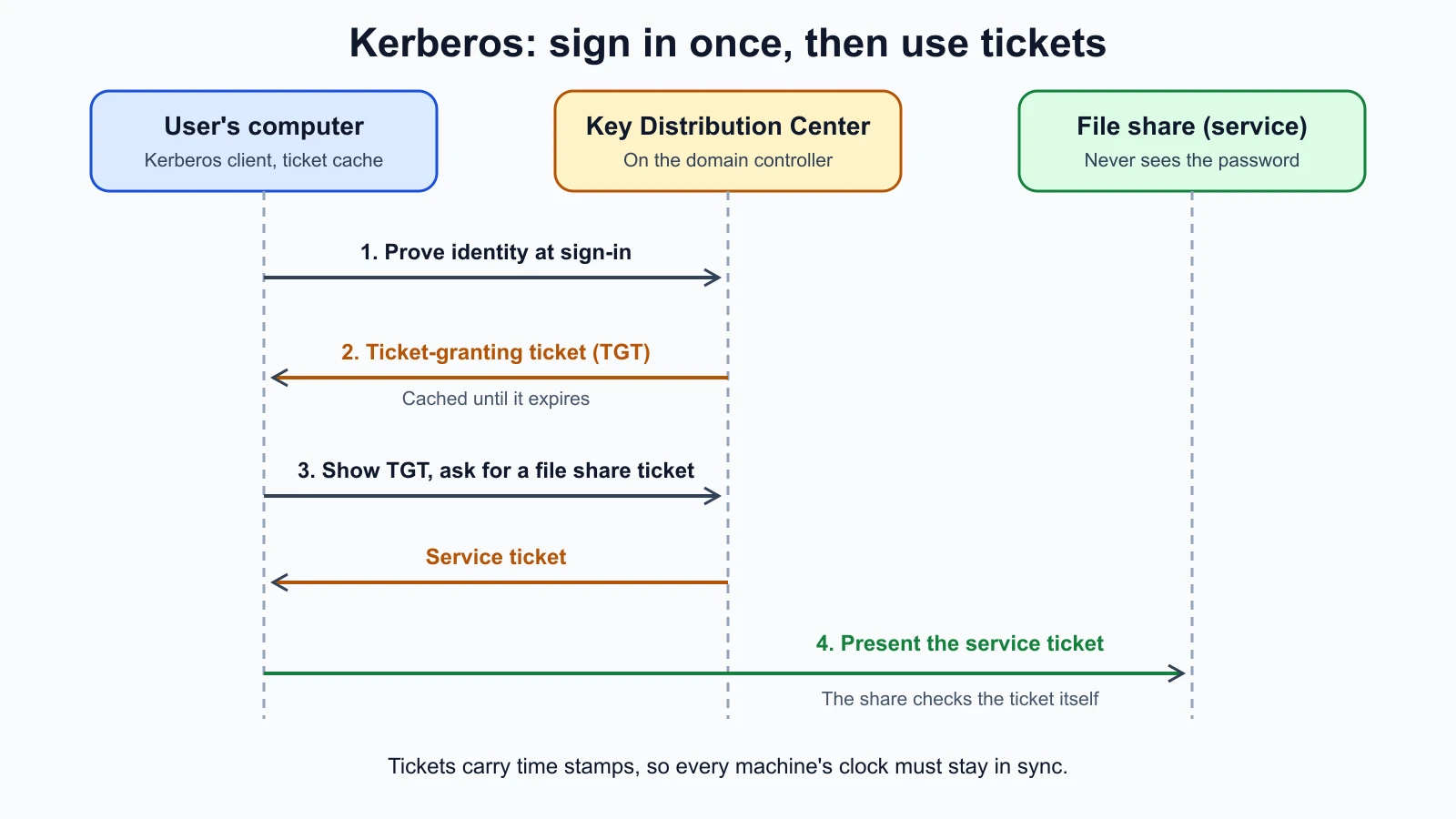
Kerberos (version 5, an IETF standard) is the authentication protocol at the center of Windows domains. Microsoft's overview describes three parties: the client, the service it wants to reach, and a Key Distribution Center (KDC) that both trust. In Windows the KDC runs on every domain controller and uses Active Directory as its account database.
The flow works like a fairground wristband:
- When a user signs in, the client proves the user's identity to the KDC and receives a ticket-granting ticket (TGT). The TGT lets the client ask for access to services without sending the password again, and it is cached until it expires.
- To use a service, such as a file share, the client presents the TGT to the KDC and asks for a service ticket for that service.
- The client presents the service ticket to the service, which can verify it without contacting the domain controller each time.
Microsoft lists mutual authentication as one advantage over the older NTLM protocol: with Kerberos, each end can verify the other, while NTLM did not let clients verify a server's identity, because it was designed on the assumption that servers were genuine. Kerberos depends on synchronized clocks, because tickets carry time stamps. Attacks on Kerberos, such as stealing or forging tickets, are a major part of attacks on Windows networks, and you will meet their names in the lesson on malware and system attacks.
Single sign-on
Single sign-on (SSO) lets a user sign in once and then use many applications without signing in again. Inside a Windows domain, Kerberos provides it. For web and cloud applications, two standards dominate: SAML, an older XML-based standard common in businesses, and OpenID Connect, which describes itself as an interoperable authentication protocol based on OAuth 2.0. After you sign in, the identity provider sends the application a signed statement (an assertion in SAML, an ID token in OpenID Connect) saying who you are and how you authenticated.
SSO's security trade-off is simple. It is good because there is one place to enforce strong MFA, one place to disable a leaver, and fewer passwords for people to reuse. It is risky because the SSO account becomes the key to everything, so it must have the strongest MFA available. For Harbor Books, "Sign in with" the shop's Google or Microsoft account across its apps is SSO, and it makes the email account's MFA even more important.
RADIUS: network access
RADIUS (Remote Authentication Dial In User Service, RFC 2865, UDP port 1812) carries authentication requests from network equipment to a central server. A Wi-Fi access point or VPN gateway, called the network access server, sends an Access-Request with the user's credentials; the RADIUS server replies with Access-Accept, Access-Reject or Access-Challenge (asking for more, such as an MFA code). Business Wi-Fi where each person signs in with their own account, rather than one shared password, usually uses RADIUS behind the scenes. You will see how that fits with WPA2 and WPA3 Enterprise in the lesson on secure protocols and wireless security.
Certificates and keys
Some authentication uses no password at all, but a key pair: a private key that never leaves the user's device and a public key the server knows. The cryptography lesson explains how this works. Three common forms:
- SSH keys: a private key on your computer and the matching public key on the server. Much stronger than passwords for SSH, especially when the private key is protected with a passphrase.
- Client certificates and smart cards: a certificate issued by an organization's certificate authority, often stored on a card or in a device's secure chip. These count as PKI-based phishing-resistant MFA in CISA's ranking.
- Passkeys and security keys: FIDO credentials, one key pair per website, unlocked with a fingerprint, face or PIN.
Authorization: who may do what
Once someone is authenticated, authorization decides what they may do. Two ideas carry most of the weight:
- Least privilege, from the core concepts lesson: the minimum access needed for the job.
- Role-based access control (RBAC): permissions are attached to roles (owner, manager, assistant) and people are given roles, rather than permissions being set person by person. When someone changes job, you change their role.
Authorization also needs maintenance. Access reviews check, every few months, that each person's access still matches their job. Offboarding removes access the day someone leaves, starting with email, SSO and any shared passwords they knew. Separate admin accounts keep powerful rights out of the account used for email and browsing.
Here is an access plan for Harbor Books:
| Role | Accounts | Authentication | Authorized to |
|---|---|---|---|
| Owner (daily) | Standard user on office PC; shop email | Passkey or security key; authenticator app as backup | Email, accounts software, reports |
| Owner (admin) | Separate admin account; router and web shop admin | Security key | Changes to systems, users and settings |
| Manager | Till manager login; staff email | Authenticator app | Refunds, price changes, staff rota |
| Shop assistant | Till login; staff email | Authenticator app | Sales only |
| Former staff | None | Disabled the day they leave | Nothing |
Privilege escalation
Privilege escalation is gaining more access than you were given. MITRE ATT&CK, a public knowledge base of attacker behavior that you will study in the threat frameworks lesson, describes this tactic (TA0004) as the adversary trying to gain higher-level permissions, typically by taking advantage of system weaknesses, misconfigurations and vulnerabilities. Attackers often get in with an ordinary account and then escalate, because the ordinary account cannot reach their goal.
There are two directions:
- Vertical escalation: from a normal user to an administrator or root.
- Horizontal escalation: from one user to another user at the same level, such as reading a colleague's mailbox.
Common causes are exactly the weaknesses earlier lessons warned about: unpatched software with a known flaw, files or services with permissions that are too loose (the chmod 777 mistake from the operating systems lesson), passwords left in scripts or shared folders, overly broad sudo rules, and users who work as administrators all day. Defenses follow: patch promptly, apply least privilege, use separate admin accounts, review sudo rules and group memberships, and log and alert on changes to admin groups. You will see specific escalation techniques, explained for detection and prevention, in the lesson on malware, exploits and system attacks.
Mistakes beginners make
-
Confusing authentication with authorization. Checking who someone is does not decide what they may do.
Fix: For every system, write down both: how users prove identity, and what each role may do.
-
Forcing complex, frequently changed passwords. It produces predictable patterns and sticky notes.
Fix: Follow NIST SP 800-63B-4: long passwords, a blocklist check, no composition rules, changes only after compromise.
-
Treating all MFA as equal. SMS and plain push can be defeated in ways passkeys cannot.
Fix: Use phishing-resistant MFA for email, SSO and admin accounts, and number matching where push is used.
-
Approving an unexpected MFA prompt. That is how push bombing succeeds.
Fix: Deny any prompt you did not start, then change your password, because someone has it.
-
Forgetting leavers and old accounts. Former staff and unused accounts are open doors.
Fix: Offboard on the last day and review access every few months.
Recap and try it yourself
Identification claims an identity, authentication proves it, authorization limits what it may do, and accounting records it. MFA combines different kinds of factor. NIST SP 800-63B-4 (July 2025) favors length (15 characters for a single-factor password, 8 with MFA), blocklists, no composition rules and no forced periodic changes. CISA ranks phishing-resistant FIDO and PKI methods highest, then app codes and number-matched push, then plain push, with SMS and voice as a last resort. TOTP codes come from a shared secret and the time. LDAP stores and queries the directory and must be protected with TLS, Kerberos signs users in with tickets, SSO extends one sign-in across applications, and RADIUS authenticates network access. Least privilege, roles, access reviews and separate admin accounts limit what privilege escalation can achieve.
Try it:
- List your five most important accounts. For each, note which MFA method is on, and move at least one to a passkey or security key if the service supports it.
- Check your email account's recovery options and sign-in history. Remove devices and sessions you do not recognize.
- Run the TOTP demo and its tests. Then call
totp()withstep=60at a few nearby times and explain why the code changes less often. - On
harbor-serverin your lab, rungetent passwdandsudo cat /etc/shadow, and identify which accounts can log in. Then runsudo -lto see what your user may do withsudo. Change nothing. - Write an access plan like the Harbor Books table for a small team you know: roles, accounts, authentication method and what each role may do.
In the next lesson you will learn the cryptography under all of this: hashing and salting, symmetric and asymmetric encryption, key exchange, handshakes and certificates.
Sources checked on 12 November 2026: NIST SP 800-63B-4 (final, July 2025); NIST SP 800-63B-4 text; CISA, Implementing Phishing-Resistant MFA (October 2022); RFC 6238, TOTP; RFC 4511, LDAP; RFC 4513, LDAP authentication; Microsoft, Kerberos authentication overview; OpenID Foundation, how OpenID Connect works; RFC 2865, RADIUS; MITRE ATT&CK, Privilege Escalation.