
Cyber Security course · lesson 8 of 24
- 1What Is Cyber Security?
- 2Fundamental IT Skills for Cyber Security
- 3Operating Systems for Security: Windows, Linux and macOS
- 4Virtualization and Your Safe Cyber Security Lab
- 5Networking Fundamentals for Cyber Security
- 6Network Services and Infrastructure for Cyber Security
- 7Network Troubleshooting and Traffic Analysis Tools
- 8Core Security Concepts Every Defender Uses
- 9Authentication and Access Control Explained
- 10Cryptography Basics for Cyber Security
- 11Secure Protocols and Wireless Security
- 12The Threat Landscape and Security Frameworks
- 13Social Engineering and Human Attacks
- 14Network and Wireless Attacks and How to Detect Them
- 15Web Attacks and the OWASP Top 10
- 16Malware, Exploits and System Attacks
- 17Hardening and Endpoint Security
- 18Network Defense, Logging and SIEM
- 19Vulnerability Management and Threat Hunting
- 20Incident Response and Digital Forensics
- 21Cloud Security Basics
- 22Scripting for Security
- 23Ethical Hacking, CTFs and Penetration Testing
- 24Cyber Security Standards, Certifications and Capstone
After this lesson, you should be able to define risk and write it down in a risk register, explain defense in depth and least privilege, tell perimeter security, a DMZ, segmentation and isolation apart, describe what zero trust changes, sort alerts into true and false positives and negatives, write a simple runbook, explain what compliance and auditors are for, and plan backups that survive ransomware. These ideas sit underneath every tool in the rest of the course.
Risk: deciding what matters first
No organization can protect everything equally. Security work starts by deciding which problems matter most, and that is what risk measures. The US government's security glossary (CNSSI 4009, reproduced by NIST) defines risk as a measure of the extent to which an entity is threatened by a potential circumstance or event, and says it typically depends on how much harm would result and how likely the event is. In plain terms:
You met the parts in What Is Cyber Security?: an asset worth protecting, a threat that could harm it, and a vulnerability the threat could use. Likelihood asks how probable it is that the threat uses the vulnerability. Impact asks how bad the result would be for confidentiality, integrity or availability.
The multiplication is a thinking aid, not precise arithmetic. Small organizations usually score each part from 1 (low) to 5 (high) and multiply, which puts the scores between 1 and 25. The point is to compare risks with each other, not to produce a number anyone should treat as exact.
Once a risk is understood, there are four common responses:
- Reduce it with a control, such as adding MFA to reduce the likelihood of account takeover.
- Accept it when the cost of reducing it is more than the harm, and write down who accepted it and why.
- Transfer or share it, for example with insurance or by moving card payments to a provider that takes on much of the work.
- Avoid it by stopping the activity, such as no longer storing customer card numbers at all.
A risk register for Harbor Books
A risk register is a list of risks with their scores, owners and planned responses. It turns vague worry into a to-do list. Here is a starter register for Harbor Books, the fictional bookshop used in this course. The scores are judgements for teaching, not measurements:
| ID | Risk | Asset | Likelihood (1-5) | Impact (1-5) | Score | Response | Owner | Review by |
|---|---|---|---|---|---|---|---|---|
| R1 | Shop email taken over through a reused password | Email account | 4 | 5 | 20 | Reduce: MFA on, unique password | Owner | 1 month |
| R2 | Ransomware encrypts the office PC and its files | Accounts and invoices | 3 | 5 | 15 | Reduce: offline backups, updates, standard user accounts | Owner | 1 month |
| R3 | Guest Wi-Fi user reaches the till | Point-of-sale | 3 | 4 | 12 | Reduce: separate guest VLAN | Manager | 3 months |
| R4 | Till fails during a busy day | Point-of-sale | 2 | 3 | 6 | Accept, with a paper backup procedure | Manager | 6 months |
| R5 | Fake supplier invoice changes bank details | Supplier payments | 3 | 4 | 12 | Reduce: phone the supplier on a known number before changing details | Owner | 3 months |
Copy the column headings for your own register. Every row needs an owner and a review date, or it will be forgotten.
Defense in depth
Defense in depth means layering several independent protections so that when one fails, another still stands. NIST's glossary includes a definition from industrial security standards: layering different security technologies across the common attack routes so that attacks missed by one technology are caught by another. Another NIST definition stresses that it combines people, technology and operations, not just products.
No single control is perfect. Passwords leak, people click links, software has bugs. Depth means a stolen password alone does not open the email account (MFA), malware run by a staff member cannot change the whole PC (standard user account), malware that does run is noticed (antivirus and logs), and even if files are encrypted the shop can recover (offline backups).
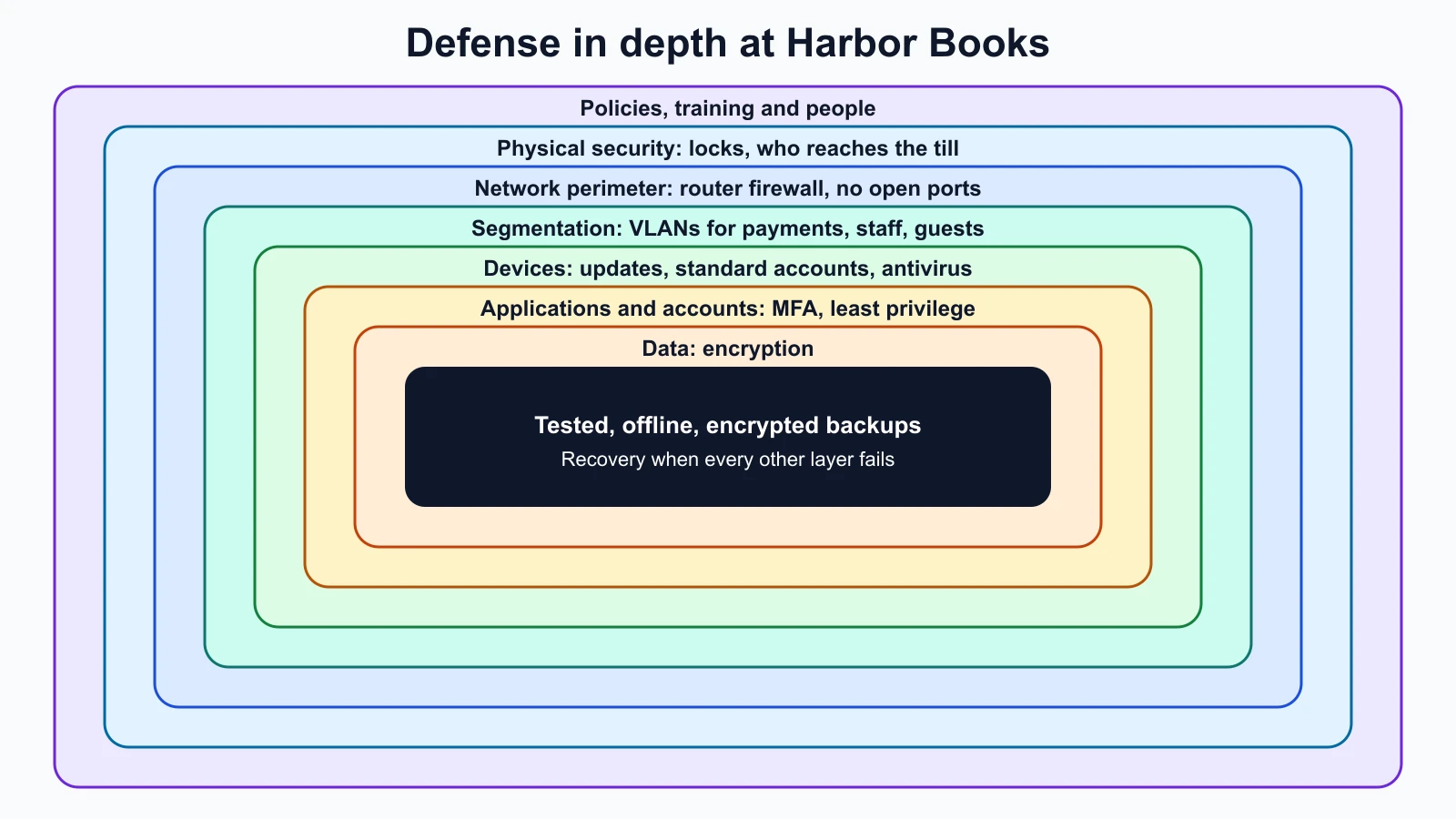
Two warnings. First, layers should be independent: two controls that fail for the same reason, such as two logins that use the same password, count as one. Second, more layers are not automatically better. Each one costs money and attention, so the risk register decides where layers are worth adding.
Least privilege
Least privilege means giving every user, program and device only the access it needs to do its job, and nothing more. NIST SP 800-53 describes it as giving each entity the minimum system resources and authorizations it needs to perform its function. You saw it in the operating systems lesson as "use a standard account day to day". It applies everywhere:
- The shop assistant's account can use the till but cannot change prices.
- The accounting software can read the invoices folder but not the whole drive.
- The card reader can reach the payment provider and nothing else.
Least privilege limits the damage from every other failure. If an account is stolen, the attacker gets only what that account could do.
Perimeter, DMZ, segmentation and isolation
These four ideas are related but different.
Perimeter security protects the boundary between the inside network and the internet, usually with a firewall at the router. It is necessary but not enough. Once something gets past the perimeter, for example malware on a laptop that was taken home, a flat network with no internal barriers lets it reach everything.
A DMZ, as explained in Network Services and Infrastructure for Cyber Security, is a separate zone for systems that must face the internet, so that a compromised public server cannot reach the inside.
Segmentation splits the inside network into zones with controlled paths between them. Harbor Books' four VLANs (equipment, payments, staff, guests) are segmentation. Its value is that an attacker who gets into one zone has to cross another controlled boundary to reach the next, which slows them down and creates a chance to detect them.
Isolation goes further: a system is cut off from others entirely, or allowed only one narrow path. Examples include a lab network with no route to the internet, a "quarantine" VLAN where a suspicious laptop is moved while it is investigated, a sandbox that runs an untrusted file where it cannot touch anything else, and a separate administrator account used only for admin tasks. Isolation is the strongest of the four and also the least convenient, so it is used for the riskiest things.
Zero trust
The older model of network security is sometimes called "castle and moat": a strong wall around the network, and anything inside trusted. Zero trust rejects the idea that being inside the network should earn trust. NIST's architecture guide, SP 800-207 (August 2020), states that zero trust assumes there is no implicit trust granted to assets or user accounts based only on their physical or network location.
In practice, zero trust means each request to a resource is checked on its own merits:
- Who is asking, proven with strong authentication such as MFA.
- From what device, and whether that device is known, updated and healthy.
- For what, and whether this user needs that resource (least privilege again).
- Checked every time, not once at the front door.
For Harbor Books, zero trust is not a product to buy. It is a direction: staff sign in to the shop's cloud apps with MFA wherever they are, the office PC is not trusted just because it is plugged into the shop network, and the owner's VPN connection still requires MFA. A small business can apply the principle long before it can afford the tools large companies use.
Zero trust and segmentation work together. Segmentation limits where traffic can go; zero trust decides whether each request is allowed even when the network path exists.
True and false, positive and negative
Security tools raise alerts: a login from an unusual country, a file that looks like malware, a port scan. Every alert, and every silence, falls into one of four boxes. NIST's glossary defines a false positive as incorrectly classifying benign activity as malicious, and a false negative as an instance in which a security tool intended to detect a particular threat fails to do so.
| Something bad really happened | Nothing bad happened | |
|---|---|---|
| Tool raised an alert | True positive: a correct catch | False positive: a false alarm |
| Tool stayed quiet | False negative: a missed attack | True negative: correctly quiet |
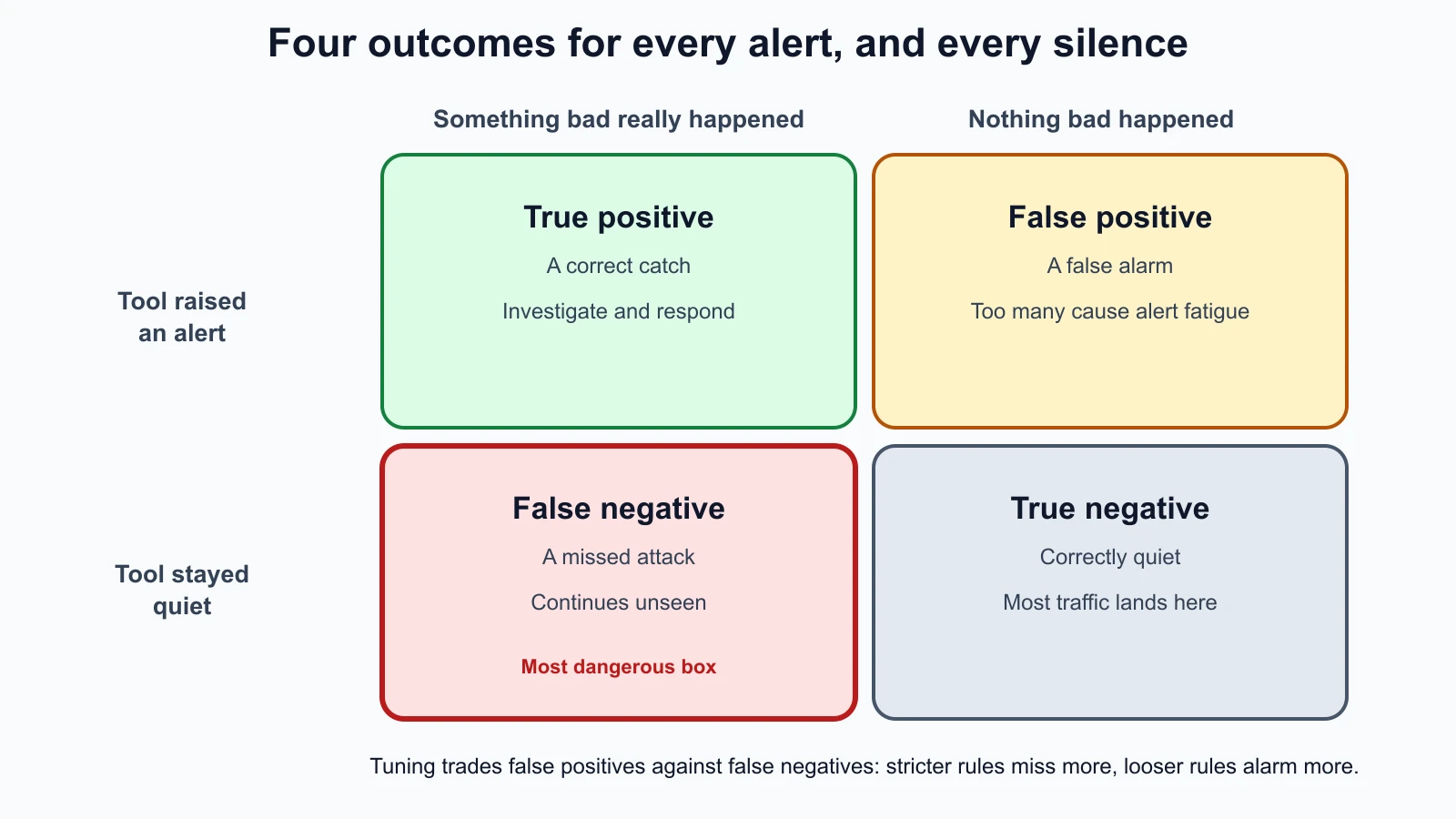
Each wrong box has a cost. False positives waste time and, in large numbers, cause alert fatigue: people start ignoring alerts, including the real ones. False negatives are worse, because an attack continues unseen. Tuning a tool trades one for the other. Make a rule stricter and it raises fewer false alarms but may miss more real attacks; make it looser and it catches more but floods the team.
A small fictional example: in one month, Harbor Books' email filter flagged 40 messages as phishing. The owner checked them and found 30 were phishing (true positives) and 10 were genuine supplier emails (false positives). Separately, 2 phishing emails reached staff inboxes without a warning (false negatives). The filter caught 30 of 32 phishing emails, which sounds good, but the 2 it missed are the ones that matter if someone clicks, so staff training remains a layer. And 10 false alarms a month is manageable, but if it rose to 100, people would stop reading the warnings.
Red, blue and purple teams in practice
What Is Cyber Security? introduced red teams (authorized attackers), blue teams (defenders) and purple teaming (both working together). The detection boxes above show why purple teaming is useful. A red team runs a known technique in an agreed scope; the blue team checks whether its tools raised a true positive or stayed silent, a false negative; both fix the gap and run the technique again. At Harbor Books' scale, one person can play both roles in the lab: run a port scan from harbor-kali, then check whether anything on harbor-server noticed it. You will build that detection in the lesson on logging and SIEM.
Runbooks: decide before the emergency
A runbook is a written, step-by-step procedure for a specific situation. Many teams use "playbook" for the broader plan and "runbook" for the exact steps, but the words overlap. The value is that decisions are made calmly in advance, not in a panic during an incident.
A good runbook names its trigger, who acts, the steps in order, what to record, and when to escalate. Here is a short one for Harbor Books:
Runbook: a staff member reports a suspicious email
- Trigger: anyone reports an email that asks for a password, payment or bank detail change, or has an unexpected attachment or link.
- Do not click the link, open the attachment or reply. Do not delete the email yet.
- Report it to the owner by phone or in person, with the sender, subject and time.
- Owner checks: if it claims to be from a known supplier or bank, phone them on a number already on file, never one in the email.
- If anyone clicked or entered a password: change that password from a different device, check that MFA is on, sign out other sessions, and note the time.
- Record what happened in the incident log: date, time, who, what was clicked, actions taken.
- Escalate to the shop's IT support or bank immediately if money was sent or card data may be involved.
- Close: delete the email once recorded, and share a short warning with the team.
You will write a full incident response runbook in the lesson on incident response and digital forensics.
Compliance and auditors
Compliance means meeting the rules that apply to an organization: laws, regulations, contracts and industry standards. Auditors check whether those rules are actually met, by asking for evidence, such as configuration screenshots, logs, policies and records of training, rather than taking anyone's word for it. Internal auditors work for the organization; external auditors are independent.
Because Harbor Books takes card payments, one standard applies directly. The PCI Data Security Standard (PCI DSS) is, in the words of the PCI Security Standards Council, a baseline of technical and operational requirements designed to protect payment account data. It applies to organizations that store, process or transmit cardholder data, including merchants. Many small merchants validate their compliance with a Self-Assessment Questionnaire (SAQ), and the Council says that whether a small merchant must validate is determined by the individual payment brands, so the shop should ask its card provider what it needs to do.
Two things to understand early:
- Compliance is not the same as security. A checklist sets a minimum. An organization can pass an audit and still be breached, and it can be quite secure in ways no checklist asks about. Use compliance as a floor, not a ceiling.
- Good security makes compliance easier. A shop that never stores card numbers, because its payment provider handles them, has far less in scope for PCI DSS. That is the "avoid" risk response at work.
Standards such as ISO/IEC 27001, the NIST Cybersecurity Framework and the CIS Controls come up again in the final lesson on standards and certifications.
Backups and resiliency
Resiliency is the ability to keep going, or recover quickly, when something goes wrong: a failed disk, a flood, a mistake, or an attack. Backups are its foundation, and they are the main reason a ransomware attack can be an inconvenience instead of the end of a small business.
CISA's ransomware guide gives clear advice: maintain offline, encrypted backups of critical data, and regularly test their availability and integrity in a disaster recovery scenario. It explains why offline matters: many ransomware variants try to find and delete or encrypt any backups they can reach. A backup drive left permanently plugged into the office PC is reachable, so it can be encrypted along with everything else.
Two terms help plan backups. NIST SP 800-34 defines the recovery point objective (RPO) as the point in time to which data must be recovered after an outage: how much recent work you can afford to lose. The recovery time objective (RTO) is the time a system can spend in recovery before the outage starts to harm the business: how long you can afford to be down.
For Harbor Books:
| System | RPO (how much data can be lost) | RTO (how long it can be down) | Backup plan |
|---|---|---|---|
| Accounts and invoices on the office PC | 1 day | 2 days | Nightly encrypted backup to cloud storage, plus a weekly copy to a drive kept unplugged and off site |
| Web shop | Hours | A few hours | The hosting provider's backups, plus a monthly export kept by the owner |
| Till | Sales data synced to the provider continuously | 1 hour | The provider's service; a paper procedure for card-reader outages |
Three backup rules follow from the CISA guidance:
- Keep at least one copy offline or otherwise unreachable from the systems it protects.
- Encrypt backups, because a stolen backup is a data breach.
- Test restores. A backup you have never restored is a hope, not a plan. Restore a sample file every month and a whole system at least once a year.
Recall from the virtualization lesson that a VM snapshot is not a backup either. Backups live somewhere separate.
Mistakes beginners make
-
Treating every risk as urgent. Without priorities, the important work never gets done.
Fix: Score risks, sort the register, and work from the top.
-
Relying on one strong control. Every control fails sometimes.
Fix: Add independent layers where the register shows high risk.
-
Trusting devices because they are inside the network. Laptops travel, and malware spreads internally.
Fix: Segment the network and require authentication for each important service, wherever the request comes from.
-
Tuning alerts only to reduce noise. Fewer alerts can mean more missed attacks.
Fix: Track false negatives too, for example with purple-team tests, before calling a rule good.
-
Never testing backups. Many people discover their backups are broken on the day they need them.
Fix: Keep an offline copy and test a restore on a schedule.
Recap and try it yourself
Risk combines likelihood and impact, and a risk register turns it into owned, dated actions with four possible responses: reduce, accept, transfer or avoid. Defense in depth layers independent controls; least privilege limits what any single failure can do. The perimeter guards the edge, a DMZ holds public systems, segmentation splits the inside, and isolation cuts off the riskiest things. Zero trust, as NIST SP 800-207 puts it, grants no implicit trust based on network location. Alerts are true or false positives, and silences are true or false negatives; tuning trades false alarms against missed attacks. Runbooks decide actions before an emergency. Compliance, checked by auditors, sets a floor such as PCI DSS for card payments. Offline, encrypted, tested backups, planned with RPO and RTO, make recovery possible.
Try it:
- Build a risk register with five rows for the organization you used in earlier exercises. Score each risk, choose a response and give it an owner and review date.
- Draw the defense-in-depth layers for your own email account: what stops an attacker at each layer?
- Take one alert you have seen, such as a "new sign-in" email or an antivirus warning, and decide which of the four boxes it fell into. How did you know?
- Write a one-page runbook for "the main computer will not start". Include who to call and where the backups are.
- Restore one file from your own backup today. If you cannot, you have found your first high-score risk.
In the next lesson you will look closely at the control at the top of most risk registers: authentication and access control, including MFA, Kerberos, LDAP and single sign-on.
Sources checked on 12 November 2026: NIST glossary, risk; NIST glossary, defense in depth; NIST glossary, least privilege; NIST SP 800-207, Zero Trust Architecture; NIST glossary, false positive; NIST glossary, false negative; PCI Security Standards Council, PCI DSS; PCI Security Standards Council, merchants; CISA #StopRansomware Guide; NIST glossary, recovery point objective; NIST glossary, recovery time objective.