
Cyber Security course · lesson 5 of 24
- 1What Is Cyber Security?
- 2Fundamental IT Skills for Cyber Security
- 3Operating Systems for Security: Windows, Linux and macOS
- 4Virtualization and Your Safe Cyber Security Lab
- 5Networking Fundamentals for Cyber Security
- 6Network Services and Infrastructure for Cyber Security
- 7Network Troubleshooting and Traffic Analysis Tools
- 8Core Security Concepts Every Defender Uses
- 9Authentication and Access Control Explained
- 10Cryptography Basics for Cyber Security
- 11Secure Protocols and Wireless Security
- 12The Threat Landscape and Security Frameworks
- 13Social Engineering and Human Attacks
- 14Network and Wireless Attacks and How to Detect Them
- 15Web Attacks and the OWASP Top 10
- 16Malware, Exploits and System Attacks
- 17Hardening and Endpoint Security
- 18Network Defense, Logging and SIEM
- 19Vulnerability Management and Threat Hunting
- 20Incident Response and Digital Forensics
- 21Cloud Security Basics
- 22Scripting for Security
- 23Ethical Hacking, CTFs and Penetration Testing
- 24Cyber Security Standards, Certifications and Capstone
After this lesson, you should be able to name the seven layers of the OSI model and place common technologies on them, read an IP address and say whether it is public, private or special, explain localhost and loopback, work out a network's size from its CIDR prefix or subnet mask, find a default gateway, split a network into subnets for security, name the ports of the most common services, and tell network-attached storage from a storage area network. Almost every attack and every defense in the rest of the course travels over a network, so these are the words you will use most.
Why networking comes first
When a scanner reports "port 3389 open on 192.168.10.20", when a firewall log shows a blocked connection from an unfamiliar address, or when an incident report says an attacker "moved laterally to the payment subnet", you need networking to understand the sentence. Attackers use networks to reach their targets, and defenders use networks to separate, watch and block them.
This lesson covers the building blocks: layers, addresses, subnets and ports. The next lesson covers the services that run on top of them, such as DHCP, DNS and VPNs, and the one after covers tools for seeing traffic. Everything here can be practised in the lab you built in Virtualization and Your Safe Cyber Security Lab.
How data moves: packets and layers
Data does not cross a network as one piece. It is split into small chunks called packets, each carrying addresses that say where it came from and where it is going. Devices along the way read those addresses and pass each packet on. At the destination, the packets are put back together.
Because networking involves so many jobs, from electrical signals to web pages, engineers describe it in layers. Each layer does one job and relies on the layer below it.
The OSI model
The Open Systems Interconnection (OSI) model is a reference model with seven layers, published as ITU-T Recommendation X.200 in 1994 (the same model is also an ISO standard). Real networks mostly use the simpler TCP/IP suite, so the OSI model is a shared vocabulary rather than a description of any one product. Security people use it all the time: "a layer 7 attack" means an attack on the application, and "a layer 2 problem" means something on the local network segment.
From the bottom up:
| Layer | Name | What it does | Examples | A security example |
|---|---|---|---|---|
| 1 | Physical | Sends bits as signals | Cables, radio, fiber | Someone plugs into a free network socket |
| 2 | Data link | Moves frames between devices on the same local network, using MAC addresses | Ethernet, Wi-Fi, switches | ARP spoofing, VLAN hopping |
| 3 | Network | Moves packets between networks, using IP addresses | IP, routers | IP address spoofing |
| 4 | Transport | Delivers data to the right program, using ports | TCP, UDP | Port scanning, SYN floods |
| 5 | Session | Sets up and manages conversations | Session handling in protocols | Session hijacking |
| 6 | Presentation | Formats and encrypts data | Character encoding, TLS encryption | Weak encryption settings |
| 7 | Application | The service the user sees | HTTP, DNS, SMTP | SQL injection, phishing pages |
A MAC address (media access control address) is the hardware address of a network card, used only on the local network. An IP address is the logical address used to route packets between networks. A common memory aid for the layers from 1 to 7 is "Please Do Not Throw Sausage Pizza Away".
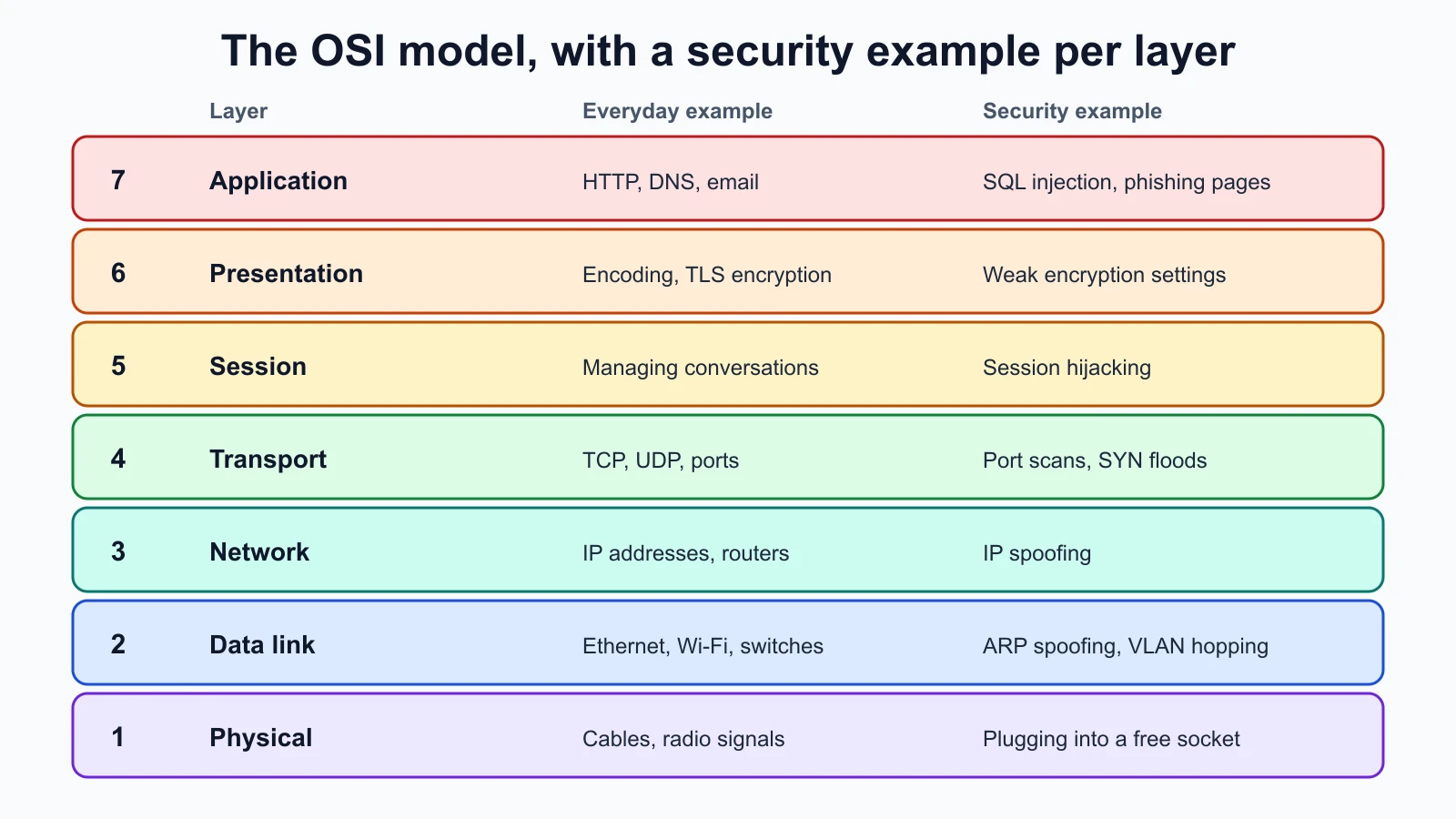
Many attacks in later lessons map neatly to one layer, and so do defenses. A switch configured to stop ARP spoofing protects layer 2; a firewall rule on a port works at layers 3 and 4; a web application firewall inspects layer 7. When you meet a new tool, ask which layer it works at.
IP addresses
An IPv4 address is 32 bits long, written as four numbers from 0 to 255 separated by dots, such as 192.168.10.20. Each of the four numbers is called an octet because it is 8 bits. There are only about 4.3 billion possible IPv4 addresses, which is not enough for every device on Earth, and that shortage explains several things in this lesson: private addresses, NAT and IPv6.
An IPv6 address is 128 bits long, written as eight groups of four hexadecimal digits separated by colons, with runs of zeros shortened to ::. RFC 4291, the IPv6 addressing standard, defines it as a 128-bit identifier. IPv6 provides vastly more addresses. Many networks now run both versions side by side, so defenders must watch and filter both. A firewall that blocks a service on IPv4 but forgets IPv6 leaves a gap.
Public and private addresses
A public address is reachable across the internet and is unique worldwide. A private address is for use inside a home or organization and is not routed on the public internet. RFC 1918 reserves three private IPv4 blocks:
10.0.0.0/8(10.0.0.0 to 10.255.255.255)172.16.0.0/12(172.16.0.0 to 172.31.255.255)192.168.0.0/16(192.168.0.0 to 192.168.255.255)
The RFC says routing information about these networks should not be passed between organizations, and internet providers should filter it out. So your laptop at home likely has an address such as 192.168.1.25, and so do millions of other laptops. When those devices reach the internet, the home router translates their private addresses to its one public address, a process called network address translation (NAT), covered in the next lesson.
Note the boundaries: 172.16.0.0/12 stops at 172.31.255.255, so 172.32.0.1 is a public address. That detail trips up beginners and sometimes firewall rules too.
Special addresses worth recognizing
IANA, the organization that coordinates internet numbers, keeps a registry of special IPv4 blocks. A few you will see often:
| Block | Name | Why you will see it |
|---|---|---|
127.0.0.0/8 | Loopback | Traffic a computer sends to itself |
169.254.0.0/16 | Link local | A device gives itself one of these when it cannot get an address from DHCP, which is a useful troubleshooting clue |
100.64.0.0/10 | Shared address space | Used by some internet providers behind their own NAT |
192.0.2.0/24, 198.51.100.0/24, 203.0.113.0/24 | Documentation | Reserved by RFC 5737 for examples, so they never belong to a real organization |
This course uses the documentation ranges for public addresses in examples. When Harbor Books, the fictional bookshop in this course, needs a public address, it is 203.0.113.10, so no example ever points at a real company's server.
Localhost and loopback
Localhost is the name a computer uses for itself, and loopback is the mechanism behind it: traffic sent to a loopback address never leaves the machine. In IPv4 that is the whole 127.0.0.0/8 block, usually 127.0.0.1; RFC 1122 says these addresses must not appear outside a host. In IPv6 the loopback address is ::1.
Here is real output from pinging the loopback address on a Mac:
1PING 127.0.0.1 (127.0.0.1): 56 data bytes
264 bytes from 127.0.0.1: icmp_seq=0 ttl=64 time=0.058 ms
364 bytes from 127.0.0.1: icmp_seq=1 ttl=64 time=0.147 ms
4
5--- 127.0.0.1 ping statistics ---
62 packets transmitted, 2 packets received, 0.0% packet loss
7round-trip min/avg/max/stddev = 0.058/0.102/0.147/0.045 ms
The replies come back in a fraction of a millisecond because nothing crossed a network. Loopback matters for security because a service listening only on 127.0.0.1 can be reached only from the same machine. A database that listens on 127.0.0.1 is out of reach of the network; the same database listening on 0.0.0.0, which means every address the machine has, is reachable by anyone who can reach the machine. Checking which address a service listens on is one of the first hardening steps you will practise.
Subnets, CIDR and masks
A subnet is a range of IP addresses that share the same network part. Every IPv4 address has two parts: the network part, which says which network it belongs to, and the host part, which identifies one device on that network.
CIDR notation (Classless Inter-Domain Routing, described in RFC 4632) writes the split as a slash and a number: the prefix length, which is how many bits from the left are the network part. In 192.168.10.0/24, the first 24 bits (192.168.10) are the network and the last 8 bits are for hosts.
A subnet mask says the same thing as a dotted number. Write the prefix as ones followed by zeros, then convert each group of 8 bits to decimal:
/24= 11111111.11111111.11111111.00000000 =255.255.255.0/16=255.255.0.0/26= 11111111.11111111.11111111.11000000 =255.255.255.192
How many addresses does a subnet hold? With a prefix of n, there are 32 minus n host bits, so addresses. Two of them are reserved in ordinary subnets: the first is the network address, which names the subnet itself, and the last is the broadcast address, which reaches every device on it. So a /24 has 256 addresses and 254 usable for hosts; a /26 has 64 and 62 usable.
The default gateway
A device can talk directly only to devices in its own subnet. For anything else, it sends packets to its default gateway, usually the router, which forwards them onward. At Harbor Books, the router is 192.168.10.1, and every device in the shop uses it as the gateway. If a device has the wrong gateway, it can reach local devices but not the internet. If an attacker can trick devices into using their machine as the gateway, they can read and change traffic, an attack you will meet in the lesson on network attacks.
You can check your own: on Windows run ipconfig, on macOS run route -n get default, on Linux run ip route. Look for "default gateway", "gateway" or "default via".
Subnetting for security at Harbor Books
Subnetting means splitting one network into smaller ones. Its security purpose is separation: devices in different subnets cannot talk directly, so a router or firewall between them can decide what traffic is allowed. If the guest Wi-Fi is on its own subnet, an infected visitor's phone cannot reach the till directly.
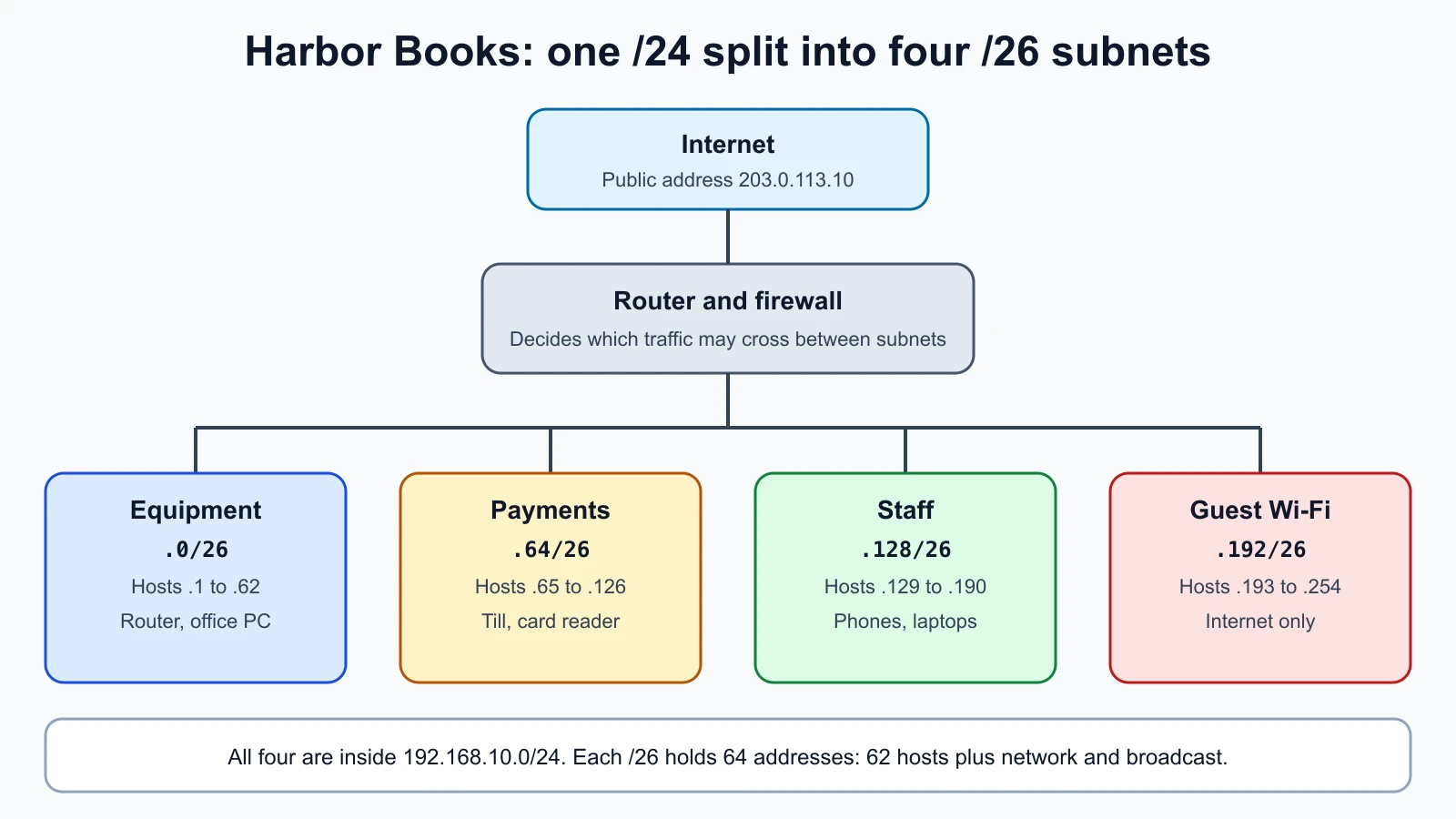
Harbor Books has the private network 192.168.10.0/24. Today every device sits on it together: the front-office PC, the till, the card reader, staff phones and customers' phones on the guest Wi-Fi. Splitting it into four /26 subnets gives each group its own range of 62 hosts:
| Subnet | Range of host addresses | Who goes there |
|---|---|---|
192.168.10.0/26 | .1 to .62 | Network equipment and the front-office PC |
192.168.10.64/26 | .65 to .126 | The till and card reader only |
192.168.10.128/26 | .129 to .190 | Staff phones and laptops |
192.168.10.192/26 | .193 to .254 | Guest Wi-Fi |
Each subnet would have its own gateway address (often the first host address, such as 192.168.10.65), and the router would allow only the traffic each group needs. The till subnet, for example, needs to reach the payment provider and nothing on the guest subnet. You will configure this kind of separation in the lessons on network services and core security concepts.
A small subnet calculator
Working subnets out by hand is good practice, and checking your answers with a tool is good habit. Python's standard library includes the ipaddress module, which does the arithmetic. This short script describes any network you give it, and checks whether it falls inside the three RFC 1918 private blocks:
1# subnet_info.py
2import ipaddress
3import sys
4
5RFC1918 = [ipaddress.ip_network(n) for n in ("10.0.0.0/8", "172.16.0.0/12", "192.168.0.0/16")]
6
7
8def describe(cidr: str) -> dict:
9    net = ipaddress.ip_network(cidr, strict=False)
10    hosts = list(net.hosts())
11    return {
12        "network": str(net.network_address),
13        "prefix": net.prefixlen,
14        "netmask": str(net.netmask),
15        "broadcast": str(net.broadcast_address),
16        "first_host": str(hosts[0]),
17        "last_host": str(hosts[-1]),
18        "usable_hosts": len(hosts),
19        "rfc1918": any(net.subnet_of(block) for block in RFC1918),
20    }
21
22
23if __name__ == "__main__":
24    for cidr in sys.argv[1:]:
25        print(cidr)
26        for key, value in describe(cidr).items():
27            print(f"  {key:12} {value}")
strict=False lets you type any address in the subnet, such as 192.168.10.77/26, and get the subnet it belongs to. The script uses its own RFC 1918 check because Python's built-in is_private also counts other special ranges as private, including the documentation ranges, which is not what this lesson means by private.
Running python3 subnet_info.py 192.168.10.64/26 203.0.113.0/24 with Python 3.12 printed:
1192.168.10.64/26
2  network      192.168.10.64
3  prefix       26
4  netmask      255.255.255.192
5  broadcast    192.168.10.127
6  first_host   192.168.10.65
7  last_host    192.168.10.126
8  usable_hosts 62
9  rfc1918      True
10203.0.113.0/24
11  network      203.0.113.0
12  prefix       24
13  netmask      255.255.255.0
14  broadcast    203.0.113.255
15  first_host   203.0.113.1
16  last_host    203.0.113.254
17  usable_hosts 254
18  rfc1918      False
These tests check the script. Save them as subnet_info_test.py in the same folder and run python3 -m unittest discover -p '*_test.py'; all four passed:
1# subnet_info_test.py
2import unittest
3
4from subnet_info import describe
5
6
7class DescribeTest(unittest.TestCase):
8    def test_slash_24(self):
9        d = describe("192.168.10.0/24")
10        self.assertEqual(d["netmask"], "255.255.255.0")
11        self.assertEqual(d["broadcast"], "192.168.10.255")
12        self.assertEqual(d["usable_hosts"], 254)
13        self.assertTrue(d["rfc1918"])
14
15    def test_slash_26_in_the_middle(self):
16        d = describe("192.168.10.64/26")
17        self.assertEqual(d["network"], "192.168.10.64")
18        self.assertEqual(d["first_host"], "192.168.10.65")
19        self.assertEqual(d["last_host"], "192.168.10.126")
20        self.assertEqual(d["usable_hosts"], 62)
21
22    def test_host_address_is_accepted(self):
23        self.assertEqual(describe("192.168.10.77/26")["network"], "192.168.10.64")
24
25    def test_public_and_documentation_ranges_are_not_rfc1918(self):
26        self.assertFalse(describe("203.0.113.0/24")["rfc1918"])
27        self.assertFalse(describe("172.32.0.0/16")["rfc1918"])
28        self.assertTrue(describe("172.31.5.0/24")["rfc1918"])
29
30
31if __name__ == "__main__":
32    unittest.main()
To be sure the tests can catch mistakes, two deliberate bugs were introduced and the tests run again: changing any to all in the private check made two tests fail, and returning the wrong last host made one fail. Both bugs were then removed and all tests passed. The script is meant for addresses with at least two usable hosts; very small special cases such as /31 and /32 follow different rules and are outside this lesson.
Ports and common protocols
An IP address gets a packet to the right machine. A port number, from 0 to 65535, gets it to the right program on that machine. A web server listens on one port, a remote login service on another. The combination of address and port, such as 203.0.113.10:443, identifies one service.
Two transport protocols carry most traffic:
- TCP (Transmission Control Protocol) sets up a connection first, numbers the data, and resends anything lost. Web pages, email and remote logins use it.
- UDP (User Datagram Protocol) sends packets without a connection or delivery guarantee. It is faster and simpler, and is used for DNS lookups, time synchronization and many voice and video calls.
IANA divides port numbers into three ranges: system ports 0 to 1023 (often called well-known ports), user ports 1024 to 49151 (registered ports), and dynamic or private ports 49152 to 65535, which are not assigned and are used for temporary connections.
These are the ports you will meet most, as registered with IANA:
| Port | Protocol | Service | Security note |
|---|---|---|---|
| 20, 21 | TCP | FTP (file transfer) | Sends passwords unencrypted; prefer SFTP |
| 22 | TCP | SSH (secure remote shell) | Encrypted, but a frequent target of password guessing |
| 23 | TCP | Telnet | Unencrypted remote login; should not be in use |
| 25, 587 | TCP | SMTP (sending email), 587 for submission | Misconfigured mail servers can be abused to send spam |
| 53 | UDP and TCP | DNS (name lookups) | Abused for tunnelling and poisoning |
| 67, 68 | UDP | DHCP (address assignment) | A rogue DHCP server can hand out a malicious gateway |
| 80 | TCP | HTTP (web) | Unencrypted |
| 123 | UDP | NTP (time) | Wrong time breaks certificates and log timelines |
| 143, 993 | TCP | IMAP, and IMAP over TLS | Use the encrypted version |
| 389, 636 | TCP | LDAP directory, and LDAP over TLS | Use the encrypted version |
| 443 | TCP | HTTPS (web over TLS) | Encrypted web traffic |
| 445 | TCP | SMB (Windows file sharing) | Should not be reachable from the internet |
| 3306 | TCP | MySQL database | Databases belong on internal networks only |
| 3389 | TCP | RDP (Windows remote desktop) | Should not be reachable from the internet |
These are defaults. A service can run on any port, so "port 443 is open" means "something is listening on 443", not "this is certainly a web server". Scanners guess the service from the port and then check it, as you will see in the lesson on network troubleshooting and traffic analysis.
For security, the rule is simple: every open port is a possible way in, so only the ports a machine needs should be open, and only to the networks that need them. Harbor Books' web shop needs 443 open to the internet. Its front-office PC needs no ports open to the internet at all.
NAS and SAN
Storage also travels over networks, and two terms come up in inventories and audits:
- NAS (network-attached storage) is a storage device on the network that shares files. AWS describes NAS as a file-dedicated storage device for sharing data over a network. Users see folders, as with a shared drive. A small office NAS box is a common sight.
- SAN (storage area network) is a dedicated network that gives servers access to storage as blocks, the raw chunks a disk is made of. AWS puts the difference this way: NAS handles individual file requests, while a SAN manages requests for contiguous blocks of data. Servers treat SAN storage as if it were a local disk. SANs are typical of data centers, not small shops.
Both hold large amounts of data in one place, so they are valuable targets. A NAS reachable from the internet, with default credentials or old firmware, is a common way for data to leak or for ransomware to encrypt every shared file at once. At Harbor Books, if the owner adds a NAS for backups, it belongs on the equipment subnet, with its own strong password, updated firmware, and no access from the guest Wi-Fi or the internet.
Mistakes beginners make
-
Treating the OSI model as how networks literally work. It is a reference model for describing layers, not a protocol stack you install.
Fix: Use it to name where a problem or attack sits, and learn TCP/IP for how traffic actually flows.
-
Getting private ranges wrong at the edges.
172.32.0.1is public;172.16.0.0/12ends at172.31.255.255.Fix: Check ranges with a tool, such as the script above, instead of guessing.
-
Forgetting the network and broadcast addresses. A
/24has 254 usable hosts, not 256.Fix: Subtract two for ordinary subnets, and write out the first and last host addresses.
-
Assuming a port number proves which service is running. Anything can listen on any port.
Fix: Treat the port as a hint and confirm the service before acting on it.
-
Leaving services listening on every address. A database or admin panel on
0.0.0.0is reachable from the network.Fix: Bind services that only local programs need to
127.0.0.1, and close ports nobody needs.
Recap and try it yourself
The OSI model names seven layers from physical to application, and attacks and defenses can be placed on them. IPv4 addresses are 32 bits and IPv6 addresses 128 bits. RFC 1918 reserves 10.0.0.0/8, 172.16.0.0/12 and 192.168.0.0/16 for private networks, loopback is 127.0.0.0/8 and ::1, and the documentation ranges keep examples safe. A CIDR prefix or subnet mask splits an address into network and host parts, a /n subnet holds addresses minus two for hosts, and the default gateway forwards traffic that leaves the subnet. Subnetting separates groups of devices so that traffic between them can be controlled. Ports identify services, TCP and UDP carry them, and only needed ports should be open. NAS shares files; a SAN provides block storage to servers.
Try it:
- Find your own computer's IP address and default gateway with
ipconfig(Windows),route -n get defaultandipconfig getifaddr en0(macOS) orip addrandip route(Linux). Is your address private? Which RFC 1918 block is it in? - By hand, work out the network address, broadcast address and number of usable hosts for
192.168.10.200/26and10.20.30.40/28. Then check your answers with the script. - In your lab, run
ip addronharbor-kaliandharbor-server. Write down each VM's address and prefix, and confirm they are in the same subnet. - Redraw Harbor Books' four subnets for a shop that also needs a separate subnet for security cameras. What prefix would give you five or more subnets from
192.168.10.0/24, and how many hosts would each hold?
Add the results to your lab record. In the next lesson you will meet the services that make these networks work: DHCP, DNS, NAT, VLANs, VPNs and the protocols that carry remote logins and web traffic.
Sources checked on 12 November 2026: ITU-T X.200, OSI basic reference model; RFC 1918, private address space; IANA IPv4 special-purpose address registry; RFC 1122, host requirements; RFC 5737, documentation addresses; RFC 4291, IPv6 addressing; RFC 4632, CIDR; IANA service names and port numbers; AWS, what is NAS; Python ipaddress module.