
Cyber Security course · lesson 16 of 24
- 1What Is Cyber Security?
- 2Fundamental IT Skills for Cyber Security
- 3Operating Systems for Security: Windows, Linux and macOS
- 4Virtualization and Your Safe Cyber Security Lab
- 5Networking Fundamentals for Cyber Security
- 6Network Services and Infrastructure for Cyber Security
- 7Network Troubleshooting and Traffic Analysis Tools
- 8Core Security Concepts Every Defender Uses
- 9Authentication and Access Control Explained
- 10Cryptography Basics for Cyber Security
- 11Secure Protocols and Wireless Security
- 12The Threat Landscape and Security Frameworks
- 13Social Engineering and Human Attacks
- 14Network and Wireless Attacks and How to Detect Them
- 15Web Attacks and the OWASP Top 10
- 16Malware, Exploits and System Attacks
- 17Hardening and Endpoint Security
- 18Network Defense, Logging and SIEM
- 19Vulnerability Management and Threat Hunting
- 20Incident Response and Digital Forensics
- 21Cloud Security Basics
- 22Scripting for Security
- 23Ethical Hacking, CTFs and Penetration Testing
- 24Cyber Security Standards, Certifications and Capstone
After this lesson, you should be able to describe the main kinds of malware and how each spreads and hides, explain what a buffer overflow and a memory leak are and which protections make them harder to exploit, describe pass the hash and the common routes to privilege escalation, explain "living off the land" and what the LOLBAS, GTFOBins and WADComs projects document, say what reverse engineering and exploit frameworks are, and run a small tested script that audits a Linux or macOS system for risky setuid programs. This is the "installation" and "actions on objectives" end of the Cyber Kill Chain from The Threat Landscape and Security Frameworks: what happens once an attacker has code running.
Safety and law
This lesson explains how these attacks work so that you can recognize and prevent them. It does not include working malware, exploit code, or step-by-step instructions for using attack tools. Creating or spreading malware, and using exploits or stolen password hashes against systems you are not authorized to test, are crimes under computer misuse laws such as the UK Computer Misuse Act (which, as the Crown Prosecution Service guidance notes, also covers making or supplying articles for use in offences), the US Computer Fraud and Abuse Act and India's IT Act. Never download real malware samples to "have a look". Analysis of real samples happens in isolated, purpose-built environments by trained people, or in the online sandboxes from the threat frameworks lesson. This is awareness, not legal advice.
What malware is
NIST's glossary defines malware as software or firmware intended to perform an unauthorized process. Its malware incident guide, SP 800-83 Revision 1 (2013), describes it as the leading external threat to most hosts, often requiring costly recovery. Malware is usually described by how it spreads and what it does:
| Type | How it works | Example harm at Harbor Books |
|---|---|---|
| Virus | A program that replicates by attaching itself to other programs or files, where it hides until activated (NIST) | An infected document spreads to the shared folder |
| Worm | A self-contained program that spreads itself through systems or networks without needing a host file (NIST) | Spreads from the office PC to every unpatched device |
| Trojan | A useful or seemingly useful program with hidden malicious code (NIST) | A "free invoice tool" that installs a backdoor |
| Ransomware | Malware that encrypts files so they and the systems that depend on them are unusable until a ransom is paid (CISA); attackers often also steal data and threaten to leak it | Accounts and invoices locked; customer list threatened with publication |
| Spyware and keyloggers | Secretly collect information such as browsing, keystrokes and passwords | The owner's banking password captured |
| Backdoor and remote access trojan | Give the attacker hidden, ongoing access | The attacker returns after the "cleanup" |
| Rootkit | Files installed on a host to change its normal behavior in a hidden way (NIST), often to conceal other malware | Antivirus reports a clean system that is not |
| Bot and botnet | An infected device controlled remotely as part of a network of many | The shop's router helps attack someone else |
| Logic bomb | Malicious code that triggers on a condition, such as a date | Data deleted weeks after a contractor leaves |
| Fileless or living-off-the-land malware | Runs mainly through the system's own built-in tools and memory rather than new files | Little for file-based antivirus to find |
| Cryptominer | Uses the victim's computing power to mine cryptocurrency | Slow PC, high electricity use |
Real malware often combines several of these: a trojan delivers a backdoor, which installs ransomware that also steals data.
Common signs of infection include unexplained slowness or high CPU use, new programs or services that start at boot, security tools that are switched off, unexpected outbound connections, renamed or encrypted files, and new administrator accounts. The tools from Operating Systems for Security (process lists, startup items, logs) are where defenders look first.
Core defenses are the ones you have already met: updates, standard user accounts, blocking macros from the internet, email filtering, application control (allowing only approved programs to run), offline backups, and endpoint protection, which the next lesson covers in detail.
Exploits and memory bugs
An exploit is input or code that takes advantage of a vulnerability to make software do something its authors did not intend: run the attacker's code, reveal data, or crash. Many of the most serious vulnerabilities are memory bugs in software written in languages such as C and C++, which let programs manage memory directly.
Buffer overflow
A buffer is a fixed-size area of memory set aside to hold data, such as a 32-character space for a name. MITRE's Common Weakness Enumeration describes the related weakness CWE-787, Out-of-bounds Write, as a product writing data past the end, or before the beginning, of the intended buffer. If a program copies a 200-character input into a 32-character buffer without checking the length, the extra data overwrites whatever sits next to it in memory. That neighboring memory may hold other variables or, on the stack, information about where the program should continue after the current function. By carefully choosing the overflowing data, an attacker can change what the program does next.
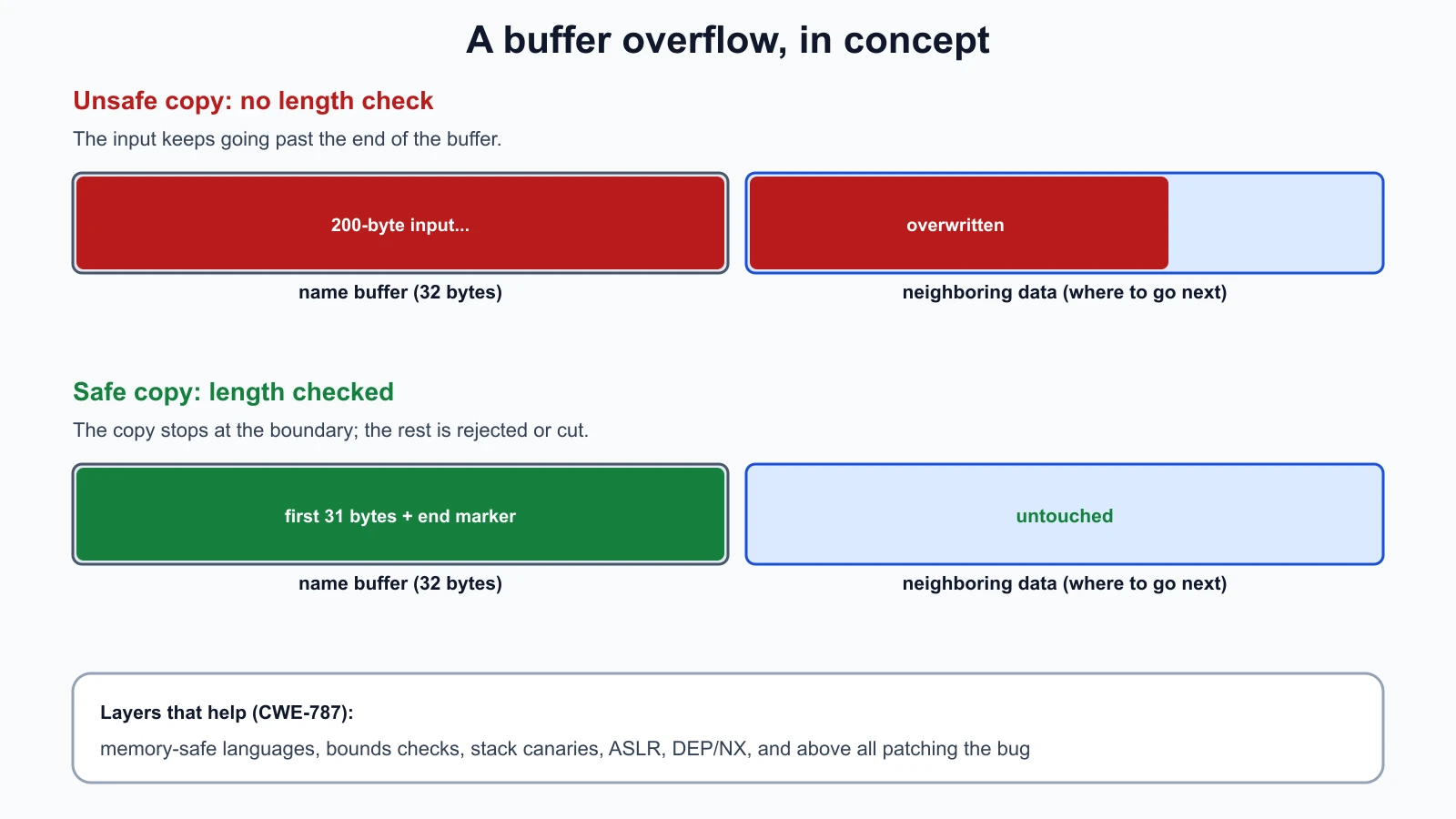
The CWE entry lists defenses that work in layers:
- Memory-safe languages that manage memory themselves and are not subject to classic buffer overflows. Python, Java and C# are examples; Rust is designed for memory safety without a garbage collector.
- Bounds checking: always check sizes before copying, and use length-aware functions instead of unbounded ones.
- Compiler protections such as stack canaries (a guard value that, if changed, stops the program) as defense in depth.
- ASLR (address space layout randomization): loading code at unpredictable addresses so an attacker cannot rely on knowing where things are.
- DEP or NX (data execution prevention): marking data memory as non-executable so injected data cannot simply be run as code.
None of the operating system protections is complete on its own; they make exploitation harder and less reliable. Patching the vulnerable program is still the fix.
Memory leak
A memory leak is a quieter bug. CWE-401, Missing Release of Memory after Effective Lifetime, describes a product that does not track and release memory it no longer needs, so that memory becomes unavailable for reuse. Its main security impact is on availability: if an attacker can trigger the leak on purpose, for example by sending a request that leaks a little memory each time, they can exhaust memory and crash or hang the program, a denial of service.
Privilege escalation
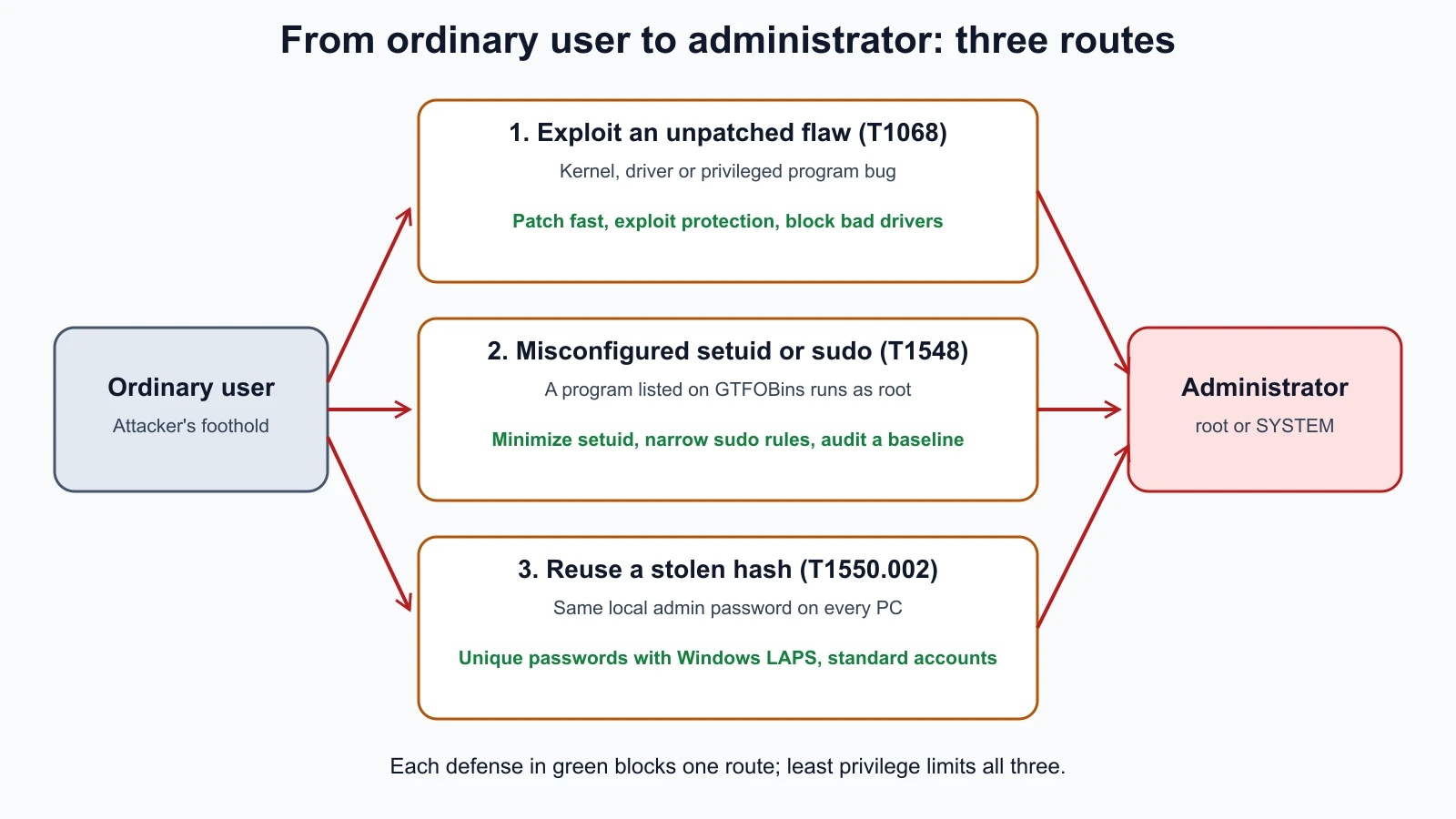
Authentication and Access Control Explained introduced privilege escalation, ATT&CK tactic TA0004: gaining higher permissions than you were given. Attackers usually land as an ordinary user and then look for a way up. The common routes:
- Exploiting a vulnerability (ATT&CK T1068): a flaw in the operating system, a driver or a privileged program lets ordinary code run as administrator, SYSTEM or root. ATT&CK also describes attackers loading a signed but vulnerable driver to reach the kernel. Mitigations: patching, exploit protection features, sandboxing, and blocking known vulnerable drivers.
- Misconfigured setuid programs (T1548.001): on Linux and macOS, a program with the setuid bit runs with its owner's permissions, often root, whoever starts it. That is needed for tools such as
sudoandpasswd, but ATT&CK warns that programs with known vulnerabilities or ways to "escape" to a shell should not have the bit set, and that the number of setuid programs should be kept to a minimum. - Overly broad
sudorules: letting a user run an editor, a pager or a scripting language as root can let them run anything as root. - Weak file and service permissions: a service running as administrator whose program file ordinary users can overwrite; a scheduled task that runs a script anyone can edit.
- Stored credentials: passwords in scripts, configuration files, browser storage or shared folders.
A tested setuid audit
ATT&CK's detection guidance for setuid abuse includes looking for setuid files in user-writable or unusual places and for changes that add the setuid bit. This defensive script lists every setuid file under the folders you name, flags files that are writable by others, that sit in temporary or home folders, or that are not in a saved baseline of known-good files. It only reads file information; it changes nothing.
1# suid_audit.py
2import argparse
3import os
4import stat
5from pathlib import Path
6
7UNUSUAL_PREFIXES = ("/tmp/", "/var/tmp/", "/private/tmp/", "/private/var/tmp/", "/dev/shm/", "/home/", "/Users/")
8
9
10def find_setuid(roots: list[str]) -> list[Path]:
11    found = []
12    for root in roots:
13        for dirpath, _dirs, files in os.walk(root):
14            for name in files:
15                path = Path(dirpath, name)
16                try:
17                    mode = path.lstat().st_mode
18                except OSError:
19                    continue
20                if mode & stat.S_ISUID:
21                    found.append(path)
22    return sorted(found)
23
24
25def in_unusual_place(path: Path) -> bool:
26    return str(path).startswith(UNUSUAL_PREFIXES)
27
28
29def assess(path: Path, baseline: set[str]) -> list[str]:
30    reasons = []
31    mode = path.lstat().st_mode
32    if mode & stat.S_IWOTH or mode & stat.S_IWGRP:
33        reasons.append("writable by group or others")
34    if in_unusual_place(path):
35        reasons.append("in a temporary or home folder")
36    if baseline and str(path) not in baseline:
37        reasons.append("not in baseline")
38    return reasons
39
40
41def main() -> None:
42    parser = argparse.ArgumentParser(description="List setuid programs and flag unusual ones.")
43    parser.add_argument("roots", nargs="+", help="folders to search, for example /usr /bin /sbin")
44    parser.add_argument("--baseline", help="file with one known-good path per line")
45    parser.add_argument("--write-baseline", help="save the current list as a baseline file")
46    args = parser.parse_args()
47    found = find_setuid(args.roots)
48    if args.write_baseline:
49        Path(args.write_baseline).write_text("".join(f"{p}\n" for p in found))
50    baseline = set(Path(args.baseline).read_text().split()) if args.baseline else set()
51    flagged = 0
52    for path in found:
53        reasons = assess(path, baseline)
54        flagged += bool(reasons)
55        print(f"{'REVIEW' if reasons else 'ok':6} {path}" + (f"  ({'; '.join(reasons)})" if reasons else ""))
56    print(f"{len(found)} setuid files, {flagged} to review")
57
58
59if __name__ == "__main__":
60    main()
On a Mac running macOS 26.1, python3 suid_audit.py /usr /bin /sbin --write-baseline baseline.txt listed 16 setuid programs, all in system folders; run again with --baseline baseline.txt, it printed:
1ok     /bin/ps
2ok     /usr/bin/at
3ok     /usr/bin/atq
4ok     /usr/bin/atrm
5ok     /usr/bin/batch
6ok     /usr/bin/crontab
7ok     /usr/bin/login
8ok     /usr/bin/newgrp
9ok     /usr/bin/quota
10ok     /usr/bin/su
11ok     /usr/bin/sudo
12ok     /usr/bin/top
13ok     /usr/libexec/authopen
14ok     /usr/libexec/security_authtrampoline
15ok     /usr/sbin/traceroute
16ok     /usr/sbin/traceroute6
1716 setuid files, 0 to review
To show what a finding looks like, a harmless two-line shell script was created in a temporary folder and given the setuid bit with permissions that let anyone change it. Auditing that folder against the same baseline printed (path shortened):
1REVIEW /private/tmp/lab/fake-drop/helper  (writable by group or others; in a temporary or home folder; not in baseline)
21 setuid files, 1 to review
Run the script once on a clean system to make the baseline, keep the baseline file somewhere the system's users cannot change, and run it again regularly. Any new setuid program is worth a look, and GTFOBins (below) is a good place to check whether a flagged program is known to be abusable. A file in a temporary or home folder with the setuid bit is almost never legitimate. On Linux, the --write-baseline run may print permission warnings for folders your user cannot read; run it with sudo on your lab server for a complete list.
These tests create setuid files only inside a temporary folder they make and delete themselves; save them as suid_audit_test.py and run python3 -m unittest discover -p '*_test.py':
1# suid_audit_test.py
2import os
3import tempfile
4import unittest
5from pathlib import Path
6
7from suid_audit import assess, find_setuid, in_unusual_place
8
9
10class SuidAuditTest(unittest.TestCase):
11    def setUp(self):
12        self.tmp = tempfile.TemporaryDirectory()
13        self.root = Path(self.tmp.name)
14        self.plain = self.root / "plain-tool"
15        self.suid = self.root / "suid-tool"
16        self.loose = self.root / "loose-tool"
17        for path in (self.plain, self.suid, self.loose):
18            path.write_text("#!/bin/sh\n")
19        os.chmod(self.plain, 0o755)
20        os.chmod(self.suid, 0o4755)
21        os.chmod(self.loose, 0o4777)
22
23    def tearDown(self):
24        self.tmp.cleanup()
25
26    def test_finds_only_setuid_files(self):
27        self.assertEqual(find_setuid([str(self.root)]), sorted([self.loose, self.suid]))
28
29    def test_world_writable_setuid_is_flagged(self):
30        self.assertIn("writable by group or others", assess(self.loose, set()))
31
32    def test_baseline_member_is_clean_outside_unusual_folders(self):
33        reasons = assess(self.suid, {str(self.suid)})
34        self.assertNotIn("not in baseline", reasons)
35        self.assertNotIn("writable by group or others", reasons)
36
37    def test_new_file_is_flagged_against_baseline(self):
38        self.assertIn("not in baseline", assess(self.suid, {"/usr/bin/sudo"}))
39
40    def test_unusual_locations(self):
41        self.assertTrue(in_unusual_place(Path("/tmp/helper")))
42        self.assertTrue(in_unusual_place(Path("/home/ana/bin/tool")))
43        self.assertFalse(in_unusual_place(Path("/usr/bin/sudo")))
44
45    def test_missing_folder_is_ignored(self):
46        self.assertEqual(find_setuid([str(self.root / "does-not-exist")]), [])
47
48
49if __name__ == "__main__":
50    unittest.main()
All six tests passed with Python 3.12 on macOS. Four deliberate bugs (listing every file instead of setuid ones, and disabling each of the three checks in turn) each made a test fail. The first round of bug checks also found two lines that made no difference to the result, an error handler that repeated the default behavior and a redundant file-type check, so both were removed. A first draft of the tests also had a check for the unusual-folder rule that could never fail; it was replaced with a direct test.
Pass the hash
Windows can authenticate with a password hash in some network protocols (NTLM) without ever needing the password itself. ATT&CK (T1550.002) describes pass the hash as adversaries using stolen password hashes to authenticate as a user without the cleartext password. The attacker first obtains hashes from a machine they control, usually from memory or from the local account database, which requires administrator rights there, and then uses them to sign in to other machines that accept the same account. That makes it a technique for lateral movement: spreading from one compromised computer to others.
The weakness it exploits is shared credentials. If every PC in an office has a local administrator account with the same password, one stolen hash opens all of them. ATT&CK's mitigations focus on exactly that: limit credential overlap across systems, do not put a domain user in the local administrators group on many machines, and apply Windows restrictions on remote use of local accounts. Microsoft's Windows LAPS (Local Administrator Password Solution), built into current Windows, automatically gives each device its own local administrator password and rotates it; Microsoft lists protection against pass-the-hash and lateral-traversal attacks as one of its benefits. Detection, in ATT&CK's guidance, looks for unusual NTLM network logons without matching domain logon events, especially from one workstation to another using administrative tools.
For Harbor Books, with two or three Windows PCs, the lesson is simple: never reuse the same local administrator password across machines, and keep daily work in standard accounts so that a stolen user session does not hold administrator hashes in the first place.
Living off the land
Security tools are good at spotting new, unknown programs. So attackers increasingly use the tools already on the system. This is called living off the land. ATT&CK's System Binary Proxy Execution (T1218) describes adversaries running malicious content through signed, trusted system programs, often Microsoft-signed files that ship with Windows, to get past defenses that trust signed software.
Three community projects catalog these behaviors, and defenders use them as much as attackers:
- LOLBAS (Living Off The Land Binaries, Scripts and Libraries) lists Windows programs, scripts and libraries that can be used for unintended purposes, such as executing code, downloading files or bypassing application control, and maps each to ATT&CK techniques.
- GTFOBins is a curated list of Unix-like programs that can be abused to bypass local security restrictions on misconfigured systems, for example to escape a restricted shell or escalate privileges through
sudoor setuid. Its own site stresses that it is not a list of exploits and that the programs listed are not vulnerable in themselves; the risk comes from how they are configured. - WADComs is an interactive cheat sheet of offensive security tools and commands for Windows and Active Directory environments, inspired by GTFOBins and LOLBAS.
How defenders use them: check that no program listed on GTFOBins is setuid or allowed in a broad sudo rule unless there is a clear reason; use LOLBAS to decide which built-in Windows programs ordinary users never need to run, and block or alert on them with application control; and write detections for unusual use, such as a system utility downloading files from the internet or being started by a word processor. ATT&CK's mitigations for T1218 include removing unneeded built-in programs, application control, attack surface reduction rules, and network filtering.
Reverse engineering basics
Reverse engineering means working out how a program behaves without its source code. Malware analysts use it to understand what a sample does, write detections and find ways to recover data. There are two broad approaches:
- Static analysis: examining the file without running it: its hash, readable text strings, imported functions, and its machine code converted back into a readable form. A disassembler turns machine code into assembly language; a decompiler goes further and approximates higher-level source code. Ghidra, a free and open-source reverse engineering framework created and maintained by the US National Security Agency's Research Directorate, does both, along with graphing and scripting.
- Dynamic analysis: running the sample in an isolated environment and watching what it does: files created, network connections, registry changes. The online sandboxes in the threat frameworks lesson are automated dynamic analysis.
For beginners, the right way to practise is on small programs you compile yourself or on training challenges built for the purpose, which the lesson on ethical hacking and CTFs covers. Do not analyze real malware on your own computer or in a lab connected to anything you care about.
Exploit frameworks and common tools
You will meet these names in job adverts, reports and training. At awareness level:
- Metasploit Framework: an open-source framework, published by Rapid7 on GitHub, that organizes exploits, payloads and supporting modules so authorized testers can check whether known vulnerabilities are present and exploitable. Defenders see its traffic and artefacts in logs and detection rules.
- Password tools such as John the Ripper and Hashcat test the strength of password hashes; they are why salted, slow hashing matters.
- Web testing proxies such as Burp Suite and OWASP ZAP sit between a browser and a web application so testers can inspect and modify requests.
- Credential and Active Directory tools, the kind WADComs lists, are what make pass the hash and similar attacks practical, and why their detection matters.
All of these are dual-use: the same tool that proves a vulnerability in an authorized test causes harm in unauthorized hands. In this course they appear only in the lab, against your own machines.
Mistakes beginners make
-
Downloading malware samples or "hacking tools" from random sites. Many are themselves malware.
Fix: Use official sources, isolated labs and online sandboxes, and leave real malware to trained analysts.
-
Trusting signed or built-in programs automatically. Living-off-the-land attacks rely on that trust.
Fix: Monitor how built-in tools are used, and block those ordinary users never need.
-
Reusing local administrator passwords. One stolen hash then opens every machine.
Fix: Unique local admin passwords (Windows LAPS) and standard accounts for daily work.
-
Adding setuid or broad
sudorules "to make it work". Many common programs can be turned into a root shell.Fix: Grant the narrowest rule possible, check GTFOBins, and audit regularly against a baseline.
-
Relying on ASLR and DEP instead of patching. They make exploitation harder, not impossible.
Fix: Patch quickly, prioritizing vulnerabilities known to be exploited.
Recap and try it yourself
Malware is software intended to perform unauthorized actions: viruses attach to files, worms spread themselves, trojans hide inside useful-looking programs, ransomware encrypts and often steals data, spyware and keyloggers collect information, rootkits hide, backdoors keep access, and bots join botnets. Buffer overflows (CWE-787) write past the end of memory buffers and can let attackers redirect programs; memory-safe languages, bounds checks, canaries, ASLR and DEP make them harder. Memory leaks (CWE-401) can be turned into denial of service. Privilege escalation uses unpatched flaws, setuid and sudo misconfigurations, weak permissions and stored credentials. Pass the hash reuses stolen hashes for lateral movement, and unique local admin passwords stop it spreading. LOLBAS, GTFOBins and WADComs document how legitimate tools are abused, which defenders use to restrict and monitor them. Reverse engineering is static or dynamic analysis, Ghidra is a free tool for it, and exploit frameworks such as Metasploit are dual-use.
Try it:
- Save
suid_audit.pyand its tests, run the tests, then build a baseline onharbor-serverwithsudo python3 suid_audit.py / --write-baseline baseline.txtand look up two of the listed programs on GTFOBins. - On
harbor-server, runsudo -lfor your user. Would any allowed command appear on GTFOBins? - On a Windows PC you own, check whether the local administrator password is the same as on any other PC you own. If so, change it.
- Pick one program from LOLBAS and one from GTFOBins, read what they can be used for, and write one detection idea for each.
- Write down three signs of infection you would check first on the Harbor Books office PC, and which tool from earlier lessons shows each.
That completes the threats and attacks module. Next, the course turns to defense: hardening operating systems, endpoint protection and a file-integrity checker.
Sources checked on 12 November 2026: NIST glossary, malware; NIST SP 800-83 Rev. 1, malware incident prevention and handling; NIST glossary, virus; NIST glossary, worm; NIST glossary, trojan horse; NIST glossary, rootkit; CISA, Ransomware 101; CPS guidance on the Computer Misuse Act; CWE-787, Out-of-bounds Write; CWE-401, Missing Release of Memory; MITRE ATT&CK, Exploitation for Privilege Escalation T1068; MITRE ATT&CK, Setuid and Setgid T1548.001; MITRE ATT&CK, Pass the Hash T1550.002; Microsoft, Windows LAPS overview; MITRE ATT&CK, System Binary Proxy Execution T1218; LOLBAS project; GTFOBins; WADComs; Ghidra (NSA); Metasploit Framework (Rapid7).