
Cyber Security course · lesson 23 of 24
- 1What Is Cyber Security?
- 2Fundamental IT Skills for Cyber Security
- 3Operating Systems for Security: Windows, Linux and macOS
- 4Virtualization and Your Safe Cyber Security Lab
- 5Networking Fundamentals for Cyber Security
- 6Network Services and Infrastructure for Cyber Security
- 7Network Troubleshooting and Traffic Analysis Tools
- 8Core Security Concepts Every Defender Uses
- 9Authentication and Access Control Explained
- 10Cryptography Basics for Cyber Security
- 11Secure Protocols and Wireless Security
- 12The Threat Landscape and Security Frameworks
- 13Social Engineering and Human Attacks
- 14Network and Wireless Attacks and How to Detect Them
- 15Web Attacks and the OWASP Top 10
- 16Malware, Exploits and System Attacks
- 17Hardening and Endpoint Security
- 18Network Defense, Logging and SIEM
- 19Vulnerability Management and Threat Hunting
- 20Incident Response and Digital Forensics
- 21Cloud Security Basics
- 22Scripting for Security
- 23Ethical Hacking, CTFs and Penetration Testing
- 24Cyber Security Standards, Certifications and Capstone
After this lesson, you should be able to distinguish ethical security testing from unauthorized access, write down the key parts of a rules-of-engagement document, describe a penetration test from planning through reporting, explain how a CTF differs from a client assessment, and choose a legal practice environment. You will also see where Kali and Parrot fit without assuming that installing a security distribution gives you permission to test anything. The fictional Harbor Books exercise uses a small, explicitly approved test scope.
Harbor Books wants to know whether its staging web shop follows the access rules it expects. The owner asks for a short assessment before the next release. A staff member suggests "trying the same things we did in a CTF" against the live website. The security lead stops to define the target, accounts, allowed checks, time window and emergency contact first. That planning is what turns a collection of techniques into a controlled security assessment.
Permission comes before the tool
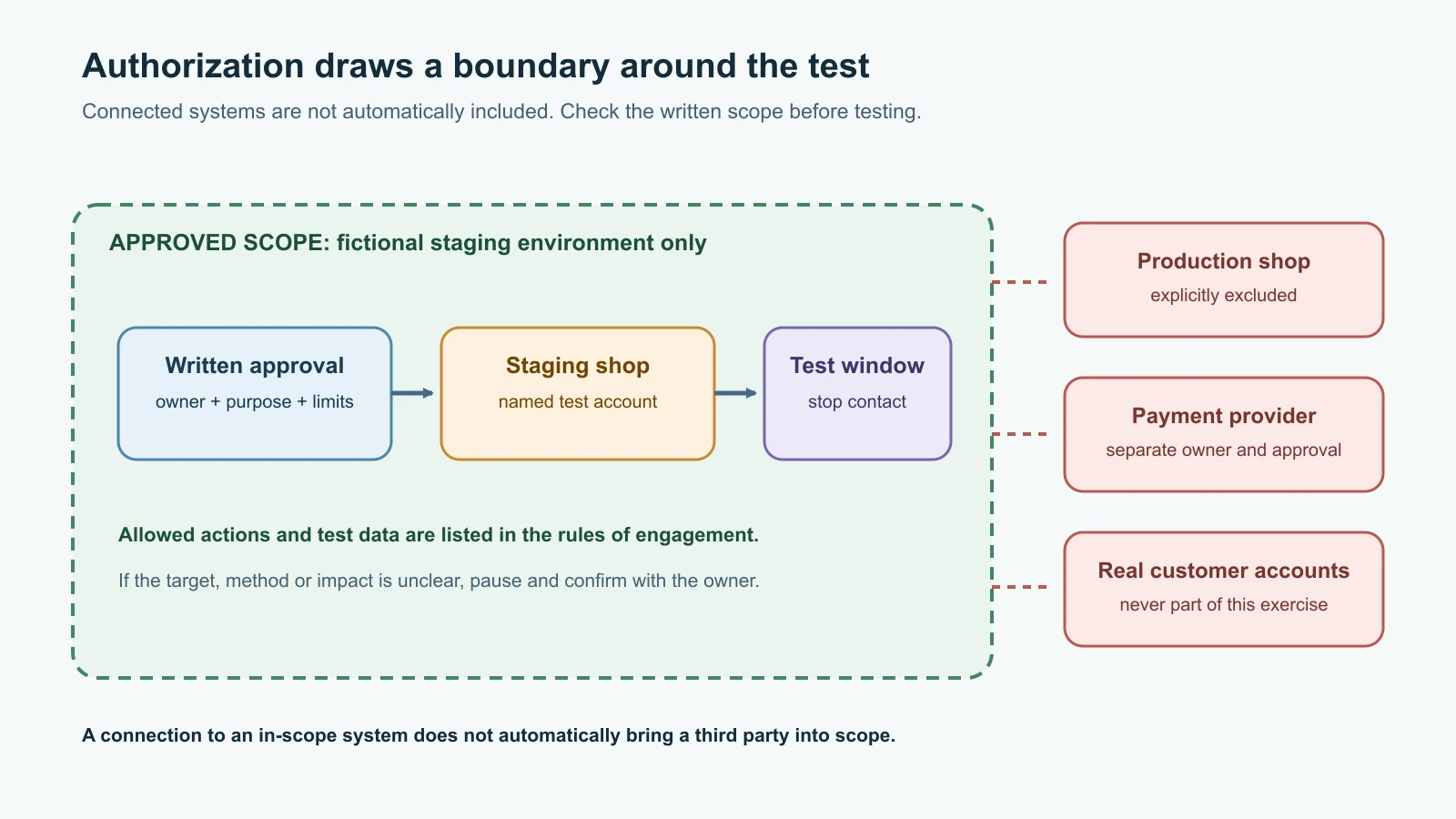
Ethical hacking is authorized security testing performed to find weaknesses and help an owner reduce risk. The word "ethical" does not create permission by itself. Intent is not enough: you need authorization from someone with the authority to grant it, and the work must stay inside the agreed boundaries. A company asking you to "check our website" does not automatically authorize you to test its payment provider, employees, cloud account, customer devices or a third-party service connected to it.
Use the principles from What Is Cyber Security? and the lab boundaries in Virtualization and Your Safe Cyber Security Lab. For a real engagement, get current written authorization that names the assets and the testing that is allowed. If the scope is ambiguous, pause and ask the owner to clarify before interacting with the system. Testing without that permission can be an offence under computer misuse laws such as the UK Computer Misuse Act 1990, the US Computer Fraud and Abuse Act (18 U.S.C. 1030) and sections 43 and 66 of India's Information Technology Act, 2000, even if nothing is damaged and even if you meant to help. Laws and contracts differ by location and circumstance; this lesson is not legal advice.
A training platform authorizes activity only in the lab environments assigned to you, and only under its current rules. TryHackMe's acceptable-use policy states that its lessons do not authorize testing other systems. The same habit should apply everywhere: follow the platform rules, competition rules, service terms and local law. A technique learned in a lab is knowledge, not consent to use it against an unrelated system.
Write rules of engagement
Rules of engagement (RoE) describe what an assessment is meant to accomplish and how it may be conducted. A short, clear RoE protects the owner, users and testers from different assumptions. It is part of the contract and authorization process, not a formality to fill in after scanning.
Before work begins, record:
| RoE item | What to make clear |
|---|---|
| Purpose | What question should the assessment answer, and who will use the result? |
| Authorized owner | Who can approve the work, and who is the technical point of contact? |
| Exact scope | Named domains, IP ranges, applications, accounts, APIs or lab machines; include exclusions. |
| Allowed methods | Which passive review, scanning, manual tests or configuration reviews are permitted? Which are prohibited? |
| Test accounts and data | Which accounts are supplied, what data is synthetic, and what must not be accessed or changed? |
| Schedule and rate limits | When may testing occur, at what intensity, and when must it stop? |
| Safety boundaries | No denial of service, persistence, destructive changes, data extraction or social engineering unless explicitly and separately approved. |
| Third parties | Which cloud, hosting, payment or identity providers are involved, and who obtains any additional approvals? |
| Emergency stop | Who can call a halt, how the tester is contacted, and how the tester confirms work has stopped? |
| Evidence and privacy | What can be recorded, where it is stored, who can access it and when it will be deleted or returned? |
| Deliverables | Report format, severity method, delivery date, recipients and retest expectations. |
The permission should match what you intend to do. Permission to scan a staging server does not necessarily authorize password guessing, testing employees, accessing customer data, or reaching adjacent systems. A bug-bounty policy may authorize only specific assets and techniques, with explicit exclusions and reporting instructions. Read it before testing; do not infer that an organization's public website or an in-scope hostname makes its whole infrastructure fair game.
Harbor Books' fictional scope note
Harbor Books gives its internal tester written approval to assess staging.harbor-books.example using a test account during a defined two-hour maintenance window. The goal is to review sign-in and role-based access for a fictional order-management workflow. Only synthetic orders are present. The test excludes the production shop, payment provider, staff accounts, denial-of-service testing, phishing, data deletion and persistence. The operations lead is the emergency contact. If the tester reaches real customer data or causes unexpected disruption, the instruction is to stop and contact the lead.
This example uses the reserved .example domain and does not refer to a real service. Its point is the level of precision: "test the shop" is vague, while a named environment, test account, purpose, exclusions, time and contact give people something concrete to follow.
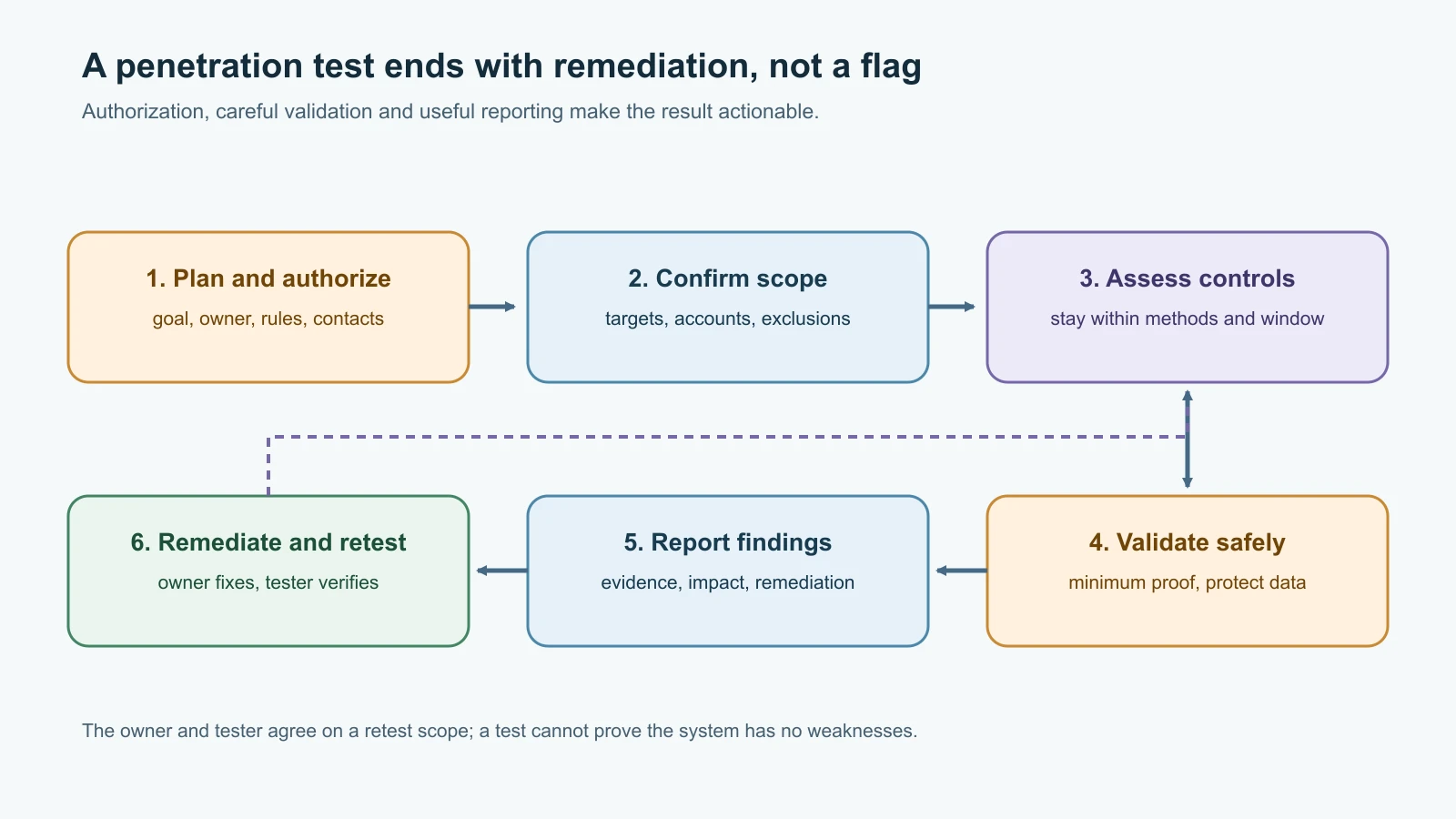
A penetration test is a planned assessment
A penetration test is a scoped assessment that uses a tester's perspective to identify and validate security weaknesses, then communicates their impact and possible fixes. It combines technical testing with judgment and documentation. It is not a guarantee that a system has no vulnerabilities. A test samples the agreed scope and time; a defect may be missed because it was out of scope, not visible, too risky to validate, or introduced after the test.
The process is iterative, but a useful beginner's outline is:
- Plan and authorize. Agree on the business question, team, authority, schedule, safety limits and deliverables.
- Map the scope. Confirm which assets and accounts are included, identify dependencies and exclusions, and verify the test environment.
- Understand the system. Review architecture, roles, normal workflows, threat assumptions and available documentation. Use only approved information-gathering methods.
- Assess controls. Check relevant configuration, authentication, authorization, input handling, exposed services or code against the agreed plan. A web test may use the OWASP Web Security Testing Guide as a topic reference.
- Validate carefully. Confirm whether a potential weakness is real and what impact it could have, using the least disruptive proof the owner approved. Do not collect unnecessary data or extend access just to demonstrate capability.
- Record evidence. Keep dates, affected assets, safe reproduction notes, screenshots or logs where allowed, and limitations. Protect the material as sensitive information.
- Report and debrief. Explain the root cause, risk, impact, evidence, scope limits and practical remediation to both technical and business readers.
- Remediate and retest. The owner fixes the issue. A scoped retest checks whether the fix works and whether it caused a new problem.
NIST SP 800-115 describes planning and conducting technical security tests, analyzing findings and developing mitigation strategies. OWASP's Web Security Testing Guide offers a web-focused set of testing areas and reporting guidance. Neither replaces the engagement's authorization or tailoring to the system's risk and business needs.
Know what kind of test you are doing
People use "security test" to describe different activities. Choosing the right one helps set expectations and prevents overclaiming what a result means.
| Activity | Main purpose | What it does not mean by itself |
|---|---|---|
| Vulnerability assessment | Find and prioritize possible weaknesses across a defined set of assets | That every finding has been manually validated or exploited |
| Penetration test | Carefully validate selected weaknesses and assess impact within an approved scope | A guarantee that no other weakness exists |
| Configuration review | Compare system settings with a policy, baseline or expected design | A full test of how the live application behaves |
| Code review | Inspect source and design for security defects | A check that every deployed service matches the reviewed code |
| Bug bounty | Invite reports under a published program scope and policy | Permission to test excluded assets or prohibited methods |
| Red-team exercise | Simulate selected adversary objectives to evaluate people, processes and controls | A routine vulnerability scan, or permission to target anything outside the plan |
| Capture the Flag (CTF) | Solve challenge tasks and find flags in a competition or training environment | A client assessment or authorization to test a similar real system |
Tests can complement each other. A vulnerability scan may find an outdated component; a code review may reveal why it is used unsafely; a penetration test may validate whether the flaw matters in a particular workflow. Monitoring and incident response provide another perspective by asking whether suspicious activity is visible and what the organization would do if testing or an actual attack produced an alert.
CTFs are practice, not client work
A Capture the Flag (CTF) is a structured challenge where participants solve tasks to find a flag, often a short text value submitted to a scoreboard. Challenges can cover web security, cryptography, digital forensics, reverse engineering, networking or general problem solving. In a "Jeopardy" style event, competitors solve independent challenges for points. Other events may have teams defending services while attacking other teams under special competition rules. The event's own rules determine what is allowed.
CTFs are useful for learning a tool in a bounded environment, practicing how to break a problem into steps, and getting comfortable with command-line output. They often simplify systems and reward puzzle solving. Real assessments involve business context, written authorization, service availability, data protection, stakeholder communication, evidence handling and a report the owner can act on. Capturing a flag is not the same as explaining a risk and helping someone fix it.
Respect challenge rules and intellectual property. Some educational platforms ask learners not to publish walkthroughs or solutions because other students use the same material. A competition may prohibit sharing hints during play or attacking the scoring infrastructure. Before posting a write-up, check whether the challenge is still active and what its creator permits. Do not upload a platform's private content or assessment material elsewhere.
Choose a practice environment deliberately
The platforms below serve different learning styles. Their offerings, rules, account models and terms can change, so read the official rules before creating an account or launching a lab. This is a comparison of learning environments, not an endorsement or a price guide.
| Environment | What it is useful for | Boundary to keep in mind |
|---|---|---|
| Hack The Box (HTB) Academy and Labs | Academy offers guided modules and paths; the separate Labs platform offers more exploratory practice. The provider describes both as hands-on learning environments. | Academy and Labs are separate products. Use only the targets and routes assigned by the platform, and follow CTF or exam rules. |
| TryHackMe | Browser-accessible, guided rooms and learning paths for hands-on practice. | Its current acceptable-use policy limits activity to assigned labs or systems you own or have current written permission to test. A room does not authorize activity elsewhere. |
| VulnHub | Community-listed virtual machines intended as practice targets that you download and run locally. | Treat each VM as untrusted software: use a disposable virtual machine, isolated host-only network, snapshots and no bridged connection to a real network. Check the individual machine notes. |
| picoCTF / CyLab Security Academy | Carnegie Mellon University's free learning platform for foundational and competitive cybersecurity learning. The picoCTF site now directs learners to CyLab Security Academy; it says existing picoCTF logins created before 8 May 2026 can be used there. | Follow the platform rules and any classroom or competition boundaries. Do not publish protected challenge solutions where the platform asks you not to. |
| pwn.college | A hands-on "dojo" for core cybersecurity and computing skills, maintained by Arizona State University and used in its curriculum. | The site asks users not to publish challenge write-ups, walkthrough videos or solution livestreams. Respect the rules presented before entering material. |
The right first platform is the one whose format matches what you need to learn. A guided room can be less intimidating than an unexplained target. A local VM offers more control but requires safe isolation and careful handling. A timed CTF can be motivating, but it may reward speed over careful documentation. Try beginner material first, take notes, and pause when a task asks you to test anything outside the assigned environment.
Kali and Parrot are tool environments
Kali Linux and Parrot Security are Linux distributions that include collections of security and forensic tools. Kali's documentation describes it as a distribution geared toward penetration testing and security auditing, and notes that it assumes some Linux familiarity. Parrot describes itself as a cybersecurity toolkit and secure working environment, with a dedicated Security edition. Neither system is an exploit by itself; they are operating environments for authorized work.
Beginners do not need to install either distribution to start learning. Earlier lessons already use Linux fundamentals and safe virtualization. A browser lab may provide its own environment, while local training can use a VM isolated from the host's ordinary network. When you do download a distribution, use its official source and follow its verification instructions. Keep it updated, use a normal user account for daily activity, and learn what each tool does before running it.
An installed toolkit does not imply a target is permitted. A port scanner, web proxy or password-testing tool can disrupt a service or expose sensitive information if pointed at the wrong place. Configure your practice network so the training target and tester VM can communicate with each other but are separated from home, school, work and public networks. The lab topology from Virtualization and Your Safe Cyber Security Lab is designed for this sort of isolated exercise.
Write a useful report
A responsible assessment ends with communication, not a screenshot of a shell or a list of tool output. The report should make it possible for the owner to understand what was tested, what the tester found, why it matters, what evidence supports the conclusion, and what to do next.
For each finding, record:
- A concise title and affected in-scope asset.
- A risk rating and the reason for it, including business context.
- The root cause, explained in terms the system owner can investigate.
- Evidence and a safe description of how the issue was validated.
- The potential impact, with clear limits on what was actually observed.
- A practical remediation or mitigation path.
- Any uncertainty, environmental limitation or related control that reduced impact.
- Retest status and date after the owner addresses it.
Avoid including passwords, session tokens, personal data or unnecessary exploit detail in the report. If sensitive proof is required, agree on how to store and transfer it. Keep executive summaries concise and non-alarmist; put technical detail where engineers can use it. A finding should describe evidence, not attribute intent or blame to a person without an appropriate investigation.
A miniature fictional finding
Finding: Staging order records did not consistently enforce the expected staff role check. Evidence: In the approved synthetic test account, the tester observed an order summary available through a workflow intended for another role. No real customer records were present or accessed. Impact: If the same behavior existed in production, a user with a lower-privilege account might be able to view information beyond their job role. Recommendation: Enforce authorization on the server for each order request, add role-based tests, and review related endpoints. Retest: Pending owner remediation.
This example avoids publishing an operational recipe and makes clear which environment and evidence support the claim. It does not say the production shop is vulnerable.
A learning path that builds judgment
You do not need to memorize every tool. Build a foundation in operating systems, networking, web requests, identity, logs and secure configuration, then practice one topic at a time in a legal lab. Keep a notebook with the question, scope, method, observations, interpretation and next step. Separate what you observed from what you think it means.
When you finish a room or challenge, ask what the underlying weakness was, what control would prevent it, what evidence a defender might see, and how you would describe it to a system owner. Revisit the hardening and monitoring ideas from Hardening and Endpoint Security, Network Defense, Logging and SIEM, and Incident Response and Digital Forensics. The goal is to connect testing with prevention and response, not to collect flags without understanding them. References such as GTFOBins and WADComs, introduced in Malware, Exploits and System Attacks, are useful in the same way: read an entry to learn which built-in tools a defender should restrict and watch, not as a menu to try on systems outside your lab.
Mistakes beginners make
- Assuming that "ethical hacker" or "educational" makes an activity authorized.
- Treating a company's name, domain or cloud account as proof that all connected systems are in scope.
- Starting active testing before confirming the target, method, time window and emergency contact.
- Assuming a CTF flag, tutorial or lab assignment grants permission to test a real system.
- Forgetting that cloud, payment, identity and hosting services may belong to third parties with separate approval requirements.
- Connecting a vulnerable training VM to a bridged home, school or work network.
- Installing Kali or Parrot before learning the Linux and networking basics needed to use them safely.
- Running a scanner without understanding its load, request behavior or stop conditions.
- Overstating a potential issue as confirmed compromise or claiming a system is secure because one test found nothing.
- Publishing challenge solutions or sensitive assessment evidence against the platform or client rules.
- Sending a report that contains secrets, personal data or raw output instead of useful, limited evidence.
- Ending the engagement without a clear remediation owner or retest plan.
Recap and try it yourself
Ethical security testing begins with permission, defined scope and safe rules of engagement. A penetration test plans, assesses, validates carefully, documents findings, reports risk and supports remediation. A CTF or practice lab can help build skills, but its authorization stops at the platform's assigned environment and stated rules. Kali and Parrot provide security tools; they do not authorize their use. Good reports distinguish evidence from assumptions and give owners a practical path to reduce risk.
Try it yourself by drafting a one-page rules-of-engagement note for a fictional Harbor Books staging application. Name one in-scope host, one out-of-scope service, one test account, the purpose, schedule, prohibited actions, emergency contact and report recipient. Then write a miniature finding from a synthetic login or role test, clearly labeling what you observed and what remains hypothetical. Do not test a real website, account, network or device for this exercise.
Sources checked on 12 November 2026: roadmap.sh Cyber Security roadmap; NIST SP 800-115, Technical Guide to Information Security Testing and Assessment; OWASP Web Security Testing Guide and testing framework; TryHackMe Acceptable Use Policy; Hack The Box Academy platform overview, Academy and Labs overview and CTF rules; VulnHub; Carnegie Mellon CyLab Security Academy notice; Arizona State University's pwn.college; Kali Linux overview, whether Kali is appropriate and official image verification; and ParrotOS documentation. Platform descriptions and rules were checked on this date and may change. All Harbor Books details are fictional. No platform account was created and no system was tested.