
Cyber Security course · lesson 1 of 24
- 1What Is Cyber Security?
- 2Fundamental IT Skills for Cyber Security
- 3Operating Systems for Security: Windows, Linux and macOS
- 4Virtualization and Your Safe Cyber Security Lab
- 5Networking Fundamentals for Cyber Security
- 6Network Services and Infrastructure for Cyber Security
- 7Network Troubleshooting and Traffic Analysis Tools
- 8Core Security Concepts Every Defender Uses
- 9Authentication and Access Control Explained
- 10Cryptography Basics for Cyber Security
- 11Secure Protocols and Wireless Security
- 12The Threat Landscape and Security Frameworks
- 13Social Engineering and Human Attacks
- 14Network and Wireless Attacks and How to Detect Them
- 15Web Attacks and the OWASP Top 10
- 16Malware, Exploits and System Attacks
- 17Hardening and Endpoint Security
- 18Network Defense, Logging and SIEM
- 19Vulnerability Management and Threat Hunting
- 20Incident Response and Digital Forensics
- 21Cloud Security Basics
- 22Scripting for Security
- 23Ethical Hacking, CTFs and Penetration Testing
- 24Cyber Security Standards, Certifications and Capstone
After this lesson, you should be able to explain what cyber security protects, describe a security problem in terms of confidentiality, integrity and availability, tell red, blue and purple teams apart, and name the rule that comes before every tool in this course: test only what you own or have written permission to test. You do not need any technical background. Every term is defined the first time it appears.
What cyber security means
Cyber security is the work of protecting computers, networks, software and the information they hold from being accessed, changed, damaged or made unavailable by people who should not be able to do those things. The US National Institute of Standards and Technology (NIST) keeps a public glossary of security terms, and one of its shorter definitions describes cybersecurity as "the process of protecting information by preventing, detecting, and responding to attacks." You will see both spellings, "cyber security" and "cybersecurity". They mean the same thing.
That short definition contains three jobs. Preventing means making attacks harder: strong passwords, software updates, firewalls and careful settings. Detecting means noticing when something goes wrong anyway, usually by collecting and reading logs, which are records that computers write about what happened on them. Responding means limiting the damage, removing the attacker and getting back to normal. A team that only prevents has no plan for the day prevention fails.
Security is also about more than technology. A shop assistant who reads a password aloud on the phone, a manager who approves a fake invoice, or a backup that nobody has tested are all security problems. Most of this course is technical, but people and processes appear in almost every lesson because attackers use them.
Three words come up constantly, so it helps to fix them now:
- An asset is anything of value that needs protecting: a laptop, a customer list, a website, a payment terminal, even a company's reputation.
- A threat is anything that could harm an asset: a criminal, a careless employee, a flood, a software bug.
- A vulnerability is a weakness that a threat could use, such as an unpatched program, a reused password or an unlocked server room.
Risk combines these: how likely it is that a threat uses a vulnerability, and how bad the result would be. Security work is mostly about deciding which risks to reduce first with limited time and money. The lesson on core security concepts treats risk properly. For now, treat it as the question "what could go wrong here, and how much would it hurt?"
The CIA triad
The CIA triad is a long-standing way to describe what security is trying to keep true about information. CIA stands for confidentiality, integrity and availability. It has nothing to do with the intelligence agency. US federal law (44 U.S.C. 3552) defines information security using these three properties, and the wording is worth reading closely:
- Confidentiality is "preserving authorized restrictions on access and disclosure, including means for protecting personal privacy and proprietary information." In plain terms, only the right people can see the information.
- Integrity is "guarding against improper information modification or destruction." The information is accurate and has not been changed by someone who should not change it.
- Availability is "ensuring timely and reliable access to and use of information." The people who need the information or system can use it when they need it.
Each property can fail on its own, and each failure feels different to the people affected. If a customer list leaks to a stranger, confidentiality failed, even though the list is still accurate and still available. If someone quietly changes the bank account number on a supplier's invoice, integrity failed. If ransomware (malicious software that locks files and demands payment to unlock them) encrypts every file on the shop computer, availability failed, and confidentiality may have failed too if the attackers copied files before locking them.
The triad also helps when security goals pull against each other. Locking a file away in a safe that nobody can open protects confidentiality and destroys availability. Letting every employee edit every record is convenient and puts integrity at risk. A good security decision names which property matters most for a given asset and accepts sensible trade-offs for the others.
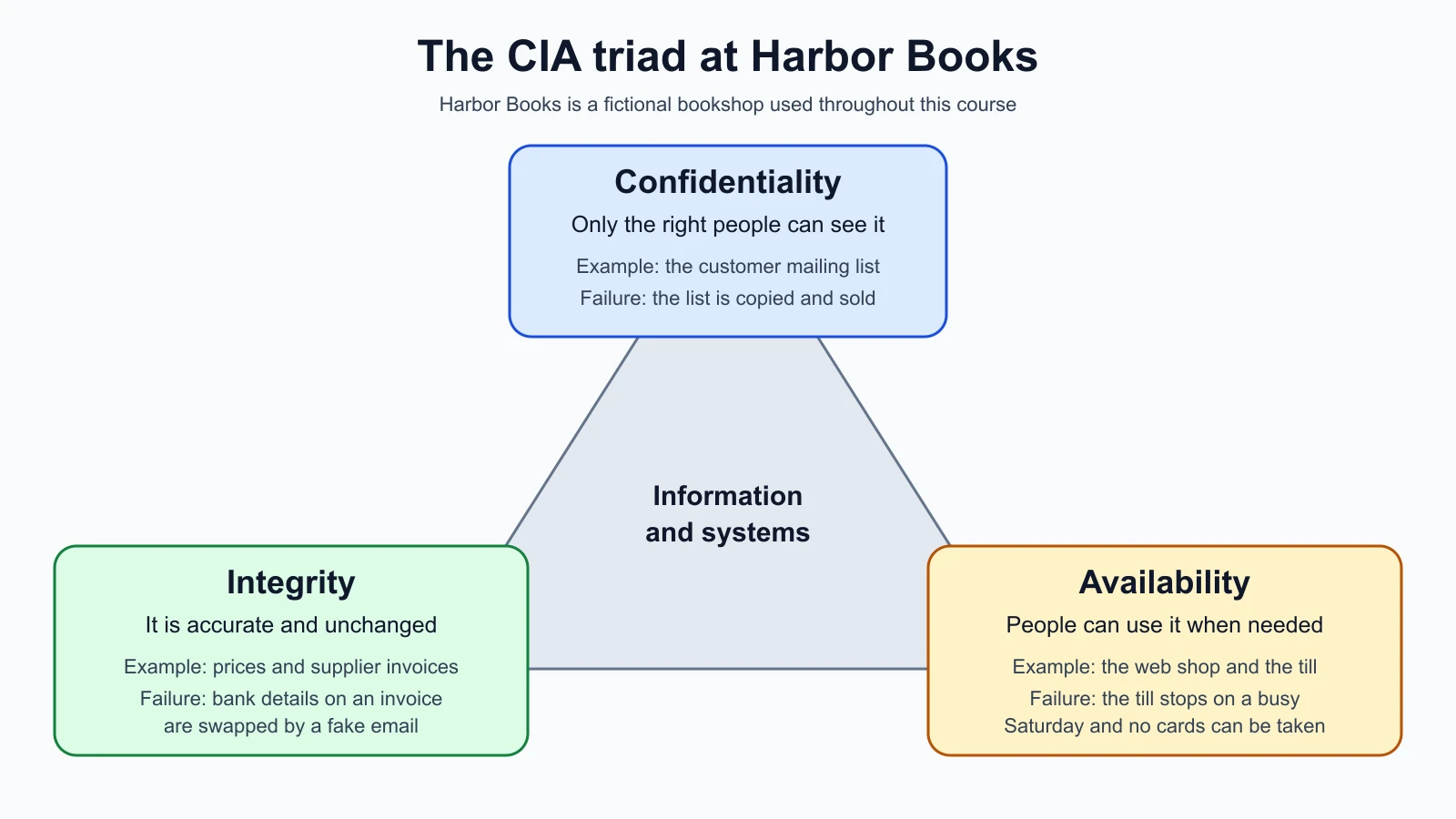
You will use the triad throughout the course. When a later lesson explains an attack, ask which of the three properties it breaks. When a lesson explains a defense, ask which property it protects. That habit turns a long list of technical terms into something you can reason about.
Meet Harbor Books, the case for this course
Harbor Books is a fictional small bookshop invented for this course. It has a front-office PC where the owner does the accounts, a point-of-sale machine (the till that takes card payments), a Wi-Fi network shared by staff and, on a separate password, customers, a small web shop, and a cloud storage account that holds invoices and the customer mailing list. Four people work there. Nobody is a security specialist.
Harbor Books is useful because it looks like many real small organizations. It has things worth stealing and things worth breaking, a limited budget, and staff who are busy with other work. Each module of the course protects one part of the shop, shows how that part is attacked in a safe practice lab, and shows how to notice an attack in progress. By the capstone you will have secured the shop, tested it in the lab, monitored it and written an incident report.
Here is the shop through the CIA triad:
| Harbor Books asset | Most important property | What failure looks like |
|---|---|---|
| Customer mailing list | Confidentiality | The list is copied and sold, or sent to the wrong person |
| Prices in the web shop | Integrity | Someone changes a price to 1 and orders 50 books |
| Supplier invoices | Integrity | A fake email changes the bank details on an invoice |
| Point-of-sale machine | Availability | The till stops on a Saturday and no cards can be taken |
| Web shop | Availability | The site is down during a holiday sale |
No row is limited to one property. The customer list also needs integrity, because a corrupted list is useless, and availability, because marketing emails need it. The table shows where the owner would lose the most if that one property failed, which is where protection should start.
Red, blue and purple teams
Security people often describe their work with team colors.
A red team is a group of people authorized to act like an attacker. The US Committee on National Security Systems glossary (CNSSI 4009), listed in NIST's glossary, defines a red team as "a group of people authorized and organized to emulate a potential adversary's attack or exploitation capabilities" against an organization's security. Its purpose is to show the defenders what a real attack could do and which defenses work. The key word is authorized. A red team works to a written agreement with the owner of the systems it tests.
A blue team defends. The same glossary describes it as the group responsible for defending an organization's use of information systems by maintaining its security posture, which means its overall state of protection. Blue team work includes setting up systems safely, watching logs and alerts, investigating suspicious events and responding to incidents. An incident is a security event that actually harms or threatens an organization, such as a stolen password being used or a server being infected.
A purple team is less a separate team than a way of working: red and blue sit together, the red side runs a test, the blue side checks whether its tools noticed, and both sides fix the gaps and run the test again. There is no single official definition, and organizations use the term differently. What matters is the habit it describes: attack findings are only useful when they improve defense.
Many people picture security as attacking, because attacks make better films. Day to day, a large share of security work is building, monitoring and fixing systems. This course teaches both sides, with defense next to every attack.
Roles and career paths
Security is a family of jobs rather than one job. NIST's NICE Workforce Framework for Cybersecurity (the NICE Framework) gives employers a shared vocabulary for describing that work. Its current components, version 2.2.0, group work roles into five categories:
- Oversight and Governance: setting policy, managing risk, making sure the organization meets laws and contracts, and leading security programs.
- Design and Development: designing and building secure systems and software.
- Implementation and Operation: installing, configuring and running systems and networks day to day.
- Protection and Defense: watching for attacks, analyzing alerts, testing for weaknesses and responding to incidents.
- Investigation: gathering and analyzing digital evidence, for example after a crime or a serious incident.
Job titles you will see in adverts map onto these categories. A security operations center (SOC) analyst watches alerts and investigates them, which is protection and defense. A penetration tester runs authorized attacks to find weaknesses before criminals do. A security engineer builds and configures defenses. A governance, risk and compliance (GRC) analyst works on policies, audits and risk. A digital forensics investigator examines evidence after an incident. Titles vary between employers, so read the duties in an advert, not just the title.
Many people arrive in security from another IT job: help desk, system administration, networking or software development. That background helps, because you cannot protect a network you do not understand. That is why the first two modules of this course are about computers, operating systems and networks, and only then about attacks. Certifications can help with a first job, and the final lesson compares the common ones. Hands-on practice in a lab matters at least as much, and this course builds one with you.
Law and ethics come before any tool
This is the most important section of the lesson. Many tools in this course, such as port scanners, password crackers and packet capture programs, are legal to download and are used every day by defenders. Using them against a computer, network or account that you do not own and have not been given permission to test can be a crime, even if you mean no harm and even if you change nothing.
The laws differ between countries, but they share one idea: access needs authorization. Three examples, as awareness and not legal advice:
- United Kingdom. The Computer Misuse Act 1990 makes it an offence, under section 1, to try to access a program or data on a computer when you know that access is unauthorized. Prosecutor guidance from the Crown Prosecution Service notes that the maximum penalty for this basic offence is two years in prison, with higher maximums for the more serious offences in later sections.
- United States. The Computer Fraud and Abuse Act (18 U.S.C. 1030) covers intentionally accessing a computer without authorization, or exceeding authorized access, and obtaining information. "Exceeding authorized access" means you had some permission and used it to reach information you were not entitled to.
- India. Under section 43 of the Information Technology Act, 2000, a person who accesses a computer, computer system or network without permission of the owner or person in charge is liable to pay compensation to the person affected. Section 66 makes the same acts a criminal offence when done dishonestly or fraudulently, punishable by up to three years in prison, a fine of up to five lakh rupees, or both.
Look at what these laws have in common. None of them asks whether you broke anything. They ask whether you had permission. "I was only looking" and "I wanted to show them the weakness" are not defenses. If you live elsewhere, look up your own country's computer misuse law, and for anything beyond personal learning in your own lab, ask a qualified lawyer.
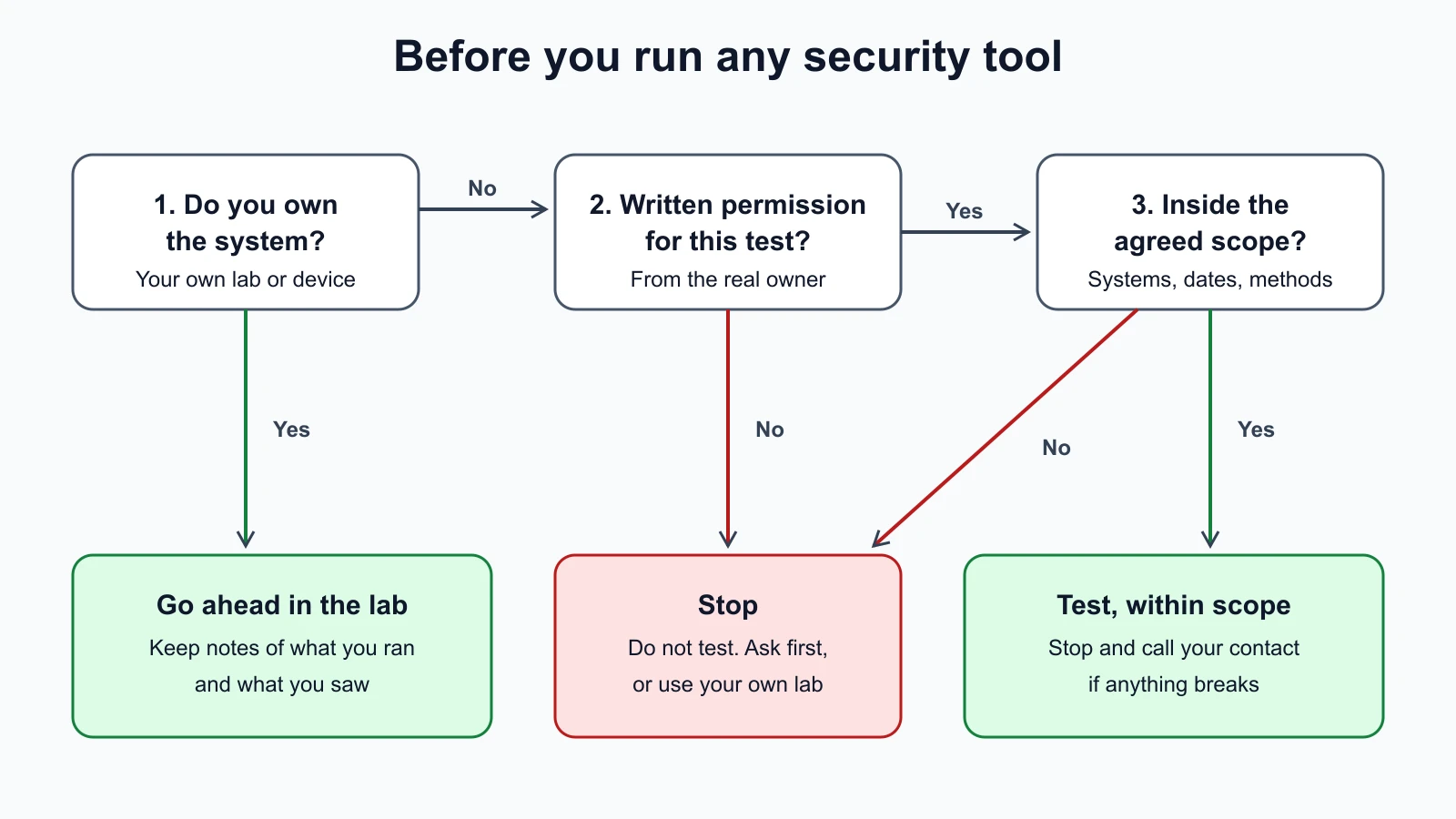
Permission has to be specific. A friend saying "sure, try to hack my website" over a message is weak evidence, and it may not even be theirs to give if the site runs on a hosting company's servers, because the hosting company's terms also apply. Professional testers work from a signed document that names the systems in scope, the dates, the allowed techniques, the forbidden ones and who to call if something breaks. You will write one in the lesson on ethical hacking and penetration testing.
What this course will and will not do
To keep you on the right side of the law, every exercise in this course follows the same rules:
- You only test machines you own: virtual machines in your own lab, your own home network, or practice targets built to be attacked, such as deliberately vulnerable web apps you run on your own computer, and legal training platforms used under their terms.
- Attack lessons explain how the attack works, how to recognize it in logs and traffic, how to test for it safely in the lab, and how to prevent it. They do not give step-by-step instructions for breaking into real accounts, devices or networks.
- Any output shown is either from a command run in a local lab or clearly labelled as illustrative.
When you find a real weakness by accident
Sooner or later you may notice something wrong on a site you use, such as another customer's order appearing in your account. Do not keep exploring to see how far it goes. Write down what you saw, stop, and report it to the organization through its published security contact. Many organizations publish one on their website, and some put it in a file at /.well-known/security.txt, a format described in RFC 9116. This is called responsible disclosure, or coordinated vulnerability disclosure: the finder tells the owner privately, the owner fixes the problem, and details are published only after a fix is available. The US Cybersecurity and Infrastructure Security Agency (CISA) runs a coordinated disclosure process for vulnerabilities that affect many organizations, which shows how seriously the security field treats doing this in order.
How to use this course
The course has 24 lessons in seven modules. Read them in order, because later lessons assume the earlier ones.
- Foundations (lessons 1 to 4): this lesson, then IT skills, operating systems, and building your safe practice lab with virtual machines.
- Networking (lessons 5 to 7): how data moves between computers, the services that make networks work, and tools for seeing traffic.
- Security concepts (lessons 8 to 11): defense in depth, zero trust, authentication, cryptography and secure protocols.
- Threats and attacks (lessons 12 to 16): how attackers think, social engineering, network, web and system attacks, each paired with detection and defense.
- Defense and response (lessons 17 to 20): hardening, monitoring and logs, vulnerability management, incident response.
- Cloud and code (lessons 21 and 22): cloud security and scripting.
- Practice and career (lessons 23 and 24): legal practice platforms, standards, certifications and the Harbor Books capstone.
Plan time for practice, not just reading. Each lesson ends with a short task, and from Virtualization and Your Safe Cyber Security Lab onward most tasks happen in your lab.
If you are interested in the security of AI systems specifically, the AI Red Teaming course builds on the same authorization rules for testing language models and AI products. Take this foundations course first if networks and operating systems are new to you.
Mistakes beginners make
-
Treating security as a list of tools. Learners collect scanners and cheat sheets without understanding what they are protecting.
Fix: For every tool you meet, name the asset it protects and the CIA property it serves.
-
Testing something they do not own "just to see". Scanning a school network, a neighbor's Wi-Fi or a public website can be unauthorized access under computer misuse laws.
Fix: Keep every test inside your own lab or a platform built for practice, and get written permission for anything else.
-
Skipping the fundamentals. Jumping straight to attack tools means you cannot read what they show you.
Fix: Work through the operating system and networking lessons before the attack lessons, even if they feel slow.
-
Thinking security is only the attacker's side. Much of the work is building, monitoring and fixing.
Fix: For every attack you learn, also learn how it shows up in logs and how to prevent it.
-
Exploring a real weakness further after finding it. Curiosity can turn an accident into an offence.
Fix: Stop, write down what you saw, and report it through the organization's security contact.
Recap and try it yourself
Cyber security protects computers, networks and information by preventing attacks, detecting them and responding to them. The CIA triad gives you three questions to ask about any asset: who can see it (confidentiality), can it be trusted (integrity), and can people use it when they need to (availability). Red teams act as authorized attackers, blue teams defend, and purple teaming joins the two so findings improve defenses. Security careers span governance, design, operations, defense and investigation. Above everything: test only what you own or have written permission to test.
Try it: pick an organization you know well, such as your workplace, a club or your household. List five assets it depends on. For each one, write which CIA property matters most and one sentence describing what failure would look like, using the Harbor Books table as a model. Do not test anything; this is a thinking exercise. Keep the list, because you will build on it when you learn about risk and threat modeling.
Sources checked on 12 November 2026: NIST glossary: cybersecurity; 44 U.S.C. 3552 definitions; NIST glossary: red team; NIST glossary: blue team; NICE Framework (NICCS); CPS guidance on the Computer Misuse Act; 18 U.S.C. 1030; IT Act 2000 section 43 text (CIS India); IT Act 2000 section 66 text (CIS India); CISA coordinated vulnerability disclosure; RFC 9116, security.txt.