
Cyber Security course · lesson 15 of 24
- 1What Is Cyber Security?
- 2Fundamental IT Skills for Cyber Security
- 3Operating Systems for Security: Windows, Linux and macOS
- 4Virtualization and Your Safe Cyber Security Lab
- 5Networking Fundamentals for Cyber Security
- 6Network Services and Infrastructure for Cyber Security
- 7Network Troubleshooting and Traffic Analysis Tools
- 8Core Security Concepts Every Defender Uses
- 9Authentication and Access Control Explained
- 10Cryptography Basics for Cyber Security
- 11Secure Protocols and Wireless Security
- 12The Threat Landscape and Security Frameworks
- 13Social Engineering and Human Attacks
- 14Network and Wireless Attacks and How to Detect Them
- 15Web Attacks and the OWASP Top 10
- 16Malware, Exploits and System Attacks
- 17Hardening and Endpoint Security
- 18Network Defense, Logging and SIEM
- 19Vulnerability Management and Threat Hunting
- 20Incident Response and Digital Forensics
- 21Cloud Security Basics
- 22Scripting for Security
- 23Ethical Hacking, CTFs and Penetration Testing
- 24Cyber Security Standards, Certifications and Capstone
After this lesson, you should be able to name the ten categories in the OWASP Top 10:2025, explain how SQL injection, cross-site scripting (XSS), cross-site request forgery (CSRF), directory traversal and broken access control work, recognize each in code and in logs, and fix each one the way OWASP recommends. Every attack is shown on a small, fictional "Harbor Books shop" module that runs only in memory on your own computer, with a vulnerable version and a fixed version side by side and tests that prove the difference.
Law and lab rules
Testing a website for these flaws without the owner's written permission is unauthorized access under computer misuse laws, even if you only "check" a login form or change a number in a URL. The rules from What Is Cyber Security? apply in full. Everything in this lesson runs against code on your own machine. If you want to practise against a full web application later, use an intentionally vulnerable training app that you run yourself in your lab, or a legal practice platform under its terms, as covered in the lesson on ethical hacking. This is awareness, not legal advice.
How a web request travels
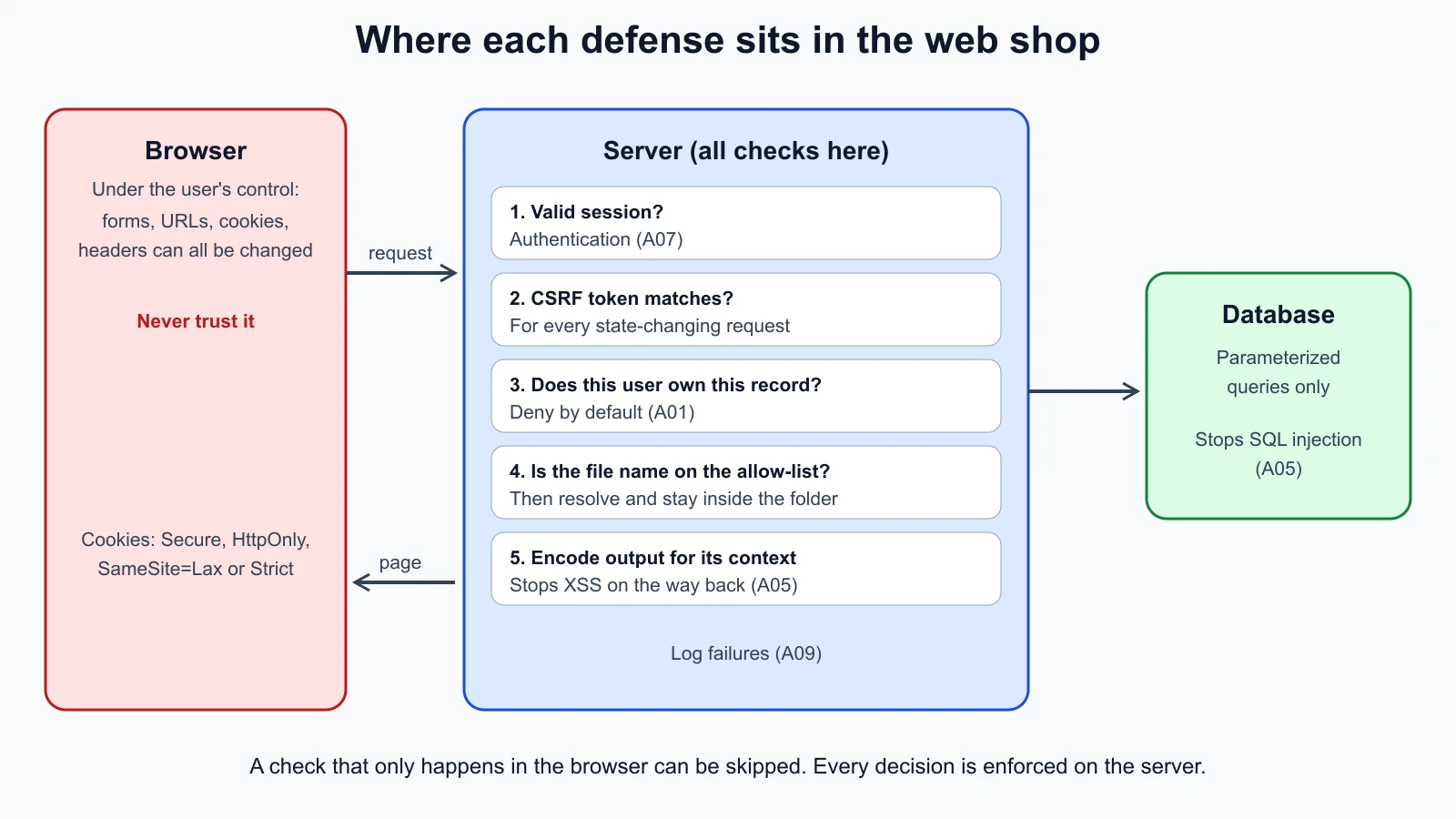
A web application has three parts that matter here: the browser, which shows pages and runs their JavaScript; the server, which receives requests, applies the business rules and builds responses; and the database and files the server uses. Everything the browser sends, including form fields, URL parameters, cookies and headers, is under the user's control, and an attacker can change any of it with nothing more than the browser's developer tools.
That gives the single most important rule of web security: never trust input from the browser, and enforce every decision on the server. Most of the attacks below are one way or another of breaking that rule.
The OWASP Top 10:2025
The OWASP Top 10 is an awareness document from the Open Worldwide Application Security Project listing the most critical risks to web applications. The current edition is the Top 10:2025:
| ID | Category | In one line |
|---|---|---|
| A01 | Broken Access Control | Users can act outside their permissions, such as viewing someone else's order |
| A02 | Security Misconfiguration | Default settings, unnecessary features, verbose errors |
| A03 | Software Supply Chain Failures | Vulnerable or tampered components, libraries and build tools |
| A04 | Cryptographic Failures | Sensitive data not protected, weak or misused cryptography |
| A05 | Injection | Untrusted input interpreted as code or commands, including SQL injection and XSS |
| A06 | Insecure Design | Missing security thinking in the design itself |
| A07 | Authentication Failures | Weak login, session and credential handling |
| A08 | Software or Data Integrity Failures | Trusting updates, data or code without checking integrity |
| A09 | Security Logging and Alerting Failures | Attacks not recorded or not noticed |
| A10 | Mishandling of Exceptional Conditions | Errors and unusual states handled in unsafe ways |
Several of these connect to earlier lessons: cryptographic failures to Cryptography Basics for Cyber Security, authentication failures to Authentication and Access Control Explained, and logging to the upcoming lesson on network defense and SIEM. This lesson concentrates on the attacks you can see in a few lines of code.
The practice code
The module below, harbor_shop.py, uses only Python's standard library. It creates a tiny in-memory database with two fictional customers, Ana and Ben, and defines a vulnerable (_unsafe) and a fixed (_safe) version of each feature. Nothing listens on the network.
1# harbor_shop.py
2import hashlib
3import hmac
4import html
5import re
6import sqlite3
7from pathlib import Path
8
9
10def make_db() -> sqlite3.Connection:
11    db = sqlite3.connect(":memory:")
12    db.execute("CREATE TABLE orders (id INTEGER PRIMARY KEY, email TEXT, owner TEXT, total REAL)")
13    db.executemany(
14        "INSERT INTO orders (email, owner, total) VALUES (?, ?, ?)",
15        [("ana@example.com", "ana", 18.50), ("ben@example.com", "ben", 42.00)],
16    )
17    return db
18
19
20# SQL injection
21def find_orders_unsafe(db: sqlite3.Connection, email: str) -> list:
22    return db.execute(f"SELECT id, total FROM orders WHERE email = '{email}'").fetchall()
23
24
25def find_orders_safe(db: sqlite3.Connection, email: str) -> list:
26    return db.execute("SELECT id, total FROM orders WHERE email = ?", (email,)).fetchall()
27
28
29# Cross-site scripting
30def render_review_unsafe(text: str) -> str:
31    return f"<p class='review'>{text}</p>"
32
33
34def render_review_safe(text: str) -> str:
35    return f"<p class='review'>{html.escape(text)}</p>"
36
37
38# Path traversal
39def read_invoice_unsafe(base: Path, name: str) -> str:
40    return (base / name).read_text()
41
42
43def read_invoice_safe(base: Path, name: str) -> str:
44    if not re.fullmatch(r"INV-\d{1,6}\.txt", name):
45        raise PermissionError("invalid invoice name")
46    path = (base / name).resolve()
47    if not path.is_relative_to(base.resolve()):
48        raise PermissionError("outside invoice folder")
49    return path.read_text()
50
51
52# Broken access control
53def get_order_unsafe(db: sqlite3.Connection, order_id: int, user: str) -> tuple | None:
54    return db.execute("SELECT id, email, total FROM orders WHERE id = ?", (order_id,)).fetchone()
55
56
57def get_order_safe(db: sqlite3.Connection, order_id: int, user: str) -> tuple | None:
58    return db.execute("SELECT id, email, total FROM orders WHERE id = ? AND owner = ?", (order_id, user)).fetchone()
59
60
61# Cross-site request forgery
62def csrf_token(server_key: bytes, session_id: str) -> str:
63    return hmac.new(server_key, session_id.encode(), hashlib.sha256).hexdigest()
64
65
66def change_email_allowed(server_key: bytes, session_id: str, submitted_token: str | None) -> bool:
67    if not submitted_token:
68        return False
69    return hmac.compare_digest(csrf_token(server_key, session_id), submitted_token)
SQL injection
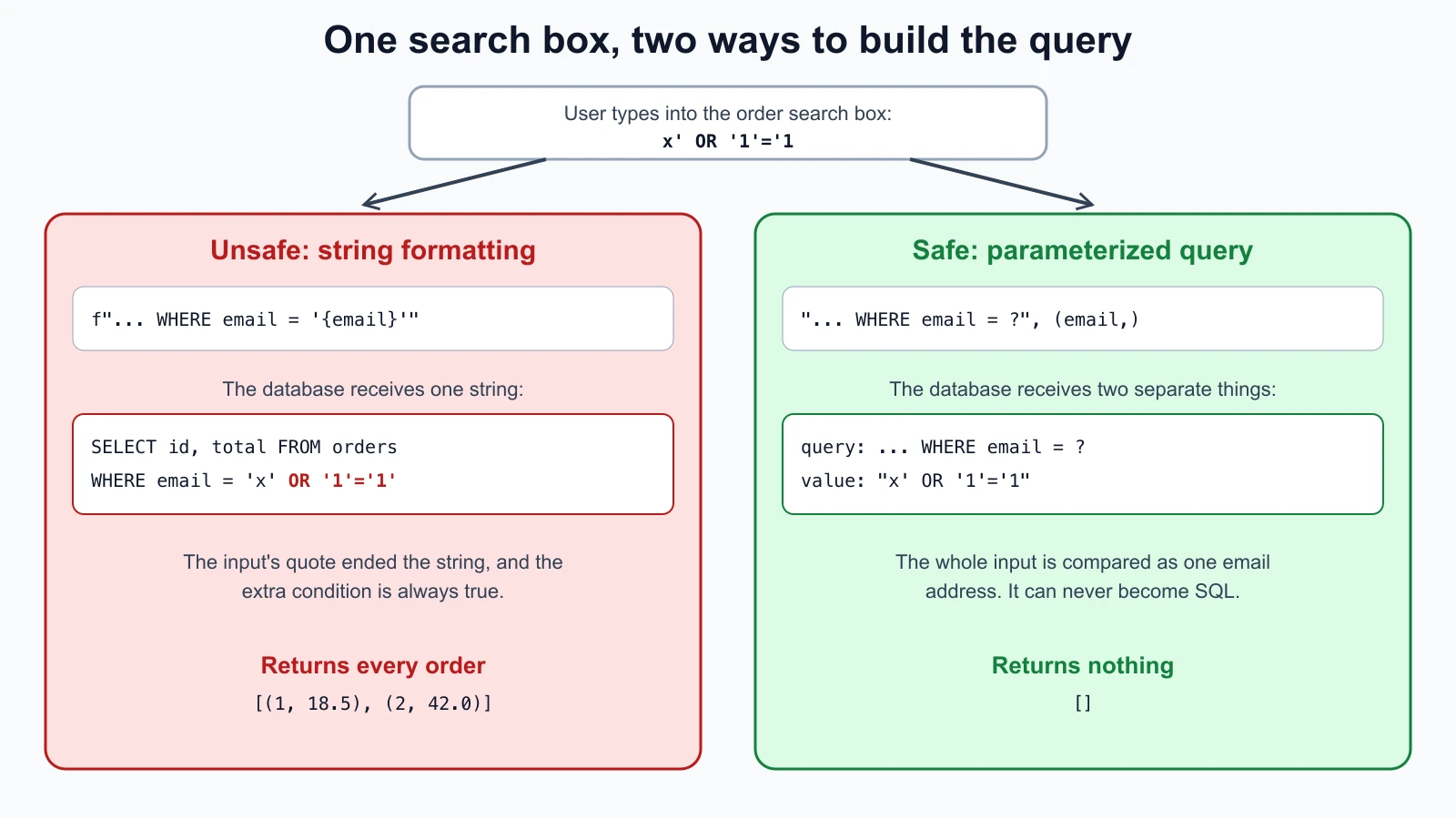
SQL injection happens when user input is pasted into a database query as text, so the input can change the query's meaning. Look at find_orders_unsafe: it builds the query with an f-string. A normal email produces a normal query. But if someone types the classic training string x' OR '1'='1 into the search box, the query becomes:
1SELECT id, total FROM orders WHERE email = 'x' OR '1'='1'The quote in the input closed the string early, and OR '1'='1' is always true, so the database returns every order. In a real shop that could mean every customer's orders, or with other input, changing or deleting data.
The fix is in find_orders_safe: a parameterized query with a ? placeholder, passing the value separately. OWASP's SQL Injection Prevention Cheat Sheet states the principle as defining the SQL structure separately from its data values and then binding those values through the database API, and it discourages manual escaping. Python's own sqlite3 documentation says to always use placeholders instead of string formatting, to avoid SQL injection. For parts of a query that cannot be parameters, such as a column name for sorting, OWASP recommends mapping the user's choice to a fixed list of allowed values.
In logs, SQL injection attempts show up as quotes, OR, UNION, comment markers such as --, and database error messages. A web application firewall can block common patterns, but it is a backstop, not the fix.
Cross-site scripting (XSS)
Cross-site scripting happens when a site includes user input in a page without encoding it, so the browser runs the input as code. In the Top 10:2025 it falls under Injection. There are three common forms:
- Stored XSS: the input is saved, such as a product review, and runs for every visitor who views it.
- Reflected XSS: the input comes from the request, such as a search term in the URL, and is reflected straight back in the page.
- DOM-based XSS: the page's own JavaScript inserts untrusted data into the page in the browser, without the server being involved.
In render_review_unsafe, a review containing <script>alert('lab')</script> is placed into the HTML as it is, so every visitor's browser would run it. A real attacker would not show an alert; they would steal session tokens, change what the page shows, or act as the logged-in user.
render_review_safe applies html.escape, which turns < into < and quotes into entities, so the browser displays the text instead of running it. OWASP's XSS Prevention Cheat Sheet treats this output encoding for the right context (HTML body, attribute, JavaScript, URL) as the core control, and warns that coverage is what matters: protecting 99 places and missing one still leaves the site vulnerable. Its other advice: rely on your framework's automatic escaping and be careful with its escape hatches, use a maintained HTML sanitizer when users really must submit HTML, prefer browser APIs that treat data as text, and add a Content Security Policy as an extra layer, not the main defense.
The HttpOnly cookie attribute limits the damage: OWASP's Session Management Cheat Sheet explains it stops scripts from reading the session cookie, although injected script can still send requests that carry it.
Cross-site request forgery (CSRF)
CSRF tricks a logged-in user's browser into sending a request the user did not intend. Suppose Ana is signed in to the Harbor Books shop, and then visits a malicious page. That page silently submits a form to the shop's "change email" address. Ana's browser attaches her session cookie automatically, so without a defense, the shop would change her email to the attacker's, and the attacker could then reset her password.
The OWASP CSRF Prevention Cheat Sheet's main defense is a CSRF token: a value the server puts into its own forms and checks on every state-changing request. A malicious site cannot read the token, so it cannot build a valid request. The practice code derives the token from the session with an HMAC, and change_email_allowed refuses requests with a missing or wrong token. OWASP describes the SameSite cookie attribute (Strict or Lax) and checks of the browser's Sec-Fetch-Site header as useful extra layers, says state-changing actions must never be reachable with a GET request, and carries a blunt warning: cross-site scripting can defeat all CSRF defenses, because injected script runs as the site itself and can read the token.
Directory traversal
Directory traversal (or path traversal) lets an attacker read files outside the folder a feature is meant to use. OWASP's description: the attacker manipulates input that refers to files using dot-dot-slash (../) sequences or absolute paths.
read_invoice_unsafe joins a folder with the requested name. Asking for ../secrets.txt climbs out of the invoices folder and reads a file next to it, which in the tests holds a fake router password. On a real server, the same trick has been used to read configuration files containing database passwords.
read_invoice_safe follows OWASP's advice in two layers. First, it accepts only known-good names: the name must match INV- followed by digits and .txt. Second, it resolves the full path and checks it is still inside the invoices folder, which also catches tricks such as a link inside the folder that points somewhere else. OWASP's other recommendations: avoid putting user input in file paths at all where possible, use IDs mapped to files instead of file names, and keep sensitive files outside the web root.
Broken access control
Broken access control is A01, the top category in the 2025 list. OWASP describes it as users being able to act outside their intended permissions, and gives examples including viewing or editing another user's account by supplying its identifier (an insecure direct object reference, or IDOR), reaching admin pages by typing their URL, and APIs missing checks for create, update and delete requests.
In the practice code, get_order_unsafe looks an order up by its number alone. Ana's own order is 1; if she changes the URL to order 2, she sees Ben's email address and total. Nothing about this needs special tools, just editing a number.
get_order_safe adds AND owner = ? with the logged-in user, so the database returns only Ana's own orders. OWASP's prevention advice: deny by default, enforce access control in trusted server-side code (checks only in the browser can be bypassed with a simple tool such as curl), enforce record ownership, build the checks once and reuse them, and log access control failures.
Running the demonstration
A short script calls both versions with the same inputs:
1# demo.py
2import harbor_shop as shop
3
4db = shop.make_db()
5payload = "x' OR '1'='1"
6print("unsafe search:", shop.find_orders_unsafe(db, payload))
7print("safe search:  ", shop.find_orders_safe(db, payload))
8review = "<script>alert('lab')</script>"
9print("unsafe review:", shop.render_review_unsafe(review))
10print("safe review:  ", shop.render_review_safe(review))
11print("ana opens order 2, unsafe:", shop.get_order_unsafe(db, 2, "ana"))
12print("ana opens order 2, safe:  ", shop.get_order_safe(db, 2, "ana"))
Run with Python 3.12 on a Mac, it printed:
1unsafe search: [(1, 18.5), (2, 42.0)]
2safe search: []
3unsafe review: <p class='review'><script>alert('lab')</script></p>
4safe review: <p class='review'><script>alert('lab')</script></p>
5ana opens order 2, unsafe: (2, 'ben@example.com', 42.0)
6ana opens order 2, safe: NoneThe unsafe search returned both customers' orders; the safe one returned none. The unsafe review kept a live script tag; the safe one turned it into harmless text. The unsafe lookup showed Ben's order to Ana; the safe one returned nothing.
Tests
These tests check each attack against both versions. Save them as harbor_shop_test.py beside the module and run python3 -m unittest discover -p '*_test.py':
1# harbor_shop_test.py
2import tempfile
3import unittest
4from pathlib import Path
5
6import harbor_shop as shop
7
8SQLI = "x' OR '1'='1"
9XSS = "<script>alert('lab')</script>"
10
11
12class InjectionTest(unittest.TestCase):
13 def setUp(self):
14 self.db = shop.make_db()
15
16 def test_normal_lookup_works_both_ways(self):
17 self.assertEqual(shop.find_orders_unsafe(self.db, "ana@example.com"), [(1, 18.5)])
18 self.assertEqual(shop.find_orders_safe(self.db, "ana@example.com"), [(1, 18.5)])
19
20 def test_unsafe_query_leaks_every_order(self):
21 self.assertEqual(len(shop.find_orders_unsafe(self.db, SQLI)), 2)
22
23 def test_parameterized_query_treats_input_as_data(self):
24 self.assertEqual(shop.find_orders_safe(self.db, SQLI), [])
25
26
27class XssTest(unittest.TestCase):
28 def test_unsafe_render_keeps_script_tag(self):
29 self.assertIn("<script>", shop.render_review_unsafe(XSS))
30
31 def test_safe_render_escapes_it(self):
32 out = shop.render_review_safe(XSS)
33 self.assertNotIn("<script>", out)
34 self.assertIn("<script>", out)
35
36
37class PathTraversalTest(unittest.TestCase):
38 def setUp(self):
39 self.tmp = tempfile.TemporaryDirectory()
40 root = Path(self.tmp.name)
41 self.base = root / "invoices"
42 self.base.mkdir()
43 (self.base / "INV-1001.txt").write_text("invoice 1001")
44 (root / "secrets.txt").write_text("router password")
45 (self.base / "notes.txt").write_text("staff notes")
46 (self.base / "INV-2002.txt").symlink_to(root / "secrets.txt")
47
48 def tearDown(self):
49 self.tmp.cleanup()
50
51 def test_unsafe_read_escapes_the_folder(self):
52 self.assertEqual(shop.read_invoice_unsafe(self.base, "../secrets.txt"), "router password")
53
54 def test_safe_read_allows_real_invoice(self):
55 self.assertEqual(shop.read_invoice_safe(self.base, "INV-1001.txt"), "invoice 1001")
56
57 def test_safe_read_blocks_traversal(self):
58 with self.assertRaises(PermissionError):
59 shop.read_invoice_safe(self.base, "../secrets.txt")
60
61 def test_safe_read_only_allows_invoice_names(self):
62 with self.assertRaises(PermissionError):
63 shop.read_invoice_safe(self.base, "notes.txt")
64
65 def test_safe_read_blocks_link_pointing_outside(self):
66 with self.assertRaises(PermissionError):
67 shop.read_invoice_safe(self.base, "INV-2002.txt")
68
69
70class AccessControlTest(unittest.TestCase):
71 def setUp(self):
72 self.db = shop.make_db()
73
74 def test_unsafe_lets_ana_read_bens_order(self):
75 self.assertIsNotNone(shop.get_order_unsafe(self.db, 2, "ana"))
76
77 def test_safe_checks_ownership(self):
78 self.assertIsNone(shop.get_order_safe(self.db, 2, "ana"))
79 self.assertIsNotNone(shop.get_order_safe(self.db, 1, "ana"))
80
81
82class CsrfTest(unittest.TestCase):
83 KEY = b"lab-only-server-key"
84
85 def test_valid_token_accepted(self):
86 token = shop.csrf_token(self.KEY, "session-ana")
87 self.assertTrue(shop.change_email_allowed(self.KEY, "session-ana", token))
88
89 def test_missing_or_foreign_token_rejected(self):
90 self.assertFalse(shop.change_email_allowed(self.KEY, "session-ana", None))
91 other = shop.csrf_token(self.KEY, "session-ben")
92 self.assertFalse(shop.change_email_allowed(self.KEY, "session-ana", other))
93
94
95if __name__ == "__main__":
96 unittest.main()All fourteen tests passed with Python 3.12 on macOS. (The symlink test needs a system that allows creating symbolic links; on Windows that may need developer mode.) To check that the tests catch real mistakes, deliberate bugs were introduced one at a time into the fixed functions: putting string formatting back into the safe query, removing html.escape, dropping the owner check, accepting any CSRF token, and removing each of the two path checks in turn. The first round showed that removing the file name allow-list went unnoticed, because the second path check still blocked ../; two tests were added so each check is tested on its own. After that, every bug made at least one test fail. One change, treating only a missing token rather than an empty one as invalid, made no difference, because an empty token fails the comparison anyway.
For Harbor Books
Harbor Books is unlikely to write its own web shop. The lesson still applies when choosing and running one:
- Prefer a well-maintained hosted shop platform, and keep its plugins few and updated (A03, supply chain).
- Turn off features you do not use and remove default accounts (A02, misconfiguration).
- Use MFA on the admin login (A07, authentication failures).
- Check that customers can see only their own orders, by signing in as a test customer and trying another order number on your own shop (A01).
- Make sure the platform logs admin sign-ins and changes, and that someone reads the alerts (A09).
Mistakes beginners make
-
Building queries with string formatting. Any quote in the input can change the query.
Fix: Use parameterized queries for every value, and allow-lists for names that cannot be parameters.
-
Escaping input once on the way in. Data ends up in different contexts (HTML, attributes, JavaScript) that need different encoding.
Fix: Encode on output for the context, and let the framework do it by default.
-
Hiding buttons instead of checking permissions. The server still answers anyone who sends the request.
Fix: Check ownership and role on the server for every request.
-
Trying to "clean" file paths with string replacement. Removing
../once can be beaten by....//and similar.Fix: Use IDs or an allow-list, then resolve the path and check it stays inside the folder.
-
Relying on SameSite or a web application firewall alone. Both are useful layers, not the fix.
Fix: Use CSRF tokens, parameterized queries and output encoding as the primary controls.
Recap and try it yourself
The OWASP Top 10:2025 lists Broken Access Control first, followed by Security Misconfiguration, Software Supply Chain Failures, Cryptographic Failures, Injection, Insecure Design, Authentication Failures, Software or Data Integrity Failures, Security Logging and Alerting Failures, and Mishandling of Exceptional Conditions. SQL injection is stopped by parameterized queries; XSS by context-aware output encoding, with a Content Security Policy and HttpOnly cookies as extra layers; CSRF by tokens, with SameSite and Fetch Metadata as extra layers; directory traversal by allow-lists and resolved-path checks; and broken access control by server-side, deny-by-default ownership checks. Never trust anything the browser sends.
Try it:
- Save
harbor_shop.py,harbor_shop_test.pyanddemo.pyin an empty folder and run the tests and the demo. - Add a
find_orders_by_total_unsafeand_safepair that searches by a minimum total, write a test showing injection through it, and fix it with a placeholder. - Add a second review payload using an HTML attribute, such as an image tag with an
onerrorhandler, and confirmhtml.escapeneutralizes it. - Write a
delete_order_safefunction that checks ownership before deleting, and a test proving Ana cannot delete Ben's order. - Sign in to an online shop where you have an account, open one of your orders, and look at the URL. Do not change it to someone else's number; instead, write down how the shop should check ownership if you did.
In the next lesson you will look at what happens after an attacker gets code running: malware types, exploits such as buffer overflows, pass the hash, privilege escalation techniques and how defenders spot them.
Sources checked on 12 November 2026: OWASP Top 10:2025; OWASP Top 10:2025, A01 Broken Access Control; OWASP SQL Injection Prevention Cheat Sheet; Python sqlite3 documentation; OWASP Cross Site Scripting Prevention Cheat Sheet; OWASP Session Management Cheat Sheet; OWASP Cross-Site Request Forgery Prevention Cheat Sheet; OWASP, Path Traversal.