
Cyber Security course · lesson 10 of 24
- 1What Is Cyber Security?
- 2Fundamental IT Skills for Cyber Security
- 3Operating Systems for Security: Windows, Linux and macOS
- 4Virtualization and Your Safe Cyber Security Lab
- 5Networking Fundamentals for Cyber Security
- 6Network Services and Infrastructure for Cyber Security
- 7Network Troubleshooting and Traffic Analysis Tools
- 8Core Security Concepts Every Defender Uses
- 9Authentication and Access Control Explained
- 10Cryptography Basics for Cyber Security
- 11Secure Protocols and Wireless Security
- 12The Threat Landscape and Security Frameworks
- 13Social Engineering and Human Attacks
- 14Network and Wireless Attacks and How to Detect Them
- 15Web Attacks and the OWASP Top 10
- 16Malware, Exploits and System Attacks
- 17Hardening and Endpoint Security
- 18Network Defense, Logging and SIEM
- 19Vulnerability Management and Threat Hunting
- 20Incident Response and Digital Forensics
- 21Cloud Security Basics
- 22Scripting for Security
- 23Ethical Hacking, CTFs and Penetration Testing
- 24Cyber Security Standards, Certifications and Capstone
After this lesson, you should be able to explain what a hash is and why passwords must be stored as salted, slow hashes, tell symmetric from asymmetric encryption and say when each is used, describe how two strangers agree on a secret key over an open network, follow a TLS handshake at a high level, read the main fields of a certificate and explain how a chain of trust works, keep private keys private, and recognize encoding and obfuscation that only look like protection. Earlier lessons kept saying "the cryptography lesson explains this". This is that lesson. No mathematics beyond multiplication is needed.
Why cryptography matters here
Cryptography is the set of techniques that protect information using mathematics. It serves every part of the CIA triad from What Is Cyber Security?:
- Confidentiality: encryption makes data unreadable to anyone without the key.
- Integrity: hashes and message authentication codes reveal any change.
- Authentication: digital signatures and certificates prove who sent something.
A practical warning comes first: never invent your own cryptography. Even experts get it wrong. The skill a security professional needs is choosing well-tested standard algorithms, using them through well-tested libraries, and spotting when someone has not.
Hashing: a fingerprint for data
A hash function takes any input, a word or a whole disk image, and produces a fixed-size output called a hash or digest. NIST's Secure Hash Standard (FIPS 180-4, 2015), which specifies the SHA-2 family including SHA-256, says such digests are used to detect whether messages have been changed since the digests were generated.
A good cryptographic hash has three properties:
- One-way: you cannot work backwards from the hash to the input.
- Collision-resistant: it is infeasible to find two different inputs with the same hash.
- Avalanche effect: a tiny change in the input produces a completely different hash.
Here is the avalanche effect in real output from shasum -a 256 on a Mac, for two files that differ in a single character, v1 versus v2:
1317089fb3bac79f1337637a9da1a673eb60204ff267707ea9db98df50e89f8d1  a.txt
2e1aead31453d9f7a421dd873217e2f06698902cebdfa536474a18797a4c91239  b.txt
Nothing in the second hash hints that the files were nearly identical. That is why software downloads often publish a SHA-256 hash: compute the hash of the file you downloaded, compare, and any change shows. You will use the same idea for a file-integrity checker in the hardening lesson.
Old hash functions break. MD5 and SHA-1 have known collision attacks and should not be used for security, though you will still see them in old systems and file listings. Use SHA-256 or stronger for integrity checks.
A related tool is the HMAC (hash-based message authentication code): a hash computed together with a secret key. Only someone with the key can produce or check it, so it proves both integrity and that the sender had the key. You met it inside the TOTP code in Authentication and Access Control Explained.
Storing passwords: salt and slow hashes
A website should never store your password. It should store a hash, and when you sign in, hash what you typed and compare. But a plain fast hash such as SHA-256 is not enough, for two reasons.
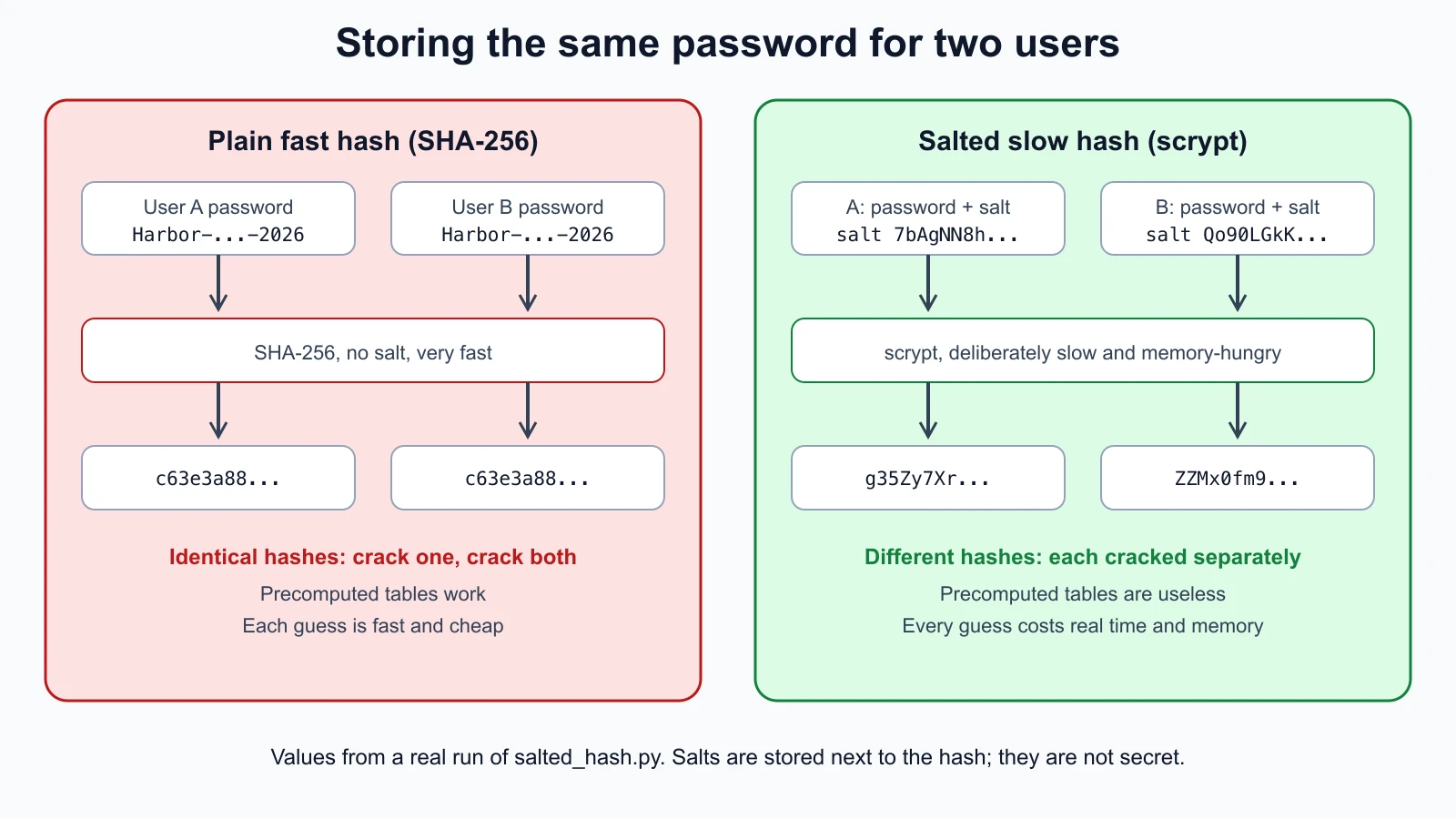
Same password, same hash. Everyone who chose the same password gets the same hash, so cracking one cracks them all, and attackers can use precomputed tables of hashes for common passwords. The fix is a salt: a random value generated for each password, stored next to the hash and mixed in before hashing. Identical passwords then produce different hashes. NIST SP 800-63B-4 requires salts of at least 32 bits.
Fast hashes are fast for attackers too. A graphics card can try enormous numbers of SHA-256 guesses per second. The fix is a deliberately slow, preferably memory-hungry password hashing function with a cost setting you can raise as computers get faster. NIST says the cost factor should be as high as practical without hurting the service's performance. The OWASP Password Storage Cheat Sheet recommends Argon2id first, then scrypt if Argon2id is not available, bcrypt for legacy systems, and PBKDF2 where FIPS-140 compliance is required, with specific minimum settings for each.
A tested salted-hash demonstration
This Python script uses hashlib.scrypt from the standard library, with the scrypt settings the OWASP cheat sheet lists (N=2^17, r=8, p=1), a random 16-byte salt per password, and a constant-time comparison when checking:
1# salted_hash.py
2import base64
3import hashlib
4import hmac
5import os
6
7# scrypt cost settings from the OWASP Password Storage Cheat Sheet (N=2^17, r=8, p=1).
8N, R, P = 2**17, 8, 1
9MAXMEM = 256 * 1024 * 1024
10
11
12def hash_password(password: str, salt: bytes | None = None) -> str:
13    salt = salt if salt is not None else os.urandom(16)
14    key = hashlib.scrypt(password.encode(), salt=salt, n=N, r=R, p=P, maxmem=MAXMEM, dklen=32)
15    return "scrypt$" + base64.b64encode(salt).decode() + "$" + base64.b64encode(key).decode()
16
17
18def verify_password(password: str, stored: str) -> bool:
19    scheme, salt_b64, key_b64 = stored.split("$")
20    if scheme != "scrypt":
21        raise ValueError("unknown scheme")
22    salt = base64.b64decode(salt_b64)
23    expected = base64.b64decode(key_b64)
24    key = hashlib.scrypt(password.encode(), salt=salt, n=N, r=R, p=P, maxmem=MAXMEM, dklen=len(expected))
25    return hmac.compare_digest(key, expected)
26
27
28if __name__ == "__main__":
29    for word in ("Harbor-Books-staff-2026", "Harbor-Books-staff-2026"):
30        print("plain SHA-256:", hashlib.sha256(word.encode()).hexdigest()[:32] + "...")
31    for word in ("Harbor-Books-staff-2026", "Harbor-Books-staff-2026"):
32        print("salted scrypt:", hash_password(word)[:52] + "...")
The stored value has three parts separated by $: the scheme name, the salt and the derived key, both in Base64 so they fit in a text column. hmac.compare_digest compares in constant time, so an attacker cannot learn anything from how long a failed comparison takes. Running it with Python 3.12 (OpenSSL 3.0.11) hashed the same password twice each way and printed:
1plain SHA-256: c63e3a884a818a35b76d8eeaeec05abf...
2plain SHA-256: c63e3a884a818a35b76d8eeaeec05abf...
3salted scrypt: scrypt$7bAgNN8hUEoJ7Rf+LY3Vrg==$g35Zy7XrXsSlus1TTcmy...
4salted scrypt: scrypt$Qo90LGkKmXkugrRaeQ6JyA==$ZZMx0fm9+xhtxGUFZ5iz...
The plain hashes are identical; the salted ones are not, and you will get different salted values each time you run it. These tests check the behavior. Save them as salted_hash_test.py and run python3 -m unittest discover -p '*_test.py'; they take about a second, because each scrypt call is deliberately slow:
1# salted_hash_test.py
2import unittest
3
4from salted_hash import hash_password, verify_password
5
6
7class SaltedHashTest(unittest.TestCase):
8    @classmethod
9    def setUpClass(cls):
10        cls.stored = hash_password("correct horse battery staple")
11
12    def test_correct_password_verifies(self):
13        self.assertTrue(verify_password("correct horse battery staple", self.stored))
14
15    def test_wrong_password_fails(self):
16        self.assertFalse(verify_password("correct horse battery stapler", self.stored))
17
18    def test_same_password_gets_different_hashes(self):
19        self.assertNotEqual(hash_password("same"), hash_password("same"))
20
21    def test_same_password_and_salt_gives_same_hash(self):
22        salt = b"0123456789abcdef"
23        self.assertEqual(hash_password("same", salt), hash_password("same", salt))
24
25    def test_tampered_hash_fails(self):
26        scheme, salt, key = self.stored.split("$")
27        tampered = scheme + "$" + salt + "$" + ("A" if key[0] != "A" else "B") + key[1:]
28        self.assertFalse(verify_password("correct horse battery staple", tampered))
29
30
31if __name__ == "__main__":
32    unittest.main()
All five tests passed. Three deliberate bugs were then introduced one at a time to check that the tests notice: using a fixed salt instead of a random one, making verify_password always return True, and ignoring the stored salt during verification. Each made at least one test fail.
For real applications, use your framework's built-in password hashing, which handles these details and upgrades, rather than writing your own. The demo is for understanding what that built-in code does.
Symmetric encryption: one shared key
Encryption turns readable data (plaintext) into unreadable data (ciphertext) using a key, and decryption reverses it. In symmetric encryption, the same key encrypts and decrypts.
The standard symmetric algorithm is AES (Advanced Encryption Standard), specified in NIST FIPS 197 in 2001 and republished with editorial updates in 2023. It encrypts data in 128-bit blocks with keys of 128, 192 or 256 bits. Symmetric encryption is fast, so it protects bulk data: disk encryption, Wi-Fi traffic, and the contents of every TLS connection.
Here is AES-256 in real use with OpenSSL 4.1.0 on a Mac, encrypting a one-line note with a key derived from a passphrase (using PBKDF2 with 600,000 iterations, the OWASP figure for PBKDF2-HMAC-SHA256), then decrypting it with the right and the wrong passphrase:
1openssl enc -aes-256-cbc -pbkdf2 -iter 600000 -salt -in note.txt -out note.enc -pass pass:lab-only-demo-pass
2xxd note.enc | head -2
3openssl enc -d -aes-256-cbc -pbkdf2 -iter 600000 -in note.enc -pass pass:lab-only-demo-pass
4openssl enc -d -aes-256-cbc -pbkdf2 -iter 600000 -in note.enc -pass pass:wrong100000000: 5361 6c74 6564 5f5f 32e6 4fb3 7756 e383 Salted__2.O.wV..
200000010: 3310 f7c0 904c 39ac b27f 34f5 09b0 148e 3....L9...4.....
3Till 2 float: 150.00
4bad decryptThe ciphertext starts with the marker Salted__ and the salt, then unreadable bytes. The right passphrase recovers the note; the wrong one fails. Typing a passphrase on the command line, as here, leaves it in your shell history, which is acceptable for a throwaway lab demo and not for real secrets. For real file encryption, use a maintained tool or your operating system's disk encryption.
The weakness of symmetric encryption is the key distribution problem: both sides need the same secret key, and you cannot safely send it over the network it is meant to protect. Asymmetric cryptography solves that.
Asymmetric encryption: public and private keys
Asymmetric (public-key) cryptography uses a key pair: a public key you can give to anyone and a private key you never share. They are mathematically linked, but the private key cannot practically be worked out from the public one. Common algorithms are RSA and elliptic-curve methods such as Ed25519 and ECDSA.
The pair is used in two directions:
- Encryption: anyone encrypts with your public key; only your private key decrypts.
- Digital signatures: you sign with your private key; anyone checks the signature with your public key. A valid signature proves the message came from the private key holder and was not changed.
Asymmetric operations are much slower than symmetric ones, so real systems use them for small jobs: proving identity, signing, and agreeing on a symmetric key. Then symmetric encryption does the bulk work.
You already use key pairs. This is a throwaway SSH key pair generated on a Mac with ssh-keygen -t ed25519 (OpenSSH 10.0); the public key is safe to show, the private key is not:
1ssh-ed25519 AAAAC3NzaC1lZDI1NTE5AAAAIIBPQyrp7bS37K7kY9BwXf1Y7wzeRCUj8YcJByQvNyVz harbor-lab-demo
2-----BEGIN OPENSSH PRIVATE KEY-----
3-rw-------@ lab_key
4-rw-r--r--@ lab_key.pub
The first line is the whole public key, which you would place on harbor-server to log in without a password. The second line is only the start of the private key file. Note the permissions from the operating systems lesson: ssh-keygen made the private key readable by its owner only (600) and the public key readable by everyone (644). SSH refuses to use a private key that others can read. Protect real private keys with a passphrase, never email or paste them, and never commit them to a code repository.
Key exchange: agreeing on a secret in public
How do two computers that have never met agree on a symmetric key while an eavesdropper watches every packet? Diffie-Hellman key exchange solves this. Each side generates a temporary private value and sends a public value derived from it. Each side then combines its own private value with the other side's public value, and the mathematics guarantees both arrive at the same shared secret. The eavesdropper sees only the public values and cannot compute the secret from them.
The classic analogy uses paint: both sides start with a common color, each mixes in a secret color and swaps the mixture, then each adds their own secret color again, ending with the same final color. Unmixing paint is hard, just as reversing the mathematics is.
When the temporary values are thrown away after each session, the exchange gives forward secrecy: even if a server's long-term private key is stolen later, past recorded sessions cannot be decrypted. In TLS 1.3, every certificate-based handshake uses a key exchange of this kind.
Handshakes: putting it together
A handshake is the opening exchange where two sides agree how to communicate securely. The TLS 1.3 handshake, defined in RFC 8446 and introduced in Network Services and Infrastructure for Cyber Security, combines everything in this lesson:
- The client says hello: supported versions and algorithms, and its key-exchange public value.
- The server replies with its choices and its own key-exchange public value. Both now compute the same shared secret (Diffie-Hellman).
- The server sends its certificate, and signs the handshake with its private key to prove it holds the key matching the certificate (asymmetric signature).
- Both sides confirm the handshake was not tampered with, using values derived from the shared secret (HMAC).
- From then on, application data is encrypted with fast symmetric keys derived from the shared secret (for example AES).
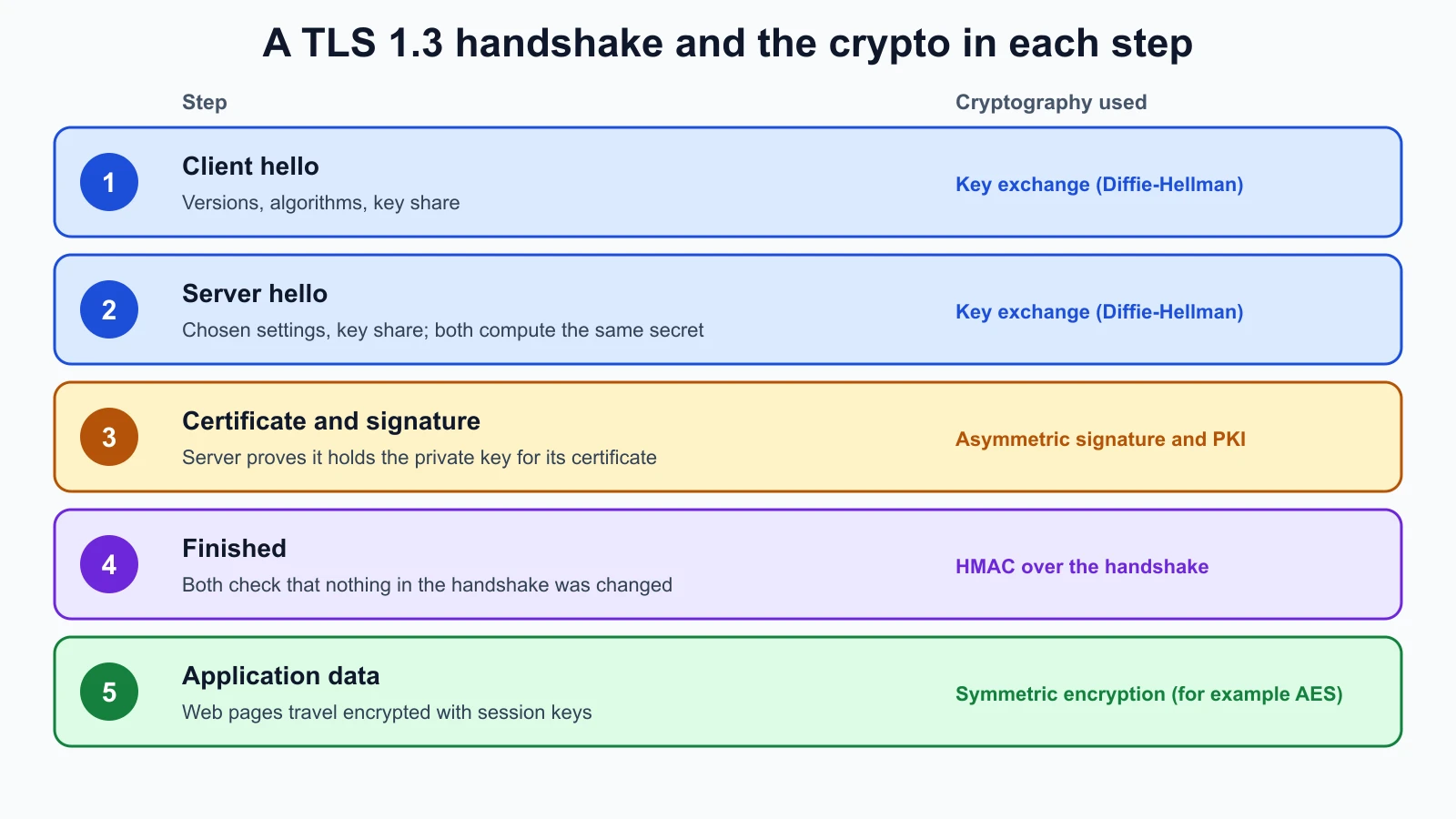
The SSH connection to your lab server follows the same pattern: key exchange, server authentication with its host key (the fingerprint SSH asks you to check), then symmetric encryption.
PKI and certificates: why trust a public key?
Asymmetric cryptography raises one more question. If an attacker hands you their public key while claiming to be harborbooks.example, you would encrypt to the attacker. Something must bind a public key to an identity. That is a certificate, and the system of organizations and rules that issue and check certificates is a public key infrastructure (PKI).
A certificate, in the X.509 format profiled in RFC 5280, contains, among other fields:
- Subject: who the certificate is for, with website names in the subject alternative name extension.
- Issuer: the certificate authority (CA) that signed it.
- Validity: the start and end dates (notBefore and notAfter).
- Subject public key: the public key being vouched for.
- The issuer's signature over all of it.
Trust works as a chain. Your browser and operating system ship with a set of trusted root CA certificates. A root CA signs an intermediate CA's certificate, and the intermediate signs the website's certificate. RFC 5280 describes how software validates this path: starting from a CA key it already trusts, it checks each certificate's signature and matches each certificate's issuer to the subject of the one above, and checks validity dates. Separately, it can check whether a certificate has been revoked, cancelled before its end date, for example because its private key leaked.
You saw a real example in the network services lesson: example.com's certificate was issued by an intermediate CA and expired on a stated date. A certificate warning in a browser means one of these checks failed: wrong name, expired, untrusted issuer or revoked. Each failure is a reason to stop, because each is also what a person-in-the-middle attack looks like.
Organizations can also run a private CA for internal systems, such as the client certificates and smart cards from the authentication lesson. Private CA certificates must be installed as trusted on the organization's own devices, and nowhere else.
Encoding, obfuscation and encryption are different
Three things that look similar but protect very differently:
- Encoding changes the format of data so it can be stored or sent, with no secret involved. Base64 is the common example. RFC 4648, which defines it, says plainly that base encoding does not provide any computational confidentiality. Real output:
printf 'password123' | base64printscGFzc3dvcmQxMjM=, andprintf 'cGFzc3dvcmQxMjM=' | base64 -dprintspassword123again. Anyone can reverse it. - Obfuscation makes data or code harder to read, such as scrambled JavaScript or a "hidden" setting, but the method is in the software, so a determined person can always undo it. It slows down casual reading and nothing more.
- Encryption requires a key. Without the key, the data stays unreadable even when the method is public; AES and TLS are published in full and still secure. This is the principle of relying on the secrecy of the key, not of the method.
A config file with password: cGFzc3dvcmQxMjM= is not protecting anything. When you review systems, treat Base64 or "encoded" secrets as plaintext.
Looking ahead: post-quantum cryptography
Large quantum computers, if built, would break today's common public-key algorithms (RSA and elliptic curves), though not well-designed symmetric encryption or hashes in the same way. NIST has already published replacement standards, including FIPS 203 (August 2024), which specifies ML-KEM, a key-encapsulation mechanism NIST says is believed to be secure even against adversaries with a quantum computer. You do not need to act on this as a beginner, but you will see "post-quantum" or "hybrid" key exchange appear in TLS and VPN settings, and organizations are planning the change now.
Mistakes beginners make
-
Storing passwords with a fast hash or no salt. Leaked databases are then cracked quickly.
Fix: Use Argon2id, scrypt, bcrypt or PBKDF2 through a maintained library, with a unique random salt per password.
-
Calling Base64 encryption. It is reversible by anyone.
Fix: Treat encoded secrets as plaintext and move them to proper secret storage.
-
Sharing or exposing private keys. A leaked private key lets anyone impersonate you or decrypt what was meant for you.
Fix: Keep private keys on the device that uses them, with owner-only permissions and a passphrase.
-
Clicking through certificate warnings. The warning may be the only sign of an interception.
Fix: Find out which check failed before continuing.
-
Writing your own crypto. Small mistakes destroy security silently.
Fix: Use standard algorithms through well-tested libraries and platform features.
Recap and try it yourself
Hashes are one-way fingerprints that reveal any change; use SHA-256 or stronger, not MD5 or SHA-1. Passwords need a unique salt and a slow password hashing function, as NIST SP 800-63B-4 and the OWASP cheat sheet describe. Symmetric encryption, such as AES from FIPS 197, is fast and protects bulk data but needs a shared key. Asymmetric key pairs give public-key encryption and digital signatures. Diffie-Hellman lets strangers agree on a key in public, and short-lived keys give forward secrecy. A TLS handshake combines key exchange, a certificate, a signature and symmetric encryption. Certificates bind public keys to names, and PKI checks them through a chain up to a trusted root. Encoding and obfuscation are not encryption. Post-quantum standards such as FIPS 203 are arriving.
Try it:
- Create two text files that differ by one character and compare their SHA-256 hashes (
shasum -a 256on macOS,sha256sumon Linux,Get-FileHashin PowerShell). - Save
salted_hash.pyand its tests, run them, and then hash the same password twice. Explain to yourself why the stored values differ but both verify. - On
harbor-kali, generate an SSH key pair withssh-keygen -t ed25519, copy the public key toharbor-serverwithssh-copy-id, and log in without a password. Check the private key's permissions. - In a browser, open the certificate details for a site you use. Find the subject, issuer, validity dates and the chain up to the root.
- Find one Base64 string in a sample file, decode it, and write one sentence on why encoding is not protection.
In the next lesson you will apply this to the protocols that carry it: secure versus insecure protocols, IPsec, DNSSEC, LDAPS, S/MIME and Wi-Fi security from WEP to WPA3.
Sources checked on 12 November 2026: NIST FIPS 180-4, Secure Hash Standard; NIST SP 800-63B-4; OWASP Password Storage Cheat Sheet; NIST FIPS 197, AES; RFC 8446, TLS 1.3; RFC 5280, X.509 certificates; RFC 4648, Base64; NIST FIPS 203, ML-KEM; Python hashlib.