
Cyber Security course · lesson 20 of 24
- 1What Is Cyber Security?
- 2Fundamental IT Skills for Cyber Security
- 3Operating Systems for Security: Windows, Linux and macOS
- 4Virtualization and Your Safe Cyber Security Lab
- 5Networking Fundamentals for Cyber Security
- 6Network Services and Infrastructure for Cyber Security
- 7Network Troubleshooting and Traffic Analysis Tools
- 8Core Security Concepts Every Defender Uses
- 9Authentication and Access Control Explained
- 10Cryptography Basics for Cyber Security
- 11Secure Protocols and Wireless Security
- 12The Threat Landscape and Security Frameworks
- 13Social Engineering and Human Attacks
- 14Network and Wireless Attacks and How to Detect Them
- 15Web Attacks and the OWASP Top 10
- 16Malware, Exploits and System Attacks
- 17Hardening and Endpoint Security
- 18Network Defense, Logging and SIEM
- 19Vulnerability Management and Threat Hunting
- 20Incident Response and Digital Forensics
- 21Cloud Security Basics
- 22Scripting for Security
- 23Ethical Hacking, CTFs and Penetration Testing
- 24Cyber Security Standards, Certifications and Capstone
After this lesson, you should be able to tell a security event from a confirmed incident, describe the six familiar incident handling steps, use a simple response runbook, preserve evidence responsibly, and explain when to involve technical responders, management, HR, legal counsel, privacy or compliance staff. You will also leave with a fictional incident checklist and evidence record. This lesson is educational, not legal advice or a substitute for a trained incident response team. The Harbor Books scenario is fictional.
Harbor Books' monitoring analyst receives an alert: a shop computer is making unusual connections, and a staff member says several files have changed names. The point-of-sale terminal still works, but no one yet knows whether this is a software fault, a test, or a compromise. The analyst's job is not to guess the story. The team needs to protect people and services, understand what happened, preserve reliable evidence, and communicate clearly while facts change.
An alert is a lead, not a verdict
A security event is an observable occurrence, such as a failed login, an endpoint alert, or a configuration change. An incident is an event or set of events that the organization has determined needs coordinated response because it may affect confidentiality, integrity, availability, safety, or policy. The exact definition and reporting threshold come from an organization's policy, contracts and applicable rules. One alert does not prove an attacker is present; several ordinary events together may reveal a serious problem.
Use the monitoring foundations from Network Defense, Logging and SIEM and the hunt worksheet from Vulnerability Management and Threat Hunting. They help you ask what the evidence shows, which systems and accounts are involved, and what data is missing. Avoid turning an unverified alert into an accusation about an employee or vendor.
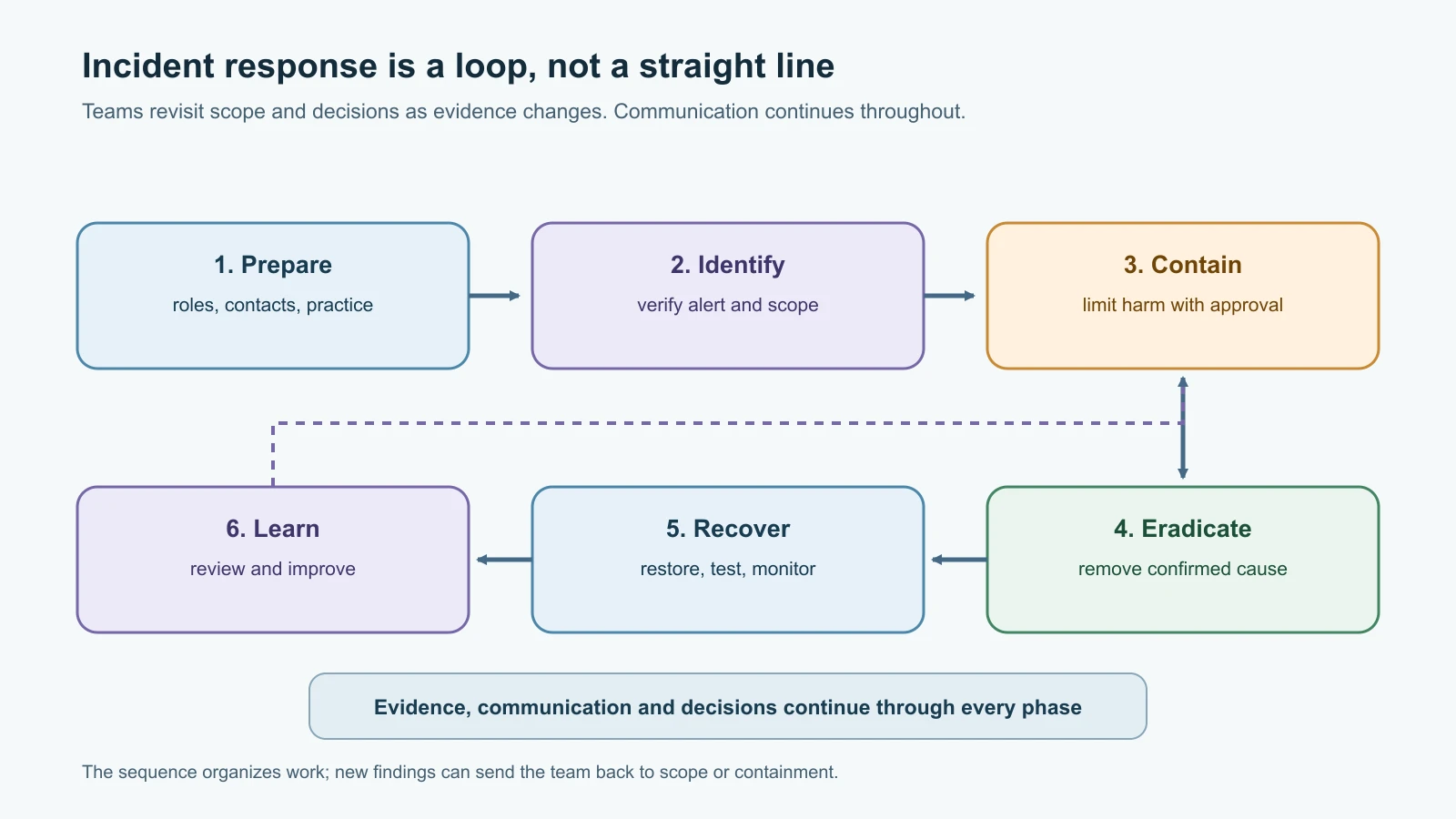
Incident response is the coordinated work of preparing for, detecting, analyzing, containing, removing, recovering from and learning from security incidents. NIST SP 800-61 Rev. 3, published in April 2025, frames response as part of broader cybersecurity risk management and the NIST Cybersecurity Framework 2.0. Many teams still teach a six-step handling sequence: preparation, identification, containment, eradication, recovery, and lessons learned. It remains a useful way to organize a response, as long as readers understand that real work loops between steps and preparation, communication and improvement happen continuously.
Prepare before an alert arrives
Preparation is people, authority and practice, not just a document in a folder. Harbor Books names an incident lead and backup, publishes an internal reporting route, keeps current contact details for its IT provider and key vendors, and defines who may isolate a device or disable an account. It identifies which systems support sales, payment, payroll, customer orders and backups. It also knows how to reach important people if email or single sign-on is unavailable.
A small organization can write down a few decision boundaries in advance. For example, an analyst may preserve an alert and notify the incident lead, while only the lead or an authorized administrator may isolate a critical system. The person who makes a decision records what they knew, what they did, when they did it, and who approved it. This reduces delay and prevents a well-intentioned responder from shutting down a service or altering evidence without coordination.
The response plan should include a current asset list, backup and restoration steps, logging coverage, evidence storage, escalation contacts, a communication channel that does not depend on a possibly compromised account, and a schedule for exercises. Practice a short tabletop scenario: a suspicious login, a lost laptop, or a web shop outage. The point is to find unclear roles and missing contacts before a real incident. A plan no one has tried may not work under pressure.
Identify and scope carefully
Identification begins with triage. Confirm what was observed, when it occurred, which system reported it, whether the alert is reproducible, and what other records support or contradict it. Check the device's owner and business function in the inventory. Compare endpoint, identity, firewall and application records, as appropriate. Record time zones and clock uncertainty; event timestamps from different systems may not line up exactly.
Harbor Books checks its endpoint alert against the device's file activity, recent sign-ins and firewall records. It confirms that the machine belongs to a staff member, finds an unusual process alert, and sees a recently created account session that the owner does not recognize. That makes the case serious enough for the incident lead to open a case. It still does not prove how access occurred or what data was viewed.
Scope is a working estimate that changes as evidence arrives. Start with potentially affected accounts, devices, services, data and time ranges. Ask whether other endpoints share an indicator, whether a cloud account is involved, whether a vendor connection was active, and whether payment or customer data may be affected. State uncertainty plainly. "Two systems are confirmed to show the behavior; other endpoints have not yet been checked" is more useful than an unsupported claim that the issue is contained.
Contain in a way that limits harm
Containment aims to stop or limit ongoing harm while preserving options for investigation and recovery. Possible actions include isolating a single endpoint from the network, disabling a suspected account, blocking a confirmed malicious destination, or restricting an affected service. The right action depends on what is happening, business impact, available backups and the authority of the responder. A point-of-sale device, medical system, factory controller and ordinary test laptop do not have the same operational consequences.
Do not automatically power off or wipe a suspicious computer. Shutting it down can destroy volatile information, interrupt a needed service, or complicate recovery. Leaving it connected can allow further harm. A trained incident lead weighs urgency, safety, business need, evidence value and the organization's response procedure. A beginner should promptly report the issue and follow the designated instructions, not improvise forensic collection or containment.
Harbor Books' incident lead confirms that the affected office workstation is not needed for payment processing and authorizes its network isolation. The administrator notes the time, method, reason and approval, then checks with the employee before moving the device. The lead separately reviews whether the unfamiliar account session remains active and asks the identity administrator to revoke it under the response plan. These are fictional actions; the lesson does not provide commands for changing a real system.
Eradicate the cause, not just the visible symptom
Eradication removes the confirmed cause or foothold from affected systems. Depending on findings, trained responders may remove malicious software, disable an unauthorized account, correct a vulnerable configuration, rotate exposed credentials, or rebuild a system from a trusted source. Before making changes, preserve the records needed to understand the incident and coordinate with the system owner. Removing one suspicious file does not demonstrate that an attacker has lost access.
Determine how the activity began and what else it affected. If the cause was a stolen password, identify other sessions and credentials that may be exposed. If an internet-facing service was vulnerable, verify which systems used the same version and whether logs show access. If a managed vendor or cloud service may be involved, contact its security channel using an independently verified address. Use the vulnerability management process to track the underlying weakness and verify its remediation.
Recover with checks and monitoring
Recovery returns affected systems and services to normal in a controlled way. Restore from a trusted backup or rebuild when appropriate, apply required updates and configuration changes, re-establish access carefully, and test important business functions with their owners. Confirm that accounts, endpoints, backups and security tools work as expected. Increase monitoring for relevant behavior, and keep the system's owner informed about any temporary limitations.
For Harbor Books, the team verifies that order data is available, checks that the restored workstation has current protections, and watches sign-in and endpoint alerts for a period defined in its plan. It records which backup was used and who approved the return to service. A successful login alone is not enough to call recovery complete; the business process and protective controls both need checks.
Learn and improve after the response
The final step turns the incident into specific improvements. Hold a review that focuses on the process and evidence rather than blame. What happened, what was the impact, which decisions worked, where did responders wait for permission or data, what remains uncertain, and who owns each corrective action? Note the date and owner for every follow-up item, such as improving log retention, updating a contact list, testing restoration, or changing account controls.
Preserve a timeline of important observations and decisions while the incident is active. After recovery, compare the timeline with the evidence, identify gaps, and record any alternative explanations that were considered. If legal, regulatory, contractual, insurance or law-enforcement reporting may apply, let qualified counsel or the appropriate specialist determine duties and deadlines. Requirements differ by jurisdiction, data type and organization; a general lesson cannot establish a deadline for a real event.
Digital forensics helps answer bounded questions
Digital forensics is the careful identification, collection, preservation, examination and reporting of digital data for a defined purpose. In a security response, the purpose may be to determine which account accessed a service, whether data was copied, when a file changed, or whether recovery is safe. It should answer a question relevant to the incident. Collecting everything "just in case" can expose private information, cost time, and create additional handling obligations.
An evidence item might be an endpoint log, an exported identity record, a network capture, a disk image, a memory capture or a cloud audit record. Each has limits. Logs can be missing or time-shifted. A packet capture may show connection metadata but not encrypted content. A disk image captures a point in time and may not explain what happened in a cloud service. Memory changes while a computer runs, and collection itself can alter some system state. Record these limitations rather than treating a tool's output as complete truth.
When a matter may involve employee conduct, customer data, legal claims, regulated information or law enforcement, involve the right people before collecting or reviewing personal content. HR can guide workplace processes and employee communications; legal counsel can advise on privilege, preservation and applicable law; privacy and compliance staff can assess information-handling duties; management can authorize business decisions and resources. Keep each person's role clear. A security analyst should not conduct an employee interview or make disciplinary findings unless that is explicitly part of their authorized role.
Preserve evidence and document custody
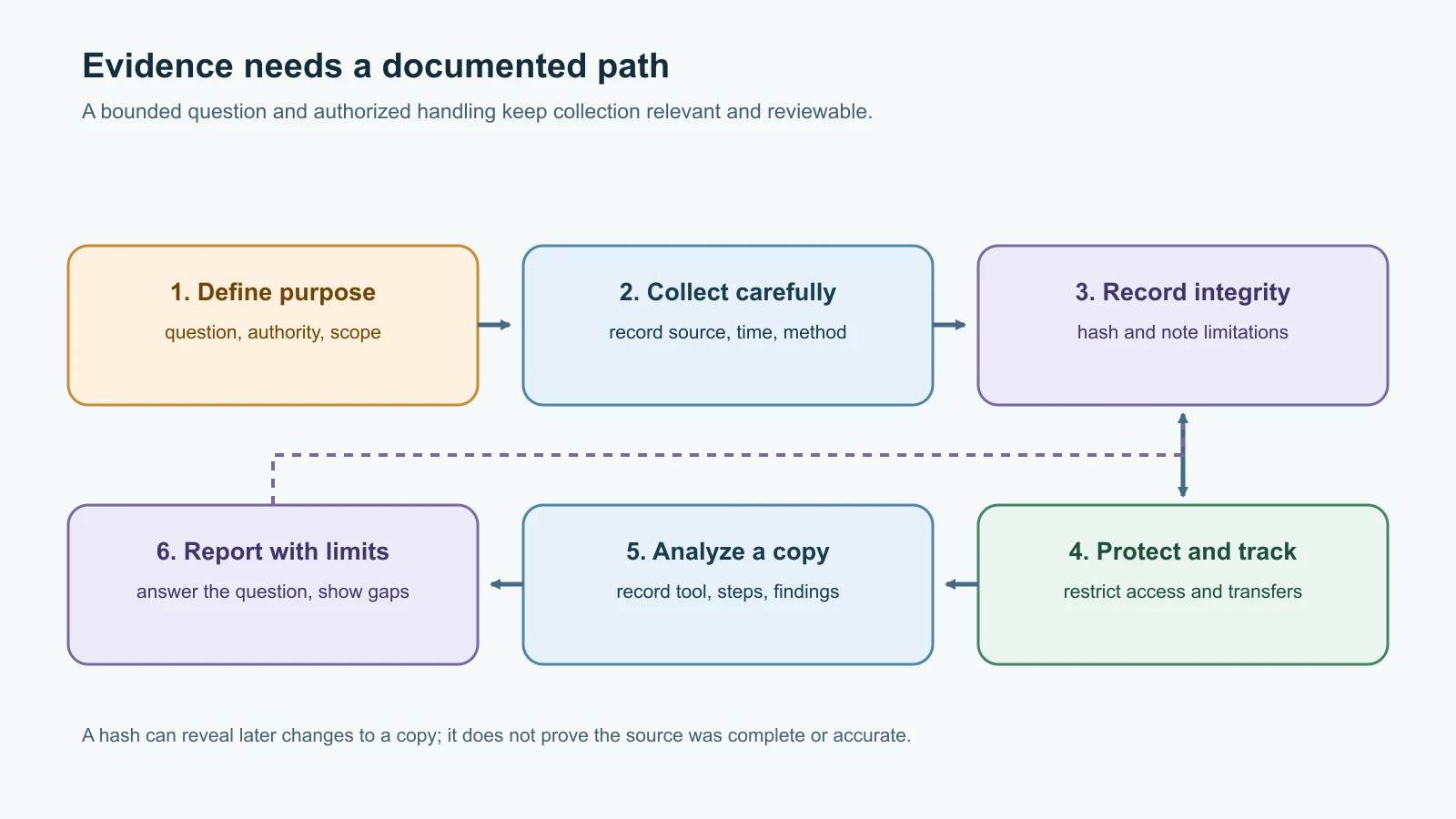
Chain of custody is the record of who handled evidence, when it was collected or transferred, and why. It helps another reviewer understand where an item came from and whether its handling is documented. For each item, record a unique identifier, source, collector, date and time with time zone, collection method, storage location, integrity check if performed, every transfer, and any access or analysis. Keep original evidence protected and perform analysis on a verified working copy when the procedure permits.
Hashing a collected file or image can help detect later changes to that copy. A matching hash does not prove that the original source was accurate, that collection was complete, or that the person collecting it had authority. Record the algorithm, tool and result alongside the evidence. Use approved storage with restricted access, encryption where required, and a retention or legal hold process set by the organization. Do not send evidence through ordinary email or a personal cloud drive.
Minimize changes to a source device. A write blocker can prevent writes to certain storage media during acquisition, but it does not solve every collection problem and cannot be casually applied to all systems. Live systems, encrypted devices, cloud services and volatile memory need appropriate methods. If you lack training or authorization, stop at documenting what you observed, protect the device from unnecessary handling, and contact the designated responder. Do not search a colleague's files, copy personal data, or experiment on a real device.
Forensic tools have different jobs
Tools support a process; they do not provide authority, context or a conclusion by themselves. The examples below are awareness-level descriptions. Product features and availability change, and any real acquisition should follow organizational procedures and qualified guidance.
| Tool or family | Typical role | A beginner should remember |
|---|---|---|
| FTK Imager | Preview or acquire selected computer evidence and create disk images; the vendor also describes memory capture capabilities | It is an acquisition tool, not a substitute for a case plan, authority or documented handling. Check current vendor documentation and supported platform. |
| Autopsy with The Sleuth Kit | Examine a forensic image and organize file-system, timeline, search and other analysis results | Work from an authorized image or provided training dataset. Automated results need human validation and context. |
| WinHex | Hex editor with data inspection and forensic-oriented features | Editing bytes can change evidence. Do not experiment on an original or open a real evidence item without training. |
Memory dump tools such as memdump | Capture volatile memory for later examination when authorized and appropriate | A live capture changes system state and can contain credentials or personal data; collection requires a trained decision-maker. |
| Wireshark | Inspect saved packet captures and, when authorized, analyze network traffic | Captures can contain sensitive data. Use only an approved capture or synthetic lab file and limit retention. |
dd and grep | General-purpose copying and text-search utilities sometimes used in forensic workflows | They are not forensic suites. A mistaken source, destination or option can alter or expose data; do not use command recipes on real evidence. |
head, tail and cat | Show the start, end or whole of a text file such as a log export | Read a working copy, not the original. Large or binary files can flood the terminal. |
ping, tracert, nslookup, dig, curl, arp, ipconfig | Quick checks on reachability, name lookups and web responses during scoping | Covered in Network Troubleshooting and Traffic Analysis Tools. Each check also creates traffic and log entries of its own. |
hping3 | Builds custom network packets for testing firewall rules and responses | It can generate unusual or heavy traffic. Use it only inside the lab or with explicit written approval. |
FTK Imager is currently documented by Exterro as a Windows application, so a reader on another operating system should not assume the same workflow is available. Autopsy's current user guide describes case-based analysis and evidence sources. Wireshark can read saved capture files, but packet interpretation depends on protocol, encryption and collection scope. For this lesson, use only a synthetic dataset or a training image provided specifically for practice. FTK Imager, Autopsy, WinHex, memdump, Wireshark and hping3 are not run here; the small text tools are, below.
Practice on a synthetic log export
This exercise uses a six-line log export invented for this lesson, saved as web-auth-export.log. It shows the habit of hashing an item, working on a copy, and confirming the copy matches before you read it. The commands were run on macOS 26.1; on Linux, use sha256sum in place of shasum -a 256.
1shasum -a 256 web-auth-export.log
2dd if=web-auth-export.log of=working-copy.log bs=4096
3shasum -a 256 working-copy.log
Real output:
1423358f329a6e788e2dd4e773aedd861077a112b318e4b068eb38170dc2a3e3e  web-auth-export.log
20+1 records in
30+1 records out
4482 bytes transferred in 0.000027 secs (17851852 bytes/sec)
5423358f329a6e788e2dd4e773aedd861077a112b318e4b068eb38170dc2a3e3e  working-copy.log
The two hashes match, so the working copy has the same bytes as the export. Your hash will differ if your file differs by even one character, such as a trailing space. Here dd copies a small file; on a real disk, the same command with the wrong if or of can overwrite evidence, which is why trained responders use write blockers and checked procedures.
Now read the copy:
1head -n 2 working-copy.log
2tail -n 2 working-copy.log
3grep -c 'login_failed' working-copy.log
4grep -n '198.51.100.23' working-copy.log
Real output:
12026-11-12T21:58:04+05:30 harbor-web login_success user=owner src=192.0.2.10
22026-11-12T22:41:17+05:30 harbor-web login_failed user=admin src=198.51.100.23
32026-11-12T22:43:02+05:30 harbor-web role_changed user=admin target=temp-support role=manager
42026-11-12T22:47:55+05:30 harbor-web logout user=admin src=198.51.100.23
52
62:2026-11-12T22:41:17+05:30 harbor-web login_failed user=admin src=198.51.100.23
73:2026-11-12T22:41:49+05:30 harbor-web login_failed user=admin src=198.51.100.23
84:2026-11-12T22:42:30+05:30 harbor-web login_success user=admin src=198.51.100.23
96:2026-11-12T22:47:55+05:30 harbor-web logout user=admin src=198.51.100.23
The timeline reads: two failed logins for admin, a success from the same address, a role change that gave a new temp-support account manager rights, then a logout. That is a lead worth escalating, not proof of an attack: the owner might have made the change from a new network. Record the hash, the tool versions and these limits in the evidence record below. The addresses come from the documentation-only ranges 192.0.2.0/24 and 198.51.100.0/24.
Harbor Books incident runbook
This compact checklist gives a small team a starting point. The actual organization should adapt it with its system owners, service provider, qualified legal counsel and applicable requirements.
| Stage | Action and record |
|---|---|
| Prepare | Confirm the reporting route, incident lead, backup, decision authority, critical services, outside contacts and evidence storage. Exercise the plan. |
| Identify | Record the alert or report, source, time zone, affected assets/accounts, facts confirmed, uncertainty and initial severity. Open a case ID. |
| Contain | Choose the least disruptive effective action; identify who approved it, who performed it, when, why and the business impact. Reassess scope. |
| Preserve | Identify evidence relevant to the question. Record source, collector, time, method, integrity check if appropriate, storage and transfers. Restrict access. |
| Eradicate | Confirm the cause and affected scope; plan removal, credential actions, configuration fixes or rebuilds with system owners and qualified responders. |
| Recover | Restore from a trusted source, test business and security controls, monitor for recurrence, and obtain the required return-to-service approval. |
| Improve | Conduct a review, document impact and open questions, assign corrective actions, owners and due dates, and update the runbook. |
Evidence record template: case ID; evidence ID; description; source system and asset owner; question it may help answer; collection authority or approver; collector; date, time and time zone; collection method and tool/version; hash algorithm and value if used; original and working-copy locations; access restrictions; transfer date, sender, recipient and purpose; analysis performed; limitations; retention or disposition instruction.
Communication note template: case ID; intended audience; confirmed facts; current uncertainty; effect on services or people; action requested; next update time; sender and approver. Keep technical details out of broad announcements when they could expose personal information, security controls or investigation details. Use the communication channel approved for the incident.
Coordinate people as carefully as systems
Incident response often crosses team boundaries. IT knows how systems operate; security assesses alerts and evidence; service owners explain business impact; HR handles workplace processes; legal counsel advises on legal duties and preservation; privacy and compliance staff assess data obligations; communications staff prepare approved messages; management decides risk, resources and service priorities. A small company may rely on an external IT provider for several of these roles. Name one incident lead to maintain a shared timeline and make sure questions reach the right decision-maker.
Share information on a need-to-know basis. Tell affected staff what they need to do, where to report issues, and when they will hear more. Do not promise that no data was accessed until the investigation can support it. Do not name a suspected employee or vendor in broad messages. If customers, regulators, insurers, law enforcement or partners may need notification, use the organization's approved process and qualified advice rather than an improvised template.
Mistakes beginners make
- Treating one alert as proof of compromise or assuming an unfamiliar event is harmless without checking.
- Waiting for perfect certainty before notifying the incident lead.
- Isolating, rebooting, wiping or restoring a device without considering service impact, evidence and authorization.
- Recording actions from memory later instead of noting time, reason, approver and result as they happen.
- Searching or copying employee data without a defined purpose, authority and privacy review.
- Treating a hash match as proof that evidence is complete, authentic or collected correctly.
- Letting multiple people send conflicting updates or make unrecorded decisions.
- Declaring recovery complete before owners check both business functions and security controls.
- Assuming a general checklist establishes legal reporting duties or deadlines.
- Closing the case without assigning and tracking improvements.
Recap and try it yourself
The six familiar steps are preparation, identification, containment, eradication, recovery and lessons learned. Real responses move between them, and communication, evidence handling and improvement continue throughout. Digital forensics asks bounded questions using carefully documented data. Chain of custody records how evidence is collected, protected, accessed and transferred. Tools can help acquire or examine data, but authorization, sound process, context and trained judgment make the work trustworthy.
Try the runbook with a fictional alert: Harbor Books receives a report that an office computer has unusual file changes and an unfamiliar login. Write three facts you would verify, two people you would notify, one containment decision that needs approval, and which evidence might help answer whether another account or device was involved. Fill in an evidence record for a synthetic log export, including its time zone and limitations. Do not collect data from a real person or device for this exercise.
Sources checked on 12 November 2026: NIST SP 800-61 Rev. 3, the current NIST incident response publication; NIST SP 800-86, Guide to Integrating Forensic Techniques into Incident Response and NIST's chain of custody definition; CISA Cybersecurity Incident Response Playbook, written for federal agencies and used here only as a process reference; Exterro FTK Imager documentation; The Sleuth Kit Autopsy User Documentation; and the Wireshark User's Guide; X-Ways WinHex; The Coroner's Toolkit page listing memdump; and hping. Requirements for reporting, employment, evidence and privacy depend on jurisdiction and organizational context; consult qualified counsel and specialists. All Harbor Books details are fictional. No live system was investigated and no forensic suite was run; the hashing and text commands ran only on the synthetic export shown.