
Cyber Security course · lesson 21 of 24
- 1What Is Cyber Security?
- 2Fundamental IT Skills for Cyber Security
- 3Operating Systems for Security: Windows, Linux and macOS
- 4Virtualization and Your Safe Cyber Security Lab
- 5Networking Fundamentals for Cyber Security
- 6Network Services and Infrastructure for Cyber Security
- 7Network Troubleshooting and Traffic Analysis Tools
- 8Core Security Concepts Every Defender Uses
- 9Authentication and Access Control Explained
- 10Cryptography Basics for Cyber Security
- 11Secure Protocols and Wireless Security
- 12The Threat Landscape and Security Frameworks
- 13Social Engineering and Human Attacks
- 14Network and Wireless Attacks and How to Detect Them
- 15Web Attacks and the OWASP Top 10
- 16Malware, Exploits and System Attacks
- 17Hardening and Endpoint Security
- 18Network Defense, Logging and SIEM
- 19Vulnerability Management and Threat Hunting
- 20Incident Response and Digital Forensics
- 21Cloud Security Basics
- 22Scripting for Security
- 23Ethical Hacking, CTFs and Penetration Testing
- 24Cyber Security Standards, Certifications and Capstone
After this lesson, you should be able to explain how cloud services differ from an organization-owned data center, distinguish SaaS, PaaS and IaaS, compare public, private and hybrid deployment models, describe shared responsibility, and identify common risks in cloud storage, infrastructure as code and serverless systems. You will also use a practical cloud security checklist for the fictional Harbor Books shop. This is a foundation, not a provider-specific deployment guide; service features and account settings change, so confirm current vendor documentation before making changes.
Harbor Books already runs a web shop and stores business files online. The owner is considering moving order processing to cloud services and giving staff access to shared documents from home. "The provider secures the cloud" sounds reassuring, but it does not answer who manages staff accounts, chooses file sharing permissions, protects payment data, or notices a leaked credential. Cloud security starts by identifying which service is being used and which party controls each part of it.
What people mean by cloud computing
Cloud computing provides network access to computing resources that can be provisioned and released with limited effort. Instead of buying and operating every server, an organization uses services delivered by a provider, often through a web console, API or application. The provider runs data centers and underlying infrastructure; the customer selects, configures and uses services under a contract.
Cloud services can make it easier to add capacity, deploy software, collaborate across locations and use managed databases or storage. They can also add new responsibilities: identities are controlled through an online account, permissions can be changed by configuration, data may be copied or shared quickly, and a mistake can affect many systems at once. Moving a workload does not remove the need for asset inventory, access control, backups, monitoring or incident response. The layered thinking from Core Security Concepts Every Defender Uses still applies.
Compare cloud and on-premises computing as different operating arrangements rather than opposing security levels:
| Question | Mostly on-premises | Cloud service |
|---|---|---|
| Who operates physical facilities and hardware? | The organization or its data-center provider | The cloud provider for its underlying service infrastructure |
| Who chooses capacity and deployment? | The organization purchases and installs it | The customer configures from provider options and service limits |
| Who maintains the operating system and application? | Usually the organization, with vendor updates | Depends on whether the service is IaaS, PaaS or SaaS |
| How are users and data protected? | The organization configures local systems and policies | The organization still manages identity, data, access and many settings |
| What can go wrong? | Unpatched systems, poor physical controls, weak accounts, outages | The same problems plus exposed cloud permissions, leaked keys, unsafe sharing or misconfigured services |
Neither arrangement is automatically safer. Cloud providers may have substantial expertise and resources for operating infrastructure, but customers still choose what to deploy, who can reach it and which data to place there. A small organization may benefit from a managed service while still needing clear account ownership, secure configuration and recovery plans.
Service models: SaaS, PaaS and IaaS
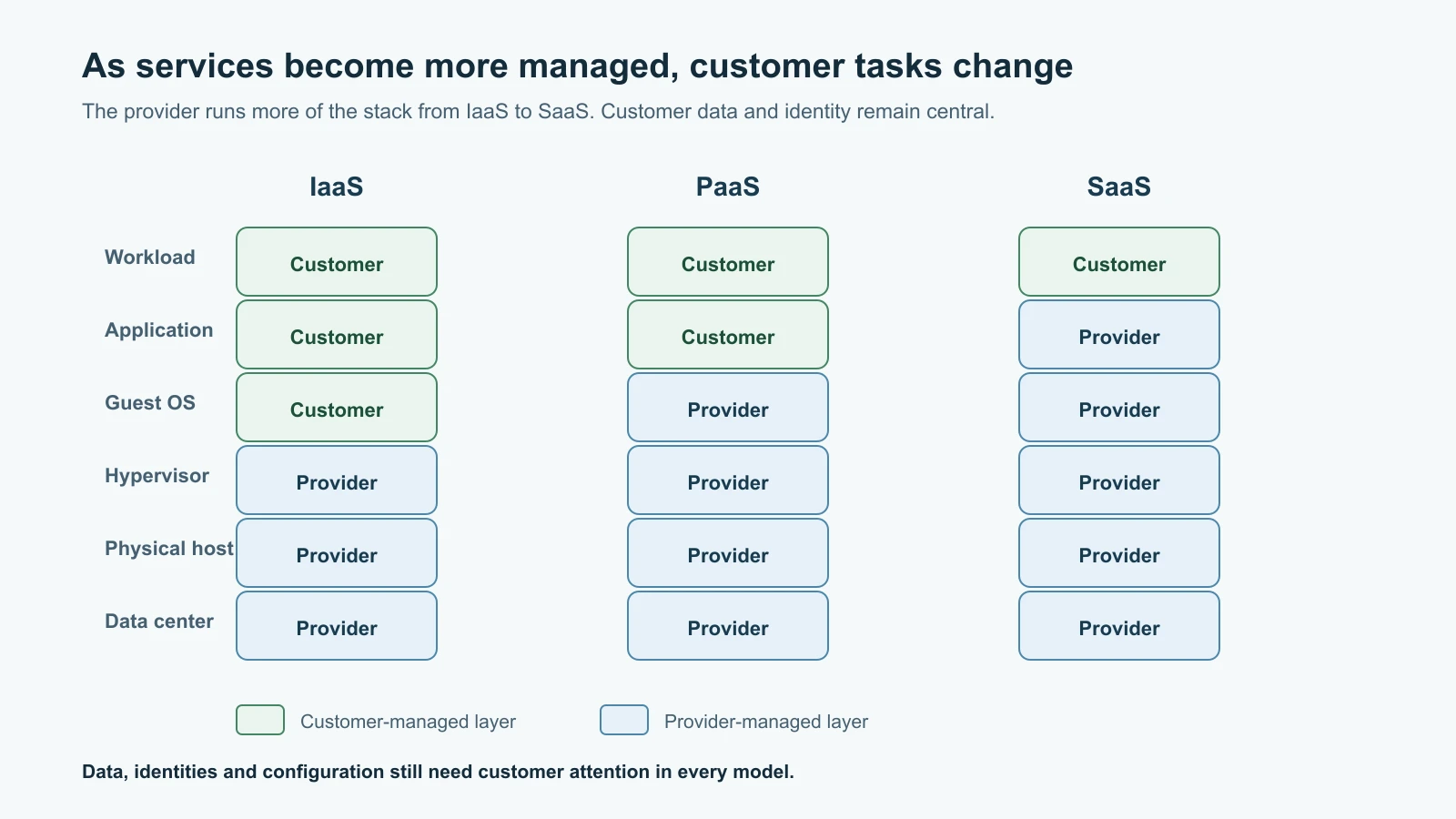
The service model describes how much of the technology stack the provider operates for you. The simple rule is that the customer generally manages less infrastructure as they move from IaaS toward SaaS, but the customer always needs to understand the particular service and its configuration.
Infrastructure as a Service (IaaS) provides building blocks such as virtual machines, storage and networks. The provider operates the data center, physical machines and virtualization layer. The customer commonly manages the guest operating system, updates, applications, identity, data, and many network rules. A virtual server is not automatically patched or hardened just because it runs in a provider's data center.
Platform as a Service (PaaS) provides a managed application platform, database or runtime. The provider operates more of the underlying system, so the customer can focus on application code and configuration. The customer still needs to protect the code, data, secrets, user access and service settings. A managed database can still be exposed to the wrong network or have excessive permissions.
Software as a Service (SaaS) is a ready-to-use application delivered over a network, such as online email, file collaboration or customer-management software. The provider operates the application and underlying service, while the organization still manages its users, data, devices, sharing choices, retention and account security. SaaS is not synonymous with "no configuration" or "the vendor handles everything."
| Model | Provider commonly operates | Customer commonly manages | Harbor Books example |
|---|---|---|---|
| IaaS | Facilities, physical equipment and virtualization | VM operating system, installed software, network rules, accounts and data | A virtual server hosting a custom web shop |
| PaaS | Facilities, machines, operating system and managed runtime or database | Application code, data, identities and service configuration | A managed web application platform and database |
| SaaS | The finished application and its operating environment | Users, access, content, sharing, devices and organization settings | A hosted email and document collaboration service |
This division is a guide, not a contract. A provider may offer several service types in one product, and responsibility can vary between individual features. Read the service's security documentation and agreement. Ask who configures a control, who monitors it, who supplies evidence, and who responds when something goes wrong.
Deployment models: public, private and hybrid
The deployment model describes how the cloud infrastructure is made available and arranged. NIST's cloud definition includes public, private, community and hybrid models. This lesson focuses on public, private and hybrid, the three you will meet most often.
A public cloud is provider-operated infrastructure made available to customers, often with logically separated accounts and resources. "Public" describes the service's availability to customers; it does not mean every customer's data is public. The customer must still configure access so that only intended people and systems can use their resources.
A private cloud is cloud infrastructure reserved for one organization. It might be operated by that organization or by a provider, and it may be on or off the organization's premises. Exclusive use does not make it secure by itself. The operator still needs to maintain identity, configuration, patching, monitoring and recovery.
A hybrid cloud combines distinct infrastructure, such as an organization's private environment and one or more public cloud services, connected so that data or applications can work across them. Hybrid designs can help with migration or specific requirements, but create more identity links, networks, logs and data flows to govern. If Harbor Books keeps its point-of-sale system locally but uses hosted email, shared storage and a cloud web platform, it already has a hybrid operating environment in the ordinary sense, even if it never built a formal hybrid cloud architecture.
Deployment and service models are different axes. A SaaS application might run in a public cloud, while a private cloud might offer infrastructure resources. A hybrid environment can include IaaS, PaaS and SaaS from different vendors. Name the actual service and data path when making a security decision; broad labels alone are not enough.
AWS, Google Cloud and Azure at a glance
Amazon Web Services (AWS), Google Cloud and Microsoft Azure are broad provider platforms. Each offers compute, networking, storage, databases, identity, logging and managed application services. Their product names and console layouts differ, but many security questions are shared: Which identity can change the resource? Is it reachable from the internet? What data is stored there? Are actions logged? Can the service be restored?
| Provider | Examples of familiar services | Security work a customer still needs to understand |
|---|---|---|
| AWS | EC2 virtual machines, S3 object storage, Lambda functions | Account and IAM roles, network controls, storage policies, function permissions and service logs |
| Google Cloud | Compute Engine VMs, Cloud Storage buckets, Cloud Run services | Organization/project IAM, bucket access, service identities, network exposure and audit logging |
| Microsoft Azure | Azure Virtual Machines, Blob Storage, Azure Functions | Entra identities and roles, storage authorization, network access, function identity and activity logs |
These are examples rather than a full product comparison. Service names, features and responsibility boundaries evolve. AWS describes responsibility as "security of the cloud" and "security in the cloud"; Google Cloud describes shared responsibility and shared fate; Microsoft publishes a service-model responsibility matrix. Those provider documents are useful starting points, but your organization's workload, configuration, plan and agreement determine the actual work.
Shared responsibility follows the service
Shared responsibility means the provider and customer each have security tasks. The provider operates the layers it supplies; the customer secures the data, identities and configurations they control. As a simple memory aid, the provider usually handles more of the lower technology layers in PaaS and SaaS than in IaaS. The customer is still responsible for using those services safely.
For an IaaS virtual machine, the customer typically patches the guest operating system, controls administrator access, configures its firewall rules, protects application secrets, and backs up important data. The provider handles physical security and underlying infrastructure. For a SaaS file service, the vendor runs the application, but Harbor Books still decides which staff accounts remain active, whether a link is restricted or open, whether a collaborator can edit, and how the organization retains business records.
The shared responsibility model is not a transfer of accountability. If Harbor Books uploads a customer list and accidentally makes a broad link, the provider may have operated its service correctly while the business made an unsafe sharing choice. If a cloud service has an outage, the provider's reliability processes matter, but Harbor Books still needs a plan for business continuity. The details vary, so keep a responsibility record for each important service:
| Control question | Owner to name |
|---|---|
| Who approves and removes user access? | Harbor Books account owner or identity administrator |
| Who secures physical equipment and the managed platform? | Cloud provider, as defined by service documentation |
| Who configures resource permissions, network exposure and encryption options? | Customer, provider or shared, depending on the service |
| Who monitors administrative changes and suspicious activity? | Both parties for their respective logs and controls |
| Who restores data and verifies the business service works? | Named business and technical owners, using the provider's capabilities |
Protect identities, permissions and data
Cloud accounts are control planes: a user with broad administrative rights may be able to create resources, read data, change network access or disable monitoring. Protect administrator accounts with strong authentication, as covered in Authentication and Access Control, and separate privileged roles from ordinary daily work. Give each person and workload only the permissions it needs, remove access when a role changes, and review emergency accounts. A service identity used by an application is still an identity; protect its permissions and credentials just as carefully as a person's account.
Classify information before uploading it. Harbor Books might mark public product descriptions as low sensitivity, supplier agreements as business-confidential, and payment or customer records as restricted. Classification helps decide which storage, location, encryption, retention and sharing controls are appropriate. Encryption helps protect data in transit and at rest, but it does not fix an overbroad permission. If an authorized account can decrypt the file, encryption alone may not prevent misuse of that account.
Use the least access needed. Prefer named people or managed groups over links that anyone can use. Give view permission when editing is unnecessary. Remove old collaborators and links. Use multifactor authentication for accounts, protect recovery methods, and monitor sign-ins and administrative changes. Keep secrets such as API keys, access tokens, passwords and private certificates out of code, ordinary documents, logs and screenshots. Store and rotate them through a managed secret system suited to the service.
Cloud storage is exposed through permissions
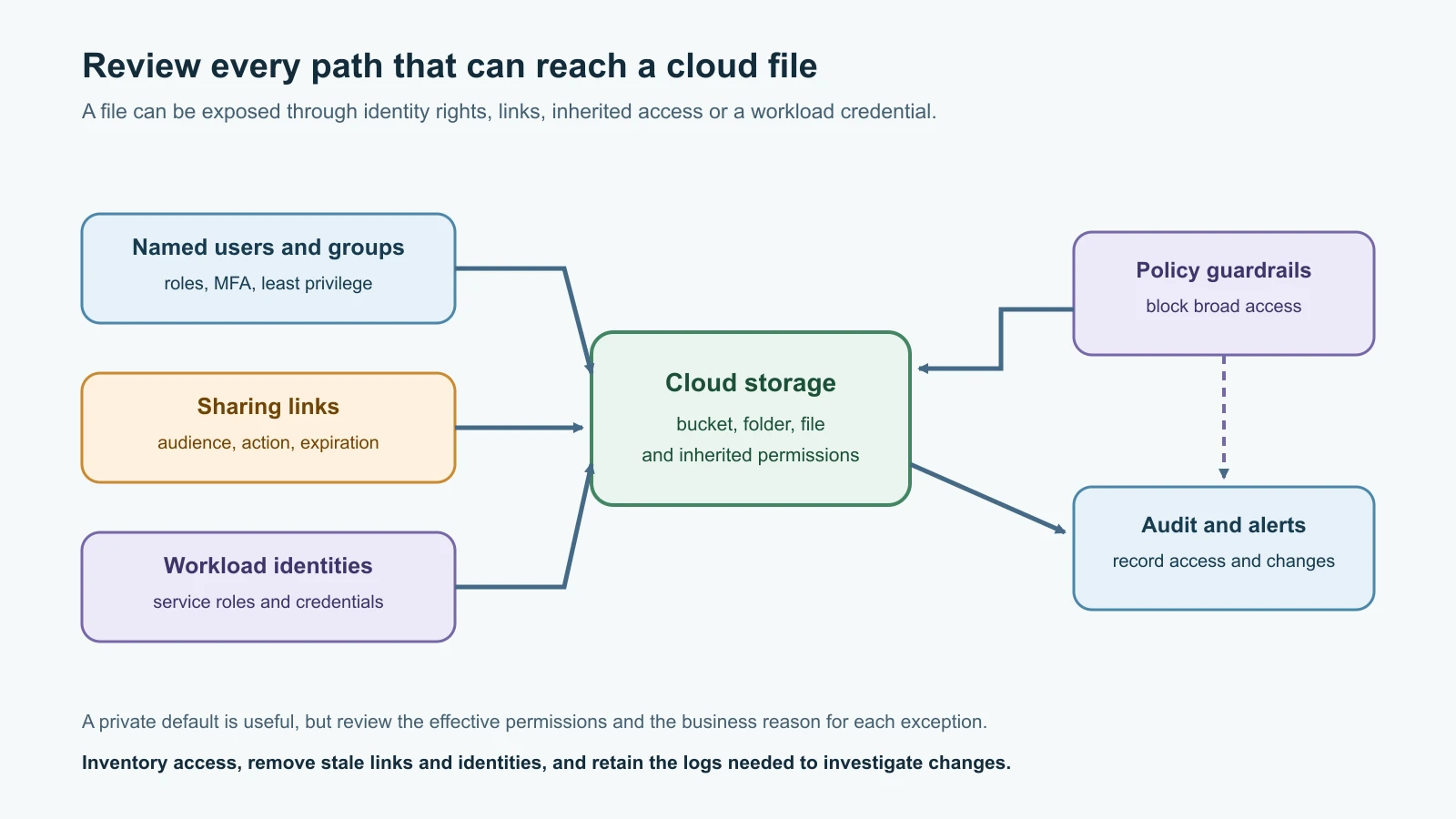
Cloud object storage and collaboration tools can be exposed through more than one route: public access settings, identity policies, object-level permissions, inherited folder access, shared links, service accounts, or credentials copied elsewhere. A security review must consider the complete effective access path, not just one "private" toggle.
| Storage service | Example exposure path | Defensive review |
|---|---|---|
| Amazon S3 | A bucket, access point, account or organization policy permits public access; a role grants broad data access | Review Block Public Access at relevant levels, bucket and identity policies, access points, logs and business need for public content |
| Google Cloud Storage | IAM or an object ACL grants access to allUsers or allAuthenticatedUsers; a signed URL is shared too widely | Review IAM and ACL paths, consider uniform bucket-level access and public access prevention, and manage scoped signed URLs |
| Dropbox | A shared link is set for broad access or a collaborator grants more access than intended | Inventory active links, audience, permission level and expiration; remove links that no longer serve a purpose |
| Box | A shared link allows people with the link to view, download or edit | Review link audience and actions; use the narrowest access your account and organization policies allow |
| OneDrive | An "Anyone" or organization-wide link is forwarded beyond its intended recipients | Prefer specific people when appropriate, review Manage Access, and remove stale links or collaborators |
| Google Drive | General access is set to "Anyone with the link" or "Public" | Review general access and collaborator roles; use Restricted access for private content and remove old links |
| iCloud Drive | A shared link permits anyone holding it to view or change a file or folder | Choose invited people where appropriate, use view-only permissions when sufficient, and stop sharing when finished |
The names and available controls can vary by account type, administrator policy and product version. "Anyone with the link" does not mean that a link is secret; it means access can follow the link wherever it is forwarded. Link permissions can also differ from direct collaborator permissions or inherited folder access. Review who can access the content, what they can do, and whether access is still needed.
Harbor Books keeps public product images separate from order exports and staff records. The product images can be delivered through a controlled public-facing service. Customer lists remain restricted to named business roles. The shop owner sets a default that blocks broad public access where possible, but still checks the effective permissions and any necessary exception. Backups are protected from accidental deletion and from identities that could otherwise delete both the live data and recovery copies.
Infrastructure as code makes configuration repeatable
Infrastructure as code (IaC) means defining infrastructure in machine-readable files so it can be reviewed and applied consistently. A template might describe a virtual network, database, storage bucket, identity role or application service. IaC can reduce undocumented manual steps and make it easier to see how an environment is intended to work. It can also repeat a mistake quickly if a template grants broad access or creates an exposed service.
Treat IaC as software that can change production. Store it in a reviewed repository; restrict who can approve and deploy changes; scan templates for insecure settings and embedded secrets; separate test and production environments; and keep deployment identities narrowly scoped. Preview proposed changes and understand destructive effects before applying them. Record what was deployed and compare the live environment with the approved definition to find configuration drift, meaning changes that have moved away from the intended state.
A template is not automatically secure because it is version-controlled. It may reference an untrusted module, expose a management endpoint, allow a broad network range, grant a service identity excessive permissions or store secret values in plain text. Protect the pipeline that deploys it, because someone who can alter both the template and its deployment credentials may be able to change the cloud environment. Scripting for Security introduces small scripts that can help automate reviews; for now, focus on what the files describe and who can change or apply them.
Serverless systems still need security boundaries
Serverless describes a model where the provider manages much of the server infrastructure and runs code or application services on demand. The term does not mean servers do not exist, and it does not mean the application has no operating costs or security responsibilities. Examples include event-triggered functions and managed application platforms.
A serverless function may be triggered by a web request, file upload, queue message or schedule. Risks include a public endpoint without appropriate authorization, a function role that can read unrelated data, unsafe handling of untrusted input, vulnerable dependencies, secrets in configuration, excessive network access, and logs that capture sensitive values. A compromised function can inherit its service identity's permissions. A noisy event source can also cause unexpected resource use or cost.
Design functions around narrow tasks. Give each one a dedicated identity with only required permissions. Authenticate callers and authorize each action. Validate inputs, protect secrets, update dependencies, limit network paths, log meaningful security events without recording sensitive content, and set reasonable usage limits or alerts. Test changes before production and review whether the function needs internet access. These practices apply even when the provider maintains the runtime.
Cloud security checklist for Harbor Books
Use this checklist to start a review. It is a conversation guide, not proof of compliance or a substitute for the provider's service-specific security guidance.
| Area | Review question | Evidence or action to record |
|---|---|---|
| Inventory | What accounts, projects, subscriptions, services, data and owners exist? | Current inventory, business purpose, data classification and service model |
| Identity | Who has administrator access, and how is sign-in protected? | Named owner, MFA status, privileged role review and access removal process |
| Permissions | Which users, groups, workloads and links can reach each resource? | Effective access review, least-privilege changes and exceptions with owners |
| Storage | Could any bucket, folder, file or link be public or shared more widely than intended? | Provider access controls, link inventory and approved exceptions |
| Secrets | Where are keys and tokens stored, who can retrieve them, and how are they rotated? | Managed secret reference, access list and rotation procedure; no secret value in the record |
| Network and application | Which services have public endpoints, and what protects each one? | Exposure map, authorization checks, service configuration and change owner |
| Logging | Are identity, administrative and data-access events available and retained? | Log sources, monitoring owner, retention decision and alert route |
| Recovery | Can important data and services be restored if an account or provider is unavailable? | Protected backup, tested restore evidence, recovery owner and target |
| Change | How are IaC and console changes reviewed and approved? | Repository, deployment identity, review process and drift review |
| Incident response | Who contacts the provider and who coordinates the business response? | Current contact route, evidence preservation process and exercise date |
Mistakes beginners make
- Assuming "in the cloud" means the provider manages user accounts, application settings and data permissions.
- Treating public cloud as data that is public, or treating a private cloud as secure by default.
- Saying "we use Azure" or "we use AWS" without knowing which service, account and configuration are involved.
- Applying the same responsibility split to every IaaS, PaaS or SaaS product without checking its documentation.
- Assuming encryption prevents exposure when a broadly authorized account can still read or share the data.
- Checking one bucket or folder while ignoring inherited access, identity policies, signed links or service identities.
- Giving a function, CI/CD pipeline or administrator account more permission than its task requires.
- Treating infrastructure templates as harmless text rather than code capable of creating public or destructive resources.
- Believing that serverless removes the need for authentication, logging, dependency updates or cost controls.
- Keeping backups under the same broadly privileged identity that can delete the production data.
- Leaving shared links and former collaborators active after the work is complete.
Recap and try it yourself
Cloud computing changes who operates parts of the technology stack; it does not remove the need to secure identities, data, configuration and recovery. SaaS, PaaS and IaaS describe service models. Public, private and hybrid describe deployment arrangements. The provider and customer share responsibility, with the exact division tied to the service. Cloud storage is exposed through effective permissions and sharing paths. IaC can make good controls repeatable or repeat a bad choice at scale. Serverless still depends on secure identities, code, inputs, configuration, logging and cost boundaries.
Try it yourself with a fictional Harbor Books order export in a file-sharing service. Identify its sensitivity, who needs access, whether they need view or edit rights, whether an open link is acceptable, how you would review inherited access, and how you would remove access later. Then choose one imaginary serverless function that creates a thumbnail from a product image. List the one input it needs, the storage permission it needs, a permission it should not have, and the log event that would help investigate an unexpected invocation. Do not create a cloud account, upload personal data or change a real sharing setting for this exercise.
Sources checked on 12 November 2026: NIST SP 800-145, The NIST Definition of Cloud Computing; AWS shared responsibility overview, S3 Block Public Access, CloudFormation security best practices, and Lambda security; Google Cloud shared responsibility and shared fate, Cloud Storage access control and public access prevention; Microsoft cloud shared responsibility; Dropbox sharing with others; Box shared links; Microsoft OneDrive sharing; Google Drive sharing and access; and Apple iCloud Drive sharing and Advanced Data Protection. Product settings can depend on plan, account type and administrator policy. Harbor Books is fictional; no cloud account was created or changed and no data was uploaded.