
Cyber Security course · lesson 11 of 24
- 1What Is Cyber Security?
- 2Fundamental IT Skills for Cyber Security
- 3Operating Systems for Security: Windows, Linux and macOS
- 4Virtualization and Your Safe Cyber Security Lab
- 5Networking Fundamentals for Cyber Security
- 6Network Services and Infrastructure for Cyber Security
- 7Network Troubleshooting and Traffic Analysis Tools
- 8Core Security Concepts Every Defender Uses
- 9Authentication and Access Control Explained
- 10Cryptography Basics for Cyber Security
- 11Secure Protocols and Wireless Security
- 12The Threat Landscape and Security Frameworks
- 13Social Engineering and Human Attacks
- 14Network and Wireless Attacks and How to Detect Them
- 15Web Attacks and the OWASP Top 10
- 16Malware, Exploits and System Attacks
- 17Hardening and Endpoint Security
- 18Network Defense, Logging and SIEM
- 19Vulnerability Management and Threat Hunting
- 20Incident Response and Digital Forensics
- 21Cloud Security Basics
- 22Scripting for Security
- 23Ethical Hacking, CTFs and Penetration Testing
- 24Cyber Security Standards, Certifications and Capstone
After this lesson, you should be able to list the insecure protocols still found on networks and name the secure replacement for each, explain what IPsec, DNSSEC, LDAPS, SRTP and S/MIME protect and what they do not, trace Wi-Fi security from WEP through WPA and WPA2 to WPA3, explain why WPS should be turned off, tell personal Wi-Fi from enterprise Wi-Fi, and compare EAP methods such as EAP-TLS and PEAP. The previous lesson, Cryptography Basics for Cyber Security, explained the building blocks. This lesson is about the protocols that put them to work, and how to choose the right one.
What makes a protocol secure
A protocol is an agreed set of rules for how two systems talk. Many of the internet's core protocols were designed when networks were small and trusted, so they send everything as readable text and do not check who is on the other end. A protocol is secure for a purpose when it provides the CIA properties that purpose needs:
- Confidentiality: others cannot read the traffic (encryption).
- Integrity: changes are detected (hashes, MACs, signatures).
- Authentication: each end can confirm who the other is (certificates, keys, credentials).
Not every secure protocol gives all three, and that matters. DNSSEC, for example, gives integrity and authenticity but no confidentiality. Knowing what a protocol does not protect is as important as knowing what it does.
Insecure protocols and their replacements
These are the swaps to make. You met several in Network Services and Infrastructure for Cyber Security:
| Insecure | Problem | Secure replacement | What changes |
|---|---|---|---|
| Telnet (23) | Plaintext logins and commands | SSH (22) | Encrypted, server authenticated by host key |
| FTP (20, 21) | Plaintext passwords and files | SFTP (over SSH) or FTPS (FTP over TLS) | Encrypted transfer and login |
| HTTP (80) | Plaintext pages and form data | HTTPS (443) | TLS: encrypted, server authenticated |
| SSL 2.0, 3.0, TLS 1.0, 1.1 | Known weaknesses, formally retired | TLS 1.2 and 1.3 | Modern ciphers and handshakes |
| LDAP simple bind (389) | Password readable on the wire | LDAPS (636) or StartTLS | TLS protects the bind |
| DNS (53) | Answers can be forged | DNSSEC for integrity; encrypted DNS for privacy | Signed answers; optional encryption |
| RTP (voice and video) | Calls can be captured and replayed | SRTP | Encrypted, authenticated media |
| Plain email | Readable and forgeable in transit and storage | S/MIME (or OpenPGP) for messages; TLS between servers | Signed and encrypted messages |
| SNMP v1 and v2c | Plaintext "community string" as a password | SNMPv3 | Authentication and encryption |
| Unprotected IP traffic between sites | Readable across the internet | IPsec (or a TLS VPN) | Encrypted, authenticated tunnels |
The packet capture of an FTP login in Network Troubleshooting and Traffic Analysis Tools showed why the left column is dangerous: the password was simply there to read. The right column is the answer for every row.
SSL versus TLS, one more time
SSL was the original web encryption protocol; TLS replaced it. RFC 7568 says SSL 3.0 must not be used, and RFC 8996 deprecated TLS 1.0 and 1.1 in 2021. When people say "SSL certificate" or "SSL VPN" today, they almost always mean TLS. When you configure a server, enable TLS 1.2 and 1.3 only.
IPsec: securing IP itself
IPsec protects traffic at the network layer, so every application on top benefits without changing. RFC 4301, the IPsec architecture (2005), lists its services: access control, connectionless integrity, data origin authentication, rejection of replayed packets, and confidentiality through encryption.
Two protocols and two modes do the work:
- AH (Authentication Header) gives integrity and authentication but no confidentiality.
- ESP (Encapsulating Security Payload) gives the same plus encryption. Implementations must support ESP, and in practice ESP is what you will see.
- Transport mode protects the payload of each packet between two hosts.
- Tunnel mode wraps the whole original packet inside a new one, which is how site-to-site VPNs between two offices work.
Keys are usually agreed with IKE (Internet Key Exchange), as NIST's guide to IPsec VPNs describes. IPsec is common for site-to-site links and some remote-access VPNs.
DNSSEC: trustworthy answers, not private ones
The network services lesson showed that DNS answers can be forged or poisoned. DNSSEC (DNS Security Extensions) adds digital signatures to DNS records. RFC 4033 says it verifies that DNS data came from its claimed source and was not changed, and states plainly that, by a deliberate design choice, DNSSEC does not provide confidentiality. Anyone on the path can still see which names you look up.
Signatures chain upward, like certificates: the root zone signs the key for .com, .com signs the key for a domain, and the domain signs its records. A validating resolver checks the chain and refuses answers that fail.
Here is real output from querying a public validating resolver (1.1.1.1) on a Mac with dig. First, a signed domain with DNSSEC requested (+dnssec):
1dig @1.1.1.1 cloudflare.com A +dnssec +noall +answer +comments1;; flags: qr rd ra ad; QUERY: 1, ANSWER: 3, AUTHORITY: 0, ADDITIONAL: 1
2cloudflare.com. 1 IN A 104.16.133.229
3cloudflare.com. 1 IN A 104.16.132.229
4cloudflare.com. 1 IN RRSIG A 13 2 300 20261113140456 20261111120456 34505 cloudflare.com. dGO3AdTnUxalrRAYUXi3v5eHRQ9L1CIWMe0Z1SRZ9aw9KVYhwMDjAQXH zIZAbuKJZgmFtcGpoaSHhzlaawuSVg==The ad flag (authenticated data) means the resolver validated the answer. The RRSIG record is the signature over the address records, with a validity window shown as two dates.
Next, a domain whose signatures fail validation, dnssec-failed.org, asked normally and then with checking disabled (+cd):
1dig @1.1.1.1 dnssec-failed.org A +noall +comments
2dig @1.1.1.1 dnssec-failed.org A +cd +noall +comments +answer1;; ->>HEADER<<- opcode: QUERY, status: SERVFAIL, id: 25193
2;; flags: qr rd ra; QUERY: 1, ANSWER: 0, AUTHORITY: 0, ADDITIONAL: 1
3
4;; ->>HEADER<<- opcode: QUERY, status: NOERROR, id: 18209
5;; flags: qr rd ra cd; QUERY: 1, ANSWER: 1, AUTHORITY: 0, ADDITIONAL: 1
6dnssec-failed.org. 300 IN A 96.99.227.255With validation on, the resolver returned SERVFAIL and no address: it refused an answer it could not verify. With checking disabled, the same answer came back. That is DNSSEC protecting integrity, and it is also why a broken DNSSEC setup takes a domain offline for validating users. These results were observed on 12 November 2026 and can change.
For privacy, separate standards encrypt the queries themselves between you and your resolver: DNS over TLS and DNS over HTTPS. Browsers and operating systems increasingly support them. DNSSEC and encrypted DNS solve different problems and can be used together.
LDAPS: protecting directory logins
From the authentication lesson: an LDAP simple bind sends the user name and password, and RFC 4513 says that is unsuitable without confidentiality protection. LDAPS runs LDAP inside TLS on port 636; StartTLS upgrades a connection on port 389 to TLS. Either way, configure clients to check the server's certificate, or an attacker can pose as the directory and collect passwords.
SRTP: protecting calls
Internet voice and video calls carry media with RTP (Real-time Transport Protocol). SRTP (RFC 3711, 2004) is a profile of RTP that adds confidentiality for the media, message authentication, and protection against replayed packets. If a business phone system or video tool offers an option for encrypted media, it is usually SRTP, and it should be on. Without it, anyone who can capture traffic on the network can reconstruct calls.
S/MIME: protecting email messages
TLS between mail servers protects messages in transit between those servers, but not where they are stored, and not against a compromised server. S/MIME works on the message itself. RFC 8551 (S/MIME 4.0, 2019) says it provides authentication, message integrity and non-repudiation of origin through digital signatures, and confidentiality through encryption. Both depend on certificates: to send an encrypted message you need each recipient's public key, and to sign you need your own certificate.
In practice, S/MIME is used mostly inside organizations that issue certificates to staff. For a small business such as Harbor Books, the more common email protections are MFA on mailboxes, TLS between providers, and anti-spoofing records published in DNS, which you will meet in the lesson on social engineering. Signed email is still a useful defense against fake invoices where both sides support it.
Wireless security: from WEP to WPA3
Wi-Fi travels through the air, often beyond the building, so anyone nearby can capture it. The security protocol decides whether they can read it or join the network.
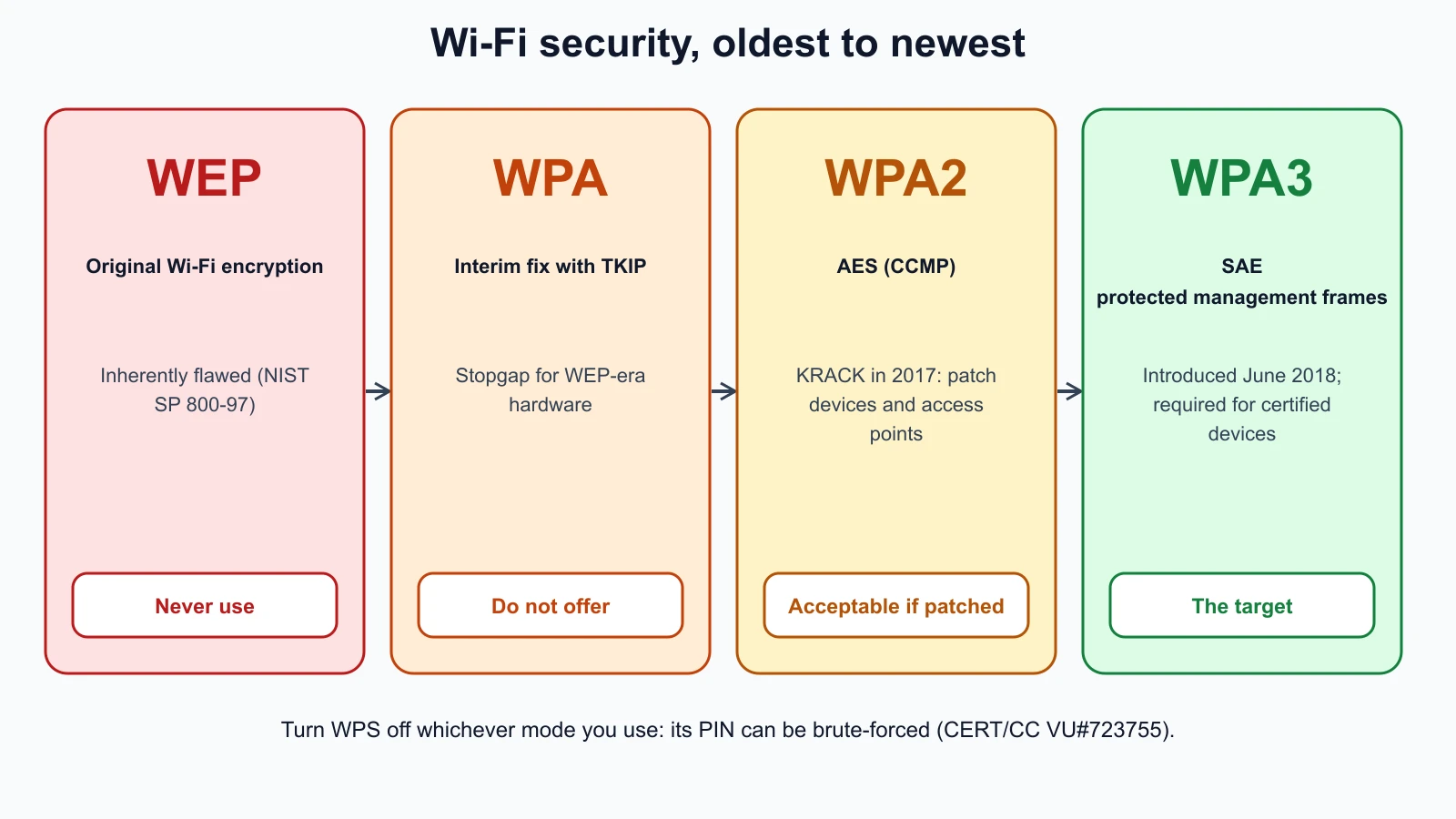
WEP
WEP (Wired Equivalent Privacy) was the original Wi-Fi encryption. Its design was broken: NIST's 2007 guide to robust wireless security (SP 800-97, since withdrawn as outdated) described WEP as "inherently flawed". Tools can recover a WEP key from captured traffic quickly. Treat a WEP network as if it had no encryption at all, and replace any device that supports only WEP.
WPA
WPA (Wi-Fi Protected Access) was the interim fix, designed to run on hardware built for WEP. It used TKIP, a wrapper that patched WEP's worst problems. NIST SP 800-97 describes IEEE 802.11i's two-step approach: an interim step and a long-term one. WPA was the interim step. The Wi-Fi Alliance says WPA3 networks disallow outdated legacy protocols, and modern equipment should not offer TKIP.
WPA2
WPA2 was the long-term step: it uses AES-based encryption (CCMP) and served as the standard for many years. In 2017, researcher Mathy Vanhoef disclosed KRACK (key reinstallation attacks), weaknesses in the WPA2 protocol that could let an attacker in range decrypt or replay some traffic. The fix was software updates for both devices and access points; the KRACK site notes that changing the Wi-Fi password does not prevent the attack. WPA2 with AES on updated equipment is still acceptable where WPA3 is not available, but it is not the target.
WPA3
The Wi-Fi Alliance introduced WPA3 on 25 June 2018. It has two main modes:
- WPA3-Personal uses SAE (Simultaneous Authentication of Equals) instead of the older pre-shared key handshake. The Wi-Fi Alliance says SAE provides more resilient password-based authentication, even when users choose passwords weaker than recommended, and better protection against password guessing. With WPA2-Personal, a recording of a device joining the network can be used to test password guesses away from the network, so weak passphrases fall quickly; SAE was designed to make that kind of guessing much harder.
- WPA3-Enterprise adds an optional security suite equivalent to 192-bit cryptographic strength for sensitive networks.
WPA3 also requires Protected Management Frames, which make it harder to forge the control messages used to disconnect devices, a building block of several Wi-Fi attacks. A transition mode lets WPA2 and WPA3 devices share one network while older devices are replaced; it is a stepping stone, because it keeps WPA2's weaknesses for the WPA2 devices. The Wi-Fi Alliance now says WPA3 is mandatory for Wi-Fi CERTIFIED devices. Its Wi-Fi Enhanced Open certification adds encryption to open networks, such as cafe hotspots, without a shared password, though it does not authenticate the network.
CISA's guidance on securing wireless networks says WPA3 is currently the strongest encryption and recommends WPA3-capable equipment.
WPS: turn it off
WPS (Wi-Fi Protected Setup) lets devices join by pressing a button or typing an eight-digit PIN instead of the password. The PIN method has a design flaw. CERT/CC's vulnerability note VU#723755 (December 2011) explains that the router reveals when the first half of the PIN is correct, cutting the guesses needed from about 100 million to about 11,000, and many routers did not lock out repeated attempts. An attacker in range can recover the Wi-Fi password. The note's mitigation is to disable WPS. Many routers ship with it on, so check.
Personal versus enterprise Wi-Fi
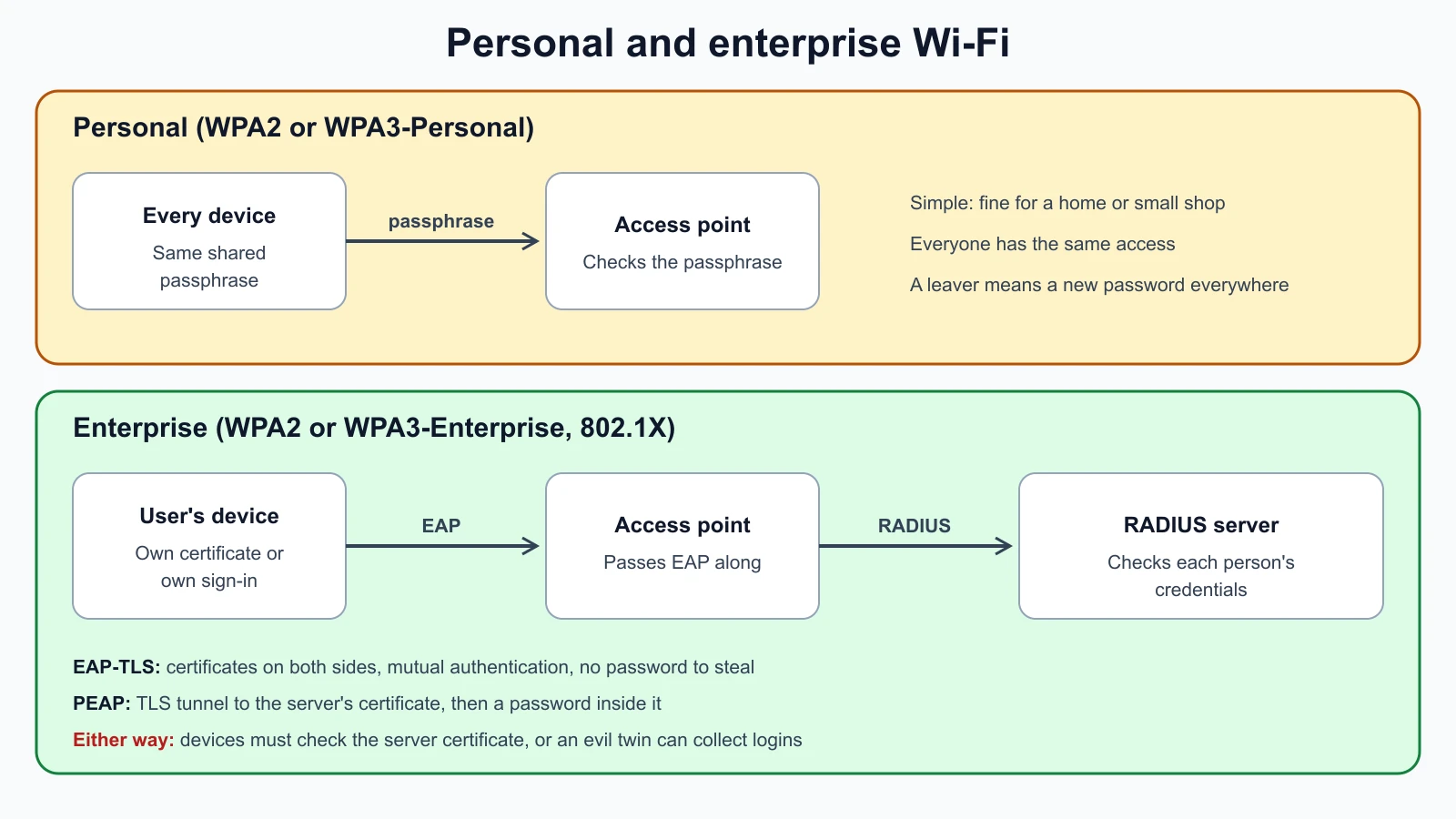
Personal mode (WPA2-Personal or WPA3-Personal) uses one shared password for everyone. It is simple, and fine for a home or a very small shop, but every person who knows the password has the same access, and when someone leaves, the only way to remove them is to change the password on every device.
Enterprise mode (WPA2-Enterprise or WPA3-Enterprise) gives each person their own credentials, checked by a central server. It uses IEEE 802.1X: the access point acts as a gatekeeper and passes authentication messages to a RADIUS server, which you met in Authentication and Access Control Explained. When someone leaves, you disable their account and nothing else changes.
EAP, EAP-TLS and PEAP
The messages between the device and the RADIUS server use EAP (Extensible Authentication Protocol, RFC 3748), which is a framework rather than a single method: it carries whichever authentication method the network chooses. Two methods you will meet most:
- EAP-TLS (RFC 5216) uses certificates on both sides: the server proves itself with its certificate and the device proves itself with its own. The RFC describes it as certificate-based mutual authentication. It is strong and resists password theft, but it needs a way to issue and manage device certificates.
- PEAP (Protected EAP) first builds a TLS tunnel authenticated by the server's certificate, then runs a second, inner method inside it, most often a user name and password with MS-CHAPv2. Microsoft's specification describes these two phases. PEAP is easier to deploy because users sign in with their existing passwords.
PEAP's protection depends on the device checking the server's certificate. If devices are set to accept any certificate, an attacker can run a fake access point with the same network name (an evil twin, covered in the lesson on network and wireless attacks), present their own certificate, and collect the inner login attempts. Configure devices to trust only the organization's RADIUS server certificate.
Harbor Books' secure protocol and Wi-Fi plan
Pulling this together for the fictional shop:
| Area | Setting | Why |
|---|---|---|
| Staff Wi-Fi | WPA3-Personal, or WPA2/WPA3 transition mode until older devices are replaced; long unique passphrase | Strongest mode the equipment supports |
| Guest Wi-Fi | Separate network on the guest VLAN; WPA3 with a passphrase on a sign, or Enhanced Open | Isolates visitors and still encrypts their traffic |
| WPS | Off | VU#723755 |
| Router admin | Default password changed; firmware updated; remote administration off | CISA wireless guidance |
| Remote access | VPN (IPsec or TLS) with MFA | No plaintext or exposed remote desktop |
| Web shop and email | HTTPS only with TLS 1.2 and 1.3; TLS between mail providers | Encrypted in transit |
| File transfers to the accountant | SFTP or a shared cloud folder with MFA, never FTP or email attachments | No plaintext credentials |
| Domain | DNSSEC enabled at the registrar if offered; MFA on the registrar account | Protects the shop's DNS answers and the account behind them |
If the shop grows to many staff, moving staff Wi-Fi to WPA3-Enterprise with RADIUS lets each person have their own login.
Mistakes beginners make
-
Leaving legacy protocols enabled "for compatibility". Telnet, FTP, TLS 1.0 and WEP stay open doors.
Fix: Inventory protocols in use, replace each insecure one, and turn the old option off.
-
Assuming DNSSEC hides lookups. It signs answers but does not encrypt them.
Fix: Use DNSSEC for integrity and encrypted DNS for privacy.
-
Leaving WPS on. The PIN can be brute-forced from outside the building.
Fix: Disable WPS in the router settings and check again after firmware updates.
-
Staying in WPA2/WPA3 transition mode forever. Older devices keep the weaker protocol alive.
Fix: Replace WPA2-only devices and switch to WPA3-only when you can.
-
Accepting any certificate in PEAP. Devices then hand credentials to an evil twin.
Fix: Pin the RADIUS server's certificate or its issuing CA in each device's Wi-Fi profile.
Recap and try it yourself
Secure protocols supply confidentiality, integrity and authentication; know which each one gives. Replace Telnet with SSH, FTP with SFTP, HTTP with HTTPS, old SSL and TLS with TLS 1.2 and 1.3, LDAP simple binds with LDAPS, RTP with SRTP, and SNMPv1 or v2c with SNMPv3. IPsec protects IP traffic with AH or, in practice, ESP, in transport or tunnel mode. DNSSEC signs DNS answers but does not encrypt them. S/MIME signs and encrypts individual email messages using certificates. On Wi-Fi, WEP is broken, WPA with TKIP was a stopgap, WPA2 with AES is acceptable on patched equipment, and WPA3 with SAE and protected management frames is the target. Turn WPS off. Enterprise Wi-Fi uses 802.1X, EAP and RADIUS, with EAP-TLS certificates or PEAP inside a TLS tunnel, and devices must check the server certificate.
Try it:
- Find your home router's Wi-Fi security setting. Which mode is it in? Is WPS on? Is the admin password still the default? Change only what you understand, on a router you own.
- Run
dig @1.1.1.1 cloudflare.com A +dnssecand find theadflag and theRRSIGrecord. Then try a domain you use; is it signed? - List every protocol used in a small network you know (home or workplace) and mark each as secure or insecure using the table in this lesson.
- In your lab, confirm that
harbor-serveraccepts SSH and nothing like Telnet or FTP: run the port checker from the troubleshooting lesson against ports 21, 22 and 23. - On your phone or laptop, open the details of a saved Wi-Fi network and find which security mode it uses.
That completes the security concepts module. The next module turns to threats: how attackers are classified, how frameworks such as the Cyber Kill Chain and MITRE ATT&CK describe attacks, and how threat intelligence tools help defenders.
Sources checked on 12 November 2026: RFC 7568, deprecating SSL 3.0; RFC 8996, deprecating TLS 1.0 and 1.1; RFC 4301, IPsec architecture; RFC 4033, DNSSEC; RFC 4513, LDAP authentication; RFC 3711, SRTP; RFC 8551, S/MIME 4.0; NIST SP 800-97 (withdrawn); KRACK attacks; Wi-Fi Alliance, WPA3 introduction; Wi-Fi Alliance, security; CISA, securing wireless networks; CERT/CC VU#723755, WPS PIN brute force; RFC 3748, EAP; RFC 5216, EAP-TLS; Microsoft, MS-PEAP overview.