
Cyber Security course · lesson 14 of 24
- 1What Is Cyber Security?
- 2Fundamental IT Skills for Cyber Security
- 3Operating Systems for Security: Windows, Linux and macOS
- 4Virtualization and Your Safe Cyber Security Lab
- 5Networking Fundamentals for Cyber Security
- 6Network Services and Infrastructure for Cyber Security
- 7Network Troubleshooting and Traffic Analysis Tools
- 8Core Security Concepts Every Defender Uses
- 9Authentication and Access Control Explained
- 10Cryptography Basics for Cyber Security
- 11Secure Protocols and Wireless Security
- 12The Threat Landscape and Security Frameworks
- 13Social Engineering and Human Attacks
- 14Network and Wireless Attacks and How to Detect Them
- 15Web Attacks and the OWASP Top 10
- 16Malware, Exploits and System Attacks
- 17Hardening and Endpoint Security
- 18Network Defense, Logging and SIEM
- 19Vulnerability Management and Threat Hunting
- 20Incident Response and Digital Forensics
- 21Cloud Security Basics
- 22Scripting for Security
- 23Ethical Hacking, CTFs and Penetration Testing
- 24Cyber Security Standards, Certifications and Capstone
After this lesson, you should be able to explain how denial of service, spoofing, person-in-the-middle, ARP, DHCP and DNS poisoning, rogue access points, evil twins, deauthentication, VLAN hopping, replay, brute force and password spraying attacks work, describe what each one looks like in logs and traffic, and name the controls that prevent or limit it. You will also run a small tested script that checks an ARP table for signs of spoofing. Each attack here builds on the networking lessons: Network Services and Infrastructure for Cyber Security explained ARP, DHCP and DNS, and this lesson shows how they are abused.
Law and safety first
This lesson explains attacks so you can recognize and stop them. It does not give step-by-step instructions for running them against anyone. Network attacks are a clear case for the rules from What Is Cyber Security?: flooding a service, intercepting traffic, or guessing passwords on systems you do not own can be offences under computer misuse laws such as the UK Computer Misuse Act, the US Computer Fraud and Abuse Act and India's IT Act, and intercepting other people's communications can break separate interception and privacy laws. Practise only in your own lab, never on shared, school, office or public networks, and treat this as awareness, not legal advice.
Denial of service
NIST's glossary defines denial of service (DoS) as the prevention of authorized access to resources or the delaying of time-critical operations. A distributed denial of service (DDoS) is a DoS technique that uses numerous hosts to perform the attack, often thousands of infected devices called a botnet. DoS attacks target availability, the A in the CIA triad.
CISA's DDoS guidance (March 2024) groups attacks into three kinds:
- Volumetric: consuming the available bandwidth with sheer traffic.
- Protocol: exploiting weaknesses in network protocols, for example a SYN flood that opens half-finished TCP connections until the server runs out of room for new ones.
- Application: targeting a specific application or service, such as repeatedly requesting an expensive search page.
What it looks like: a sudden traffic spike, many connections from many sources, servers slow or timing out, a firewall or router at full capacity, many half-open connections (SYN_RECV in ss or netstat output) for a SYN flood.
Defenses: a small business cannot absorb a large DDoS on its own internet line, so the realistic defense is to host public services with a provider that offers DDoS protection, often through a content delivery network (CDN) that spreads traffic across many locations. Add rate limits on login and search pages, keep a contact at your internet and hosting providers, and plan how the shop keeps trading if the web shop is down. Harbor Books' till does not depend on the web shop being reachable, which is itself a resilience decision.
Spoofing
NIST defines spoofing as the deliberate inducement of a user or resource to take incorrect action. In practice, it means faking an identity:
- IP spoofing: forging the source address on packets, used in some DoS attacks so replies hit a victim instead of the attacker.
- MAC spoofing: changing a network card's hardware address to impersonate another device or get past simple MAC filtering.
- Email and caller ID spoofing: faking the sender, covered in Social Engineering and Human Attacks.
- ARP, DHCP and DNS spoofing: faking answers to network services, covered below.
Spoofing works wherever a system believes a claim without checking it. Every defense in this lesson adds a check.
Person-in-the-middle
A person-in-the-middle attack, also called man-in-the-middle (MITM) or, in MITRE ATT&CK, adversary-in-the-middle (T1557), places the attacker between two parties so traffic passes through them. ATT&CK describes adversaries abusing protocols that control traffic flow, such as ARP, DNS and LLMNR, to route a device's traffic through a system they control, then sniffing it, changing it or replaying it. It lists four sub-techniques: name resolution poisoning and SMB relay, ARP cache poisoning, DHCP spoofing, and evil twin.
Encryption is the main reason MITM is less damaging today than it used to be. If traffic uses TLS and the client checks certificates, the attacker in the middle sees only encrypted data, and a certificate warning appears if they try to substitute their own. That is why ATT&CK's mitigations include encrypting sensitive traffic and training users to treat certificate errors as suspicious, alongside segmentation, limiting access to network equipment, filtering legacy protocols and network intrusion detection.
ARP cache poisoning
ARP, from RFC 826, has no way to verify replies. An attacker on the same local network sends forged ARP replies telling the victim "the gateway's IP address is at my MAC address", and telling the gateway "the victim's IP address is at my MAC address". Both now send their traffic to the attacker, who forwards it so nothing seems broken.
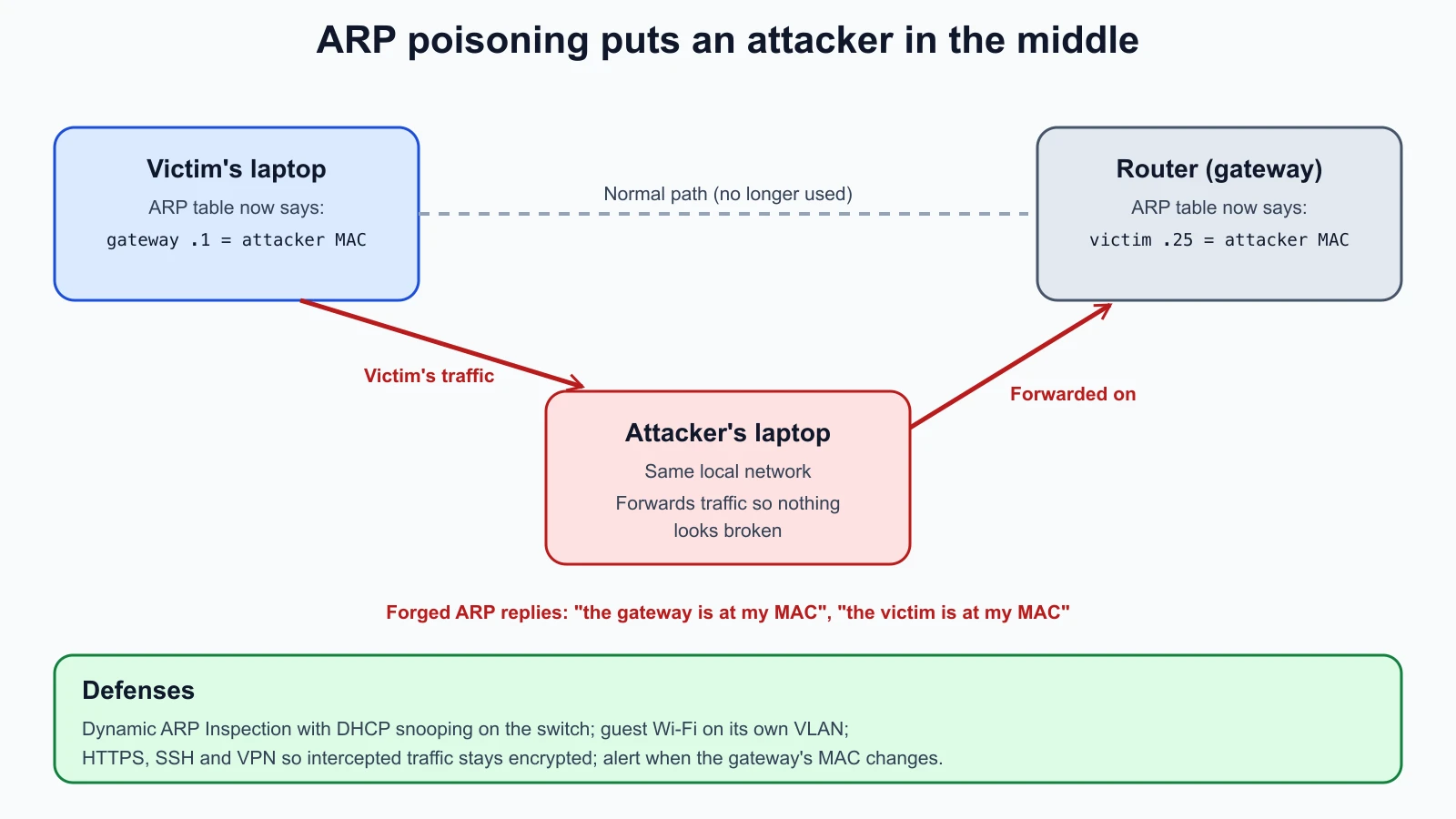
What it looks like: in the victim's ARP table, the gateway's IP address maps to the same MAC address as another device on the network. Network monitoring tools may report a "MAC address changed" or "duplicate IP" event, and a packet capture shows a flood of unrequested ARP replies.
Defenses: on managed switches, Dynamic ARP Inspection (DAI) checks ARP packets and drops those with invalid IP-to-MAC bindings. Cisco's configuration guide explains that it judges validity using the DHCP snooping binding database, so it is enabled together with DHCP snooping. Segmentation also helps: ARP poisoning only works inside one local network, so Harbor Books' guest Wi-Fi on its own VLAN cannot poison the till's VLAN. And encrypted connections (HTTPS, SSH, VPN) keep intercepted traffic unreadable.
A tested ARP spoofing checker
This defensive script reads the output of arp -a (or arp -an), in either the macOS and Linux format or the Windows format, and reports any MAC address that answers for more than one IP address. If one of those IP addresses is your gateway, it raises an alert, because that is the classic sign of ARP poisoning. It only reads your own computer's table and sends nothing on the network.
1# arp_check.py
2import argparse
3import re
4import sys
5from collections import defaultdict
6
7IP = r"(\d{1,3}(?:\.\d{1,3}){3})"
8MAC = r"([0-9a-fA-F]{1,2}(?:[:-][0-9a-fA-F]{1,2}){5})"
9UNIX_LINE = re.compile(rf"\({IP}\) at {MAC}")
10WINDOWS_LINE = re.compile(rf"^\s*{IP}\s+{MAC}\s", re.MULTILINE)
11IGNORED = {"ff:ff:ff:ff:ff:ff"}
12
13
14def normalise_mac(mac: str) -> str:
15    return ":".join(part.zfill(2) for part in re.split("[:-]", mac.lower()))
16
17
18def parse_arp(text: str) -> dict[str, str]:
19    table = {}
20    for ip, mac in UNIX_LINE.findall(text) + WINDOWS_LINE.findall(text):
21        mac = normalise_mac(mac)
22        if mac not in IGNORED:
23            table[ip] = mac
24    return table
25
26
27def find_shared_macs(table: dict[str, str], gateway: str | None = None) -> list[str]:
28    by_mac = defaultdict(list)
29    for ip, mac in table.items():
30        by_mac[mac].append(ip)
31    warnings = []
32    for mac, ips in sorted(by_mac.items()):
33        if len(ips) < 2:
34            continue
35        level = "ALERT" if gateway in ips else "check"
36        warnings.append(f"{level}: {mac} answers for {', '.join(sorted(ips))}")
37    return warnings
38
39
40def main() -> None:
41    parser = argparse.ArgumentParser(description="Flag one MAC address claiming several IP addresses in arp -a output.")
42    parser.add_argument("--gateway", help="your default gateway's IP address")
43    args = parser.parse_args()
44    table = parse_arp(sys.stdin.read())
45    warnings = find_shared_macs(table, args.gateway)
46    print(f"{len(table)} entries checked")
47    for line in warnings or ["no MAC address is shared by several IP addresses"]:
48        print(line)
49
50
51if __name__ == "__main__":
52    main()
macOS prints MAC addresses without leading zeros (0:11:22...), so the script pads each part before comparing; the broadcast address ff:ff:ff:ff:ff:ff is ignored. Run on a real Mac with Python 3.12 against its own ARP table and gateway, it reported (addresses not shown):
134 entries checked
2no MAC address is shared by several IP addresses
Fed a fictional three-line table in which one MAC address claims both the gateway 192.168.10.1 and another device, it printed:
13 entries checked
2ALERT: 00:11:22:33:44:55 answers for 192.168.10.1, 192.168.10.20
Two cautions. A shared MAC address is not always an attack: a device with two IP addresses, or some routers and virtual machines, can legitimately appear this way, which is why only the gateway case is an alert. And the script checks a single moment; an attacker can poison briefly. These tests cover both output formats and the alert logic; save them as arp_check_test.py and run python3 -m unittest discover -p '*_test.py':
1# arp_check_test.py
2import unittest
3
4from arp_check import find_shared_macs, normalise_mac, parse_arp
5
6MAC_OUTPUT = """? (192.168.10.1) at 0:11:22:33:44:55 on en0 ifscope [ethernet]
7? (192.168.10.20) at 0:11:22:33:44:55 on en0 ifscope [ethernet]
8? (192.168.10.25) at aa:bb:cc:dd:ee:1 on en0 ifscope [ethernet]
9? (192.168.10.255) at ff:ff:ff:ff:ff:ff on en0 ifscope [ethernet]"""
10
11WINDOWS_OUTPUT = """Interface: 192.168.10.30 --- 0x5
12  Internet Address      Physical Address      Type
13  192.168.10.1          00-11-22-33-44-55     dynamic
14  192.168.10.25         aa-bb-cc-dd-ee-01     dynamic
15  192.168.10.255        ff-ff-ff-ff-ff-ff     static"""
16
17
18class ArpCheckTest(unittest.TestCase):
19    def test_normalise_mac(self):
20        self.assertEqual(normalise_mac("0:11:22:33:44:5"), "00:11:22:33:44:05")
21        self.assertEqual(normalise_mac("AA-BB-CC-DD-EE-01"), "aa:bb:cc:dd:ee:01")
22
23    def test_parse_macos_and_linux_style(self):
24        table = parse_arp(MAC_OUTPUT)
25        self.assertEqual(table["192.168.10.25"], "aa:bb:cc:dd:ee:01")
26        self.assertNotIn("192.168.10.255", table)
27
28    def test_parse_windows_style(self):
29        table = parse_arp(WINDOWS_OUTPUT)
30        self.assertEqual(table, {"192.168.10.1": "00:11:22:33:44:55", "192.168.10.25": "aa:bb:cc:dd:ee:01"})
31
32    def test_gateway_impersonation_is_an_alert(self):
33        warnings = find_shared_macs(parse_arp(MAC_OUTPUT), gateway="192.168.10.1")
34        self.assertEqual(warnings, ["ALERT: 00:11:22:33:44:55 answers for 192.168.10.1, 192.168.10.20"])
35
36    def test_shared_mac_without_gateway_is_a_check(self):
37        warnings = find_shared_macs(parse_arp(MAC_OUTPUT), gateway="192.168.10.254")
38        self.assertTrue(warnings[0].startswith("check:"))
39
40    def test_clean_table_has_no_warnings(self):
41        self.assertEqual(find_shared_macs(parse_arp(WINDOWS_OUTPUT), gateway="192.168.10.1"), [])
42
43
44if __name__ == "__main__":
45    unittest.main()
All six tests passed. Six deliberate bugs were introduced one at a time, including skipping the zero padding, ignoring Windows output, treating a single entry as shared, and never raising the gateway alert; each made at least one test fail.
DHCP spoofing
The network services lesson quoted RFC 2131's own warning that unauthorized DHCP servers are easy to set up. A rogue DHCP server answers new devices first and hands out its own address as the gateway or DNS server, placing itself in the middle. ATT&CK lists this as T1557.003. What it looks like: devices with an unexpected gateway or DNS server in ipconfig /all or ip route, and DHCP offers from more than one server in a capture. Defense: DHCP snooping on managed switches, which allows DHCP server replies only from trusted ports, and which also feeds Dynamic ARP Inspection.
DNS poisoning
DNS poisoning plants false answers so that a name resolves to the attacker's address. Cache poisoning targets a resolver's cache, so every user of that resolver is misdirected. CERT/CC's 2008 vulnerability note VU#800113 described flaws in the DNS protocol and common implementations that made cache poisoning practical. Its primary fix was randomizing the source ports resolvers use, which adds unpredictability the attacker must guess, and it noted that full protection needs protocol changes such as DNSSEC, which you met in Secure Protocols and Wireless Security. Attackers can also poison DNS more simply by changing a device's DNS settings, its hosts file, or the router's configuration.
What it looks like: a familiar name resolving to an unexpected address (compare answers from two resolvers with dig, as in the troubleshooting lesson), certificate warnings on sites that normally work, or unexplained edits to /etc/hosts or resolver settings, which ATT&CK's detection guidance specifically calls out. Defenses: patched resolvers, DNSSEC validation, a trusted resolver configured centrally, the router admin password changed, and alerts on DNS setting changes.
Wireless attacks
Rogue access points and evil twins
A rogue access point is any wireless access point connected to a network without permission, whether a staff member's well-meant travel router or an attacker's device plugged into a free socket. It creates a way into the network that bypasses its controls.
An evil twin is an attacker's access point that imitates a legitimate network name. ATT&CK (T1557.004) describes adversaries boosting signal strength or blocking legitimate access points to push victims onto their network, answering devices' requests for networks they have joined before, and using fake login pages or captive portals to collect credentials. Once connected, the victim's traffic passes through the attacker.
What it looks like: ATT&CK's detection guidance lists a known network name broadcast from an unexpected hardware address (BSSID), a stronger signal than usual, different encryption settings from the real network, and unexpected captive portal redirects. Defenses: wireless intrusion detection or prevention that scans for rogue and look-alike access points; WPA3 or WPA2-Enterprise with devices that check the server certificate, as explained in the secure protocols lesson; staff trained to distrust open networks and certificate warnings; and a VPN when using any public Wi-Fi.
Deauthentication
Wi-Fi uses management frames to connect and disconnect devices. In older Wi-Fi, these frames were not protected, so anyone in range could forge a "deauthentication" frame and knock a device off the network. Attackers use this to cause disruption, to push a device to reconnect to an evil twin, or to capture the handshake as it rejoins a WPA2-Personal network for offline password guessing. Protected Management Frames, which the Wi-Fi Alliance requires for WPA3 networks and new certified devices, authenticate these frames so forged disconnects are ignored. What it looks like: devices repeatedly dropping and rejoining, and wireless monitoring that reports a burst of deauthentication frames.
VLAN hopping
VLANs separate traffic on shared switches, so attackers try to break out of their VLAN. Two classic methods are widely described:
- Switch spoofing: a computer pretends to be a switch and negotiates a trunk link, which carries all VLANs. This works when switch ports are left in a mode that negotiates trunking automatically.
- Double tagging: the attacker sends a frame carrying two VLAN tags. The first switch removes the outer tag, which matches the trunk's untagged "native" VLAN, and forwards the frame with the inner tag into another VLAN. It works only one way and only when the attacker's port is in the trunk's native VLAN.
Defenses: configure every switch port explicitly as an access port or a trunk and turn off automatic trunk negotiation; give trunks a dedicated native VLAN that no user port belongs to; put unused ports in an unused VLAN and disable them. For Harbor Books, with one small managed switch, that means setting each port deliberately rather than leaving factory defaults.
Replay attacks
NIST describes a replay attack as one in which the attacker is able to replay previously captured messages between a legitimate claimant and a verifier, so recorded traffic is sent again to repeat its effect, such as a login or a payment instruction. Encryption alone does not stop it, because the attacker does not need to read the message, only resend it. Defenses make each message usable once: random values (nonces) and sequence numbers, timestamps with short validity (which is why Kerberos tickets carry times, as in the authentication lesson), and protocols such as TLS, IPsec and SRTP that include replay protection. What it looks like: duplicate requests with identical content, or authentication messages reused outside their time window.
Brute force, password spraying and credential stuffing
MITRE ATT&CK groups password attacks under Brute Force (T1110), with sub-techniques for password guessing, password cracking, password spraying and credential stuffing:
- Password guessing (brute force against one account): many passwords tried against one user name. It triggers account lockout quickly.
- Password spraying: ATT&CK describes adversaries using a single password or a small list of commonly used passwords against many different accounts, to avoid the lockouts that brute forcing a single account would cause.
- Credential stuffing: using user name and password pairs leaked from another site, betting that people reused them.
- Password cracking: guessing offline against stolen password hashes, which is why the cryptography lesson insisted on salted, slow hashes.
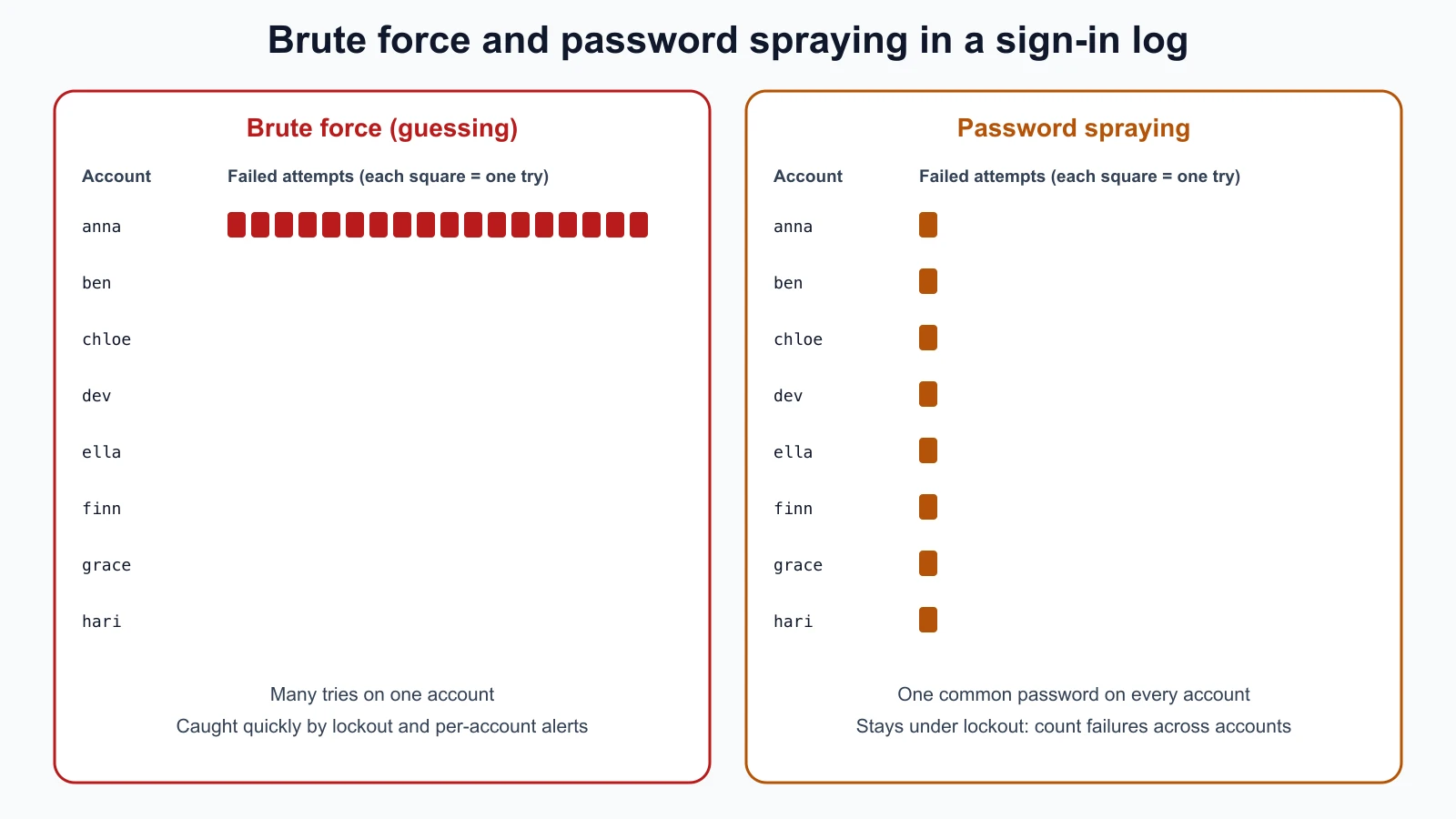
What it looks like: for guessing, many failures for one account in a short time, then a lockout. For spraying, ATT&CK's detection guidance suggests looking for many accounts failing within a short window, failures across many user identities from one source address, and slow attacks spread over days or weeks to stay under thresholds, including on less-watched services such as LDAP, Kerberos, SSH and webmail. On Windows, failed sign-ins appear as event ID 4625. For credential stuffing, many successful or near-successful sign-ins with different accounts from unusual places.
Defenses: ATT&CK recommends MFA, especially on internet-facing services; account lockout policies, with the caution that a policy that is too strict lets an attacker lock out real users, a denial of service of its own; password rules aligned with NIST guidance, including the blocklist of common passwords from the authentication lesson, which defeats spraying's "common password" strategy; and resetting accounts known to appear in breached credential lists. You will build a log analyser that detects these patterns in the lesson on network defense, logging and SIEM.
Detection and defense at a glance
| Attack | What you might see | Main defenses |
|---|---|---|
| DoS or DDoS | Traffic spike, timeouts, many half-open connections | Provider DDoS protection or CDN, rate limits, continuity plan |
| ARP poisoning | Gateway IP sharing a MAC with another device | Dynamic ARP Inspection, segmentation, encryption |
| DHCP spoofing | Unexpected gateway or DNS server on clients | DHCP snooping |
| DNS poisoning | Names resolving to unexpected addresses, certificate warnings | Patched resolvers, DNSSEC, alerts on DNS setting changes |
| Rogue AP or evil twin | Known network name from unknown hardware, odd encryption | Wireless monitoring, WPA3 or Enterprise with certificate checks, VPN |
| Deauthentication | Devices repeatedly disconnecting | Protected Management Frames (WPA3) |
| VLAN hopping | Traffic appearing in the wrong VLAN, unexpected trunks | Explicit port modes, no auto trunking, dedicated native VLAN |
| Replay | Duplicate requests, reused authentication messages | Nonces, timestamps, replay-protected protocols |
| Brute force or spraying | Many failures per account, or one failure per many accounts | MFA, password blocklists, sensible lockout, alerts |
Mistakes beginners make
-
Testing attacks on networks you do not own. A "quick test" on a café or office network can be illegal and harms other people.
Fix: Use only your isolated lab.
-
Assuming the inside network is safe. ARP, DHCP and evil twin attacks all start from inside or nearby.
Fix: Segment networks, enable switch protections, and encrypt traffic everywhere.
-
Setting lockout thresholds very low. An attacker can then lock out every user on purpose.
Fix: Combine MFA and blocklists with moderate lockouts and alerting.
-
Looking only for many failures on one account. Password spraying is designed to avoid that pattern.
Fix: Also count failures across accounts and over longer periods.
-
Ignoring certificate warnings on public Wi-Fi. They are the main sign of an interception.
Fix: Disconnect, use mobile data or a VPN, and report the network.
Recap and try it yourself
DoS denies access and DDoS uses many hosts; CISA groups attacks as volumetric, protocol and application, and small organizations rely on provider protection. Spoofing fakes identities wherever claims go unchecked. Person-in-the-middle attacks (ATT&CK T1557) use ARP poisoning, DHCP spoofing, name resolution poisoning or evil twins, and encryption plus certificate checks limit the damage. Dynamic ARP Inspection and DHCP snooping stop the local versions, and DNSSEC and patched resolvers protect DNS. Rogue access points, evil twins and deauthentication target Wi-Fi; Protected Management Frames and WPA3 help. VLAN hopping is blocked by explicit port configuration. Replay attacks are stopped by one-time values and timestamps. Brute force hits one account hard, password spraying hits many accounts lightly, and credential stuffing reuses leaked passwords; MFA and blocklists defeat all three.
Try it:
- Save
arp_check.pyand its tests and run them. Then runarp -an | python3 arp_check.py --gatewayfollowed by your gateway's address on your own computer. - In your lab, run the same check on
harbor-kaliandharbor-server. Both should show no shared MAC addresses. - On your own computer, run
ipconfig /allorip routeandcat /etc/resolv.conf, and write down the gateway and DNS servers you expect. You will compare against these if anything changes. - Look at the sign-in history of one of your own accounts (most email providers show recent activity). Would brute force or spraying against your account be visible there?
- Fill in a copy of the detection table for Harbor Books: for each attack, which device or service would show the evidence?
In the next lesson you will move up to the application layer: web attacks and the OWASP Top 10, demonstrated and fixed on a local practice application.
Sources checked on 12 November 2026: NIST glossary, denial of service; NIST glossary, distributed denial of service; CISA, understanding and responding to DDoS attacks (March 2024); NIST glossary, spoofing; MITRE ATT&CK, Adversary-in-the-Middle T1557; MITRE ATT&CK, Evil Twin T1557.004; Cisco, configuring Dynamic ARP Inspection; CERT/CC VU#800113, DNS cache poisoning; Wi-Fi Alliance, security; NIST glossary, replay attack; MITRE ATT&CK, Brute Force T1110; MITRE ATT&CK, Password Spraying T1110.003.