
Cyber Security course · lesson 17 of 24
- 1What Is Cyber Security?
- 2Fundamental IT Skills for Cyber Security
- 3Operating Systems for Security: Windows, Linux and macOS
- 4Virtualization and Your Safe Cyber Security Lab
- 5Networking Fundamentals for Cyber Security
- 6Network Services and Infrastructure for Cyber Security
- 7Network Troubleshooting and Traffic Analysis Tools
- 8Core Security Concepts Every Defender Uses
- 9Authentication and Access Control Explained
- 10Cryptography Basics for Cyber Security
- 11Secure Protocols and Wireless Security
- 12The Threat Landscape and Security Frameworks
- 13Social Engineering and Human Attacks
- 14Network and Wireless Attacks and How to Detect Them
- 15Web Attacks and the OWASP Top 10
- 16Malware, Exploits and System Attacks
- 17Hardening and Endpoint Security
- 18Network Defense, Logging and SIEM
- 19Vulnerability Management and Threat Hunting
- 20Incident Response and Digital Forensics
- 21Cloud Security Basics
- 22Scripting for Security
- 23Ethical Hacking, CTFs and Penetration Testing
- 24Cyber Security Standards, Certifications and Capstone
After this lesson, you should be able to harden a computer starting from a published baseline, run a patching routine, turn on and read a host firewall, apply least privilege with ACLs, Group Policy and application allowlisting, explain MAC-based controls, network access control, port blocking and jump servers, tell antivirus, EDR, HIPS and DLP apart, use sandboxes and DNS sinkholes, and run a tested file-integrity checker that spots added, removed and changed files. This lesson opens the defense module. The attacks in the last five lessons are what these controls are for.
What hardening means
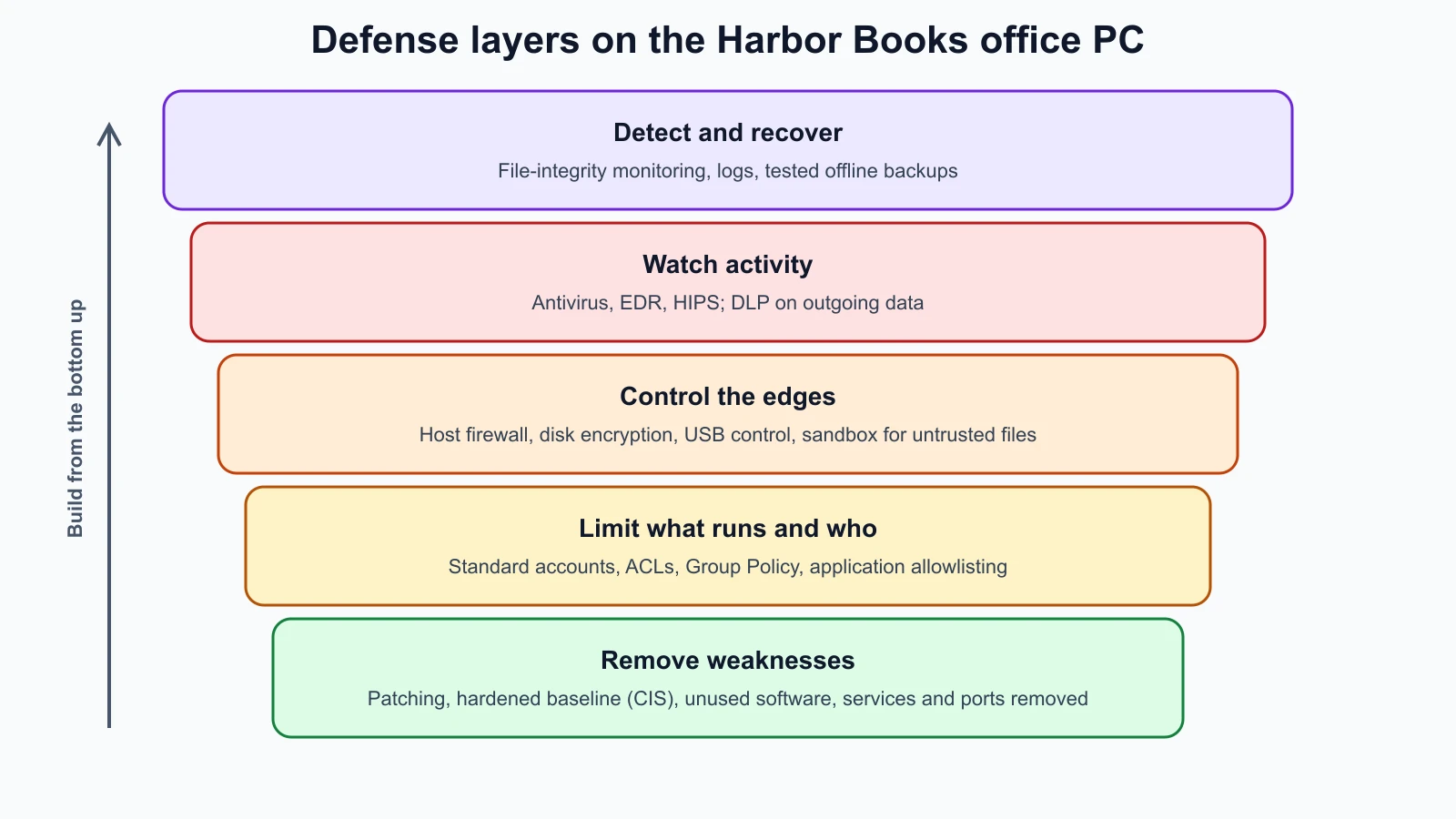
NIST defines hardening as a process intended to eliminate a means of attack by patching vulnerabilities and turning off nonessential services. In practice it means changing a system from "works out of the box" to "does only what it needs to, in the safest way". Every service you turn off, every port you close and every right you remove is one less thing an attacker can use.
Start from a baseline
Nobody hardens a system from memory. Organizations start from a published baseline, a list of recommended settings. The CIS Benchmarks from the Center for Internet Security are prescriptive configuration recommendations developed by consensus among security experts, covering Windows, macOS, Ubuntu, Red Hat and Debian, cloud platforms, network devices, browsers and server software. Operating system vendors also publish their own security baselines. A baseline turns hardening into a checklist you can apply, check and repeat.
Two warnings: apply a baseline in a test environment first, because some settings break things a business relies on; and record any setting you choose not to apply, with the reason, as an accepted risk in the register from Core Security Concepts Every Defender Uses.
Patching
NIST's patching guide, SP 800-40 Revision 4 (April 2022), treats patching as a critical part of preventive maintenance: a routine cost of doing business that prevents compromises, data breaches and disruptions. Its message for organizations is to have a planned, repeatable patching strategy rather than reacting case by case.
A workable routine for a small business:
- Turn on automatic updates for operating systems, browsers and office software on every device, as CISA recommends.
- Know what you have: keep the inventory from Fundamental IT Skills for Cyber Security current, including routers, the till, the card reader and the NAS, which do not update themselves as reliably.
- Prioritize vulnerabilities on CISA's Known Exploited Vulnerabilities catalog, from the threat frameworks lesson, and anything exposed to the internet.
- Check monthly that updates actually installed, and that nothing is running an operating system past its end of support, as discussed in the operating systems lesson.
- Restart when updates need it; many fixes do not take effect until then.
Reduce the attack surface
- Remove software you do not use. Unused programs still need patching and still have bugs.
- Turn off services you do not need. On Linux,
systemctl list-units --type=service --state=runningshows running services; on Windows, the Services console; on macOS, System Settings under General and Sharing. - Close and block ports. Check what is listening with
ss -tulpn,netstatorlsoffrom the troubleshooting lesson, and block everything else. - Disable unused accounts and remove default or guest accounts.
- Encrypt disks with BitLocker on Windows, FileVault on macOS or LUKS on Linux, so a lost laptop does not mean lost data.
- Lock screens automatically after a few minutes, and require a password to unlock.
Host-based firewalls
NIST describes a host-based firewall as a software firewall installed on a computer to monitor and control its incoming and outgoing network traffic. Every major operating system has one: Windows Defender Firewall, the macOS application firewall, and on Linux, nftables or a front end such as Ubuntu's ufw.
Ubuntu's documentation notes that ufw is disabled by default. On your lab server, harbor-server, a simple policy allows SSH and nothing else from the network:
1sudo ufw allow 22
2sudo ufw enable
3sudo ufw status verbose
Those commands follow Ubuntu's firewall guide and were not run for this lesson. Allow SSH before enabling the firewall when you are connected over SSH, or you will lock yourself out. A host firewall matters even behind a network firewall, because it still protects the machine from other devices on the same network, which is where ARP poisoning and lateral movement happen.
Least privilege on the endpoint
- Standard user accounts for daily work, with separate administrator accounts, as covered in the operating systems and authentication lessons.
- Access control lists (ACLs) on files and folders so each person or program can reach only what it needs. You met Windows ACLs and Unix permissions in Operating Systems for Security.
- Group Policy on Windows networks. Microsoft describes it as a feature that provides centralized management and configuration of operating systems, applications and user settings; settings are grouped into Group Policy Objects (GPOs) and applied when computers start and users sign in. It is how organizations push the same hardening settings to hundreds of machines.
- Application allowlisting. NIST describes an application allowlist as a list of applications and components authorized to be present or active on a host according to a well-defined baseline. Only approved programs run; anything else, including most malware, is blocked. It is one of the strongest endpoint controls, and also the most work to maintain, so it suits fixed-purpose machines such as Harbor Books' till first.
Controls at the network edge of the endpoint
- MAC-based controls allow or block devices by their hardware address, for example "only these MAC addresses may join the staff Wi-Fi". They are easy to bypass, because MAC addresses can be spoofed, as covered in Network and Wireless Attacks and How to Detect Them. Treat them as a tidy-up measure, not security.
- Network access control (NAC). NIST describes NAC as a feature that allows access based on a user's credentials and the results of security checks run on the device, for example whether it is patched and has antivirus running. NAC often builds on 802.1X and RADIUS from the authentication and wireless lessons. A device that fails the checks can be placed in a quarantine VLAN until it is fixed.
- Port blocking and port security on switches: disable unused wall sockets and switch ports, and limit which devices may use each active port, so a visitor cannot simply plug in.
- Jump servers (also called bastion hosts): a single, hardened, closely monitored machine that administrators must connect through before reaching sensitive systems. Instead of every admin laptop being able to reach the payment system directly, only the jump server can, and every session through it is logged.
Endpoint protection tools
| Tool | What it does | Notes |
|---|---|---|
| Antivirus / antimalware | Scans files and activity for known malware signatures and suspicious behavior, and quarantines threats | Built into Windows as Microsoft Defender Antivirus; essential but not enough on its own |
| EDR (endpoint detection and response) | Continuously records detailed activity on each device so analysts can detect, investigate and respond to attacks | Microsoft's description of its EDR: near real-time detections, collected telemetry on processes, network activity, sign-ins, registry and file changes, and response actions such as isolating a device |
| HIPS (host-based intrusion prevention) | Watches a single host's activity and blocks behavior that matches attacks | NIST SP 800-94 covers host-based intrusion detection and prevention as one of four classes |
| DLP (data loss prevention) | Detects and stops sensitive data leaving where it should be, such as card numbers in an email or files copied to USB | The US government glossary describes DLP as designed to detect and prevent unauthorized use and transmission of information |
| Host-based firewall | Controls traffic in and out of one machine | See above |
The difference between antivirus and EDR matters. Antivirus mainly asks "is this file bad?" EDR asks "is this sequence of behavior an attack?", for example a word processor starting a command shell that downloads a file and contacts an unfamiliar server. That is how EDR catches the living-off-the-land techniques from the malware lesson, where no single file is malicious. For a small shop, the built-in antivirus plus a small-business EDR product, managed by an IT provider, is a reasonable step up.
Sandboxing
A sandbox runs something in an isolated environment where it cannot touch the rest of the system. Browsers sandbox each website; mobile operating systems sandbox each app. Windows Pro, Enterprise and Education editions include Windows Sandbox, which Microsoft describes as a lightweight, isolated desktop that is disposable: closing it deletes all software, files and state. Microsoft recommends opening untrusted files there with networking disabled and the file's folder mapped read-only. Your lab VMs are a sandbox too.
Sinkholes
A sinkhole redirects traffic meant for a malicious destination to a harmless one that the defender controls. A DNS sinkhole answers requests for known-bad domains with a safe address, so infected machines cannot reach their command servers, and the defender sees which machines tried. CISA's Protective DNS service for US federal agencies works this way: when a lookup matches a threat indicator, it blocks, redirects or sinkholes the response and alerts the agency. Small businesses get similar protection by choosing a DNS resolver that blocks known malicious domains.
File integrity monitoring
Attackers change files: they replace a web page, add a web shell to the site folder, edit a configuration, or swap a system program. File integrity monitoring (FIM) detects that by recording a hash of each important file and checking later whether anything was added, removed or changed. It uses the SHA-256 hashing from Cryptography Basics for Cyber Security: any change, even of one character, produces a different hash.
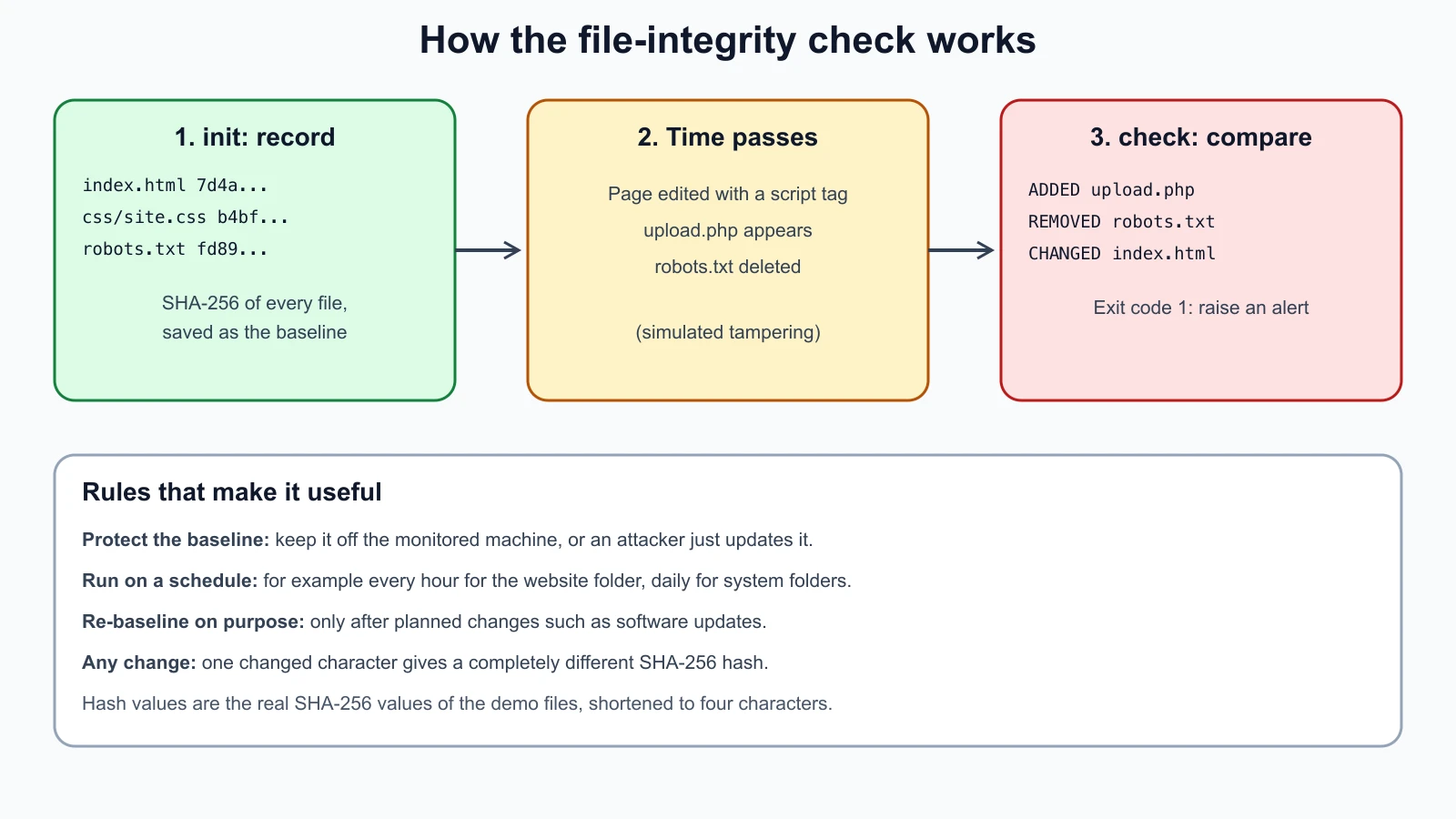
This script records a baseline of every file in a folder, then compares the folder against it. It exits with code 1 when anything changed, so it can be run on a schedule and trigger an alert.
1# fim.py
2import argparse
3import hashlib
4import json
5from pathlib import Path
6
7
8def sha256_file(path: Path) -> str:
9    digest = hashlib.sha256()
10    with path.open("rb") as handle:
11        for chunk in iter(lambda: handle.read(65536), b""):
12            digest.update(chunk)
13    return digest.hexdigest()
14
15
16def snapshot(folder: Path) -> dict[str, str]:
17    return {
18        str(path.relative_to(folder)): sha256_file(path)
19        for path in sorted(folder.rglob("*"))
20        if path.is_file() and not path.is_symlink()
21    }
22
23
24def compare(baseline: dict[str, str], current: dict[str, str]) -> dict[str, list[str]]:
25    return {
26        "added": sorted(current.keys() - baseline.keys()),
27        "removed": sorted(baseline.keys() - current.keys()),
28        "changed": sorted(p for p in baseline.keys() & current.keys() if baseline[p] != current[p]),
29    }
30
31
32def main() -> int:
33    parser = argparse.ArgumentParser(description="Record or check SHA-256 hashes of every file in a folder.")
34    parser.add_argument("folder")
35    parser.add_argument("baseline", help="JSON file to write (init) or read (check)")
36    parser.add_argument("mode", choices=["init", "check"])
37    args = parser.parse_args()
38    folder = Path(args.folder)
39    if args.mode == "init":
40        current = snapshot(folder)
41        Path(args.baseline).write_text(json.dumps(current, indent=2))
42        print(f"baseline saved: {len(current)} files")
43        return 0
44    result = compare(json.loads(Path(args.baseline).read_text()), snapshot(folder))
45    for kind, paths in result.items():
46        for path in paths:
47            print(f"{kind.upper():8} {path}")
48    total = sum(len(paths) for paths in result.values())
49    print("no changes" if total == 0 else f"{total} change(s) found")
50    return 1 if total else 0
51
52
53if __name__ == "__main__":
54    raise SystemExit(main())
It skips symbolic links and reads files in chunks, so large files do not fill memory. To try it, a small fictional "shop website" folder with three files was created, a baseline taken and checked, then the folder was tampered with: the home page was given an extra script tag, an unexpected upload.php was added and robots.txt was deleted. With Python 3.12 on a Mac:
1python3 fim.py shop-site shop-baseline.json init
2python3 fim.py shop-site shop-baseline.json check1baseline saved: 3 files
2no changesAfter the tampering, python3 fim.py shop-site shop-baseline.json check printed:
1ADDED    upload.php
2REMOVED  robots.txt
3CHANGED  index.html
43 change(s) found
and exited with code 1. Keep the baseline file somewhere an attacker on the monitored machine cannot rewrite, such as a separate machine or read-only media; otherwise they can simply update it. Update the baseline deliberately after legitimate changes, such as a software update.
These tests use a temporary folder and the known SHA-256 of abc from the standard's examples; save them as fim_test.py beside the script and run python3 -m unittest discover -p '*_test.py':
1# fim_test.py
2import subprocess
3import sys
4import tempfile
5import unittest
6from pathlib import Path
7
8from fim import compare, sha256_file, snapshot
9
10
11class FimTest(unittest.TestCase):
12    def setUp(self):
13        self.tmp = tempfile.TemporaryDirectory()
14        self.root = Path(self.tmp.name)
15        (self.root / "sub").mkdir()
16        (self.root / "index.html").write_text("<h1>Harbor Books</h1>")
17        (self.root / "sub" / "config.txt").write_text("debug=false")
18
19    def tearDown(self):
20        self.tmp.cleanup()
21
22    def test_known_hash(self):
23        path = self.root / "abc.txt"
24        path.write_bytes(b"abc")
25        self.assertEqual(sha256_file(path), "ba7816bf8f01cfea414140de5dae2223b00361a396177a9cb410ff61f20015ad")
26
27    def test_snapshot_includes_subfolders(self):
28        self.assertEqual(sorted(snapshot(self.root)), ["index.html", "sub/config.txt"])
29
30    def test_no_changes(self):
31        base = snapshot(self.root)
32        self.assertEqual(compare(base, snapshot(self.root)), {"added": [], "removed": [], "changed": []})
33
34    def test_detects_added_removed_and_changed(self):
35        base = snapshot(self.root)
36        (self.root / "index.html").write_text("<h1>Hacked</h1>")
37        (self.root / "sub" / "config.txt").unlink()
38        (self.root / "shell.php").write_text("unexpected")
39        result = compare(base, snapshot(self.root))
40        self.assertEqual(result, {"added": ["shell.php"], "removed": ["sub/config.txt"], "changed": ["index.html"]})
41
42    def test_same_size_change_is_detected(self):
43        base = snapshot(self.root)
44        (self.root / "sub" / "config.txt").write_text("debug=fals3")
45        self.assertEqual(compare(base, snapshot(self.root))["changed"], ["sub/config.txt"])
46
47    def test_command_line_exit_codes(self):
48        script = Path(__file__).with_name("fim.py")
49        baseline = self.root.parent / (self.root.name + "-baseline.json")
50        run = lambda mode: subprocess.run([sys.executable, str(script), str(self.root), str(baseline), mode], capture_output=True, text=True)
51        try:
52            self.assertEqual(run("init").returncode, 0)
53            self.assertEqual(run("check").returncode, 0)
54            (self.root / "index.html").write_text("<h1>Changed</h1>")
55            result = run("check")
56            self.assertEqual(result.returncode, 1)
57            self.assertIn("CHANGED  index.html", result.stdout)
58        finally:
59            baseline.unlink(missing_ok=True)
60
61    def test_symlinks_are_skipped(self):
62        (self.root / "link.txt").symlink_to(self.root / "index.html")
63        self.assertNotIn("link.txt", snapshot(self.root))
64
65
66if __name__ == "__main__":
67    unittest.main()
All seven tests passed. Deliberate bugs, introduced one at a time, included hashing with MD5 instead of SHA-256, scanning only the top folder, following symbolic links, ignoring changes, swapping added and removed, and always exiting 0; each made a test fail. The exit-code bug went unnoticed in the first round, which is why the command-line test was added. Changing the chunk size made no difference, as it should not.
A hardening checklist for Harbor Books
Copy and adapt this for each device. Tick, date and initial each line; record anything not done as an accepted risk.
| Area | Check | Office PC | Till | Staff laptops |
|---|---|---|---|---|
| Baseline | Applicable CIS Benchmark or vendor baseline reviewed | |||
| Patching | Automatic updates on; last update checked this month; OS still supported | |||
| Accounts | Standard daily account; separate admin; default and unused accounts removed | |||
| Passwords | Unique local admin password; MFA on accounts that offer it | |||
| Software | Unused programs removed; only approved software (allowlist on the till) | |||
| Services and ports | Unneeded services off; only needed ports listening | |||
| Firewall | Host firewall on; inbound blocked by default | |||
| Encryption | Full-disk encryption on; recovery key stored safely | |||
| Endpoint protection | Antivirus on and updating; EDR if available | |||
| Screen | Auto-lock after 5 minutes | |||
| USB | Unknown USB storage blocked or controlled | |||
| Integrity | FIM baseline for website and key folders; checked on a schedule | |||
| Backups | Covered by the offline backup plan; restore tested |
Mistakes beginners make
-
Hardening from memory. Settings get missed and nobody can check what was done.
Fix: Start from a CIS Benchmark or vendor baseline and keep the checklist.
-
Enabling a firewall remotely without allowing your own access. You lock yourself out.
Fix: Allow the management port first, then enable, and keep console access available.
-
Relying on MAC filtering. MAC addresses are trivially spoofed.
Fix: Use 802.1X, NAC or WPA3-Enterprise for real access control.
-
Treating antivirus as complete protection. It misses new and fileless attacks.
Fix: Combine it with patching, least privilege, application control and, where possible, EDR.
-
Storing the integrity baseline on the machine it protects. An attacker can update it.
Fix: Keep baselines off the monitored host and protect them from changes.
Recap and try it yourself
Hardening removes ways to attack a system, starting from a published baseline such as the CIS Benchmarks. Patching, as NIST SP 800-40 Rev. 4 puts it, is preventive maintenance and needs a routine. Reduce the attack surface by removing software, services, ports and accounts, and use host-based firewalls and disk encryption. Apply least privilege with standard accounts, ACLs, Group Policy and application allowlisting. MAC filtering is weak; NAC, port security and jump servers are stronger network-side controls. Antivirus looks for bad files, EDR records and analyzes behavior, HIPS blocks attacks on one host, and DLP stops data leaving. Sandboxes isolate untrusted code and DNS sinkholes cut off malicious domains. File integrity monitoring compares SHA-256 hashes against a protected baseline to spot added, removed and changed files.
Try it:
- On
harbor-server, allow SSH, enableufw, and confirm withsudo ufw status verbose. Then use the port checker from the troubleshooting lesson to confirm only port 22 answers. - Save
fim.pyand its tests, run them, then create a baseline of/etconharbor-server(sudo python3 fim.py /etc etc-baseline.json init), install any package, and runcheck. Which files changed? - Find the CIS Benchmark for your own operating system and read the first ten recommendations. How many does your computer already meet?
- Check whether full-disk encryption and automatic updates are on for your own computer.
- Fill in the hardening checklist for one device you own.
In the next lesson you will move from single machines to the network: firewalls and next-generation firewalls, IDS and IPS, honeypots, logs from syslog to NetFlow, SIEM, and a tested brute-force log analyser.
Sources checked on 12 November 2026: NIST glossary, hardening; CIS Benchmarks; NIST SP 800-40 Rev. 4, enterprise patch management; CISA, update software; NIST glossary, host-based firewall; Ubuntu, firewalls; Microsoft, Group Policy overview; NIST glossary, application allowlisting; NIST glossary, network access control; Microsoft, endpoint detection and response in Defender for Endpoint; NIST SP 800-94, intrusion detection and prevention systems; NIST glossary, data loss prevention; Microsoft, Windows Sandbox; CISA, Protective DNS resolver.