
Cyber Security course · lesson 18 of 24
- 1What Is Cyber Security?
- 2Fundamental IT Skills for Cyber Security
- 3Operating Systems for Security: Windows, Linux and macOS
- 4Virtualization and Your Safe Cyber Security Lab
- 5Networking Fundamentals for Cyber Security
- 6Network Services and Infrastructure for Cyber Security
- 7Network Troubleshooting and Traffic Analysis Tools
- 8Core Security Concepts Every Defender Uses
- 9Authentication and Access Control Explained
- 10Cryptography Basics for Cyber Security
- 11Secure Protocols and Wireless Security
- 12The Threat Landscape and Security Frameworks
- 13Social Engineering and Human Attacks
- 14Network and Wireless Attacks and How to Detect Them
- 15Web Attacks and the OWASP Top 10
- 16Malware, Exploits and System Attacks
- 17Hardening and Endpoint Security
- 18Network Defense, Logging and SIEM
- 19Vulnerability Management and Threat Hunting
- 20Incident Response and Digital Forensics
- 21Cloud Security Basics
- 22Scripting for Security
- 23Ethical Hacking, CTFs and Penetration Testing
- 24Cyber Security Standards, Certifications and Capstone
After this lesson, you should be able to explain where a firewall, next-generation firewall, IDS and IPS sit in a network; compare network and host sensors; describe what a honeypot can and cannot tell you; distinguish event logs, syslog, firewall logs, packet captures and NetFlow; explain how SIEM and SOAR fit into monitoring; and run a tested Python analyser against synthetic login events. Every example uses Harbor Books, a fictional shop, or artificial data. Do not test against a network you do not own or have written permission to assess.
Harbor Books has just hardened its point-of-sale computer and office laptop in Hardening and Endpoint Security. Its owner now wants to know whether the controls are working and whether suspicious activity is happening. A firewall can block traffic, but someone still needs evidence about what was allowed, denied, detected and changed. This lesson connects prevention to monitoring.
Safety and authorization
This lesson focuses on defensive design and analysis. The Python example reads a small CSV file that you create from synthetic records. It does not connect to a network, try passwords, block an address, or change a firewall. Keep any packet capture, IDS rule test or honeypot inside the isolated lab from Virtualization and Your Safe Cyber Security Lab, or use a deliberately provided dataset. Capturing someone else's traffic can expose private information and may violate law or policy. Scanning or monitoring another network needs explicit authorization and a defined scope, as discussed in What Is Cyber Security?.
Firewalls decide which traffic may pass
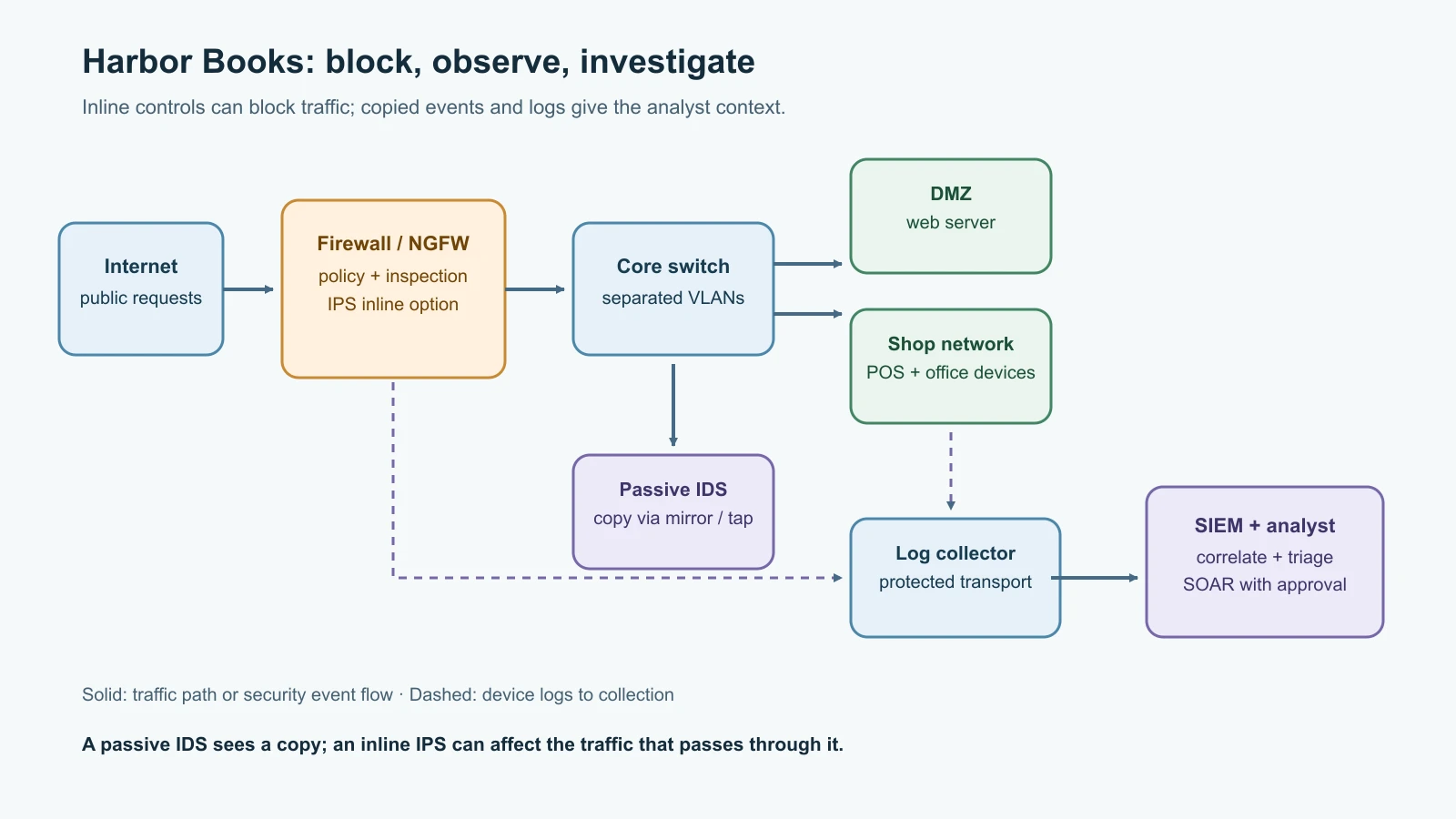
A firewall applies rules to network traffic crossing a boundary. A basic packet-filtering rule can consider source and destination addresses, transport protocol, ports and direction. A stateful firewall also tracks connection state, so it can distinguish a reply belonging to an allowed connection from an unrelated inbound packet. A host firewall protects one computer; a network firewall controls traffic between network segments or between a network and the internet.
Harbor Books might allow web traffic from the public internet to its web server in a separated DMZ, while denying direct internet access to the till and office file share. Staff devices can reach only the services they need. This extends the segmentation and defense-in-depth concepts from Core Security Concepts Every Defender Uses. A firewall is only as useful as its policy and maintenance: overly broad rules, forgotten exceptions, and poor logging can weaken it.
A next-generation firewall (NGFW) is a product category that usually combines traditional traffic filtering with additional capabilities such as application identification, intrusion-prevention signatures, reputation feeds, or TLS inspection. The exact feature set varies by vendor and license; CISA's Joint Guide on Modern Approaches to Secure Network Access describes common NGFW capabilities. It is not a magic replacement for a sound rule set, endpoint protections, or monitoring. TLS inspection can expose decrypted content to the inspection system and has privacy, certificate, performance and policy implications. Review vendor documentation and organizational requirements before enabling it.
Firewall logs help answer concrete questions: Was a connection allowed or denied? Which rule matched? Which interface, address, port and protocol were involved? Was the decision unusual for that host? A deny event does not automatically mean an attack; ordinary software can make blocked connections. An allow event does not prove the traffic was safe. Keep enough context to investigate while controlling access and retention.
IDS and IPS look for suspicious activity
An intrusion detection system (IDS) monitors host or network events and alerts when they match suspicious patterns or behavior. An intrusion prevention system (IPS) can also attempt to stop or disrupt detected activity. Network-based systems are often called NIDS and NIPS; host-based sensors inspect events on an endpoint. NIST describes IDS as warning about suspected unauthorized access, while an IPS can attempt to stop it.
A network IDS is commonly connected to a switch mirror port or network tap so it receives a copy of traffic without sitting in the normal path. It can observe and alert, but cannot itself block that copied traffic. A network IPS is commonly inline: traffic passes through it, so it can drop or reject traffic matching a rule. That placement can prevent harm, but a bad rule, overloaded device or failure can interrupt legitimate service. Teams plan carefully for fail-open or fail-closed behavior, tuning, change control and rollback.
Detection methods have trade-offs:
| Method | What it looks for | Typical limitation |
|---|---|---|
| Signature or rule matching | A known byte pattern, protocol sequence or indicator | Can miss changed or unknown activity; rules need updates and tuning |
| Anomaly or behavior analysis | Activity that differs from a baseline, such as an unusual connection rate | Normal changes can look suspicious; stealthy activity may resemble normal work |
| Protocol analysis | Unexpected use or malformed behavior in a protocol | Encrypted traffic and vendor variations limit visibility |
No detector sees everything. A false positive is a benign event raised as suspicious; a false negative is suspicious activity that was missed. Use alerts to start an investigation, then compare with asset role, user activity, endpoint logs, firewall decisions and network context. The confusion-matrix terms from Core Security Concepts remain useful here.
Honeypots are decoys, not general-purpose sensors
A honeypot is a system or resource intentionally made attractive to an intruder so defenders can observe interaction with it. A low-interaction decoy might imitate a service and record connection attempts. A higher-interaction honeypot behaves more like a real system and can provide richer observations, but it also creates more risk and requires stronger isolation and monitoring.
Harbor Books could place a decoy file share in a restricted lab segment and alert if any staff computer tries to access it. Because ordinary users should have no reason to touch it, that event deserves attention. But the alert is a clue, not proof: a scanner, misconfiguration or security test might also reach it. Honeypots do not replace patching, backups, logging or an incident-response plan. Never place an unmanaged decoy on the public internet or allow a compromised honeypot to reach real systems. Use one only when an owner can maintain it and review its alerts.
Logs turn events into evidence
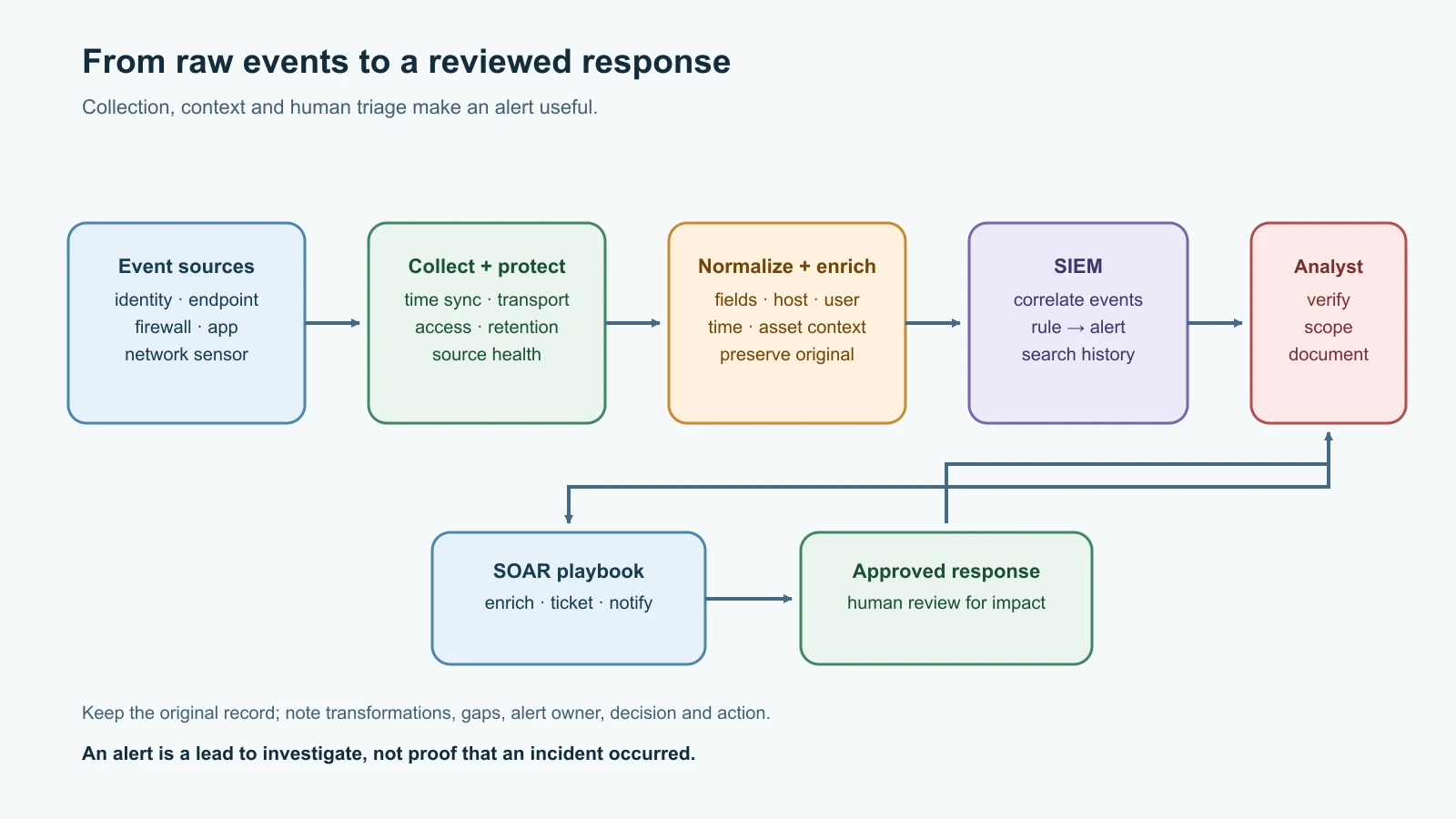
A log is a recorded event from a system or service. Useful security records often answer when something happened, which device produced it, which account or process was involved, what action occurred, and whether it succeeded. Synchronize clocks across systems; otherwise, events from the same incident may appear out of order. Preserve original records and document any transformation used for analysis.
| Record type | What it can show | Example question |
|---|---|---|
| Operating-system event log | Sign-ins, services, policy changes, process or device events | Did a new account log in after closing time? |
| Application or identity log | Login success/failure, account changes, application errors | Did the shop web app receive repeated failures for one account? |
| Firewall log | Traffic decision and rule context | Which rule allowed the connection to the server? |
| Syslog | A standard message format and ecosystem used by network devices and Unix-like systems | Can a router send structured events to a collector? |
| Packet capture | Individual packets and their headers, and sometimes payload | What protocol exchange occurred during the connection? |
| NetFlow-style flow record | Summary of a communication flow, such as endpoints, protocol, time and byte counts | Which host exchanged a large amount of data with an unfamiliar destination? |
Syslog is commonly used to convey event notifications from devices and services to relays or collectors. The modern protocol format is specified in RFC 5424. The message format and the transport are separate questions: a syslog record can be transported in different ways, and the chosen transport affects delivery and confidentiality. Where supported, use a protected transport such as TLS and restrict which devices may send logs. A log collector should not be an unauthenticated service open to the whole internet.
NetFlow is a vendor-originated family of flow-export technologies. IPFIX, standardized in IETF RFC 7011, provides a protocol for exporting flow information. Flow records summarize communications rather than preserve every packet. They can help identify unusual volumes, destinations or timing, but do not normally provide the full content of a web request. Packet captures are more detailed and more sensitive: they may contain personal data, session identifiers or unencrypted content. Limit capture scope, storage, access and retention.
Logs can be missing, duplicated, delayed, truncated, misconfigured or altered. A system that produces no logs may be offline, misconfigured, or tampered with. Define which assets must report, how collectors detect gaps, who can change retention, and how long records must be kept. Store security logs separately from the system being monitored when practical, so an intruder who controls one endpoint cannot quietly erase every copy.
SIEM and SOAR help teams manage volume
A security information and event management system (SIEM) centralizes security logs from different sources. It parses and normalizes fields so that timestamps, users, addresses and event types can be compared. It can correlate records across systems, apply detection rules, search history and present alerts to analysts. For example, a SIEM might connect repeated failed logins on the web server with a later successful login and a new firewall connection from the same source.
Centralization brings its own work: connectors need maintenance; fields can be mapped incorrectly; clocks and time zones matter; log volume can grow quickly; and a retention policy must balance investigation needs, privacy, cost and legal duties. A SIEM does not guarantee detection. Analysts still need useful rules, reliable source coverage, alert triage and a response plan. NIST's log-management guidance emphasizes managing the full lifecycle of records, from generation and transmission through storage, access and disposal.
Security orchestration, automation and response (SOAR) refers to tools or platforms that coordinate and automate parts of security operations. A playbook might enrich an alert with asset information, create a ticket, notify an analyst, or request approval before disabling an account. Automation can reduce repetitive work, but an incorrect rule can affect many users quickly. Start with low-impact enrichment and notification. Keep human approval for disruptive or irreversible actions such as blocking a business-critical service, disabling accounts, or isolating a point-of-sale system.
Build a small brute-force log analyzer
The analyzer below looks for a burst of failed logins against the same account from the same source address within a chosen time window. A brute-force pattern means repeated guesses against one account; password spraying spreads a small number of guesses across many accounts. The difference was introduced in Network and Wireless Attacks. This script detects only the first pattern.
It reads a small CSV file with a fixed schema. It is not a SIEM, does not inspect a live authentication log, and does not prove an attack took place. It reports a pattern worth checking. The synthetic addresses use the documentation-only range 192.0.2.0/24.
Create auth_log_analyzer.py:
1#!/usr/bin/env python3
2"""Find possible failed-login bursts in a synthetic or authorized CSV export."""
3
4from __future__ import annotations
5
6import argparse
7import csv
8import ipaddress
9import sys
10from collections import defaultdict
11from dataclasses import dataclass
12from datetime import datetime, timedelta
13from pathlib import Path
14from typing import TextIO
15
16
17REQUIRED_COLUMNS = {"timestamp", "host", "event", "user", "src_ip"}
18
19
20@dataclass(frozen=True)
21class LoginFailure:
22    timestamp: datetime
23    host: str
24    user: str
25    src_ip: str
26
27
28@dataclass(frozen=True)
29class Alert:
30    host: str
31    user: str
32    src_ip: str
33    first_seen: datetime
34    last_seen: datetime
35    attempts: int
36
37
38def read_failures(source: TextIO) -> tuple[list[LoginFailure], int]:
39    """Return valid failed logins and a count of malformed rows skipped."""
40    reader = csv.DictReader(source)
41    if reader.fieldnames is None or not REQUIRED_COLUMNS.issubset(reader.fieldnames):
42        missing = sorted(REQUIRED_COLUMNS - set(reader.fieldnames or []))
43        raise ValueError(f"CSV is missing required columns: {', '.join(missing)}")
44
45    failures: list[LoginFailure] = []
46    rejected = 0
47    for row in reader:
48        if (row.get("event") or "").strip().lower() != "login_failed":
49            continue
50        try:
51            timestamp = datetime.fromisoformat((row.get("timestamp") or "").strip())
52            if timestamp.tzinfo is None or timestamp.utcoffset() is None:
53                raise ValueError("timestamp must include a timezone offset")
54            host = (row.get("host") or "").strip()
55            user = (row.get("user") or "").strip()
56            src_ip = str(ipaddress.ip_address((row.get("src_ip") or "").strip()))
57            if not host or not user:
58                raise ValueError("host and user are required")
59        except (ValueError, TypeError):
60            rejected += 1
61            continue
62        failures.append(LoginFailure(timestamp, host, user, src_ip))
63
64    failures.sort(key=lambda event: event.timestamp)
65    return failures, rejected
66
67
68def find_brute_force(
69    failures: list[LoginFailure], threshold: int, window: timedelta
70) -> list[Alert]:
71    """Find the first threshold-sized burst for each host/source/user tuple."""
72    if threshold < 2:
73        raise ValueError("threshold must be at least 2")
74    if window <= timedelta(0):
75        raise ValueError("window must be greater than zero")
76
77    grouped: dict[tuple[str, str, str], list[datetime]] = defaultdict(list)
78    for event in failures:
79        grouped[(event.host, event.src_ip, event.user)].append(event.timestamp)
80
81    alerts: list[Alert] = []
82    for (host, src_ip, user), times in sorted(grouped.items()):
83        times.sort()
84        left = 0
85        for right, current in enumerate(times):
86            while current - times[left] > window:
87                left += 1
88            if right - left + 1 >= threshold:
89                alerts.append(
90                    Alert(
91                        host=host,
92                        user=user,
93                        src_ip=src_ip,
94                        first_seen=times[left],
95                        last_seen=current,
96                        attempts=right - left + 1,
97                    )
98                )
99                break
100    return alerts
101
102
103def main() -> int:
104    parser = argparse.ArgumentParser(description=__doc__)
105    parser.add_argument("csv_file", type=Path, help="authorized CSV export or synthetic sample")
106    parser.add_argument("--threshold", type=int, default=5, help="failures needed (default: 5)")
107    parser.add_argument("--window-minutes", type=int, default=5, help="time window (default: 5)")
108    args = parser.parse_args()
109
110    if args.window_minutes < 1:
111        parser.error("--window-minutes must be at least 1")
112    try:
113        with args.csv_file.open(newline="", encoding="utf-8") as source:
114            failures, rejected = read_failures(source)
115        alerts = find_brute_force(
116            failures, args.threshold, timedelta(minutes=args.window_minutes)
117        )
118    except (OSError, ValueError) as error:
119        print(f"error: {error}", file=sys.stderr)
120        return 2
121
122    if rejected:
123        print(f"Skipped {rejected} malformed failed-login row(s).", file=sys.stderr)
124    if not alerts:
125        print("No burst met the configured threshold; this does not prove there was no attack.")
126        return 0
127
128    for alert in alerts:
129        print(
130            "Possible brute-force pattern: "
131            f"host={alert.host} user={alert.user} source={alert.src_ip} "
132            f"attempts={alert.attempts} first={alert.first_seen.isoformat()} "
133            f"last={alert.last_seen.isoformat()}"
134        )
135    print("Review surrounding events and confirm whether the activity was authorized.")
136    return 0
137
138
139if __name__ == "__main__":
140    raise SystemExit(main())
The script normalizes and validates IP addresses, requires timestamps with an explicit timezone offset, skips malformed failed-login rows, and sorts events before checking the window. It groups by host, source and account so unrelated users or systems are not combined. Sorting means it loads the complete CSV into memory; use a real SIEM or a streaming design for large production datasets. The threshold is a teaching default, not a universal detection rule.
Create test_auth_log_analyzer.py beside it:
1import io
2import unittest
3from datetime import datetime, timedelta
4
5from auth_log_analyzer import LoginFailure, find_brute_force, read_failures
6
7
8def failure(minute: int, user: str = "cashier", src_ip: str = "192.0.2.44") -> LoginFailure:
9    return LoginFailure(
10        datetime.fromisoformat(f"2026-11-12T08:{minute:02d}:00+05:30"),
11        "pos-01",
12        user,
13        src_ip,
14    )
15
16
17class AnalyzerTests(unittest.TestCase):
18    def test_finds_burst_for_one_account_and_source(self):
19        events = [failure(0), failure(1), failure(2), failure(3)]
20        alerts = find_brute_force(events, threshold=4, window=timedelta(minutes=5))
21        self.assertEqual(len(alerts), 1)
22        self.assertEqual(alerts[0].attempts, 4)
23        self.assertEqual(alerts[0].user, "cashier")
24
25    def test_does_not_combine_different_accounts(self):
26        events = [failure(0), failure(1, user="manager"), failure(2), failure(3, user="manager")]
27        alerts = find_brute_force(events, threshold=3, window=timedelta(minutes=5))
28        self.assertEqual(alerts, [])
29
30    def test_does_not_alert_for_attempts_outside_window(self):
31        events = [failure(0), failure(6), failure(12)]
32        alerts = find_brute_force(events, threshold=3, window=timedelta(minutes=5))
33        self.assertEqual(alerts, [])
34
35    def test_parser_keeps_only_valid_failed_logins(self):
36        sample = io.StringIO(
37            "timestamp,host,event,user,src_ip\n"
38            "2026-11-12T08:00:00+05:30,pos-01,login_failed,cashier,192.0.2.44\n"
39            "2026-11-12T08:01:00+05:30,pos-01,login_success,cashier,192.0.2.44\n"
40            "not-a-time,pos-01,login_failed,cashier,192.0.2.44\n"
41        )
42        events, rejected = read_failures(sample)
43        self.assertEqual(len(events), 1)
44        self.assertEqual(rejected, 1)
45
46
47if __name__ == "__main__":
48    unittest.main()
Run it only on the synthetic sample or an authorized export you are permitted to process:
1python3 -m unittest -vCreate sample-auth.csv:
1timestamp,host,event,user,src_ip
22026-11-12T08:00:00+05:30,pos-01,login_failed,cashier,192.0.2.44
32026-11-12T08:01:00+05:30,pos-01,login_failed,cashier,192.0.2.44
42026-11-12T08:02:00+05:30,pos-01,login_failed,cashier,192.0.2.44
52026-11-12T08:03:00+05:30,pos-01,login_failed,cashier,192.0.2.44
62026-11-12T08:04:00+05:30,pos-01,login_failed,cashier,192.0.2.44
72026-11-12T08:05:00+05:30,pos-01,login_success,cashier,192.0.2.44
Then run:
1python3 auth_log_analyzer.py sample-auth.csvOn Python 3.12, the four tests pass and the analyzer prints:
1Possible brute-force pattern: host=pos-01 user=cashier source=192.0.2.44 attempts=5 first=2026-11-12T08:00:00+05:30 last=2026-11-12T08:04:00+05:30
2Review surrounding events and confirm whether the activity was authorized.
That is a possible pattern for cashier on pos-01: five failures inside the five-minute window. The successful event is ignored by this detector, which is one reason analysts should inspect the surrounding timeline rather than treat this output as a verdict. This lesson's sample is invented; it is not a claim about a real Harbor Books incident.
Read the result as a lead
A production analyst would ask whether the source belongs to a staff device, a known identity provider, a health check, or an approved test. They would check successful sign-ins, lockouts, MFA events, the target's role, VPN or proxy logs, and whether clocks agree. They would look for a password-spray pattern separately, as the tool does not detect one. If the account later logged in, follow the organization's incident process rather than immediately resetting or disabling accounts without context.
The script has deliberate limits. It expects one normalized CSV schema; operating systems and identity providers use different formats. It groups by the source address reported by the log, which can be a proxy, NAT gateway or shared egress rather than the original device. It does not account for distributed sources, success-after-failure logic, account lockout policy, or detection across multiple systems. A malicious actor can also stay below a threshold. These are examples of how a useful beginner tool differs from a maintained detection system.
A practical logging plan for Harbor Books
Before buying a SIEM, Harbor Books lists the assets and questions it needs to answer. It starts with identity sign-ins, point-of-sale system events, web-server access, firewall allow/deny decisions, endpoint protection alerts, backup failures, and administrator changes. It chooses a secure collection route, checks that events arrive with consistent time, limits access, and decides retention with privacy and business requirements in mind.
| Source | Minimum useful fields | Review question | Owner |
|---|---|---|---|
| Identity service | time, user, result, source, MFA state | Are failures followed by an unusual success? | Account administrator |
| Firewall | time, rule, action, source/destination, port, protocol | Did a new path appear between segments? | Network owner |
| POS endpoint | time, account, process/service change, protection status | Did the till change outside its maintenance window? | Store IT contact |
| Web server | time, route, status, source, request ID | Is an error spike limited to one endpoint or user? | Web maintainer |
| Backup service | time, job, result, protected asset | Is there a recent recoverable copy? | Backup owner |
Start with a small number of high-value alerts and test them with known benign events. Record expected coverage and gaps. Tune noisy rules with evidence rather than silencing them wholesale. When an alert is raised, preserve the original event and note who reviewed it, what was checked, and what action was approved. Incident Response and Digital Forensics develops this into a full response process.
Mistakes beginners make
- Assuming a firewall blocks every harmful action or a permitted flow is safe.
- Putting an IPS inline without testing its rules and failure behavior.
- Treating every IDS alert as a confirmed incident, or every quiet dashboard as proof nothing happened.
- Deploying a honeypot without isolating it or assigning someone to maintain it.
- Collecting logs without clock synchronization, source identity or retention decisions.
- Treating a packet capture and a flow record as the same kind of evidence.
- Sending sensitive logs to a collector without protecting transport, access and storage.
- Buying a SIEM before deciding which assets and questions matter.
- Automating disruptive SOAR actions before validating the alert and approval path.
- Treating the sample analyzer's threshold as a universal rule or its output as proof of an attack.
- Sharing authentication logs that contain usernames, addresses or session details without considering privacy.
Recap and try it yourself
Firewalls enforce traffic policy; IDS sensors alert; IPS deployments can block but add operational risk. Honeypots are isolated decoys. Event logs, syslog, firewall records, packet captures and flow summaries provide different kinds of evidence. A SIEM collects and correlates records for analysis; SOAR coordinates response, often with human approval for consequential actions. The Python tool demonstrates one bounded rule against synthetic failed-login data and is not a replacement for a monitored production system.
Try it yourself in the isolated lab: add two more failed events to sample-auth.csv and rerun the tests and analyzer. Then change one event to a different account and explain why the brute-force alert should not combine them. Sketch which Harbor Books log sources would let an analyst determine whether the activity came from an authorized test, and what private details should be removed before sharing the file.
For the host controls behind this monitoring plan, revisit Hardening and Endpoint Security. Next, Vulnerability Management and Threat Hunting builds a repeatable process for finding and fixing weaknesses.
Sources checked on 12 November 2026: NIST SP 800-94, Guide to Intrusion Detection and Prevention Systems and IDS, IPS, SIEM, and honeypot glossary entries; NIST SP 800-92, Guide to Computer Security Log Management and its log management project page, which lists Rev. 1 as a draft; IETF RFC 5424, The Syslog Protocol and RFC 7011, IPFIX; CISA Joint Guide on Modern Approaches to Secure Network Access for NGFW capabilities and TIC 3.0 Security Capabilities Catalog for its SOAR capability description; and the current roadmap.sh Cyber Security roadmap. The Harbor Books story and all CSV records are fictional; no live systems or real authentication logs were used.