What Is CI/CD? A Beginner's Guide to Continuous Integration
Pushing code to production used to feel like launching a space shuttle. You would prepare for weeks, freeze feature additions, run manual test suites over a long weekend, and pray that a subtle dependency mismatch didn't crash the server at 2:00 AM. If you have ever felt that pit-of-the-stomach dread right after running a deploy script, you are not alone.
Modern software teams don't deploy this way anymore. Instead of massive, terrifying releases every quarter, teams ship updates dozens of times a day using continuous integration and automated deployment pipelines.
Understanding what is CI/CD is the single fastest way to upgrade your workflow from chaotic manual deployments to predictable, repeatable software shipping. Whether you are building your first web application or joining an enterprise team, mastering this methodology turns software delivery into an automated background process.
The Core Concept: Breaking Down Continuous Integration and Continuous Delivery
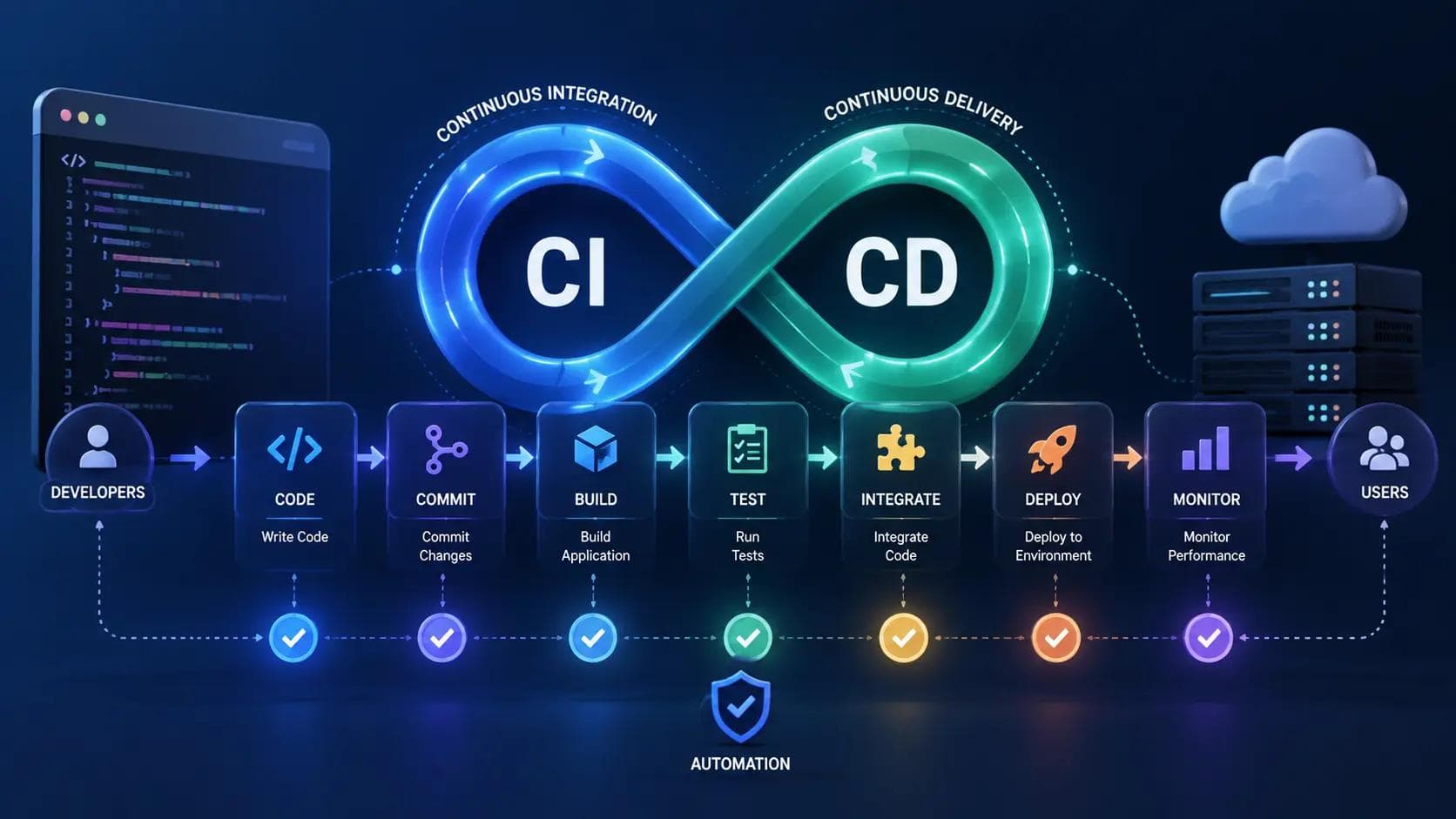
To understand the full pipeline, you have to split the acronym into its core components. While they work together, CI/CD represents three distinct stages of automation: Continuous Integration, Continuous Delivery, and Continuous Deployment.
1┌─────────────────────────────────────────────────────────┐
2│                 Continuous Integration                  │
3│   [ Code ] ──> [ Commit ] ──> [ Build ] ──> [ Test ]    │
4└──────────────────────────┬──────────────────────────────┘
5                           │
6┌──────────────────────────▼──────────────────────────────┐
7│                 Continuous Delivery                     │
8│   [ Staging ] ──> [ Automated Checks ] ──> [ Manual ]   │
9└──────────────────────────┬───────────────────(Approve)──┘
10                           │
11┌──────────────────────────▼──────────────────────────────┐
12│                Continuous Deployment                    │
13│   [ Production Deployment ] ──> [ Live Application ]   │
14└─────────────────────────────────────────────────────────┘
What Is Continuous Integration (CI)?
Continuous Integration is the practice of merging all developer code changes into a central repository multiple times a day. Every commit triggers an automated build and test sequence to catch errors early.
Instead of working in isolation on long-lived feature branches for months, developers push small code changes frequently. The continuous integration server automatically checks out the new code, compiles it, and runs unit tests. If a test fails, the team gets notified instantly.
Continuous Delivery vs. Continuous Deployment (CD)
The "CD" half of the equation causes the most confusion because it refers to two slightly different practices:
- Continuous Delivery: Your code is always in a release-ready state. Every change that passes automated testing is automatically built and staged in a test environment. However, pushing that code to actual production users requires a manual human decision or approval button.
- Continuous Deployment: There is no manual gatekeeper. Every single code change that passes all automated test suites flows directly into production automatically, within minutes of being merged into the main branch.
When I first set up a pipeline for a SaaS app, I mistakenly thought we had to go straight to Continuous Deployment. Pushing code directly to production without a human sanity check terrifyingly broke our user authentication flow within forty-eight hours. I learned quickly that Continuous Delivery—where automated checks prepare the release, but a human clicks "Deploy"—is often the sweet spot for growing engineering teams.
Why CI/CD Matters: Moving from Manual Pain to Automated Reliability
Software development without automation creates massive bottlenecks. When developers write code in isolation, merging their work creates what engineers call "Merge Hell." Two developers might modify the exact same subsystem, and nobody realizes the conflict until weeks later.
Manual testing is equally problematic. Human testers miss edge cases when performing repetitive regression checks, and manual releases require long maintenance windows that burn out engineers.
1Manual Release Process:
2Developer Code ──> Manual Testing ──> Staging Delay ──> Nightly Deploy Window ──> Rollback Firefight
3
4Automated CI/CD Pipeline:
5Developer Push ──> Auto Test Suite ──> Auto Build ──> Instant Deployment ──> Automated Telemetry
According to DORA's (DevOps Research and Assessment) State of DevOps report, elite engineering teams who adopt robust continuous integration practices deploy code 208 times more frequently and have a 7-times lower change failure rate than low-performing teams.
By automating the repetitive steps between writing code and shipping software, you eliminate human error from the operational side of development. You can review our detailed guide on DevOps best practices to see how automation transforms team productivity.
Anatomy of a Modern CI/CD Pipeline
A continuous integration pipeline is simply a sequence of automated steps that code must pass through before reaching production. Think of it as an assembly line for software quality.
1[ Source ]  ──>  [ Build ]   ──>  [ Test ]    ──>  [ Deploy ]
2  • Git Commit     • Compile        • Unit            • Staging
3  • Pull Request   • Docker Image   • Integration     • Production
4                   • Assets         • Security Scan
1. Source Code Trigger
The pipeline starts when a developer pushes code to a version control system like GitHub, GitLab, or Bitbucket. Creating a pull request triggers the continuous integration service to run checks on the proposed branch before it is allowed to merge into main.
2. The Build Phase
In this stage, the continuous integration runner pulls the source code, installs dependencies, and compiles the project. For modern web applications, this step might compile TypeScript into JavaScript, minify CSS assets, or package the entire application into a lightweight Docker container.
3. The Automated Test Phase
Once built, the runner executes various testing suites to verify that the new changes haven't broken existing functionality:
- Unit Tests: Verify individual functions and methods in isolation.
- Integration Tests: Test how different modules or database models interact with each other.
- End-to-End (E2E) Tests: Simulate real user behavior in a headless browser to ensure UI workflows operate correctly.
- Security & Linting: Analyze code syntax, check for hardcoded secrets, and scan dependencies for known security vulnerabilities.
4. Deployment Phase
If all tests pass, the artifact moves to deployment. In a staging environment, the application is updated so product managers and QA engineers can test live features. In production, zero-downtime deployment techniques (like Blue/Green or Canary deployments) switch user traffic over to the newly verified code effortlessly.
Top CI/CD Tools for 2026: Picking the Right Tech Stack
Choosing the right tool depends heavily on where your code lives and how complex your cloud infrastructure is. Here are the leading tools powering modern software integration today:
GitHub Actions
GitHub Actions has become the default continuous integration choice for most developers because it is built natively into GitHub repositories.
- Best for: Open-source projects, startups, and small-to-medium software teams.
- Why use it: Extremely easy setup using .github/workflows/ YAML files. You can leverage thousands of pre-built actions from the GitHub Marketplace without reinventing the wheel.
GitLab CI/CD
GitLab offers a fully integrated DevOps platform where source code management, issue tracking, container registries, and continuous delivery live under one roof.
- Best for: Teams wanting an all-in-one platform without stitching together third-party services.
- Why use it: Built-in runner management, auto-DevOps capabilities, and powerful security scanning features out of the box.
CircleCI
CircleCI is a dedicated cloud runner platform known for raw speed, deep caching options, and complex workflow orchestration.
- Best for: Fast-growing engineering organizations with massive test suites that require heavy parallelization.
- Why use it: Excellent resource optimization, custom executor environments, and advanced build metrics.
Argo CD & Flux
For teams deploying heavily to Kubernetes, declarative continuous delivery tools like Argo CD use GitOps principles to sync live cluster states directly with Git repositories.
- Best for: Cloud-native Kubernetes environments.
- Why use it: Eliminates the need to store cluster credentials inside CI runner scripts, making deployments significantly more secure.
If you are evaluating cloud environments to host these pipelines, check out our performance comparison between Vercel vs AWS Amplify for frontend and full-stack hosting solutions.
How to Set Up Your First Continuous Integration Pipeline (Step-by-Step)
Let's walk through building a real, practical continuous integration workflow using GitHub Actions for a Node.js project.
1Developer Pushes Code to GitHub
2                      │
3                      ▼
4         GitHub Triggers Actions Workflow
5                      │
6        ┌─────────────┴─────────────┐
7        ▼                           ▼
8  Node 18.x Runner            Node 20.x Runner
9  • Install Deps              • Install Deps
10  • Run Linter                • Run Linter
11  • Execute Unit Tests        • Execute Unit Tests
12        └─────────────┬─────────────┘
13                      │
14                      ▼
15            Both Build Matrixes Pass
16                      │
17                      ▼
18            Merge Approved safely!
Step 1: Create Your Repository Structure
In the root directory of your project, create the GitHub Actions workflow directory path:
1Bash
2mkdir -p .github/workflows
3touch .github/workflows/ci.yml
Step 2: Define the CI Workflow YAML
Open .github/workflows/ci.yml and add the following configuration:
1name: Continuous Integration Pipeline
2
3on:
4  push:
5    branches: [ "main" ]
6  pull_request:
7    branches: [ "main" ]
8
9jobs:
10  build-and-test:
11    runs-on: ubuntu-latest
12
13    strategy:
14      matrix:
15        node-version: [18.x, 20.x]
16
17    steps:
18    - name: Checkout Source Code
19      uses: actions/checkout@v4
20
21    - name: Use Node.js ${{ matrix.node-version }}
22      uses: actions/setup-node@v4
23      with:
24        node-version: ${{ matrix.node-version }}
25        cache: 'npm'
26
27    - name: Install Dependencies
28      run: npm ci
29
30    - name: Run Linter
31      run: npm run lint --if-present
32
33    - name: Run Automated Unit Tests
34      run: npm test
Step 3: Test the Pipeline
- Commit the ci.yml file and push it to a new Git branch.
- Open a Pull Request on GitHub.
- GitHub Actions will immediately spin up a clean Ubuntu virtual machine, install Node.js across versions 18 and 20, install your packages cleanly, run your tests, and report the status directly on the Pull Request interface.
If a developer writes code that breaks a unit test, the Pull Request check turns red, preventing bad code from entering your main branch.
5 Common CI/CD Mistakes Beginners Make (And How to Fix Them)
Building a pipeline is easy; building an efficient, reliable pipeline requires avoiding a few common traps that slow development down.
1❌ ANTI-PATTERN                        ✅ BETTER APPROACH
2-----------------------------------------------------------------------
3Flaky Tests ignored            -->   Fix or quarantine broken tests immediately
4120-minute pipelines           -->   Parallelize runs & aggressive dependency caching
5Hardcoded API Secrets in Git   -->   Use Environment Secrets (Vault, GitHub Secrets)
6Deploying without Rollbacks    -->   Implement automated health checks & quick rollbacks
7Testing only in Production     -->   Maintain identical local/staging environments
1. Letting the Pipeline Get Slow
If your continuous integration build takes thirty minutes to run, developers won't wait for it. They will push code, context-switch to another task, and lose focus when a build failure alerts them half an hour later.
Fix: Keep your feedback loop under ten minutes. Use dependency caching, parallelize test suites across multiple runners, and split slow E2E tests away from quick unit tests.
2. Ignoring Flaky Tests
A "flaky test" is a test that fails randomly without any code changes, usually due to network timeouts or race conditions. If developers see failing tests and say, "Oh, just click re-run, that test fails sometimes," your CI process has lost its purpose.
Fix: Quarantine flaky tests immediately. Fix the root cause or delete the test entirely—a suite you don't trust is worse than no suite at all.
3. Hardcoding Secrets inside Pipeline Configs
Never store API keys, database credentials, or SSH certificates directly inside your .yml workflow files or application repositories.
Fix: Use your CI provider's secure secret store (such as GitHub Encrypted Secrets or HashiCorp Vault) and inject them as environment variables during runtime.
4. Over-Complicating the Initial Pipeline
When setting up continuous integration for the first time, developers often try to implement full automated deployments, matrix testing across ten operating systems, and automated Slack notifications all at once.
Fix: Start simple. Build a single workflow that checks out code, runs tests, and verifies linting. Add deployment steps only after your test suite is stable. You can review our guide on clean code best practices to ensure your codebase stays readable as your pipeline grows.
Key Takeaways
- Continuous Integration (CI) automatically builds and tests code with every commit to catch bugs early.
- Continuous Delivery (CD) ensures code is always ready for production deployment, but keeps a human approval step before release.
- Continuous Deployment takes automation a step further by deploying every passing commit directly to production automatically.
- Fast feedback loops (under 10 minutes) are critical to maintaining high developer momentum.
- Starting small with simple test automation yields higher immediate returns than over-engineering complex deployment workflows.
Conclusion
Understanding what is CI/CD is more than just learning another technical acronym; it is a fundamental mindset shift in how modern software gets built and shipped. By automating testing and deployment workflows, you free yourself from tedious manual verification and gain the confidence to push updates frequently without fear of breaking production.
Start small today. Pick an existing side project or work repository, add a simple GitHub Actions or GitLab workflow, and automate your basic test suite. Once you experience the satisfaction of automated checks catching your first typo before it hits production, you will never want to ship code manually again.
For teams looking to optimize their overall engineering infrastructure, explore our guide on Platform Engineering: Scaling DevOps and Enhancing DevEx to take your automated development workflows to the next level.
Frequently Asked Questions
What is CI/CD in plain English?
CI/CD stands for Continuous Integration and Continuous Delivery (or Deployment). In plain English, it is a automated software pipeline that checks, tests, builds, and publishes code changes automatically whenever a developer updates a project repository, preventing human error during software releases.
What is the difference between CI and CD?
Continuous Integration (CI) focuses on automatically testing and merging code changes into a central repository. Continuous Delivery (CD) takes those tested changes and automatically packages and prepares them for deployment to staging or production environments.
Why is continuous integration important for small teams?
Continuous integration allows small teams to move quickly without breaking existing features. By running automated tests on every pull request, small teams can catch bugs early without needing dedicated QA departments or spending hours on manual verification before shipping code.
Do I need Docker to set up a CI/CD pipeline?
No, Docker is not mandatory for running a continuous integration pipeline. While containerizing your applications with Docker helps ensure build environments match production environments exactly, you can run CI pipelines directly on virtual machine runners provided by tools like GitHub Actions or CircleCI.
How long should a CI/CD pipeline take to run?
Ideally, a continuous integration feedback loop should complete in under 10 minutes. If a pipeline takes longer than 15 minutes, developers experience context switching, which reduces productivity. Optimizing build caching and running tests in parallel helps keep pipeline times low.
Which CI/CD tool is best for beginners?
GitHub Actions is generally the best starting point for beginners. It requires no additional server setup if your code is already on GitHub, uses easy-to-read YAML files, and offers a vast marketplace of pre-built workflow actions to get started quickly.
About the Author

Madhu - WriterDock
Madhu is a writer and SEO Executive who is passionate about creating informative, engaging, and search-optimized content that helps readers find practical solutions. With expertise in content strategy and SEO, she transforms complex topics into easy-to-understand, valuable blog posts. She loves sharing knowledge through helpful blogs that educate, inspire, and empower audiences.