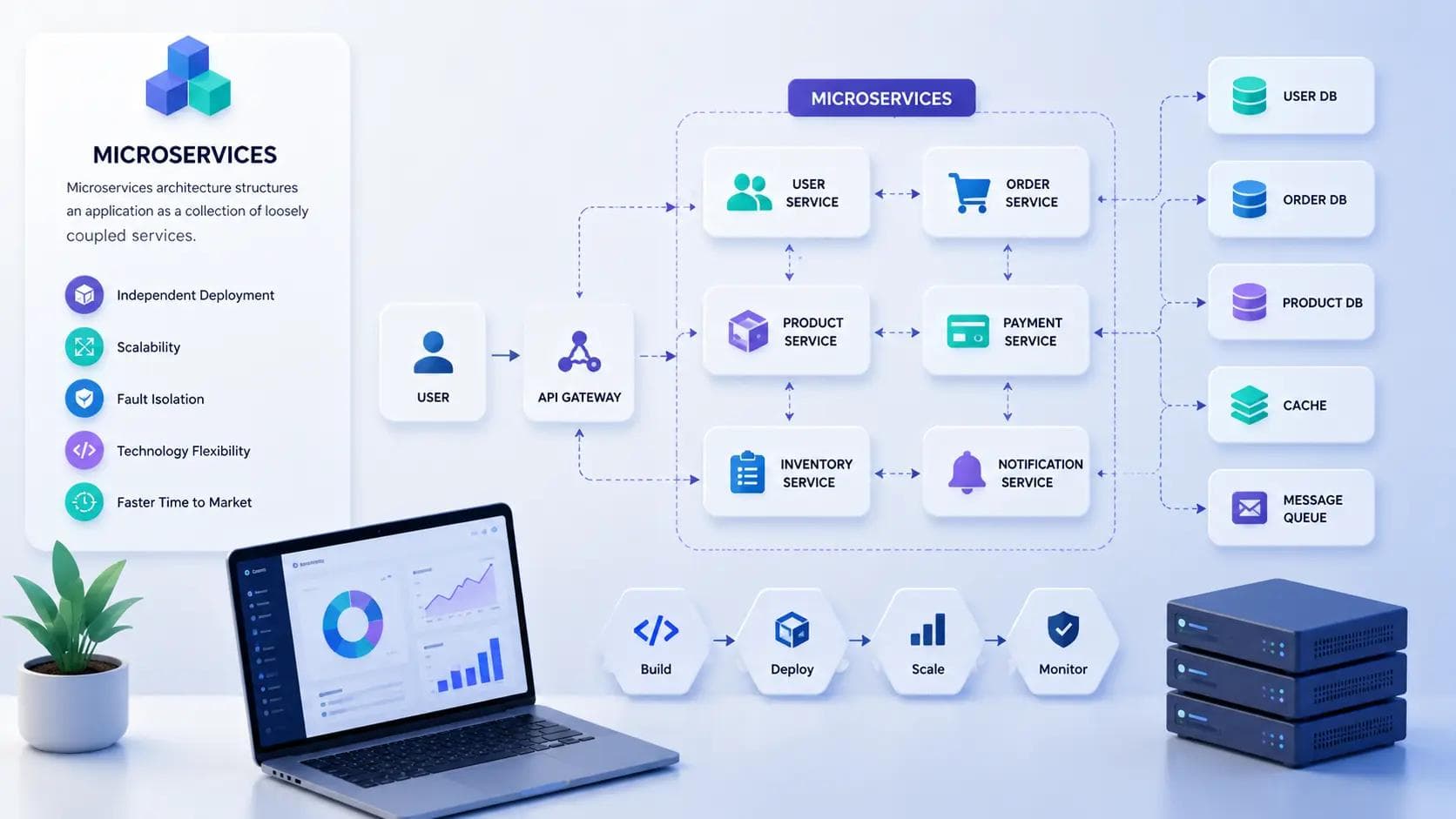
Your app started as one clean codebase. Six months later, every deploy feels like defusing a bomb, and one broken feature can take the whole thing down. That's the moment most teams start asking about microservices architecture. It's not a magic fix, but it does solve a specific, painful problem: it breaks a large application into small, independent services that you can build, deploy, and scale on their own.
I've worked on systems that went from a single tangled monolith to a set of separate services, and I've also seen teams adopt microservices way too early and regret it. This guide walks through what microservices actually are, how they compare to the monolithic approach, when they make sense, and where teams typically get it wrong.
By the end, you'll know enough to have an informed opinion in your next architecture meeting — not just repeat buzzwords you heard in a conference talk.
What Microservices Architecture Actually Means
Microservices architecture is a way of structuring an application as a collection of small, independently deployable services, each responsible for one specific piece of business functionality. Instead of one giant codebase handling users, payments, orders, and notifications together, you get separate services — a user service, a payment service, an order service — each with its own codebase, its own database, and its own deployment pipeline.
These services talk to each other over the network, usually through REST APIs, gRPC, or message queues. Each one can be written in a different programming language, scaled independently, and owned by a different team.
The Core Idea Behind It
The principle underneath all of this is loose coupling. A change to the payment service shouldn't require you to redeploy the order service. If the notification service goes down, users should still be able to browse products and check out. That isolation is the entire point.
Why Teams Move Toward This Model
Growth is usually the trigger. When a single team can no longer reason about the whole codebase, or when different parts of the app need to scale at wildly different rates, splitting things up starts to make sense. A checkout service under Black Friday load has very different needs than an admin dashboard used by five internal employees.
Microservices vs Monolithic Architecture
A monolithic architecture puts everything — the UI, business logic, and data access — into a single deployable unit. It's simple to build, simple to test locally, and simple to deploy, at least early on.
Microservices architecture trades that simplicity for flexibility. You get independent scaling and independent deployments, but you also take on network latency, distributed data management, and a much more complex deployment story.
| Aspect | Monolithic | Microservices |
|---|---|---|
| Deployment | One unit | Many independent units |
| Scaling | Scale the whole app | Scale individual services |
| Codebase | Single, shared | Multiple, isolated |
| Failure impact | Can take down everything | Usually isolated to one service |
| Complexity | Lower upfront | Higher upfront, more manageable long-term |
In my experience, the monolith isn't the enemy here. A well-structured monolith with clear internal boundaries will outperform a poorly designed set of microservices almost every time. The architecture choice matters less than the discipline you bring to either one.
Key Components of a Microservices System
A working microservices setup usually includes a handful of recurring pieces. Understanding these makes the rest of the topic click into place.
API Gateway
The API gateway sits in front of your services and routes incoming requests to the right one. It also commonly handles authentication, rate limiting, and request logging in one place, so individual services don't have to repeat that logic.
Service Discovery
When you have dozens of services, each with multiple running instances, something needs to track where each one lives. Service discovery tools like Consul or etcd maintain a live registry so services can find each other without hardcoded addresses.
Containerization
Most microservices run inside containers, typically using Docker. Containers package a service with everything it needs to run, so it behaves the same way on your laptop as it does in production. Kubernetes then handles orchestrating those containers — restarting failed ones, scaling up under load, and rolling out updates gradually.
Message Queues and Event Buses
Not every service needs to talk to another one directly and wait for a response. Tools like Kafka or RabbitMQ let services publish events and let other services react to them asynchronously. This decouples services further and improves resilience when one part of the system slows down.
Benefits of Microservices Architecture
The appeal isn't theoretical. Companies like Netflix and Amazon rebuilt around microservices specifically to solve scaling and deployment bottlenecks they'd hit with monolithic systems.
- Independent scaling — you can give more resources to the parts of your app under heavy load without touching the rest.
- Faster, safer deployments — teams can ship changes to their own service without coordinating a full-app release.
- Technology flexibility — one team can use Python for a data-heavy service while another uses Node.js for a real-time feature.
- Fault isolation — a crash in one service doesn't necessarily bring down the entire application.
- Team autonomy — smaller, focused teams can own a service end-to-end, from code to deployment.
According to the 2023 O'Reilly Technology Trends survey, a majority of organizations building large-scale software reported using microservices in some form, with adoption particularly high among companies operating at significant scale. That's not a reason to copy them by default — it's a reason to understand what problem they were actually solving.
Common Challenges and Mistakes to Avoid
This is the part most beginner guides skip, and it's the part that actually matters.
Splitting services too early. When I first worked on a microservices migration, the team split a small e-commerce app into twelve services before it had meaningful traffic. The result was more deployment overhead than the monolith ever caused, with none of the scaling benefits to show for it. If your team is under ten engineers and your app isn't under real scaling pressure, a monolith with clean internal boundaries is usually the better call.
Underestimating data consistency. Each service owning its own database sounds clean until you need data that spans two services. You lose simple database transactions and have to reach for patterns like the Saga pattern or eventual consistency, both of which add real complexity to your codebase.
Ignoring observability. With one codebase, a stack trace tells you almost everything. Across fifteen services, a single user request might touch six of them, and you need distributed tracing — tools like Jaeger or Datadog — just to see where something broke.
Treating microservices as a silver bullet. They solve organizational and scaling problems. They do not automatically make your code better designed. Poorly bounded services just move your spaghetti code from one file into a dozen network calls, which is genuinely harder to debug.
The hardest part of microservices architecture isn't the technology — it's correctly deciding where one service ends and another begins.
How to Decide If You Need Microservices
Ask a few honest questions before committing. Does your app actually have distinct scaling needs across different features? Do you have multiple teams that need to ship independently without blocking each other? Is your current monolith genuinely hard to maintain, or does it just feel that way because the code is messy?
If you answered no to most of these, the fix might be a better-structured monolith, not a full migration. A useful middle ground many teams use today is starting with a modular monolith — clear internal service boundaries within one deployable unit — and splitting pieces out only when a specific part proves it needs to scale or ship independently.
One practical tip you can use today: pick the single component in your current app that causes the most deployment pain or scaling headaches, and prototype extracting just that one piece into its own service. You'll learn more from that one real extraction than from any amount of planning.
Tools Commonly Used in Microservices Setups
- Docker — the standard for packaging services into portable containers. Reliable, but adds a learning curve if your team hasn't containerized anything before.
- Kubernetes — the most common orchestration platform for running containers at scale. Powerful, though genuinely complex to operate without dedicated DevOps support.
- Kong or NGINX — popular choices for API gateway functionality. Both work well; Kong offers more plugin flexibility out of the box.
- Istio — a service mesh that handles service-to-service communication, security, and traffic management. Worth adopting once you have enough services that manual configuration becomes painful, not before.
Key Takeaways
- Microservices architecture splits an application into small, independently deployable services, each owning its own logic and data.
- It trades simplicity for flexibility, giving you independent scaling and deployments at the cost of distributed system complexity.
- Common building blocks include an API gateway, service discovery, containerization, and message queues.
- The most common mistake is adopting microservices before you actually have the scaling or team-size problem they're meant to solve.
- A modular monolith is often a smarter starting point than jumping straight to a full microservices setup.
- Observability and data consistency need deliberate planning — they don't come for free.
Wrapping Up
Microservices architecture isn't inherently better or worse than a monolith — it's a trade-off you make when independent scaling and team autonomy genuinely outweigh the added complexity of running a distributed system. Start by getting honest about whether your current pain comes from your architecture or from unclear code boundaries, because the second problem follows you into microservices too.
If you're weighing this decision right now, pick one component of your app and sketch out what extracting it into its own service would actually involve. That small exercise will tell you more about whether microservices architecture fits your team than any framework comparison ever could.
Frequently Asked Questions
What is the main difference between microservices and monolithic architecture? A monolith runs your entire application as one deployable unit sharing a single codebase and database. Microservices split the application into separate, independently deployable services, each with its own codebase and often its own database, communicating over the network instead of through direct function calls.
How do microservices communicate with each other? Most commonly through REST APIs or gRPC for direct request-response communication, and message queues like Kafka or RabbitMQ for asynchronous, event-driven communication. The choice depends on whether a service needs an immediate response or can react to an event later.
Is microservices architecture always better for scalability? Not automatically. It enables independent scaling of individual components, which helps when different parts of your app face different load patterns. But a well-designed monolith can scale just fine for many applications, and poorly designed microservices can introduce bottlenecks a monolith never had.
Can a small startup use microservices architecture? It's possible, but usually not advisable early on. Small teams typically lack the operational capacity to manage distributed deployments, monitoring, and data consistency across services. A modular monolith usually serves early-stage startups better until real scaling pressure appears.
Should every application eventually move to microservices? No. Plenty of successful, high-traffic applications run as well-structured monoliths indefinitely. The decision should follow a genuine organizational or scaling need, not the assumption that microservices are the more advanced or correct choice by default.
Does microservices architecture require Kubernetes? No, but Kubernetes is the most common tool for managing microservices at scale because it automates deployment, scaling, and recovery of containerized services. Smaller setups can run microservices with simpler tools, adopting Kubernetes only once the operational overhead of manual management becomes worthwhile.
About the Author

Madhu - WriterDock
Madhu is a writer and SEO Executive who is passionate about creating informative, engaging, and search-optimized content that helps readers find practical solutions. With expertise in content strategy and SEO, she transforms complex topics into easy-to-understand, valuable blog posts. She loves sharing knowledge through helpful blogs that educate, inspire, and empower audiences.