I still remember the first time I shipped a bug caused by var.
I was building a simple e-commerce checkout page. The logic seemed foolproof: iterate through a list of buttons, add a click listener to each one, and log the product ID when clicked. I tested it, deployed it, and went to lunch.
Ten minutes later, the support tickets started rolling in. "Every button adds the wrong product!" "No matter what I click, it adds the last item in the cart!"
I stared at the code. It looked perfect. It took me two hours to realize that the variable i in my for loop, declared with var, was leaking out of the loop and overwriting itself. Every single button was sharing the exact same reference to that variable.
If you have ever stared at a variable that should be 1 but is somehow 10, you are fighting the ghosts of JavaScript's past.
In this article, we are going to settle the debate once and for all. We aren't just going to memorize "use const by default." We are going to understand why var acts the way it does, how let and const fix it, and exactly what is happening inside the JavaScript engine when you declare a variable.
The Simple Explanation (Plain English)
Here is the difference in one paragraph:
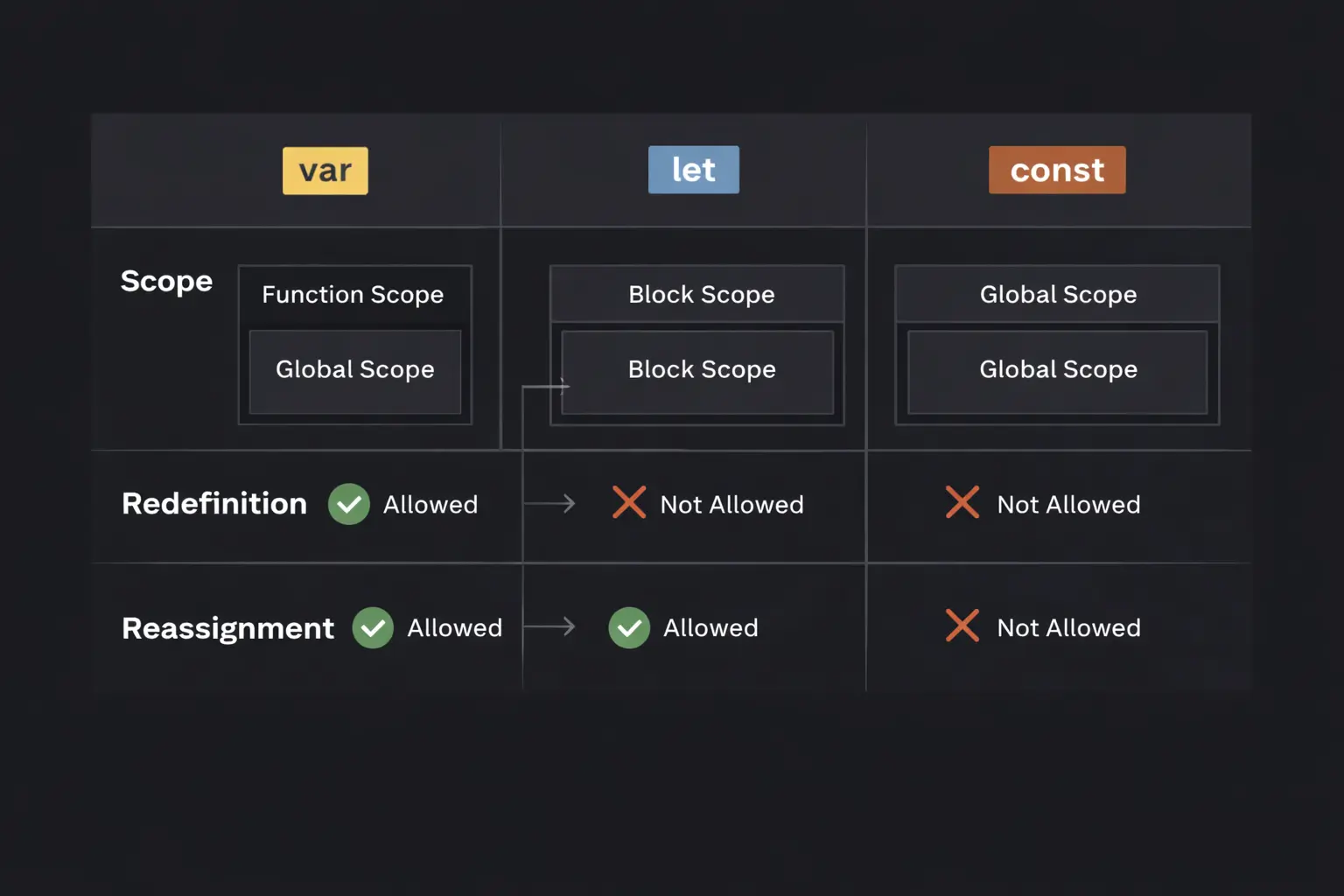
var is the old way of declaring variables; it ignores block boundaries (like if statements) and can be accessed before it's defined (as undefined). let is the modern way for variables that change; it respects block boundaries and crashes if you touch it too early. const is for variables that shouldn't be reassigned; it behaves like let but forbids you from using the = sign on it again.
The Mental Model: The Office Analogy
To visualize scope, let’s imagine a corporate office.
var(The Office Loudspeaker): Declaring avaris like making an announcement over the building's loudspeaker. Even if you are standing inside a private meeting room (anifblock), if you shout into the loudspeaker system, everyone on that floor (the function) can hear you. The walls of the meeting room don't stop the sound.let(The Sticky Note): Declaring aletis like writing on a sticky note and pasting it on your specific desk inside that meeting room. Only people inside that specific room can see it. If you walk out of the room, the sticky note stays there. It is invisible to the rest of the floor.const(The Superglued Sticky Note):constis just likelet—it’s a sticky note inside a specific room. The difference is that you have superglued the note to the desk. You cannot rip it off and replace it with a new note (reassignment). However, if the note is a list of tasks, you can cross out items and write new ones on the same piece of paper (mutation).
Step-by-Step Code Execution
Let’s look at a code example that highlights the most dangerous difference: Scoping.
1function testScope() {
2  if (true) {
3    var functionScoped = "I am var";
4    let blockScoped = "I am let";
5    const constantVar = "I am const";
6  }
7
8  console.log(functionScoped); // Works!
9  // console.log(blockScoped); // Error: ReferenceError
10  // console.log(constantVar); // Error: ReferenceError
11}
12
13testScope();
14
What is happening here?
Step 1: The Function Scope
When testScope runs, JavaScript creates a container (Function Execution Context).
Step 2: The var Declaration
The engine sees var functionScoped inside the if block.
- The Check: Is
varblock-scoped? No. - The Action: The engine "hoists" the variable to the top of the function. Even though it is written inside the
if, it effectively lives at the top oftestScope. - Result: The variable is visible everywhere inside the function.
Step 3: The let and const Declarations
The engine sees let blockScoped and const constantVar.
- The Check: Are these block-scoped? Yes.
- The Action: The engine creates a strictly private environment for the
ifblock. These variables exist only between the{and}braces. - Result: When the code execution hits the closing
}, these variables are destroyed (removed from memory).
Step 4: The Console Logs
console.log(functionScoped): The engine looks in the function scope. It finds the variable. It prints "I am var".console.log(blockScoped): The engine looks in the function scope. It does not find the variable because it died inside the block. It throws aReferenceError.
How It Works Internally: Hoisting & The TDZ
To be a senior developer, you need to understand the Temporal Dead Zone (TDZ). This is usually what trips people up in interviews.
You might have heard that "var is hoisted and let is not." This is technically false.
Both var and let are hoisted. The difference is initialization.
The Lifecycle of a Variable
- Declaration: "I need memory for a variable named X."
- Initialization: "Set the value of X to
undefined." - Assignment: "Set the value of X to
10."
How var does it:
When the engine parses your code, it finds all var declarations. It runs Step 1 (Declaration) AND Step 2 (Initialization to undefined) instantly, before running any code.
1console.log(myVar); // Output: undefined (No error!)
2var myVar = 5;
3
It doesn't crash because the memory is already set up and filled with undefined.
How let and const do it:
The engine finds let declarations. It runs Step 1 (Declaration) instantly. But it refuses to run Step 2.
It marks the variable as "uninitialized." The time between entering the scope and actually hitting the line let x = 5 is called the Temporal Dead Zone.
1console.log(myLet); // Error: Cannot access 'myLet' before initialization
2let myLet = 5;
3
Even though the engine knows myLet exists (it was hoisted), it prevents you from touching it until it is officially assigned. This is a safety feature to prevent bugs where you use empty variables by accident.
Common Mistakes Developers Make
I see these errors in code reviews constantly. They aren't syntax errors; they are logic errors caused by misunderstanding these keywords.
1. The const Mutation Trap
This is the number one misconception. const does not mean "constant value." It means "constant reference."
If you create a primitive (string, number), you can't change it. But if you create an object, you can change the contents of the object.
1const user = { name: "Alice" };
2
3// This works perfectly fine!
4user.name = "Bob";
5
6// This crashes
7user = { name: "Charlie" }; // Error: Assignment to constant variable.
8
Why?
The variable user holds a memory address (e.g., Address 0x001).
const locks that address. You cannot point user to Address 0x002.
However, const does not care what happens inside the house at Address 0x001. You can rearrange the furniture (properties) all you want.
2. The var Loop Bug
This is the classic hook I mentioned in the introduction.
1for (var i = 0; i < 3; i++) {
2  setTimeout(() => console.log(i), 100);
3}
4
Expected: 0, 1, 2 Actual: 3, 3, 3
Why?
Because var i is function-scoped, there is only one variable i for the entire loop.
The loop runs 3 times. i becomes 3.
Then, 100ms later, the timers fire. They all look at the same variable i, which is now 3.
The Fix: Use let.
let creates a new variable binding for every single iteration of the loop. Each timer gets its own personal copy of i.
3. Shadowing Variables Accidentally
Shadowing occurs when you declare a variable with the same name inside a nested scope.
1let status = "active";
2
3if (true) {
4  let status = "inactive"; // This is a TOTALLY DIFFERENT variable
5  console.log(status); // "inactive"
6}
7
8console.log(status); // "active"
9
While this is valid JS, it is dangerous. If you intended to update the outer status but added let by mistake, you created a new variable instead of updating the old one. Your app will behave as if the update never happened.
Real-World Use Cases
So, when should you actually use each one?
1. const: The Default (95% of the time)
In modern React, Node, or Vue development, you should reach for const first.
- Imports:
const React = require('react'); - Functions:
const helper = () => { ... } - Config:
const API_URL = "..."
Writing const signals to other developers: "This variable will not be reassigned. You don't need to track its changes." It reduces cognitive load.
2. let: for Counters and Accumulators
Use let only when you know the value must change.
- Loops:
for (let i = 0; ...) - Math:
let total = 0; total += price; - Toggles:
let isOpen = false;
3. var: Never (Almost)
There is virtually no reason to use var in code written after 2015.
The only time you will see it is:
- Legacy Code: You are maintaining a project from 2013.
- Global Hacks: You want to intentionally pollute the global window object (which is bad practice anyway).
If you see var in a pull request today, it is usually a mistake.
Interview Perspective
If I am interviewing you, I will use var to test your knowledge of scope.
Common Question: "What will this output?"
1var a = 1;
2function test() {
3  console.log(a);
4  var a = 2;
5}
6test();
7
The Trap:
Most candidates say 1 (looking at the global variable) or 2.
The Answer: undefined.
Explanation:
Inside the function test, there is a var a = 2.
Due to hoisting, the declaration var a moves to the very top of the function.
So the function actually looks like this to the engine:
1function test() {
2  var a; // initialized to undefined
3  console.log(a); // prints undefined
4  a = 2;
5}
6
The local a shadows the global a, but it hasn't been assigned 2 yet when the log happens.
Tricky Question: "Can I freeze a const object?"
Question: "You said const allows object mutation. How do I stop that?"
Answer: Use Object.freeze().
const obj = Object.freeze({ name: "Alice" });
Now, if you try obj.name = "Bob", it will fail silently (or throw an error in strict mode). This shows you know the difference between variable assignment and object immutability.
TL;DR / Key Takeaways
var: Function-scoped. Can be redeclared. Hoisted asundefined. Avoid using it.let: Block-scoped. Cannot be redeclared in the same block. Hoisted but sits in the "Dead Zone" until initialized. Use for variables that change.const: Block-scoped. Cannot be reassigned. However, objects declared withconstcan be mutated. Use as your default.- Scope:
varleaks out ofifblocks and loops.let/conststay inside.
FAQ
Q: Does using const improve performance?
A: Marginally, yes, but not enough to matter. The JavaScript engine can make certain optimizations if it knows a variable won't change, but you should use const for code readability and bug prevention, not performance.
Q: Can I use var in the browser console?
A: Yes. Often when testing quickly in DevTools, var is easier because const and let throw errors if you try to redeclare them (e.g., if you run the same code snippet twice). var is forgiving in that specific "scratchpad" context.
Q: Why do old tutorials use var?
A: Before 2015 (ES6), let and const didn't exist. JavaScript only had var. If you see a tutorial using var, check the date. It might be outdated.
Conclusion
The shift from var to let and const wasn't just a syntax update. It was a fix for one of the biggest design flaws in the JavaScript language.
By scoping variables to blocks instead of functions, JavaScript finally behaves the way developers expect it to. We no longer have to worry about loop counters overwriting each other or variables leaking out of if statements.
Make it a habit:
- Write
const. - If the linter yells at you because you need to change the value, change it to
let. - Forget
varexists (until the interview).
Mastering these three keywords is the first step to writing clean, predictable, and professional JavaScript. Now, go refactor that legacy code.