I remember the exact moment I realized I didn't actually understand how JavaScript works.
I was debugging a complex UI glitch in a dashboard application. The data was loading, but the loading spinner wouldn't disappear until after the data had already flickered on the screen. It looked unprofessional.
I tried to fix it by wrapping my state update in a setTimeout(..., 0), thinking, "I'll just push this to the end of the queue." It didn't work. The order of operations was still wrong. I swapped it for a Promise.resolve().then(), and suddenly—magic. It worked perfectly.
Why? Why did a Promise behave differently than a Timeout? They are both asynchronous. They both wait for the main thread to finish.
The answer lies in a hidden battle happening inside the JavaScript Event Loop: the war between Microtasks and Macrotasks.
If you have ever been asked to predict the output of a code snippet in an interview and got the order wrong, this concept is the missing piece of the puzzle.
In this article, we are going to open up the engine room. We will look at the two distinct queues that drive JavaScript's asynchronous behavior, understand the strict rules of priority, and learn how to control exactly when your code runs.
The Simple Explanation (Plain English)
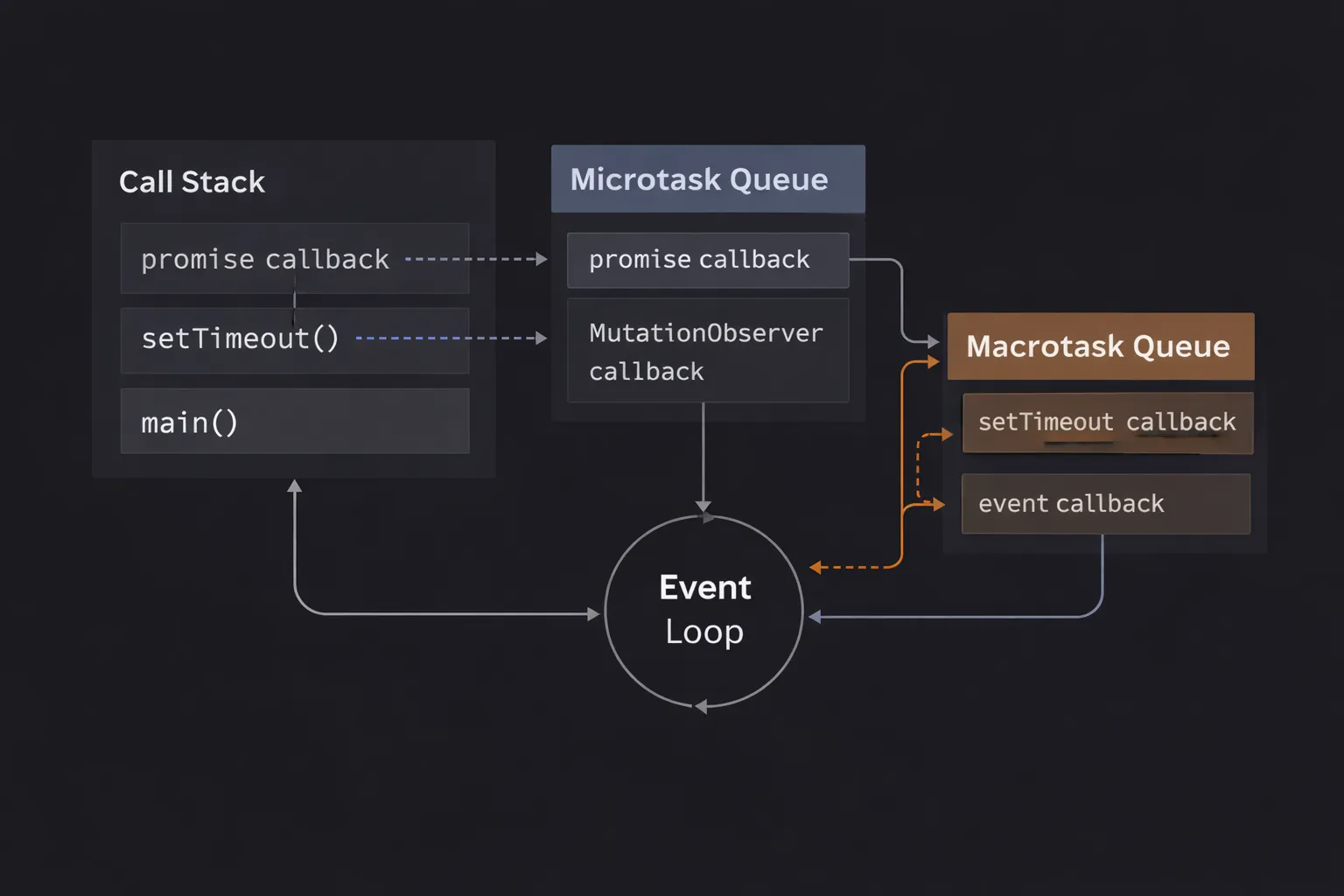
JavaScript handles asynchronous tasks using two different queues.
- Macrotasks (Task Queue): These are standard, heavy tasks like
setTimeout,setInterval, or user input events (clicks). Think of them as the "General Admission" line. - Microtasks (Microtask Queue): These are high-priority, urgent tasks like
Promise.then()callbacks orqueueMicrotask. Think of them as the "VIP" line.
The Golden Rule: The JavaScript engine will always process the entire Microtask Queue (the VIPs) before it processes even a single item from the Macrotask Queue. If a VIP invites more VIPs, they get to cut the line too.
The Mental Model: The Theme Park Rides
To visualize this, imagine you are operating a roller coaster (the Call Stack).
- The Macrotask Queue (The Regular Line): There is a long line of people waiting to get on the ride. These are your
setTimeoutcallbacks. The operator (Event Loop) takes one person, puts them on the ride, and runs it. - The Microtask Queue (The Fast Pass / VIP Lane): There is a separate, shorter line for VIPs (Promises).
- The Rule: Before the operator lets the next person from the Regular Line onto the ride, they must look at the VIP Lane.
- Is there anyone in the VIP lane? Yes? Put them on the ride immediately.
- Did that VIP just text their friend to come join them (a Promise creating another Promise)? Yes? That friend joins the VIP lane and gets on the ride next.
- The Regular Line (Macrotasks) waits until the VIP lane is completely empty.
This is why Promise callbacks run before setTimeout callbacks, even if the timeout is set to 0 milliseconds. The VIPs always win.
Step-by-Step Code Execution
Let's look at the classic interview snippet. If you can explain why the output is in this order, you have mastered this concept.
1console.log('1. Start');
2
3setTimeout(() => {
4  console.log('2. Timeout');
5}, 0);
6
7Promise.resolve().then(() => {
8  console.log('3. Promise');
9});
10
11console.log('4. End');
12
Expected Output:
- Start
- End
- Promise
- Timeout
What is happening internally?
Step 1: Synchronous Code
The engine runs line 1. It prints '1. Start'.
Step 2: Scheduling the Macrotask
The engine hits setTimeout. It sends the callback to the Web API, which immediately (since delay is 0) pushes it into the Macrotask Queue.
- Macrotask Queue:
[Log '2. Timeout'] - Microtask Queue:
[]
Step 3: Scheduling the Microtask
The engine hits Promise.resolve().then(). It pushes the .then() callback into the Microtask Queue.
- Macrotask Queue:
[Log '2. Timeout'] - Microtask Queue:
[Log '3. Promise']
Step 4: Finishing Synchronous Code
The engine runs line 11. It prints '4. End'. The main script finishes. The Call Stack is empty.
Step 5: The Microtask Checkpoint
The Event Loop wakes up. It sees the stack is empty. Crucial Step: It does not look at the Macrotask Queue yet. It checks the Microtask Queue.
It finds the Promise callback. It runs it.
It prints '3. Promise'.
Step 6: The Macrotask Execution
The Event Loop checks the Microtask Queue again. It is empty.
Now, and only now, does it look at the Macrotask Queue.
It finds the Timeout callback. It runs it.
It prints '2. Timeout'.
How It Works Internally
To truly understand performance implications, we need to look at the Event Loop definition.
The Event Loop follows a strict algorithm that repeats indefinitely:
- Execute Script: Run the code on the Call Stack until it is empty.
- Process Microtasks: Check the Microtask Queue.
- Run the first microtask.
- Check again. Is there another one? Run it.
- Repeat until the Microtask Queue is effectively empty.
- Note: If a microtask adds another microtask, run that one too immediately.
- Render (Optional): If the browser decides it's time to repaint the screen (usually 60 times a second), do it now.
- Process Macrotask: Pick one (and only one) task from the Macrotask Queue and run it.
- Loop: Go back to Step 2.
The "Starvation" Risk
Because the engine loops through all microtasks before moving on, it is possible to create an infinite loop of microtasks that blocks the page forever.
1function loop() {
2  Promise.resolve().then(loop); // Infinite recursion via Microtasks
3}
4loop();
5
If you run this, the browser tab will freeze. The Event Loop gets stuck in "Step 2" of the algorithm above. It keeps emptying the queue, but the queue keeps filling up. It never reaches "Step 3" (Render) or "Step 4" (Macrotasks).
If you did this with setTimeout(loop, 0), the browser would remain responsive because setTimeout allows a render/macrotask cycle in between executions.
Common Mistakes Developers Make
I have seen these specific misunderstandings lead to race conditions in production apps.
1. Assuming setTimeout(0) is "Immediate"
Many developers use setTimeout(fn, 0) thinking it will run "right now." It won't. It will run after all synchronous code AND after all Promises. If your application processes a lot of data using Promises, your timeout might be delayed significantly.
The Fix: If you need something to run "as soon as possible but asynchronously," use queueMicrotask(fn) instead. It’s cleaner and faster than a timeout.
2. Inconsistent State Updates
Imagine you update a variable in a Promise, but read it in a Timeout.
1let status = 'loading';
2
3setTimeout(() => {
4  console.log(status); // Developer expects 'active'
5}, 0);
6
7Promise.resolve().then(() => {
8  status = 'active';
9});
10
Here, the developer got lucky. The Promise runs first, updates status to 'active', and then the Timeout runs.
However, if you unknowingly swapped the Promise for a network request (which is a Macrotask initially) or a postMessage, the order might flip, and your logic would break.
Lesson: Never rely on the timing difference between Macrotasks and Microtasks for critical logic unless you explicitly control it.
3. Blocking the UI with Microtasks
I once reviewed code that processed 10,000 JSON objects using a recursive Promise chain. The developer thought, "It's asynchronous, so it won't freeze the UI." Wrong. Because Promises are Microtasks, they starved the Event Loop. The browser couldn't render a single frame until all 10,000 objects were processed.
The Fix: For heavy processing, use setTimeout (Macrotask) or requestIdleCallback to break the work into chunks, allowing the browser to breathe (render) in between.
Real-World Use Cases
Why does this matter outside of interviews?
1. Framework State Batching (React/Vue)
Modern frameworks utilize Microtasks heavily. When you update a state variable in React, it doesn't re-render the DOM immediately. It queues a microtask. This allows React to "batch" multiple state updates into a single re-render.
- Update 1 -> Queue Microtask
- Update 2 -> (Merged into same Microtask)
- Update 3 -> (Merged)
- Stack Empty -> Process Microtasks -> Re-render DOM once.
If React used Macrotasks (setTimeout), you might see visual flickering because the browser might try to paint between the updates.
2. queueMicrotask for Clean APIs
Sometimes you want to write a library function that is always asynchronous to ensure consistent behavior, even if the data is already available.
1// A cache function that acts consistently
2function getData(key) {
3  if (cache[key]) {
4    // If we just return cache[key], it's synchronous.
5    // If we fetch, it's asynchronous.
6    // This mix is bad (Zalgo).
7
8    // Solution: Force it to be a microtask
9    return new Promise(resolve => resolve(cache[key]));
10  }
11  return fetch('/api/' + key);
12}
13
This ensures the caller always receives the data in the "next tick," preventing race conditions.
Interview Perspective
If I am interviewing you for a Senior Frontend role, I will verify if you know where different APIs fit.
The Categorization Test
I might ask: "Classify these into Microtasks or Macrotasks."
Macrotasks (Task Queue):
setTimeoutsetIntervalsetImmediate(Node.js)- I/O (Network, File System events)
- UI Rendering / User Events (Click, Scroll)
Microtasks:
Promise.then,.catch,.finallyprocess.nextTick(Node.js - technically distinct but similar priority)queueMicrotaskMutationObserver
The "Trick" Question
"What about requestAnimationFrame?"
Answer: It is neither! It has its own special queue that runs right before the browser repaints. It typically runs after Microtasks but before the next Macrotask (if a paint is scheduled).
TL;DR / Key Takeaways
- Two Queues: JavaScript has a VIP line (Microtasks) and a Regular line (Macrotasks).
- Priority: Microtasks (Promises) always execute before Macrotasks (Timeouts).
- Exhaustion: The Event Loop will drain the Microtask queue completely before moving on.
- UI Blocking: Too many Microtasks prevents the browser from re-rendering (the "Starvation" problem).
- Use Cases: Use Microtasks for data consistency and framework internals. Use Macrotasks for heavy computation batching to keep the UI responsive.
FAQ
Q: Is async/await a Microtask?
A: Yes. await is just syntax sugar for Promises. Everything after the await keyword effectively runs in a .then() callback, which is a Microtask.
Q: Does setTimeout(fn, 0) put the task at the front of the Macrotask queue?
A: No. It puts it at the end of the queue. If there are 5 other timeouts waiting, yours will be 6th.
Q: What is queueMicrotask()?
A: It is a modern browser API introduced to replace the hacky Promise.resolve().then(fn). It explicitly schedules a function in the Microtask queue without the overhead of creating a Promise object.
Q: Does Node.js work the same way?
A: Mostly yes, but with a slight twist. Node.js has process.nextTick, which is an even higher priority Microtask than Promises. In modern Node (v11+), the behavior matches the browser much more closely than it used to.
Conclusion
The distinction between Microtasks and Macrotasks is subtle, but it dictates the heartbeat of your application. It is the difference between a UI that feels snappy and one that feels jittery.
When you understand that the Microtask Queue is a "do this immediately after the current script" list, and the Macrotask Queue is a "do this when you have some free time" list, you stop fighting the Event Loop and start conducting it.
Next time you see a Promise racing a setTimeout, don't guess. Look at the VIP line. The Promise always wins.