The JavaScript Event Loop Explained Using Simple Examples
I still remember the first time I felt betrayed by JavaScript.
I was building a simple dashboard. I needed to fetch some user data, update the UI, and then immediately calculate a layout adjustment. To make sure the layout calculation happened last, I wrapped it in a setTimeout with a delay of 0 milliseconds.
"Zero milliseconds means immediately," I told myself. "It means right now."
It didn't happen right now. It happened later. And in between my data fetch and that timeout firing, the UI flickered, the layout broke, and I spent three hours staring at the screen wondering how math works.
If you have ever written setTimeout(fn, 0) and wondered why it didn't run instantly, or if you’ve wondered why a while(true) loop freezes your entire browser tab, you have collided with the Event Loop.
It is the engine room of JavaScript. It is the single most important concept to understand if you want to move from "junior developer who copies code" to "senior developer who architects systems."
Let’s walk through this together. We are going to break down the mechanics, look at the gears turning, and finally understand how JavaScript manages to do so much while running on a single thread.
What is the Event Loop? (The Plain English Version)
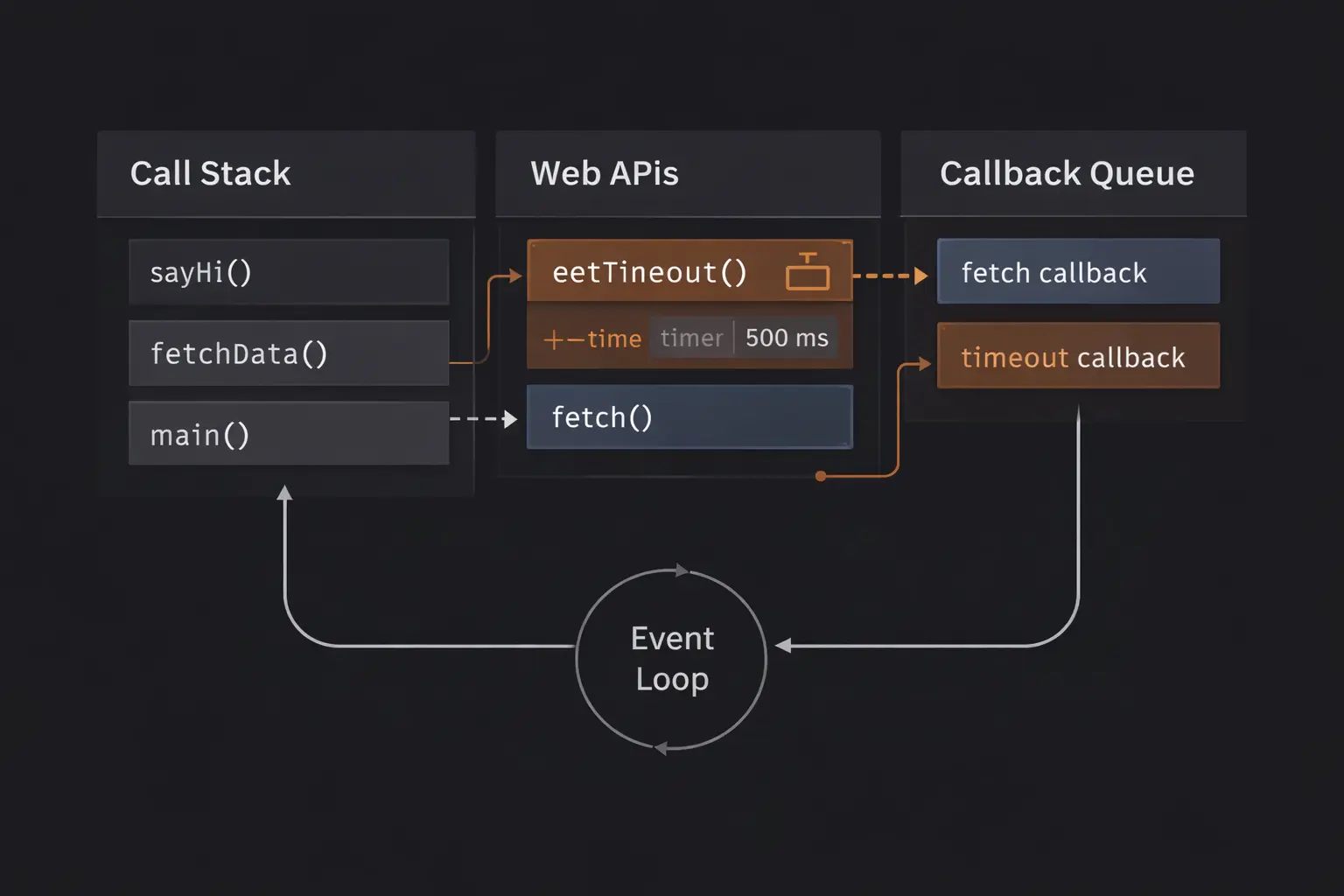
The Event Loop is a mechanism that constantly checks if your main program has finished running and if there are any other tasks (like user clicks, network responses, or timers) waiting to be executed.
JavaScript is single-threaded, meaning it can only do one thing at a time. The Event Loop is the traffic controller that manages this limitation. It allows JavaScript to perform long tasks (like fetching data) without freezing the entire page, by offloading those tasks to the browser and running them later when the main thread is free.
The Mental Model: The Busy Coffee Shop
To visualize this, forget about code for a minute. Imagine a busy coffee shop with only one barista (the JavaScript Engine/Call Stack).
- The Barista (The Call Stack): This person can only make one drink at a time. They cannot multitask. If they are making a Latte, they cannot take an order or clean a table. They are locked in.
- The Customers (Functions): Customers line up to order. The Barista serves them one by one.
- The Special Orders (Async Operations): Suddenly, a customer orders a slow-roasted sandwich that takes 5 minutes.
- The wrong way: The Barista stands there and watches the oven for 5 minutes. No one else gets coffee. The shop freezes. (This is "blocking" code).
- The JavaScript way: The Barista puts the sandwich in the oven and says, "I'll call your name when it's done." Then, they immediately turn back to the next customer in line to make coffee.
- The Counter (The Web APIs): The oven is doing the work now, not the Barista. The oven is separate.
- The Pickup Counter (The Callback Queue): When the sandwich is ready, the oven doesn't throw it at the Barista. It puts it on the Pickup Counter.
- The Manager (The Event Loop): The Manager stands in the corner watching the Barista. Their job is simple: "Is the Barista busy? No? Okay, is there anything on the Pickup Counter? Yes? Send it to the Barista."
This is exactly how JavaScript works. It offloads heavy work to the browser (the oven), keeps running your code (serving coffee), and only processes the results when it has absolutely nothing else to do.
Step-by-Step Code Execution
Let’s look at the classic interview example. If you can predict the output of this correctly, you are already ahead of 50% of applicants.
1console.log("Start");
2
3setTimeout(() => {
4  console.log("Timeout");
5}, 0);
6
7console.log("End");
8
Expected Output:
- Start
- End
- Timeout
Wait, why? We set the timeout to 0. Shouldn't it happen between "Start" and "End"?
Let’s trace the execution:
- Line 1: The engine sees
console.log("Start"). It pushes it onto the Call Stack. It runs. It prints "Start". It pops off the stack. - Line 3: The engine sees
setTimeout. It pushes it onto the stack.
- Crucial Moment: The engine knows
setTimeoutis a Web API (a tool provided by the browser, not JS itself). It hands the callback function (() => console.log("Timeout")) and the timer (0ms) over to the browser's timer module. - JavaScript says: "Hey Browser, handle this timer for me. I'm moving on."
- The
setTimeoutfunction completes and pops off the stack.
- Line 7: The engine sees
console.log("End"). It pushes it onto the stack. It prints "End". It pops off. - The Gap: Now the stack is empty. The global code has finished.
- The Loop: The Event Loop looks at the stack. "Stack is empty." It looks at the Callback Queue.
- Even though the timer was 0ms, the browser moved the callback to the Callback Queue immediately.
- The Event Loop sees the callback waiting. It grabs it and pushes it onto the Call Stack.
- The Callback: Now, finally,
console.log("Timeout")runs.
How It Works Internally
To truly understand performance and debugging, we need to drop the coffee analogy and look at the actual architecture.
1. The Call Stack
This is a LIFO (Last In, First Out) data structure. It tracks where we are in the program. If you call a function multiply(), it gets pushed on. If multiply calls add(), add gets pushed on top. add must finish and pop off before multiply can finish.
Key Rule: JavaScript cannot do anything else while the Call Stack has items in it. This is what we mean by "blocking the main thread."
2. Web APIs
This is where the magic happens. The Call Stack is just V8 (the engine). But V8 doesn't know what a DOM is, or what setTimeout is, or what fetch is. These are provided by the browser (window).
When you call setTimeout, you are actually calling a C++ API in the browser. This allows the timer to run in parallel to your JavaScript code without pausing it.
3. The Callback Queue (Task Queue)
When a Web API finishes its job (the timer hits 0, or the data returns from the API), it doesn't interrupt your code. It drops the callback function into the Callback Queue. This queue is FIFO (First In, First Out). It is a waiting room.
4. The Event Loop
This is a continuous process that checks two things:
- Is the Call Stack empty?
- Is there anything in the Callback Queue?
If the answer to 1 is YES and the answer to 2 is YES, it moves the first item from the Queue to the Stack.
5. Microtasks (The VIP Queue)
Here is where it gets tricky, and where modern JavaScript (Promises) changed the game.
There isn't just one queue. There is a second, higher-priority queue called the Microtask Queue.
- Macrotasks:
setTimeout,setInterval, DOM events. - Microtasks:
Promise.then,queueMicrotask,MutationObserver.
The Rule: The Event Loop will always process the entire Microtask Queue before it moves on to the Callback Queue (Macrotasks). If a Microtask adds another Microtask, that new one will also run before any setTimeout.
Common Mistakes Developers Make
I have seen production apps crash because developers misunderstood these queues.
1. Blocking the Event Loop with Heavy Computation
Beginners often think that because JavaScript is "asynchronous," everything is fast.
1// DON'T DO THIS
2button.addEventListener('click', () => {
3  // A huge synchronous loop
4  let i = 0;
5  while (i < 1000000000) { i++ }
6  console.log("Done");
7});
8
When the user clicks the button, this loop hits the Call Stack. Because it is a while loop, it stays on the stack until it finishes.
- Can the browser render the screen? No.
- Can the user click anything else? No.
- Does the GIF spinner spin? No.
The entire page freezes. The Event Loop is blocked. It cannot check the queue or update the UI because the stack is never empty.
The Fix: Break heavy tasks into smaller chunks using setTimeout or Web Workers.
2. Assuming setTimeout is Exact
You write setTimeout(fn, 1000). You expect it to run in exactly 1.000 seconds.
It won't.
It will wait 1.000 seconds in the Web API. Then it goes to the Queue. If your Call Stack is busy doing other things (like processing a huge array), the timer callback has to wait in line. I have seen 1-second timers take 3 seconds to fire because the main thread was clogged with React rendering logic.
3. The Promise Loop of Death
Remember how I said Microtasks (Promises) have VIP priority?
1function loop() {
2  Promise.resolve().then(loop);
3}
4loop();
5
If you do this with setTimeout, the browser is fine because it checks for UI updates between timeouts.
But with Promises, the Event Loop says, "Oh, a Microtask? Let me run it. Oh, it added another Microtask? run that one too."
It never stops to let the browser breathe. The tab will freeze completely.
Real-World Use Cases
Why does this matter in your day-to-day work?
1. React useEffect and State Updates
React relies heavily on understanding the event loop. When you trigger a state update, React doesn't update the DOM immediately. It schedules a re-render. Understanding that this re-render happens asynchronously (conceptually) helps you understand why console.log(state) immediately after setState shows the old value.
2. Node.js Performance
If you are writing backend code in Node.js, the Event Loop is even more critical. Node is single-threaded. If you write one function that calculates Fibonacci numbers synchronously for 5 seconds, no other user can connect to your server for those 5 seconds. You have to ensure that all heavy I/O operations (reading files, database queries) are asynchronous so the Event Loop can keep accepting new requests while the database is thinking.
3. Debouncing Search Inputs
When building a "Type-ahead" search bar, you don't want to fire an API call for every keystroke. You use setTimeout to delay the call.
Every time the user types, you clear the old timer and set a new one. You are effectively manipulating the Web API and Callback Queue to ensure only the final "settled" event actually hits your Call Stack.
The Interview Perspective
If I am interviewing you for a Senior role, I am going to ask you to predict the output of a mixed code snippet.
The "Tricky" Example
1console.log('1');
2
3setTimeout(() => {
4  console.log('2');
5}, 0);
6
7Promise.resolve().then(() => {
8  console.log('3');
9});
10
11console.log('4');
12
Take a second. What is the order?
The Answer: 1, 4, 3, 2.
The Explanation:
1is synchronous. Prints immediately.setTimeoutschedules2for the Macrotask queue.Promiseschedules3for the Microtask queue.4is synchronous. Prints immediately.- Stack is empty.
- Event Loop checks Microtasks first. Finds
3. Prints3. - Microtasks empty. Event Loop checks Macrotasks. Finds
2. Prints2.
If you get this wrong, it tells me you don't understand the priority difference between Promises and Timeouts.
TL;DR / Key Takeaways
- JavaScript is single-threaded. It has one Call Stack.
- The Event Loop is a monitor. It watches the Stack and the Queue.
- Blocking code is the enemy. Anything that stays on the Stack too long freezes the UI.
- Web APIs do the heavy lifting. Timers and HTTP requests run outside the main thread.
- Microtasks (Promises) > Macrotasks (Timeouts). Promises always cut the line.
FAQ
Q: Is the Event Loop part of JavaScript itself? A: Surprisingly, no. The ECMAScript specification (the rules of JS) didn't mention the Event Loop for a long time. The Event Loop is implemented by the host environment (the Browser or Node.js) to orchestrate execution.
Q: Can I force JavaScript to be multi-threaded? A: Not on the main thread. However, you can use Web Workers. A Web Worker creates a completely separate thread with its own Event Loop. It’s perfect for heavy calculations (like image processing) so the UI doesn't freeze.
Q: Why is setTimeout(fn, 0) useful if it doesn't run immediately?
A: It is a hack to "defer" execution. It tells the browser, "Run this code as soon as the stack is empty." We use this to let the browser repaint the UI or finish a current calculation before starting a new one.
Q: Does Node.js have the same Event Loop as Chrome?
A: Mostly, yes, but with differences. Node.js used to have a slightly different implementation involving process.nextTick and setImmediate, which are specific to Node. However, in recent versions, they have converged significantly. The core concept remains identical.
Conclusion
The JavaScript Event Loop is the heartbeat of your application. It is the reason your interface feels smooth, and it is the reason your Node server can handle thousands of connections.
When I stopped viewing it as a "black box" and started visualizing the Stack, the Queue, and the Loop, my debugging changed. I stopped staring at code wondering why things were happening out of order, and started architecting my code to work with the flow, not against it.
Next time you write a setTimeout or a .then(), pause. Close your eyes. Visualize the Coffee Shop. See the Barista, the Oven, and the Manager. If you can see the flow, you have mastered the loop.