I recently spent two hours debugging a "simple" React component that refused to work. The logic was sound. The syntax was perfect. Yet, every time I tried to access a specific user ID inside a helper function, it came back undefined.
I wasn't battling a complex algorithm. I was battling JavaScript Scope.
If you are reading this, you have probably been there. You define a variable here, try to use it over there, and JavaScript acts like it has never heard of it. Or worse, your variable suddenly changes value because another part of your code accidentally overwrote it.
Scope is the silent ruleset that dictates where your data lives and dies. It is the number one reason beginners struggle with bugs that "make no sense."
In this article, we are going to stop guessing. We are going to break down exactly how JavaScript decides where variables are visible, why your code is crashing, and how to master the invisible boundaries of your codebase.
What is Scope? (The Plain English Version)
Scope is simply the set of rules that determines where you can access a variable in your code.
Think of it as "visibility." If a variable is in the current scope, you can use it. If it is not, it is invisible to you—it effectively doesn't exist. Scope answers the question: "Can I see this variable from this line of code?"
The Mental Model: The Office Building with Tinted Glass
To understand how JavaScript handles scope, I want you to imagine a multi-story office building with a very specific architectural rule: One-way tinted glass.
- The Global Scope (The Street): Imagine the street outside the building. This is the Global Scope. Everyone on the street can see each other.
- The Function Scope (The Office Floor): Now, imagine an office on the 3rd floor. This is a Function Scope.
- Looking Out: Because the windows are tinted, people inside the office can look out and see what's happening on the street (Global Scope).
- Looking In: People on the street cannot look into the office. The variables inside are private.
- The Block Scope (The Private Meeting Room): Inside that office, there is a glass meeting room. This is a Block Scope (created by
ifstatements or loops usinglet/const).
- Looking Out: People in the meeting room can see the office floor and the street outside.
- Looking In: People on the office floor cannot see into the meeting room.
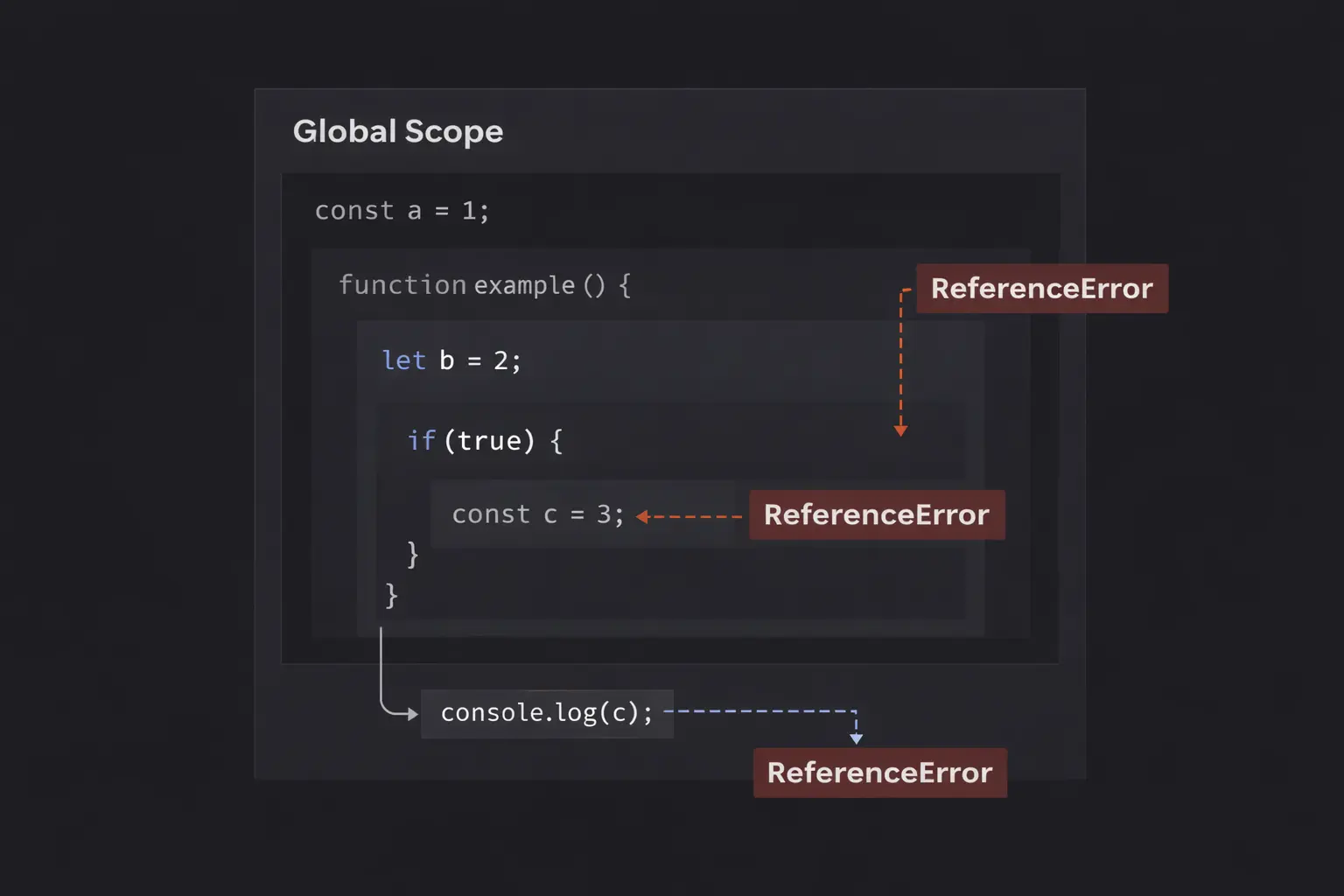
The Golden Rule: You can always look out (up the scope chain), but you can never look in (down the scope chain).
Step-by-Step Code Execution
Let’s translate that building analogy into actual code. We will trace a script that uses all three levels of scope.
1// 1. GLOBAL SCOPE
2const globalUser = "Admin";
3
4function processUserData() {
5  // 2. FUNCTION SCOPE
6  const localStatus = "Active";
7
8  if (localStatus === "Active") {
9    // 3. BLOCK SCOPE
10    const secretKey = "123-XYZ";
11
12    console.log(`User: ${globalUser}`); // Works!
13    console.log(`Status: ${localStatus}`); // Works!
14    console.log(`Key: ${secretKey}`); // Works!
15  }
16
17  // Back in Function Scope
18  // console.log(secretKey); // ERROR!
19}
20
21processUserData();
22// console.log(localStatus); // ERROR!
23
What is happening here?
Step 1: The Global Level
The JavaScript engine starts at the top. It creates a global variable globalUser. This variable is available everywhere. It’s on the "street."
Step 2: Entering the Function
We call processUserData(). The engine creates a new Function Scope.
It creates localStatus inside this scope.
- Can this function access
globalUser? Yes, it looks "out" to the global scope.
Step 3: Entering the Block
The engine hits the if statement. Because we used const (or let), a new Block Scope is created.
It creates secretKey inside this block.
- Can this block access
localStatus? Yes, it looks "out" to the function scope. - Can this block access
globalUser? Yes, it looks "out" past the function to the global scope.
Step 4: The Cleanup
When the if block finishes, the Block Scope is destroyed. secretKey is wiped from memory.
When we try to log secretKey immediately after the block closes, the engine throws a ReferenceError. It tries to look for the variable in the function scope, but it doesn't exist there. It can't look "in" to the dead block scope.
Step 5: Function Exit
When processUserData finishes, the Function Scope is destroyed. localStatus is wiped.
If we try to log localStatus in the global scope, it fails. The street cannot see into the office.
How It Works Internally: The Scope Chain
To really debug complex apps, you need to understand the mechanism behind the scenes: The Lexical Environment.
When your code runs, JavaScript doesn't just pile variables into a heap. It organizes them into a structured hierarchy called the Scope Chain.
Every time a function is defined (not called, but defined), it saves a reference to its parent environment. This is called Lexical Scoping. "Lexical" means "where it sits in the code."
If you define a function child() inside a function parent(), the child will always have access to parent's variables, no matter where or when child is actually called.
The Lookup Process
When you ask for a variable, the JavaScript engine (V8, for example) follows a strict algorithm:
- Check Local: "Do I have a variable with this name in my current scope?"
- If Yes: Use it. Stop looking.
- If No: Go to step 2.
- Check Parent: "Does my outer (lexical) environment have it?"
- If Yes: Use it. Stop looking.
- If No: Go to step 3.
- Repeat: Keep going up until you hit the Global Scope.
- Fail: If you are in the Global Scope and still can't find it, throw a
ReferenceError.
This "one-way street" lookup is why global variables are dangerous. If you accidentally name a variable data in a function, but you forget to declare it (using let, const, or var), JavaScript might try to find a global data and overwrite it.
Common Mistakes Developers Make
I have reviewed thousands of lines of junior code. These are the three specific scope mistakes that cause 90% of the headaches.
1. The var vs. Block Scope Trap
Before ES6 (2015), we only had var. The problem with var is that it ignores block scope.
1if (true) {
2  var dangerous = "I am everywhere";
3}
4
5console.log(dangerous); // Output: "I am everywhere"
6
Wait, what? The variable escaped the if block!
var is function-scoped, not block-scoped. Even though it looks like it is inside the if block, var "hoists" itself up to the nearest function (or the global scope if not in a function).
The Fix: Always use let or const. They respect block boundaries (like if statements and for loops).
2. The "Accidental Global" Leak
This is a classic silent killer. If you assign a value to a variable without declaring it first, JavaScript (in non-strict mode) kindly creates a global variable for you.
1function createUser() {
2  userId = 555; // Oops! Missed 'const' or 'let'
3}
4
5createUser();
6console.log(window.userId); // Output: 555
7
You just polluted the global namespace. If any other script uses userId, you just broke it.
The Fix: Always use 'use strict'; at the top of your files, or use a linter (like ESLint). Strict mode converts this mistake into an error, stopping the crash before it happens.
3. Shadowing Confusion
Shadowing happens when you declare a variable with the same name as a variable in an outer scope.
1let user = "Alice";
2
3function login() {
4  let user = "Bob"; // This 'shadows' the outer 'user'
5  console.log(user); // Output: "Bob"
6}
7
8login();
9console.log(user); // Output: "Alice"
10
This isn't an error, it is a feature. But it is confusing. Within login, the outer Alice is completely inaccessible. You cannot access the shadowed variable. I often see developers try to update a global state inside a function, but they accidentally re-declare the variable, updating only the local copy.
Real-World Use Cases
Scope isn't just a theory; it is a tool we use to build better applications.
1. The Module Pattern (Encapsulation)
In large applications, you don't want every part of your code to access every variable. You want privacy. We use scope to hide "private" details.
1// We use a function (scope) to create a private environment
2const BankAccount = (() => {
3  let balance = 0; // Private: The outside world can't touch this
4
5  return {
6    deposit: (amount) => {
7      balance += amount; // This function CAN see balance via closure
8    },
9    getBalance: () => {
10      return balance;
11    }
12  };
13})();
14
15BankAccount.deposit(100);
16console.log(BankAccount.getBalance()); // 100
17// console.log(BankAccount.balance); // Undefined!
18
By wrapping balance in a function scope, we ensure that no other developer can manually set balance = 1000000. They must use our deposit function. This is the foundation of security in code architecture.
2. Loop Headers in Asynchronous Code
This is a scenario you will face when working with API calls or timers inside loops.
1// BAD
2for (var i = 0; i < 3; i++) {
3  setTimeout(() => console.log(i), 1000);
4}
5// Output: 3, 3, 3
6
7// GOOD
8for (let i = 0; i < 3; i++) {
9  setTimeout(() => console.log(i), 1000);
10}
11// Output: 0, 1, 2
12
Because let is block-scoped, it creates a new scope for every single iteration of the loop. Each setTimeout gets its own personal version of i. With var, they all share the same global i, which has already changed to 3 by the time the timer fires.
The Interview Perspective
If you are applying for a React or Node.js role, I will ask you about scope. I want to know if you understand how data flows through your application.
Common Question: "Explain Scope Chain vs. Prototype Chain"
This trips people up because they sound similar.
- Scope Chain: Used for resolving variables. If the variable isn't here, look up the parent scope functions.
- Prototype Chain: Used for resolving properties on objects. If the property isn't on the object, look up the object's prototype.
The "Tricky" Example
I might show you this code and ask for the output:
1const length = 10;
2
3function fn() {
4  console.log(this.length);
5}
6
7const obj = {
8  length: 5,
9  method: function(fn) {
10    fn(); // Call 1
11    arguments[0](); // Call 2
12  }
13};
14
15obj.method(fn, 1);
16
The Trap: This combines scope with this context (which is related but distinct).
- Call 1:
fn()is called as a standalone function. In strict mode,thisis undefined. In non-strict,thisis the global window. Iflengthis defined globally withvar(notconst), it might print 10. But withconst, it's not on the window object. - Call 2:
arguments[0]()callsfnattached to theargumentsarray object. The "this" becomes the arguments array. If you passed 2 arguments tomethod, the length ofargumentsis 2. The output is 2.
This tests if you understand that Scope is static (lexical), but Context (this) is dynamic.
TL;DR / Key Takeaways
If you are skimming, memorize this list:
- Scope = Visibility. It defines which variables you can see.
- Lexical Scoping. Inner scopes can see outer scopes, but outer scopes can't see inner ones.
- Block Scope (
let/const) vs. Function Scope (var).varleaks out ofifblocks and loops.letandconststay put. - The Scope Chain. JavaScript looks for variables locally first, then moves up one level at a time until it hits the Global scope.
- Shadowing. A local variable can "hide" a global variable of the same name.
FAQ
Q: Why do I get "ReferenceError: x is not defined"?
A: You are trying to access a variable that is either not declared yet, or it is trapped inside a child scope (like a function or an if block) that you don't have access to.
Q: Should I ever use Global Variables?
A: Sparingly. Constants like configuration URLs (API_BASE_URL) are fine. But mutable global variables (like currentUser) make debugging a nightmare because any function in your app can change them unexpectedly.
Q: Is Scope the same as this?
A: No. Scope is about variables (where they live). this is about objects (who called the function). They are completely different systems in JavaScript.
Q: Does const make a variable immutable?
A: No. const prevents reassignment. If the variable is an object, you can still modify its properties. But const does respect block scope, just like let.
Conclusion
Understanding JavaScript Scope is the difference between writing code that works by accident and writing code that works by design.
When you understand that every function creates a new "tinted window" room, and that every let block creates a private workspace, the chaos of variable management disappears. You stop worrying about variables overwriting each other. You stop getting confusing undefined errors.
The next time you write a function, pause for a second. Visualize the invisible bubble wrapping around your code. Ask yourself: What is inside this bubble, and what is outside?
Once you can see the bubbles, you have mastered Scope. Now, go fix that bug.