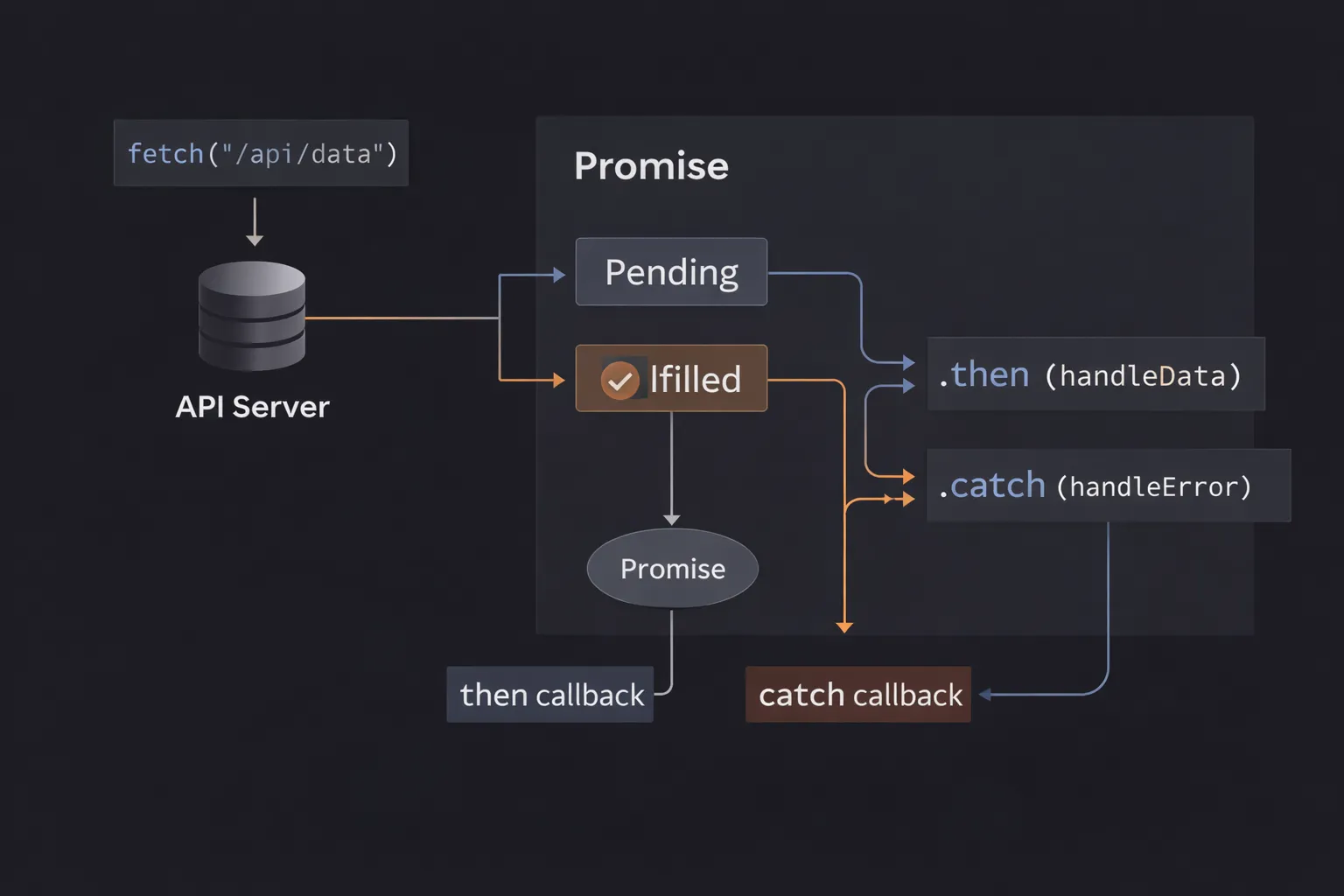
I remember the first time I had to make three API calls in a row.
I needed to fetch a user's profile, then use their ID to fetch their recent posts, and finally use the post ID to fetch the comments. By the time I finished writing the code, my screen looked like a sideways pyramid. It was a mess of nested callbacks, indented so far to the right that I could barely read the logic.
If one of those requests failed, the error handling was a nightmare. I had to copy-paste the error logging logic three times. I stared at that code and thought, "There has to be a better way to handle time."
That "better way" is the JavaScript Promise.
If you have ever stared at a fetch request, confused by .then() chains, or wondered why your variable is logging as Promise { <pending> } instead of the actual data, you are in the right place.
In this article, we are going to dismantle the "magic" of Promises. We will look at what they are, how they run inside the engine, and how to use them to write clean, professional asynchronous code.
What is a Promise? (The Plain English Version)
A Promise is simply an object that represents the eventual completion (or failure) of an asynchronous operation and its resulting value.
Think of it as a placeholder. When you ask JavaScript to do something that takes time (like fetching data from a server), it can't give you the data immediately. Instead, it gives you a Promise—a guarantee that it will return something later. That "something" will either be the success data or an error message explaining why it failed.
The Mental Model: The Restaurant Buzzer
To visualize a Promise, imagine you are walking into a busy fast-food restaurant.
- The Request (Pending): You order a burger. The cashier takes your money. The burger isn't ready yet, so they hand you a plastic buzzer.
- This buzzer is the Promise.
- Currently, the buzzer is in a Pending state. It doesn't have a burger, but it represents the future burger.
- The Wait (Non-Blocking): You don't stand frozen at the counter staring at the cashier. You go sit down, check your phone, and talk to friends. You are free to do other things while the kitchen works.
- The Resolution (Settled): Eventually, the buzzer lights up.
- Scenario A (Fulfilled): You go to the counter, return the buzzer, and get your burger. The transaction was successful.
- Scenario B (Rejected): You go to the counter, and the manager tells you, "Sorry, we ran out of beef." The transaction failed, and you get a reason (the error).
In JavaScript, you attach instructions to the buzzer. You effectively say, "When this buzzes, execute this specific function."
Step-by-Step Code Execution
Let's look at how to create a Promise from scratch to see the mechanics.
1// 1. Creating the Promise
2const myPromise = new Promise((resolve, reject) => {
3  // Simulate an API call taking 1 second
4  setTimeout(() => {
5    const success = true;
6
7    if (success) {
8      resolve("Data received!"); // Scenario A
9    } else {
10      reject("Server error!");   // Scenario B
11    }
12  }, 1000);
13});
14
15console.log("1. Promise created");
16
17// 2. Consuming the Promise
18myPromise
19  .then((data) => {
20    console.log(`2. Success: ${data}`);
21  })
22  .catch((error) => {
23    console.log(`2. Error: ${error}`);
24  });
25
26console.log("3. Code finished");
27
What is happening here?
Line 1: We create a new Promise. The function inside is called the Executor. JavaScript runs this executor immediately and synchronously.
Line 3: Inside the executor, we hit setTimeout. This is an asynchronous Web API. The browser starts a 1-second timer in the background. The executor finishes.
Line 13: We log "1. Promise created".
Line 16: We call .then(). This tells JavaScript: "Hey, when that buzzer eventually goes off with a success, run this function." JavaScript registers this callback and moves on.
Line 24: We log "3. Code finished".
The Gap: Now the call stack is empty. The main code is done.
1 Second Later: The timer finishes. The code inside setTimeout runs. We call resolve("Data received!").
The Trigger: Calling resolve changes the state of the Promise from Pending to Fulfilled. This triggers the .then() callback.
Line 18: The console logs "2. Success: Data received!".
Notice the order: 1 -> 3 -> 2. The Promise code didn't block the main thread.
How It Works Internally
To be a senior developer, you need to know what a Promise actually is in memory.
When you say new Promise, the engine creates a JavaScript Object with three internal properties (slots) that you cannot access directly:
[[PromiseState]]: Starts as"pending". Can change to"fulfilled"or"rejected".[[PromiseResult]]: Starts asundefined. Will eventually hold the data (value) or the error (reason).[[PromiseFulfillReactions]]/[[PromiseRejectReactions]]: Lists of callback functions attached via.then()and.catch().
The Microtask Queue
This is the most critical part of Promise performance.
When a Promise resolves, it does not run the .then() callback immediately. It pushes that callback into a special queue called the Microtask Queue.
The Event Loop checks the Microtask Queue before it checks the regular Callback Queue (where setTimeout lives). This means Promise callbacks have higher priority than almost anything else.
If you resolve a Promise, the engine finishes the current line of code, and then immediately executes the attached .then(), before it even thinks about repainting the screen or handling a click event.
Real-World Use Case: Fetching User Data
Enough theory. Let’s look at how we actually use this in a project. We usually don't create promises with new Promise; we consume them from APIs like fetch.
Let's build a function that fetches a user profile and handles errors properly.
1function getUserProfile(userId) {
2  console.log("Fetching user...");
3
4  // fetch returns a Promise automatically
5  fetch(`https://jsonplaceholder.typicode.com/users/${userId}`)
6    .then((response) => {
7      // Step 1: Check if the network request was actually successful
8      if (!response.ok) {
9        throw new Error(`HTTP Error! Status: ${response.status}`);
10      }
11      // Step 2: Parse the JSON body
12      // .json() ALSO returns a Promise (it takes time to parse)
13      return response.json();
14    })
15    .then((userData) => {
16      // Step 3: Use the final data
17      console.log(`User Name: ${userData.name}`);
18      console.log(`Email: ${userData.email}`);
19    })
20    .catch((error) => {
21      // Step 4: Handle ANY error in the chain
22      console.error("Failed to load profile:", error.message);
23    })
24    .finally(() => {
25      // Step 5: Cleanup (e.g., hide loading spinner)
26      console.log("Operation complete.");
27    });
28}
29
30getUserProfile(1);
31
Why is this better than callbacks?
This is a Promise Chain. Notice how flat the code is. We aren't nesting functions inside functions. We are chaining steps logically:
- Get the response.
- Parse the JSON.
- Use the data.
- Catch errors.
If the network fails, or if the JSON is invalid, or if our code inside the then throws an error—any issue will skip straight to the .catch() block. This is centralized error handling, and it is beautiful.
Common Mistakes Developers Make
I review a lot of Pull Requests, and I see the same Promise mistakes repeatedly.
1. The "Nesting" Trap (Promise Hell)
Developers often discover Promises but keep writing them like callbacks.
1// DON'T DO THIS
2fetch('/user')
3  .then(user => {
4    fetch(`/posts/${user.id}`)
5      .then(posts => {
6        fetch(`/comments/${posts[0].id}`)
7          .then(comments => {
8            console.log(comments);
9          })
10      })
11  })
12
Why it's bad: You are recreating the Pyramid of Doom. You lose the benefit of the flat chain.
The Fix: Return the promise to the next .then().
1// DO THIS
2fetch('/user')
3  .then(user => fetch(`/posts/${user.id}`))
4  .then(posts => fetch(`/comments/${posts[0].id}`))
5  .then(comments => console.log(comments))
6  .catch(err => console.error(err));
7
2. Forgetting to Return
Inside a .then(), if you don't return anything, the next .then() receives undefined.
1fetch('/data')
2  .then(data => {
3    // Missing 'return'
4    someProcess(data);
5  })
6  .then(result => {
7    // result is undefined!
8    console.log(result);
9  });
10
The Fix: Always return the value or the next promise if you want to pass data down the chain.
3. Swallowing Errors
If you don't add a .catch() at the end of your chain, errors will fail silently (or just warn in the console), leaving your app in a broken state with no feedback to the user.
The Interview Perspective
If I am interviewing you, I will ask you to output the order of execution. This tests your knowledge of the Microtask queue.
The "Tricky" Question
1console.log('1');
2
3const promise = new Promise((resolve) => {
4  console.log('2');
5  resolve();
6});
7
8promise.then(() => {
9  console.log('3');
10});
11
12console.log('4');
13
What is the order?
Answer: 1, 2, 4, 3.
Explanation:
1is synchronous.new Promiseruns the executor immediately (synchronously). So2prints.resolve()is called. The.then()callback is scheduled in the Microtask Queue. It does NOT run yet.4is synchronous.- Main thread finishes. Event loop checks Microtasks.
3prints.
Many candidates get 2 wrong because they think the entire Promise is asynchronous. Only the resolution (.then) is asynchronous.
Another Common Question: Promise.all vs Promise.allSettled
Promise.all([p1, p2, p3]): Waits for all to finish. If one fails, the whole thing fails immediately. Useful when you need all data to proceed.Promise.allSettled([p1, p2, p3]): Waits for all to finish, regardless of success or failure. Useful when you want to show a report like "2 uploads succeeded, 1 failed."
TL;DR / Key Takeaways
- Promises are placeholders for future values.
- Three States: Pending, Fulfilled, Rejected.
- Chaining:
.then()returns a new Promise, allowing flat chains. - Microtasks: Promise callbacks run before
setTimeoutor DOM events. - Error Handling: A single
.catch()at the end handles errors from any previous step. - Avoid Nesting: Always return a Promise to keep the chain flat.
FAQ
Q: Can I cancel a Promise?
A: Not natively. Once a Promise is created, it will run until it settles. However, you can use an AbortController with the fetch API to cancel the network request associated with a promise.
Q: What is the difference between .then(success, fail) and .then(success).catch(fail)?
A: In the first form, if the success function throws an error, the fail function inside the same .then cannot catch it.
In the second form (.catch), it handles errors from the original promise and errors that occur inside the .then. The second form is safer and recommended.
Q: Is async/await better than Promises?
A: async/await is just "syntactic sugar" built on top of Promises. It makes the code look synchronous, which is easier to read, but underneath, it is still using Promises and the Microtask queue. You must understand Promises to truly understand async/await.
Conclusion
Promises are the backbone of modern JavaScript. They transformed the language from a callback-heavy scripting tool into a robust platform capable of handling complex asynchronous flows.
When you stop fighting against the asynchronous nature of JavaScript and start visualizing the "Buzzer," the code becomes clear. You stop worrying about race conditions and timing issues because the Promise chain guarantees the order.
The next time you see a Promise { <pending> } in your console, don't panic. Just remember: the burger isn't ready yet. Attach a .then(), sit down, and let the Event Loop bring the data to you.