I remember the exact moment I thought I understood JavaScript, and the exact moment—about two days later—when I realized I didn't.
I was debugging a simple loop in a legacy codebase. It was supposed to print numbers 1 through 5. Instead, it printed "6" five times. I stared at the screen, baffled. The logic looked perfect. The syntax was correct. But the variable wasn't behaving the way I expected a variable to behave.
That was my introduction to closures.
If you are reading this, you are probably in the same boat. You know the textbook definition. You might have even memorized it for an interview. But when you look at a complex React useEffect hook or a Node.js middleware function, you still feel that slight pang of uncertainty. Where is this data coming from? Why is it still alive?
In this article, we are going to fix that. We aren't just going to define closures; we are going to dismantle them, look at the gears turning inside, and then build a real-world debounce utility that you would actually use in a production application.
What is a Closure? (The Plain English Version)
A closure is simply a function that remembers the variables around it, even after the outer function has finished running.
That’s it. Normally, when a function finishes executing, JavaScript wipes its local variables from memory to save space. But if you create a function inside another function, the inner function holds onto a reference to the outer variables. It refuses to let them die. It "closes over" them.
The Mental Model: The Backpack Analogy
When I teach junior developers, I always use the "Backpack" analogy. It helps you visualize where the data lives.
Imagine a function is a person. When a function runs, it’s like a person walking into a room to do a job. They have local variables, which are like tools they pick up in that room.
Usually, when the person leaves the room (the function returns), they drop all their tools. The room is cleaned up. The tools are gone.
However, if that person creates a new person (an inner function) while they are in the room, that new person puts some of those tools into a backpack.
When the outer person leaves, the tools on the floor are swept away. But the new person walks out carrying that backpack. Whenever they need those variables later—even a week later—they don't look at where the room was; they just reach into their backpack.
The closure is the backpack. It is a permanent storage unit attached to a specific instance of a function.
Step-by-Step Code Execution
Let’s look at the classic counter example. This is the "Hello World" of closures, but we are going to analyze it differently.
1function createCounter() {
2  let count = 0; // This is the variable that will go into the backpack
3
4  function increment() {
5    count++;
6    console.log(`Current count: ${count}`);
7  }
8
9  return increment;
10}
11
12const myCounter = createCounter();
13
14myCounter(); // Output: Current count: 1
15myCounter(); // Output: Current count: 2
16myCounter(); // Output: Current count: 3
17
What is happening here?
- Line 1: We define
createCounter. Nothing runs yet. - Line 12: We call
createCounter().
- A new execution context is created.
- The variable
countis initialized to0in memory. - The function
incrementis defined. - Crucial Step: Because
incrementis created insidecreateCounter, it looks around, seescount, and puts a reference to it in its "backpack" (closure scope). - The function returns
increment.
- End of Line 12:
createCounterfinishes. Normally, the Garbage Collector would come in and deletecount. But it can't. ThemyCounterfunction is holding onto it. - Line 14: We call
myCounter().
- It runs the code inside
increment. - It looks for
count. It's not insideincrementitself. - It checks the backpack (closure). It finds
countis0. - It updates it to
1.
- Line 15: We call
myCounter()again.
- It checks the backpack.
countis now1. - It updates it to
2.
The variable count is private. No other code in your entire application can touch it. Only myCounter has the key to that backpack.
How It Works Internally: The Scope Chain
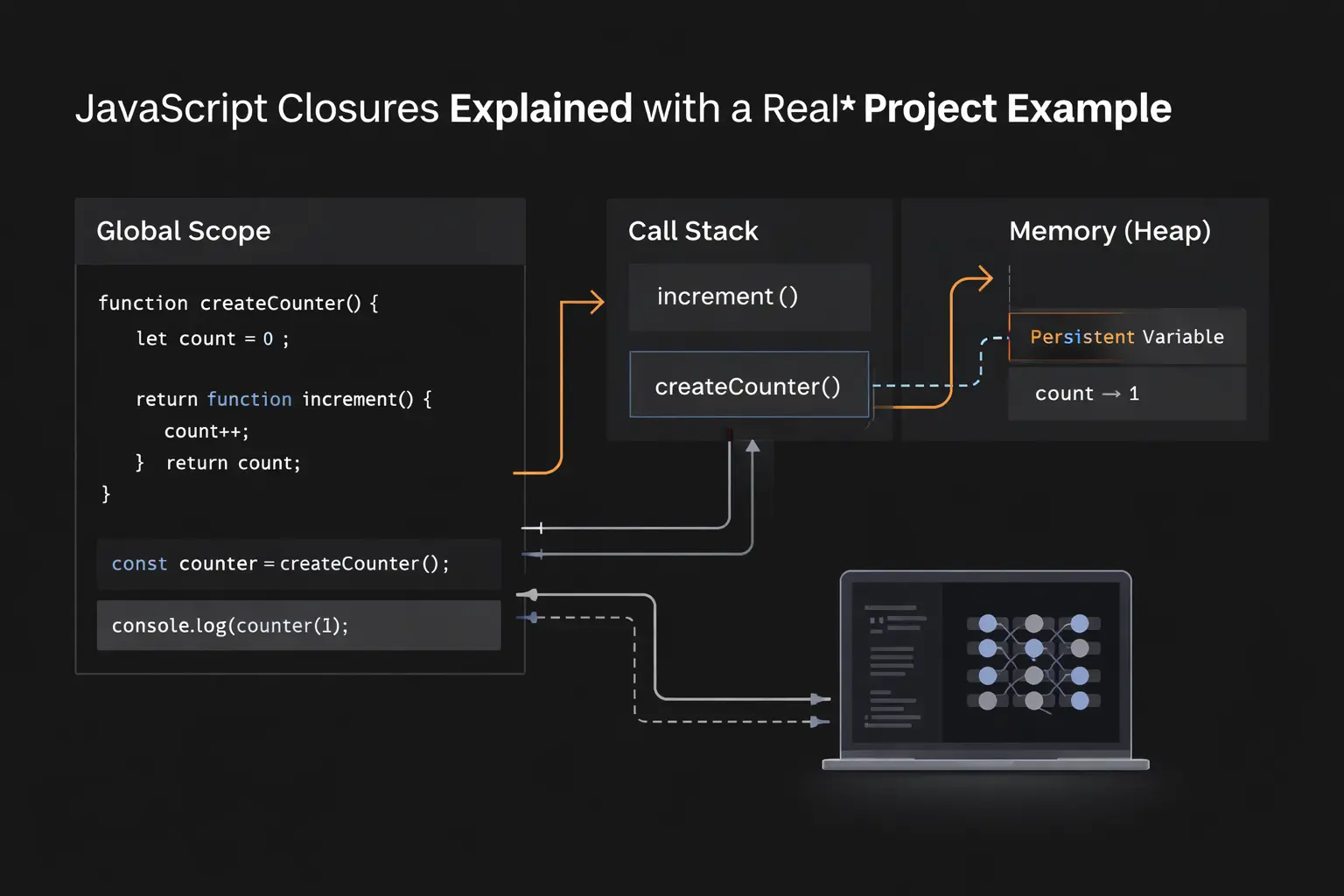
To truly master this, we have to talk about the Heap and the Call Stack.
When you run JavaScript code, the engine (V8 in Chrome/Node) creates an Execution Context. This context has a reference to its outer environment.
When createCounter runs, it creates a scope. The count variable lives in that scope.
When createCounter returns, the Execution Context is popped off the Call Stack. In languages like C++, this local variable would be destroyed (stack deallocation). But in JavaScript, because the returned function increment still references count, the engine moves count to the Heap (long-term memory).
The engine knows: "I cannot delete this variable yet because myCounter might need it later."
This connection is called the Lexical Scope Chain. The inner function is technically "lexically bound" to the variables of its parent.
Common Mistakes Developers Make
I have interviewed hundreds of developers, and I see the same closure mistakes repeatedly.
1. The Loop Problem (The "Classic" Trap)
This used to be the most common bug in JavaScript before ES6 (let and const) fixed it, but you still see it in legacy code or poorly transpiled code.
1// DON'T DO THIS
2for (var i = 1; i <= 3; i++) {
3  setTimeout(function() {
4    console.log(i);
5  }, 1000);
6}
7
Expected: 1, 2, 3 Actual: 4, 4, 4
Why? The variable i is declared with var, which is function-scoped (or global in this case), not block-scoped. All three setTimeout callbacks share the exact same reference to i. By the time the 1000ms timer finishes, the loop has already finished, and i has become 4.
The Fix: Use let. let creates a new binding (a new scope) for every iteration of the loop.
1for (let i = 1; i <= 3; i++) {
2  setTimeout(function() {
3    console.log(i);
4  }, 1000);
5}
6
2. Stale Closures in React
If you use React hooks, you have likely created a "stale closure."
1function Timer() {
2  const [count, setCount] = useState(0);
3
4  useEffect(() => {
5    const interval = setInterval(() => {
6      console.log(count); // ALWAYS logs 0!
7    }, 1000);
8    return () => clearInterval(interval);
9  }, []); // Empty dependency array
10}
11
Why? The function inside setInterval is a closure. It captured the value of count from the first render (which was 0). Even though the component re-renders and count updates in the state, the interval function is still holding onto its old backpack from the first render.
Real Project Example: Building a Debounced Search
Enough theory. Let’s look at a real-world scenario.
Imagine you are building a search bar for an e-commerce site. You have an event listener that fires every time the user types a key. If they type "Samsung", you don't want to fire 7 API calls (S, Sa, Sam...). You want to wait until they stop typing.
This technique is called Debouncing. It is purely powered by closures.
Here is how we write it from scratch:
1// The Outer Function (The Factory)
2function debounce(func, delay) {
3  // This variable 'timer' is the private state in the closure
4  let timer;
5
6  // The Inner Function (The logic that actually runs)
7  return function(...args) {
8    const context = this;
9
10    // Clear the previous timer if it exists.
11    // We can access 'timer' because of closure.
12    clearTimeout(timer);
13
14    // Set a new timer
15    timer = setTimeout(() => {
16      func.apply(context, args);
17    }, delay);
18  };
19}
20
21// SIMULATING REAL USAGE
22
23// 1. The expensive API call function
24const searchAPI = (query) => {
25  console.log(`Fetching results for: ${query}`);
26};
27
28// 2. Create the debounced version
29// 'efficientSearch' now holds the closure with the 'timer' variable
30const efficientSearch = debounce(searchAPI, 500);
31
32// 3. User types "Hello" quickly
33efficientSearch("H");
34efficientSearch("He");
35efficientSearch("Hel");
36efficientSearch("Hell");
37efficientSearch("Hello");
38
39// Output after 500ms:
40// "Fetching results for: Hello"
41
Why Closures Are Essential Here
Look at the variable timer inside debounce.
If we didn't have closures, we would have to define timer as a global variable. That would be messy. If we had two search bars on the page, they would fight over the same global timer.
By using a closure, we encapsulate the state. Every time we call debounce(), it creates a fresh environment with its own timer.
- First keystroke ("H"):
efficientSearchruns. It seestimeris undefined. It sets a timer for 500ms.timernow holds ID 123. - Second keystroke ("He"):
efficientSearchruns. It seestimeris 123. It runsclearTimeout(123). It sets a new timer.timeris now ID 124.
The timer variable persists across multiple function calls, but it is invisible to the rest of the world. This is the superpower of closures: Persistent, Private State.
Real-World Use Cases
Beyond debouncing, where else will you use this in your job?
1. The Module Pattern (Data Privacy)
Before modern JavaScript modules (import/export), this was how we organized all code. You still see this pattern in utility libraries to hide implementation details.
1const BankAccount = (function() {
2  let balance = 0; // Private
3
4  function changeBy(val) {
5    balance += val;
6  }
7
8  return {
9    deposit: function() { changeBy(10); },
10    withdraw: function() { changeBy(-10); },
11    value: function() { return balance; }
12  };
13})();
14
15console.log(BankAccount.value()); // 0
16BankAccount.deposit();
17console.log(BankAccount.value()); // 10
18// console.log(BankAccount.balance); // undefined (Private!)
19
2. Function Currying & Partial Application
This is huge in functional programming. You create a generic function and use closures to "bake in" arguments.
1function createMultiplier(multiplier) {
2  return function(number) {
3    return number * multiplier;
4  };
5}
6
7const double = createMultiplier(2);
8const triple = createMultiplier(3);
9
10console.log(double(5)); // 10
11console.log(triple(5)); // 15
12
The double function remembers that multiplier is 2. The triple function remembers it is 3.
The Interview Perspective
If you are applying for a Senior or Mid-level role, I will ask you about closures. I am not asking for a definition; I am checking if you understand how memory works.
Common Question: "What will this log?"
I might show you this code:
1let count = 0;
2(function() {
3  if (count === 0) {
4    let count = 1;
5    console.log(count); // What is this?
6  }
7  console.log(count); // What is this?
8})();
9
Answer: It logs 1 then 0.
Explanation: The let count = 1 inside the if block creates a block-scoped variable that shadows the outer count. The closure captures the scope chain, but shadowing rules still apply.
Trickier Question: Memoization
"Write a function that remembers the result of a heavy calculation."
This requires a closure to store a cache object.
1function memoize(fn) {
2  const cache = {}; // The closure "backpack"
3
4  return function(...args) {
5    const key = JSON.stringify(args);
6    if (cache[key]) {
7      return cache[key];
8    }
9    const result = fn(...args);
10    cache[key] = result;
11    return result;
12  };
13}
14
This demonstrates you know how to use closures for performance optimization.
TL;DR / Key Takeaways
If you only remember three things from this article, remember these:
- Closures are backpacks. A function carries the variables from the scope where it was created, wherever it goes.
- They enable private state. You can simulate private variables in JavaScript without using classes.
- They are memory expensive. Because closures prevent variables from being garbage collected, overusing them (like attaching huge objects to closures in a loop) can cause memory leaks.
FAQ
Q: Do closures cause memory leaks? A: Not inherently. They are a feature, not a bug. However, if you create a closure that holds onto a massive DOM element or a large data array, and you never destroy the closure, that memory stays occupied. This is a common issue in Single Page Applications (SPAs).
Q: Is let better than var for closures?
A: Yes. let and const are block-scoped, which makes their behavior much more predictable, especially inside loops. It eliminates the vast majority of accidental closure bugs.
Q: Are closures used in Class-based programming?
A: Less often. In classes, you usually store state in this.state or private class fields (#field). However, you will still encounter closures in event handlers or callbacks defined inside methods.
Conclusion
Closures are not magic. They are simply a result of how JavaScript handles memory and scope.
When I finally understood closures, the language slowed down for me. I stopped guessing why variables were changing (or not changing) and started visualizing the connections between functions.
The next time you write a function inside another function, pause. Visualize the backpack. Ask yourself: What is this function carrying with it? Once you can see the backpack, you have mastered the closure.
Now, go open your code editor and try to write that debounce function from memory. It is the best way to make it stick.