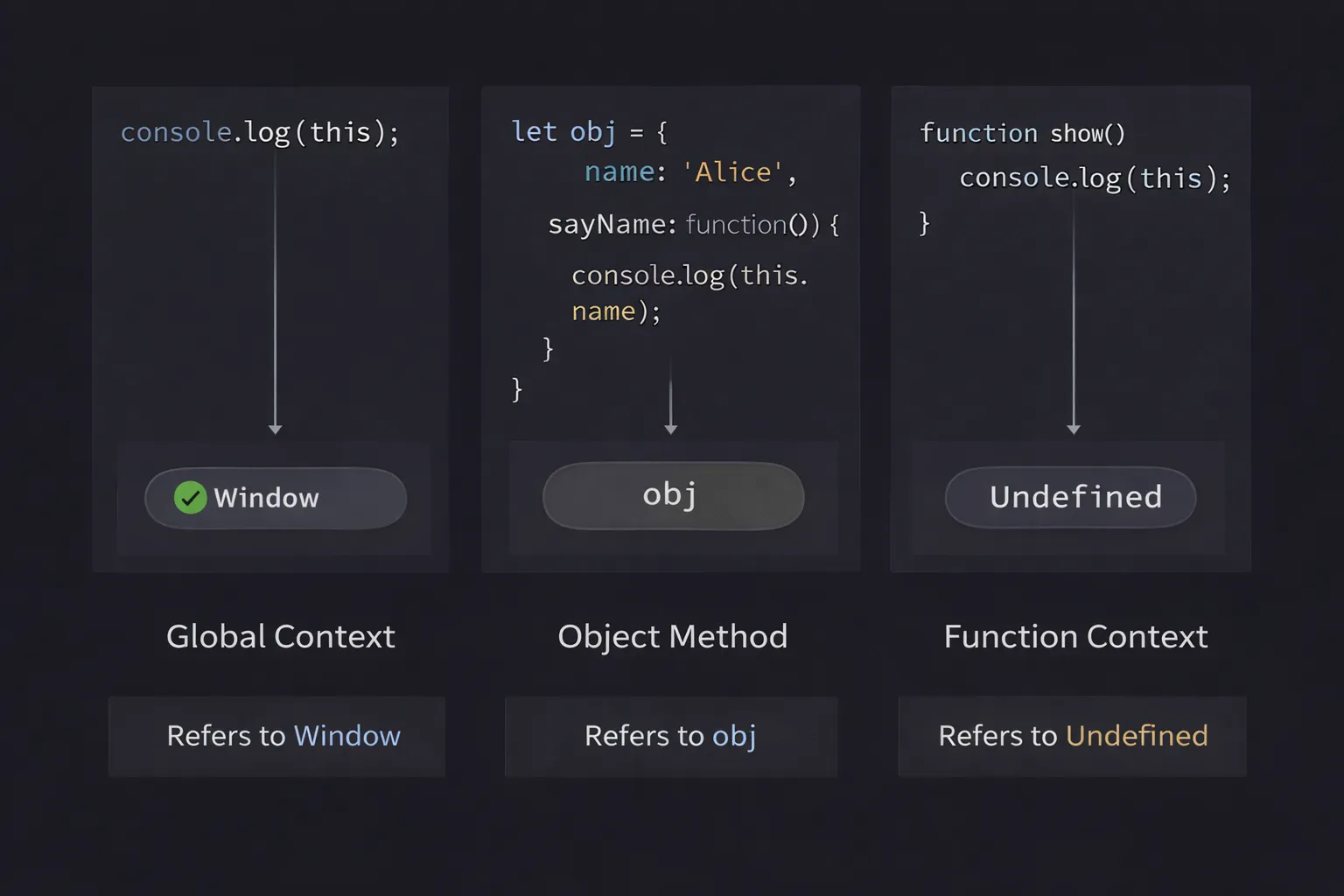
I still remember the first time I lost a job interview because of the this keyword.
I was sitting in a glass-walled conference room, confident. The interviewer handed me a marker and asked me to write a simple React class component event handler. I scribbled the code on the whiteboard. He looked at it, then at me, and asked, "What will this refer to inside that click handler?"
I froze. I muttered something about the global window object. He shook his head. "It will be undefined," he said. "Next question."
That walk back to my car was painful. I realized I had been copy-pasting code for two years without truly understanding the engine running it. I knew this existed, but I treated it like magic. Sometimes it worked, sometimes I needed .bind(this), and sometimes I just switched to arrow functions and prayed.
If you feel the same way—confused, frustrated, or just guessing—you are in the right place. The this keyword is widely considered the most confusing concept in JavaScript. But it doesn't have to be.
In this article, we are going to strip away the magic. We will dismantle the mechanism, look at the gears, and build a mental model that will never fail you again.
What is this? (The Simple Explanation)
The this keyword is a variable that refers to the object that called the function.
That’s it. It is not a reference to the function itself. It is not a reference to the scope. It is simply a pointer to the "owner" of the execution. Think of it as the subject of a sentence. If I say "John kicks the ball," the action is "kick," and the subject (this) is "John."
The Mental Model: The Borrowed Pen
To visualize this, I use the "Borrowed Pen" analogy.
Imagine a function is a Pen. Imagine an object is a Person.
If I hold the pen and write, "I am writing," the "I" refers to me. If I hand the exact same pen to you, and you write, "I am writing," the "I" now refers to you.
The pen didn't change. The ink didn't change. The only thing that changed was who was holding it when the action happened.
In JavaScript:
- The function is the Pen.
- The
thiskeyword is the word "I". - The execution context is the person holding the pen.
The value of this is not defined when you write the function. It is defined when you call the function. It is dynamically determined at the moment of execution.
Step-by-Step Code Execution
Let’s look at a code example that typically confuses beginners. We will trace it line by line.
1const user = {
2  name: "Alice",
3  greet: function() {
4    console.log(`Hello, I am ${this.name}`);
5  }
6};
7
8const admin = {
9  name: "Bob"
10};
11
12// 1. Standard Method Call
13user.greet();
14
15// 2. Assigning the function to a variable
16const sayHello = user.greet;
17sayHello();
18
19// 3. Borrowing the method
20admin.greet = user.greet;
21admin.greet();
22
What happens here?
**Line 13: user.greet()**
- Execution: We call the
greetfunction. - The Check: Who is holding the pen? Look to the left of the dot (
.). - The Object: The object is
user. - Result:
thispoints touser. It prints: "Hello, I am Alice".
**Line 17: sayHello()**
- Execution: We take the function definition from
user.greetand store it in the variablesayHello. Then we callsayHello(). - The Check: Look to the left of the call. Is there a dot? No. It is a plain function call.
- The Object: In standard mode, the "owner" defaults to the global object (
windowin browsers). In Strict Mode, it defaults toundefined. - Result: It prints: "Hello, I am undefined" (or empty string if window.name is empty).
- Why: The pen was dropped on the floor. No one is holding it.
**Line 21: admin.greet()**
- Execution: We manually attach the function to the
adminobject. Then we call it viaadmin. - The Check: Look to the left of the dot.
- The Object: The object is
admin. - Result:
thispoints toadmin. It prints: "Hello, I am Bob".
The function greet is the same in all three cases. But this changed every time based on how it was called.
How It Works Internally
To truly master this, we need to look at the Execution Context.
When the JavaScript engine prepares to run a function, it creates an Execution Context. You can think of this as a record of the environment. This record contains:
- Variable Environment: Where local variables live.
- Scope Chain: References to parent scopes.
- The
thisBinding: The value assigned tothis.
The Binding Rules
The engine uses a specific hierarchy of rules to determine what this should be. It checks them in this specific order:
- New Binding: Was the function called with
new? If yes,thisis the newly created object. - Explicit Binding: Was the function called with
.call(),.apply(), or.bind()? If yes,thisis the object you passed in. - Implicit Binding: Was the function called with a dot (e.g.,
obj.method())? If yes,thisis the object before the dot. - Default Binding: If none of the above apply,
thisis the global object (orundefinedin strict mode).
This is not magic. It is a strict algorithm. The engine runs down this checklist every single time a function runs.
Common Mistakes Developers Make
I have reviewed thousands of lines of junior code. The same this bugs appear over and over again.
1. The Callback Trap (The "Lost Context" Bug)
This is the classic React/Event Listener bug.
1const buttonHandler = {
2  message: "Clicked!",
3  clickMe: function() {
4    console.log(this.message);
5  }
6};
7
8const btn = document.querySelector('button');
9// DON'T DO THIS
10btn.addEventListener('click', buttonHandler.clickMe);
11
The Bug: You click the button, and it logs undefined.
Why: You passed the reference to the function clickMe. You didn't call it. When the browser (the DOM) eventually calls your function later, it calls it as a plain function clickMe(), not as buttonHandler.clickMe(). The context is lost.
The Fix: Use .bind() or an arrow function wrapper.
1btn.addEventListener('click', buttonHandler.clickMe.bind(buttonHandler));
2
2. Inner Functions Shadowing this
In older codebases, you will see var self = this. This is why.
1const dashboard = {
2  user: "John",
3  loadData: function() {
4    // 'this' is dashboard here
5
6    fetch('/api/data').then(function() {
7      // OOPS! 'this' is NOT dashboard here!
8      // 'this' is undefined or window because this is a plain callback.
9      console.log(this.user);
10    });
11  }
12};
13
The Bug: Inside the .then() callback, this changes. It resets to the default binding.
The Fix: Use Arrow Functions.
3. The Arrow Function Misunderstanding
Arrow functions are special. They do not have their own this. They inherit this from the parent scope (Lexical Scoping).
Beginners often think arrow functions "fix" everything, so they use them everywhere.
1const user = {
2  name: "Sarah",
3  // DON'T DO THIS
4  sayHi: () => {
5    console.log(this.name);
6  }
7};
8
9user.sayHi(); // undefined
10
Why: An arrow function looks up. The parent scope of user is the Global Scope (window). So this becomes window.
Rule: Never use arrow functions for top-level object methods if you need access to the object itself.
Real-World Use Cases
Where does this actually matter in modern development?
1. Class-Based Components (Legacy React & Angular)
Even though React Hooks are popular, millions of lines of code still use classes.
1class Toggle extends React.Component {
2  constructor(props) {
3    super(props);
4    this.state = { isOn: true };
5    // This line is mandatory in classes!
6    this.handleClick = this.handleClick.bind(this);
7  }
8
9  handleClick() {
10    this.setState(state => ({ isOn: !state.isOn }));
11  }
12
13  // ...
14}
15
If you forget that .bind(this) line in the constructor, this will be undefined when the user clicks, and your app will crash. Understanding why saves you hours of debugging.
2. Method Chaining (jQuery / Builders)
Libraries like jQuery or D3 rely heavily on this returning the object instance to allow chaining.
1const ladder = {
2  step: 0,
3  up() {
4    this.step++;
5    return this; // Crucial!
6  },
7  down() {
8    this.step--;
9    return this;
10  }
11};
12
13ladder.up().up().down().up();
14
This pattern only works because this correctly refers to the ladder object in every call.
3. Event Handling (DOM)
When you write vanilla JavaScript, the value of this inside an event listener is usually the DOM element that fired the event.
1button.addEventListener('click', function() {
2  this.classList.add('active'); // 'this' is the button HTML element
3});
4
This is extremely useful for toggling UI states without needing to query the DOM again.
Interview Perspective
If I am interviewing you for a senior role, I won't ask "What is this?". I will give you a code snippet and ask you to fix it.
The Standard Question
"Explain how .call(), .apply(), and .bind() differ."
Answer:
.call(obj, arg1, arg2): Invokes the function immediately. Arguments are passed individually..apply(obj, [args]): Invokes the function immediately. Arguments are passed as an array..bind(obj): Does NOT invoke the function. It returns a new function withthispermanently locked to the object.
The Tricky Example
"What is the output of this code?"
1const length = 4;
2function callback() {
3  console.log(this.length);
4}
5
6const object = {
7  length: 5,
8  method(fn) {
9    fn();
10  }
11};
12
13object.method(callback, 1, 2);
14
The Trap:
Most candidates guess 5.
The correct answer in the browser is 4 (if length is var globally) or undefined (if let/const).
Why: Inside method, fn() is called as a plain function call. The dot is gone. So this falls back to the global object. The fact that it was passed through object doesn't matter. The execution site is fn().
TL;DR / Key Takeaways
If you are skimming, memorize these rules:
- Look at the Call Site:
thisis determined by how the function is called, not where it is written. - Dot Rule: If there is a dot (
obj.func()),thisis the object before the dot. - No Dot: If it is a plain call (
func()),thisis Global (or undefined). - Arrow Functions: They don't have their own
this. They grab it from the parent scope. - New Keyword: Calling with
newcreates a fresh object and assigns it tothis.
FAQ
Q: Why does this exist if it's so confusing?
A: It allows us to reuse functions. Without this, we would have to write a separate greet function for every single user object. this allows one function to operate on millions of different objects dynamically.
Q: Should I just use arrow functions for everything?
A: No. Arrow functions are great for callbacks (like inside .map() or setTimeout), but they are bad for object methods because they can't access the object instance. Use the right tool for the job.
Q: What is globalThis?
A: It is a modern standard to access the global object. In browsers, it's window. In Node.js, it's global. globalThis works in both environments, making your code portable.
Q: Can I change this after binding it?
A: No. Once you use .bind(), that function is locked. You cannot bind a bound function again. The first binding always wins.
Conclusion
The JavaScript this keyword is not a random number generator. It is a predictable, logical mechanism.
The confusion comes from our brain trying to read code statically (based on where it sits on the page), while the engine executes code dynamically (based on who called whom).
Next time you see this in a codebase, pause. Don't guess. Ask yourself: "Who is holding the pen?" Look at the call site. Look for the dot. Look for the binding.
Once you start seeing the execution flow instead of just the text, this becomes one of the most powerful tools in your arsenal.
Now, open your console and try to break it. It’s the only way to learn.