I still remember the first time I tried to refactor a "Pyramid of Doom."
I was working on a legacy Node.js backend. The code needed to authenticate a user, fetch their permissions, look up their organization, and finally log the access. It was written in 2013 using raw callbacks. The indentation went so far to the right that I had to scroll horizontally on my 27-inch monitor just to see the closing brackets.
It was a nightmare to read, and even harder to debug. If an error happened in step 3, good luck finding out where it was caught (if it was caught at all).
I decided to rewrite it using Promises. I knew .then() existed, but I didn't truly understand chaining. I ended up nesting my .then() calls inside each other, effectively recreating the exact same pyramid structure, just with different syntax.
I missed the "Aha!" moment: Promises are designed to be flat.
If you have ever found yourself nesting .then() blocks, or if you've wondered why your variables are returning undefined in the next step of a chain, you are grappling with the mechanics of Promise Chaining.
In this article, we are going to break down exactly how chaining works. We will move beyond the syntax and look at the memory allocation, the Event Loop, and the specific rules the engine follows to ensure your data flows smoothly from one asynchronous task to the next.
Simple One-Paragraph Explanation
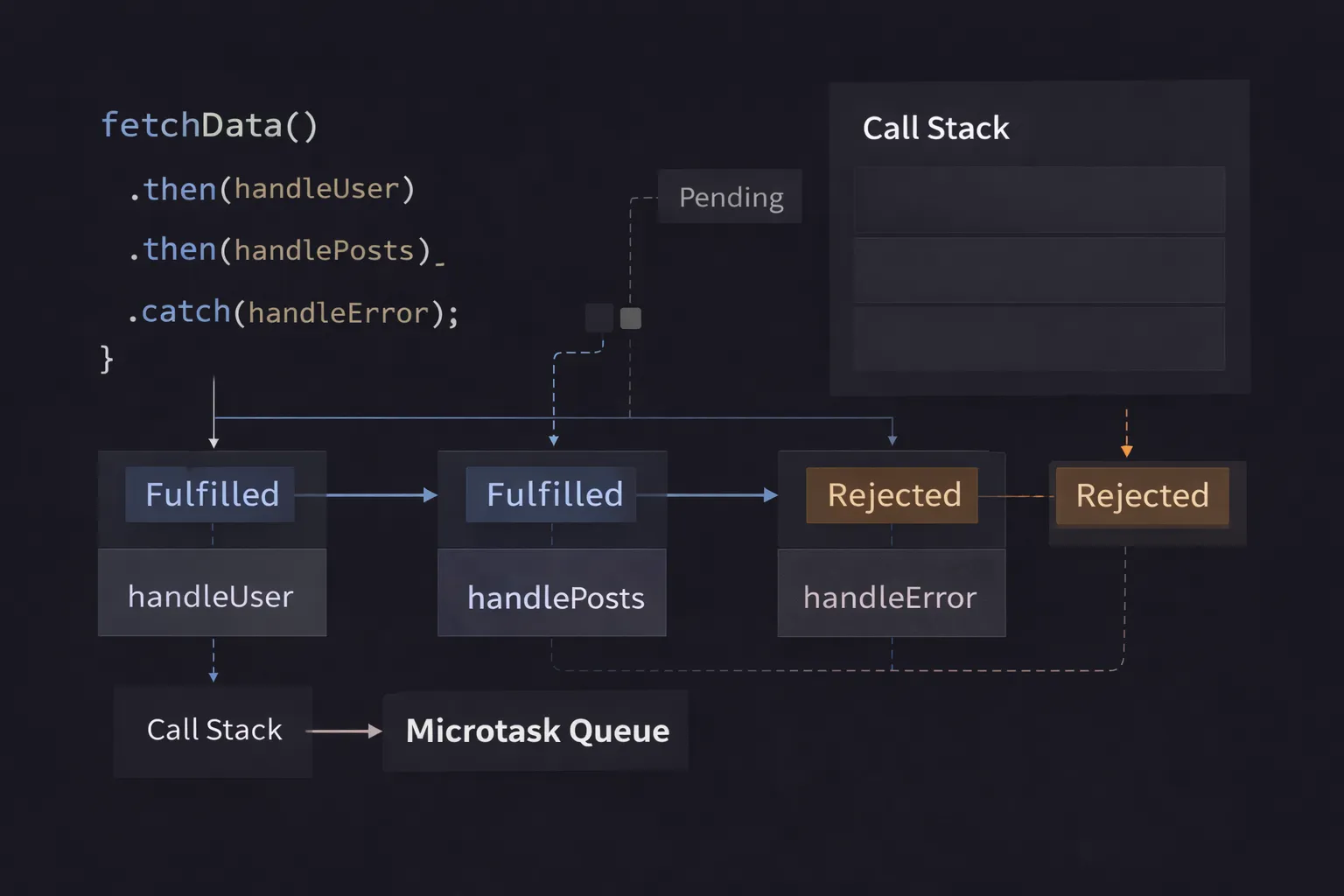
Promise chaining is the ability to connect multiple asynchronous operations in a sequence, where the output of one operation automatically becomes the input of the next. Every time you call .then(), JavaScript automatically creates and returns a brand new Promise. This means you can attach another .then() to it immediately, creating a flat, readable list of steps instead of a nested pyramid of callbacks.
The Mental Model: The Assembly Line
To visualize this, imagine a factory assembly line.
- Station 1 (The First Promise): A robot is building a car frame. It takes time.
- The Conveyor Belt (The Chain): When Station 1 finishes, it doesn't just dump the frame on the floor. It places it on a conveyor belt that moves it directly to Station 2.
- Station 2 (The Next
.then): This robot is waiting. It cannot start until the frame arrives. Once it arrives, it paints the frame. - The Output: Crucially, Station 2 produces a painted car, which travels to Station 3.
In this analogy:
- The Robots are your asynchronous functions (API calls).
- The Conveyor Belt is the Promise Chain.
- You are the factory manager. You define the order of the stations once, start the line, and walk away. The line manages the timing itself.
Step-by-Step Code Execution
Let's look at a realistic scenario: Fetching a user, then finding their top post, then getting the comments for that post.
1// A helper to simulate an API request
2function mockApi(data, ms) {
3  return new Promise((resolve) => {
4    setTimeout(() => {
5      console.log(`Finished: ${data}`);
6      resolve(data);
7    }, ms);
8  });
9}
10
11console.log("1. Start");
12
13// THE CHAIN
14mockApi("User Data", 1000)
15  .then((user) => {
16    // Step 1: Use user data to get posts
17    console.log("2. Processing User");
18    // Return a NEW Promise
19    return mockApi("User's Posts", 1000);
20  })
21  .then((posts) => {
22    // Step 2: Use posts to get comments
23    console.log("3. Processing Posts");
24    // Return a synchronous value
25    return "Simple Comment Data";
26  })
27  .then((comments) => {
28    // Step 3: Final step
29    console.log(`4. Final Result: ${comments}`);
30  });
31
32console.log("5. End of script");
33
What is happening here?
Line 11: The engine prints "1. Start".
Line 14 (The Trigger): We call mockApi. It starts a 1-second timer (asynchronous) and immediately returns a Promise (let's call it P1) in the Pending state.
Line 15 (The First Link): We call P1.then().
- JavaScript registers the callback function.
- Crucial Step:
.then()immediately returns a new Promise (P2).P2is currentlyPending.
Line 21 (The Second Link): We attach a .then() to P2.
- JavaScript registers the second callback.
- It immediately returns a new Promise (
P3).P3isPending.
Line 26 (The Third Link): We attach a .then() to P3.
- It returns
P4.
Line 32: The engine prints "5. End of script". The main thread finishes.
1 Second Later (The Flow Begins):
- The timer for
P1finishes.P1resolves with"User Data". - The first
.then()callback runs. It logs"2. Processing User". - The Magic: This callback returns a new call to
mockApi(a Promise). P2(the promise returned by the first.then) sees that we returned a Promise. It says, "Okay, I will lock my state to match this new Promise." It effectively pauses.
2 Seconds Later:
- The second
mockApicall finishes. It resolves with"User's Posts". - Because
P2was locked to it,P2now resolves. - The second
.then()callback runs. It logs"3. Processing Posts". - Value Return: This callback returns a simple string:
"Simple Comment Data". P3sees a simple value. It resolves immediately with that value.
Final Step:
- The third
.then()callback runs immediately. - It logs
"4. Final Result: Simple Comment Data".
How It Works Internally
To be a senior developer, you need to understand that .then() is not just a listener; it is a Promise Factory.
When you write promiseA.then(callback), the JavaScript engine performs the following internal operations:
- Creation: It creates a brand new Promise object (
promiseB). - Scheduling: It queues the
callbackto run whenpromiseAsettles. - Returning: It returns
promiseBto you instantly.
The Resolution Procedure (The "Lock-In")
What determines when promiseB resolves? It depends entirely on what your callback function returns.
When your callback runs, the engine looks at the return value x:
- If
xis a Value (Number, String, Object): The engine resolvespromiseBimmediately withx. The chain proceeds instantly. - If
xis a Promise: The engine makespromiseBadopt the state ofx.
- If
xis pending,promiseBwaits. - If
xresolves,promiseBresolves. - If
xrejects,promiseBrejects.
- If an Error is Thrown: The engine catches the error (try/catch) and rejects
promiseBwith that error.
The Microtask Queue
Remember, Promise callbacks never run on the main call stack. They run in the Microtask Queue.
Every time a link in the chain resolves, the next .then() callback is pushed to the Microtask Queue. This ensures that even if you chain 100 promises together, the browser has a chance to check for urgent interactions (like high-priority events) in between, although it will prioritize Microtasks over Macrotasks (like setTimeout).
Common Mistakes Developers Make
I see these three mistakes in code reviews constantly. They break the chain and lead to unhandled errors.
1. The Broken Chain (Forgetting to Return)
This is the number one cause of bugs in Promise chains.
1// BAD
2getUser(id)
3  .then(user => {
4    // We call this, but we don't RETURN it!
5    getPermissions(user);
6  })
7  .then(permissions => {
8    // 'permissions' is undefined!
9    console.log(permissions);
10  });
11
Why it breaks:
The first function returns undefined (implicitly).
The next link in the chain sees a value (undefined) and resolves immediately. It does not wait for getPermissions to finish.
The Fix: Always write return getPermissions(user).
2. The Nesting Trap (The Pyramid Reborn)
Developers often nest promises because they want access to variables from the top of the scope (Closure).
1// MESSY
2getUser(id).then(user => {
3  getPosts(user.id).then(posts => {
4    getComments(posts[0]).then(comments => {
5      // I have access to user, posts, and comments here
6      console.log(user, posts, comments);
7    });
8  });
9});
10
Why it's bad: You lose the benefits of linear error handling.
The Fix: Use Promise.all or, even better, modern async/await. But if you must use chains, pass data down the chain explicitly.
3. The "Ghost" Catch
Placing .catch() in the wrong spot.
1step1()
2  .then(step2)
3  .catch(handleError) // Catches errors from step1 OR step2
4  .then(step3); // Runs even if step2 failed!
5
The Confusion: .catch() also returns a Promise! If you handle an error, the chain recovers and continues to step3.
The Fix: If you want the whole chain to stop on error, put .catch() at the very end.
Real-World Use Cases
Where do we actually use raw Promise chaining today?
1. The Fetch API
The standard browser fetch is the classic example. It requires two steps because the headers arrive before the body.
1fetch('/api/user')
2  .then(response => {
3    // Step 1: Check status and parse headers
4    if (!response.ok) throw new Error('Network error');
5    // Step 2: Return a promise to parse the body
6    return response.json();
7  })
8  .then(userData => {
9    // Step 3: Use the actual data
10    console.log(userData);
11  })
12  .catch(error => {
13    console.error("Something went wrong:", error);
14  });
15
2. Service Workers (Caching)
Service workers rely heavily on Promise chaining to open caches, match requests, and return responses.
1caches.open('my-cache')
2  .then(cache => cache.match(event.request))
3  .then(response => response || fetch(event.request));
4
3. Database Transactions
When using SQL libraries or MongoDB (without async/await), you often need to ensure operations happen in strict order.
- Connect to DB -> Start Transaction -> Insert User -> Insert Profile -> Commit.
- If any step fails, the
.catchtriggers a Rollback.
Interview Perspective
If I am interviewing you, I will ask you to predict the output of a chain. This tests if you understand that .then handles both values and promises.
The Tricky Question
1Promise.resolve(1)
2  .then(x => x + 1)          // Returns 2 (Value)
3  .then(x => { throw x })    // Throws 2
4  .catch(x => x + 1)         // Catches 2, Returns 3 (Recovered!)
5  .then(x => Promise.resolve(x + 1)) // Returns Promise(4)
6  .then(x => console.log(x)) // What prints here?
7  .catch(err => console.error('Error:', err));
8
The Breakdown:
- Start with
1. 1 + 1 = 2. Next promise resolves with2.- Throw
2. Next promise rejects. - Catch catches
2.2 + 1 = 3. Catch returns3. Next promise resolves (recovery). - Return
Promise.resolve(4). Next promise waits, then resolves with4. - Answer: Prints
4.
Many candidates think once an error is thrown, the chain is dead. They forget that .catch() can return a valid value to "resurrect" the chain.
TL;DR / Key Takeaways
- Factory:
.then()always creates and returns a new Promise. - Waiting: If you return a Promise inside
.then(), the chain pauses until that Promise settles. - Flow: If you return a simple value, the chain passes it to the next step immediately.
- Broken Chains: If you forget to
return, you passundefined, and the chain doesn't wait. - Recovery:
.catch()is just a.then()that handles errors. It can return a value to continue the chain.
FAQ
Q: Can I chain .catch() multiple times?
A: Yes. You can use intermediate .catch() blocks to handle specific errors (like a "soft fail") and keep the chain going, while a final .catch() handles fatal errors.
Q: Is async/await just Promise chaining?
A: Yes. async/await is syntactic sugar. await effectively behaves like the .then() callback, and the rest of the function is the code inside that callback. The engine essentially rewrites your async code into a Promise chain.
Q: Does a Promise chain run in parallel?
A: No. It runs sequentially. Step 1 must finish before Step 2 starts. If you want parallel execution (e.g., fetch 3 users at once), use Promise.all().
Conclusion
Promise chaining is the backbone of clean asynchronous JavaScript. It allows us to turn complex, time-dependent workflows into flat, readable stories.
The secret is to stop thinking of .then() as a destination and start thinking of it as a transformer. It takes a value, transforms it (synchronously or asynchronously), and passes it down the conveyor belt.
The next time you write a chain, pause at every closing brace and ask yourself: "Did I return the result?" That simple check will save you hours of debugging ghost values and broken logic.
Now, go check your chains. I bet there is a missing return statement waiting for you.