I distinctly remember the moment I stopped guessing and started knowing.
I was three years into my career, staring at a bug in a complex payment processing module. A variable named transactionID was returning undefined inside a callback function. I had defined it globally. I had defined it locally. I moved lines of code up and down, hoping for a miracle.
I was treating JavaScript like a black box. I put code in, shook the box, and hoped the right result fell out.
The breakthrough happened when I finally sat down and learned about Execution Context. It wasn't just academic trivia. It was the blueprint of the machine. Once I understood how JavaScript creates environments for code to run in, that bug (and hundreds of others) became instantly obvious.
If you have ever wondered why this changes value unexpectedly, or why a variable is available in one place but not another, you are struggling with Execution Context.
In this article, we are going to open the hood of the JavaScript engine. We will move past the definitions and watch exactly how the engine prepares and runs your code, line by line.
What is Execution Context? (The Simple Explanation)
Execution Context is simply the environment in which your JavaScript code is evaluated and executed.
Think of it as a container. Whenever you write code, it doesn't run in a vacuum. It runs inside a context. This context holds everything the code needs to do its job: the value of this, the variables available to it, and a reference to the environment outside of it. If code is the script, the Execution Context is the stage where the scene plays out.
The Mental Model: The Nested Boxes
To visualize this, I always use the "Nested Boxes" analogy.
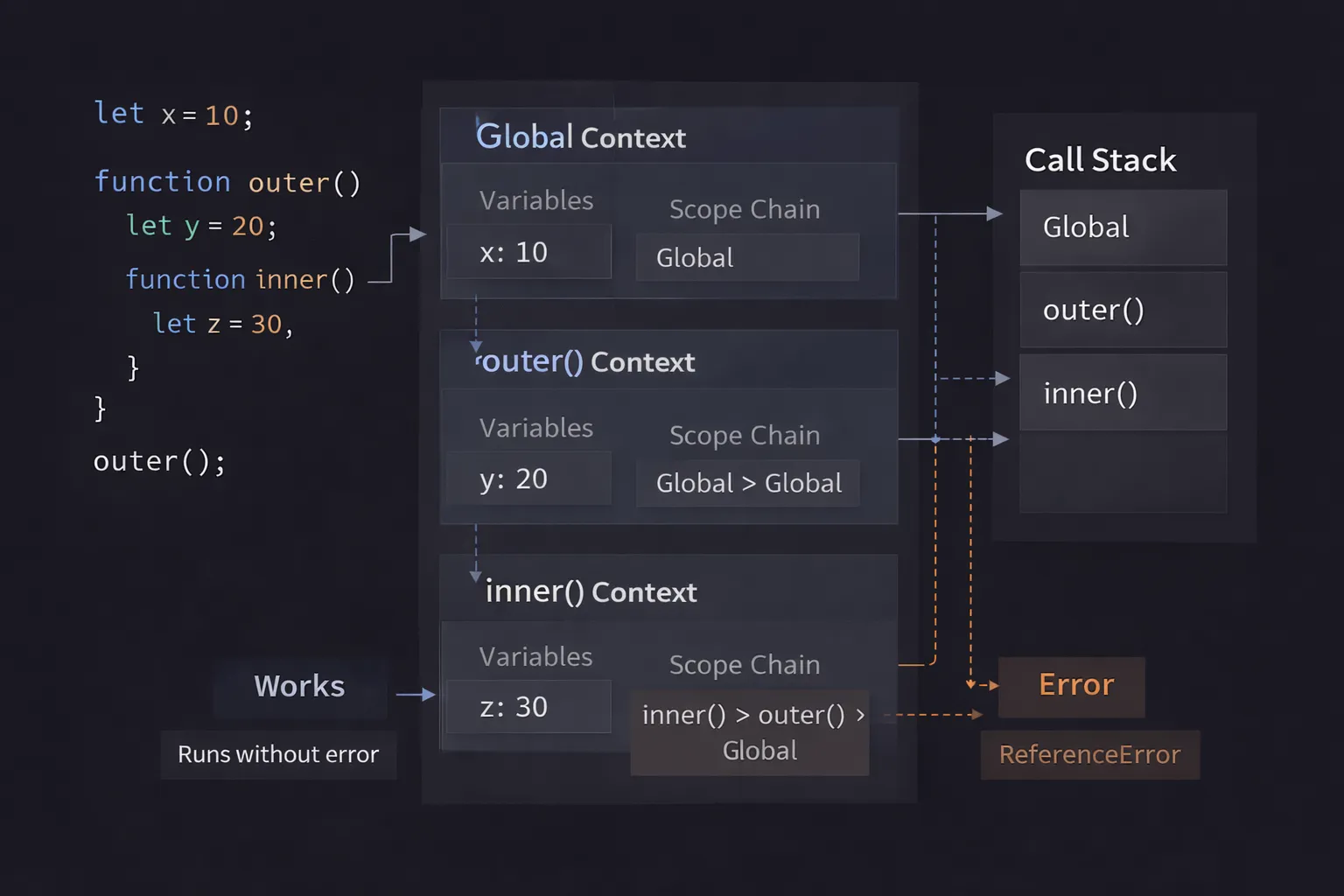
Imagine your entire JavaScript program is running inside a giant cardboard box. This is the Global Execution Context.
- When you create a variable in the open, you are writing it on the wall of this big box.
- When you run a function, you aren't just reading lines of text. You are physically placing a smaller box inside the big box.
- The Rule of Visibility: If you are standing inside the small box (the function), you can look at the walls of your own box and the walls of the big box outside (Scope Chain).
- However, the big box cannot see inside your small box. And if you have two small boxes side-by-side, they cannot see inside each other.
Every time a function is called, a new box is constructed. When the function finishes, the box is crushed and thrown away (usually).
Step-by-Step Code Execution
Let's look at a realistic piece of code. This example uses global variables, local variables, and a nested function call.
1const globalName = "Application";
2
3function processUser(name) {
4  const status = "Active";
5
6  function getDetails() {
7    return `${name} is ${status}`;
8  }
9
10  const result = getDetails();
11  return result;
12}
13
14const finalOutput = processUser("Alice");
15
Tracing the Execution
Let’s slow down time and watch what the JavaScript Engine (like V8 in Chrome) does.
Step 1: The Global Setup
Before a single line of code runs, the engine creates the Global Execution Context. It finds globalName, processUser, and finalOutput. It reserves memory for them.
Step 2: The Function Call
The engine hits the last line: processUser("Alice").
It pauses the global execution. It creates a new Function Execution Context for processUser.
- It puts "Alice" into the argument variable
name. - It reserves space for
status,getDetails, andresult.
Step 3: The Nested Call
Inside processUser, it hits getDetails().
It pauses processUser. It creates a third context for getDetails.
- Inside this third box, it looks for
name. It's not there. It looks "up" to theprocessUserbox. Found it ("Alice"). - It looks for
status. It's not there. It looks "up". Found it ("Active").
Step 4: The Cleanup
getDetails returns a string. Its box is destroyed.
processUser returns that string. Its box is destroyed.
We are back in the global box, assigning the string to finalOutput.
How It Works Internally
Now, let's get technical. This is the part that separates junior developers from senior engineers.
When an Execution Context is created, it happens in two distinct phases. This is crucial. If you understand these two phases, "Hoisting" stops being magic.
Phase 1: The Creation Phase
Before execution begins, the engine scans the code inside the function (or script). It sets up the memory. It does not run any code yet.
During this phase, the engine constructs a special object comprising three things:
- The Variable Environment (State):
- It looks for
functiondeclarations. It stores the entire function definition in memory. - It looks for
varvariables. It sets them toundefined. - It looks for
letandconst. It reserves the name but marks them as "Uninitialized" (The Temporal Dead Zone). - It stores the
argumentsobject.
- The Scope Chain Reference:
- It creates a link to the outer environment (the parent box). This tells the context where to look if it can't find a variable locally.
- The
thisBinding:
- It determines what
thiswill point to. This is decided right now, based on how the function was called.
Phase 2: The Execution Phase
Now, the engine runs through the code line by line.
- It assigns values to variables (
var a = 10). - It executes function calls.
- If it hits a
letvariable that was uninitialized, it finally initializes it.
Why does this matter? This is why you can call a function before you define it in code. In the Creation Phase, the engine already memorized the function. By the time the Execution Phase hits the call, the function is ready.
Common Mistakes Developers Make
Understanding Execution Context helps you avoid some of the most frustrating bugs in JavaScript.
1. The Stack Overflow (Infinite Recursion)
Every time you create an execution context, it takes up a specific amount of memory in the Call Stack. The browser has a limit (usually around 10,000 to 50,000 frames).
1// A function that calls itself without stopping
2function panic() {
3  panic();
4}
5panic();
6
The Bug: The engine creates a context for panic. Then another. Then another. It never reaches the "return" line to pop them off the stack.
The Result: The stack fills up, and the browser crashes with Maximum call stack size exceeded.
2. Losing this in Callbacks
This happens because the Execution Context's this value is determined when the function is called, not when it is defined.
1const user = {
2  name: "John",
3  sayHi: function() {
4    console.log(this.name);
5  }
6};
7
8setTimeout(user.sayHi, 1000);
9
The Bug: You might expect this to print "John". It prints undefined.
The Why: setTimeout is running the function later, in a completely different context (usually the global context). The connection to the user object is broken. The this binding in the new context points to the global window, not user.
3. Variable Shadowing Confusion
Shadowing happens when you declare a variable inside a function that has the same name as a global variable.
1var status = "Ready";
2
3function check() {
4  var status = "Busy";
5  console.log(status);
6}
7check();
8
The Bug: Developers sometimes think check() changes the global status.
The Why: The Execution Context for check creates its own status variable in the Creation Phase. It isolates it. The global status is untouched.
Real-World Use Cases
You use Execution Context constantly, even if you don't name it.
1. Debugging with Stack Traces
When your app crashes, the console gives you a Stack Trace.
1Error at getDetails (app.js:10)
2    at processUser (app.js:5)
3    at global (app.js:15)
4
This is literally a snapshot of the active Execution Contexts stacked on top of each other. Reading this from top to bottom tells you exactly which context crashed and who created that context.
2. Closures (Data Privacy)
Closures are a direct result of how Execution Contexts work. When a function returns, its context is destroyed, unless an inner function still refers to its variables. If you build a "private" counter or a user session handler, you are relying on the engine keeping that specific Execution Context alive in memory so the inner function can still access the Scope Chain.
3. Framework Performance (React/Vue)
In libraries like React, understanding that every render is a function call (and thus a new Execution Context) is vital. If you declare a variable inside a React component:
1function Component() {
2  const data = calculateHeavyMath(); // Runs every render!
3  return <div>{data}</div>;
4}
5
Because a new Context is created on every render, data is recalculated every time. Understanding this leads you to use tools like useMemo to prevent expensive operations within the context.
Interview Perspective
This is a favorite topic for Senior Developer interviews. I don't ask for the definition; I ask for the behavior.
The "Tricky" Question
I often write this code on the whiteboard and ask the candidate to write the output.
1var x = 1;
2
3function test() {
4  console.log(x);
5  var x = 2;
6}
7
8test();
9
The Wrong Answer: 1 (accessing global) or 2.
The Right Answer: undefined.
The Explanation:
"Inside the test execution context, the Creation Phase runs first. It finds var x. It hoists it and sets it to undefined.
When the Execution Phase runs console.log(x), it finds the local x (which is undefined). It does not look up to the global scope because it found a match locally. The assignment x = 2 happens after the log."
If a candidate gets this right, I know they understand the Creation Phase vs. Execution Phase.
Scope vs. Context
Be prepared to answer: "What is the difference between Scope and Execution Context?"
- Scope is static. It is defined by where you write the code (lexical). It doesn't change.
- Execution Context is dynamic. It is created when the code runs.
TL;DR / Key Takeaways
- It's a Container: Execution Context is the environment where code runs (Global or Function).
- Two Phases: It is created first (memory allocation), then executed (code running).
- Hoisting: Variables are hoisted because they are set up in the Creation Phase before code runs.
- The Stack: Contexts are stacked. The active one is on top. When it returns, it pops off.
this: Determined during the Creation Phase based on how the function is called.
FAQ
Q: Is Execution Context the same as the Call Stack? A: Not exactly. The Call Stack is the data structure that holds the Execution Contexts. The Context is the actual item inside the stack.
Q: Do arrow functions create an Execution Context?
A: Yes, they create a context for variables, but they do not create their own this binding. They use the this from the parent context.
Q: What happens to the Global Execution Context when I reload the page? A: It is destroyed. The memory is wiped, and a fresh Global Context is created when the page loads again.
Conclusion
JavaScript often feels like magic, but it is just a machine following strict rules.
The next time you look at a function, don't just see the curly braces. Visualize the box being built. Visualize the engine scanning for variables before it runs a single line. Visualize the stack growing and shrinking.
When you start thinking in terms of Execution Contexts, you stop debugging by trial and error. You stop guessing why a variable is undefined. Instead, you look at the code and say, "Ah, I know exactly which box I'm standing in."
That is the moment you truly master the language. Now, go debug that code with confidence.